Recover photos, messages, WhatsApp, and more — no backup
needed.
Recover photos, messages, WhatsApp, and more — no backup
needed.

 100% Security Verified | No Subscription Required | No Malware

 :
: 
 ChatGPT
 Perplexity
 Gemini
 Claude
 Grok
Grok
Snapchat deletes content on an automated timer. Conversations clear without user action, while the app offers no archive folder or trash bin. Your ability to recover Snapchat messages depends on two factors: saved status and active conversation settings.
Clear knowledge of these rules prevents wasted effort on ineffective tools. This guide explains workable solutions to recover deleted Snapchat messages. Learn if iCloud/iTunes/Finder backup can help and why Dr.Fone - Data Recovery (iOS) is the most practical choice.
In this article
- Part 1. Can You Recover Deleted Snapchat Messages on iPhone?
- Part 2. Before You Try Snapchat Message Recovery
- Part 3. How to Recover Deleted Snapchat Messages on iPhone
- Part 4. Can You Recover Deleted Snapchat Messages from iCloud, iTunes, or Finder Backup?
- Part 5. Why You Cannot Find Deleted Snapchat Messages
- Part 6. How to Prevent Important Snapchat Messages from Disappearing
Part 1. Can You Recover Deleted Snapchat Messages on iPhone?
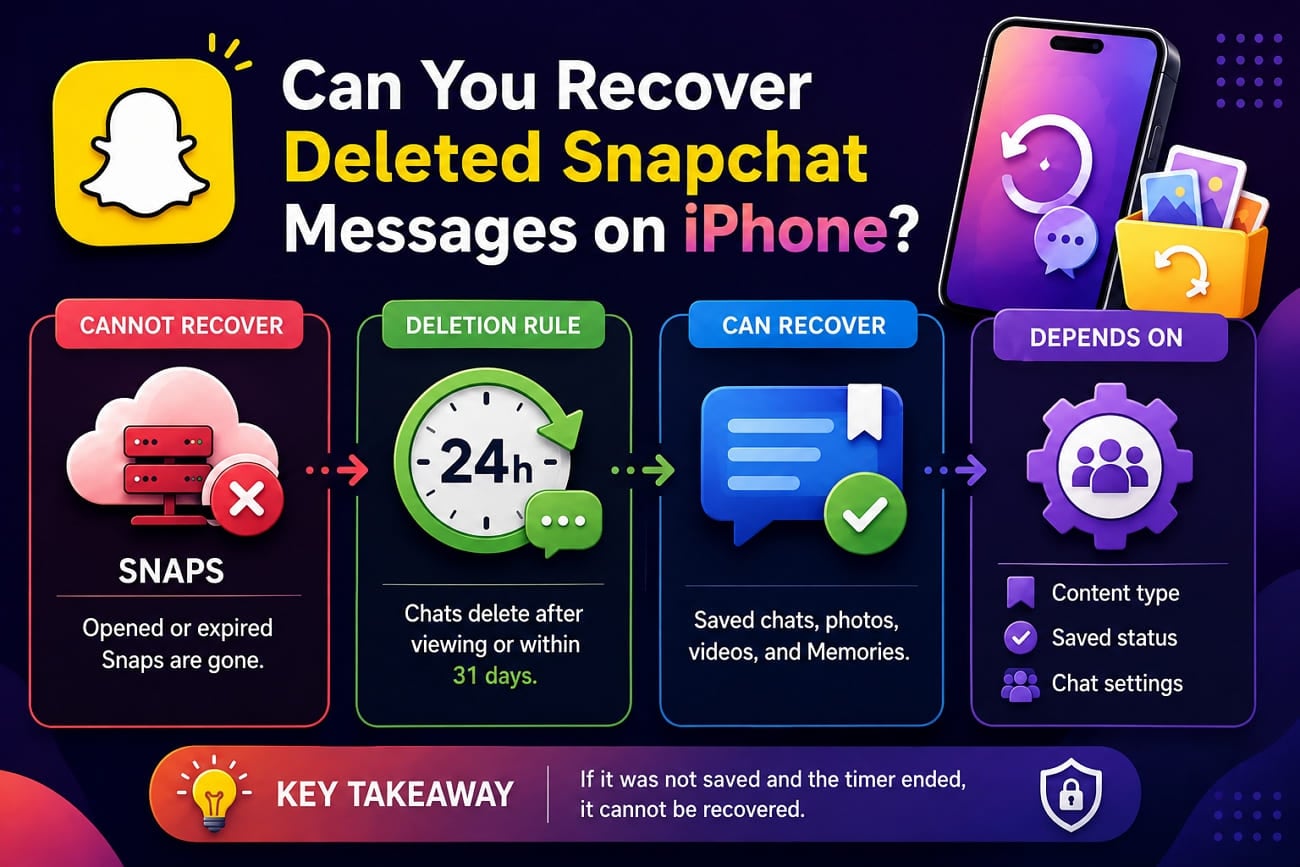
An iPhone may still retain cached Snapchat data after content disappears from the app, although these remnants are not guaranteed to remain recoverable. Snapchat servers cannot restore purged Chats, Snaps, or Memories. Opened or expired Snaps disappear permanently from company infrastructure.
Snapchat automatically deletes Chats according to the conversation’s retention settings. However, cached remnants may remain in local iPhone storage until removed or overwritten. This is where tools like Dr.Fone - Data Recovery (iOS) can scan for available Snapchat data. So, successful Snapchat chat recovery depends on retention settings and whether recoverable local data still exists.
How Long Does Snapchat Keep Messages and Snaps?
Before you recover deleted Snapchat messages, learn how long the app keeps messages. Snapchat confirms these retention periods and notes that participants can alter select conversation settings.
| Snapchat Content | Default Retention | Can It Be Kept Longer? |
|---|---|---|
| 1:1 Chat | 24 hours after everyone views it or 31 days after sending, whichever is sooner | Yes, depending on Chat settings |
| Group Chat | 24 hours after everyone views it or 7 days after sending, whichever is sooner | Yes, depending on Chat settings |
| Community Group Chat | 7 days after everyone views it | Depends on retention settings |
| Viewed Snap | Deleted after all recipients view it | Yes, eligible Snaps can be saved in Chat |
| Unopened 1:1 Snap | 31 days after sending | No, unless opened and saved when eligible |
| Unopened Group Snap | 7 days after sending | No, unless opened and saved when eligible |
| Saved Chat | Remains while saved | Yes, until unsaved or deleted |
| My Story Snap | Usually 24 hours | Yes, through Memories or other saving options |
| Snap/Chat Metadata | Retention varies by metadata type | Some records may remain longer |
| Topic Chat | Up to 5 years | Public-content retention applies |
When Can a Snapchat Message Stay Available?
A Chat persists longer when a user saves, replies to, or reacts to it. Saving a message preserves all attached reactions as well. Users can save eligible Snaps during or immediately after viewing. This converts them into Chat Media within the thread.
Can You Change When Snapchat Deletes Chats?
Snapchat allows chat participants to select deletion rules, including After Viewing, 24 Hours After Viewing, 7 Days After Viewing, or Never. New rules apply strictly to messages sent after the change, while older texts keep the rules set at send time. This system’s behavior makes it crucial to act fast if you need to find deleted Snapchat messages.
Part 2. Before You Try Snapchat Message Recovery
Before you recover Snapchat chat history, here are some prerequisites that you need to follow:
| Check First | Why It Matters | What to Do |
|---|---|---|
| Correct Snapchat Account | The conversation may belong to another account. | Verify your username and other accounts. |
| Search for the Conversation | Clearing a conversation from the Chat feed does not delete its saved content. | Search for the contact and reopen the conversation. |
| Check Saved Messages | Messages saved in Chat can remain available longer. | Reopen the Chat and look for saved messages. |
| Review Delete Settings | Chat retention settings can differ between conversations. | Check whether Chats delete after viewing, 24 hours, 7 days, or never. |
| Check Who Deleted It | A participant can delete messages they previously sent. | Review the Chat and ask the sender if needed. |
| Limit iPhone Activity | Recoverable cached data may eventually be overwritten or removed. | Minimize downloads, updates, and unnecessary use before scanning the iPhone. |
| Protect Your Snapchat Login | Untrusted recovery sites may attempt to collect account credentials. | Never provide your Snapchat password to a recovery website. |
Part 3. How to Recover Deleted Snapchat Messages on iPhone
Once you verify those checks, the message has left your view. 2 separate methods search distinct data sources to help you recover Snapchat chat history.
Method 1. Request Your Snapchat My Data Archive
This route asks Snapchat for whatever its servers still hold on your account. Saved chat text arrives with sender names and UTC timestamps attached, alongside snap records, friend lists, and account history. Unsaved messages were cleared long before the request, so they never appear in the file. So, to find deleted Snapchat messages via this method, follow these steps:
-
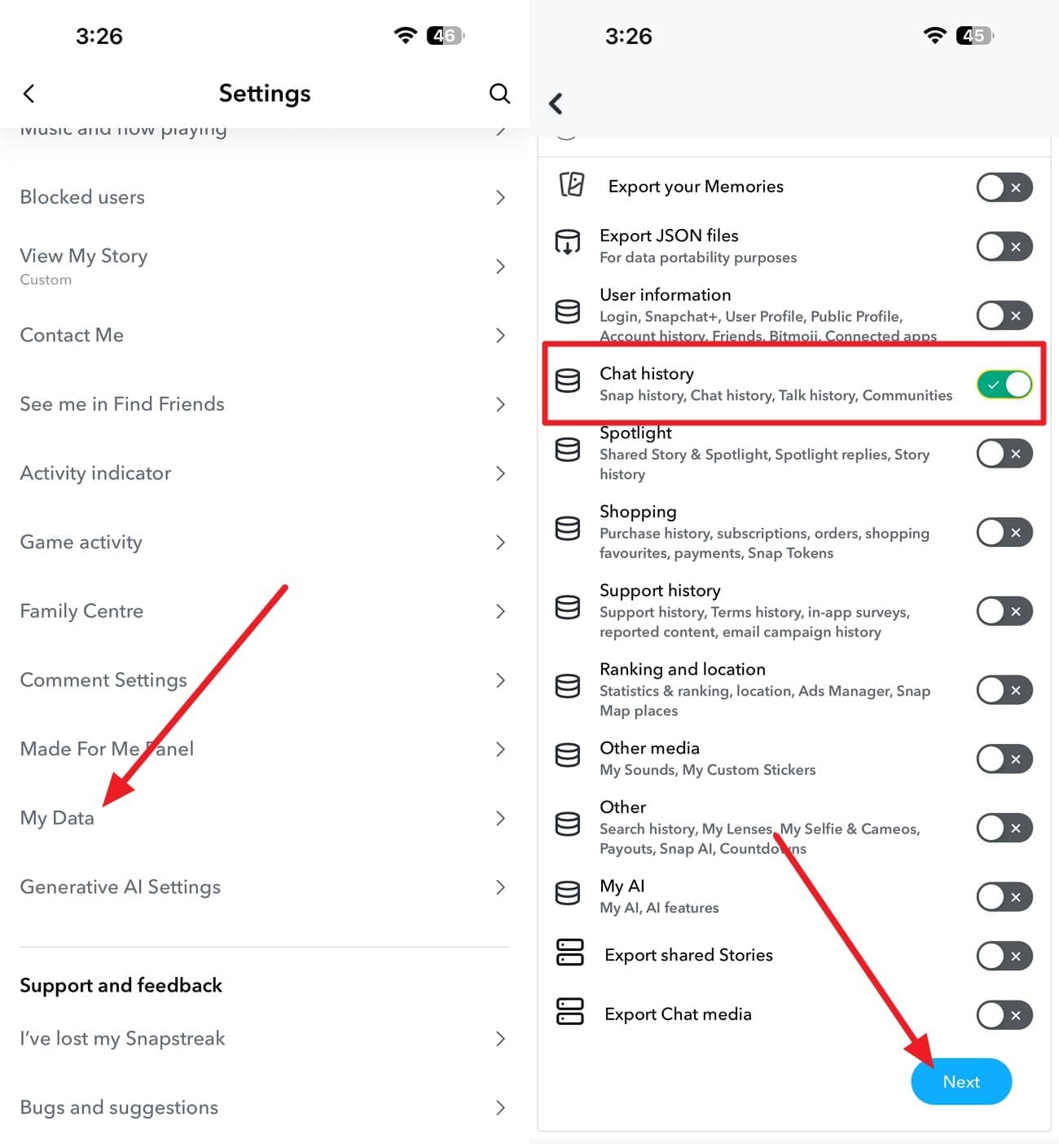
Step 1 Access My Data
Tap your profile icon in Snapchat to access “Settings > My Data” > Toggle “Chat History” and press “Next.”
-
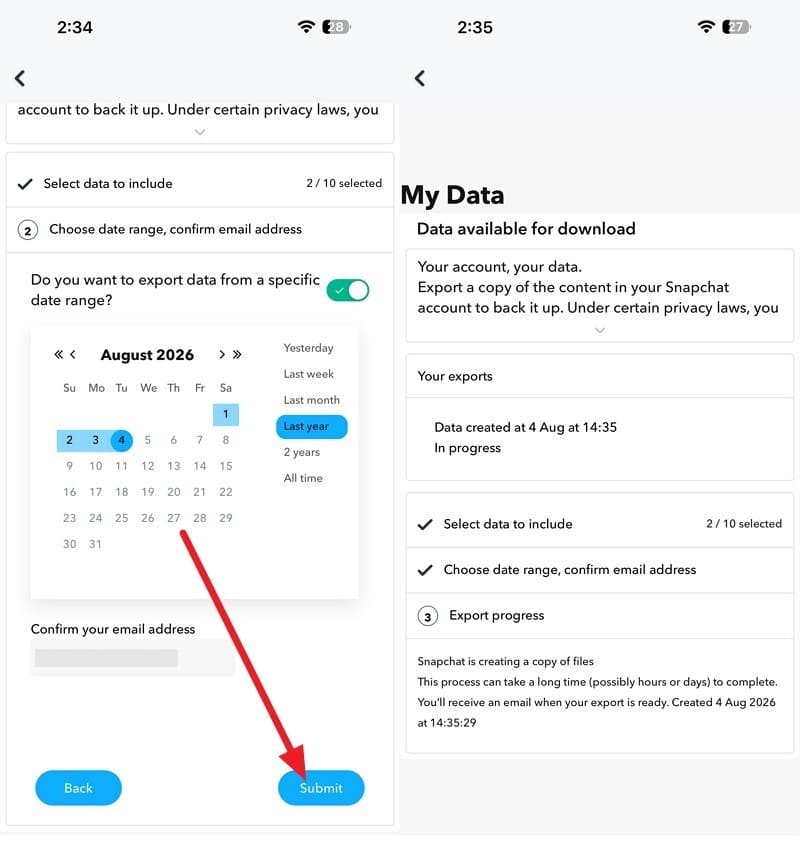
Step 2 Submit Request
Pick the “Time,” verify the email, and press the “Submit” button to create the export.
-
Step 3 Download and View
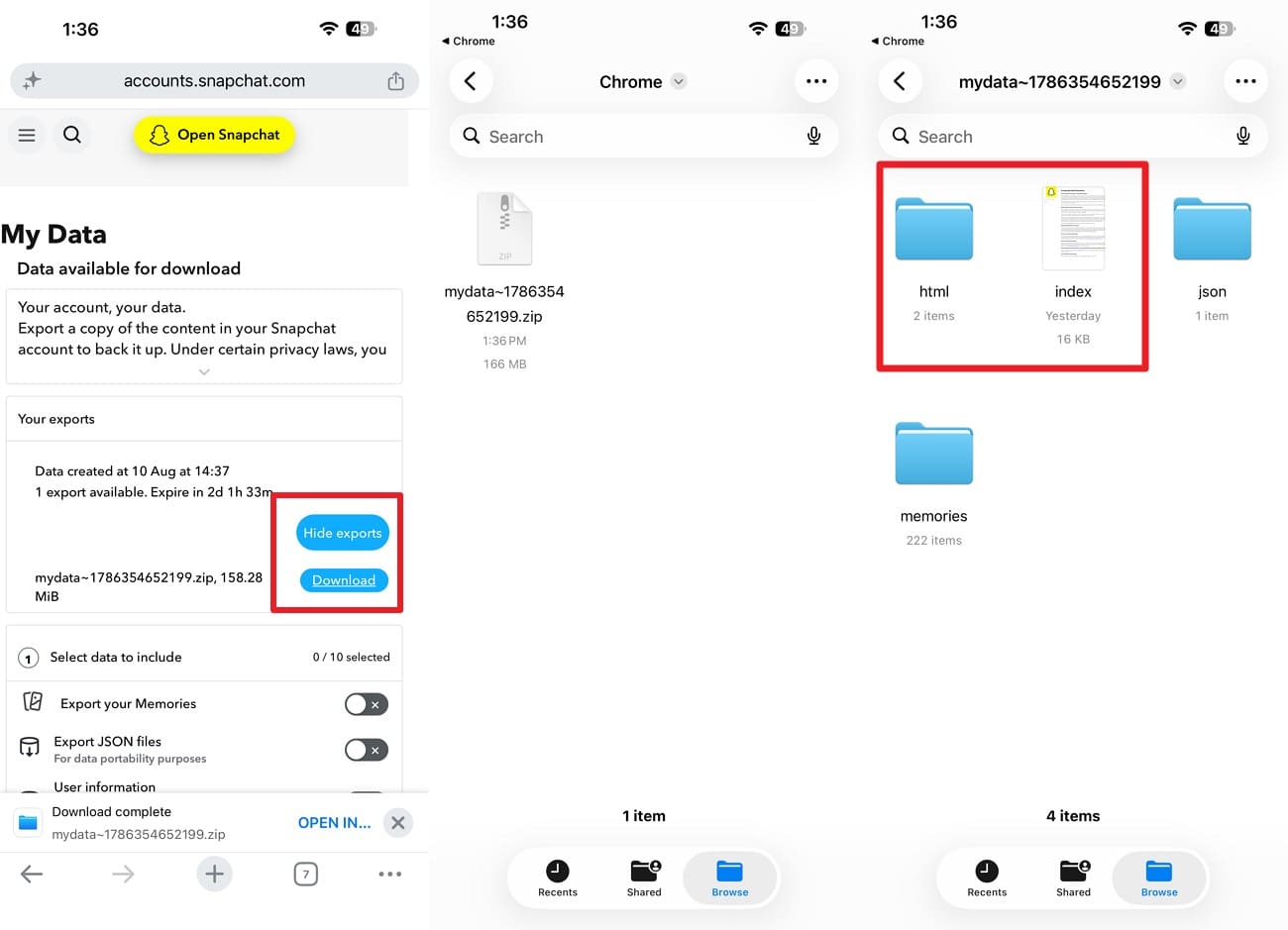
An email arrives with a download link once the archive is built. Choose “See Export > Download > Open in Files app > Press the file to unzip > Pick “html” or “index” file to see messages.

Method 2. Recover Available Snapchat Data with Dr.Fone - Data Recovery
Local storage preserves deleted data on your phone long after Snapchat servers remove it. Since Apple blocks on-device data recovery utilities, you must connect the phone to a desktop computer to scan files and recover deleted Snapchat messages. As a reliable choice, you can use Dr.Fone - Data Recovery (iOS) for a read-only scan and choose the Snapchat Chats & Attachments category on iPhone 16 and earlier.
The scan is free and does not overwrite the existing data, and you get a free 100% thumbnail preview. Moreover, you can filter the messages to deleted ones and choose the desired export location. In addition to Snapchat, you can also retrieve other 35+ data types. Since these aspects make Dr.Fone versatile, you get free weekly updates for all the upcoming iOS versions.
 Recovers data after deletion, crashes, or device damage.
- Supports photos, messages, contacts, WhatsApp, and more.
- Supports all major iPhone, iPad, and iPod models.
- Preview and recover only what you need.

How to Scan an iPhone for Snapchat Chat History
Stop using the phone and charge the battery to keep new data from overwriting old files. Follow these three steps to find deleted Snapchat messages after servers clear the chat logs.
-
Step 1 Connect and Open Data Recovery
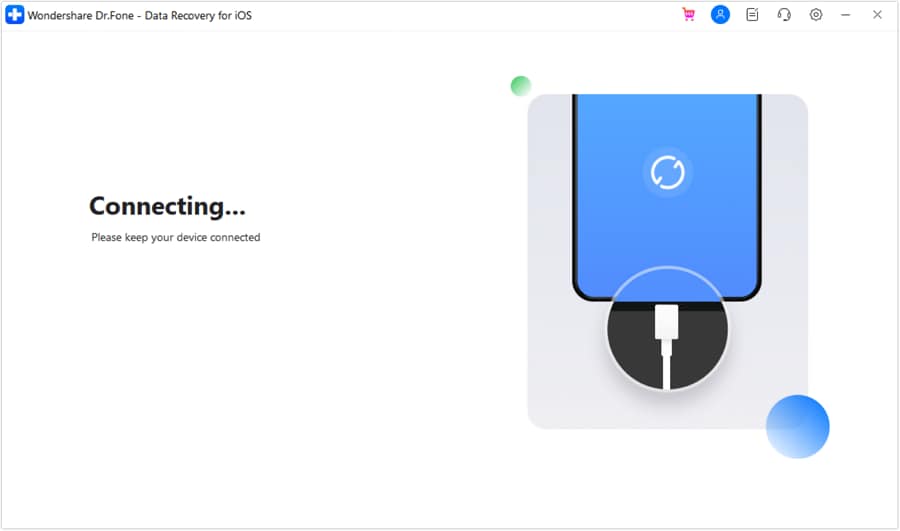
Select the “Recover Data from iOS Device" mode on Dr.Fone’s Data Recovery tool for iOS and connect your iPhone when prompted.
-
Step 2 Pick the Snapchat Categories
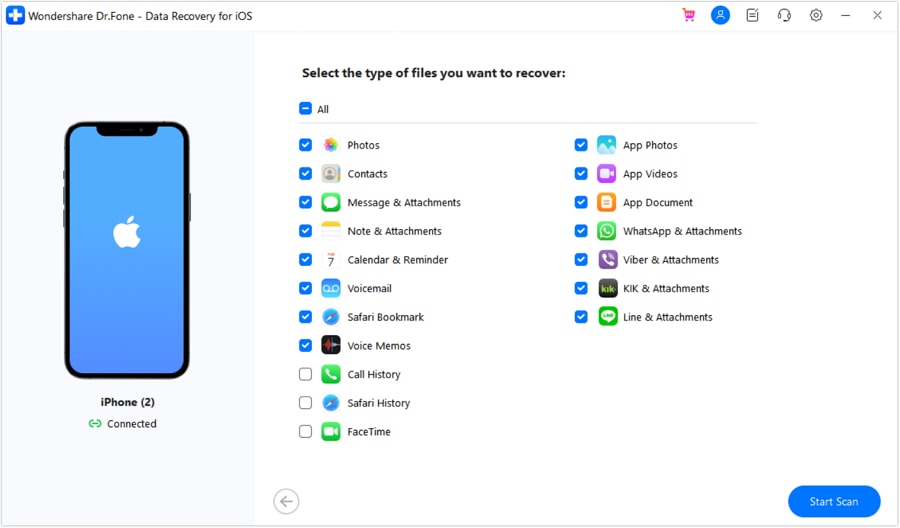
With the source set, select “Snapchat” along with the relevant app media and document categories, then click “Start Scan.” Keep the iPhone connected until the scan completes.
-
Step 3 Confirm Findings and Save
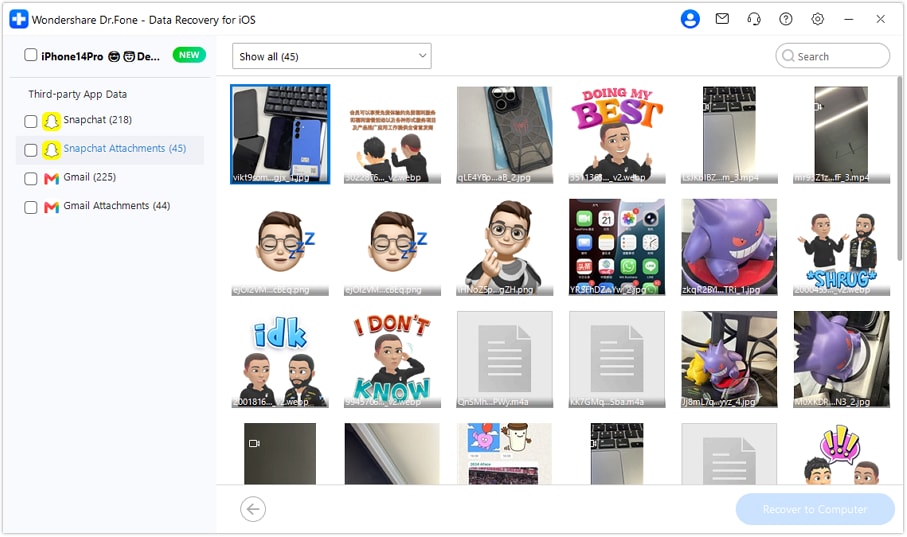
After the scan completes, filter the results to show deleted data and review the available Snapchat items. Select what you want to recover, click “Restore to Computer,” choose the preferred “Export To” location, and press “Recover” to save the files.




Part 4. Can You Recover Deleted Snapchat Messages from iCloud, iTunes, or Finder Backup?
A device scan differs from a backup search. Apple marks app caches as temporary and excludes them from backups, so unsaved Snapchat conversations never exist there. However, saved items such as photos sent to your main gallery do land in iTunes or iCloud files. Tools like Dr.Fone - Data Recovery (iOS) extract these entries individually without a full system restore, which protects the device cache you need to recover Snapchat chat history.
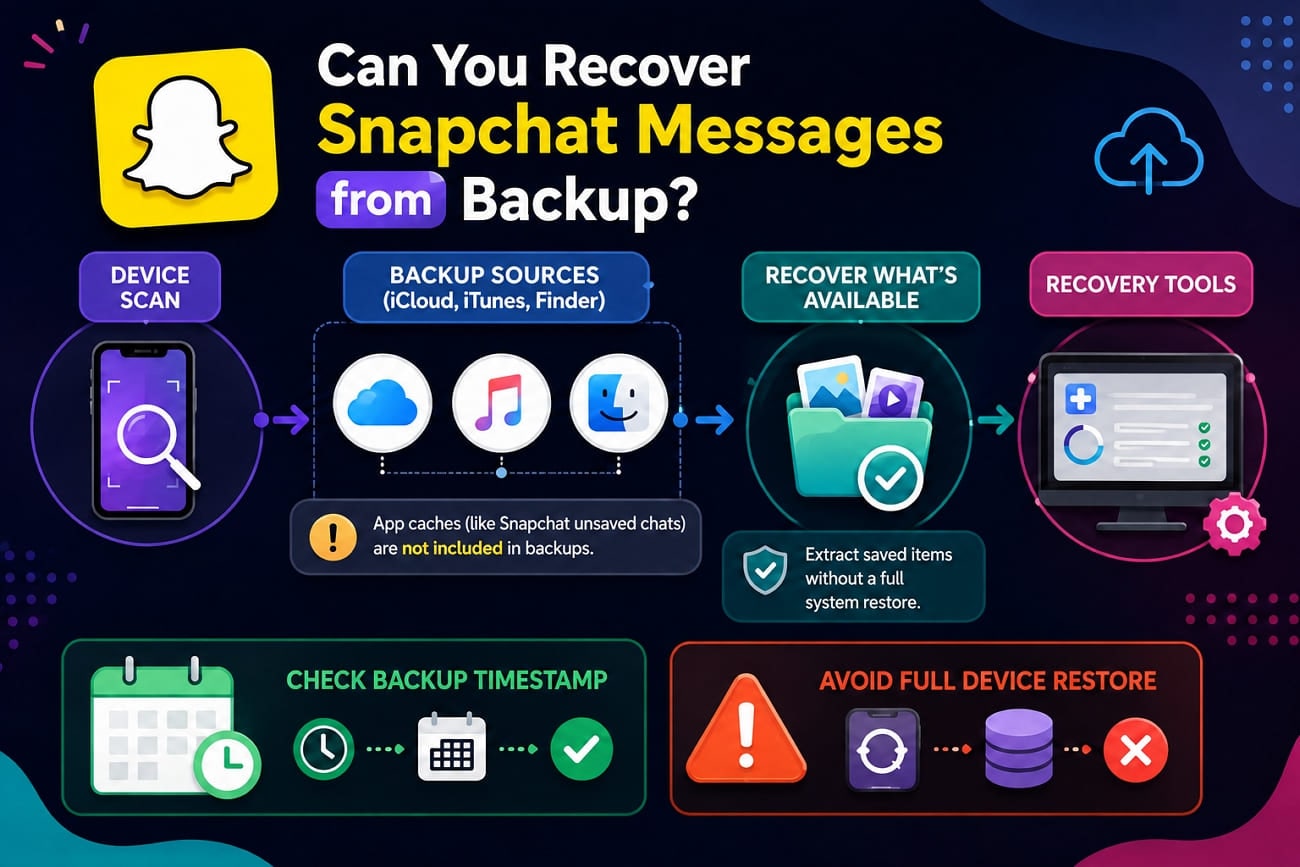
Check the backup timestamp before you start. The archive date must precede the message loss to hold valid data. Avoid a complete device restore, because that action overwrites active handset storage and ruins your best chance to find deleted Snapchat messages.
Part 5. Why You Cannot Find Deleted Snapchat Messages
When you fail to recover deleted Snapchat messages, learn the possible cause and solution in the given table:
| Problem | Possible Cause | Recommended Solution |
|---|---|---|
| Conversation Cleared from the Chat Feed | Clearing the conversation hides it without deleting saved messages. | Search the username and reopen the conversation. |
| The Message Was Never Saved | Unsaved Chats follow Snapchat’s automatic deletion rules. | Try a device scan because cached data may still exist locally. |
| My Data Contains Limited Records | My Data only provides information Snapchat still retains for your account. | Try a local device scan for data unavailable in the archive. |
| Another Participant Deleted It | Senders can delete messages they previously sent. | Ask the sender whether another copy of the content still exists. |
| The Message Expired on Its Setting | The conversation’s retention setting automatically removed the message. | Choose a longer retention setting for future messages. |
| Dr.Fone Finds No Recoverable Data | Cached data may have been removed, overwritten, or never stored locally. | Check Snapchat My Data or a relevant older backup for another copy. |
| The Deleted Data Was Overwritten | Continued iPhone activity may overwrite previously stored cached data. | Check other available copies if the cached data cannot be recovered. |
Part 6. How to Prevent Important Snapchat Messages from Disappearing
After the Snapchat chat recovery, follow these practices to prevent the messages from being lost in the future:
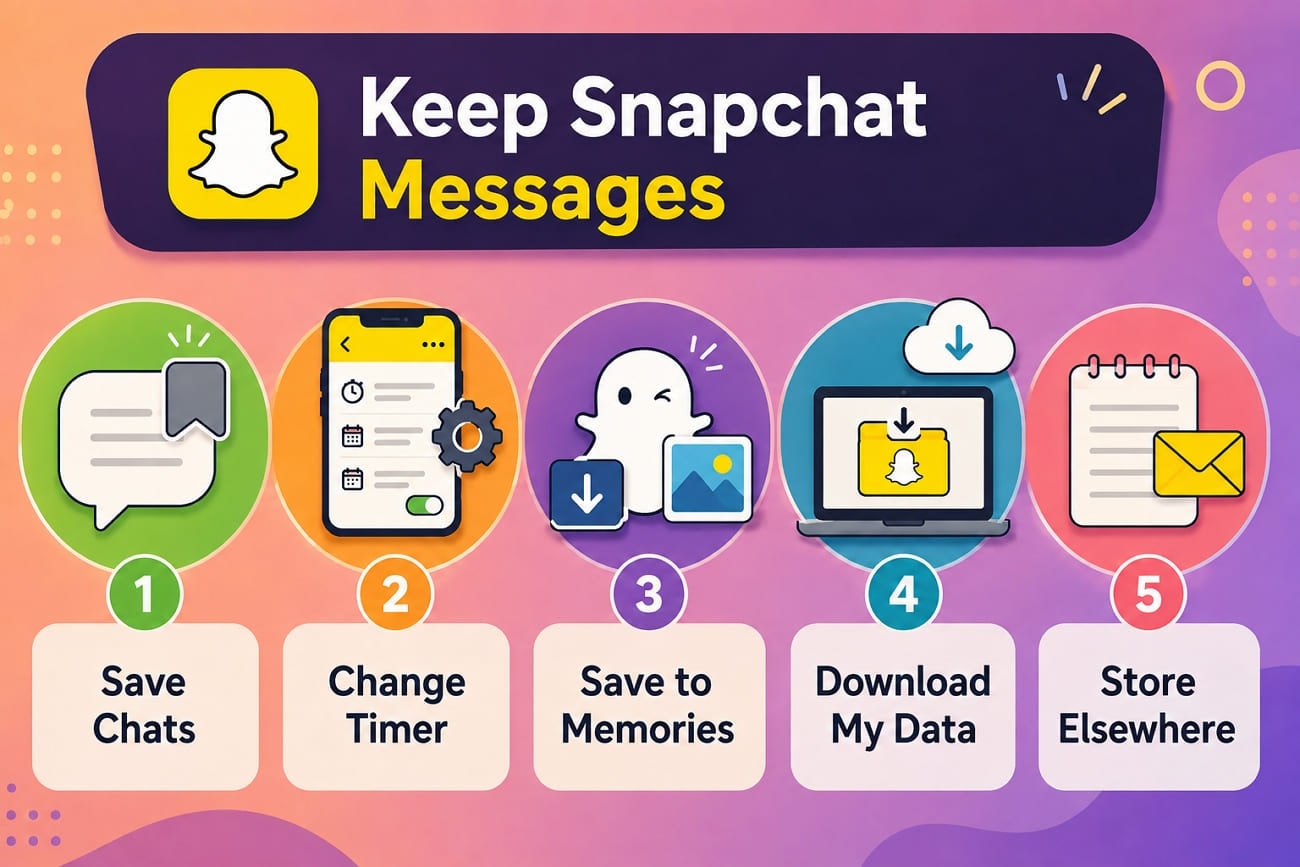
- Save Important Messages Inside Chat: Tap a message to save it in Chat. It remains available until someone unsaves or deletes it, making it useful for conversations you want to keep.
- Change the Conversation Deletion Setting: Press and hold a friend’s name, open “Chat and Notification Settings > Delete Chats,” and choose a longer retention period. The selected setting controls how future Chats in that conversation are deleted.
- Save Important Snaps to Memories or Camera Roll: Save important Snaps to Memories or your Camera Roll when the option is available. This creates a saved copy you can access separately instead of depending only on the Chat.
- Download Snapchat My Data Periodically: Request your Snapchat My Data archive when you want a copy of available account information. The export can include saved Chat history and other data Snapchat currently retains for your account.
- Keep Important Information Outside Snapchat: Copy addresses, order numbers, and other information you may need later into Notes, email, or another suitable app. This avoids relying on Snapchat’s automatic Chat deletion settings.
Conclusion
Success depends on whether a copy survives in your account or local storage. Official server downloads return saved data, while specialized tools like Dr.Fone - Data Recovery (iOS) search your phone storage for remaining cache traces. Check your server archive first, scan local storage if needed, and update chat retention settings to protect future messages and recover Snapchat messages.
Frequently Asked Questions
-
1. Will reinstalling Snapchat restore deleted messages?
No, and it actively makes things worse. Reinstalling pulls down only what the servers still hold, which is the saved messages you already had. Removing the app also destroys the local cache a device scan would have read, so it closes the one route that might have worked. -
2. Can you recover Snapchat messages after unblocking someone?
Blocking hides the conversation entirely, so you can't save or delete anything in it while the block stands. Unblocking may restore the thread, but only the messages Snapchat still holds. Anything that expired during the block is gone, and the timers kept running the whole time. -
3. Does deleting a Snapchat message remove it for both people?
Snapchat attempts to delete the message from its servers and recipients’ devices. However, deletion may fail if someone has a poor internet connection or an outdated Snapchat version. Recipients can also see that a message was deleted, while screenshots or other copies saved earlier remain available.
 Add Wondershare Dr.Fone as a preferred source on Google