Teleport your device anywhere instantly with one click.


 100% Security Verified | No Subscription Required | No Malware

 :

 ChatGPT
 Perplexity
 Gemini
 Claude
 Grok
The best place to look for Dratini is a location with a recent, credible report, not a permanently guaranteed 'nest'. Old lists of waterfront coordinates can help suggest areas to investigate, but the live encounter pool matters more than a place name copied from an early guide. This 2026 update separates the original location suggestions from claims that were never adequately supported.
Dratini is a Dragon-type Pokemon with a slender blue body, pale underside, white head fins and a developing horn on its forehead. Its lore describes underwater life, feeding on food that sinks down, increasing internal energy and repeated shedding as it grows, sometimes sheltered by a waterfall. The species is about 1.8 m long; those story details are not Pokemon GO spawn rules. Nor should Outrage be described as a move exclusive to Dratini.
In this article
Part 1: How Does Dratini Evolve?
The evolution sequence is Dratini → Dragonair → Dragonite. In Pokemon GO, the first evolution normally uses 25 Dratini Candy, followed by 100 more to evolve Dragonair into Dragonite. Check the evolve button in the current app before spending resources.
The source's level 30 and level 55 thresholds belong to the main-series evolution rules, not Pokemon GO's candy-based system. Raising your trainer level to either number does not automatically evolve an individual Dratini. Keeping that distinction clear is more useful than repeatedly visiting an alleged nest with the wrong evolution target in mind.
Dragonair
Dragonair retains the long, blue serpentine form and pale underside, but has a more prominent horn, white wing-like structures near its head and distinctive orbs on its neck and tail. These visual differences help separate it from Dratini at a glance.
In Pokemon lore, Dragonair stores energy, is associated with seas and lakes, and can affect weather through its aura or crystalline orbs. Accounts also describe it flying or riding the wind. These are species descriptions, not instructions for changing real weather, and they do not prove that a nearby body of water will spawn one in Pokemon GO.
Dragonite
Dragonite changes the silhouette dramatically: an orange, dragon-shaped body, pale segmented belly, antenna-like horns and comparatively small wings replace the snake-like form. It combines Dragon and Flying typing, unlike its two earlier Dragon-type stages.
Its fictional reputation emphasizes intelligence, kindness, rapid flight despite its heavy build and rescuing people in danger at sea. Those traits explain why the evolutionary line is memorable. For Pokemon GO progression, however, the immediate practical question is having the required candy and choosing the individual you want to evolve, rather than expecting the lore to determine a guaranteed coastal encounter.
Part 2: Where Should You Look for Dratini Reports?
The original location list focused on water-adjacent areas, particularly northeastern San Francisco, Pier 39 and Pier 15. Those names are retained as historical search suggestions, not current verified nests. No live Dratini encounter or exact coordinate at any of those locations has been independently confirmed for this article.
The earlier instruction to head west toward a Squirtle nest is also not a dependable Dratini route. A different species' nest does not establish a Dratini concentration, and the guide did not identify a sufficiently precise current destination. Do not travel or enter an unsafe area on the strength of that vague direction.
Tokyo, Sydney and the wider New South Wales area, and Paris were other places named in the original comparison. They are broad locations, not confirmed individual spawn points. Dratini is not limited to those cities or countries in the way a regional-exclusive species is; living elsewhere does not mean you must simulate travel to find one.
The claim of a fixed 5% daily spawn chance is not supported by a reliable probability study. It should not be used to calculate how long you must wait. Availability can change with the active season and events, so inspect current in-game information and fresh local reports instead of assuming every waterfront has the same encounter chance.
- Check the time: an old report may document a past encounter but cannot promise one is still present.
- Check the position: confirm the location is specific, publicly accessible and safe to reach.
- Check the context: a temporary event or local concentration is not proof of a permanent nest.
- Check the game: compare community information with what your own in-game map and nearby view currently show.
Part 3: Is a Nest the Same Thing as a Spawn Point?
No. A spawn point is a location where encounters can appear. A nest is an area in which a particular eligible species appears more frequently during a period of time. A single Dratini, or even several nearby reports, does not automatically establish a formal nesting area.
Older community nest guides describe a roughly two-week rotation for eligible nesting species, with scheduled changes expressed in UTC rather than every player's local midnight. Events and other changes can interrupt that pattern. The source incorrectly applied a general nest explanation directly to Dratini and promised repeated two-week farming.
Historical community research specifically distinguished Dratini sightings and habitats from ordinary nesting species. Accordingly, do not assume a Dratini nest will return to the same point after an alternate-Thursday migration. A location can produce future Dratini without validating a fixed nest schedule or a permanent species assignment.
Keep useful records of real encounters if you enjoy local exploration: note when and where you saw the Pokemon, and revisit only when there is a good reason. Repeatedly checking an old marker cannot guarantee future availability, and a quiet period does not by itself establish that a nest 'moved'.
Part 4: How Can You Improve Your Dratini Search?
Begin with legitimate in-game information and recent local sightings. When an official event features Dratini, read the event conditions and dates instead of assuming a past event is still running. Where no useful reports exist, do not replace missing evidence with invented nest coordinates or the promise that moving to a famous city will solve the problem.
The original guide proposed GPS relocation as the main answer for people living elsewhere. That is not necessary simply because you are outside its example cities. Pokemon GO's fairness policy prohibits falsifying location, and neither a waiting period nor simulated walking guarantees protection from account restrictions.
 Set your map route to simulate GPS movement.
- Set your wanted movement speed.
- HD and large map view to check location.
- Fake GPS location to anywhere.

Dr.Fone - Virtual Location provides a separate supported-device GPS-simulation workflow through a desktop map. It can select a position by place name, address or coordinates. That is useful to understand as a location-testing function, not as evidence that the game will create a Dratini encounter at the selected point.
Its joystick and route controls can simulate movement at chosen speeds, such as a walking or cycling pace. Compatibility must be checked for the device and system version, and individual apps may treat simulated location differently. Avoid the original blanket claim that any geolocation app can use it safely; a technical location change is not permission from the service receiving it.
Relevant product functions and boundaries:
- Teleport Mode changes a supported phone's simulated map position; it cannot make an expired encounter return.
- Joystick navigation adjusts the virtual position interactively, but is not a guarantee of accepted in-game movement.
- Route and speed settings represent movement for permitted testing, not proof that the phone has physically traveled.
- Support for iOS and Android configurations does not mean every phone, app and current release has identical behavior.
Complete desktop walkthrough: the retained source images show an older interface. Use the installed version's labels and prompts, not a toolbar number or layout from an old screenshot, when identifying a control.
Step 1 Open the location module
Install the appropriate desktop version, launch it and locate Virtual Location from the home screen. Check device compatibility and connection requirements before continuing.
Step 2 Connect the phone
Use a reliable compatible USB cable, authorize the connection and follow the on-screen setup. In the illustrated interface, Get Started opens the map workflow. Wait for the intended phone to be detected rather than assuming a charging indicator is enough.
Step 3 Inspect the current map position
Review the device marker. The Current Virtual Location control recenters the map on the reported virtual position; it is not proof of a real-world move or an independent correction of GPS accuracy.
Step 4 Search in Teleport Mode
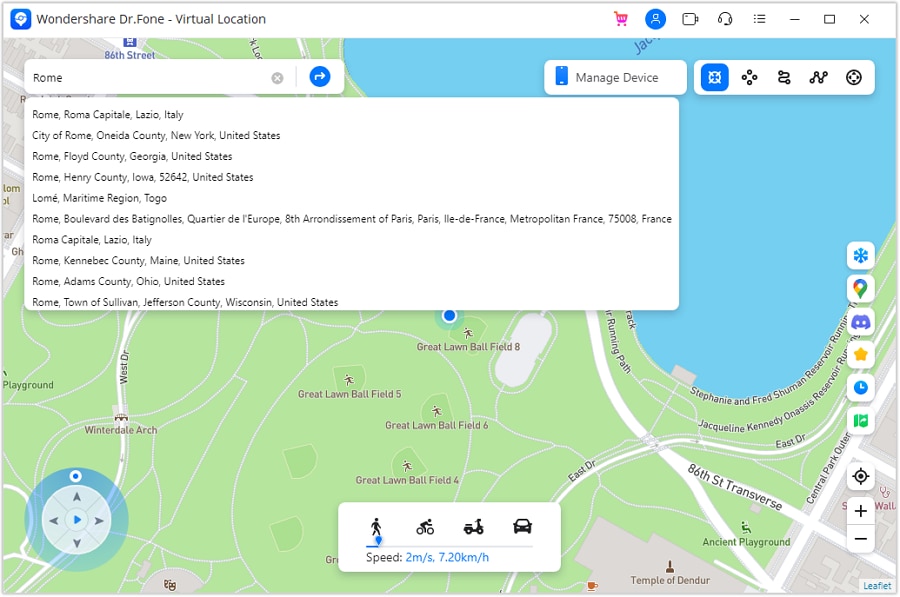
Select Teleport Mode using its label or tooltip. Enter the intended address or coordinates and submit the search. Preserve latitude and longitude signs and verify the country. The Rome, Italy image below is an interface example, not a newly verified Dratini nest.
Step 5 Confirm the selected point
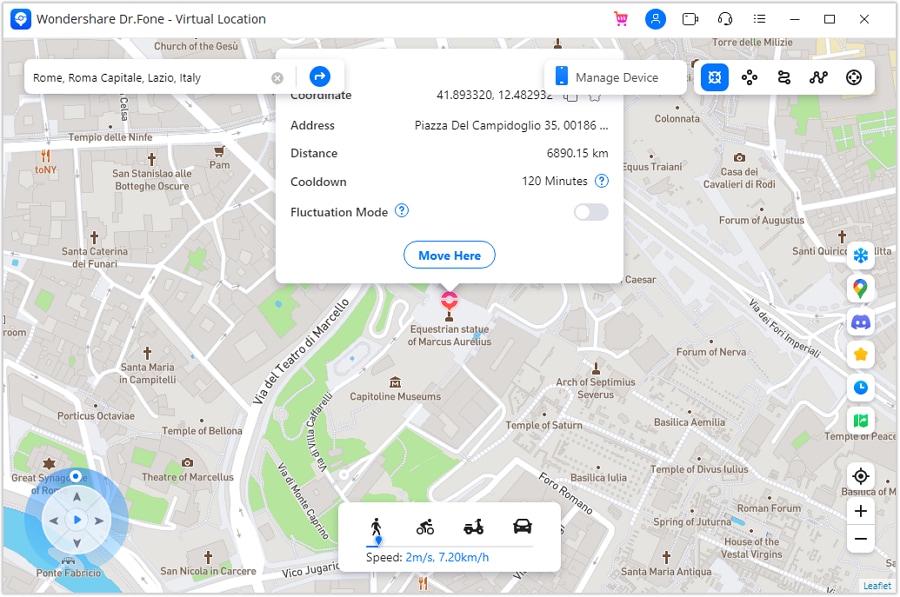
After inspecting the map result, choose Move Here to apply the simulated position. A successful search alone is not the final confirmation. The command does not make the position permanently real, preserve a nest for two weeks or establish a safe gameplay cooldown.
Step 6 Check the desktop map
Confirm that the marker is at the intended point. Route or joystick controls can be used for a permitted movement test if needed. Staying at the point, catching other Pokemon or waiting before another move does not guarantee that a game will permit GPS simulation.
Step 7 Verify the phone-side result
Open the phone's map and compare its reported position with the desktop selection. This confirms only the device-location workflow. A game's response, encounter availability and enforcement decisions remain separate.
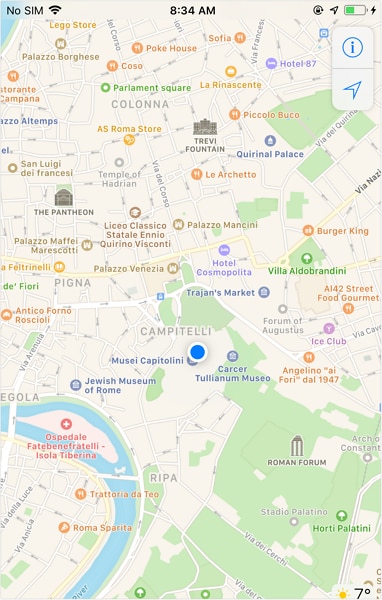
When testing is finished, follow the program's restart-device guidance to restore actual GPS and verify the result in the phone's map. Do not rely on an assumed permanent relocation or on the claim that camping at a spot prevents a ban. Neither claim is a supported property of the location tool.




Conclusion
Dratini's appeal comes from its distinctive design and evolution into Dragonair and Dragonite, but finding it still depends on current game conditions. Treat the San Francisco, Tokyo, Sydney and Paris suggestions as historical starting points, not permanent nest guarantees or measured spawn probabilities. Keep evolution costs and nest terminology separate from the species' fictional lore.
Dr.Fone - Virtual Location offers supported-device GPS simulation with map and movement controls. It cannot validate an old Dratini report, guarantee a remote catch or remove Pokemon GO's rules against altered location. Base a search on fresh evidence and permitted play rather than a promised coordinate shortcut.
FAQ
1. Are Pier 39 and Pier 15 guaranteed Dratini nests?
No. They are historical waterfront suggestions. Check recent local reports and current in-game conditions rather than assuming a permanent encounter.2. How much candy does Dratini's evolution line need?
In Pokemon GO, Dratini normally needs 25 Candy for Dragonair, followed by 100 more for Dragonite. The main-series level thresholds are a different system.3. Is there a verified 5% daily chance at every waterfront?
No reliable evidence was supplied for that claim. A location suggestion cannot establish a universal encounter rate or a fixed waiting time.4. Will waiting after a GPS change prevent account penalties?
No. A waiting period does not override the game's policy against GPS spoofing, and no location tool can guarantee that your account will avoid restrictions.
 Add Wondershare Dr.Fone as a preferred source on Google