Teleport your device anywhere instantly with one click.


 100% Security Verified | No Subscription Required | No Malware

 :

 ChatGPT
 Perplexity
 Gemini
 Claude
 Grok
Work leaves me little time for long walks. Can I make progress with Pokémon Go Eggs without planning another outing?

There is no guaranteed stationary egg-hatching shortcut in Pokémon Go. An Egg needs an Incubator and enough distance accepted by the game. Some suggestions reduce the number of separate outings, some simulate GPS movement, and others merely move a phone in a small circle without establishing usable distance.
This 2026 review keeps all nine ideas from the original guide, but separates a product's location features from a promise of hatching success. Account rules, phone safety, and the difference between obtaining an Egg and hatching it matter more than an appealing 'without walking' label.
In this article
- Way 1: Use an iOS Location Spoofer
- Way 2: Use an Android Location Spoofer
- Way 3: Fix Your Phone on a Drone and Play Pokemon Go
- Way 4: Exchange the Friend Code of Other Pokemon Go Users
- Way 5: Use Your Pokecoins to Purchase More Incubators
- Way 6: Make Use of Your Bike or Skateboard
- Way 7: Use a Roomba while Playing Pokemon Go
- Way 8: Create a Model Railroad to Play Pokemon Go
- Way 9: Use A Turntable to Hatch Eggs without Walking Pokemon Go
- Bonus Tip: The Different Types of Pokemon Eggs in Pokemon Go
Way 1: Simulating an iPhone Route With a Location Tool
 Set your map route to simulate GPS movement.
- Set your wanted movement speed.
- HD and large map view to check location.
- Fake GPS location to anywhere.
Dr.Fone - Virtual Location provides GPS simulation for supported devices. Its desktop map can apply another coordinate or generate a route, which makes it relevant to readers investigating how reported movement works. A route on that map is not proof that Pokémon Go will count the movement toward an Egg.
The original iOS method focuses on four capabilities: simulated travel, user-selected paths and repetitions, adjustable speeds, and a supported workflow without jailbreaking. Treat these as product functions subject to current compatibility requirements, not as unlimited free usage, guaranteed game support, or permission to falsify an in-game location.
- Movement simulation: the phone can report changing positions while the physical device remains connected.
- Route selection: one-stop and multi-stop controls let a user define destinations rather than relying solely on a single teleport.
- Speed control: a selected simulated pace changes the route behavior; it does not establish an undetectable speed for Pokémon Go.
- Device requirements: check the current iPhone, iOS, desktop, and connection requirements before starting. Avoid blanket claims about every device or version.
For an authorized GPS test, the original three-stage walkthrough is as follows. Its screenshots show a particular interface; current releases may use different labels or placement. The product's official movement guide documents One-Stop Route and Multi-Stop Route operation.
Step 1 Connect the phone and open Virtual Location
Launch Wondershare Dr.Fone on the computer, connect the supported iPhone, and select Virtual Location. Complete the displayed connection, trust, and terms prompts. Where the shown version uses Get Started, choose it to enter the map interface rather than assuming that connecting a cable alone changes the device position.
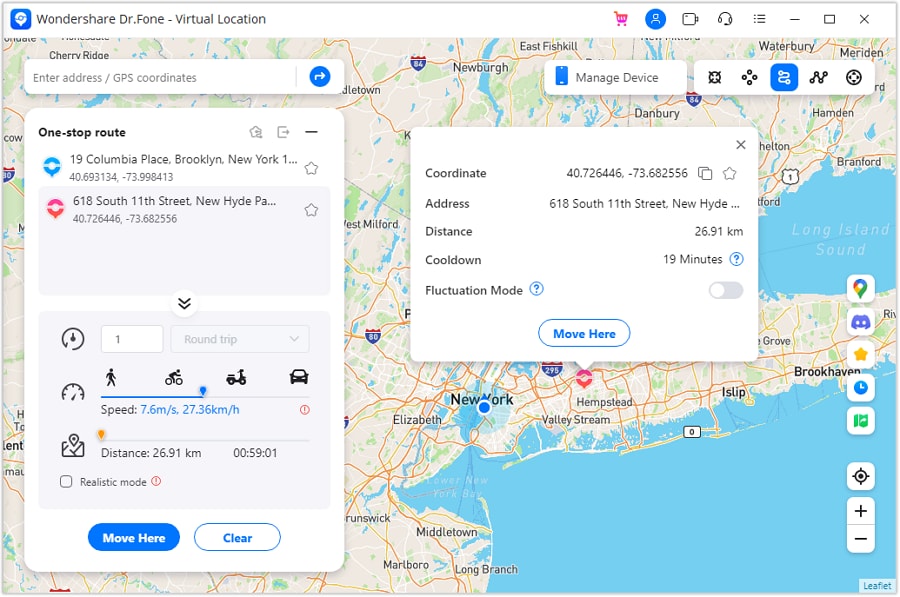
Step 2 Define a one-stop route
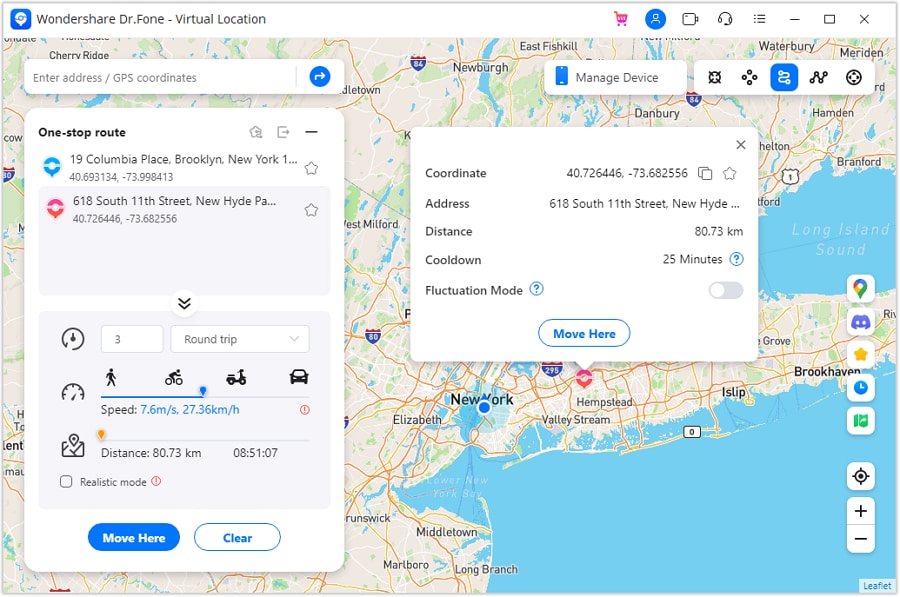
Choose One-Stop Route, depicted as the third top-right mode in the source interface. Pick a destination using the map or search control. Review the trip count, route behavior, and speed before starting; the official guide describes round-trip or loop settings and Move Here. If your version also displays realistic or fluctuation controls, follow that version's explanation rather than assuming they prevent game detection.
Step 3 Build a route with multiple destinations
For a longer test path, select Multi-Stop Route, next to the one-stop option. Mark the intended points in travel order, set the number of trips and the pace, and choose Start Moving. Monitor the result on the map and use Pause or Clear when the test ends. These controls generate GPS positions; whether a particular game accepts them is a separate question.
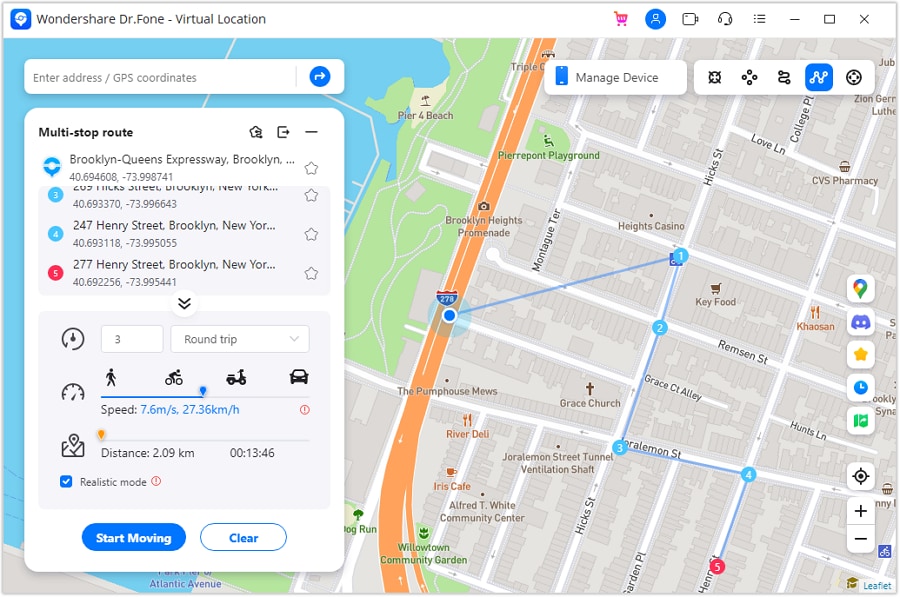
The complete route setup finishes here, after the last source screenshot. Do not equate simulated distance with earned incubation progress. The game's fairness policy treats GPS spoofing as cheating, so adjusting the pace or drawing a realistic path cannot remove the account risk.




The source additionally links to Dr.Fone Unlock Online Free IMEI Check. Device-status information is a separate subject: an IMEI report does not certify that location spoofing is safe, remove an account warning, or prove that every lock or restriction has been checked. Review the service's current scope before providing device identifiers.
Check IMEI Now for Free is the original device-information reference, not a required step in egg incubation.
Confirm the intended service and its terms before submitting device details.
Way 2: Understanding Android Location-Spoofing Options
1. Dr.Fone App - Change Location on Android
The mobile Dr.Fone App - Change Location (Android) is the source's phone-based alternative to a desktop connection. Its relevant role is selecting another GPS position on a compatible Android device, with saved-location conveniences where the installed edition supports them.
Do not confuse that role with general anonymity. A changed coordinate does not stop all tracking, conceal an account identity, or replace a network privacy tool. Likewise, support for a location-based social app does not demonstrate that Pokémon Go will award distance or accept the same configuration.
2. A General Android GPS Spoofer
The second Android approach uses Developer options and an installed mock-location app. It attempts to substitute positions reported by the phone. The original recommendation to move a few meters repeatedly describes the intended simulation, but neither a small jump nor covering a nominal 10 km establishes accepted egg-hatching distance.
This Android process should not be transferred directly to iOS. The original blanket statement that iPhone users must jailbreak is too broad: supported desktop location workflows exist separately, while Android's mock-location selector is an Android-specific setup.
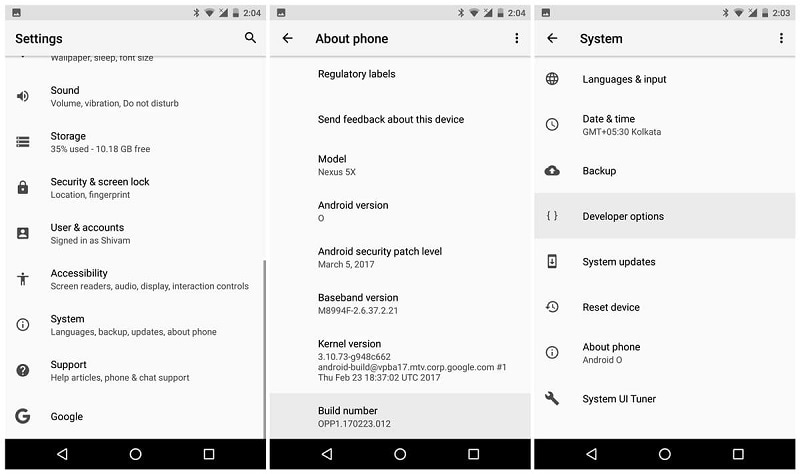
Step 1 Locate Developer options
On many phones, open Settings > About phone and tap Build number seven times. Follow any screen-lock prompt and locate Developer options afterward. Manufacturer menu paths differ, so use the device's documentation if the pictured layout is absent.
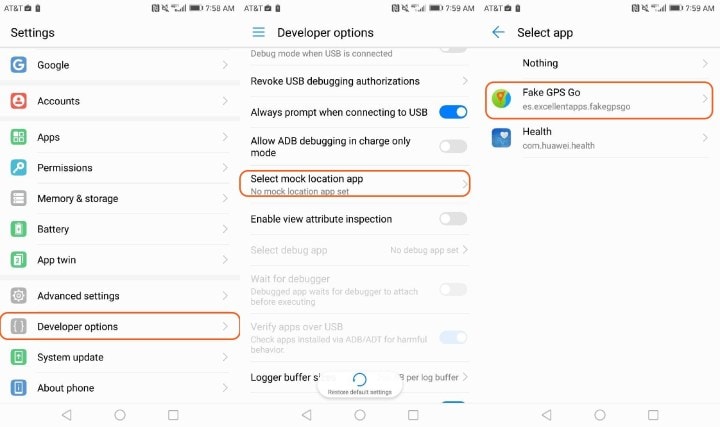
Step 2 Select a supported mock-location application
Review a legitimate app listing and its requirements before installing. Where supported, open Developer options and use the mock-location app selector to choose that utility. Enabling the developer menu and authorizing an app are distinct actions; an old Allow mock locations switch may look different on newer Android versions.
Step 3 Inspect the reported position
Open the utility, select a nearby test coordinate, and examine the result in a maps app. Repeating that selection creates a sequence of mock positions, not proof of physical steps or game-approved travel. Stop the test and restore the real location when finished; do not keep repeating location changes to bypass an in-game warning.
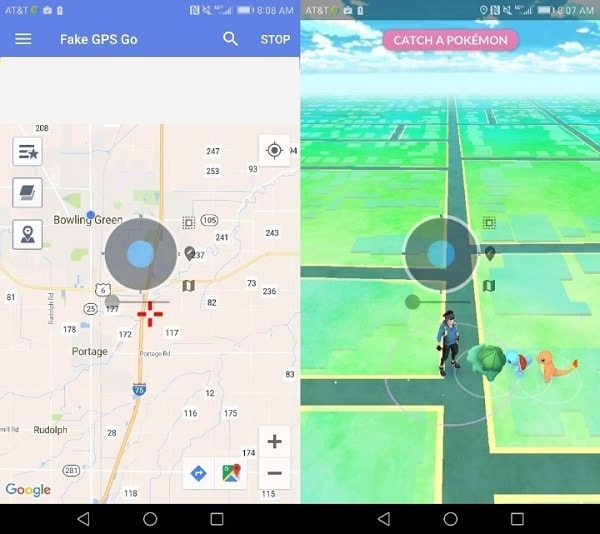
These configuration stages explain the original Android idea without promising it will hatch an Egg. Read the game's current policy before associating any mock-location tool with a live account.
Way 3: Why Carrying a Phone on a Drone Is Not Recommended
The drone idea attempts to create real displacement by carrying the handset through the air instead of simulating a coordinate. The source proposes attaching a phone, flying a route, and keeping the speed low. That is not a dependable egg-hatching method: aerial travel is not established here as accepted walking distance, and a low speed does not guarantee game acceptance.
Do not attach a phone to an unsuitable drone or operate one for a game while distracted. An added payload can affect control and safety, and flights may be subject to local rules. A few kilometers of theoretical range says nothing about whether the aircraft is approved to carry a phone or whether the game will count the journey.
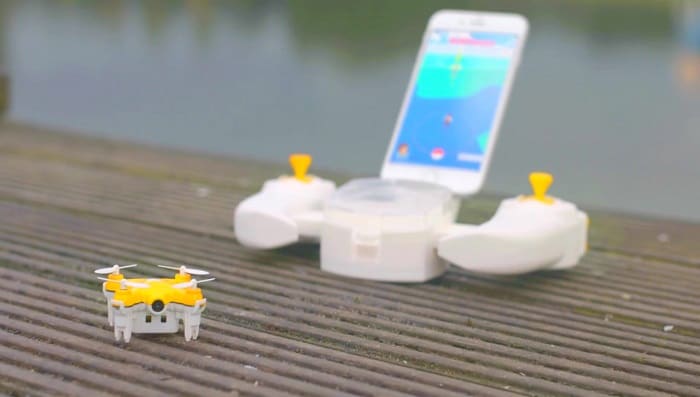
Safety points from this proposal:
- A handset flown away from its owner may be lost, damaged, or stolen. Avoid exposing an expensive device just to test an unverified shortcut.
- A lock or improvised attachment does not make an unsuitable payload safe or establish manufacturer approval.
- A device-finding service may help locate a missing phone, but it does not prevent a fall, guarantee recovery, or justify the flight.
- Flying slowly is not an anti-detection guarantee. Prefer ordinary, permitted activity over airborne workarounds.
Way 4: Friend Codes and Gifts Help Obtain Eggs, Not Hatch Them
Adding friends gives you access to the Gift system, which can provide Eggs under the game's applicable conditions. It does not let a friend directly send an Egg from their inventory or transfer walking distance to you. Receiving an Egg and meeting its incubation requirement are separate stages.
The source also conflates daily Gift limits with storage. Limits and event bonuses can change; consult the in-app rules rather than relying on a universal '20 friends a day' statement. The official Gift instructions explain sending a Gift to a selected friend and the restrictions on repeated sends.
Step 1 Open your Friend List
From the Trainer profile, choose Friends next to the personal profile tab. This is the area for connections and Gift interactions, rather than the Egg inventory.
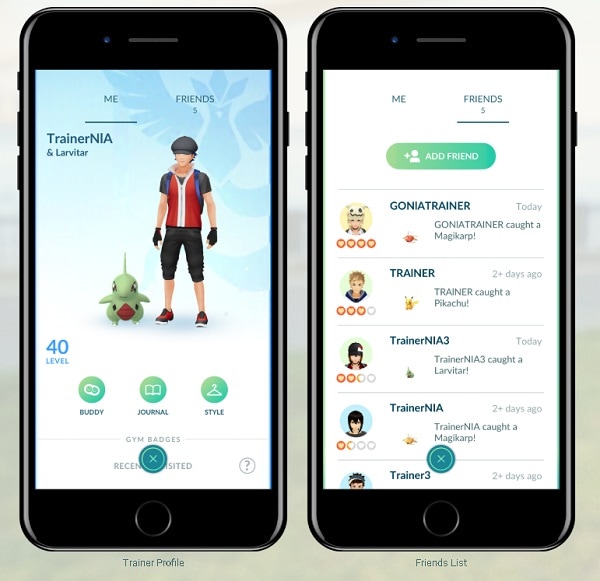
Step 2 Add a Trainer using their code
Select the add-friend option and enter the Trainer Code shared by the person you intend to add. Communities can help players find contacts, but you should consider what profile and Gift-location information those contacts can see.
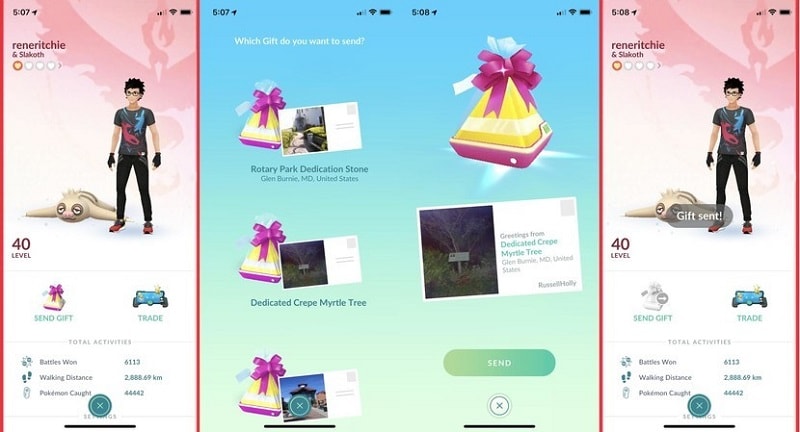
Step 3 Send or open Gifts within the displayed rules
Choose a friend, select Send Gift, pick an available Gift, and confirm. When receiving Gifts, check your Egg capacity and the current rewards. The resulting Egg still needs its own Incubator and accepted distance; trading Pokémon is a different feature and is not direct Egg trading.
The earlier tip to sign in on a jogging friend's phone should not be treated as approved shared progress. Do not share account credentials or use another person to operate your account. Walking together with separate accounts is different from transferring your login.
Way 5: Use PokéCoins for Additional Incubators
Additional Incubators are the most straightforward idea in this list for progressing several Eggs during the same permitted activity. An Incubator holds one Egg; owning more allows parallel incubation. It does not make a stationary phone earn distance, and ordinary Incubators do not erase each Egg's requirement.
PokéCoins buy eligible Shop items. The source's statement that you can simply buy Pokémon and Eggs is misleading, and its example cash price is not a universal current offer. Check the Shop for the actual regional price, item description, and any event or bundle terms before spending.
Step 1 Review your balance
Open the main menu and Shop, then check whether your available PokéCoins cover the selected Incubator or bundle. A purchase is optional, not a prerequisite for using the game's infinite-use Incubator.
Step 2 Purchase only if the offer suits you
If you decide to buy coins, use the displayed official payment flow and verify the total. The inherited image is illustrative; it does not establish a current exchange rate or a fixed price for every country.
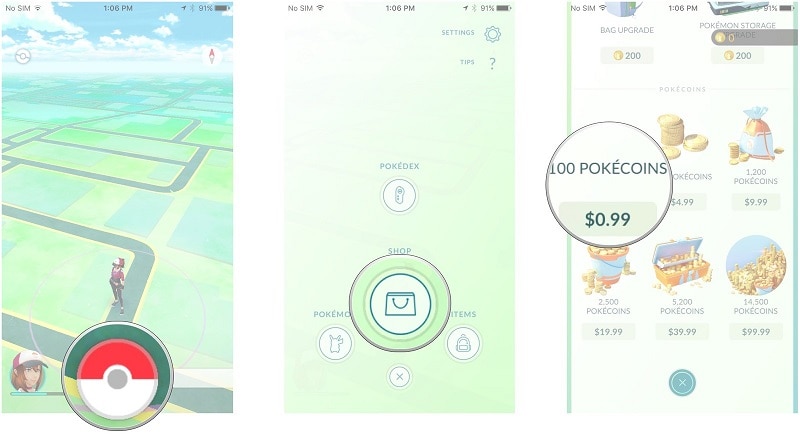
Step 3 Choose the appropriate Incubator item
Return to the Shop and inspect the item itself, including any use limit or distance-related feature expressly listed. Do not substitute a promise of buying Eggs for what the actual item provides.
Step 4 Assign Eggs before accumulating distance
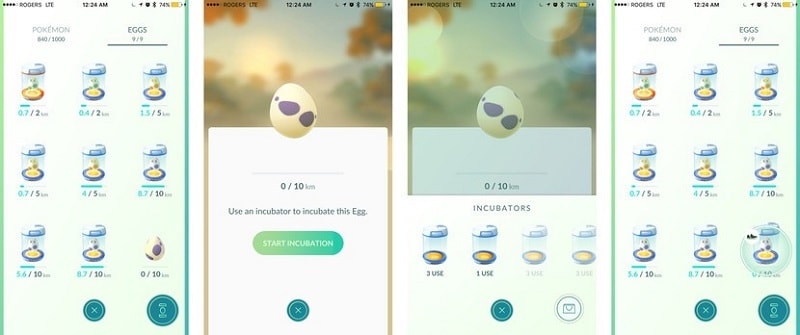
Open Pokémon > Eggs, select an Egg, tap Incubate, and choose an available Incubator. Repeat for other Eggs if you have additional Incubators. Their progress can then occur together during accepted activity, which is the real efficiency benefit.
Way 6: Bicycles and Skateboards Still Require Safe Real-World Travel
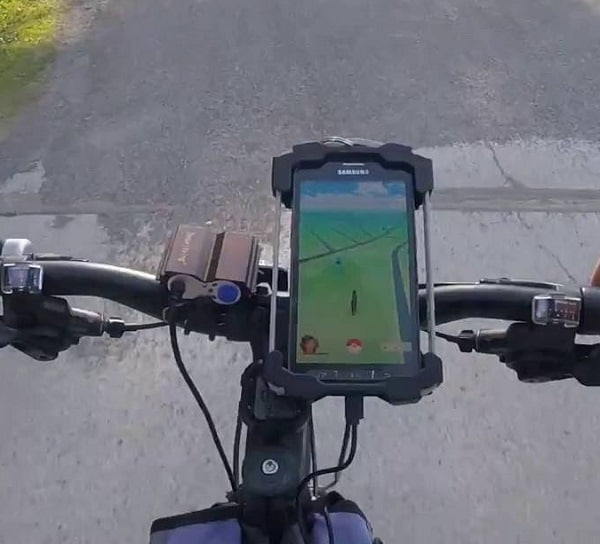
Riding changes the phone's physical position, so it differs from a stationary trick. However, Pokémon Go does not necessarily credit every trip or speed as eligible incubation distance. A bicycle journey can therefore involve substantial effort without producing the progress expected from walking.
Keep the phone securely stored and never operate the game while steering or balancing. Stop in a safe place before checking progress, follow local traffic rules, and do not adjust your riding behavior merely to try to evade a game's movement checks. The source's suggestion of riding slowly is not a published guarantee that the distance counts.
For ordinary walks you already take, the official hatching guide recommends Adventure Sync to record eligible distance while Pokémon Go is closed. That can reduce the need to keep the game open, but it does not turn a stationary phone into genuine walking activity.
Way 7: A Roomba Is an Unreliable Hatching Shortcut
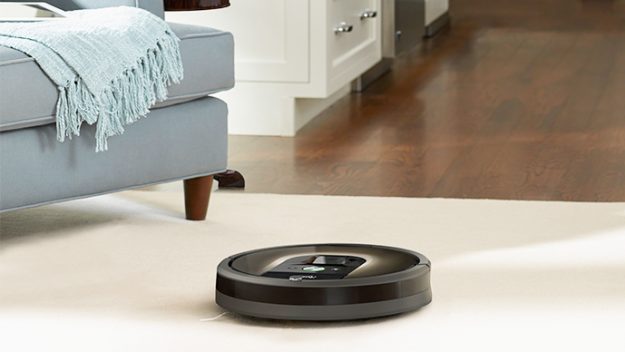
The robotic-cleaner idea places the handset on a slowly moving vacuum and lets it circulate indoors. The missing assumption is that small movements around a room will be recognized as meaningful travel. GPS accuracy indoors and the game's distance processing mean that a moving cleaner is not equivalent to a recorded outdoor walk.
There are also avoidable risks: the phone can slip, strike furniture, or interfere with the cleaner. A waterproof pouch does not resolve those mechanical hazards or guarantee distance credit. Rather than presenting the Roomba as an effective hack, treat it as an unverified experiment that is not worth damaging either device.
Way 8: Model Railroads Do Not Guarantee Useful Distance
A miniature train repeatedly circling a track is another attempt to move the phone without carrying it. Repetition alone does not establish that the game will total the circumference as walking distance. A small indoor loop may not produce reliable location changes at the resolution the phone or game uses.
Loading a model carriage with a handset also risks derailment, a fall, and damage to the train. Slower running does not settle the tracking problem, and operating the railway longer is not evidence that an Egg must eventually hatch. Enjoy the model as a hobby rather than relying on it for game progress.

Way 9: A Turntable Does Not Reliably Reproduce Walking
The source's turntable sequence is to place the phone at the record player's edge, start rotation, check the Egg, and reposition the handset if nothing changes. That describes circular motion, not proof that the device or game classifies it as human steps. The claim that any sufficiently wide circle will reliably trick the sensors is unsupported.
Do not balance a phone near a rotating edge or repeatedly reposition it on moving equipment. The device could slide off, while the turntable or record could be damaged. Checking the Egg screen afterward cannot turn that risk into a recommended or verified hatching procedure.

The GPS-route method discussed earlier is technically different from physically spinning a phone. Dr.Fone - Virtual Location exposes map and movement controls, but it should not be advertised as guaranteed egg-hatching progress or as a safe alternative under the game's anti-cheating policy.
Device safety and account rules remain relevant to every method.
Bonus Tip: Understand Egg Distances and Changing Hatch Pools
Eggs carry their own required distance, and an eligible Incubator must be assigned before progress can accumulate. The source discusses distances from 2 km to 12 km. Do not infer the contents from distance alone: the official Egg-hatching guide says to tap a particular Egg to see its eligible Pokémon and rarity groups.
- 2 km: a shorter displayed requirement, not a permanent guarantee of Pidgey or Caterpie. Use that Egg's own hatch list.
- 5 km: a separate distance category. Charmander, Squirtle, and Dratini in the original examples should not be treated as a fixed current pool.
- 7 km: commonly associated with Gift-related Eggs, but the availability of baby Pokémon or regional forms depends on the applicable pool and event.
- 10 km: a longer requirement does not promise Snorlax or Lapras, and it certainly does not establish that ordinary Eggs yield Moltres or Zapdos. Inspect the eligible list rather than extrapolating from rarity.
- 12 km and other applicable rewards: follow the acquisition conditions shown in the game. A general list cannot replace the details of an Egg already in your storage.
When several Eggs are ready, additional Incubators can share the same accepted journey. If an event changes a distance requirement or hatch pool, rely on the current in-game information instead of a historical screenshot.
Conclusion
The nine ideas answer different questions: GPS tools simulate positions, Gifts can help obtain Eggs, extra Incubators allow parallel progress, and moving machines offer unreliable shortcuts with device risks. None justifies a guarantee of hatching while stationary. If you evaluate Dr.Fone - Virtual Location, understand its supported route functions and the game's rules first. For more general creative material, the original reference to the Wondershare Video Community remains available.
Prioritize safe activity, secure devices, and accurate expectations.
FAQ
1. Can I hatch an Egg simply by leaving my phone still?
Not as a guaranteed method. An incubated Egg needs distance accepted by Pokémon Go. A stationary phone does not establish that requirement.2. Do more Incubators eliminate the distance requirement?
No. They allow different Eggs to progress at the same time. Review each Incubator's actual description and each Egg's displayed distance.3. Can a friend send an Egg directly from their inventory?
No. Gifts and their possible rewards are different from direct Egg trading. Receiving an Egg does not complete its incubation requirement.4. Is a GPS route simulator a guaranteed ban-free hatching tool?
No. Changing reported coordinates does not guarantee distance credit, and the game's fairness policy classifies GPS spoofing as cheating.
 Add Wondershare Dr.Fone as a preferred source on Google