Teleport your device anywhere instantly with one click.


 100% Security Verified | No Subscription Required | No Malware

 :

 ChatGPT
 Perplexity
 Gemini
 Claude
 Grok
Searching for Ralts nest Pokémon GO coordinates does not produce a dependable, permanent catching spot. Encounters change with the active spawn pool and event schedule, while an old map report only describes what someone saw at a particular time. Ralts' ability to sense emotions belongs to Pokémon lore: being cheerful, angry, or sad does not control whether it appears on your phone.
A more useful approach is to separate species identification, evolution requirements, and current encounter opportunities. Below, you can check what distinguishes regular and Shiny Ralts, plan the Kirlia evolution branch you want, and understand what a GPS simulator can change without confusing location simulation with a guaranteed encounter or account protection.
In this article
Part 1: Understanding Ralts, Shiny forms, and nesting claims
Biology: recognize Ralts without confusing lore with gameplay
Ralts has a small, pale body with a flared lower half that resembles a loose white garment. Its green, bowl-shaped head covering partly conceals its face, while two red projections make the silhouette distinctive. In the Pokémon story, those horns detect surrounding emotions, explaining why descriptions portray it as a timid creature drawn toward positive feelings.
That description is useful for recognizing the species, not for predicting a Pokémon GO spawn. The game does not read a Trainer's emotional state. You can search an accessible urban park or walking route, but neither an urban setting nor a happy mood guarantees a Ralts. Judge a location by live in-game encounters and current event information rather than by a character's fictional behavior.
Shiny Ralts: what changes and when to look
A regular Ralts has green head coloring; the Shiny form replaces that green with blue. This makes the encounter screen a better identification check than a distant map silhouette. Its evolution family also has distinct Shiny coloring, although Gallade should not be reduced to the same hairstyle description as Ralts or Gardevoir.
A Community Day specifically featuring Ralts can provide more chances to encounter the species and may increase Shiny availability during its published hours. Do not assume every Community Day features Ralts, or that a historical three-hour window is the schedule for a new event. Read the announcement for the event you are actually attending, including local time and any exceptions.
Shiny encounters are never promised for an individual Trainer. Outside a featured event, availability and encounter frequency depend on the current game content. Arriving after a boosted period is not equivalent to arriving during it, even when Ralts can still be encountered. Plan enough time for ordinary exploration rather than treating an old event guide as an active offer.
Evolution: plan Candy, gender, and the Sinnoh Stone
Pokémon GO uses Candy for this evolution family; it does not require Ralts to reach level 10. Spend 25 Ralts Candy to evolve Ralts into Kirlia. From there, the normal Gardevoir branch requires 100 Ralts Candy. Either male or female Kirlia can take that branch, so Gardevoir is not simply the female counterpart of Gallade.
For Gallade, first obtain a male Kirlia. Its Gallade evolution requires 100 Ralts Candy and a Sinnoh Stone. A female Kirlia cannot take that branch. Before confirming an evolution, inspect both the gender symbol and the selected evolution button; otherwise, spending Candy on Gardevoir may leave you short for the Gallade you intended to obtain.
Gallade is a separate final evolution branch, not a starting point for a collection of unrelated species. Gardevoir is Psychic/Fairy, while Gallade is Psychic/Fighting. Their Mega forms are a separate mechanic with their own requirements, not additional ordinary branches that appear merely because you caught a male Ralts.
The original advice mentioned Research rewards, Trainer Battles, and team-leader battles as possible routes to a Sinnoh Stone. Reward availability is conditional, and an individual battle does not guarantee that item. Check current reward rules and your bag before planning an evolution session; attending Community Day alone does not award every missing stone.
To complete a Shiny family, the same gender and resource requirements still matter. Keep suitable candidates instead of evolving the first Shiny immediately. A Shiny male Kirlia leaves both branches available until you choose, while a Shiny female Kirlia is suitable for the Gardevoir branch.
Does Ralts really nest? Why fixed coordinates are unreliable
There is no verified, permanently reliable Ralts nest coordinate supplied by this article. Older community descriptions may label an event cluster, repeated local sightings, or a temporarily boosted area as a nest. Those observations should not be converted into a promise that the species currently appears there, or into an absolute statement about every future spawn rotation.
Egg pools also rotate. An old reference to Ralts hatching from a 10 km Egg is historical information, not proof of today's hatch list. Check the possible hatches shown for the specific Egg in your inventory rather than assuming an old article applies to newly obtained Eggs.
Weather is another conditional factor, not an access requirement. Ralts is Psychic/Fairy, so the relevant weather boosts are windy for Psychic and cloudy for Fairy; fog boosts different types. Ralts is not restricted to cold, foggy, or cloudy days, and your mood remains irrelevant. Featured events and live encounter information are more useful than trying to wait for a particular emotional or weather combination.
Part 2: Finding current Ralts opportunities near you
Start inside Pokémon GO: inspect Nearby encounters, look at the active event details, and check accessible areas where you can walk safely. A local sighting is time-sensitive. By the time a community post reaches you, that individual encounter may be gone, so verify when and where the report was made before traveling.
Community maps and weather trackers can help organize a search, but they do not reveal every spawn or create a missing Pokémon. In-game weather may differ from the forecast you see elsewhere, and an event can change what appears. Treat a map pin as a lead to investigate, not as a reservation for a Ralts or a guarantee of a Shiny.
If a published event features Ralts, prepare storage space and catching supplies before its start time. If it does not, simply attending Community Day will not turn its featured species into Ralts. This distinction prevents a common mistake: planning around the event's name while overlooking the actual Pokémon listed in the announcement.
Tracking Community Days with current event information
The original guide recommended the Silph Road community network. That is a historical reference, not a current event calendar to rely on: the original Silph Road service has closed. Use current Pokémon GO announcements and active local groups instead of looking for a functioning version of an old community directory.
Confirm the date, local hours, featured Pokémon, evolution bonuses, and any ticket-specific activities. Ordinary Community Day participation and optional paid Research are different things; a ticket is not automatically required just to encounter the featured Pokémon in the wild. Special event access can have separate conditions, so read the relevant listing before paying or traveling.
Recheck the announcement close to the event, and arrange physical attendance where permitted. Spoofing is not an officially supported substitute for attendance. Changing a GPS coordinate cannot supply a missing event entitlement, guarantee local spawns, or remove enforcement risk.
Part 3: Dr.Fone GPS simulation and its limits for Ralts searches
 Set your map route to simulate GPS movement.
- Set your wanted movement speed.
- HD and large map view to check location.
- Fake GPS location to anywhere.
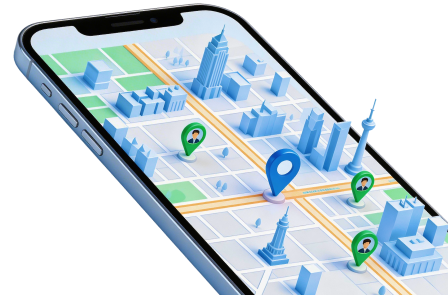
Dr.Fone - Virtual Location provides a desktop map interface for setting a supported connected phone's simulated GPS position. Its teleport and movement controls change location data; they do not control Pokémon GO's encounter pool, Shiny selection, evolution resources, or event eligibility.
The route and joystick features can simulate movement at selected speeds in supported situations. Compatibility varies by device, operating-system version, and app behavior. For Pokémon GO, location falsification can violate the game's rules and lead to restrictions or suspension. No cooldown schedule, realistic-looking route, or product safety label guarantees that an account will avoid enforcement.
- Teleport mode selects a position through an address, map point, or coordinates.
- Joystick controls provide directional input for a simulated route.
- Movement settings let you configure a route and speed rather than physically moving the phone.
- Results depend on the connected device and the app consuming its location; support should be checked before use.
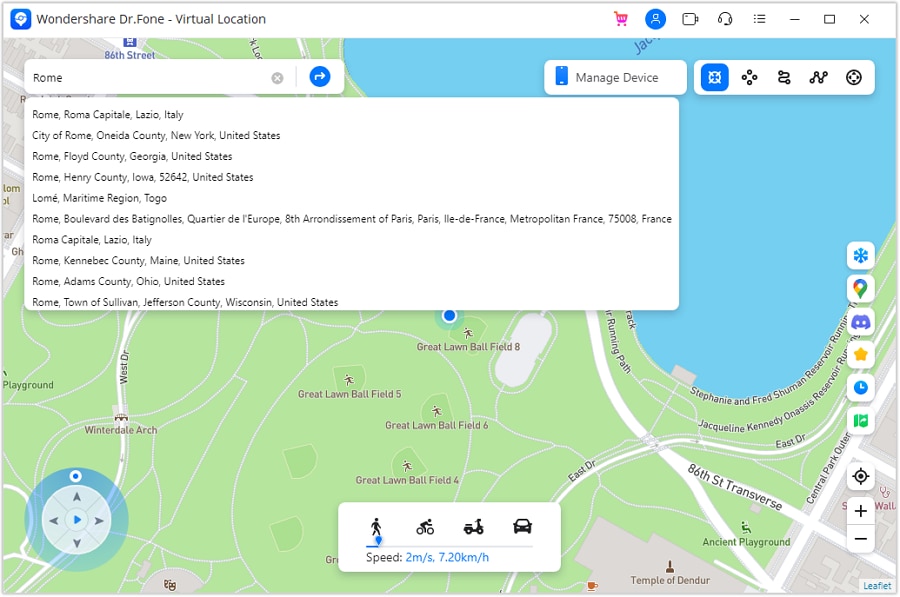
The following walkthrough explains the supplied desktop screenshots. They are interface examples, including Rome, Italy, not verified Ralts coordinates. Use location simulation for an authorized test on your own device, and do not infer that the screenshots demonstrate a current Pokémon GO capture.
Step 1 Open the installed desktop application
Install the appropriate desktop edition and launch Dr.Fone. Locate the Virtual Location module on the home screen. Check device compatibility and the current connection instructions before changing any location setting.
Step 2 Connect your phone
Choose Virtual Location and connect the phone with a reliable USB data cable. Complete any trust or permission prompts shown on the phone and computer. A cable that only charges cannot establish the required data connection.
Step 3 Check the map and select teleport mode
Review the position displayed on the map. Use the location-centering control if you need to bring the current position into view, then choose Teleport Mode. Icon order varies between releases, so use the mode's label rather than assuming it is always the third button.
Step 4 Search for the intended test location
Enter an address or coordinates in the search field and submit the search with the displayed control or Enter. Inspect the result before continuing. The Rome example illustrates selecting a destination; it is not evidence that Ralts currently spawns there.
Step 5 Confirm the simulated position
Select Move Here only after checking the map pin. Where supported, joystick or route controls can then simulate movement around the selected area. They cannot force a Ralts encounter, and waiting between location changes does not make game-rule violations safe.
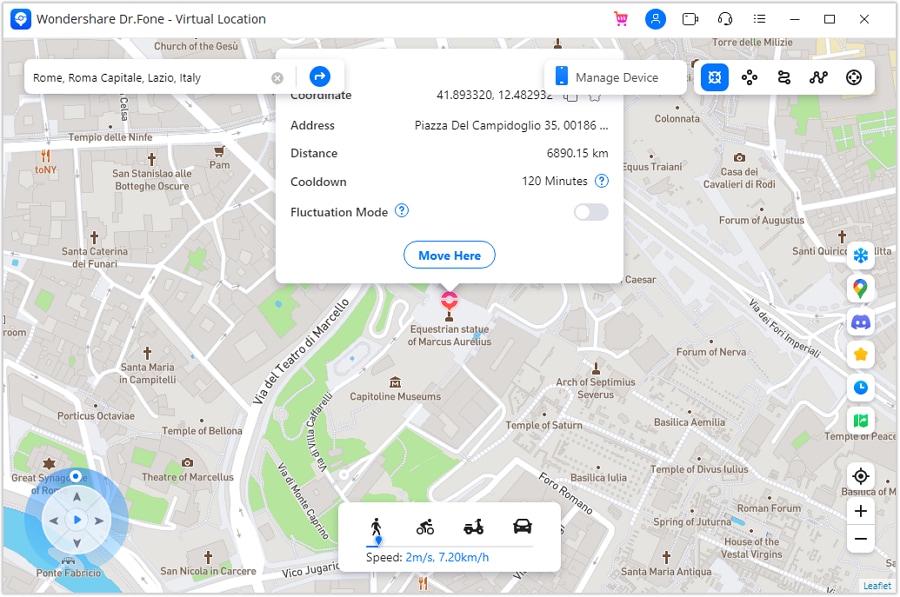
Step 6 Compare the desktop and phone maps
Confirm that the desktop map reflects the chosen position, then open a map on the connected phone to check what location it receives. This verifies location simulation, not game compatibility. After testing, follow the application's restoration prompt; the official guide describes restarting the device to restore its real position.
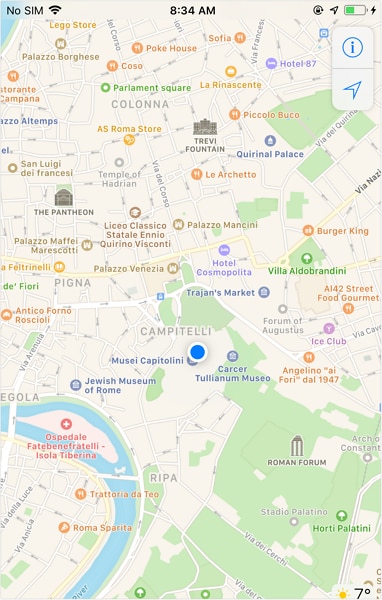
Stop if the device, operating system, or intended app is unsupported. A changed map position does not establish that a remote Community Day is accessible, that a Ralts is present, or that an account is protected. The supported way to hunt event Pokémon remains ordinary play under the game's published rules.




Conclusion
For Ralts nest Pokémon GO coordinates, current evidence matters more than a permanent pin copied from an old guide. Watch the live spawn pool and relevant event announcements, then save the Candy and Sinnoh Stone required for your preferred Kirlia branch. Ralts lore, fog, and a Trainer's mood are not reliable encounter controls.
Dr.Fone - Virtual Location offers GPS simulation, not a Pokémon generator or a ban-prevention service. Understand that distinction before changing a connected device's position, and favor physical, permitted participation when your goal is collecting Ralts and its evolutions.
FAQ
1. Are there permanent Ralts nest coordinates?
This guide provides no verified permanent nest. Historical sightings and event clusters can expire; use current in-game information and recently confirmed local reports.2. Does Ralts appear only in foggy weather?
No. Its availability is not restricted to fog. Psychic and Fairy receive windy and cloudy boosts respectively, and weather does not guarantee an encounter.3. What is required to evolve Kirlia into Gallade?
Use a male Kirlia, 100 Ralts Candy, and a Sinnoh Stone. The Gardevoir branch also costs 100 Candy but does not require a male Kirlia or that stone.4. Can a location changer guarantee Shiny Ralts or prevent a ban?
No. GPS simulation does not select encounters or Shiny outcomes, and location spoofing can lead to game-account penalties even when movement appears realistic.
 Add Wondershare Dr.Fone as a preferred source on Google