
How to Get Free In-App Purchases on Android (No Root): 9 Best Apps for 2026

Jun 30, 2026 • Filed to: Device Data Management • Proven solutions
 TL;DR:
While tools like Lucky Patcher and CreeHack can bypass local in-app purchase verifications on Android without root access, they are strictly limited to offline applications and carry severe risks including permanent account bans and malware infections.
● Target specific tools based on their bypass method: use AppSara for its curated whitelist of over 50 supported games, CreeHack for casual offline titles, or Freedom APK v1.5.3c and above to simulate transactions via a virtual card environment.
● These bypass applications will automatically fail on modern online multiplayer games that utilize server-side purchase validation, SSL certificate pinning, or active anti-cheat systems.
● Advanced memory editing tools like Game Guardian and SB Game Hacker, alongside the Xmodgames repository, typically require a fully rooted device or a parallel space virtual environment to function and do not work reliably as strict no-root solutions.
Ask AI for a summary
 ChatGPT
 Perplexity
 Gemini
 Claude
 Grok
Grok
Dr.Fone Basic:
Better Control for Your Phone
Manage, transfer, back up, restore, and mirror your device
The Google Play Store hosts over 3 billion active Android users and millions of apps spanning video streaming, mobile gaming, productivity, and more. While countless apps are free to download, many gate their best features behind paywalls—requiring subscriptions, one-time purchases, or in-app transactions to unlock full value. If you're looking for legitimate ways to access free in-app purchases on Android without root, you're not alone. Millions of users search for Lucky Patcher alternatives no root, mod APKs, and workaround methods every month.
In this 2026 updated guide, we break down the 9 best Android apps for free in-app purchases without rooting, explain how each tool works, compare their pros and cons, and highlight the risks you should know before trying any of them. Whether you're trying to unlock game currency, bypass premium paywalls, or explore android in-app purchase hacks, this guide covers every angle—so you can make an informed decision.
Disclaimer: Hacking in-app purchases may violate app developers' Terms of Service and in some jurisdictions may be considered illegal. Developers invest significant time and resources creating apps, and in-app purchases are often their primary revenue stream. This article is provided for informational and educational purposes only. We do not condone, promote, or take responsibility for any illegal or policy-violating activities undertaken after reading this content.
Part 1. What Is an In-App Purchase on Android? (And Why People Want Them Free)
An in-app purchase (IAP) on Android is a digital transaction that takes place inside a mobile application, processed securely through the Google Play Store. These purchases can include a wide range of digital goods and services: virtual currency (coins, gems, tokens), premium subscriptions, unlockable game levels, extra lives, ad-free experiences, character skins, power-ups, and expanded storage or features.
Payments are linked to the user's Google account and charged through their saved payment method—credit card, PayPal, or Google Play balance. For app developers, in-app purchases are one of the most effective monetization strategies, allowing them to offer a free base version of their app while reserving premium features for paying users.
Why do users search for free in-app purchases on Android? The answer is straightforward: many premium features are locked behind high price points, and not all users are willing or able to pay. Popular games like Clash of Clans, Candy Crush, or PUBG Mobile rely heavily on in-app purchases for progression, which drives demand for android free in-app purchases hacks and workarounds. Understanding what IAPs are—and why they exist—is the first step before exploring any tools or methods.
Types of In-App Purchases on Android:
- Consumable IAPs – Items used up and repurchased repeatedly (e.g., game coins, lives, health packs)
- Non-consumable IAPs – One-time permanent unlocks (e.g., remove ads, unlock full game, premium theme)
- Subscriptions – Recurring billing for ongoing access (e.g., Spotify Premium, app pro plans)
- Auto-renewable Subscriptions – Continue until manually cancelled by the user
Part 2. What Does "Free In-App Purchase" Mean on Android?
Free in-app purchases on Android refer to methods that allow users to obtain paid digital content—items, upgrades, or subscriptions—within a mobile app without spending real money. Rather than processing a legitimate payment through the Play Store, these methods attempt to spoof, bypass, or simulate successful purchase transactions, tricking the app into granting access to premium content.
There are several common approaches users explore for in-app purchases free access:
- Third-party modding tools – Apps like Lucky Patcher or CreeHack intercept purchase verification and simulate a successful payment
- Modified APKs (Mod APKs) – Pre-hacked versions of apps with unlimited resources or unlocked premium features built in; searched as free in-app purchase mod apk
- Memory editors – Tools like Game Guardian that modify game data stored in device memory in real time
- Google Play rewards & promotions – Legitimate methods like Google Opinion Rewards, referral credits, or promotional offers
It's important to understand the difference between legitimate free IAP methods (reward credits, trial offers, in-app rewards) and hacking-based methods (bypassing purchase verification). The latter carry significant legal and security risks, while the former are perfectly acceptable and encouraged by developers.
Tips: Looking for an all-in-one mobile management software? Look no further than Dr.Fone App - the ultimate choice for all your needs:
For iOS Users: Free up space with Smart Clean, remove any restriction including screen lock, iCloud activation lock, MDM, or Apple ID, and transfer data easily between devices with our all-in-one iOS solution.
For Android Users: Bypass screen locks and FRP with our Android unlocker, change your location with one click, and repair damaged Samsung devices with ease.
Discover more possibilities for mobile management solutions with Dr.Fone App (iOS) and Dr.Fone App (Android). Don't miss out, try it now and revolutionize your smartphone experience.



Part 3. Pros and Cons of Hacking In-App Purchases on Android
Before attempting any android in-app purchase hack, it's essential to understand both the appeal and the serious risks involved. While these tools promise free access to premium content, the real-world consequences—from account bans to malware infections—are significant. Here is a balanced, factual breakdown of the key advantages and disadvantages every user should consider.
Bottom line: If you decide to use any in-app purchase hack tool, proceed with extreme caution. Always download APKs from trusted sources, use a secondary test account, and never input personal or payment information into unofficial apps.
Part 4. 9 Best Android Apps for Free In-App Purchases Without Rooting (2026)
The following tools are the most widely discussed options for accessing free in-app purchases on Android without root in 2026. Each has been evaluated based on compatibility, ease of use, no-root capability, risk level, and supported app types. Note that effectiveness varies widely depending on the target app and its anti-cheat protections.
1. Lucky Patcher — Most Versatile Free IAP Tool for Android
Lucky Patcher is the most well-known and widely used tool for free in-app purchases on Android without root. It works by patching app APKs directly on the device, intercepting purchase verification requests, and simulating successful transactions with a fake Google Play license. Beyond IAP bypassing, Lucky Patcher can also remove ads, disable license checks, and create modified APK backups.
Lucky Patcher is also frequently cited as the benchmark when users look for Lucky Patcher alternatives no root—making understanding it essential before exploring other tools. While it can operate without root for basic patching, certain advanced features (such as patching system apps or modifying deeply protected applications) still require a rooted device.
Key Features:
- Patches in-app purchase verification for supported offline apps and games.
- Works on both rooted and non-rooted Android devices for compatible apps.
- Removes ad modules from apps to provide an ad-free experience.
- Can bypass app license verification to unlock pro/paid app features.
- Creates modified APK backups you can share or reinstall.
- Does not work on apps that validate purchases server-side (e.g., most online multiplayer games).

2. Freedom APK — Simulate Free In-App Purchases Without Root
Freedom APK is a dedicated android in-app purchase hack tool that creates a virtual card environment to simulate successful payments within apps and games. When a purchase request is triggered, Freedom intercepts it and returns a fake successful transaction code—effectively bypassing the Google Play billing layer. This allows users to unlock coins, gems, extra lives, and premium levels without any real-money transaction.
The latest version (Freedom APK v1.5.3c and above) supports Android Marshmallow through newer Android versions and works as a Lucky Patcher alternative no root for many offline games. However, it is not available on the Google Play Store and must be sideloaded, which means Google Play Protect may flag it as potentially harmful.
Key Features:
- Simulates in-app purchase transactions without spending real money.
- Works on non-rooted Android devices for supported apps.
- Unlocks coins, gems, lives, and jewels in compatible games for free.
- Compatible with Android Marshmallow and several newer Android versions.
- Useful for offline games with local purchase verification.
3. CreeHack — No-Root In-App Purchase Bypass for Android Games
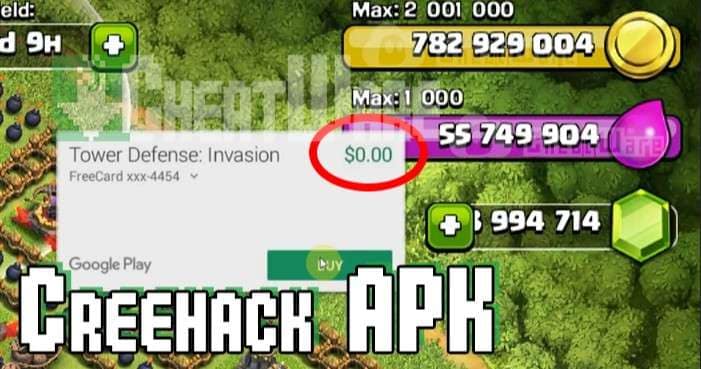
CreeHack is a lightweight, no-root Android tool designed specifically for bypassing in-app purchase verification in mobile games. It works by intercepting purchase requests at the app layer and returning a success response, allowing players to unlock unlimited coins, gems, lives, and virtual currency without paying. Its minimal footprint (small APK size) means it installs quickly and runs in the background with low performance impact.
CreeHack is particularly popular among users looking for free in-app purchases android no root solutions because it doesn't require device modification. It supports a wide range of casual and mid-core games, though heavily protected titles or games with server-side IAP verification remain unaffected.
Key Features:
- Bypasses in-app purchase prompts in supported Android games—no root needed.
- Unlocks unlimited in-game resources including gems, gold, and coins.
- Very small APK file size for fast installation and low memory usage.
- Compatible with a broad range of Android games and offline apps.
- Simple one-tap activation interface—no technical knowledge required.
4. AppSara — Lightweight IAP Hack Supporting 50+ Android Games
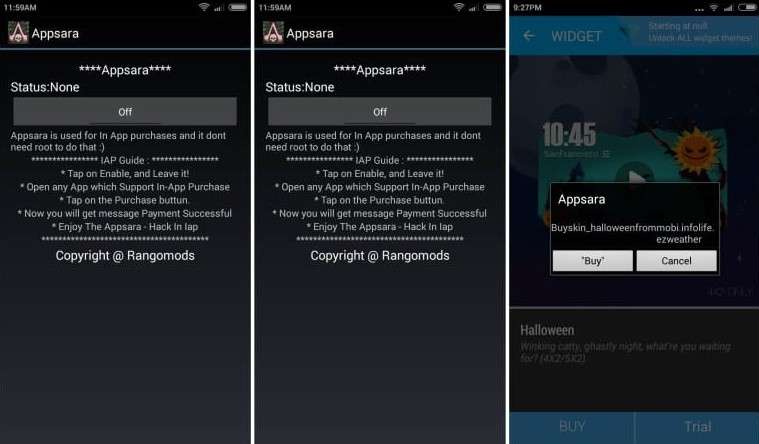
AppSara is a compact, easy-to-use free in-app purchase tool for Android that focuses on a curated list of supported games. Unlike some broader tools, AppSara maintains a specific whitelist of 50+ popular Android games for which it can reliably bypass IAP verification without root access. If your target game is on the supported list, AppSara is one of the most straightforward and reliable in-app purchase free options available.
For games outside its supported list, root access may be required—limiting its usefulness for less mainstream titles. AppSara's strength lies in its simplicity and targeted compatibility rather than broad-spectrum support.
Key Features:
- Bypasses in-app purchases for 50+ specifically supported Android games.
- No root required for games on the official supported list.
- Minimal interface—select app, activate, and start playing.
- Regularly updated to maintain compatibility with supported titles.
- Smaller attack surface compared to broader tools, reducing malware risk.
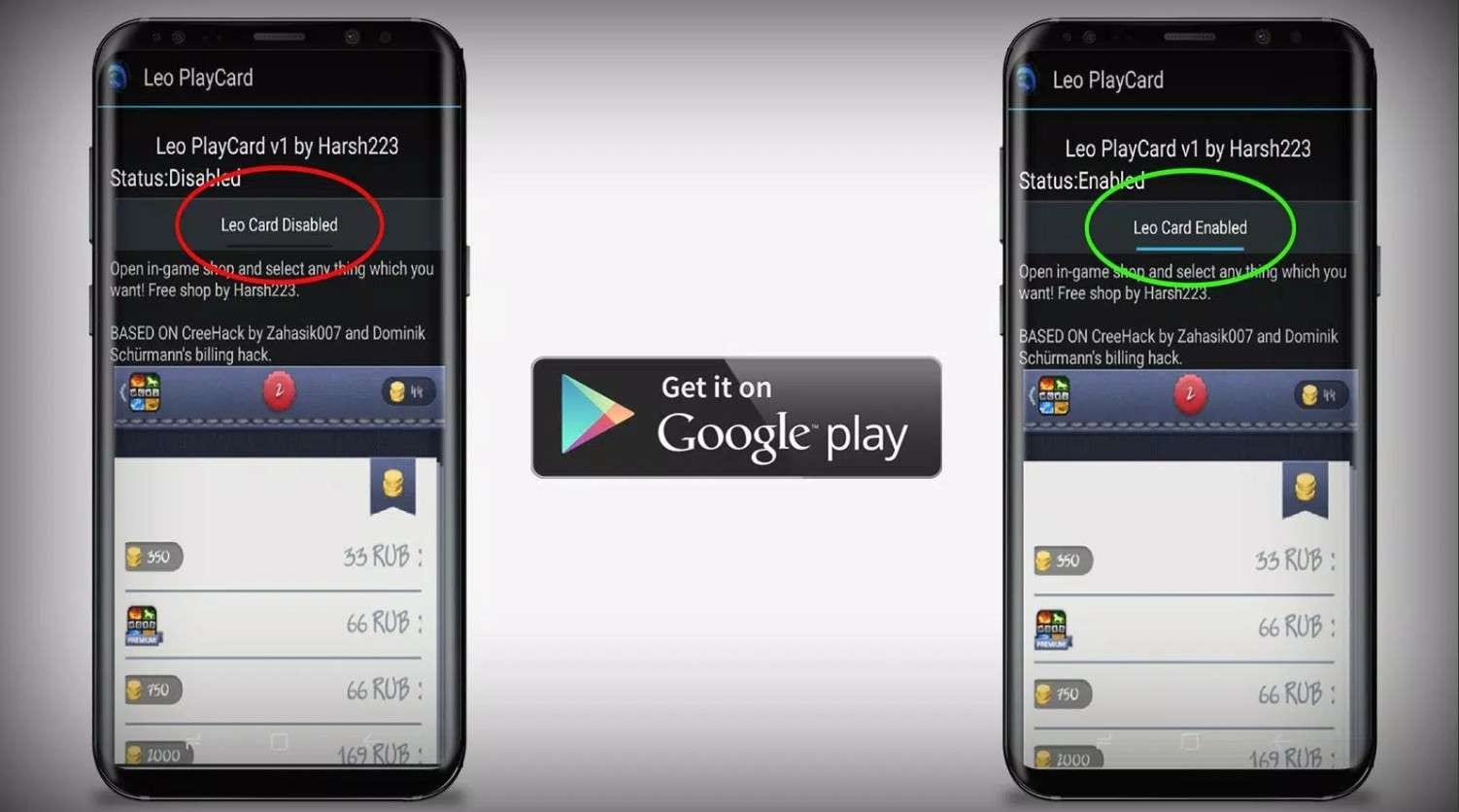
5. LeoPlay Card — Free Virtual Payment Card for Android IAPs
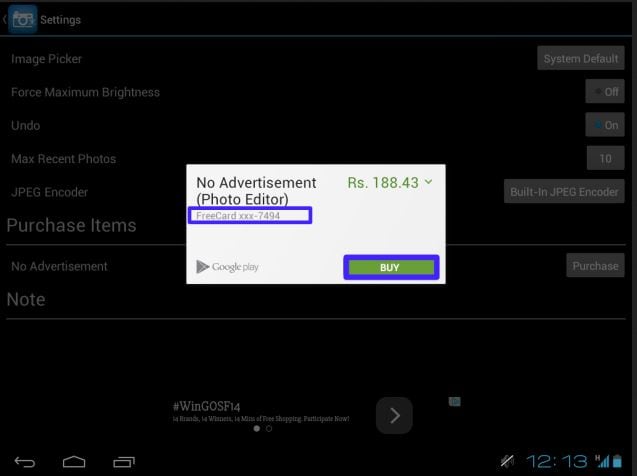
LeoPlay Card takes a different approach to free in-app purchases android no root by simulating a virtual payment card instead of directly patching app code. When you attempt an in-app purchase, LeoPlay Card provides a fake card number that tricks the app into processing a zero-cost transaction. This method is similar in concept to CreeHack and Lucky Patcher but operates differently at the payment layer.
LeoPlay Card supports most apps and games that are compatible with CreeHack and Freedom, making it a solid cross-compatible option. One notable limitation: it no longer supports certain titles like Gunship Battle, which have implemented stronger server-side payment validation to counter these tools.
Key Features:
- Uses a virtual fake payment card to bypass in-app purchase verification.
- No root access required—works on standard Android devices.
- Broad app compatibility overlapping with CreeHack and Freedom supported lists.
- Supports bypassing app payment prompts across multiple game genres.
- Provides an alternative unlock path for apps that resist direct patching.
6. Game Guardian — Advanced Memory Editor for Android IAP Hacking
Game Guardian is a powerful real-time memory scanning and editing tool used to perform android in-app purchase hacks by directly modifying values stored in a game's runtime memory. Unlike passive interception tools, Game Guardian actively searches for specific memory addresses corresponding to in-game currency, lives, or purchase flags—and modifies them to desired values. This makes it one of the most technically capable tools on this list.
However, Game Guardian requires root access on most devices to function at its full potential, placing it outside the strict free in-app purchases android no root category. It can also be used to hack app data no root in some scenarios using a virtual environment (such as a parallel space app), though results are inconsistent. It is best suited for technically advanced users comfortable with memory addresses and scripting.
Key Features:
- Real-time memory scanning and editing to modify in-game values and purchase flags.
- Supports Lua scripting for automated, repeatable memory modification tasks.
- Works with a wide range of Android games including many that resist other tools.
- Can modify game speed, currency values, health, and unlock states.
- Compatible with virtual environments (parallel space) for limited no-root use.

7. SB Game Hacker — Game Memory Modifier for Free IAPs
SB Game Hacker is a memory modification tool similar in function to Game Guardian, designed to unlock free in-app purchases on Android by altering the values stored in active game memory. It scans running game processes for specific numeric values (such as coin counts or purchase flags) and replaces them with user-defined values—effectively hacking in-game currency and bypassing purchase prompts.
While SB Game Hacker is listed as operating without root access in some versions, its full feature set and reliability on modern Android versions are limited without root privileges. It is primarily effective against older games or titles that store purchase data locally rather than on a remote server. Users should note that modern apps increasingly use server-side validation, rendering memory editors ineffective.
Key Features:
- Scans and modifies in-game memory values for currency, lives, and power-ups.
- Basic no-root mode available for some supported game versions.
- Search-by-value system to locate and change specific game parameters.
- Works alongside other modding tools for layered game modification.
- Supports freeze feature to lock values at a specific number permanently.
8. Xmodgames — Game Mod Manager with IAP Bypass Capability
Xmodgames is a modding platform for Android that provides access to community-created game mods, cheats, and in-app purchase bypasses—all managed through a single interface. Unlike standalone hacking tools, Xmodgames acts as a mod repository where users can download and apply pre-built mods for specific games, often eliminating the need to manually patch APKs. This makes it particularly appealing for users who want to access free in-app purchase mod APKs without building modifications themselves.
However, Xmodgames requires root access to inject mods into protected game processes. It is important to understand that using game mods or hacks that affect multiplayer experiences is widely considered unfair play and can result in permanent bans from game platforms.
Key Features:
- Centralized mod repository with community-sourced game modifications.
- One-click mod injection for supported games—no manual APK patching needed.
- Provides access to unlimited resources, unlocked levels, and IAP bypasses.
- Supports a range of popular Android titles with regularly updated mod packs.
- Includes built-in game recorder and screenshot tools.

9. CreeHack Clone — Alternative Build of CreeHack for IAP Bypass
CreeHack Clone is an unofficial modified rebuild of the original CreeHack app, designed to extend compatibility with apps and games that the original version no longer supports due to security updates. It retains the core IAP bypass mechanism of CreeHack—intercepting purchase verification and returning false success codes—while attempting to broaden the range of compatible applications.
While CreeHack Clone may work on some titles where the original fails, it comes with elevated security risks. As an unofficial, unverified third-party APK, it is far more likely to contain embedded malware, aggressive adware, or data-harvesting code than its original counterpart. Users seeking android in-app purchase hacks no root should treat CreeHack Clone as a last resort and scan any downloaded APK with a reputable antivirus before installation.
Key Features:
- Shares the core purchase bypass mechanism with the original CreeHack.
- No-root operation supported on compatible apps and game titles.
- Broader compatibility claims for newer app versions than the original CreeHack.
- Works with most popular casual games and offline Android apps.
Conclusion
In summary, while the 9 tools listed above represent the most commonly searched options for free in-app purchases on Android without root—including well-known names like Lucky Patcher, CreeHack, AppSara, and Freedom APK—none of them are risk-free or universally effective. Modern apps increasingly use server-side purchase validation, SSL certificate pinning, and anti-cheat systems that render most of these tools ineffective against popular online titles. Beyond technical limitations, using any android in-app purchase hack violates Google Play's Terms of Service, may breach individual app agreements, and in some jurisdictions carries legal risk under digital fraud or copyright laws.
App developers invest months—sometimes years—of engineering and design effort into building quality products. In-app purchases are a primary mechanism through which independent developers sustain their work. If you genuinely want to support the apps and games you use, purchasing in-app items or subscribing to a premium tier is always the most ethical and safest path forward.
For users seeking a safer, legal alternative for managing their Android device more efficiently, Wondershare Dr.Fone provides a comprehensive suite of Android management tools—including bulk app installation, bloatware removal, data transfer, screen unlock, and device optimization—without any of the security risks associated with third-party hacking tools.
Wondershare Dr.Fone
Easily Manage Data on Your Android Device
- Preview, delete, and export Android data on computer.
- Install, uninstall, and remove pre-installed apps or bloatware with ease.
- Transfer file and data transfer between Android and computer.
- Transfer media files from iTunes to Android.
- Migrate contacts from iCloud to Android/computer.
Frequently Asked Questions About Free In-App Purchases on Android
To get free in-app purchases on Android without root, users commonly rely on third-party tools such as Lucky Patcher, CreeHack, AppSara, Freedom APK, or LeoPlay Card. These apps intercept the in-app purchase request and return a simulated successful payment, tricking the app into unlocking premium content. However, these methods only work reliably on offline games or apps that validate purchases locally—not server-side. Additionally, using such tools may violate app Terms of Service and carries security and legal risks.
The best Lucky Patcher alternatives no root for free in-app purchases on Android include: CreeHack (broad game compatibility, no root), AppSara (focused on 50+ supported titles), Freedom APK (simulates payment transactions), and LeoPlay Card (virtual card bypass method). Each offers a slightly different bypass approach, so the best choice depends on the specific app or game you're targeting. For most casual offline games, CreeHack or AppSara will be the most reliable options.
Yes, it is technically possible to hack in-app purchases on Android without root using tools like Lucky Patcher, CreeHack, AppSara, and Freedom APK. These tools work by intercepting purchase verification at the app layer rather than modifying system-level files, which means root is not required for their core functionality. However, the success rate varies significantly: most modern apps with server-side purchase validation (e.g., online multiplayer games) cannot be bypassed this way. Results are most reliable on older apps or offline games that perform local purchase checks.
The safest legal method to get in-app purchases for free on Android is through official channels: use Google Opinion Rewards to earn Play Store credits, look for limited-time promotional offers or free trials within the app, participate in in-app reward systems (daily login bonuses, referral rewards), or redeem promotional codes shared by developers. For users comfortable with third-party tools, the lower-risk options include AppSara (targeted compatibility list) and CreeHack—but always download APKs from verified sources, scan them with antivirus software, and use a secondary Google account to minimize exposure.
Dr.Fone Basic:
Better Control for Your Phone
Manage, transfer, back up, restore, and mirror your device


Android Root
- Generic Android Root
- 1. Text Message Apps for Android
- 2. Root Android ONE Devices
- 3. Best Android Root File Managers
- 4. Get Root Access with Computer
- 5. Delete Preinstalled Apps on Android
- 6. Get Free In-APP Purchase
- 7. Wifi Hotspot Apps without Rooting
- 8. Get Root Access on Android
- 9.Root Android Devices
- 10.Root Android Phones and Tablets
- 11.Root Smartphone on Android
- 12.Why Root Android and How to Root it
- 13.Root Android 4 Series in Two Ways
- 14.Tools to Root Android Online
- 15.Root Android without PC
- Specific Android Root
- 1. Root Samsung Galaxy S7& S7 Edge
- 2. Root LG Devices with Root Script
- 3. Samsung Root Software to Root
- 4. Root Motorola Devices
- 5. 2 Solutions to Root ZTE Devices
- 6. Solution to Root Huawei P9 Safely
- 7. 2 Methods to Root Nexus 7 Easily
- 8. Solutions to Root Sony Devices
- 9. Root Any HTC Device in One Click
- Android Root Tools
- ● Manage/transfer/recover data
- ● Unlock screen/activate/FRP lock
- ● Fix most iOS and Android issues
- Free Download Free Download Free Download


 > How-to > Device Data Management > How to Get Free In-App Purchases on Android (No Root): 9 Best Apps for 2026
James Davis
staff Editor