Teleport your device anywhere instantly with one click.


 100% Security Verified | No Subscription Required | No Malware

 :

 ChatGPT
 Perplexity
 Gemini
 Claude
 Grok
There is no permanently best Pokémon GO spoofing location, and a coordinate cannot guarantee a rare spawn. The useful starting point is a place you can access legally, a current event or encounter you want, and confirmation that the game operates there. GPS spoofing violates Pokémon GO's rules and can lead to account restrictions or termination; visiting a real place is the compliant alternative.
If you searched for the 'best place to spoof Pokémon GO', the landmark list below gives the original geographic references without treating them as live spawn reports. It covers Europe, the USA, Japan, Australia, and three additional destinations. The device sections explain GPS simulation separately from capture outcomes, including why a VPN alone does not move your phone's GPS position.

In this article
- Part 1: Best Places with Coordinates to Spoof in Pokémon GO
- 1. Where is the Best Place to Play Pokémon GO in Europe?
- 2. Where is the Best Place to Play Pokémon GO in the USA?
- 3. Where is the Best Place to Play Pokémon GO in Japan?
- 4. Where is the Best Place to Play Pokémon GO in Australia?
- 5. Some Other Great Places to Play Pokémon Go in the World
- Part 2: Pokémon GO Spoofing: How to Catch Rare and Powerful Pokémon with Coordinates
- Part 3: FAQs about Pokémon GO
Part 1: Pokémon GO Location References and Coordinates
Use these coordinates to identify an area on a map, not as evidence that a specific Pokémon is currently there. Spawns can vary with events, time, habitat, and regional availability. A landmark's popularity, architecture, or number of tourists does not establish a higher catch rate or stronger individual Pokémon.
For decimal-coordinate searches, north and east are positive; south and west are negative. For example, 51.5055° N, 0.0754° W becomes 51.5055, -0.0754. Check the marker before travelling, and never enter a restricted site, stand in traffic, or trespass to reach a map point.
1. European Landmarks to Compare
1. Colosseum, Rome, Italy
Map reference: 41.8902° N, 12.4922° E. The Roman amphitheatre is an easily recognizable destination around which to plan a visit. Look at the current in-game map and public access arrangements rather than assuming an ancient building generates rare encounters. A point on the monument is not necessarily a place where visitors may stand.

2. Palace of Versailles, France
Map reference: 48.8049° N, 2.1204° E. Versailles offers a large historic destination, but buildings, gardens, and estate areas can have different admission rules. Plan around the part you can actually visit. The palace's art collection is not a game mechanic, and the coordinate does not guarantee a spawn inside a particular hall.

3. Tower Bridge, London, United Kingdom
Map reference: 51.5055° N, 0.0754° W. This Thames landmark can help orient a London route. Check nearby public walking space and avoid stopping where you obstruct pedestrians. Its engineering and visitor numbers do not predict the rarity of the Pokémon shown on your screen.

Other European map references retained from the original list:
- Stonehenge, Wiltshire, England: 51.1789° N, 1.8262° W.
- Hagia Sophia, Istanbul, Turkey: 41.0086° N, 28.9802° E.
- Blue Mosque, Istanbul, Turkey: 41.0054° N, 28.9768° E.
- Leaning Tower of Pisa, Italy: 43.7230° N, 10.3966° E.
- Eiffel Tower, Paris, France: 48.8584° N, 2.2945° E.
- Brandenburg Gate, Berlin, Germany: 52.5163° N, 13.3777° E.
- London Eye, United Kingdom: 51.5033° N, 0.1196° W.
Religious sites and protected monuments deserve particular care. Check opening hours, admission, and local rules; a listed coordinate is not permission to play throughout the premises.
When comparing two European stops, separate three questions: can you legally reach the point, does the current game map show useful activity nearby, and is the encounter you want available during your visit? A good answer to one does not answer the others. A scenic monument may be worth visiting even when it offers no particular gaming advantage. Likewise, a nearby public area may be more practical than the landmark's exact centre.
2. United States Destinations to Compare
1. Times Square, New York
Map reference: 40.7580° N, 73.9855° W. A central city location can be convenient for meeting other players during a visit. However, a crowded plaza is not a verified rare-Pokémon hotspot simply because it attracts tourists. Use safe pedestrian areas and check the current game map for nearby activity.

2. Las Vegas Strip, Nevada
Map reference: 36.1147° N, 115.1728° W. The Strip provides a recognizable urban reference in a desert-region city. Public sidewalks, private resort property, and road crossings are different access environments. Plan for weather and distance; neither casinos nor heavy visitor traffic guarantee a better encounter pool.

3. Disneyland Resort, Anaheim, California
Map reference: 33.8111° N, 117.9220° W. Consider this an attraction reference, not a way to bypass tickets or access restrictions. The diversity of visitors does not cause a corresponding diversity of Pokémon. Verify admission and current in-game conditions before including the resort in a travel plan.

Other USA map references:
- Central Park, New York: 40.7826° N, 73.9656° W.
- Union Station, Washington, DC: 38.8978° N, 77.0058° W.
- Pike Place Market, Seattle, Washington: 47.6097° N, 122.3422° W.
- Navy Pier, Chicago, Illinois: 41.8919° N, 87.6051° W.
- Balboa Park, San Diego, California: 32.7341° N, 117.1446° W.
- Golden Gate Bridge, San Francisco Bay Area: 37.8199° N, 122.4783° W.
- Epcot, Walt Disney World, Orlando, Florida: 28.3765° N, 81.5494° W.
Transport hubs and bridges are not places to stop without regard for other people. Prefer accessible public walking routes and check whether an attraction requires paid admission.
Do not treat the USA list as a single interchangeable set of current sightings. New York, Las Vegas, California, and Florida are different travel destinations, and an event report should be checked for its date and local schedule. If another player shares a coordinate, ask what it refers to: a permanent landmark, a meeting point, or a time-sensitive encounter. Only the first of those is established by this geographic list.
3. Japanese Destinations to Compare
1. Sapporo, Hokkaido
Map reference: 43.0618° N, 141.3545° E. Sapporo is a major Hokkaido city, not the political capital of Japan. A city-centre coordinate gives you a broad starting point rather than a specific active nest. Look for an accessible route and current event information before choosing where to play.

2. Shibuya Crossing, Tokyo
Map reference: 35.65948° N, 139.70057° E. The crossing is a useful landmark for a Tokyo visit, but the road itself is not a safe place to stand and browse. Move to a suitable pedestrian area before checking the game. Busy surroundings do not guarantee that the species you want is available.

3. Nikko, Tochigi
Map reference: 36.7199° N, 139.6982° E. Nikko offers a different setting from Tokyo's dense city centre. Treat this as a regional reference, then identify the specific public location you intend to visit. Scenic surroundings and historic landmarks should not be confused with a live report of a rare encounter.

Other Japan map references:
- Kusatsu Onsen, Gunma: 36.6208° N, 138.5964° E.
- Tokyo DisneySea, Tokyo Bay area: 35.6267° N, 139.8851° E.
- Kabukicho, Tokyo: 35.6961° N, 139.7026° E.
- Hiroshima Peace Memorial Park: 34.3926° N, 132.4523° E.
- Kyoto city reference: 35.0116° N, 135.7681° E.
- Osaka Castle: 34.6852° N, 135.5257° E.
- Atsuta Shrine, Nagoya: 35.1256° N, 136.9090° E.
Respect memorials, shrines, and local conduct rules. Large city references and specific landmarks have different geographic precision, so always inspect the actual map marker.
A city-centre point such as Kyoto is not as specific as a particular building or crossing. Zoom in on the map before deciding whether a suggested route is sensible. Check the current event's local time and eligibility rather than assuming a report from another region applies everywhere. None of the coordinates identifies a reserved raid place, confirms another player's attendance, or replaces the game's own encounter information.
4. Australian Destinations to Compare
1. Sydney Opera House, New South Wales
Map reference: 33.8568° S, 151.2153° E. Remember the negative latitude when using signed decimal coordinates. The harbour setting can anchor a real walking itinerary, but the famous building does not guarantee a particular encounter. Check public access around the site and any local restrictions.

2. Great Barrier Reef Marine Park Reference, Queensland
Source map reference: 19.2590° S, 146.8169° E. This coordinate points to the Townsville area; it does not describe the enormous marine park as a whole or identify an offshore catching spot. Do not treat it as a walkable reef destination. Verify the precise site and safe public access before making any travel plan.

3. Sydney Harbour Bridge, New South Wales
Map reference: 33.8523° S, 151.2108° E. Use the landmark to orient a harbour route rather than to select a spot in a road lane or restricted area. The bridge's popularity is a sightseeing fact, not evidence that powerful Pokémon spawn there.

Other Australian map references:
- Uluru-Kata Tjuta National Park, Northern Territory: 25.3438° S, 131.0347° E.
- Melbourne city and cultural-area reference, Victoria: 37.8136° S, 144.9631° E.
- Bondi Beach, New South Wales: 33.8915° S, 151.2767° E.
- Daintree National Park, Queensland: 16.3014° S, 145.2480° E.
- Kakadu National Park, Northern Territory: 13.0923° S, 132.3938° E.
- Kangaroo Island, South Australia: 35.7752° S, 137.2142° E.
- Blue Mountains National Park, New South Wales: 33.6176° S, 150.4559° E.
National parks and remote regions require real travel preparation. A broad coordinate cannot confirm reception, game activity, water access, or a safe walking route. Follow park guidance and do not enter sensitive or closed areas for a game.
Australia also illustrates why a useful coordinate needs a precise label. A city, an island, a national park, and an offshore marine region are very different-sized places. Treat the listed numbers as reference markers and identify the actual destination independently. For a real visit, follow official site guidance about access and conditions instead of assuming a point found in a gaming article is a suitable starting trailhead or visitor entrance.
5. Additional Destinations From the Original World List
1. Tian Tan Buddha, Lantau Island, Hong Kong
Map reference: 22.254106° N, 113.905144° E. The prominent Buddha statue and its surroundings are a sightseeing destination with their own visitor arrangements. Check access and conduct expectations. Neither the statue's height nor the surrounding landscape establishes that a rare Pokémon is present.

2. Ouro Preto, Brazil
Map reference: 20.3845° S, 43.5022° W. Both values become negative in signed decimal format. The historic city's landmarks provide a geographic reference for a visit, not a verified 'best collection' of Pokémon. Confirm current game activity and an accessible route rather than relying on architectural interest alone.

3. Sochi, Russia
Historical source reference: 43.6028° N, 39.7342° E. The Black Sea resort and former Winter Olympic host remains in this list for geographic completeness. Do not assume that a historical recommendation confirms present Pokémon GO service availability. Check current regional restrictions before considering it, and do not use location manipulation as a way to bypass them.

Part 2: How GPS Simulation Works on iOS and Android
Knowing a coordinate and changing a device's reported location are different tasks. Neither creates a rare spawn, changes encounter eligibility, or guarantees a capture. The workflows below explain the source's tools as location-testing methods, not as approved ways to play Pokémon GO. The game's discipline policy explicitly includes falsifying location.
Keep four outcomes separate when troubleshooting: the map search finds a destination, the location tool applies a simulated position, a phone app reads that position, and a game decides which content the account can access. Completing an earlier outcome does not prove a later one. In particular, seeing the right marker in a maps app is not evidence that a Pokémon GO encounter should exist, that a region is supported, or that location manipulation is allowed.
1. iOS: Desktop-Controlled GPS Simulation
 Set your map route to simulate GPS movement.
- Set your wanted movement speed.
- HD and large map view to check location.
- Fake GPS location to anywhere.
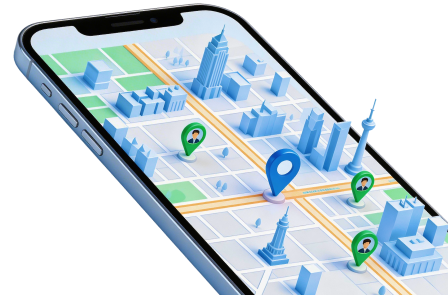
Dr.Fone - Virtual Location provides map-based position and movement simulation on supported phones. Teleport Mode changes the selected position; one-stop and multi-stop modes provide route-based movement with speed settings. These features help define a GPS test, but do not certify a location-based game's acceptance of the result.
The original description also mentions joystick controls, GPX route import and export, operation without jailbreaking on supported configurations, and up to five connected iOS devices. Check the current device list, license, and build before relying on those capabilities. Multi-device support and interface layout are not identical guarantees for every setup, and none of these features makes Pokémon GO spoofing ban-free.
Complete iOS Location-Test Workflow
Step 1 Open Virtual Location and connect the phone
Launch Dr.Fone on the computer, choose Virtual Location, connect a supported iOS device, and complete any connection prompts. Select Get Started if that control appears in your build.
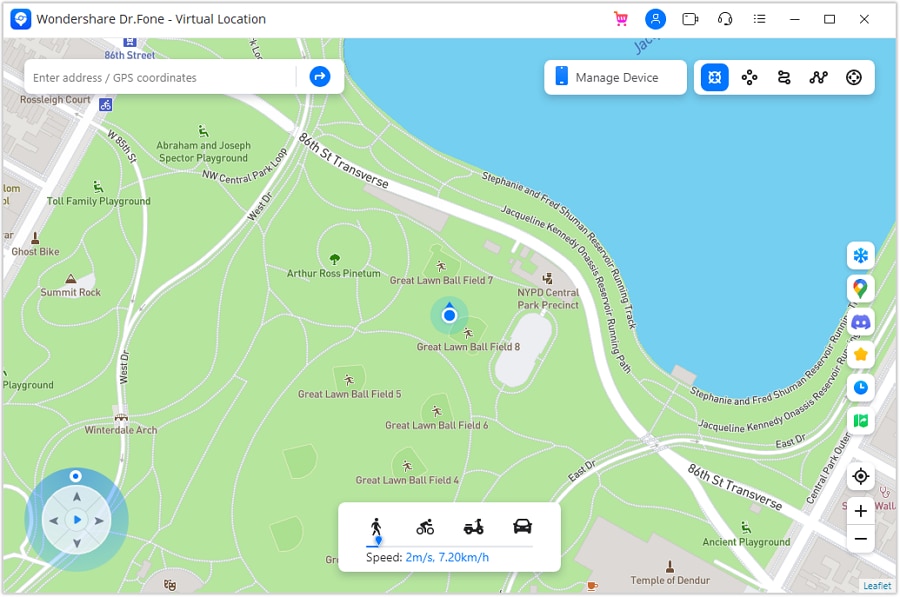
Step 2 Choose Teleport Mode
Find the mode by its label in the map interface. The retained screenshot shows the upper-right controls; icon order can vary between platform versions.
Step 3 Search, confirm and verify the test position
Enter a place or coordinate in the search field. Check hemisphere signs and the destination marker, then choose Move Here. Verify the result in the phone's maps app; that check does not prove a Pokémon will appear or that the game permits the simulation.
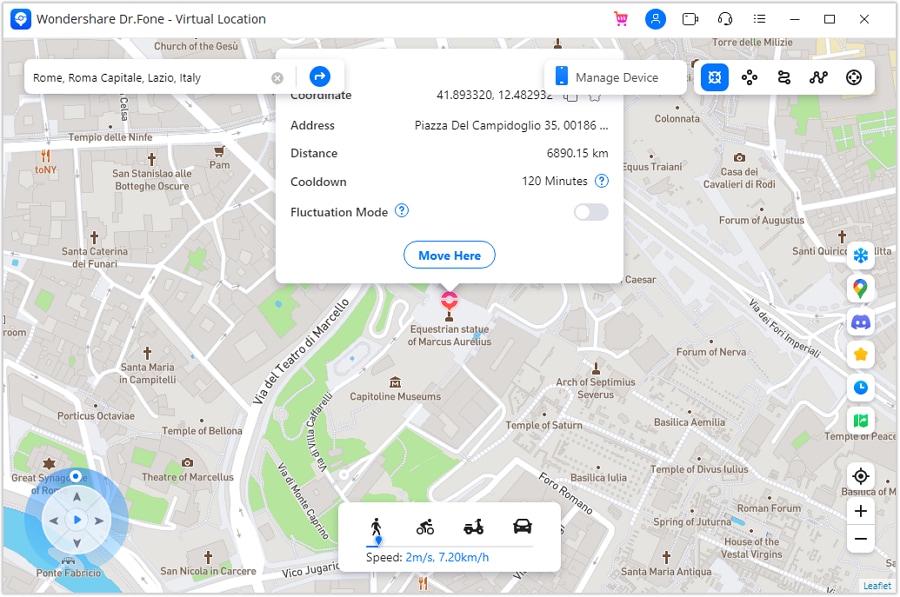
End the test when finished and follow the program's restart guidance to restore the actual phone location. A simulated coordinate does not remove service restrictions or erase previous account activity.




2. Android: Developer-Option Mock Location
The original Android reference links to a video about spoofing your location on Android. Android also provides a developer setting for a mock-location app so developers can test location-dependent behavior. A game can detect or reject mock locations, so enabling that setting is not proof of working gameplay.
A VPN routes network traffic through another server and may change the IP address websites see. That is different from replacing the GPS coordinates supplied by Android. The source examples are Fake GPS Location by Lexa and Fake GPS Go Location Spoofer. Check their current listings, permissions, and compatibility rather than assuming every version works with Pokémon GO.
If a test fails, stop and check the app's documented requirements instead of stacking several mock providers or adding a VPN as an assumed fix. The presence of Developer options does not mean every installed application must accept mocked data. Keep a note of the setting you changed so that you can return the phone to normal operation afterward. Do not follow instructions promising that an extra setting will conceal spoofing from account enforcement.
Step 1 Install the intended mock-location app
For the source's Lexa example, use the listed Play Store entry and review its permissions. These steps concern a controlled Android location test, not a guarantee of accepted game coordinates.

Step 2 Enable Developer options if required
Find Build number under About phone or the manufacturer's equivalent settings page. Tap it seven times and complete any confirmation requested. Return to settings and locate Developer options; the exact path varies by device.

Step 3 Select the mock-location provider
Open Developer options, choose Select mock location app, and select the installed testing app. Avoid changing unrelated developer settings.

Step 4 Choose a destination and finish the test
Open the mock-location app, choose the intended position, and start its test function. Verify the result in an appropriate test or maps app. Stop mocking and clear the mock-location selection when finished; do not assume the same result will be accepted by Pokémon GO.

Conclusion
The best Pokémon GO destination depends on your actual access, current events, and the encounters available at that time. The 43 retained map references are starting points for research, not live sightings or guaranteed rewards. Verify service availability and local access, and prefer real-world play that follows the game's rules.
Dr.Fone - Virtual Location provides a separate GPS-simulation workflow, while Android mock-location apps use a developer setting. Neither changes the fact that Pokémon GO prohibits falsified location, and a VPN alone does not change GPS.
FAQ
1. Does a popular country guarantee the rarest Pokémon?
No. The original article did not establish a reliable current country-by-country player ranking. Uxie, Mesprit, and Azelf are the Lake Guardians, but calling them the permanent three rarest Pokémon ignores event and regional availability. Player population alone does not determine your encounters.2. Does Charizard have a fixed cash value in Pokémon GO?
No official fixed cash price is established for an individual Charizard. Do not confuse Pokémon GO with collectible-card prices or treat an unsupported resale figure as a game mechanic.3. How can I research rare Pokémon encounters?
Check current in-game event and encounter information, then compare it with accessible local areas. The related guide to find the rarest Pokémon is a reference, not a live sighting guarantee. Nests do not supply every rare or Legendary species.4. Can a VPN change Pokémon GO GPS coordinates?
A normal VPN changes the network route and outward-facing IP, not the phone's GPS position. Dr.Fone - Virtual Location is a GPS-simulation tool rather than a VPN. Neither a VPN nor a coordinate bypasses the game's rules, account checks, or regional availability requirements.
 Add Wondershare Dr.Fone as a preferred source on Google