Teleport your device anywhere instantly with one click.


 100% Security Verified | No Subscription Required | No Malware

 :

 ChatGPT
 Perplexity
 Gemini
 Claude
 Grok
A Torkoal regional map is a starting point for a search, not a live encounter guarantee. In ordinary Pokemon GO play, Torkoal is associated with a defined Asian regional range rather than worldwide wild availability. First establish whether your intended area is in that range; then look for recent, locally relevant reports.
This Generation III Pokemon is also familiar to anime viewers through Ash's team. Its recognizable design does not make it easy to find outside its usual area. The guide below keeps the original species facts, three mapping resources and iPhone/Android location-tool comparison, while correcting outdated map claims and explaining why remote GPS simulation is not a risk-free way to catch it in 2026.
In this article
Part 1: What Makes Torkoal Distinctive?
Torkoal is the Fire-type Coal Pokemon introduced in Generation III. Its official species measurements are approximately 0.5 m tall and 80.4 kg, giving it a compact but heavy build. It has no evolution. The shell, smoke and coal-burning theme explain its name and appearance; they do not identify a real-world Pokemon GO spawn biome on their own.
The earlier description mixed abilities with attacks. White Smoke and Drought are main-series abilities, while Shell Armor is associated with its hidden-ability options. They are not three Pokemon GO moves. Its main-series profile emphasizes high physical Defense and low Speed, but those mechanics should not be transferred directly into a Pokemon GO encounter or battle claim.
The type-matchup correction is also important: Fire-type Torkoal is weak to Water, Ground and Rock. Ice and Steel should not be listed as weaknesses. Keep species information separate from a location map: knowing the type and defensive profile can help you understand the Pokemon, but it does not tell you which park currently has one.
Part 2: Where Does the Torkoal Regional Map Point?
Current regional references describe Torkoal's ordinary range broadly as western, southern and southeastern Asia, including India. The original guide named India, Oman, the UAE, Thailand, Malaysia, Indonesia, Nepal and Vietnam as search clues across this wider area. Treat that list as regional orientation, not a claim that every point inside each country's borders has identical availability.
Spawn boundaries need not match political boundaries. Local conditions, current events and the game's active encounter pool also matter. Before arranging travel, compare recent reports from the specific city with current official event information. An old national-range summary cannot establish a live spawn at a particular address, and special event access should not be assumed outside an announced event.
Using community maps: distinguish stable infrastructure such as gyms and PokeStops from individual encounter reports. For any Torkoal marker, look for a timestamp, a clearly identified location and local corroboration. No actual regional-map image was supplied in the source HTML, so the country discussion here is a written orientation rather than a newly invented visual boundary map.
1. PoGo Map
PoGo Map's accessible website describes user-contributed locations, additions and voting on gyms and PokeStops. These layers can help organize a search route. They should not automatically be interpreted as a regularly refreshed Torkoal radar.
The site's current help text labels worldwide Pokemon sighting reporting as coming soon. Accordingly, a species filter or map-shaped interface alone is not evidence that it can supply a live Torkoal encounter. Inspect the actual layer and its data before relying on coordinates or traveling to a marker.
Original map reference: https://www.pogomap.info/location/
2. The Silph Road
The Silph Road previously provided extensive community mapping and a nest atlas. That history explains its inclusion in many old regional guides, but the team's web services were closed and the former atlas is not a working live-map recommendation.
Do not follow an old instruction to select Torkoal on that retired service and expect current spawn data. Archived research and community discussions can still have historical value, but they are different from an operating map of recent sightings, nests, gyms or PokeStops.
Historical website reference: https://thesilphroad.com/
3. Poke Map
PokeMap's accessible site describes a collaborative map where users add Pokemon discoveries and show gyms or PokeStops. Where relevant reports exist, map positions can help identify an area to investigate. The source also discussed addresses, coordinates and raid information; verify which of those details are actually offered in your local view.
Coverage and freshness are the practical limits. A Torkoal entry can be outdated, misplaced or unsupported by nearby reports. A marker is not a reservation, and an empty map is not definitive proof that Torkoal cannot appear in the area. Confirm the regional context and actual in-game conditions.
Website: https://www.pokemap.net/
Part 3: How Do Map Coordinates Relate to GPS Simulation?
A community report can provide a place to investigate, while a GPS tool changes a device's reported coordinates on a supported configuration. These are separate operations. Neither validates the other, and a successful location change cannot create a Torkoal spawn, extend its lifetime or ensure that the game accepts the new location.
Pokemon GO's official fairness policy identifies GPS location spoofing as cheating and warns that account penalties can follow. Some violations can lead to termination without a guaranteed progression through warnings. Prefer legitimate travel, current officially announced opportunities or permitted in-game arrangements rather than treating a map-and-spoofer combination as assured remote access.
Using Dr.Fone - Virtual Location with a Supported iPhone
 Set your map route to simulate GPS movement.
- Set your wanted movement speed.
- HD and large map view to check location.
- Fake GPS location to anywhere.
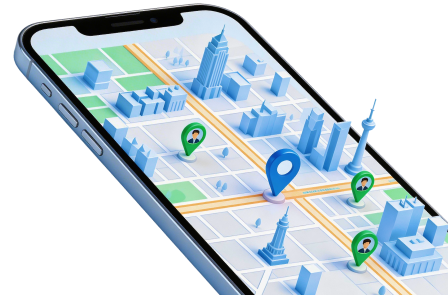
Dr.Fone - Virtual Location is a desktop GPS-simulation tool. It offers map browsing, address or coordinate search and Teleport Mode for selecting a different position. The original iPhone workflow does not require jailbreaking on supported configurations; check the current device and system requirements rather than extending that statement to every phone.
Route tools can add stops, adjust movement speed and repeat a simulated path, while joystick controls allow interactive map movement. These features can support permitted location testing. They do not prove that Pokemon GO cannot detect altered location, and the original undetectability assertion should not be relied on.
- Destination selection: zoom and pan the map, use a place name or address, or enter coordinates.
- Teleport Mode: confirm a selected point to change the simulated GPS position.
- Route simulation: choose multiple stops and an appropriate speed for the test you are conducting.
- Joystick control: change the simulated position interactively, without implying game-rule compliance or immunity from enforcement.
Step 1 Prepare the connection
Launch the desktop program, open Virtual Location, connect your supported phone and complete any required authorization prompts. Confirm that the tool detects the intended device.
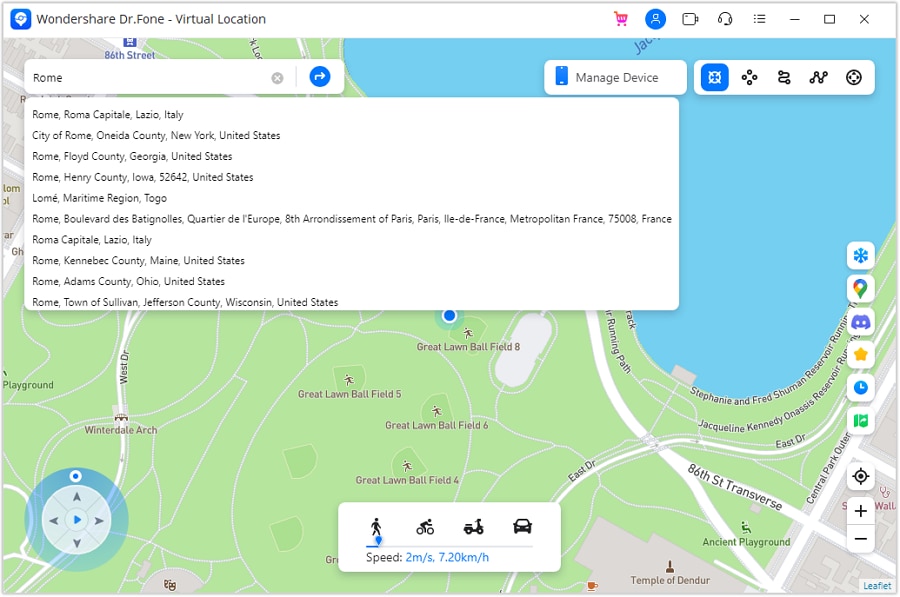
Step 2 Search the intended point
Choose Teleport Mode and search the address or coordinates. Review the marker for mistakes; copying a community report does not verify its freshness.
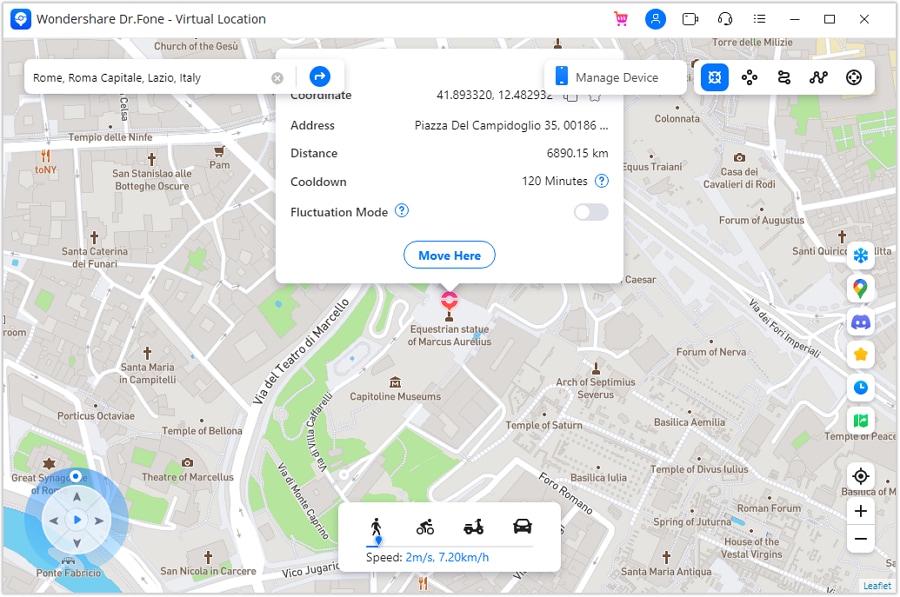
Step 3 Apply and check the result
Select Move Here when the point is correct. Open the phone's map to verify the simulated position, and judge any other app's response separately rather than assuming it will match the map.
- Map-based controls make destination selection explicit.
- Address, coordinate and route tools serve different testing needs.
- The supported iPhone workflow avoids a jailbreak requirement.
- A free download or trial does not establish unlimited free use; review the current license terms.
- App compatibility and acceptance are not universal.
- No GPS tool guarantees a Pokemon encounter or protects a game account from penalties.
Dr.Fone - Virtual Location: Finish the Device Workflow
After testing, restore the actual location using the program's restart-device guidance. Confirm the result in the phone's map before relying on navigation or another location-aware app. The original product promotion also mentioned other gaming, dating and social services; those references do not establish that all current apps accept simulated GPS. Treat compatibility and service rules as separate checks.




Android Alternative: A GPS Joystick App
Android offers mock-location tools for permitted testing. The original examples included Hola and Lexa for basic point selection, and The App Ninjas for joystick and route controls. Historical mentions do not verify current availability for the first two; check the publisher and store listing rather than installing a similarly named package from an unknown source.
The App Ninjas' current indexed Google Play description lists coordinate entry, map selection, joystick movement, saved multi-point routes and customizable speeds. Those features can simulate walking, jogging or another chosen pace in a test. They do not establish that Pokemon GO accepts the result or that adjusting speed avoids detection.
- Enter latitude and longitude carefully, preserving the signs and order of the values.
- Use the map or joystick to choose the simulated position and direction.
- Build a route with selected points and choose a suitable speed where the app permits it.
- Follow the developer's configuration instructions; mock-location setup and permissions vary by Android release.
- A standard Android mock-location workflow may not require root, depending on the configuration.
- Coordinate, route and joystick controls are available in the described app.
- The listing offers an entry point without assuming a desktop workflow.
- Initial setup can be confusing and requires checking the developer's instructions.
- The current listing includes ads and in-app purchases, so not every feature should be called wholly free.
- Using mock GPS in Pokemon GO violates its fairness rules and can lead to account restrictions.
Original store link: https://play.google.com/store/apps/details?id=com.theappninjas.fakegpsjoystick
Conclusion
Use Torkoal's broad regional range to narrow the search, then check specific local reports and current in-game availability. Do not equate an old coordinate with a live encounter or a retired atlas with an active radar. Dr.Fone - Virtual Location provides supported-device GPS simulation, but changing coordinates cannot guarantee a catch, bypass regional game rules or eliminate account risk.
FAQ
1. Is Torkoal available everywhere in Pokemon GO?
No. Its ordinary regional range is associated with parts of western, southern and southeastern Asia. Check current event information before assuming access outside that range.2. Are Ice and Steel Torkoal's weaknesses?
No. Its Fire typing is weak to Water, Ground and Rock. The older weakness list confused these type matchups.3. Can the old Silph Road atlas provide a current Torkoal location?
No. That web map service closed. Historical community information is not a current, timestamped encounter report.4. Does a GPS joystick make remote catches undetectable?
No. Joystick movement cannot guarantee game acceptance or prevent penalties. Pokemon GO's official fairness policy prohibits falsifying location.
 Add Wondershare Dr.Fone as a preferred source on Google