Recover photos, messages, WhatsApp, and more — no backup
needed.
Recover photos, messages, WhatsApp, and more — no backup
needed.

 100% Security Verified | No Subscription Required | No Malware

 :
: 
 ChatGPT
 Perplexity
 Gemini
 Claude
 Grok
Grok

I frequently forget my Snapchat password because I use different login credentials for every social media app. Are there any effective methods or a reliable Snapchat password finder to help me regain access quickly?
Social Media User
The continuous growth of social media networks and the necessity for robust security have led many users to set unique credentials for each platform. As a result, it is incredibly common for people to forget them easily. When you forget your Snapchat password, being locked out of your account can feel frustrating, especially if you rely on the app to maintain daily streaks or communicate with friends.

While you will find a surplus of tools and methods in the digital space, the strategy you adopt to retrieve your passwords requires close attention. The password recovery process must take place through a secure channel because any data leaks could lead to malicious hacking of your account. In 2026, protecting your digital identity is more important than ever, meaning you must be exceptionally careful while choosing a password finder application tailored to your needs.
Whether you want to initiate a standard reset via your phone number or email, or you prefer to use a specialized recovery tool to extract your existing credentials, this comprehensive guide has you covered. Quickly scroll down to explore detailed tips and step-by-step tricks for regaining access to your Snapchat account.
In this article
Part 1. How to Reset a Forgotten Snapchat Password from the App
In this section, you will learn the official method to reset your password directly using the Snapchat mobile app. If you have the app installed on your smartphone and have access to the mobile number associated with your account, this is the most straightforward solution. Follow the steps below to get a clear picture of the reset process.
-
Step 1 Launch the App and Access Login
You must unlock your mobile device and launch the Snapchat app. Tap the 'Log In' button on the start screen and proceed by entering your Snapchat username or email.

-
Step 2 Initiate the Password Reset
Now, hit the 'Forgot your password?' option displayed right below the password text field. A prompt will appear asking how you want to reset your password. Choose the 'via Phone' option to reset the old password using SMS verification.

-
Step 3 Verify Your Mobile Number
Select the right captcha pattern to verify that you are not a robot. Next, type in the exact mobile number that is currently associated with your registered Snapchat account.

-
Step 4 Enter the Confirmation Code
Select the 'Send via SMS' option to receive the confirmation code through your messaging app. Once the message arrives, enter the 6-digit code in the appropriate field and press the 'Continue' button.

-
Step 5 Set Your New Password
In the next screen, enter your desired new password and confirm it again by retyping it in the second field. Save the changes, and you will have successfully changed your Snapchat password to a newer one. You can now access your account without losing any data.


Part 2. How to Reset the Snapchat Password from the Website
If you prefer using a computer or simply cannot access SMS features on your phone, here is another robust method to reset the Snapchat password through their official website. If you have changed your phone number recently and do not know which phone number was originally given during the account creation with Snapchat, then this email-based method will aid you in resetting the password seamlessly.

In this method, you will be primarily using your registered email ID to proceed with the password reset process. This is particularly useful for users who rely on desktop interfaces or have temporarily lost access to their mobile device.
-
Step 1 Visit the Official Snapchat Reset Page
Initially, you must open a web browser and step into the official Snapchat website dedicated to password resets. Alternatively, navigate to the web login page and find the recovery portal.
-
Step 2 Request an Email Link
It would be best if you typed in your username or email and hit the 'Forgot Password' option to proceed. Next, you must select the email recovery option and enter your active email ID attached to your Snapchat account.
-
Step 3 Click the Reset Link
After a few seconds, you will receive an automated link in your entered email ID directly from the Snapchat security environment. Click the provided link, and it will direct you to the official secure page for the password reset option.
-
Step 4 Create a New Password
Now, you must enter a strong new password and confirm it again by retyping it. The old password is reset to a newer one, and you can comfortably carry on with your Snapchat account across all devices.

- Official and highly secure method
- Does not require mobile network access (Wi-Fi is sufficient)
- Perfect if you've lost your original phone number
- Mandatory access to the registered email account
- Emails may occasionally filter into Spam or Junk folders
- Ineffective if you forgot which email you signed up with
Part 3. Best Snapchat Password Finder: Recover Your Password on Your Phone
Another incredibly interesting and practical method is to recover the forgotten password directly instead of resetting it completely. This is highly beneficial if you use the same password across multiple platforms and want to retrieve it without disrupting your other logins. In this section, you will learn how to recover the lost password using an advanced Snapchat password finder app.
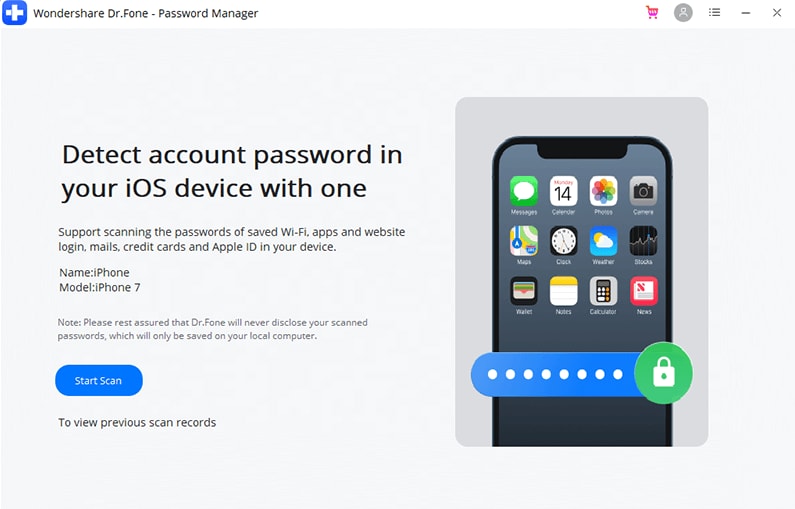
Dr.Fone - Password Manager (iOS) is exclusively designed to meet mobile phone users' needs optimally. With the help of this intelligent tool, you can bring miraculous recovery of the password saved within your iOS gadget. It is a highly recommendable program endorsed by many tech professionals worldwide for its safety and efficiency.
3-1. Recover Snapchat Passwords on iOS
Take a quick look at the mind-blowing functionalities of the ultimate Snapchat password finder app, Dr.Fone - Password Manager (iOS).
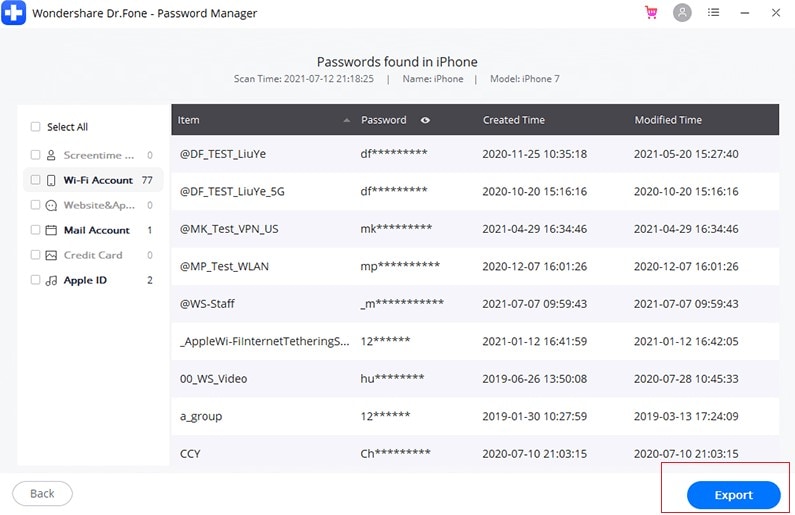
- Recovers the hidden passwords stored securely in your mobile phone using an advanced scan option.
- The entire recovery procedure completes rapidly without affecting your device's performance.
- The retrieval process takes place entirely offline at a secure local channel, ensuring zero data leaks.
- Capable of recovering all sorts of passwords, including mail, website logins, and app credentials like Snapchat.
- You can also reliably recover passwords related to your Apple ID and Wi-Fi networks.







 Add Wondershare Dr.Fone as a preferred source on Google