Effortlessly manage data through preview, delete, export, etc.

 100% Security Verified | No Subscription Required | No Malware

 :
: 
 ChatGPT
 Perplexity
 Gemini
 Claude
 Grok
Grok
The highly anticipated iPhone 17 has made its debut, and as rumored, its most transformative advancements are centered around the camera system. Apple has engineered a comprehensive imaging upgrade that goes far beyond simple megapixel counts. It combines professional-grade hardware with sophisticated AI-driven software, empowering everyone from casual users to seasoned creators to capture stunning visuals.
This detailed review covers every facet of the iPhone 17 camera. We'll explore its powerful technical specifications, analyze its performance in real-world scenarios, weigh its pros and cons, and discuss practical solutions like MobileClean - Photo Cleaner to manage the storage demands that come with this new level of quality. Find out if this is the mobile camera you've been waiting for.
In this article
Part 1. iPhone 17 Camera: A Technical Deep Dive
The iPhone 17 camera isn't just an incremental step; it's a fundamental redesign of Apple's mobile imaging philosophy. The new Fusion technology is now standard across all three rear lenses, merging data from multiple exposures to drastically improve dynamic range and low-light detail. Paired with a completely re-engineered Center Stage front camera, these enhancements deliver photos with incredible sharpness, vibrant colors, and videos with cinematic stability right out of the box.
1-1. Key Specifications at a Glance
The hardware upgrades form the foundation of the iPhone 17's photographic prowess. Here’s a breakdown of the key components that power this new system.
| Component | Specification | Key Feature |
|---|---|---|
| Main Camera | 48MP, f/1.6 Aperture | Fusion sensor, 2x optical-quality telephoto crop |
| Ultra-Wide Camera | 48MP, f/2.0 Aperture | Enhanced resolution and superior low-light fusion |
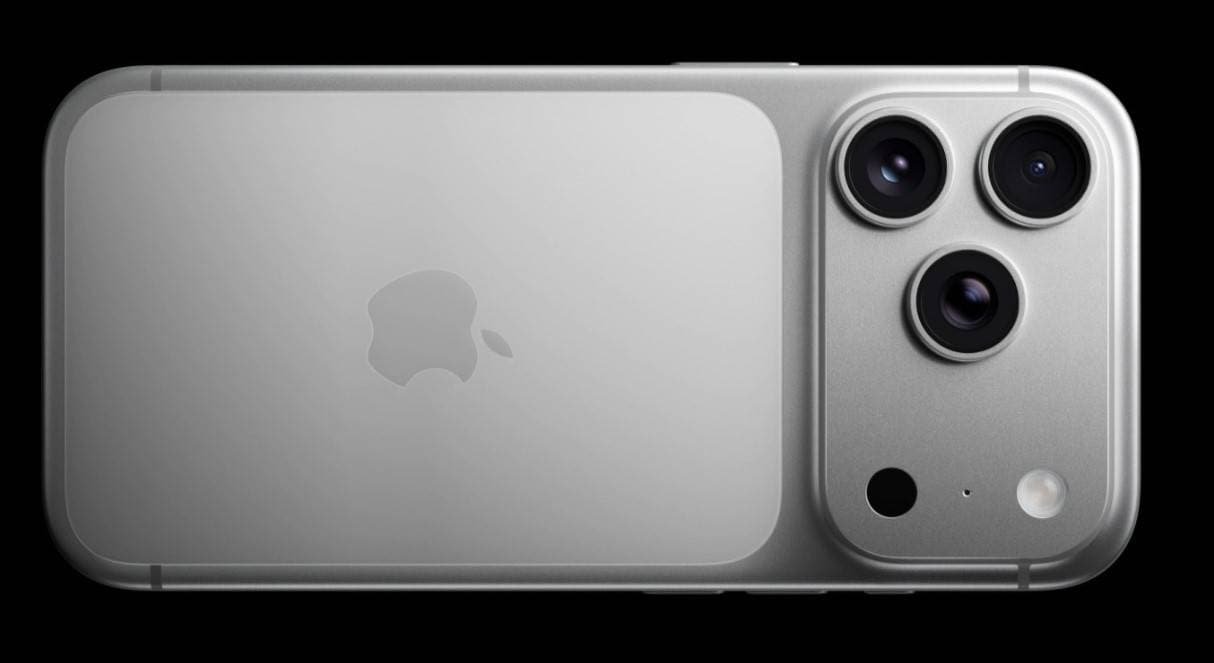
| Telephoto Camera | 48MP, f/2.8 Aperture | Up to 8x continuous optical zoom (Pro/Max models) |
| Front Camera | 18MP, f/1.9 Aperture | AI-powered Center Stage, dual capture mode |
| Video Recording | 4K at 120fps, 8K at 30fps | ProRes RAW, Dolby Vision HDR, Genlock sync |
The video features are particularly noteworthy. With support for 4K HDR recording in Dolby Vision, professional-grade ProRes RAW, and Genlock synchronization for multi-camera setups, the iPhone 17 solidifies its position as a versatile tool for both everyday moments and demanding creative projects.
1-2. How It Compares to the iPhone 16 Camera
For current iPhone users, the critical question is whether the iPhone 17 offers a compelling reason to upgrade from the already capable iPhone 16. The improvements are substantial and noticeable across the board.
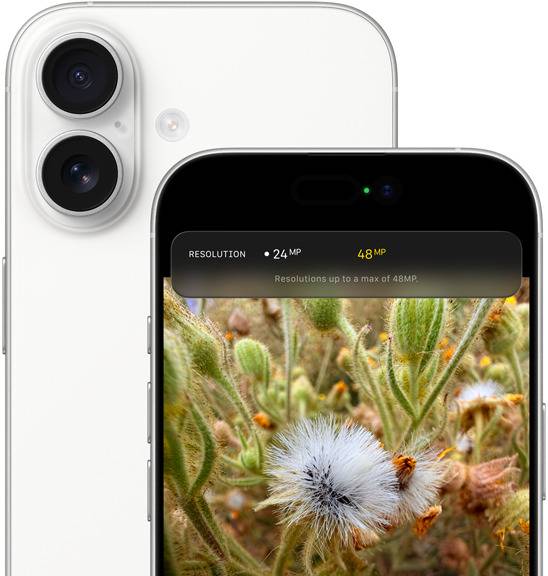
- Universal High Resolution: Unlike the iPhone 16, where only the main lens was 48MP, the iPhone 17 equips all three rear cameras with 48MP sensors. This ensures consistent quality and detail whether you're shooting wide, standard, or zoomed in.
- Next-Generation Zoom: The iPhone 16's 5x zoom was impressive, but the iPhone 17 Pro models introduce a seamless 8x optical zoom. This allows for incredibly clear, stable close-ups from a distance, making it ideal for wildlife, sports, and concert photography without digital degradation.
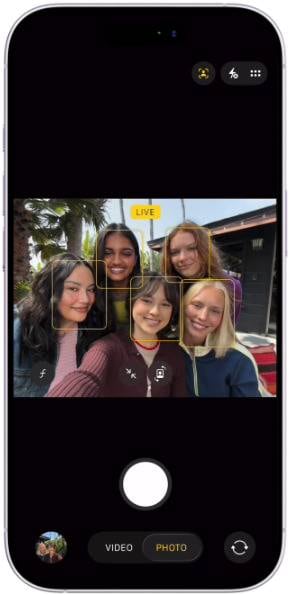
- A Smarter Front Camera: The selfie camera receives a significant upgrade to an 18MP Center Stage sensor. It not only captures sharper images but also introduces a wider field of view and a dual capture mode, enabling you to record yourself and the scene in front of you simultaneously.
- Studio-Level Video: While the iPhone 16 supported ProRes, the iPhone 17 adds ProRes RAW and Genlock synchronization. Genlock is a professional feature that ensures multiple iPhones record in perfect sync, a game-changer for independent filmmakers and multi-angle event coverage.
1-3. Strengths and Limitations
While the iPhone 17 camera sets a new standard for mobile photography, it's essential to understand its complete profile, including its limitations.
- Consistent 48MP resolution across all rear cameras
- Industry-leading 8x optical zoom on Pro models
- AI-enhanced front camera with innovative dual capture
- Professional video formats like ProRes RAW and Genlock
- Vastly improved low-light and night mode performance
- Significantly larger file sizes consume storage quickly
- Top-tier features like 8x zoom are exclusive to Pro models
- Professional video tools may have a steep learning curve
- Extended 4K and 8K recording can impact battery life
Part 2. iPhone 17 Camera in Action: Real-World Scenarios
While technical specifications are important, the true test of the iPhone 17 camera is how it performs in everyday life. Its capabilities unlock new creative potential across various scenarios.
Travel and Landscape Photography
For travelers, the 48MP Ultra-Wide lens is a game-changer. It captures expansive landscapes and architectural wonders with breathtaking detail and clarity. The improved low-light performance means that vibrant night markets, dramatic sunsets, and dimly lit historical sites are rendered beautifully without noise.
Social Media & Content Creation
Content creators can elevate their production value with features like dual capture video. This allows for recording vlogs, interviews, or reaction videos in a single take, capturing both perspectives simultaneously. When combined with ProRes RAW editing, influencers can produce polished, studio-quality content entirely on their iPhone.
Professional Filmmaking on a Budget
The introduction of Genlock synchronization democratizes filmmaking. Previously a feature of expensive cinema cameras, it allows multiple iPhone 17s to film in perfect sync. This enables indie filmmakers and small production teams to execute complex multi-camera shoots for narrative films, documentaries, or music videos at a fraction of the traditional cost.
Enhanced Remote Work and Video Conferencing
The AI-driven Center Stage front camera enhances the professionalism of video calls. It automatically tracks your movement, keeping you perfectly framed without any manual adjustments. This ensures you look your best during important presentations and virtual meetings, even if you need to move around your space.
Part 3. The Hidden Challenge: Managing High-Resolution Media
The incredible power of the iPhone 17 camera comes with a significant trade-off: massive file sizes. The jump to 48MP photos and 4K or 8K video generates a large volume of data, creating new challenges for users.
Rapidly Depleting Storage
A single 48MP ProRAW photo can exceed 75MB, and a minute of 4K ProRes video can consume over 6GB of space. Even with a high-capacity iPhone, storage can fill up surprisingly fast, potentially leaving you unable to capture a critical moment.
Risk of Accidental Deletion
With more files to manage, the risk of accidentally deleting precious memories or important project files increases. This is especially true when trying to clear space in a hurry, where a wrong tap can lead to irreversible loss.
Complex and Slow File Transfers
Transferring large video files, especially ProRes RAW footage, from your iPhone to a computer for editing can be a slow and cumbersome process. This creates bottlenecks in the creative workflow and can be frustrating for professionals working against deadlines.
Part 4. Solution Spotlight: Keeping Your iPhone 17 Storage Clear
The advanced capabilities of the iPhone 17 camera demand a smart approach to storage management. To avoid running out of space at the worst possible moment, a proactive strategy is essential. Tools like MobileClean - Photo Cleaner are designed to address this exact challenge, automating the process of identifying and removing unnecessary files to keep your device optimized for shooting.
MobileClean - Photo Cleaner (iOS)
Deep Space Cleaning: Smartly Remove Media Clutter with One Tap
- Smart Clean: Auto-detect large videos, duplicate/similar photos, screenshots, Live Photos, and expired contacts.
- Compress: Reduce photo/video size without quality loss.
- Swipe Clean: Quickly review and batch delete unwanted photos.
- Secret Space: PIN-protected vault that hides private photos/contacts on your iPhone.


Step-by-Step Guide for Freeing Up Space on iPhone Using Smart Clean
-
Step 1Install and Launch MobileClean
First, download the MobileClean - Photo Cleaner app from the App Store. Once installed, open it on your iPhone to begin.
-
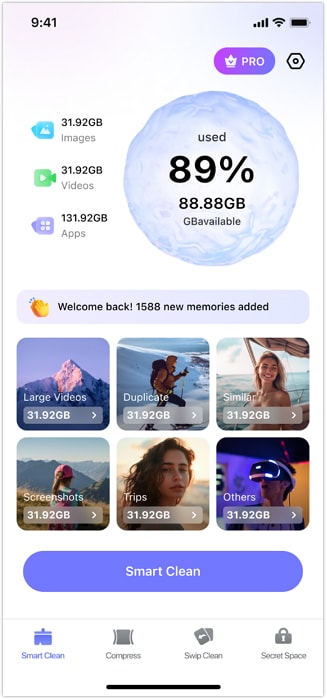
Step 2Initiate the Smart Clean Scan
Tap on the "Smart Clean" feature from the main menu. The app will immediately begin a comprehensive scan of your device's storage, identifying and categorizing files like duplicate photos, large videos, burst shots, and old screenshots.
-
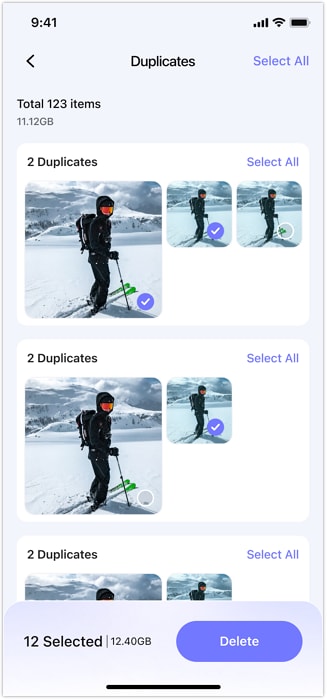
Step 3Review and Delete Unwanted Files
After the scan, the app will present you with organized categories of files you can delete. Carefully review each category, select the items you no longer need, and tap "Delete" to instantly free up gigabytes of space.
-
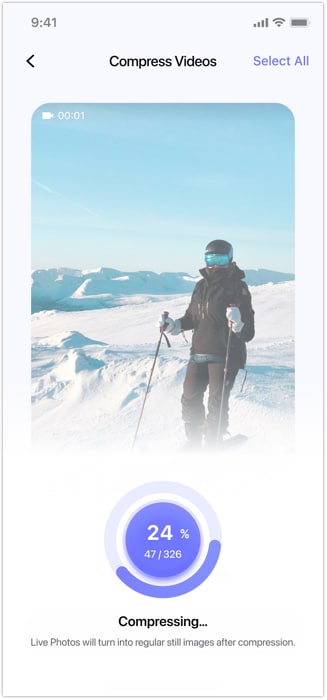
Step 4Compress Large Videos (Optional)
For large video files that you want to keep but need to save space on, navigate to the "Compress" tool. This feature reduces the file size significantly while maintaining excellent visual quality, perfect for archiving finished projects or long family videos.
Alternative Storage Management Strategies
- Cloud Services: Utilize built-in options like iCloud Photos with 'Optimize Storage' enabled, or third-party services like Google Photos for automatic backups.
- Local Backups: Regularly transfer your photos and videos to a computer or an external SSD for secure, long-term storage and to free up device space.
- Best Practice: Always ensure you have at least one verified backup of your most important files before performing large-scale deletions or system restores.
Part 5. The Role of AI in the Future of Mobile Photography
The iPhone 17 is a clear indication of Apple's deep investment in AI-driven computational photography. This trend is set to accelerate, with future software updates likely introducing even more intelligent features. We can anticipate deeper semantic understanding of scenes for automatic enhancement, real-time AI editing suggestions, and seamless creative ecosystems that sync across all Apple devices.
For users, this evolution means spending less time manually editing and more time capturing and sharing incredible moments. For professionals, it signifies the continued blurring of lines between mobile devices and traditional cameras, opening up new, more efficient workflows where an iPhone can be a primary or secondary camera in any production environment.
Conclusion
The iPhone 17 camera is a monumental achievement, representing Apple's most ambitious vision for mobile photography. With its unified 48MP Fusion triple-lens system, an intelligent 18MP front camera, and professional-level video recording tools, it provides unparalleled creative freedom. It's a device that excels in every scenario, from capturing spontaneous family photos to producing polished, cinematic films.
However, this incredible power introduces the practical need for diligent media management. The vast amount of data generated requires a smart solution to keep storage available and organized. By pairing the formidable capabilities of the iPhone 17 with an efficient tool like MobileClean - Photo Cleaner, you can ensure that your device is always ready for your next creative endeavor, keeping your memories safe and accessible without the worry of a full storage notification.
Frequently Asked Questions
-
1. Is the iPhone 17 camera's 8x optical zoom better than digital zoom?
Yes, absolutely. Optical zoom uses the camera's lenses to magnify the image without losing quality, resulting in a sharp and clear photo. Digital zoom simply crops and enlarges a portion of the image, which leads to significant pixelation and loss of detail. The 8x optical zoom on the iPhone 17 Pro models is a major advantage for capturing distant subjects. -
2. How much storage space should I get for the iPhone 17 if I shoot a lot of video?
If you plan to shoot frequently in 4K or use the ProRes RAW format, it is highly recommended to opt for at least 512GB or 1TB of storage. A single minute of 4K ProRes video can take up over 6GB of space, so lower storage tiers (like 256GB) can fill up extremely quickly, limiting your ability to record long takes. -
3. Can the iPhone 17 camera truly replace a DSLR or mirrorless camera?
For many situations, yes. For social media, travel, and even some professional content creation, the iPhone 17 camera offers incredible quality, convenience, and advanced features like ProRes RAW. However, professional photographers will still prefer DSLRs or mirrorless cameras for their larger sensors, interchangeable lenses, and superior manual controls in highly specific or demanding lighting conditions. -
4. What is Genlock synchronization, and who is it for?
Genlock (Generator Locking) is a professional video feature that synchronizes the video output of multiple cameras to a common timing signal. This ensures that every frame from every camera is captured at the exact same moment. For the iPhone 17, this means you can use several iPhones for a multi-camera shoot (like an interview or a live event) and the footage will be perfectly aligned, making editing in post-production significantly easier. It's designed for filmmakers, event videographers, and advanced content creators.
 Add Wondershare Dr.Fone as a preferred source on Google