
POCO F1 & POCO X2 Broken Screen Solutions: DIY & Professional Fixes

Dec 25, 2025 • Filed to: Data Recovery Solutions • Proven solutions
Mishaps do occur, and having a cracked screen on your POCO F1 or POCO X2 can be irritating. Phones are difficult to use and appear ugly with cracks, scratches, or broken displays. Fortunately, there are ways to resolve the issue. Some fixes can be tried at home with basic tools, while more serious damage requires help from a professional technician. Nevertheless, it is necessary to select the appropriate technique based on the damage and the level of comfort. To that end, this ultimate guide describes DIY and professional repairs of POCO F1 display broken cases.

Part 1. POCO F1 / POCO X2 Broken Screen Symptoms & Common Causes
When your POCO F1 or POCO X2 screen is broken, you will either see cracks, lines, or black spots. The touch can be inefficient, and certain areas of the screen can display nothing. More than that, colors will appear weird, and the screen can become flashing or blank.
On exceptional occasions, the phone might fail to react to taps or swipes, and this is where you can tell whether the POCO F1 screen is broken. Regardless of the symptom, the following are the major causes that may cause this vexing predicament:
| Cause | What Happens | Details / Notes |
|---|---|---|
| Dropping Phone | Cracks, shatters, or screen breaks | Even a small drop on hard surfaces can damage the glass or LCD. |
| Pressure / Impact | Lines, black spots, or unresponsive areas | Sitting on the phone or pressing it against hard objects can harm the display. |
| Sharp Objects | Scratches or tiny cracks | Keys, coins, or sharp tools in pockets or bags can scratch the screen over time. |
| Water or Moisture | Flickering, blank display, or touch failure | Water can seep into the screen layers and cause permanent damage. |
| Manufacturing Defects | Dead pixels, touch issues, or uneven display | Rare but possible; check the warranty if problems appear without an external cause. |

How to Check IMEI on Xiaomi/Redmi/POCO Devices
Pro Tip. Recover Data from Broken POCO F1/X2 Screens with Dr.Fone – Data Recovery
If you have decided on a complete replacement and are concerned that your device might require major repairs, this can pose a data security risk in most cases. To that end, it's better to seek data recovery solutions such as Dr.Fone - Data Recovery, which allows you to restore 14+ file types. Additionally, the tool provides recovery support for 6,000 Android models, a capability many tools lack. Users can also recover WhatsApp & Business data, along with View Once media, for added versatility. Dr.Fone guarantees to offer you a high success rate with the ability to preview the restored data. Not just that, you can choose multiple media types with a selective selection facility to have complete control over data restoration. So, whether you choose to retrieve data from Samsung, Xiaomi, Huawei, OPPO, or POCO, the process is fully guided.

Dr.Fone - Data Recovery (Android)
Recover whatsapp/contacts/messages/call history saved in Google Drive to your computer.
- Recover Android data by scanning your Android phone & tablet directly.
- Preview and selectively recover what you want from your Android phone & tablet.
- Supports various file types, including WhatsApp, Messages & Contacts & Photos & Videos & Audio & Document.
- Supports 6000+ Android Device Models & Various Android OS.


Tutorial to Recover Lost Data from Broken POCO F1/X2 via Dr.Fone
To know how you can restore data from the POCO F1 display that is broken on a phone, adhere to the listed guide:
- Step 1. Access the Data Recovery Tool & Choose Phone Condition
- Step 2. Connect the Device for Broken Data Recovery
- Step 3. Choose the Given Restoration Options to Retrieve Data
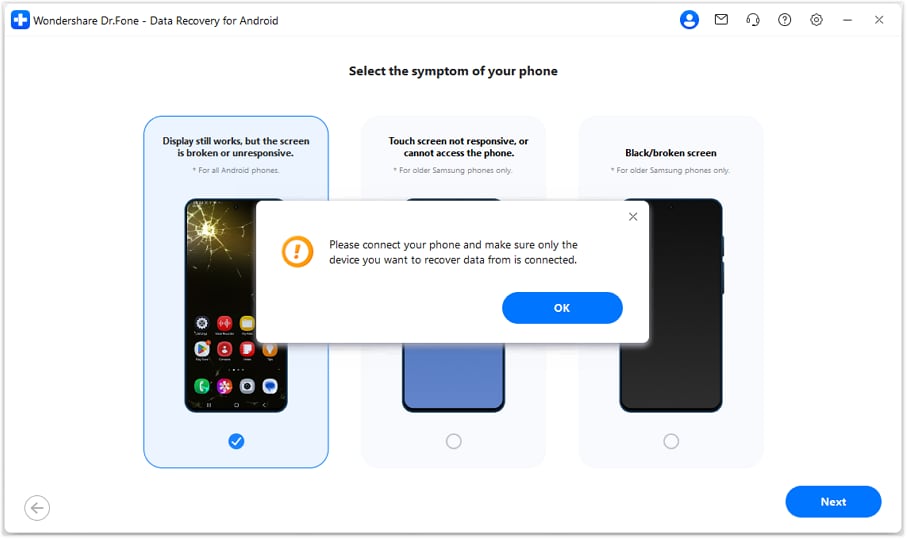
Select the "Recover from Broken Phone" feature on the Data Recovery tool for Android, choose the condition from the 3 given options, like "Screen On but Unresponsive," and click "Next." This phone condition is compatible with all POCO models to restore data.
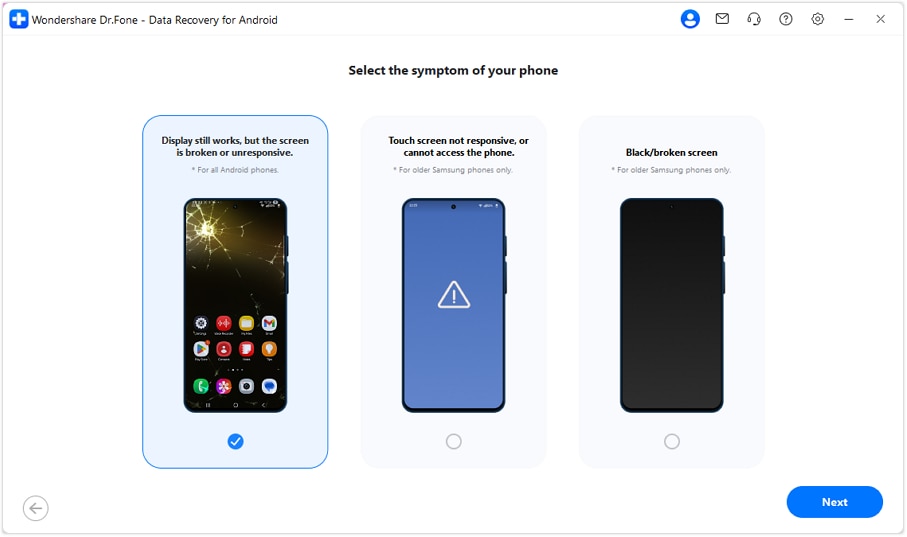
When prompted, connect the broken POCO smartphone to the PC, and the tool will begin downloading the necessary drivers.
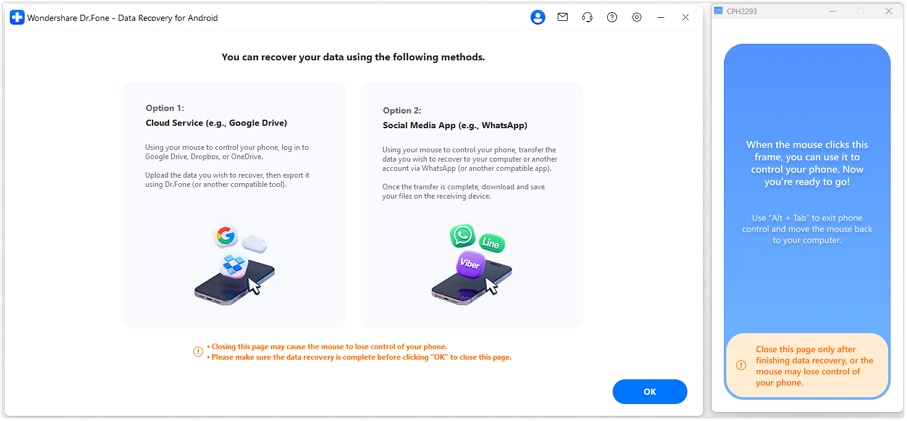
After it ends, choose the "Yes It Works" option and pick the method you seek to recover data from. For "Cloud Service," upload your phone data to the cloud, then download and export it to your computer. You can also transfer your phone data to another device or computer using supported social media applications.
 safe & secure
Part 2. What You Can Do When a POCO F1/X2 Screen Is Broken
To know how to deal with the broken POCO F1 screen, review the 5 simple ways mentioned ahead:
Fix 1: Use a Screen Protector for Minor Cracks
Use a screen protector on a cracked POCO F1 or POCO X2 to help protect the screen until it is replaced. Not just that, it keeps loose glass in place, protects fingers from cuts, and smooths sharp edges. Above all, the protector adds a layer to stop small cracks, block dust and water, and prevent new scratches.
Fix 2: Perform a Soft Reboot or Restart the Device
This solution can help diagnose software issues, stabilize the phone, and enable a safe backup before repair. A restart clears memory, stops bad apps, and can restore partial touch response. Additionally, it reduces crashes, black or white screens, and lag. Plus, the phone heats less, and the battery lasts longer, so you can restart or reboot seamlessly via the guide given below to resolve the POCO F1 glass broken issue:
To Reboot
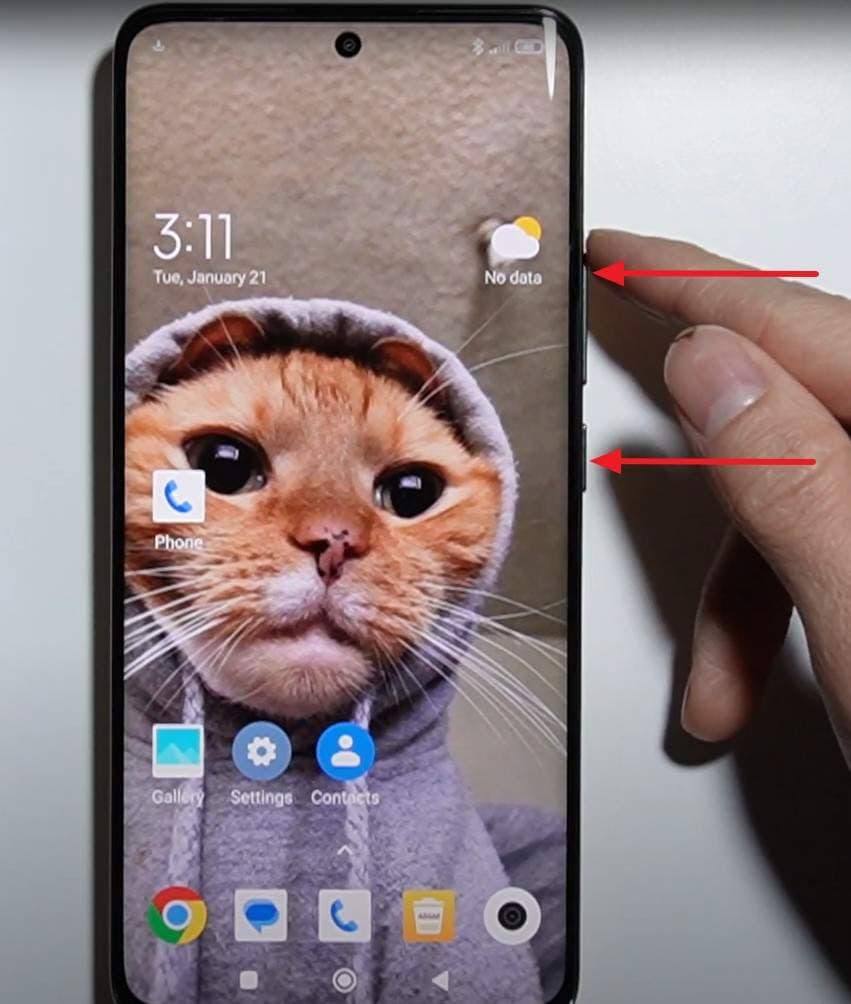
Instructions: Press and hold the "Power" button and the "Volume Up" button together for about 10 seconds until the phone restarts.
To Restart
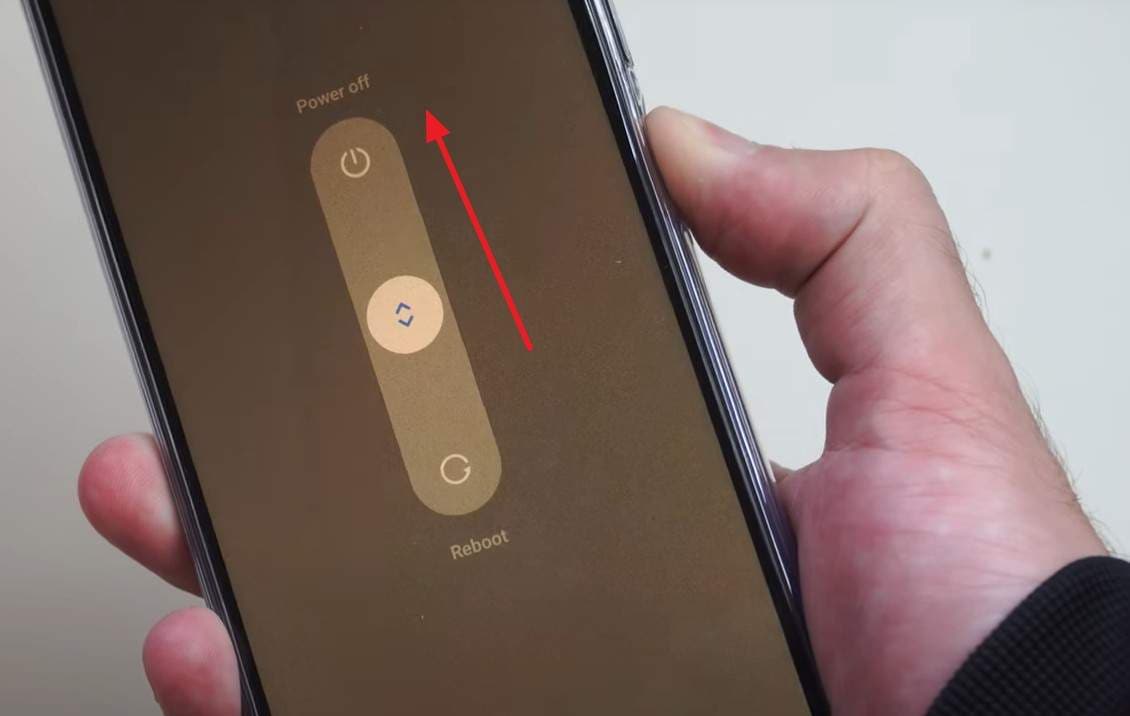
Instructions: Maintain pressure on the "Power" button and on the appearing menu, slide up the "Power Off" button. Wait a few seconds while the screen goes black, then press the "Power" button again to restart.
Fix 3: Check for Touch or Display Malfunctions
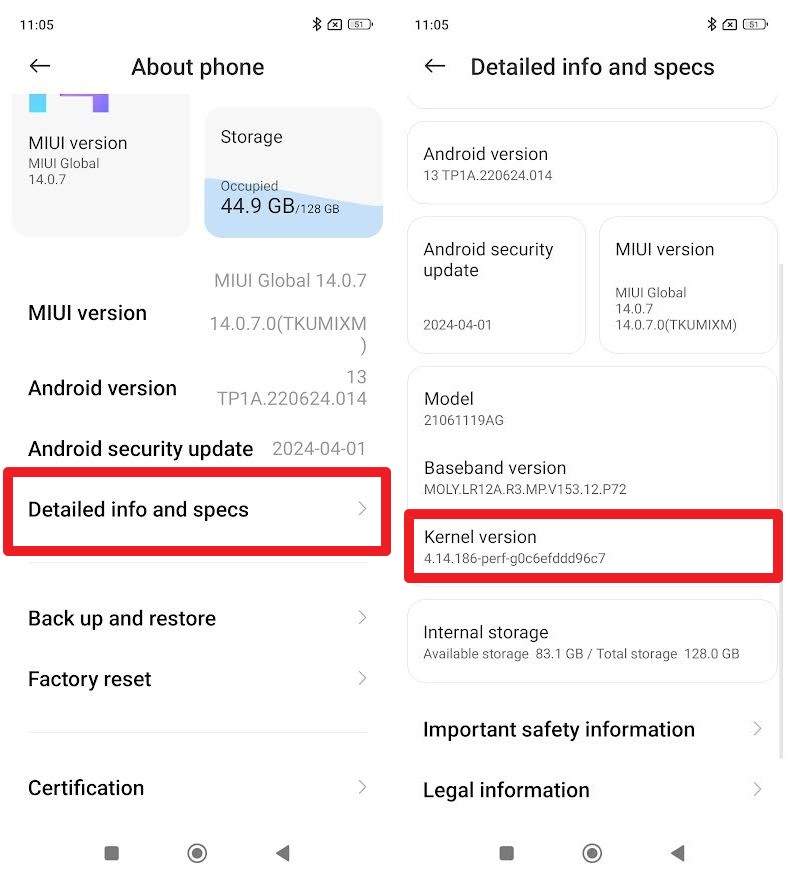
Check the touch and display on a broken POCO F1 or POCO X2 to assess the extent of the damage and plan the repair or backup. It indicates whether only the glass is cracked or the LCD and touch hardware have failed. To that end, POCO phones have built-in tests that map unresponsive areas and provide clear evidence for technicians or warranty claims, as shown:
- Step 1. From the "About Phone" option on the settings app, choose the Detailed Info and Specs" option. After that, press the "Kernel Version" 7 to 8 times, until you fetch the hardware test interface.
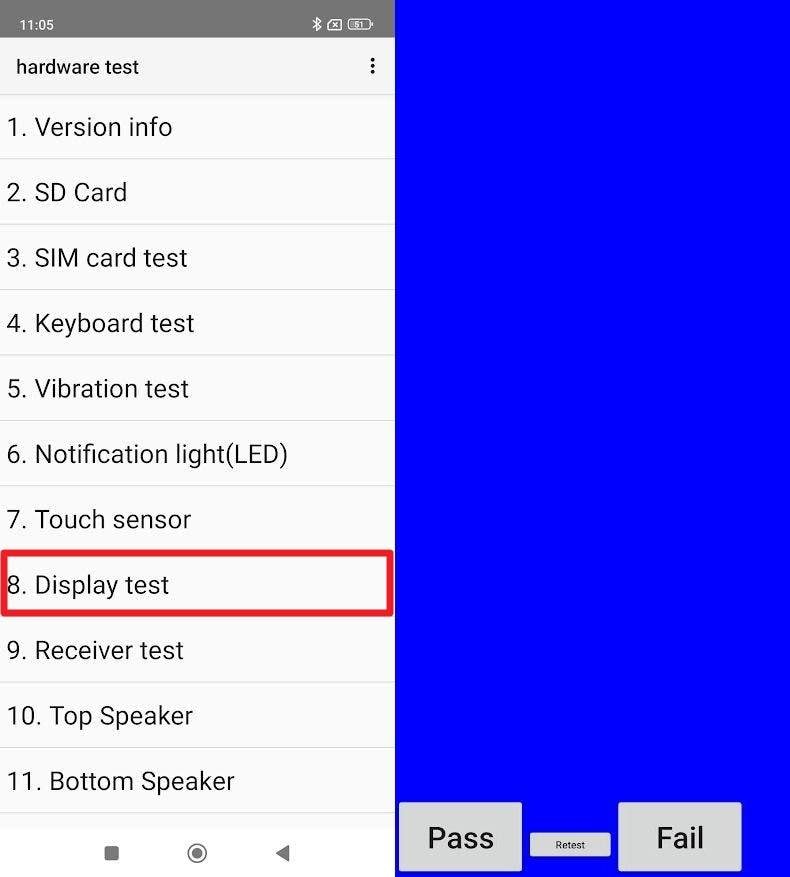
- Step 2. There, pick the "Display Test" option and press the "Next" option on the upcoming interface to determine if you "Fail" or "Pass" the test.
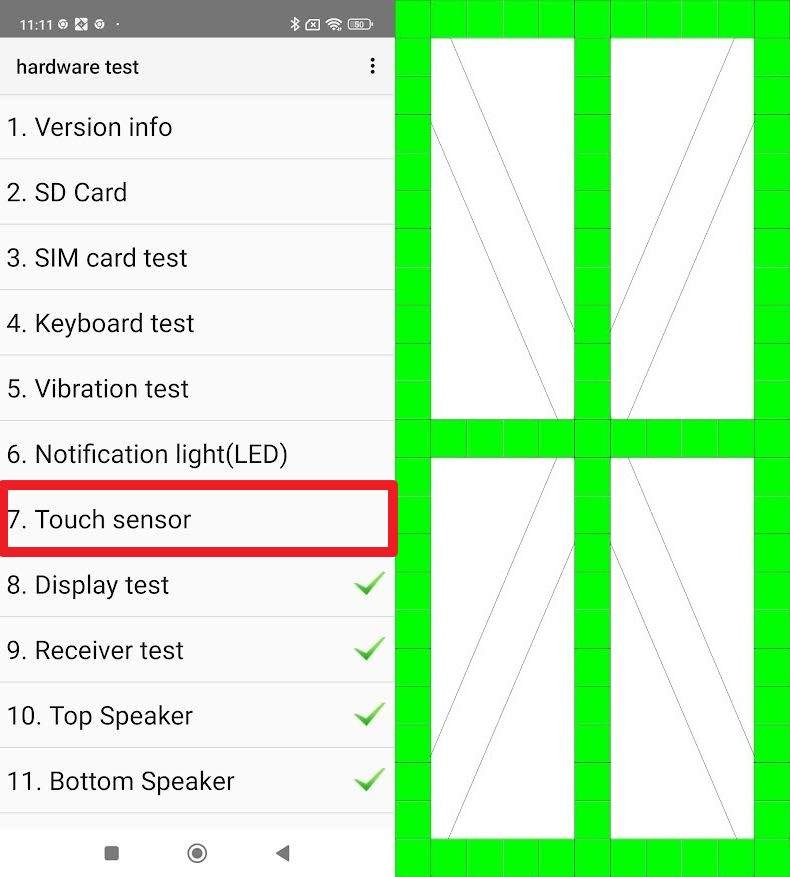
- Step 3. After that, pick the "Touch Sensor" test and use your finger to draw across all the squares on the screen. The squares you touch should light up. If any area remains blank or you cannot draw a continuous line, it indicates a "dead zone" or a hardware issue with the digitizer in that spot.
Fix 4: Replace the Glass Only
For a POCO X2 with a broken screen, you can replace only the front glass when the display and touch still work well. It fixes cracks, restores the look, and costs much less than a full display replacement. Plus, the original LCD keeps its colors and brightness, and the new glass makes the screen clear, smooth, and easy to clean.
Fix 5: Opt for a Full Display Replacement
When the broken POCO X2 has lines, black spots, flicker, low brightness, or touch issues, it is worthwhile to opt for a total replacement of the display. This substitutes glass, touch, and LCD layers, usually with the frame, in order to put the phone back to a like-new state. Hence, it fixes visual issues, dead pixels, and touch failures, and a new display lasts longer, keeps proper brightness and color, and ensures smooth touch.
Part 3. Repair Solutions for a Broken POCO X2 Screen
After reviewing the listed fixes for the POCO F1 screen broken, let's see how glass-only and full displacement differ. Plus, get to know when each one is needed and what to opt for as per your screen's condition:
| Aspect | Glass Only Replacement | Full Display Replacement |
|---|---|---|
| What Is Replaced | Outer glass layer only | Glass, touch layer, and LCD module |
| When To Use | Cracks only, and display and touch fully working | Lines, black spots, flicker, or touch problems |
| Typical Part Cost | Around 15 to 25 USD through professional repair | Around 30 to 50 USD for OEM or compatible display |
| Total Repair Cost Compared to Full Display | Lower initial cost, but may increase if the repair fails | Higher upfront cost, but usually final |
| Screen Quality After Repair | Original LCD quality is retained if the repair succeeds | New panel restores brightness, color, and touch |
| Risk Level | Very high and requires professional equipment | Lower and safer replacement process |
| Longevity | Uncertain and depends heavily on repair quality | Best long-term reliability with new layers |
Choosing the Right Parts: OEM vs Third-Party for Your POCO
As you select the replacement method for the broken POCO X2, it's essential to opt for the right equipment. For that, the following section compares OEM and third-party replacement parts to determine what is best and why:
| Factor | OEM Display or Parts | Third Party Display or Parts |
|---|---|---|
| Compatibility | Guaranteed fit with full support for brightness, touch, and sensors | Generally compatible, but some units may have fit or sensor issues |
| Display Quality | Factory-level colors, brightness, touch response, and viewing angles | Quality varies by supplier and may be dimmer or less color accurate |
| Reliability and Lifespan | Consistent long-term performance with fewer defects | May age faster with risks like ghost touch or color shift |
| Warranty and Support | Better warranty support from authorized or reputable repair centres | Warranty depends on the seller and may be limited or unavailable |
| Price | Higher upfront cost | Lower upfront cost and often 30 to 50% cheaper |
Conclusion
To wrap up, this article has addressed the POCO F1 display broken issue with 5 simple and easy solutions to try. So, review them and learn when and why you need glass-only or full display replacement and what parts are best. However, if you are afraid of data loss, the Dr.Fone - Data Recovery tool is suggested for selective broken data restoration of 14+ file types.
safe & secureFAQs
 Q1.
How can a cracked screen affect battery life on POCO F1/X2?Q2.
Can a broken screen cause overheating or hardware issues?Q3.
Does a cracked screen impact camera or sensor performance?Q4.
Is it safe to use a POCO phone with a shattered screen?
Q1.
How can a cracked screen affect battery life on POCO F1/X2?Q2.
Can a broken screen cause overheating or hardware issues?Q3.
Does a cracked screen impact camera or sensor performance?Q4.
Is it safe to use a POCO phone with a shattered screen?


Xiaomi Topics Series
- Xiaomi Screen & FRP Unlock
- 1. Unlock Xiaomi Bootloader
- 2. Mi Account Unlock Tools
- 3. Redmi Note 8 FRP Unlock Tool
- 4. Redmi Note 9 FRP Bypass Tool
- 5. Redmi 9A FRP Bypass
- 6. Remove FRP on Xiaomi/Redmi
- Xiaomi Repair
- Xiaomi Recover
- Xiaomi Reset
- Xiaomi Tips & News
- 1. Xiaomi HyperOS 3.0
- 2. Screen Mirror Xiaomi to PC
- 3. Run Hardware Tests on Xiaomi
- 4. Conduct battery test on Xiaomi
- 5. How Do I Obtain the Security Code Xiaomi
- 6. DND Mode Xiaomi
- Xiaomi Transfer & Backup
- ● Manage/transfer/recover data
- ● Unlock screen/activate/FRP lock
- ● Fix most iOS and Android issues
- Try for Free Try for Free Try for Free

 > How-to > Data Recovery Solutions > POCO F1 & POCO X2 Broken Screen Solutions: DIY & Professional Fixes
James Davis
staff Editor