

 TL;DR:
To quickly check the IMEI on any Xiaomi, Redmi, or POCO device for verifying warranty, network lock, or authenticity, dial *#06#, navigate to the "Status" menu in settings, or find the physical print on the SIM tray or original box.
● Use the *#06# dialer code for partially locked devices with a working dial pad, or rely on the SIM tray and box prints for offline devices and phones that cannot power on.
● The official Mi Product Authentication page only verifies genuine status for select models and frequently omits data for very old, region-specific, refurbished, or grey-market devices.
● Dr.Fone Online Unlock provides real-time, exportable reports for Blacklist and Activation Lock status without sign-ups, circumventing the outdated databases, missing serial number support, and mandatory ads present in alternatives like IMEICheck, iUnlocker, and IMEI 24.
Ask AI for a summary
 ChatGPT
 Perplexity
 Gemini
 Claude
 Grok
Grok
Each Xiaomi phone has its own IMEI, which identifies it in networks. Registering requires IMEI, a protection measure that helps secure your phone, maintain the warranty, and locate it in case of loss or theft. One can easily check this detail, and it can be done in various ways without any instruments.
Therefore, this guide shows clear methods to check IMEI Xiaomi safely on any Xiaomi/Redmi/POCO device. These simple steps provide all the details you need to fully understand your device and keep it safe using the IMEI. Get to know where you can access it via official and online tools, and which option suits you best.
 Verify your device info safely in one click
In this article

Part 1. What an IMEI Check Can Reveal on Xiaomi/Redmi/POCO Devices
As you check the IMEI Redmi, it reveals the phone's model, network status, and warranty validity. Beyond that, it shows if the phone is lost or stolen, and whether it is locked to a specific carrier. By locating the IMEI through the methods in this article, you can also help verify device authenticity, though it does not confirm whether internal parts are original.

Users can also see the manufacturing date, country of origin, and service history. Hence, this information helps buyers avoid fake phones, allows owners to track their devices, and ensures proper support from service centers.
Part 2. Xiaomi IMEI Check: How to Find It on Your Device
To know how you can access the IMEI of Xiaomi or any Mi phone, adhere to the listed ways and detailed instructions:
1. Dialer Code
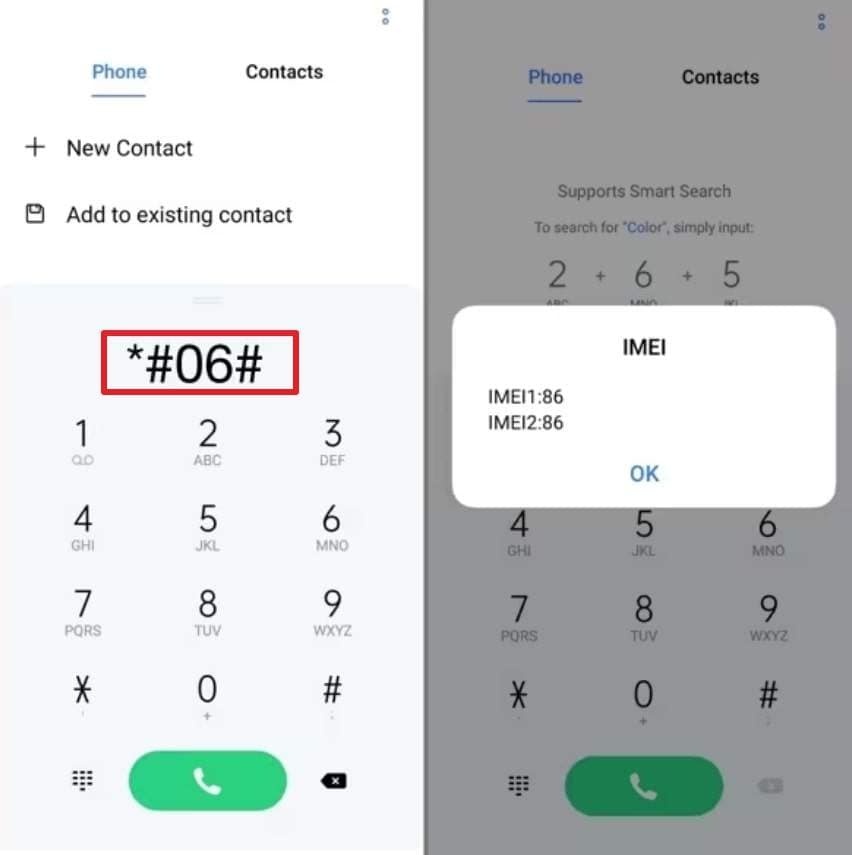
This trick is easy and applicable when you are unable to access the settings or even the box. The code shows all IMEI numbers on dual-SIM devices and is compatible with the majority of Xiaomi, Redmi, and POCO devices. In addition, the solutions are effective even when the phone has a damaged screen or a partial lock, provided the dial pad can be used, as illustrated:
Instructions: In the Phone app, dial the "*#06#" code to display the pop-up that lists the IMEI and SN details.
2. Settings Menu
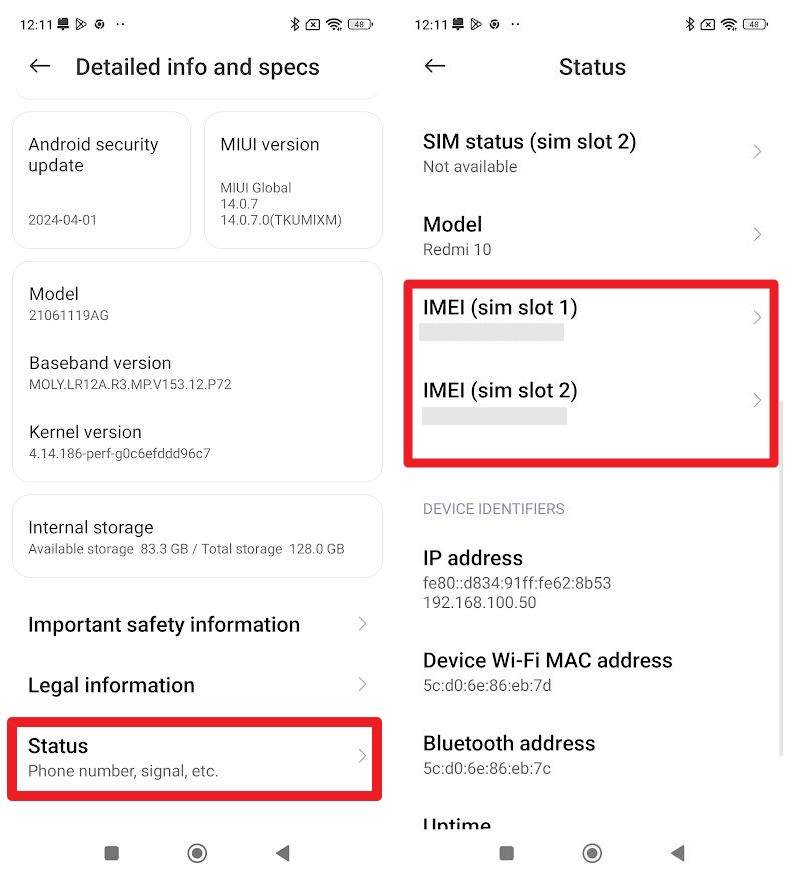
For the Xiaomi IMEI check, this method shows the IMEI along with model name, serial number, Android version, and SIM slot numbers. You do not need dialer codes or additional tools, and the information comes directly from the phone. So, it is reliable for warranty, service forms, network unlock, or lost-phone reports, as it is accessed via the listed ways:
Instructions: From the "About Phone" settings, choose the "Detailed Info and Specs" option to select the "Status" option. On the status screen, scroll to the "Device Details" section to view the IMEI and SN.
3. Original Box
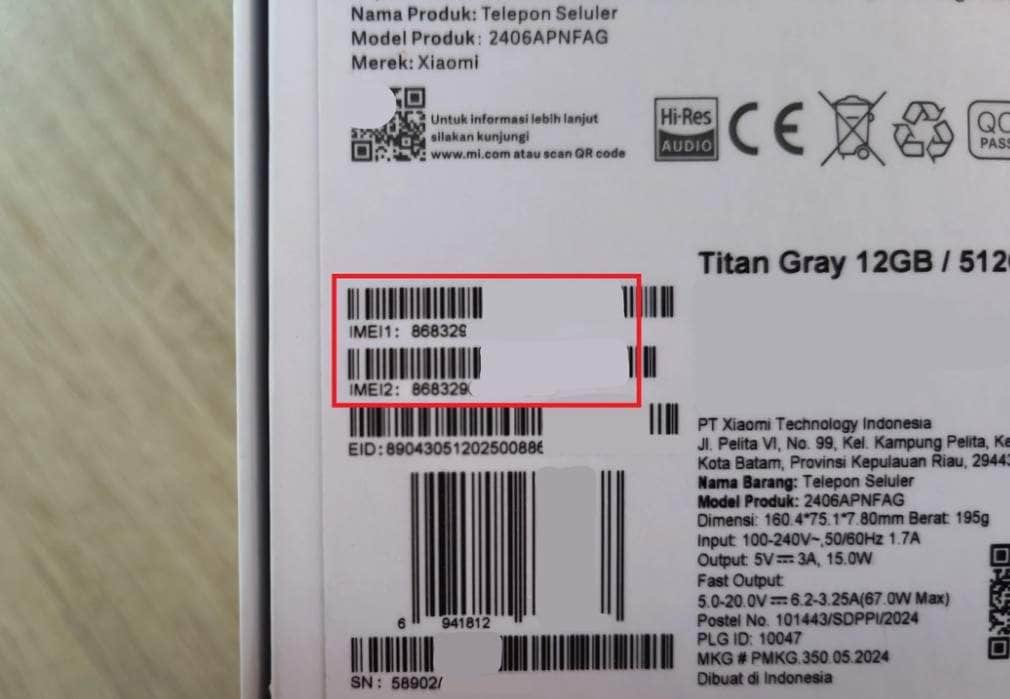
The original Xiaomi box shows the IMEI and helps when the phone is lost, dead, or cannot turn on. It provides a permanent record of the device ID, and you can report a lost or stolen phone using the IMEI even without power or internet access.
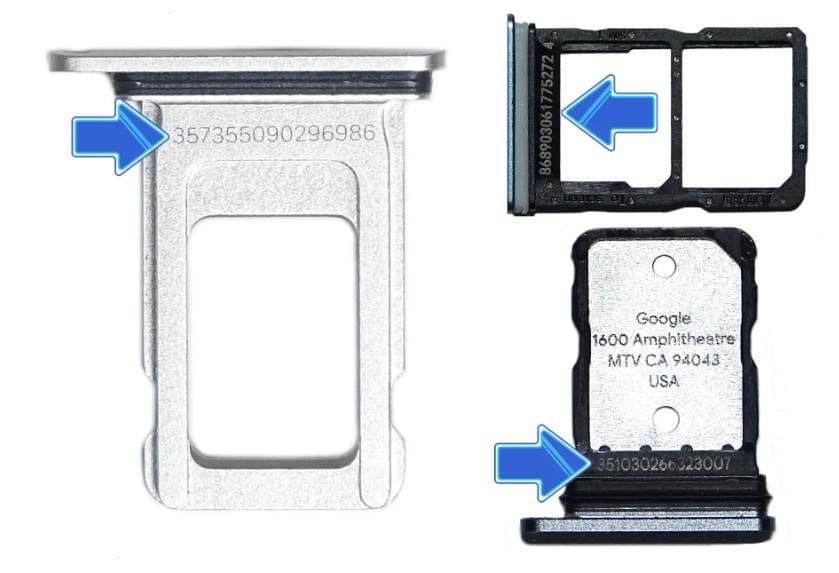
4. SIM Tray/Battery
To make the Redmi IMEI check possible, this method works even if the phone screen is broken, locked, or offline. The number gives a physical record for repairs, blacklist requests, or theft reports. Plus, the printed IMEI matches software records and proves ownership. This method does not require the original box or an internet connection and keeps the number accessible at all times.
Part 3. Check Xiaomi Activation Lock & Blacklist with Dr.Fone Online Unlock
Now that you know how to perform an IMEI check on Redmi, you might want to check your device's warranty, activation, or Backlist status. In this regard, users can consider the Dr.Fone Online Unlock tool, which offers the facility to access over 20 types of device verification. You can also use it to perform Blacklist Check, Xiaomi Activation Lock Check, while you get the product details via IMEI or SN.
Unlike other tools, it requires no sign-up or email details and offers you a detailed and exportable report by adding IMEI and SN details only. While being the secure option, it enables you to get warranty status, purchase date, and carrier or SIM Lock status in real time. Users can also get the illustrated guide on how to check IMEI number in Redmi when basic methods fail, or you don't have a battery or device with you.
Dr.Fone Online Unlock
Easily bypass Samsung FRP, remove Xiaomi account locks, and check IMEI with one trusted tool — fast, secure, and user-friendly.
- One-click Samsung FRP removal, no tech skills required.
- Unlock Xiaomi devices without a password.
- Supports 20+ different types of IMEI checks.
- Free IMEI check with no login, no ads, and instant access.
- Fully mobile-optimized for effortless on-the-go access.
Verify your device info safely in one clickGet Activation Status & Warranty Details via Dr.Fone Online Unlock
To know how to use this tool for Redmi IMEI check warranty and activation status, adhere to the simple steps given below:
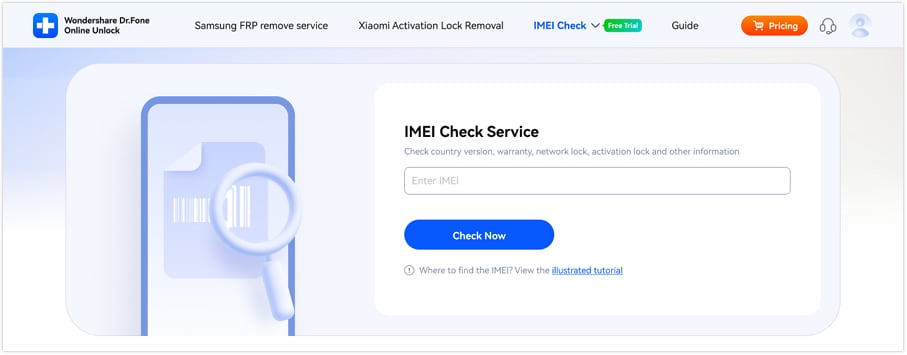
- Step 1. Access the Xiaomi Online IMEI Check Tool
As you access the IMEI Check tab on the tool, choose the "Xiaomi Activation Lock Check" tool. After that, enter the IMEI details and press the "Check Now" button on the new interface.
- Step 2. Confirm the Activation Lock or Other Details
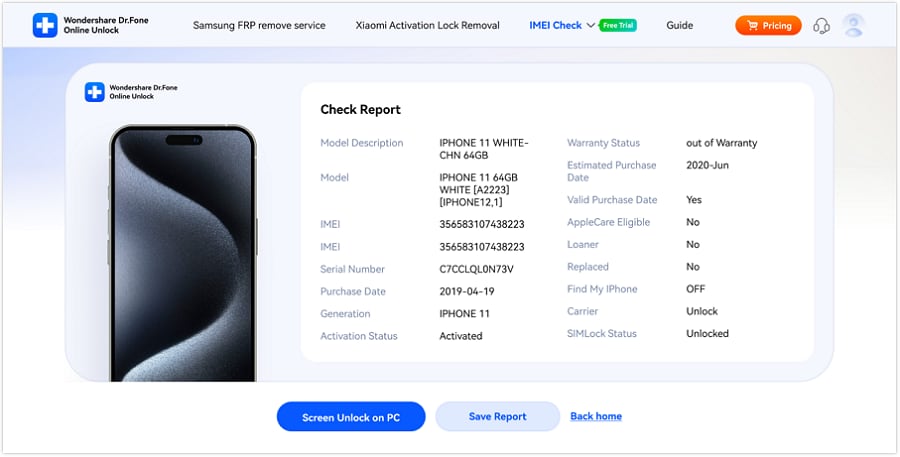
Once the tool generates a detailed report on activation lock and related details like warranty, select "Save Report."
 Verify your device info safely in one click
Part 4. Official Xiaomi IMEI Check: Limitations You Should Know
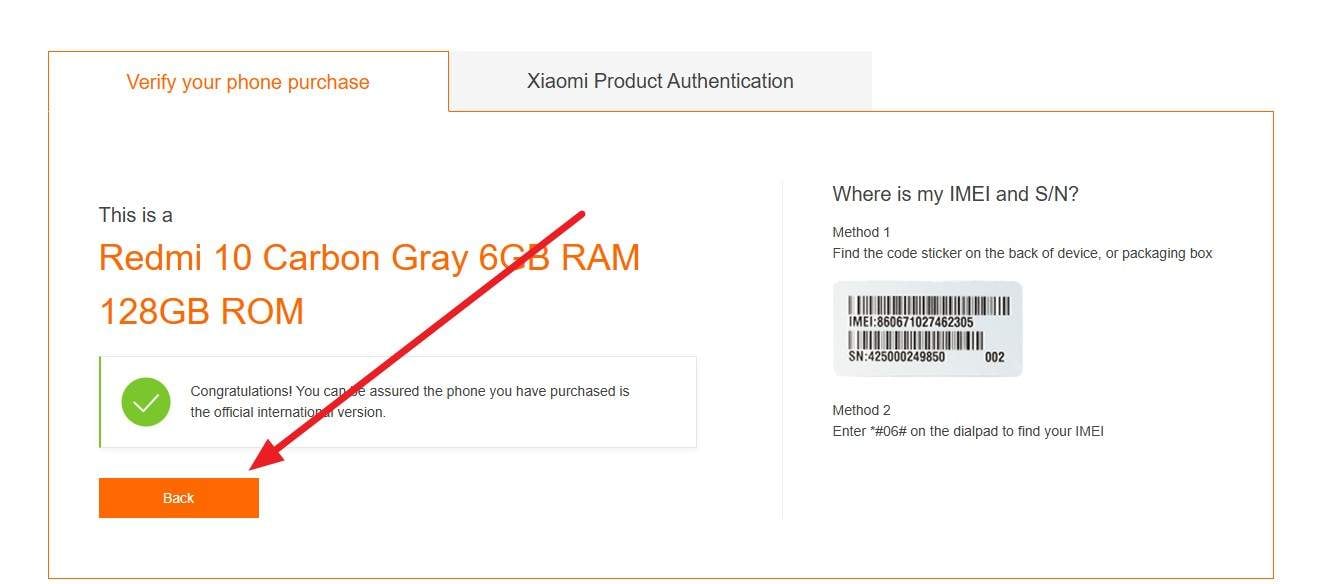
Users can also use the official Redmi IMEI number check to verify that their device is genuine and original. Xiaomi's global IMEI verify page helps check if a device or part is genuine, but it has limits. It works only with Mi products such as Xiaomi, Redmi, POCO, and selected AIoT devices. It cannot check other brands, or very old or region-specific models.
Additionally, the results come from Xiaomi's database, so new devices, refurbished units, or grey-market imports may not appear or may show incomplete information. Still, if you want to know how it works, review the listed simple steps:
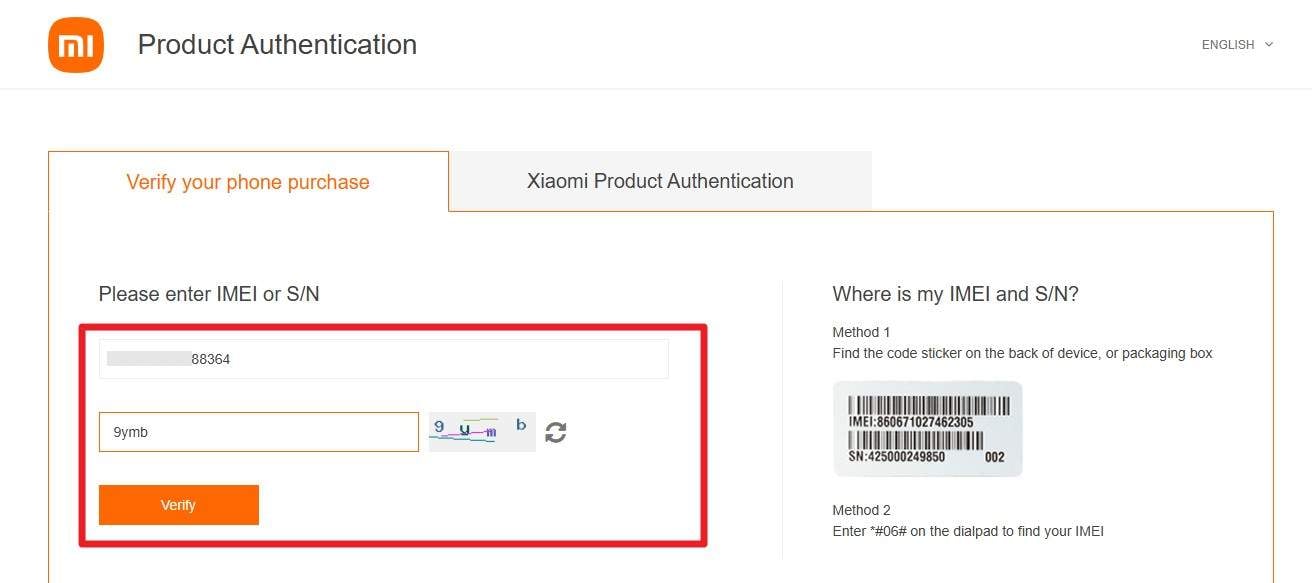
- Step 1.
On the Mi Product Authentication page, enter the IMEI details in the given textbox, verify the code, and press the "Verify" button.
- Step 2.
Once you receive the report, verify the status and select the "Back" option. The tool here fails to provide a detailed report on the Mi device and is limited to details such as purchase date, activation status, and generation. Also, it can't perform checks like Blacklist Check, Xiaomi Activation Lock Check, Samsung KNOX Guard, which Dr.Fone Online Unlock excels in.
Part 5. Other IMEI Check Tools (Optional Comparison)
While having the IMEI info for Redmi, here are some online tools that you can also use to access the product details. So, review how they work and what makes Dr.Fone Online Unlock still the best option over these:
1. IMEI.info
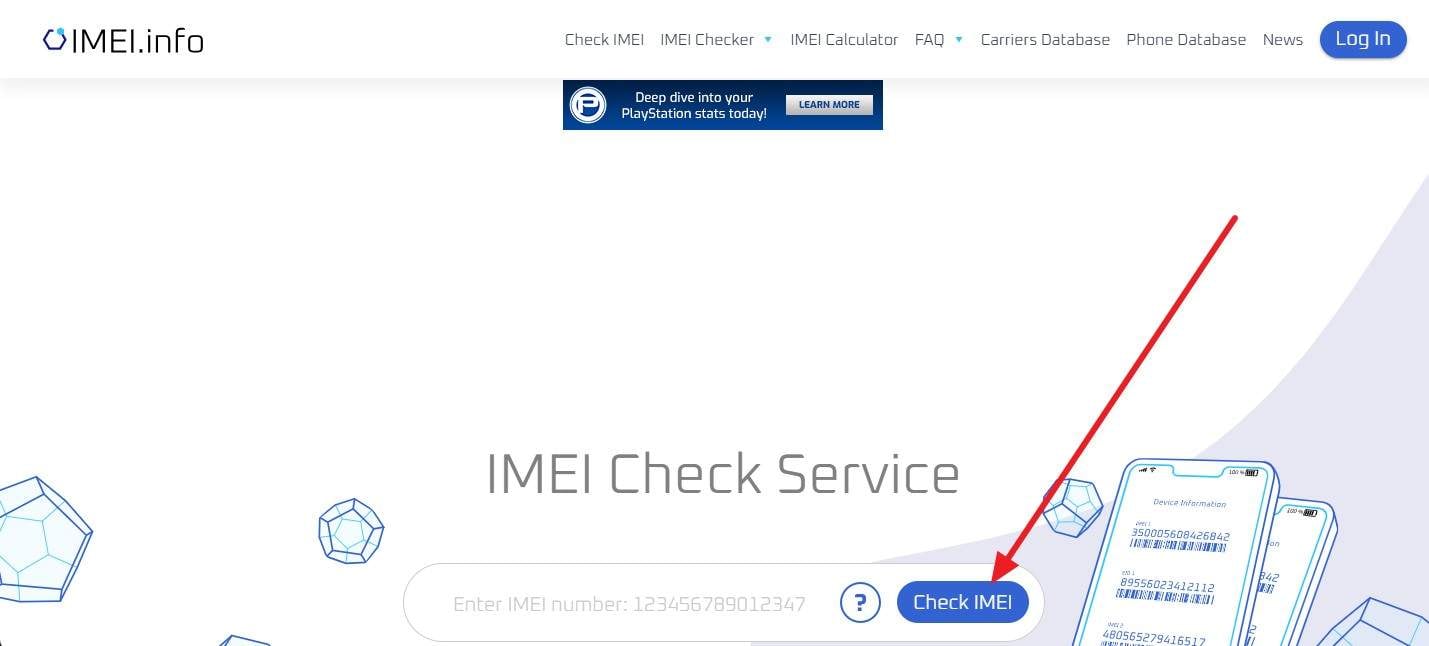
IMEI.info is an online service that shows device details and paid checks for many brands. It gives basic data such as brand, model, and hardware from the IMEI or serial number. Plus, the service displays basic details such as device type, chipset, OS, GPU Type, and more. To know how you can use it via IMEI or SN details, review the listed steps:
Instructions: Enter the IMEI or SN details in the given text box and press the "Check IMEI" button to get basic information on the new interface.
Cons
- Results depend on IMEI databases, and neither can be downloaded.
- Warranty and country details may be missing or inaccurate for some devices.
2. IMEICheck
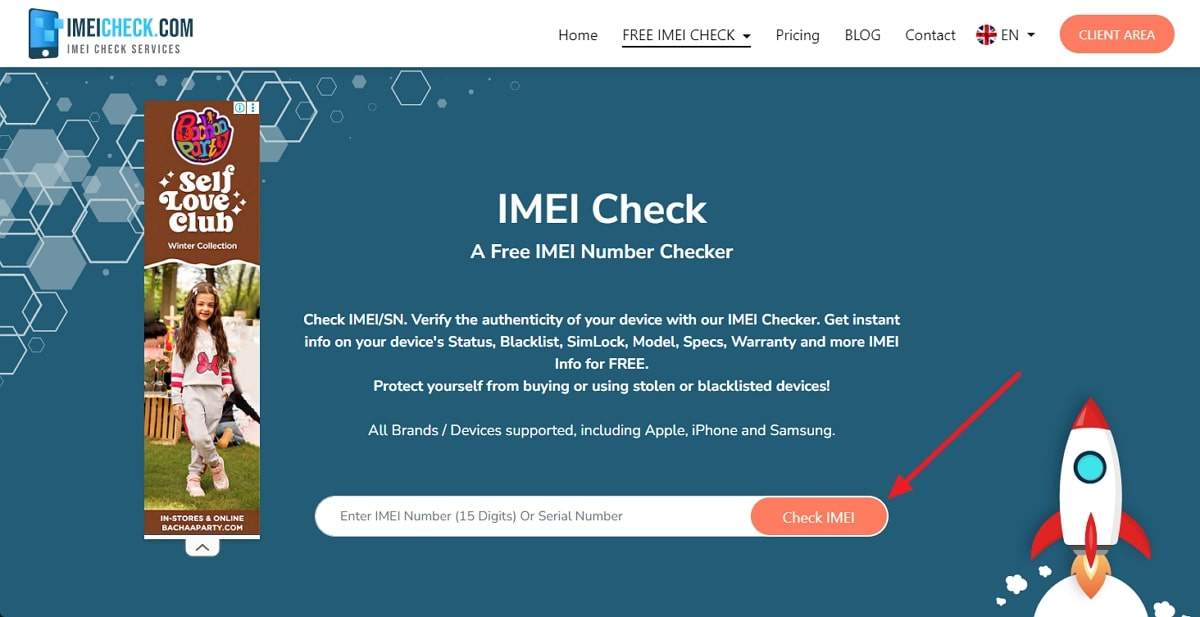
To check the IMEI Redmi or warranty details, this tool helps see security status and key details for Mi, Redmi, and POCO phones. It displays the model name and variant, and users can also view additional Xiaomi-specific information, such as Activation Lock status. Additionally, it helps confirm that the device is genuine and matches the seller's advertised specifications before purchase or service, as guided below on its usage:
Instructions: Choose the "IMEI Check" tool from the "Free IMEI Check" tab. After that, enter the IMEI or SN details in the "Enter IMEI" tab and press the "Check IMEI" button to get basic information.
Cons
- Customer support options are limited for resolving incorrect report data.
- Limited accuracy due to outdated databases and delayed blacklist updates.
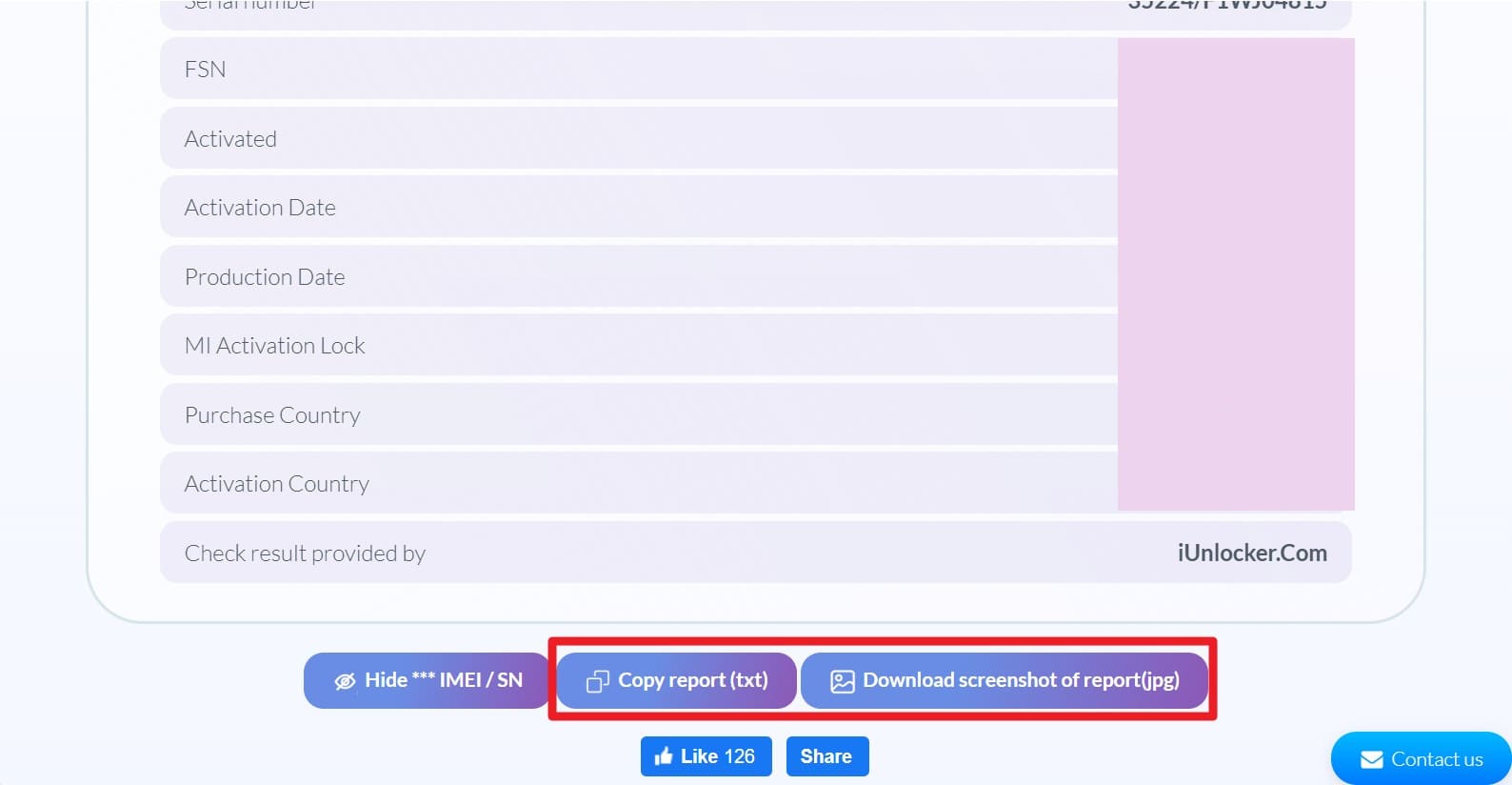
3. iUnlocker
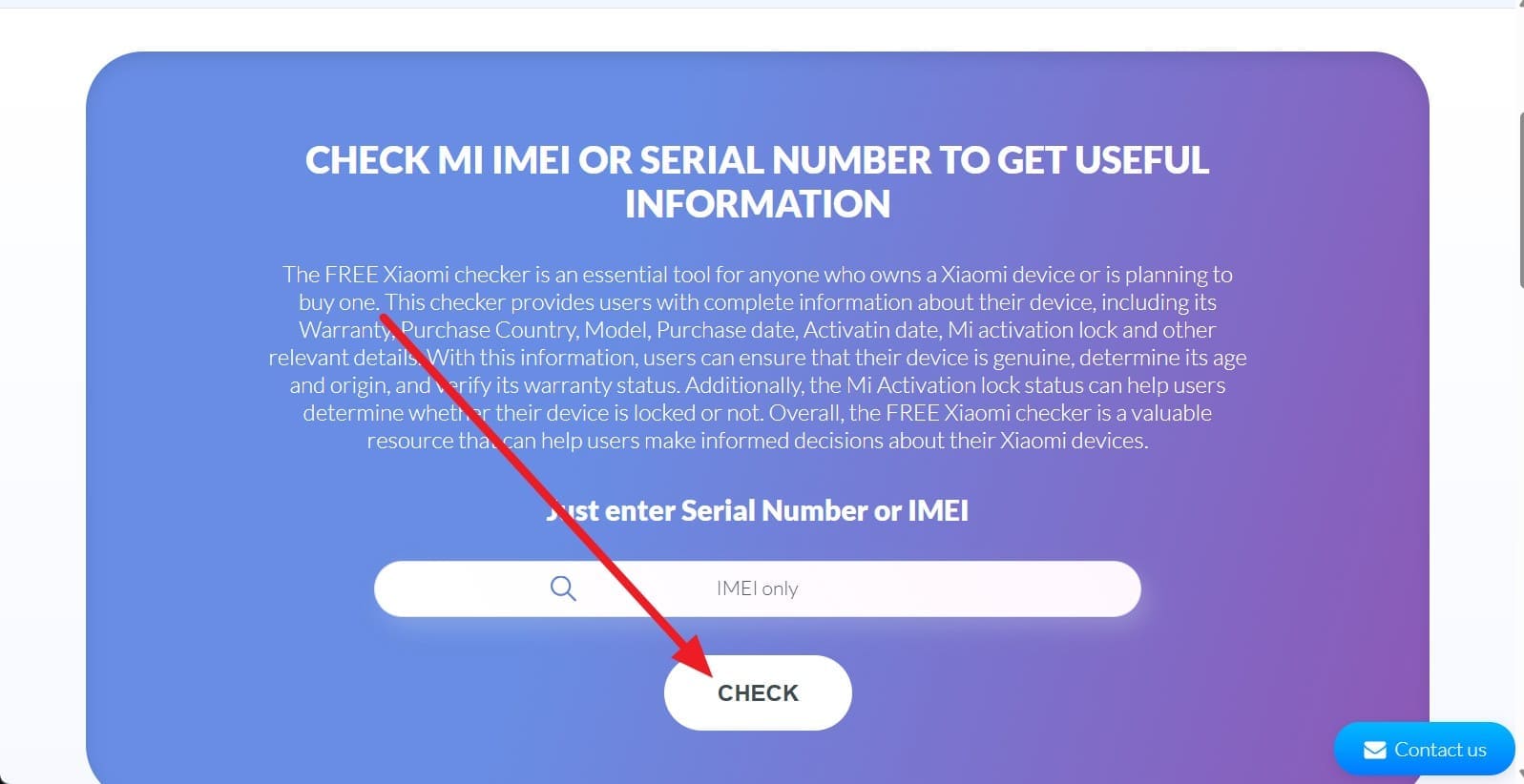
This tool for the Xiaomi IMEI check shows device authenticity, model, purchase country, and basic history. Users can see purchase date, activation date, warranty status, and Mi Activation Lock status. Plus, the tool helps confirm that a phone is genuine and safe to buy or sell. Users who want to know how to use this tool can review the listed instructions:
- Step 1.
As you access the Xiaomi IMEI Checking Service page under the "Android Check" tab, enter the IMEI details and click the "Check" button.
- Step 2.
Scroll down to the given details and choose an option like "Copy Report" or "Download Screenshot of Report."
Cons
- Unnecessary ads and pop-ups make the checkout process hectic for users.
- It offers device details via IMEI only, limiting options for SN users.
4. IMEI 24
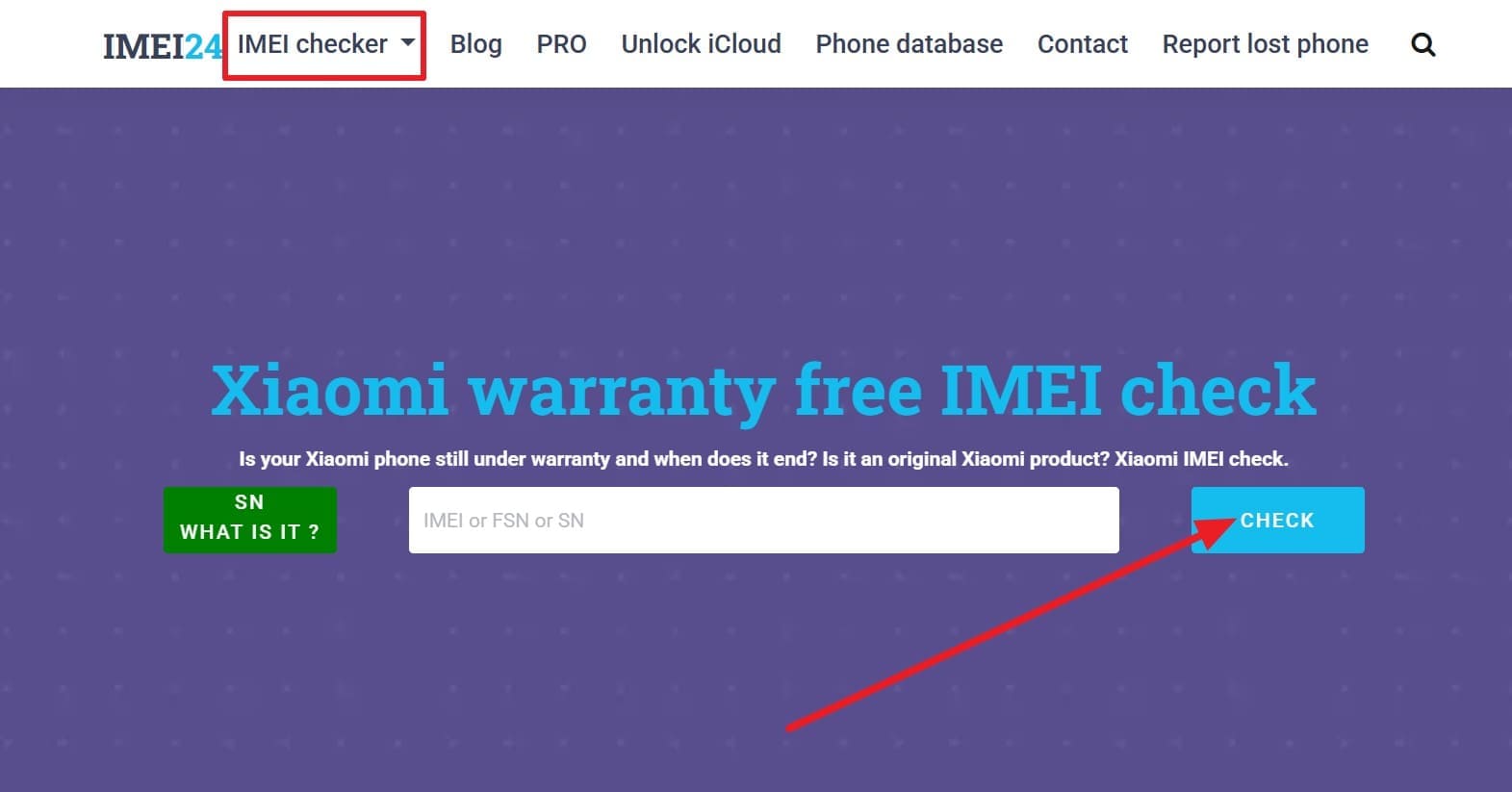
For the Xiaomi or IMEI check Redmi, this tool shows IMEI or serial number details to verify ownership and check used phones. The service identifies the exact model, confirms authenticity, and shows the warranty and purchase date. Moreover, it reports Xiaomi blacklist, lost, stolen, or blocked status, as well as Mi account lock information. In terms of its usage, simple instructions are given ahead for better clarity:
Instructions: Choose Xiaomi within the "IMEI Check" tab, enter the details, and click the "Check" button to get the report after you see an ad.
Cons
- Users must watch an unnecessary 15-second ad to access product details.
- The report is basic and only a snapshot, with no copy or export capabilities.
Conclusion
In summary, this guide has outlined straightforward online methods to check the IMEI of Xiaomi devices. So, get to know how to access the IMEI and SN details and choose the tool that suits your expertise. However, if you want an option that offers broad device support, allows you to access and export the report, and is versatile, Dr.Fone Online Unlock tool is recommended.
Verify your device info safely in one click
FAQs
-
Q: Can two Xiaomi or Redmi phones have the same IMEI number?
A: By design, no two Xiaomi or Redmi phones can share the same IMEI number. Each device is assigned a unique IMEI by the factory for network identity and security worldwide.
-
Q: What problems can occur if an IMEI number is blacklisted?
A: A blacklisted IMEI can block calls, messages, data, and network access on carriers worldwide permanently. Such phones lose resale value and are often refused service by operators in many regions today.
-
Q: Does an IMEI change after a factory reset on Xiaomi devices?
A: A factory reset does not change the IMEI on Xiaomi or Redmi phones under normal use. IMEI stays fixed since it links hardware identity, not software data, across all system resets.
-
Q: Can IMEI help recover a lost or stolen Xiaomi phone?
A: IMEI helps carriers block lost Xiaomi phones and trace network activity across multiple service areas. Police and networks use IMEI reports, but recovery is not always certain for stolen devices.




James Davis
staff Editor
Generally rated4.5(105participated)