


 TL;DR:
WhatsApp lacks a native automated alert system for user activity, meaning you must either manually check a contact's status or use third-party tracking tools to receive instant online notifications.
● Native methods like checking the last seen status, typing indicators, and read receipts ensure complete account safety but strictly require manually opening individual chat windows to monitor presence.
● Tracover provides automated real-time alerts, daily usage summaries, and timeline comparisons for multiple profiles, requiring an initial QR code scan to authorize the account connection.
● Modded clients such as GBWhatsApp offer built-in online pop-up alerts but expose users to critical risks including permanent account bans, malware threats, and data leaks to opaque background servers.
Ask AI for a summary
 ChatGPT
 Perplexity
 Gemini
 Claude
 Grok
Grok
As people communicate more through WhatsApp, knowing online activity has become essential. Many want timely alerts when contacts are active or online. A WhatsApp online notification helps track these moments without having to check manually. It ensures you stay informed about essential messages or conversations quickly. Therefore, this guide explores safe and efficient ways to get notifications. You will also learn responsible usage to respect privacy effectively.
In this Article

Part 1. What Is a "WhatsApp Online Notification" — And Why People Want It
A WhatsApp online notification is a feature that informs you when a contact becomes active. It sends instant alerts showing when someone opens or exits WhatsApp in real time. This allows users to stay aware of others' online behavior without checking the app manually. This part also provides multiple reasons why many individuals use it for personal awareness:

- Parental Safety: Parents use notify WhatsApp online alerts to ensure teens stay safe while chatting.
- Relationship Trust: Partners can spy on each other to ensure transparency in their relationship.
- Monitor Work: During working hours, employers may observe online work in order to increase productivity.
- Friend Coordination: Friends can check availability to plan calls or messages more.
- Urgent Communication: Notifies when essential contacts are online for immediate responses.
Does WhatsApp Notify When Someone Is Online?
WhatsApp does not offer any built-in feature to alert when someone becomes active. Users must manually check contact availability by opening the app and viewing their status. Yet, some external tools provide automated alerts for easier tracking of online activity in real time. Therefore, you should always choose secure methods when seeking notification for WhatsApp online to ensure protection.
Part 2. Legal & Safe Alternatives (Device & WhatsApp Built-in Options)
There are a few legal and safe ways to know when someone is online. The following options ensure privacy while still giving basic awareness of contact activity:
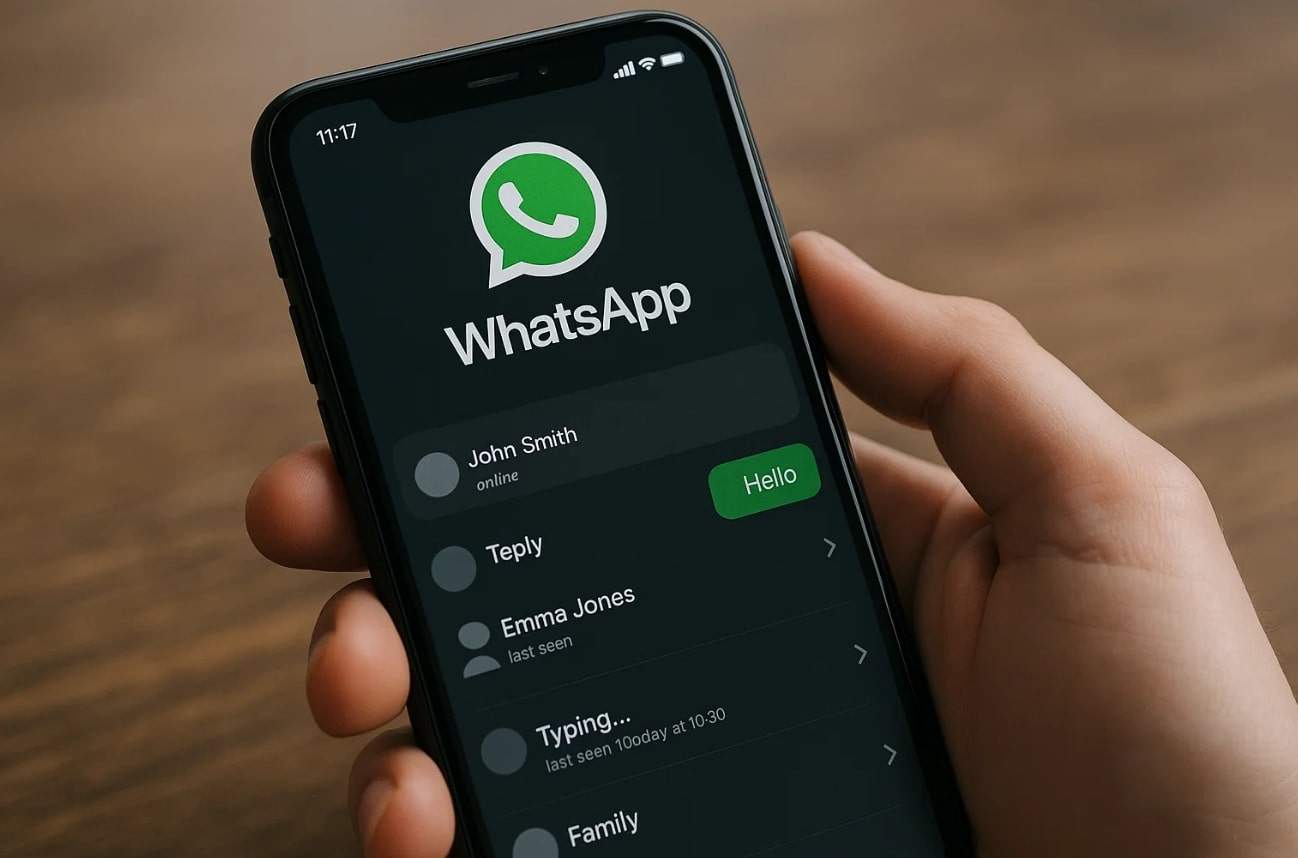
- Manual Check: Open a chat window and see "online" under the contact's name. This method is simple and works without needing external apps or risk.
- Group Activity: In group chats, active typing or message responses reveal someone's online presence. It's an ethical way to track engagement without crossing any privacy limitations.
- Typing Indicator: When someone types, you'll see a typing sign below their name. This native signal lets you know they're active without using a WhatsApp online notifier.
- Last Seen Option: You can view the "last seen" status if the user allows visibility. It offers insights into their recent online activity while respecting privacy preferences.
- Read Receipts: The blue tick marks confirm the recipient has seen your message on time. This basic indicator reflects active usage without requiring any tracking app or notifier.
Part 3. How to Get WhatsApp Online Notifications Automatically
Several external tools and unofficial apps can make tracking effortless and automatic. This part will help you learn how to get notification when someone is online on WhatsApp:
Option 1 – Tracover (Recommended Smart Solution)
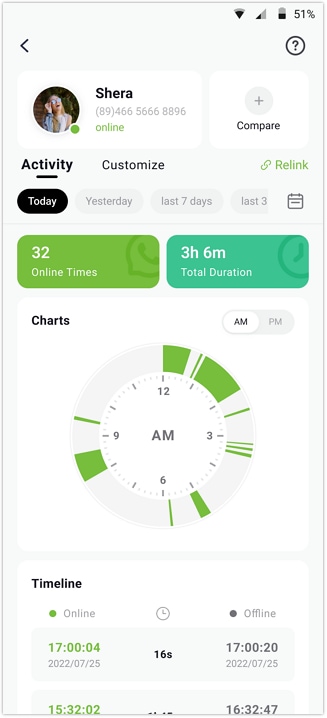
Try It Free is an innovative and advanced tracking tool designed for precise WhatsApp activity monitoring. It provides real-time data showing exactly when a contact goes online or offline immediately. Users can view detailed timestamps highlighting each login and log-out time. It summarizes total daily usage, giving clear insights into online duration every day. The app also generates timeline charts for easy visualization of daily or weekly activity patterns.
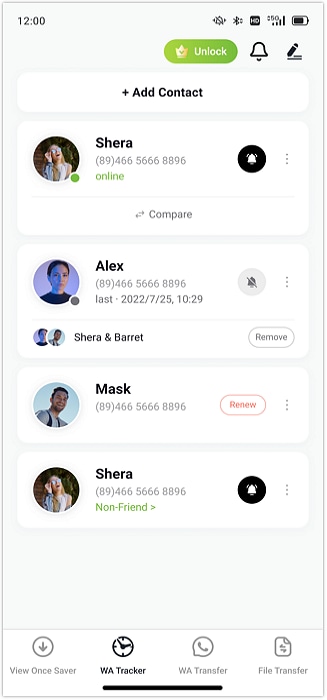
Users can even customize tracking hours or days based on personal schedule preferences. Multiple profiles can be added, allowing tracking of several contacts together without delays. Besides, instant notifications are delivered the moment any monitored contact becomes active within WhatsApp. The timeline view helps identify overlapping online sessions between two tracked profiles. Plus, its customizable alerts create an automatic WhatsApp alert when someone is online instantly.
Tracover App - WA Tracker
Track WhatsApp Online Activites Automatically
- Instant Alerts: Real-time notifications for user sign-ins.
- Custom Schedule: Set precise tracking hours and days.
- Chat Compare: Reveals shared online patterns between users.
- Weekly Trends: Visualizes user activity in simple charts.
- Status History: Stores online logs for review and comparison.


Guide to Get WhatsApp Online Notifications via Tracover
Take guidance from the following steps on how to get notification on WhatsApp when someone is online:
- Browse the WhatsApp Contact to Track
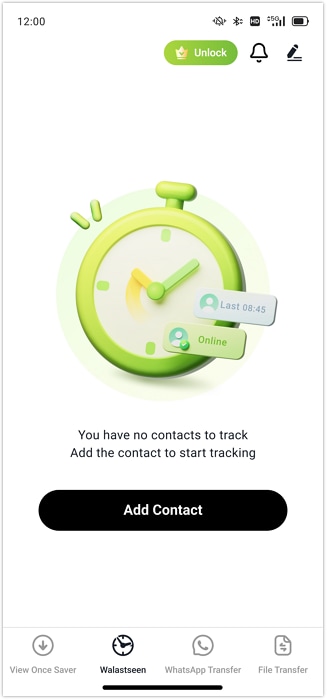
Open the app and tap the "Add Contacts" button on the home screen to load your contact list. Moving ahead, find the person you want to monitor and press the "Add" button next to their name.
- Initiate Tracking for WhatsApp
Afterward, confirm the contact's name and country code, then hit "Start Tracking." Press "Link WhatsApp" to scan the QR code with your account and authorize the connection.
- View Activity Status on Tracover
Go to the contact's profile to access the "Activity" tab and check their online/offline timestamps.
Option 2 – GBWhatsApp and Other Modded Clients
It is a modified version of WhatsApp offering unique customization and extra tracking features. This app provides a pop-up toast feature that sends instant alerts when contacts go online. The WhatsApp online alert appears on your screen when GBWhatsApp is active. Moreover, its customization options allow users to adjust themes and notification formats easily. So, follow the given steps to use this unofficial app to get online notifications:
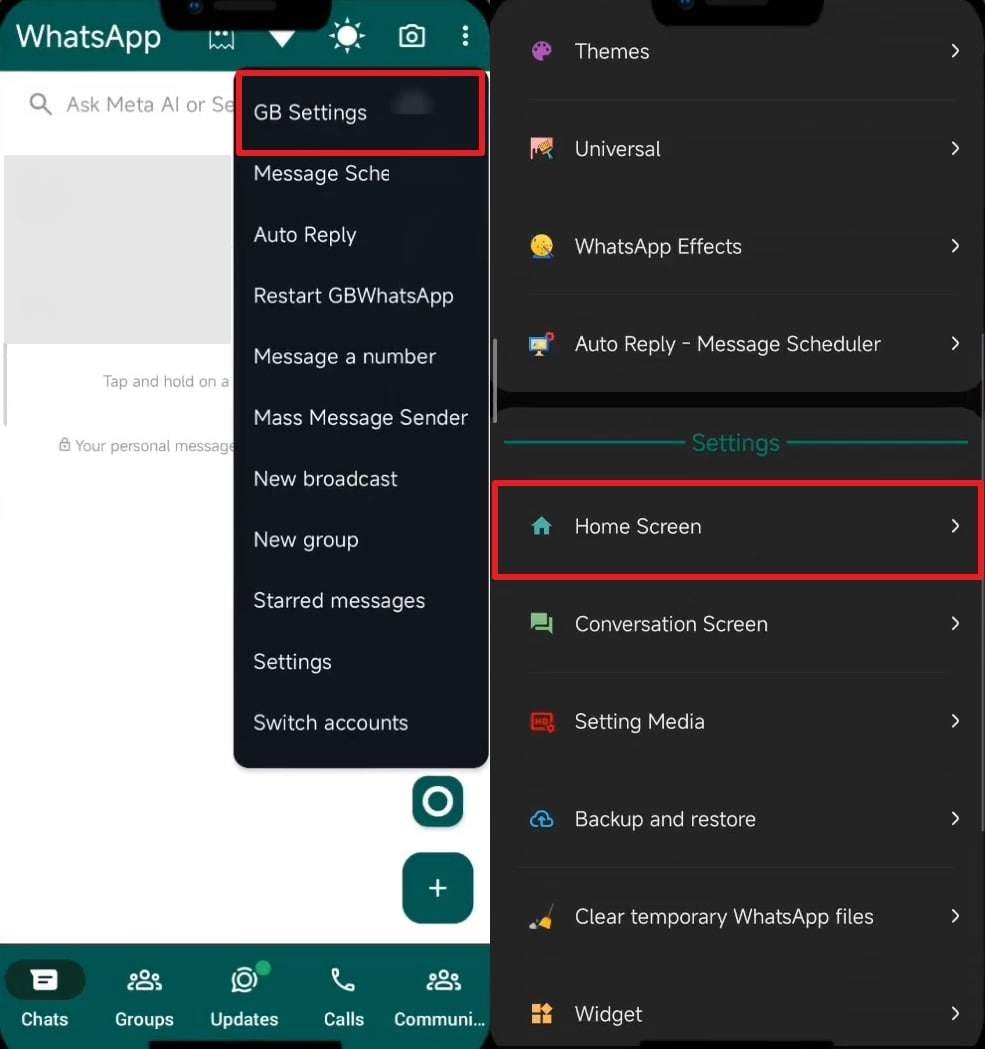
- Access GB Settings
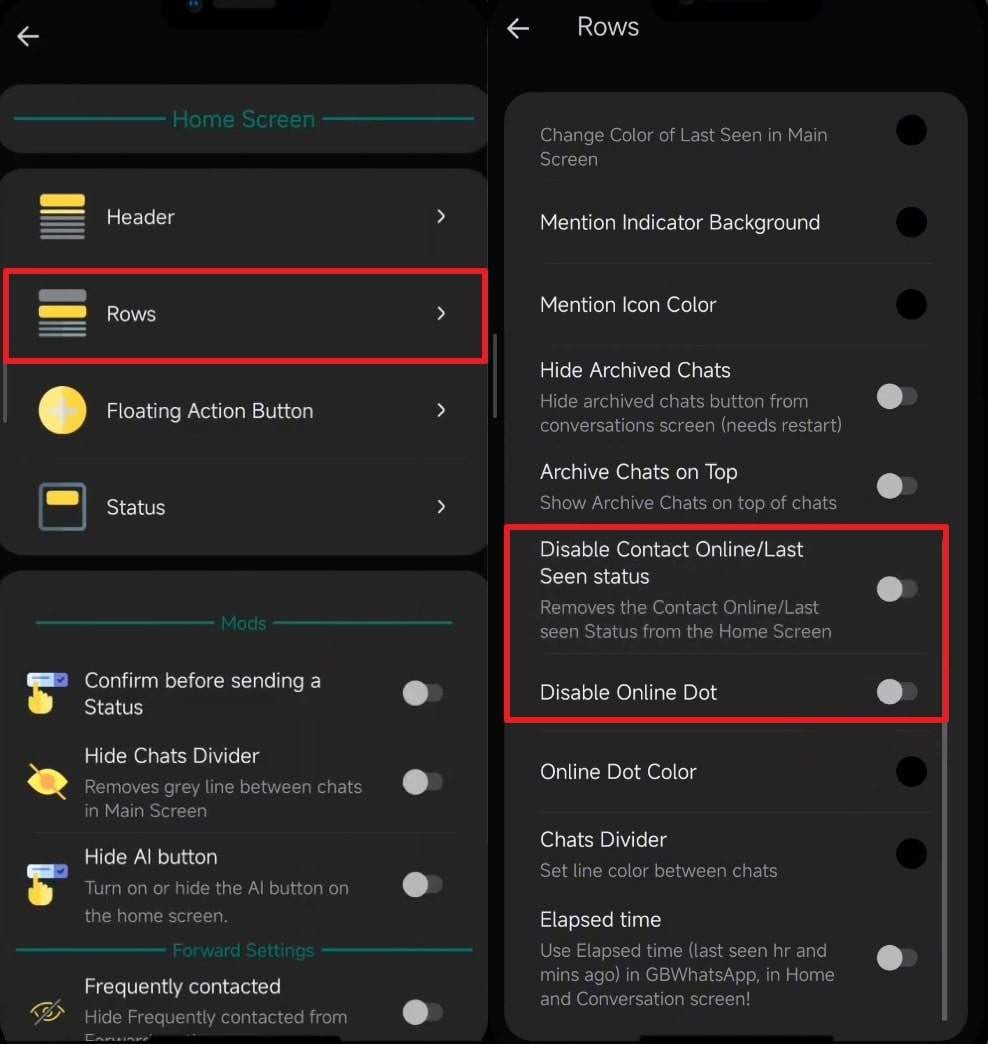
Tap the "Three Dots" icon from the app's main screen and opt for "GB Settings." Afterward, head to the "Home Screen" option to move forward.
Following this, tap and access the "Rows" section. Disable both "Disable Contact Online/Last Seen Status" and "Disable Online Dot" toggles.
Why GBWhatsApp and Other Modded Clients Are Unsafe
Although GBWhatsApp offers exciting features, it comes with serious safety and privacy risks. You must consider the following concerns before using it to get a WhatsApp alert when someone is online:
- Data Risk: It stores user chats and media on unsafe servers without strong protection. This makes private conversations easier to steal or misuse by unknown third parties.
- Privacy Leak: The app can forward your messages and contacts to opaque background servers. Loss of privacy, which puts personal or business information at risk, is the result of such exposure.
- Account Ban: WhatsApp can temporarily or even permanently ban accounts using such modded versions. Once banned, users lose chat history and cannot restore backup data.
- Malware Threat: Unofficial downloads may include harmful code that installs hidden malware. This malware can collect sensitive information or slow down overall phone performance.
- No Updates: It doesn't receive timely security patches or official software updates from WhatsApp. Lack of updates exposes users to bugs and unpatched security loopholes frequently.
Part 4. 5 Tips to Use WhatsApp Online Notification Responsibly
Using tracking tools requires responsibility to respect personal boundaries online. These tips will help you use any feature for notification when someone online on WhatsApp wisely:
- Secure Data: Choose safe apps that protect user information and never share private details. Unverified tools might expose your data to unknown parties or online risks.
- Avoid Misuse: Never use notifications to manipulate or harass others online. Responsible use keeps your actions ethical and prevents possible account-related issues.
- Respect Privacy: Always respect others' personal space when tracking their WhatsApp activity. Avoid using tracking tools for spying or controlling someone's online communication behavior.
- Limit Access: Never share the information of your tracking software or user passwords. Restricting access will ensure privacy and prevent misuse of sensitive monitoring data.
- Focus Purpose: Use notifications for coordination, safety, or time management reasons. Keeping a clear purpose ensures balanced use without invading someone's digital privacy.
Conclusion
To sum up, getting a WhatsApp online notification helps you stay updated about your contacts' activity. It ensures better coordination and improved digital awareness without constant manual checking. Since the app does not offer a native feature, always use tools with care and respect for privacy. For reliable tracking with real-time accuracy and complete safety, Try It Free is the best choice. It lets users manage WhatsApp online alerts smartly and securely.
FAQs
-
Q: Can I get WhatsApp online notifications without using any third-party app?
A: It is possible to check the online status of a contact by opening up the chat window itself. The given approach is safe and does not require any external app or authorization. Nevertheless, it won't provide automatic alerts or instant activity notifications efficiently.
-
Q: Are apps that offer WhatsApp online notifications legal to use?
A: The apps that do not interfere with WhatsApp data or do not violate policies are usually legal. Yet, modified or cloned versions of WhatsApp are strictly against its official rules. Always verify an app's source before using it for online activity tracking.
-
Q: Can I track multiple WhatsApp contacts simultaneously?
A: Yes, specific external trackers like Tracover allow monitoring several contacts at once. These tools send real-time updates whenever any tracked contact comes online or offline. Tracover also lets you compare two people's online/online activities with accurate alerts.










Julia Becker
staff Editor
Generally rated4.5(105participated)