

![How to Track WhatsApp Online Status and Activities [2026 Updated]](https://images.wondershare.com/drfone/article/2025/11/track-whatsapp-online-status-1.jpg)

 TL;DR:
You can track a WhatsApp online status by manually checking active chat windows and status updates, or by using the Tracover App to automatically record exact login timestamps and receive real-time alerts.
● Manual tracking requires the target's number to be saved in your contacts and fails entirely if the user hides their last seen privacy settings or if you need to monitor multiple accounts.
● Setting up the Tracover App requires linking your WhatsApp account via a QR code, which then unlocks custom tracking schedules, timeline charts, and multi-contact monitoring without needing the chat open.
● Using tracking tools without explicit consent may violate regional privacy laws, making these methods legally restricted to authorized uses like parental monitoring or business management.
Ask AI for a summary
 ChatGPT
 Perplexity
 Gemini
 Claude
 Grok
Grok
Many people today want to know when someone is active on WhatsApp. Sometimes it helps to stay connected or manage personal communication timing better. Others wish to track WhatsApp online status to understand friend or family availability. So, this guide explains safe and trusted ways to monitor when someone is online. It covers both manual methods and reliable tools to help check WhatsApp online status accurately at any time.
In this Article

Part 1. Is It Legal and Ethical to Track WhatsApp Online Status?
Before learning how to see if someone is online on WhatsApp, legality matters first. Tracking someone's online habits can raise privacy and ethical questions depending on intent. It is legal only when used for personal reasons like parental monitoring or business management. Nevertheless, spying on others without consent may break privacy laws in many regions. Thus, always respect people's digital boundaries while using tracking tools.

Part 2. How to Know If Someone Is Online on WhatsApp Without Opening Chat
For those looking to monitor someone's WhatsApp online activities without initiating a conversation, this section provides practical methods. It explains how to know if someone is online on WhatsApp, first by introducing an efficient tracking tool, and then by detailing manual techniques to check their online status directly within the app.
Efficient Tool to Track Whatsapp Online Status - Tracover App
Modern tools make this possible by showing online details instantly and accurately anywhere. When you wonder how to know if someone online on WhatsApp, it's recommended to use Tracover app.
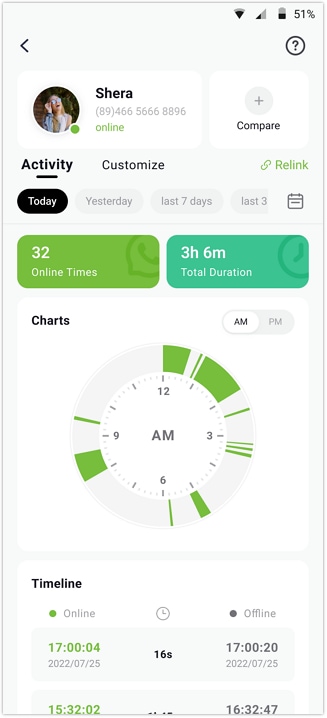
Try It Free is a powerful tracker designed to track WhatsApp activity with great accuracy. It allows users to check WhatsApp online status and receive instant alerts in real time. You can view detailed online and offline timestamps showing exact login and logout times. Tracover automatically calculates the total daily duration of each contact's online presence.
Moreover, it provides daily and weekly activity patterns through simple timeline charts for easy understanding. Users can even open the Activity tab to clearly explore live and cumulative usage statistics. Besides, you can set personalized monitoring times to track activity only during selected hours. On the other hand, the custom tracking option allows you to choose specific days and exact time ranges for updates.
Tracover App - WA Tracker
Track WhatsApp Online Activites Automatically
- Instant Alerts: Real-time notifications for user sign-ins.
- Custom Schedule: Set precise tracking hours and days.
- Chat Compare: Reveals shared online patterns between users.
- Weekly Trends: Visualizes user activity in simple charts.
- Status History: Stores online logs for review and comparison.


How to Track WhatsApp Online Status Using the Tracover app
As you explore its dedicated WhatsApp tracking features, follow the steps below to track WhatsApp activity:
- Add the Person to Track WhatsApp Activity
- Start Tracking the WhatsApp Activity
- Check the Tracked Person's WhatsApp Activity
Initially, press the "Add Contacts" button from the main screen to access your contacts' list. Afterward, tap the "Add" button next to the person whose activity you wish to track.
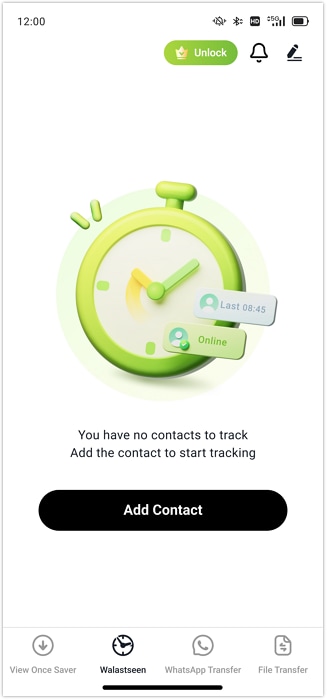
Here, add the person's name or country code and hit the "Start Tracking" button. Upon adding the person, tap the "Link WhatsApp" option and connect your account by scanning the QR code.
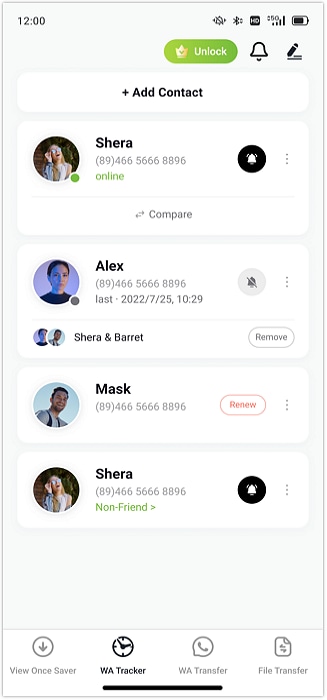
When the app begins tracking, navigate to the person's profile and access the "Activity" tab to check the exact online/offline timing.
Common Manual Methods to Track WhatsApp Online Status
In case you prefer not to use tracking tools, manual options are still available today. So, these methods explain how to track WhatsApp online/offline activity directly within the app itself. There are several basic methods available to track online status manually. These approaches rely on built-in app indicators that show a contact's real-time availability clearly:
Method 1. Check Their Online Status
The easiest way to track WhatsApp online status is by opening the person's chat window. When the contact is active, you will see "Online" displayed under their name clearly. This feature helps you know if they're currently available for messages or calls quickly. However, it only works when a person does not hide it and the internet is connected correctly. It's simple and requires no additional tools or external applications at all.

Method 2. Track Their Group Messages
Another easy way to know someone's activity is by checking shared group messages. When they send or read messages in a group, you can see the time shown. This helps you guess when they were last online or active on WhatsApp. It is an easy method that does not require any spying app or additional configuration. Nevertheless, it can only be effective when they constantly engage in WhatsApp group discussions.
Method 3. Check Their Status Time
This method shows when someone last updated their WhatsApp status, hinting at recent activity. By checking the posted time, you can estimate when they were last online accurately. It helps people who wonder how to see if someone is online on WhatsApp easily. You only need to open the Updates tab and note the displayed time below. Though effective, it depends on whether the person frequently uploads new WhatsApp stories.

Part 3. Manual Methods vs. WhatsApp Tracker Tool
While manual checking methods can reveal some activity, they lack precision and automation overall. Whereas using a WhatsApp tracker tool like Tracover ensures accurate and effortless monitoring anytime. So, this part shows you a comparison table between both approaches to help you understand clearly:
Comparison Table
| Feature | Manual Checking | Tracover - WA Tracker |
|---|---|---|
| Accuracy | Limited and depends on user observation | Highly accurate with exact timestamps |
| Notifications | No instant alerts available | Real-time online/offline notifications |
| Multiple Contacts | Can track only one contact at a time | Tracks multiple contacts simultaneously |
| Reports | No activity summary or reports | Provides detailed daily and weekly reports |
| Customization | No scheduling or filters | Custom tracking hours and activity control |
| Ease of Use | Requires frequent manual checking | Fully automatic after setup |
| Data Insights | Only visible status updates | In-depth timeline and trend analysis |
| Reliability | Affected by privacy settings | Works consistently and securely |
Why Manual Checking Isn't Enough
Manual checking can show basic activity, but lacks consistency and deeper tracking accuracy overall. Below, you will find a few reasons why manual checking is not enough for accurate spying:
- Hidden Status: In case someone hides their last seen, manual methods won't detect their actual activity.
- One Contact: Checking multiple people manually is difficult and requires a huge effort repeatedly.
- Limited Access: Manual ways only check WhatsApp online status when the chat is open.
- No Alerts: It doesn't notify users instantly when a contact becomes online or offline.
- Missed Sessions: You may miss short online sessions if you're not checking regularly enough
Hence, Tracover delivers smarter, faster, and more precise WhatsApp activity tracking effortlessly. It offers complete automation, accurate alerts, and detailed analytics that manual methods can't match.
Conclusion
To conclude, tracking someone's WhatsApp activity can help you stay informed and manage communication. While manual methods provide limited insights, they cannot deliver accurate tracking results. So, using advanced tools makes it easier to track WhatsApp online status with precision and convenience. Therefore, if you want instant and detailed reports, Try It Free is the best choice. It lets users perform accurate and automated track WhatsApp activity anytime.
FAQs
-
Q: Can I track someone's WhatsApp activity without saving their number?
A: The platform requires the contact to be saved before viewing their online activity status. You must first add the person to your phone's contact list to monitor activity properly. Saving the contact ensures accurate synchronization with the app's native feature.
-
Q: Can I track multiple WhatsApp accounts at the same time?
A: It isn't easy to follow multiple accounts manually since one must always switch between different chats. Still, using Tracover makes this process easy by automatically allowing multi-contact monitoring. It displays all tracked contacts' activity timelines together for better convenience overall.
-
Q: Why can't I see someone's last seen or online status on WhatsApp?
A: The individual might have switched off their privacy settings that show the last seen. They could also have blocked you, preventing any visibility of online or profile details. Poor internet connectivity can also be a reason that causes temporary syncing issues with the app's server.










Julia Becker
staff Editor
Generally rated4.5(105participated)