


 TL;DR:
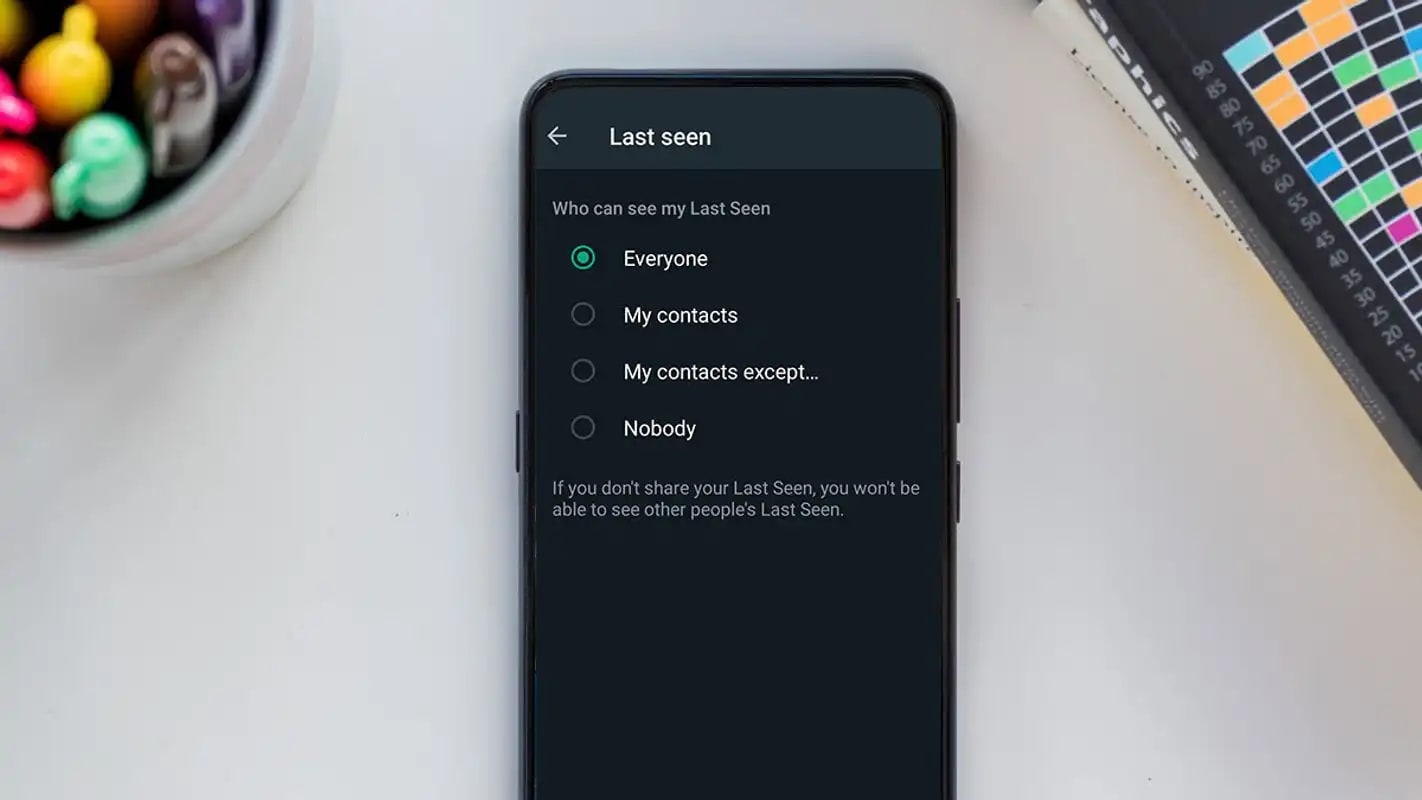
To completely hide your activity status on WhatsApp across all platforms, navigate to Settings > Privacy > Last Seen and Online, select "Nobody," and set the "Who can see when I'm online" option to "Same as last seen."
● Due to WhatsApp's mutual visibility rule, hiding your "Last Seen" and "Online" status strictly prevents you from viewing the active timestamps of any other users.
● Disabling your activity status does not hide real-time "typing" or "recording" indicators, and read receipts will always remain visible inside group chats regardless of your privacy configurations.
● To safely read and draft replies without triggering any online signals, enable your device's Airplane Mode before opening the app, compose your messages, and fully close WhatsApp from your recent apps before reconnecting to the internet.
Ask AI for a summary
 ChatGPT
 Perplexity
 Gemini
 Claude
 Grok
Grok
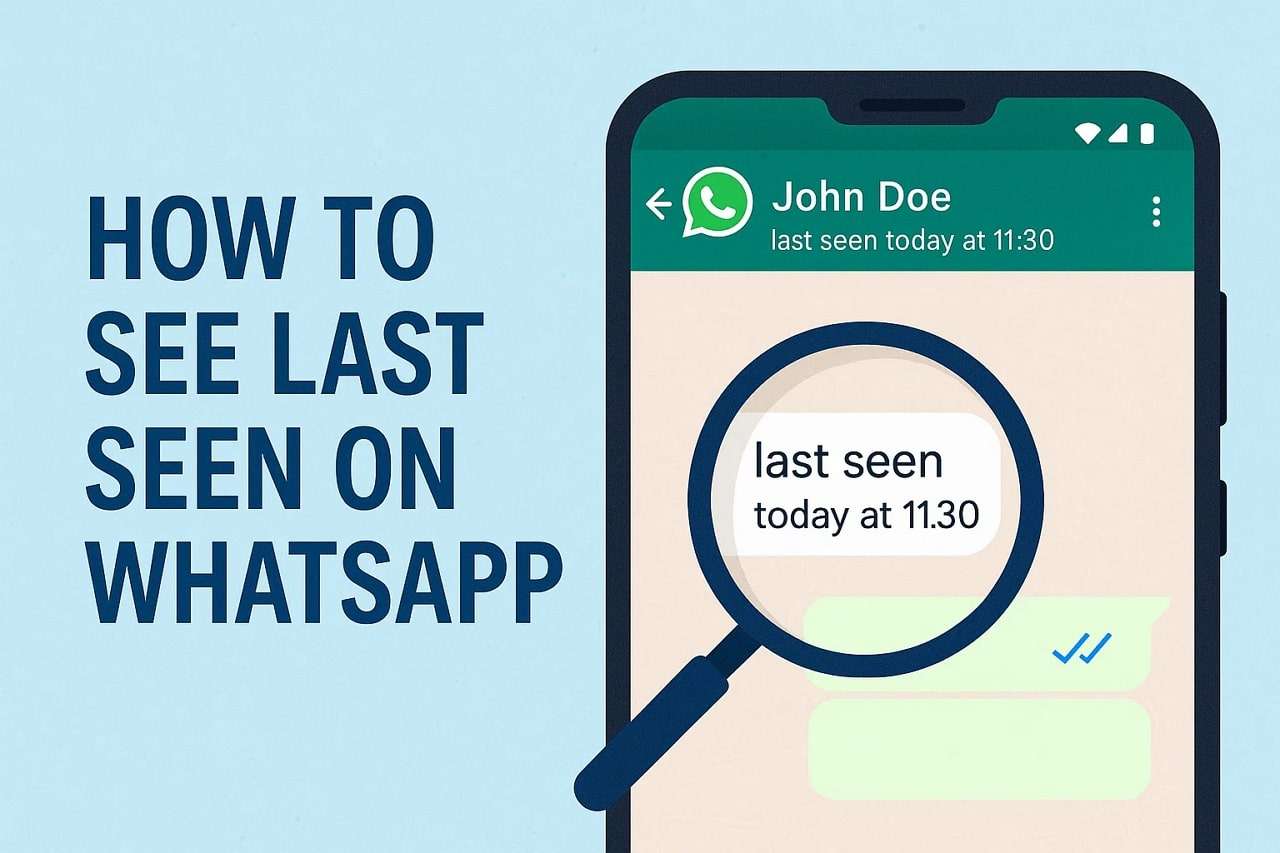
Want to turn off last seen on WhatsApp and appear offline while still using the app? WhatsApp shows your activity through the Last Seen and Online Status indicators, which tell others when you were last active. While useful for communication, many users prefer hiding this information to protect their privacy or avoid pressure to reply immediately.
In this guide, you'll learn how to turn off last seen on WhatsApp for Android, iPhone, and WhatsApp Web. We'll also explain how to control your online visibility and additional privacy settings so you can appear offline on WhatsApp without logging out. You can also explore a smart tool for monitoring WhatsApp activities while maintaining privacy.
Quick Answer: To turn off last seen on WhatsApp, open Settings → Privacy → Last Seen and Online, then choose Nobody or limit who can see your activity.
In this Article

Part 1: Understanding What Happens When You Turn Off "Last Seen"
Understand what happens when you turn off WhatsApp's last seen before understanding how to do so.
WhatsApp's Mutual Visibility Rule
WhatsApp requires fairness: if you hide your last seen, you can't see others'. This balances visibility and privacy for both sides.
How it works:
| Action | What You See | What Others See |
|---|---|---|
| Show Last Seen | You can see others' last seen | Others can see yours |
| Hide Last Seen | You can't see others' last seen times | Others can't see yours |
Why It's Not the Same as Going Offline
Many believe that concealing their last seen status makes them invisible; however, this is not true. When you turn off WhatsApp's last seen or online status, others can't know when you were last active, but they can still see you as online.
The reason:
- WhatsApp still shows your "Online" status.
- Replying displays typing or recording signs.
- Unless disabled, read receipts (blue ticks) show activity.
Although you've concealed your activity time, WhatsApp still shows evidence of use. Combine these settings with others, such as turning off read receipts or activating Airplane Mode before starting chats, for maximum privacy.
Can You Turn Off Last Seen on WhatsApp Completely?
Yes. WhatsApp allows users to hide their last seen time completely. By selecting Nobody in the Last Seen and Online privacy setting, you can prevent others from seeing when you were last active.
However, WhatsApp uses a mutual privacy rule. If you hide your last seen status, you also won't be able to see the last seen status of other users.
Part 2: How to Turn Off Last Seen on WhatsApp (Step-by-Step Guide)
Both Android and iPhone can use these settings, as can WhatsApp Web and Desktop.
On Mobile (Android & iPhone)
Android and iPhone users can turn off WhatsApp's last seen in a similar way. Follow these simple steps:
- Step 1. Launch WhatsApp on your phone. Tap three dots in the top-right corner of Android or tap Settings from the bottom menu on iPhone. Choose "Settings > Privacy."
- Step 2. Open "Last Seen and Online" in Privacy. Tap it for visibility settings.
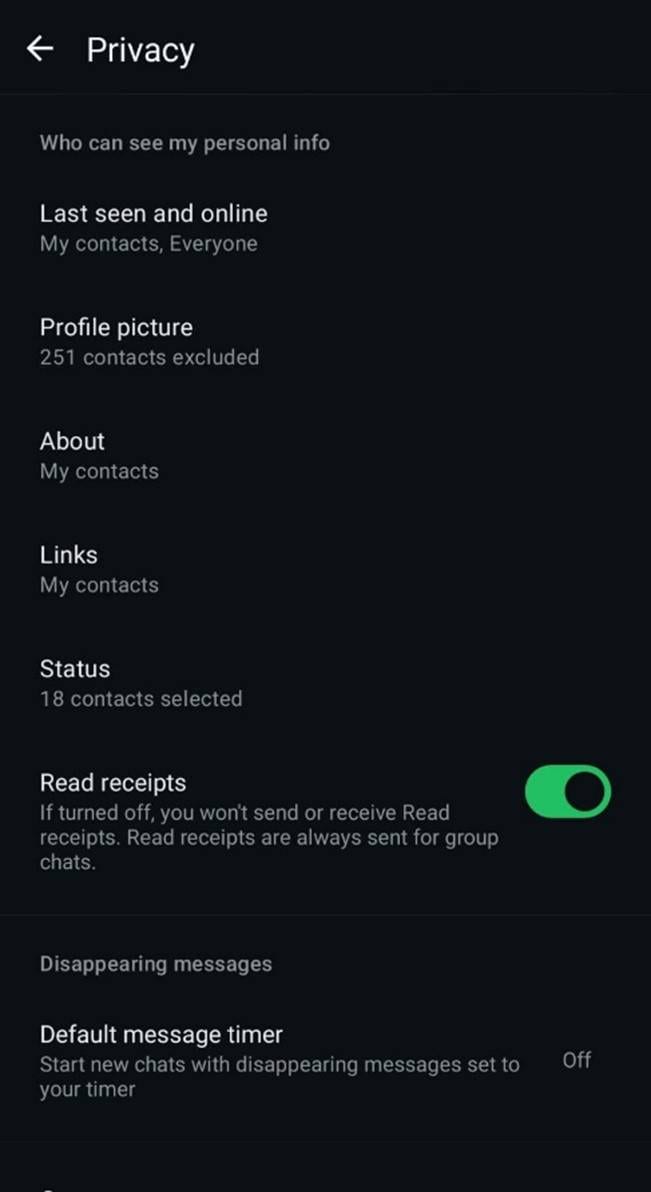
- Step 3. Select "Who Can See Your Last Seen" visibility options:
- Everyone – Your latest activity is visible to all.
- Only Contact - Your last seen is just visible to your contacts.
- My Contacts Except…. - hides your last seen from some contacts.
- Nobody - Completely hides your last seen.
- Step 4. When asked, "Who can see when I'm online," select "Same as last seen."
Your online status follows the same visibility rules with this configuration. Keeping your last seen from others will also hide your online status.
On WhatsApp Web or Desktop
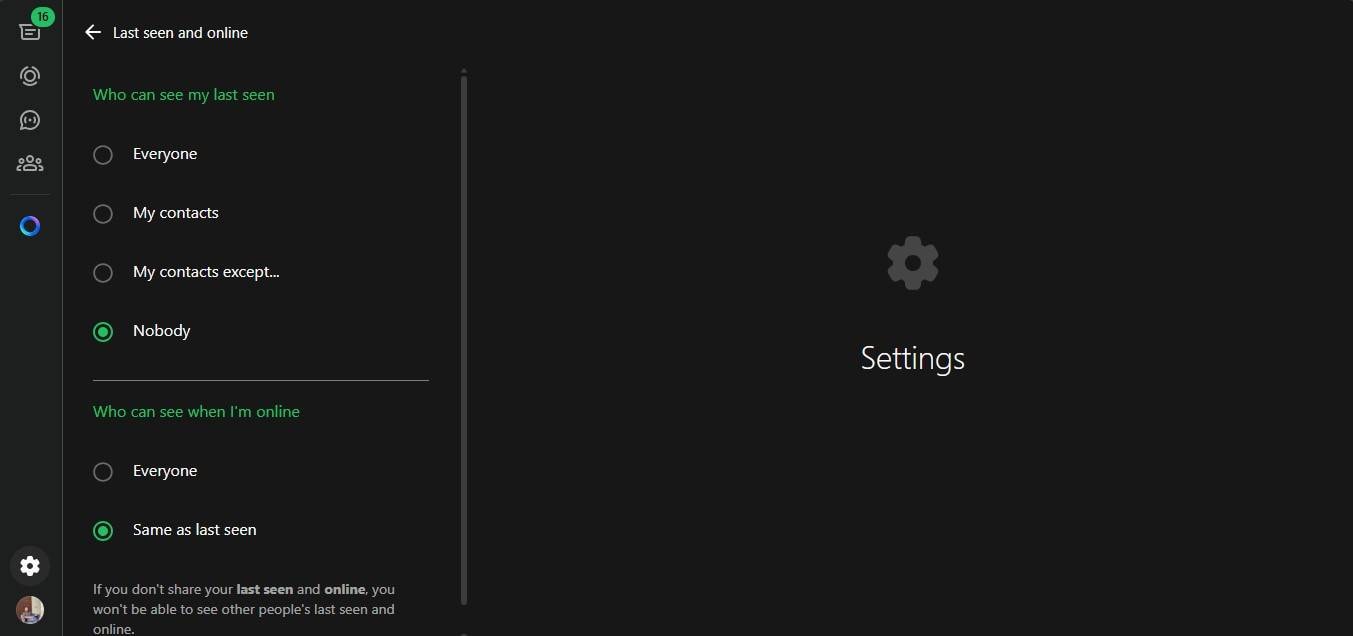
WhatsApp Web lets you turn off last seen and online status if you use WhatsApp on your computer often. Follow these steps:
- Step 1. Open WhatsApp Web or Desktop on your PC.
- Step 2. Select your profile symbol at the top of the conversation list.
- Step 3. Choose "Settings > Privacy."
- Step 4. Select "Last Seen and Online."
- Step 5. Choose "Nobody or My Contacts Except..." under "Who can see my last seen."
Part 3: Extend Your Privacy: Turn Off Other Visibility Signals
Disable Read Receipts and Typing Indicators
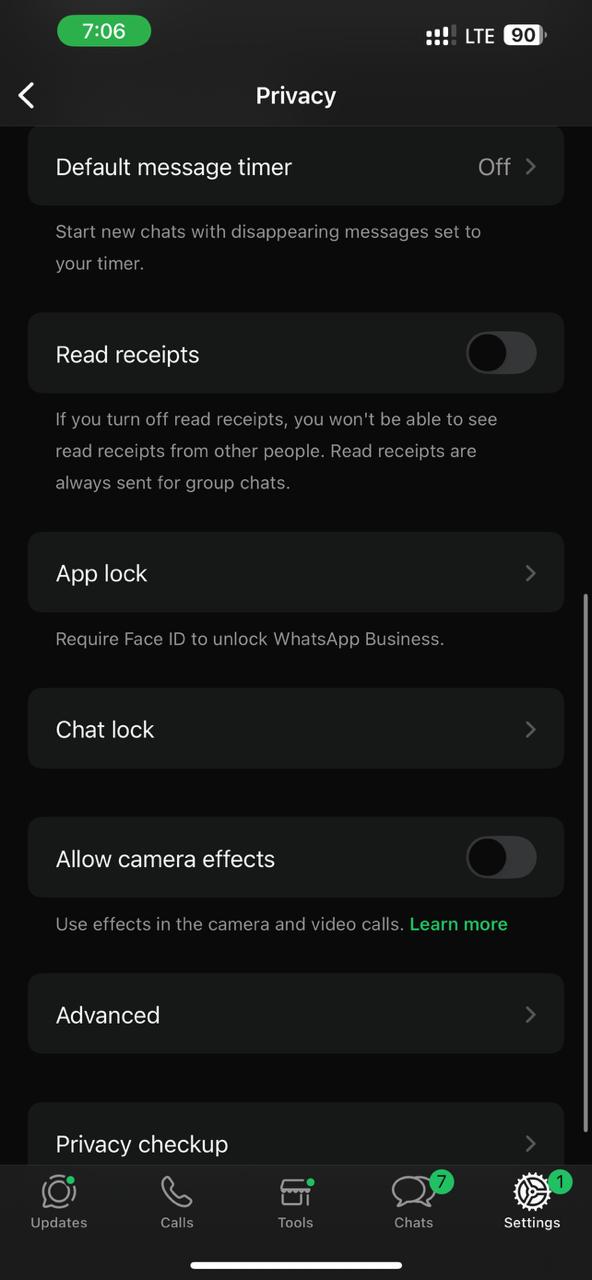
Disable Read Receipts after turning off WhatsApp last seen to look entirely private on WhatsApp. Read receipts are little blue ticks that indicate message readings. You won't know if others have viewed your messages if you turn them off. It's a basic but effective visibility control method. Here's how:
- Step 1. Open WhatsApp on your phone.
- Step 2. Visit "Settings > Privacy."
- Step 3. Scroll down to "Read Receipts."
- Step 4. Turn off toggle.
- Step 5. Turning off read notifications lets you read messages without notifications. Group chats still have blue ticks; therefore, this feature doesn't apply.
Mute Chats & Disable Notifications for Quiet Mode
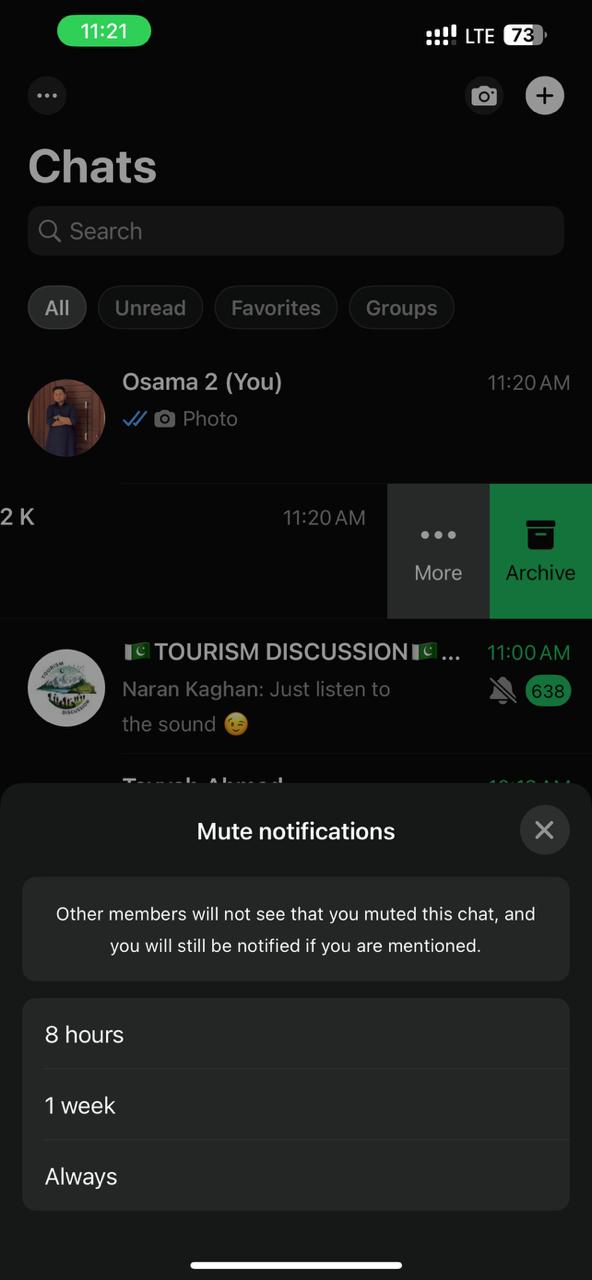
Muting chats after turning off WhatsApp's last seen increases privacy. Sometimes notifications call attention to your actions. Muting chats helps you focus, avoid distractions, and avoid seeming "online." Here's how:
- Step 1. Open the mute chat or group.
- Step 2. Tap and hold the chat. Select "Mute."
- Step 3. Choose "8 hours, 1 week, or Always."
Phone settings allow message preview disabling:
On Android: Navigate to "Settings > Notifications > WhatsApp > Lock Screen" and select "Hide sensitive content."
On iPhone: Select "Settings > Notifications > Show Previews."
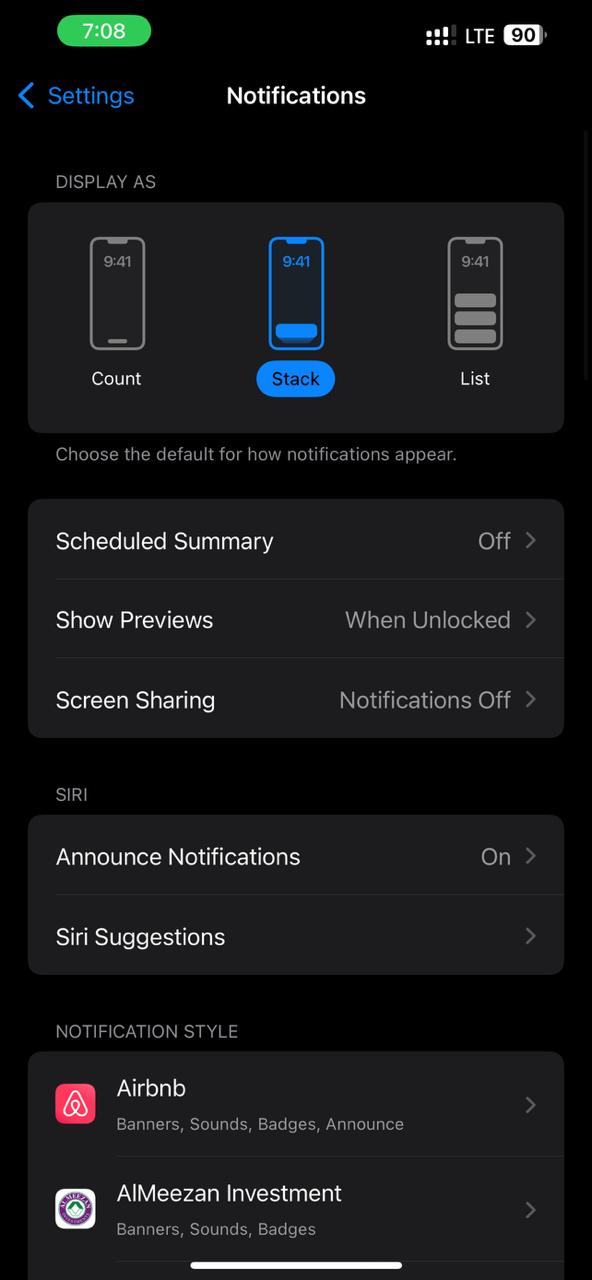
This approach hides message content on your screen, keeping you private even when others can see your phone. You can now check messages whenever you choose, without being online or feeling pushed to reply.
Turn Off "Status Updates" Visibility
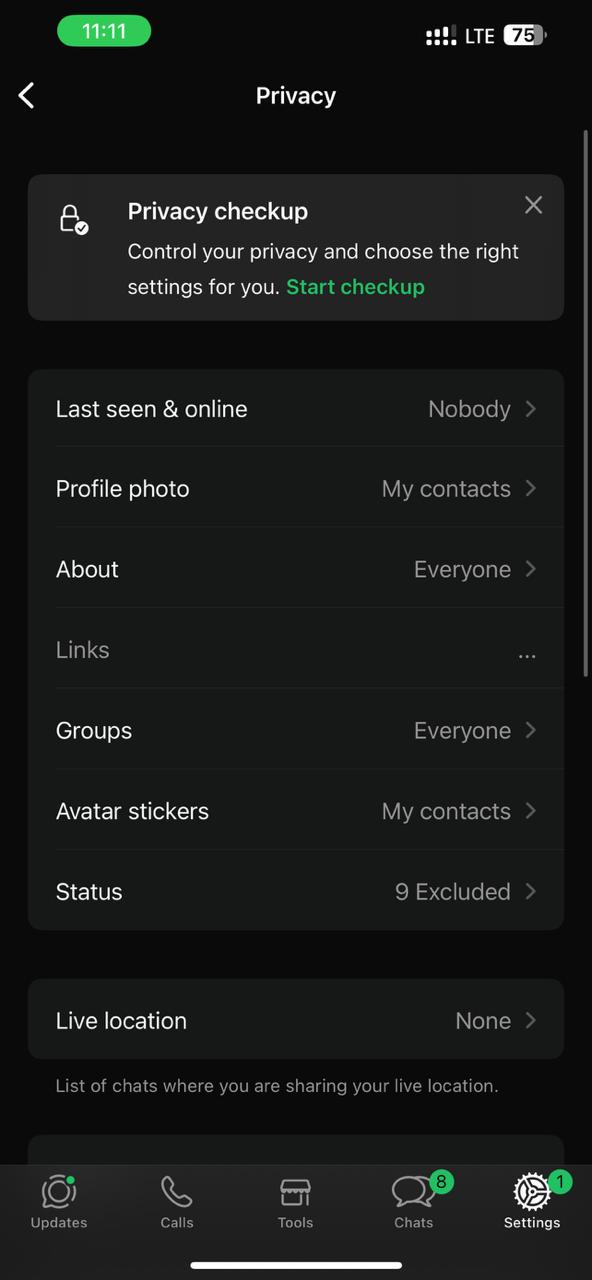
WhatsApp Status updates are another indicator of visibility. Even if you switch off your WhatsApp online status, others may see your daily posts. Change your Status privacy to control who sees your updates. Follow these steps:
- Step 1. Launch WhatsApp, then "Settings > Privacy > Status."
- Step 2. Select one of these:
- My contacts—all saved contacts can see updates.
- My contacts except... hides your status from the people you choose.
- Only share with: Share updates just with selected persons.
- Step 3. Mute others' status updates to avoid distractions. Just long-press the contact's status and tap Mute.
Part 4: Advanced: Going Fully Offline Without Logging Out
These advanced privacy methods let you check chats discreetly while remaining invisible.
Use Airplane Mode to Read Messages Offline
Airplane Mode is a simple way to temporarily turn off WhatsApp's active status. You can view or react to messages without appearing "online" or changing your last seen time with this method.
How to do it:
- Avoid opening WhatsApp when you get a message.
- First, enable Airplane Mode in your phone's quick settings. Disables Wi-Fi and mobile data.
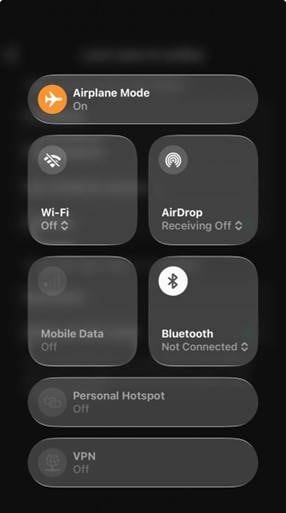
- Now open WhatsApp and view messages freely. You may type answers.
- When finished, close the app and remove it from your recent apps.
- Turn off Airplane Mode to reconnect to the internet.
Returning online will send your messages immediately, but you'll never appear active while reading them. A simple yet effective way to turn off WhatsApp's online status or appear offline without signing out.
Use Background Data Restriction for More Control
Restricting WhatsApp's background activity is another wonderful privacy approach. This prevents the program from sending or receiving data while closed so that it won't appear "online" by mistake.
Follow these steps:
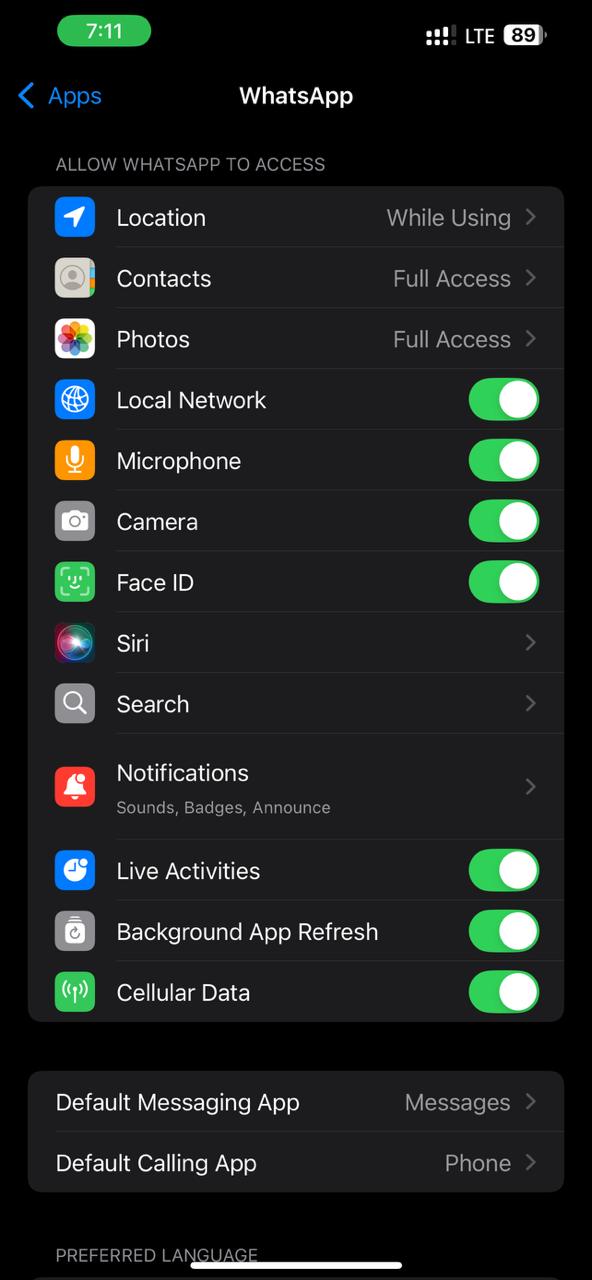
- Step 1. Go to phone "Settings."
- Step 2. Go to "Apps > WhatsApp > Cellular Data."
- Step 3. Limit background data on Android or stop Background App Refresh on iPhone.
- Step 4. WhatsApp will now remain inactive until you open it. This is ideal for those who want to turn off WhatsApp's online status without removing the app.
Manage App Permissions for Silent Mode
WhatsApp permissions can be set to prohibit device interaction for complete privacy. This keeps the app silent and prevents accidental "online." Follow the steps below:
- Step 1. Visit "Settings > Notifications>WhatsApp"
- Step 2. Toggle Allow Notifications off to prevent WhatsApp from sending any alerts.
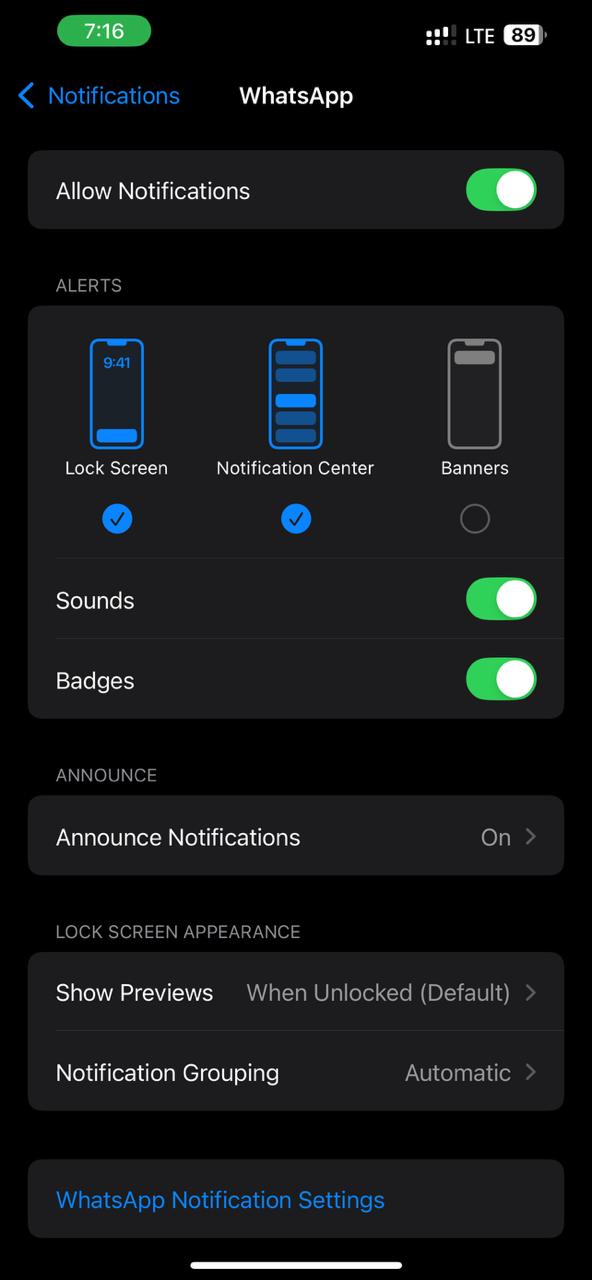
With this configuration, you won't be distracted by texts or calls, and you can keep your privacy even after turning off WhatsApp's last seen.
Combine with Tracover for Smart Privacy Awareness
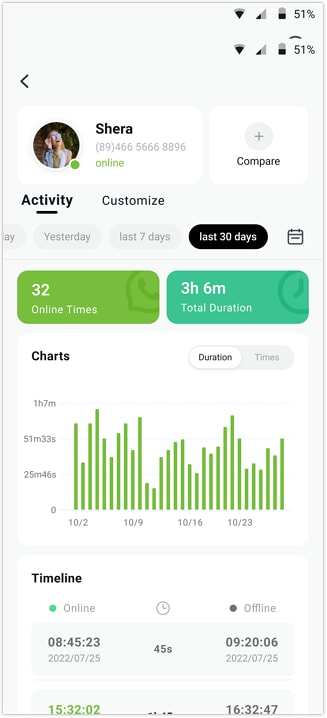
Tracover's WA Tracker can help you understand your WhatsApp usage trends, rather than just disguise them. Tracover lets you monitor WhatsApp activity trends and safely without changing your visibility.
Bonus Tip: Automatically Track WhatsApp Last Seen with Tracover
If you've learned how to turn off Last Seen on WhatsApp, you may still want to know when others are active without revealing your own presence. Here comes Try It Free. Tracover is a smart and secure solution for real-time WhatsApp online status monitoring. Its WA Tracker tool helps users analyze online activity trends to monitor family members, manage business communication, or better understand usage habits.
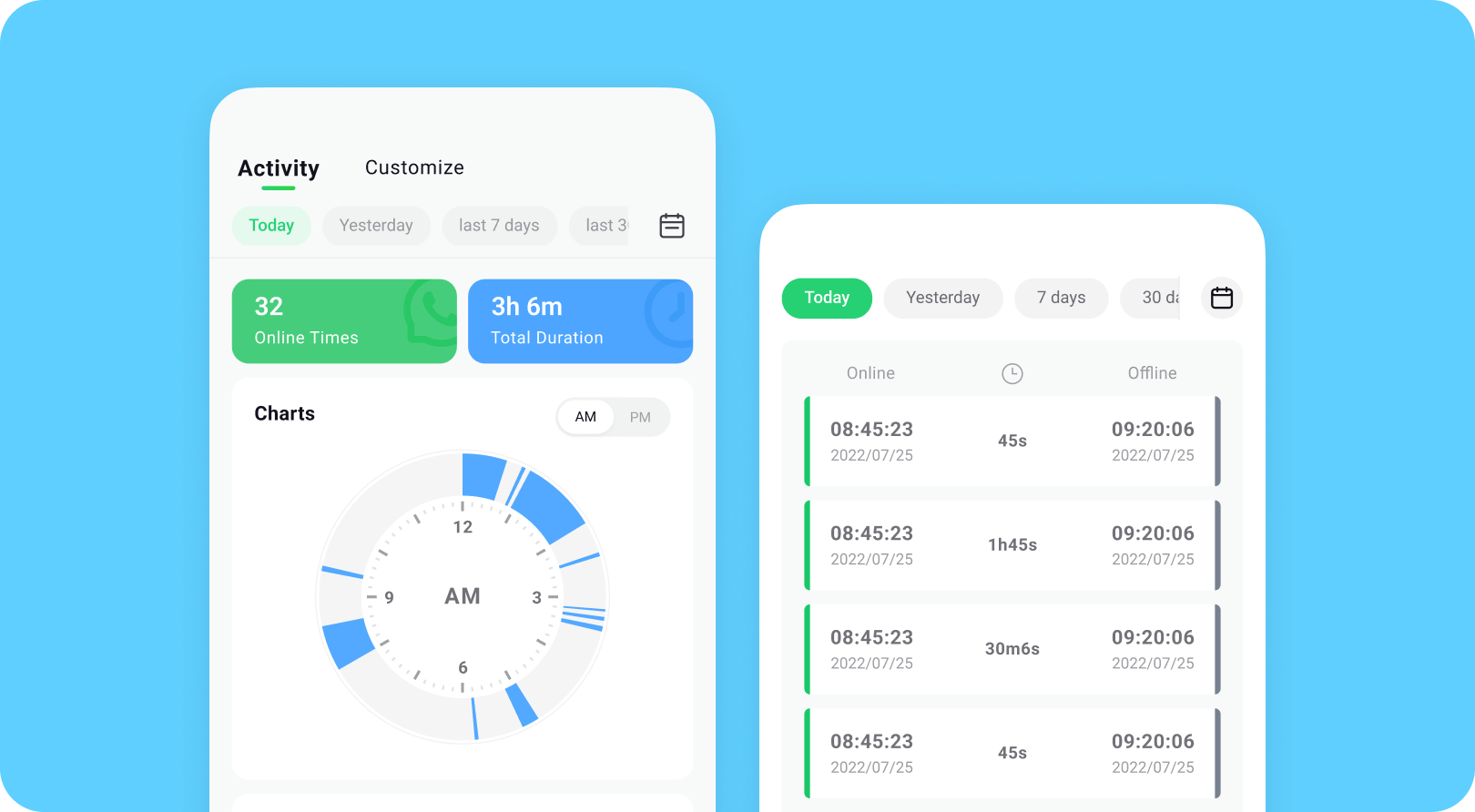
Tracover doesn't affect WhatsApp's core features or privacy settings, unlike hazardous third-party mods. It provides accurate insights into people's online and offline patterns without affecting your visibility. You may see when someone was last seen, how often they're active, and visual charts of their daily or weekly usage.
Tracover WA Tracker lets you:
- View exact contact online/offline timestamps.
- Monitor their daily activity.
- Alert you immediately when their status changes.
- Compare online times among contacts to find overlap or shared activity windows.
- Setting up is easy and requires no technological setup.
Tracover App (Android)
WhatsApp Toolkit: Transfer, Track & Recover
- View Once Saver: Permanently save those disappearing photos & videos.
- WA Tracker: Get real-time alerts for contacts' online status & activity.
- WA Transfer: Effortlessly backup & transfer your WhatsApp chats and media.
- File Transfer: Quickly and freely share files across different phones.


Tracover Quick Steps to Track WhatsApp Online Status
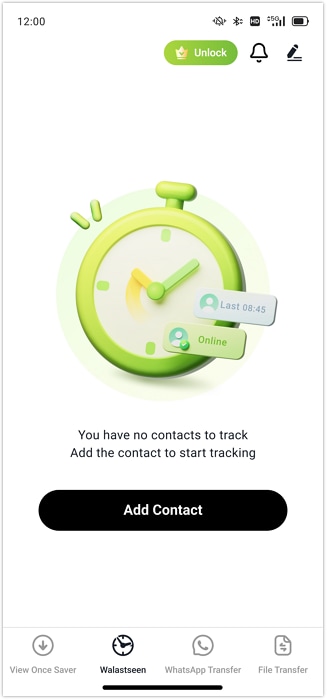
- Step 1. Launch the Tracover app on an Android phone, then select "WA Tracker." Include WhatsApp numbers to track by clicking Add Contact. After adding a person, tap "Start Tracking" to see when they're online and how long.
- Step 2. Tracover requires linking to WhatsApp for accurate tracking. Tap "Link WhatsApp," verify your phone number with an SMS code, and accept secure access when prompted.
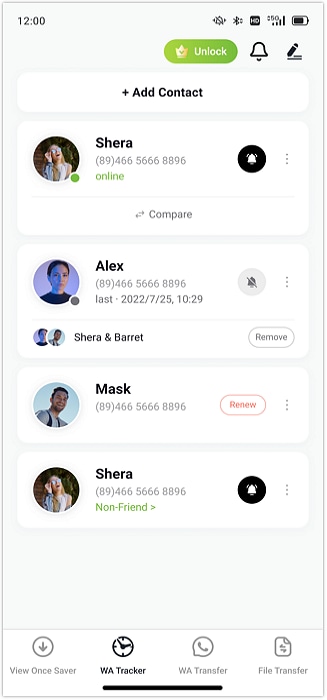
- Step 3. Launch WA Tracker's contact list after linking. Tracking many persons lets you spot usage patterns over time.
Part 5: Final Tips for a True WhatsApp "Offline" Experience
After turning off last seen and online status on WhatsApp, here are a couple more ways to keep private. Enjoy a truly "offline" experience while keeping WhatsApp secure with these recommendations.
- Disable Read Receipts ("Blue Ticks")
Deactivate read receipts if you want to remove the indication that you have read people`s messages. By going to "Settings > Privacy > Read Receipts" and turning off the option, you can keep reading messages without people knowing. - Hide "About" and Profile Photo
By hiding your profile photo and About, you do not only keep strangers away but also bolster your privacy. Go to "Settings > Privacy > Profile Photo/About > My Contacts or None" and make the changes. - Avoid Third-Party Mods
Unjustified WhatsApp modifications that promise to hide your online WhatsApp status should be ignored. Don't put your account and privacy at risk. - Keep WhatsApp Updated
If you want to benefit from the latest privacy options, like more secure means to hide your online status and appearing offline on WhatsApp, then you need to update your app regularly.
Conclusion
In order to control privacy on WhatsApp, hiding last seen, masking online status, and making it look like you are offline even when online are the most important things one should be able to do. By mixing the privacy settings that WhatsApp offers with ingenious methods such as employing Airplane Mode, notification previews, and muting chats, you are not only able to protect your visibility but also gain the tranquility which comes with undisturbed focus.
If someone would like to delve more into habits without sacrificing privacy, then Try It Free is a reliable and professional way. It opens the door to the observation of trends in online and offline activities, following a large number of contacts, and getting insights through smart analytics.
FAQs
-
Q: How do I turn off last seen on WhatsApp?
A: Open WhatsApp and go to Settings → Privacy → Last Seen and Online. Then choose Nobody or limit who can see your last seen activity.
-
Q: Can you turn off last seen on WhatsApp completely?
A: Yes. WhatsApp allows you to hide your last seen from everyone by selecting Nobody in the Last Seen privacy settings.
-
Q: Will people know if I hide my last seen on WhatsApp?
A: No. WhatsApp does not notify contacts when you change your last seen visibility settings.
-
Q: Can I appear offline on WhatsApp while still using the app?
A: Yes. By turning off last seen and online visibility, disabling read receipts, and muting chats, you can appear offline while still using WhatsApp normally.









Julia Becker
staff Editor
Generally rated4.5(105participated)