



 TL;DR:
A single grey tick on WhatsApp confirms a message is sent but undelivered, commonly caused by the recipient's phone being turned off, lacking an active internet connection, or having background data disabled, rather than indicating you are blocked.
● Genuine indicators of being blocked require multiple conditions, including the inability to view the contact's profile photo updates, "last seen" status, and status updates, combined with calls failing to ring or connect.
● If a message delivery delay originates from the sender's device, the issue can be resolved by switching between Wi-Fi and mobile data, completely closing the app from the background, or installing the latest WhatsApp version to fix syncing bugs.
● Using the third-party Tracover app to monitor a contact's live online timestamps and daily activity trends requires users to securely link and authorize their own WhatsApp account via a verification code before tracking begins.
Ask AI for a summary
 ChatGPT
 Perplexity
 Gemini
 Claude
 Grok
Grok
Seeing only one tick on WhatsApp but not blocked can confuse many users. It does not always mean the person hasn't received your message yet. Network issues, app glitches, or privacy settings can also cause this problem. This article explains the reasons, shows simple fixes, and helps confirm message status.
Sometimes, a blocked one tick on WhatsApp may look similar to a delivery delay. This guide will explain the difference, show easy ways to check messages, and give solutions. By understanding these causes, you can handle one-tick messages calmly and correctly. This guide also includes a pro tip, on using the Tracover app to Try It Free.
In this Article

Part 1: What One Tick on WhatsApp Means
Seeing one tick on WhatsApp but not blocked can make users worry unnecessarily. Understanding the tick system helps you know message status clearly.
WhatsApp uses ticks to show delivery and read status:
| Tick Status | Meaning | Notes |
|---|---|---|
| One grey check on WhatsApp | Message sent but not yet delivered | Could be due to network issues or recipient phone off |
| Two grey ticks | Message delivered to recipient's phone | Recipient has not opened the message |
| Two blue ticks | Message read by recipient | Indicates message has been seen |
A one grey check on WhatsApp does not always mean you are blocked. It often appears in normal situations, like when the recipient's phone is off, the internet is unavailable, or WhatsApp hasn't synced yet.
Part 2: Why You See Only One Tick but You Are NOT Blocked
Seeing a WhatsApp one tick but not blocked can worry many users, but it often happens for normal reasons. A single tick does not always mean the recipient is ignoring or blocking you. Here are common causes for a one gray check on WhatsApp:

A. Recipient Device Issues
These are the most common reasons a WhatsApp message stays at one tick:
- Phone is off or battery dead
Messages remain a single tick until the device turns back on. - No internet connection
If the recipient is offline, WhatsApp cannot deliver the message. - Weak or unstable signal
Poor network quality delays message delivery temporarily. - Airplane mode enabled
The device cannot connect to WhatsApp servers while offline. - Recently switched phones
WhatsApp may take time to sync messages when a user moves to a new device.
B. App or System Settings
Certain settings or outdated software can also cause a WhatsApp one grey check:
- Background data disabled
WhatsApp cannot refresh or receive messages in the background. - Outdated WhatsApp version
Older builds may have syncing or delivery bugs, causing delays. - Low storage or insufficient RAM
System lag may prevent WhatsApp from updating message delivery status promptly.
C. External or Temporary Factors
Even when both users' devices work normally, delays can still happen:
- WhatsApp server issues
Temporary outages or maintenance can cause messages to stay on one tick until service is restored.
All these situations can cause a one gray check on WhatsApp, even though your messages are safe, and the recipient can still receive them. Understanding these reasons helps reduce worry and shows that a single tick is often temporary.
BONUS TIP: Use Tracover to Track Other's WhatsApp Activity
Aside from understanding the reasons for only one tick on WhatsApp but not blocked, it is also important to learn how to use Tracover to track WhatsApp activity safely. Try It Free is a secure tool that monitors online status and activity without accessing private messages.
Tracover App - WA Tracker
Track WhatsApp Online Activites Automatically
- Instant Alerts: Real-time notifications for user sign-ins.
- Custom Schedule: Set precise tracking hours and days.
- Chat Compare: Reveals shared online patterns between users.
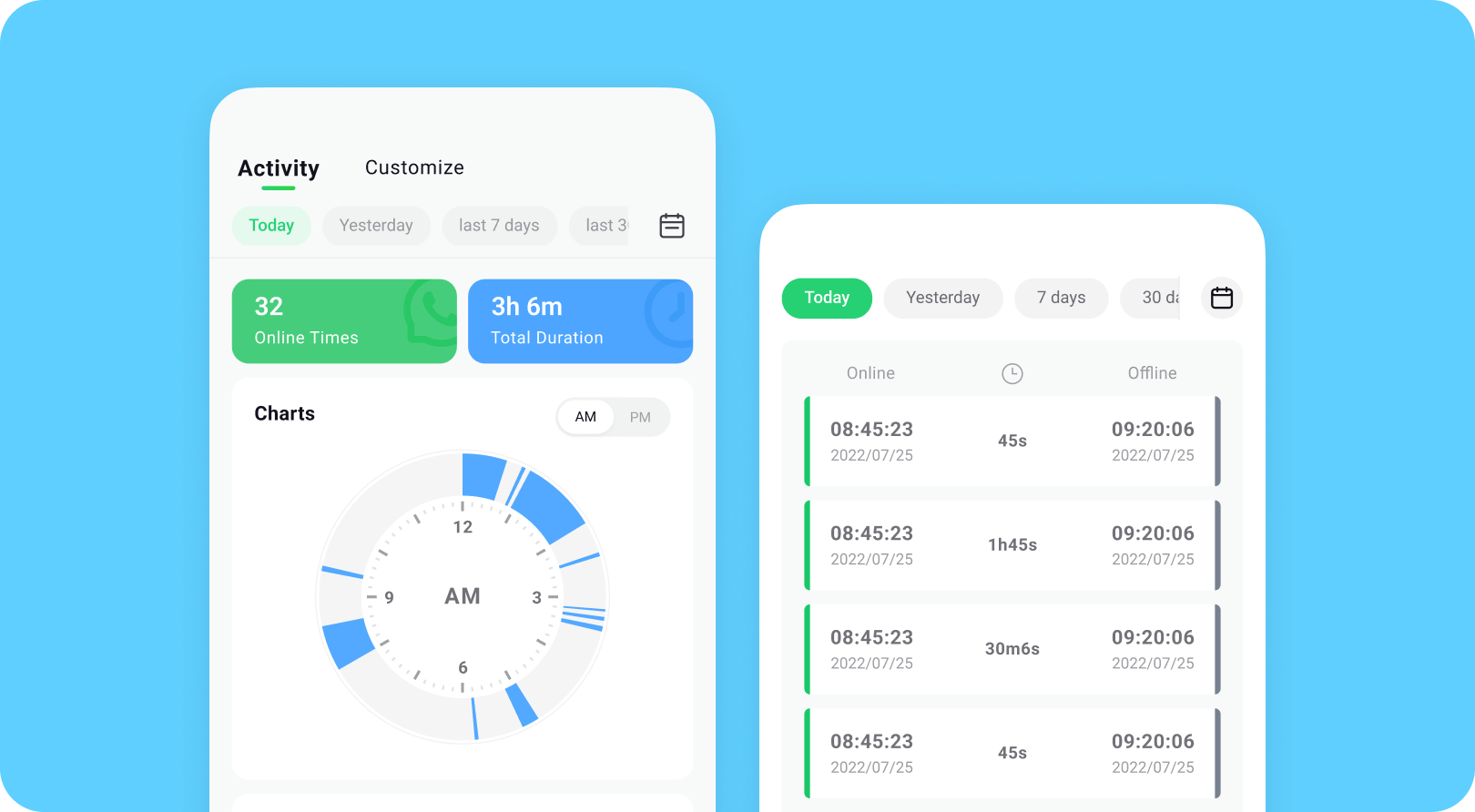
- Weekly Trends: Visualizes user activity in simple charts.
- Status History: Stores online logs for review and comparison.


Here's how to use Tracover's WA Tracker:
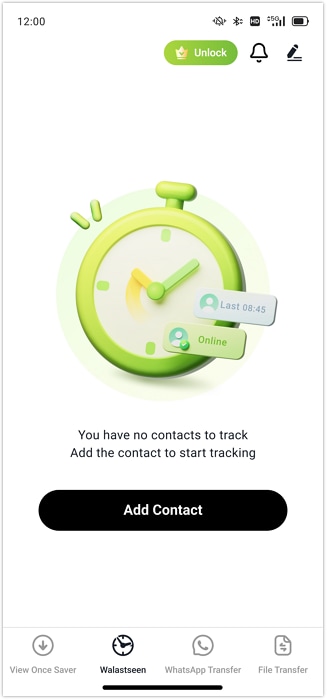
- Step 1: Add WhatsApp Contacts in Tracover
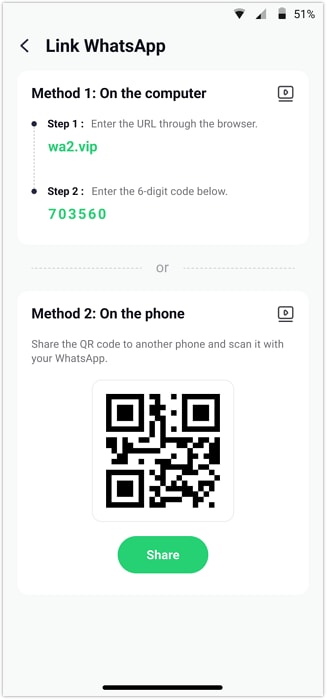
- Step 2: Link Your WhatsApp Account Securely
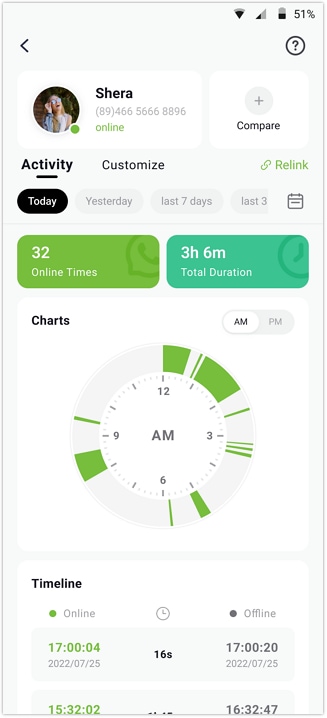
- Step 3: Start Tracking Online and Offline Status
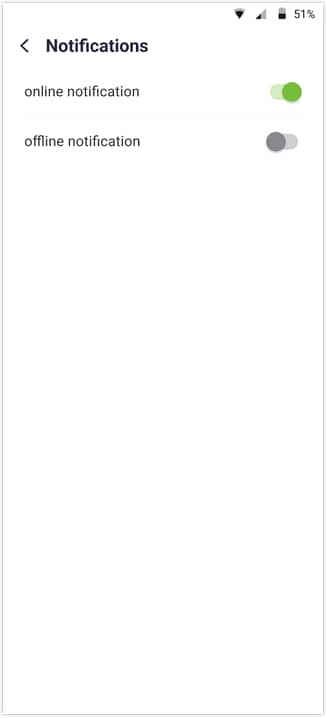
- Step 4: Enable Notifications and Customize Tracking
Open the WA Tracker in Tracover and add the contacts you want to monitor. You can choose from your phone list or enter the number manually.
Complete the one-time linking process to connect your account. Authorize access, verify your phone number, and enter the verification code.
Tap a contact's name in WA Tracker, then open the Activity tab. You can now view live online/offline timestamps and daily activity trends.
Turn on online/offline alerts in Notification Settings. Set custom tracking hours or compare activity between multiple contacts for insights.
Part 3: How to Fix WhatsApp One Tick Issues
Sometimes, a one gray check on WhatsApp happens because of the sender's device, app glitches, or connectivity problems. The following methods can help fix the issue and ensure messages are delivered.
Method 1: Check Your Internet Connection
A weak or unstable internet often causes a one gray check on WhatsApp. Even if your message is sent, it may not reach the recipient until your connection is stable. A strong internet ensures messages are delivered.

Steps:
- Open your phone's Wi-Fi or mobile data settings.
- Switch between Wi-Fi and mobile data to test connectivity.
- Make sure your connection is stable before sending messages again.
- Retry sending the message to see if it updates from one gray check.
Method 2: Restart WhatsApp or Your Device
Temporary app or device glitches may cause a one gray check on WhatsApp. Restarting WhatsApp or your phone refreshes the app, closes background issues, and often resolves the delivery problem.

Steps:
- Close WhatsApp completely from the background.
- Restart your phone to refresh all connections and apps.
- Open WhatsApp and check the message status again.
- Send a new message to confirm if the one gray check changes.
Method 3: Update WhatsApp
An outdated WhatsApp version can lead to a one gray check on WhatsApp due to syncing and delivery issues. Updates fix bugs, improve performance, and ensure timely message delivery.

Steps:
- Open the Google Play Store or App Store on your device.
- Search for WhatsApp and see if an update is available.
- Install the latest version of WhatsApp.
- Open WhatsApp and send a message to check if the one gray check updates.
Part 4: How to Know If You're Actually Blocked
Seeing a WhatsApp one grey check can make users wonder if they are blocked. While a single tick may happen for normal reasons like network issues or phone settings, there are clear signs to distinguish between being blocked and not. Knowing these signs helps avoid unnecessary worry and ensures you understand message delivery correctly.

Signs suggesting you are blocked:
- No profile photo updates from the contact, even after a long time.
- "Last seen" or "online" status is never visible in the chat.
- All messages show a WhatsApp one grey check and never change to two ticks.
- Calls to the contact never connect or ring, no matter how many attempts.
- Status updates from the contact disappear completely from your feed.
- Messages you send remain undelivered for days, showing the single tick consistently.
Signs you are not blocked:
- Status updates from the contact still appear normally and update regularly.
- Calls ring and connect without any issues or interruptions.
- Profile photo changes are visible and update over time.
- Messages show two grey ticks, indicating successful delivery.
Conclusion
Seeing only one tick on WhatsApp but not blocked is usually caused by technical reasons. Most of the time, issues with the device, network, or app settings prevent messages from being delivered. Always check these factors first before assuming any problem with the recipient.
It's important to use WhatsApp and monitoring tools safely and responsibly. As a helpful bonus, Try It Free can track the online and offline activity of your WhatsApp contacts or save view-once messages for reference. Using it ethically ensures you stay informed without violating anyone's privacy.








Alice MJ
staff Editor
Generally rated4.5(105participated)