



 TL;DR:
Secretly tracking a WhatsApp user's location or reading their encrypted messages is impossible without consent, but you can monitor their online and offline activity patterns using Tracover.
● Native WhatsApp tracking is restricted to viewing 24-hour Status updates, observing group activity, checking Last Seen timestamps if privacy settings allow, or requesting consensual Live Location sharing that lasts between 15 minutes and 18 hours on Android and iOS.
● Tracover records online and offline timestamps, sends real-time sign-in alerts, and charts weekly activity trends, but requires you to physically link the target account by scanning a QR code to initiate monitoring.
● Third-party apps claiming to bypass end-to-end encryption or track secret GPS coordinates are fake or contain malware; parents requiring continuous location tracking should use dedicated parental control apps like FamiSafe.
Ask AI for a summary
 ChatGPT
 Perplexity
 Gemini
 Claude
 Grok
Grok
How to track someone on WhatsApp is a frequently asked question these days, since many people want quick location/activity details for safety or peace of mind. However, real methods stay limited, and most apps online only make false claims that put privacy at risk.
Therefore, this guide cuts through the confusion about Try It Free and shows what works and what does not, based on real WhatsApp rules. You also see how WhatsApp protects user data and why some paths stay blocked. If you want to find a lost phone, check a child's safety, or confirm a location for a real reason, this guide offers safe and clear steps.
In this Article

Part 1. Can You Track Someone on WhatsApp? What WhatsApp Actually Allows
When one asks how can I track someone on WhatsApp, another question that pops into mind is what type of tracking? Whether it's location or status, know that WhatsApp does not offer any hidden tool that tracks someone in secret or follows their steps without consent.

You only see what the person shares on purpose, or what they forget to hide, and that, only if their privacy rules allow it. Any attempt to go past this violates WhatsApp rules and, in many countries, also the law. So, before you know how to track someone on WhatsApp, learn what WhatsApp actually lets you see or do, versus what it does not allow:
| Aspect | Allows | Does NOT Allow |
|---|---|---|
| Location | Share your current or live location in a chat for a limited time with people you choose | Secret GPS tracking of others or viewing their location without permission |
| Online or Last Seen | Show online and last seen based on that person's privacy settings | Bypassing hidden last seen or online visibility, or accessing full activity history |
| Messages and Calls | End-to-end encrypted chats and calls between participants | Reading other people's chats, calls, or spying on conversations |
| Status | View the Status of contacts who include you and see who viewed your own Status | Viewing the Status of people who block or exclude you |
| Read Receipts | Blue ticks appear when both sides keep read receipts on | Forcing read receipts when they are turned off, except in groups |
| Profile Info | See profile photo, about info, or number if shared with you | Accessing hidden profile info or extra personal data |
| Groups | Chat inside groups you are a member of, and view the member list and group info | Reading messages in groups you are not part of or in hidden groups |
| Account Control | Block or report users and manage who can add you or adjust privacy settings. | Forcing others to share data, hacking, or controlling their accounts |
Part 2. How to Track Someone on WhatsApp: The Most Reliable Method (Tracover)
With the strict regulation of WhatsApp on tracking, users look for a safe solution on how to track someone with WhatsApp, and Try It Free fills this void. Users can rely on this chat application to track online activity and receive instant alerts when someone goes online/offline. Moreover, one can analyze online patterns and view last seen timestamps to understand activity timelines. The app also lets you seamlessly compare usage across contacts.
Users can also customize the tracking hours for hours and weeks, which ultimately fills the gap for status and location tracking. This means that, with others, online/offline patterns, you can get a hint of their activity, even though you can't track it. In addition to offering you a solution to track online/offline activity, the app also securely manages and backs up chat data.
Tracover App - WA Tracker
Track WhatsApp Online Activites Automatically
- Instant Alerts: Real-time notifications for user sign-ins.
- Custom Schedule: Set precise tracking hours and days.
- Chat Compare: Reveals shared online patterns between users.
- Weekly Trends: Visualizes user activity in simple charts.
- Status History: Stores online logs for review and comparison.


Guide to Track Online/ Offline WhatsApp Status with Tracover
While versatile, Tracover also serves as a media saver and a chat app transfer app. So, since the concern is to learn how to spy on someone WhatsApp offline/online status, here is the simple guide for this app:
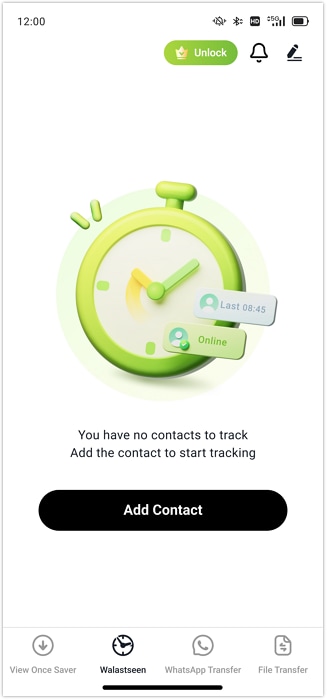
- Step 1. Launch Tracover and Add the Contact
In the app, tap the "Add Contact" button, then tap the "Add" option next to the contact you want to track.
- Step 2. Link with WhatsApp to Start the Tracking Process
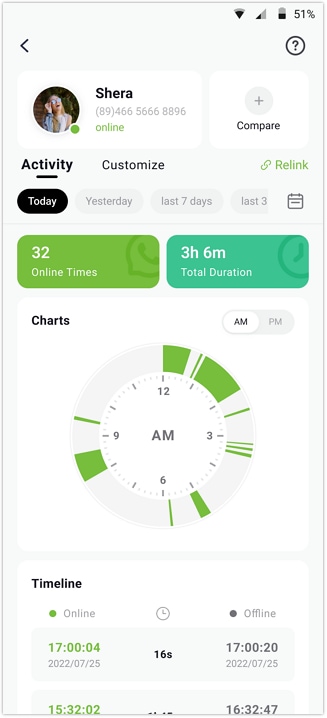
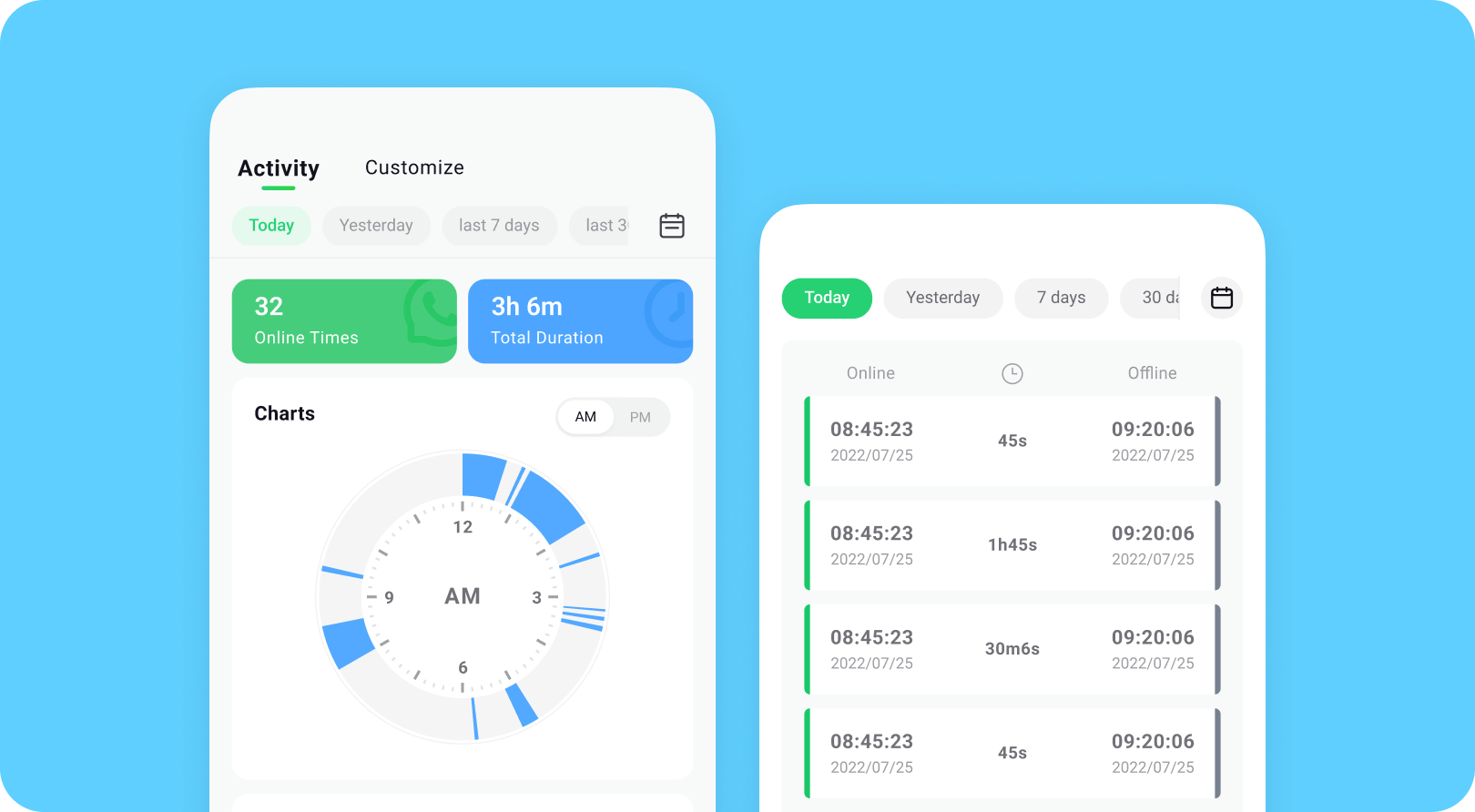
Once added, press the "Start Tracking" button, then choose the "Link WhatsApp" option in the new interface. To track the targeted person, scan the QR code and start monitoring in the "Activity" tab. Locate the "Online/Offline" timestamps and monitor the daily or weekly activity trends in the timeline chart.
- Step 3. Enable the Online or Offline Notifications
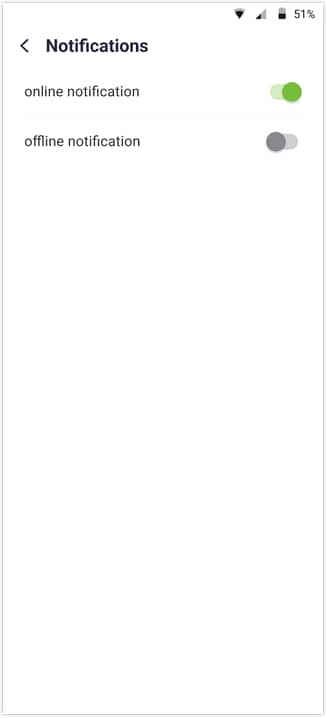
To receive online/offline notifications, head to the "Profile" and select the "Notification Settings" option. There, choose between "Online" or "Offline" options as per your preferences.
Where Tracover Helps: Key Practical Uses
While learning how can I spy on someones WhatsApp, adhere to the listed use cases and understand where this app proves to be handy:
| Feature | Use Case | Key Benefit |
|---|---|---|
| WhatsApp Online Status Check | Parents, teams, and personal coordination | See active hours and online patterns |
| Real-Time Online Alerts | Parents, support teams, time-zone users | Get quick alerts when someone appears online |
| Multi-Contact View | Families, teams, and client management | Compare several contacts on one screen |
| Device-to-Device File Transfer | Phone upgrades, cross-platform moves | Move media and chat files without using the cloud |
| Media Saving | Receipts, memories, important evidence | Keep photos/videos even if the sender deletes them |
| Chat Backup/Export | Work records, personal archive | Store full chat history safely and offline |
| Privacy-Focused Setup | Journalists, lawyers, sensitive users | Local control of data with no server risks |
Part 3. 4 Other Basic Ways to Track WhatsApp User Activity
Other than WhatsApp status tracking apps, here are some basic ways you can try to track WhatsApp user:
1. Check the Online/Last Seen Status
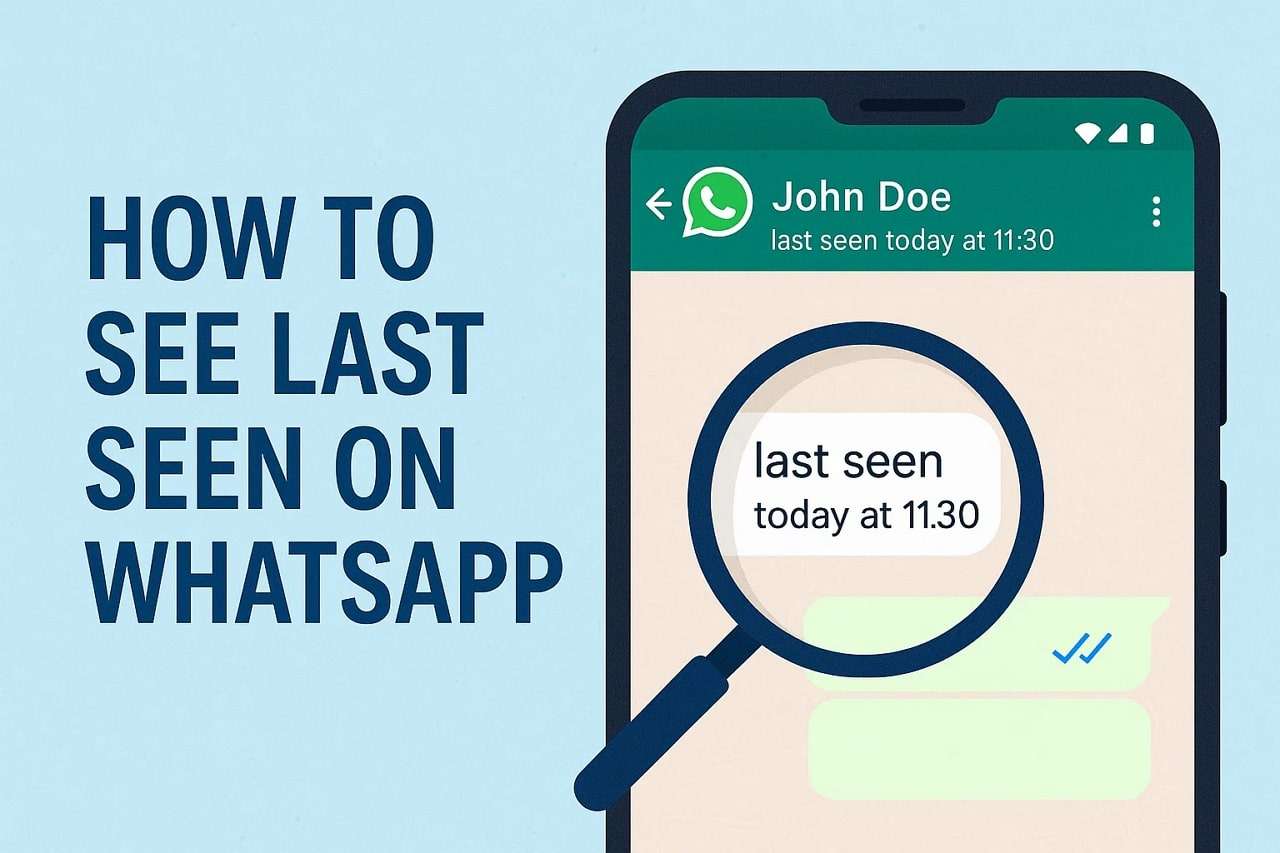
Check online/offline status because it shows when a person has the app open and when they last used it. It works inside WhatsApp without extra tools, as long as the person does not hide these details in privacy settings. Plus, these status details work the same on Android, iPhone, and WhatsApp Web/Desktop. This method depends on the other person's privacy choices, and it works best when used with respect.

2. Observe Their Group Activity
To learn how do you track someone on WhatsApp, you can also observe the group activity. You only see what the app shows, like messages, media, reactions, "typing…" status, or join/leave events. Plus, even if someone hides their last seen, group actions can still indicate when they are online. This helps friends, families, or teams coordinate better and time messages when the person is more likely to reply.
3. View Their Story Time
Watch when someone posts or updates their WhatsApp Status because it uses only what the app shows. You can see who posted, when it was posted, and if they viewed your status. Since tory has a timestamp and lasts 24 hours, it forms a timeline of recent activity. Thus, frequent posts show a person is active, while long gaps may signal reduced use.

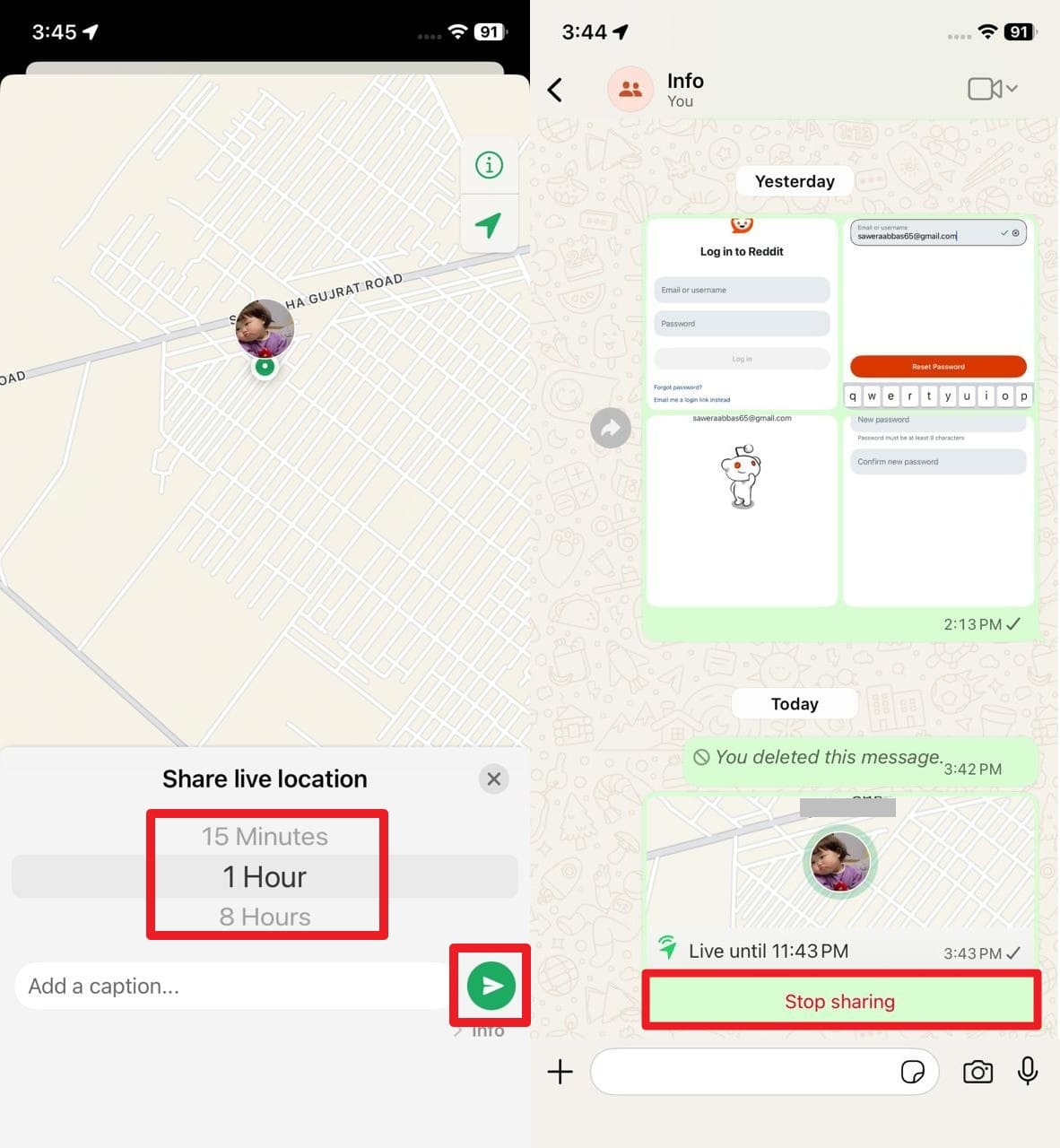
4. Live Location (With Consent)
To track WhatsApp users, sometimes it's best to apply legitimate ways and ask for consent. For that, a person must choose to share it for a set time, and it stops automatically when the time ends, or they tap "Stop sharing." Only the people in that chat see the location, and it is fully encrypted. Thus, this makes it a safe and legal method for temporary tracking, not a hidden tool, as guided:
For Android
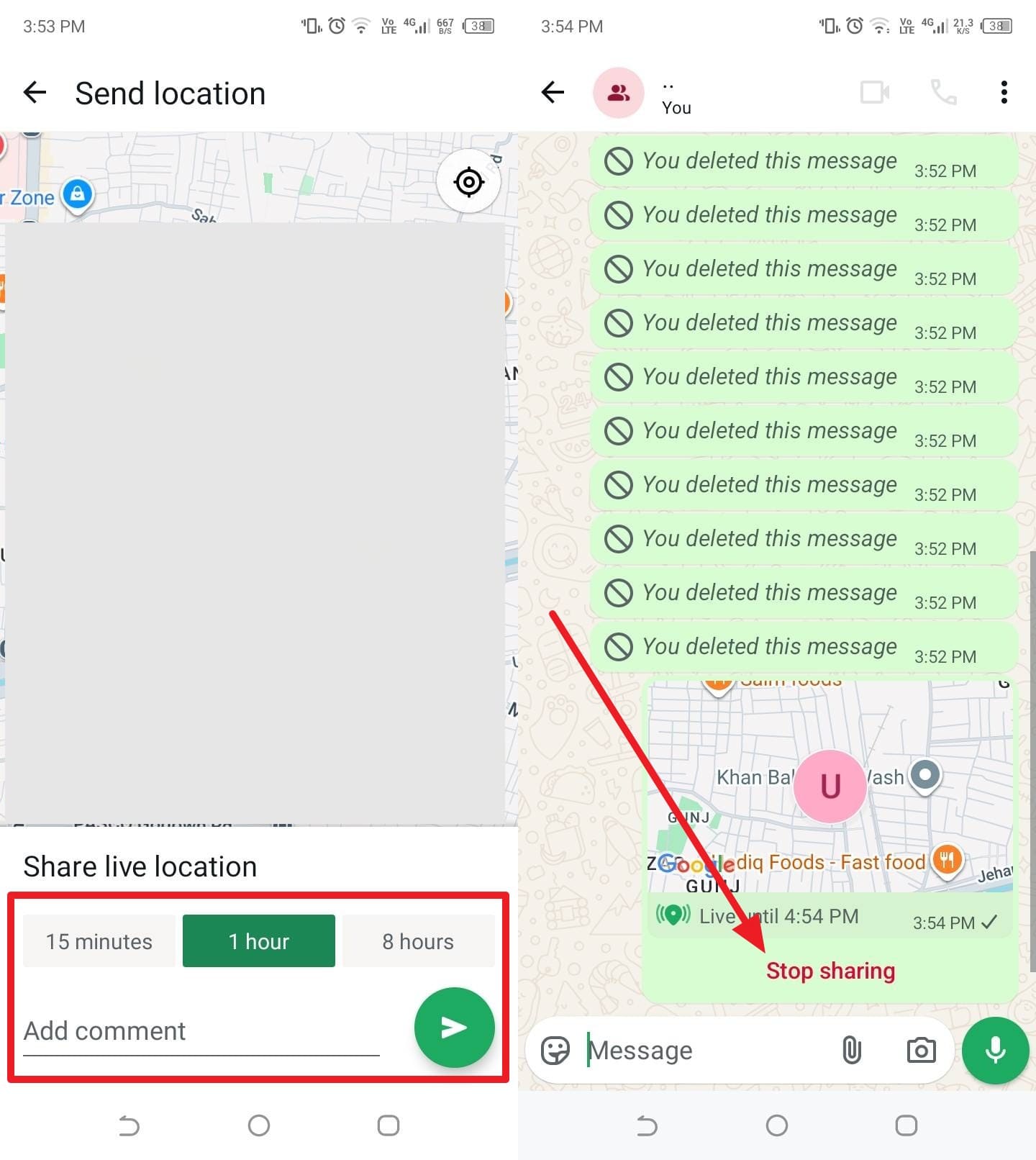
- Step 1. As the sender, select the "Attach File" icon in your chat's text box, then choose the "Location" option to select "Share Live Location."

- Step 2. After that, pick the duration they tend to share the live location and press the "Send" icon. As you are done tracking, ask them to hit the "Stop Sharing" button on the location page to end the session.
For iOS
- Step 1. To ask for the location, ask the sender to open your chat and tap the "+" icon next to the text box. On the menu that appears, pick the "Location" option and choose the "Share Live Location" option.

- Step 2. Now, ask them to choose a duration between 15 minutes and 18 hours, then press the "Send" icon. Now that you have tracked their location and want to end the session, ask them to tap the "Stop Sharing" button on the location page.
Part 4. If Your Goal Is Safety or Parenting
To track WhatsApp users, if your main goal is child safety, WhatsApp can help with live location or check-ins. However, it does not provide hidden or forced tracking of a child's or anyone else's phone. Thus, for constant parent-controlled tracking, it is better to use a dedicated app or parental control app like FamiSafe, not WhatsApp.

Part 5. What Not to Do: Myths and Illegal Methods
After knowing how to track someone on WhatsApp, no matter if it's your child, this section suggests some precautions while debunking the tracking myths:

Myths About WhatsApp Tracking: What People Believe but Should Not
- "A Secret Code Can Unlock Someone's Location."
There is no code or hidden trick that shows a person's real-time location on WhatsApp. Any video or post that claims this only spreads false ideas. - "A Special App Can Read Anyone's Chats."
No app can break WhatsApp's encryption, and any tool that promises full chat access is fake, unsafe, or full of malware. - "Turning Off Last Seen Helps Track Others Better."
Your privacy settings only control your account and do not give you any extra power to track someone else. - "Group Activity Reveals Full Private Behavior."
Group messages show basic activity inside that group, not full movement, private chats, or phone use outside WhatsApp.
Illegal WhatsApp Tracking Methods to Avoid & Safe Alternatives You Can Use
| What To Avoid (Illegal or Risky) | Safer Alternative |
|---|---|
| Spyware or stalker apps on someone else's phone | Use WhatsApp Live Location and family groups with clear consent. |
| "Hack WhatsApp with number" websites | Ask the person to share information directly or use official contact methods only. |
| Phishing links meant to capture codes or location | Never ask for codes and rely on consensual check-ins and live location. |
| Reading backups or WhatsApp Web without permission | For children, use transparent parental control or family locator apps with their knowledge. |
| Aggressive last seen or online trackers used for stalking | In case structured monitoring is needed for parenting or usage patterns, use a reputable tracker like Tracover with clear consent. |
| SIM swapping or carrier tricks to intercept SMS codes | If an account is compromised, use WhatsApp's official recovery and two-step verification instead of DIY interception. |
Conclusion
To wrap up, this guide has given all the answers to those who question how to track someone on WhatsApp. So, review the basic solution since WhatsApp limits tracking, and learn what makes Try It Free an ideal tracker for all to track online or offline status. This helps you stay informed while still respecting privacy and rules of consent.
FAQs
-
Q: Does WhatsApp notify someone if I check their profile or status often?
A: WhatsApp itself does not notify users when someone views their profile, status, or about info. Therefore, Tracover lets you watch activity patterns without alerting anyone, safely within WhatsApp rules and privacy.
-
Q: Can I see who someone chats with or how many messages they send?
A: No, WhatsApp does not show chat partners or message counts to any other user. So, any app claiming to reveal this information is unsafe, fake, or illegal and must be avoided.
-
Q: Does "online" always mean they are talking to someone?
A: No, "online" only shows that WhatsApp is open and the user is connected. They may not read or reply to messages even if their status shows active now.










Jane Lunes
staff Editor
Generally rated4.5(105participated)