



 TL;DR:
A WhatsApp single tick while a contact appears online indicates the message was sent but blocked from delivery by network drops, disabled background data, or the recipient intentionally using offline reading methods.
● You can read incoming messages without triggering a second delivery tick by turning on Airplane Mode before opening WhatsApp and ensuring the app is completely closed before reconnecting to the network.
● A persistent single tick confirms blocking only if the contact's profile photo disappears and calls fail to connect; visible status updates or profile photos indicate a temporary delivery delay.
● The third-party Tracover app bypasses delivery receipts entirely by automatically logging exact online/offline timestamps, generating activity charts, and saving view-once messages without accessing the private chats directly.
Ask AI for a summary
 ChatGPT
 Perplexity
 Gemini
 Claude
 Grok
Grok
Seeing a WhatsApp single tick but online can make users feel confused fast. A single tick means the message was sent but not delivered. This can still happen even when the contact looks online. This guide explains the reasons and helps you check message delivery clearly.
This guide explains the reasons and helps you check WhatsApp message delivery clearly. You will learn how to show one tick on WhatsApp for more control. These methods help you manage your visibility without causing problems. In addition, this guide introduces an app called Tracover, which tracks WhatsApp online status safely without reading messages. It gives helpful context while keeping your privacy fully protected.
In this Article

Part 1: What WhatsApp Single Tick but Online Means
WhatsApp uses a simple tick system that helps explain your message status clearly. It shows if messages were sent, delivered, or read, even with WhatsApp single tick but online. Understanding this system helps avoid confusion and manage expectations when messaging contacts.
| Tick Status | Meaning |
|---|---|
| One grey check | A single grey check means the message has left your device but not reached the recipient. This can happen if the recipient's phone is off, has no internet, or network issues exist. Even if the contact appears online, the message may remain a single tick until delivered. |
| Two grey ticks | Two grey ticks mean the message has been delivered to the recipient's phone but not yet read. The message is successfully on their device, but they may not have opened WhatsApp or seen it yet. |
| Two blue ticks | Two blue ticks indicate the message has been read by the recipient. This confirms the contact opened WhatsApp and viewed your message. |
Being online does not guarantee delivery because connections or settings may block messages. Other factors, like network issues or app updates, can also prevent messages from arriving.
Part 2: Reasons You See a WhatsApp Single Tick While Online

Seeing WhatsApp single tick but online can be confusing and worrying for some users. It usually happens because of issues with the device, app, or network. Understanding these common reasons can help you troubleshoot and know why messages are not delivered immediately.
Common causes include:
- The recipient's phone is off, or the battery has completely died.
- No active internet connection, or the network is very weak.
- Airplane mode is turned on, blocking all message delivery.
- Background data is disabled, or WhatsApp is restricted on the device.
- The WhatsApp app is not updated to the latest version.
- Device storage or RAM issues slow down message processing.
- Temporary WhatsApp server delays can prevent messages from being delivered.
- The contact recently switched devices, causing a temporary delivery delay.
Bonus Tip: Monitoring WhatsApp Activity With Tracover
Aside from knowing how to show single tick on WhatsApp, it's important to know Try It Free. This tool safely tracks online and offline patterns without reading anyone's messages. It helps you understand why messages may stay on a single tick even when the contact appears online.
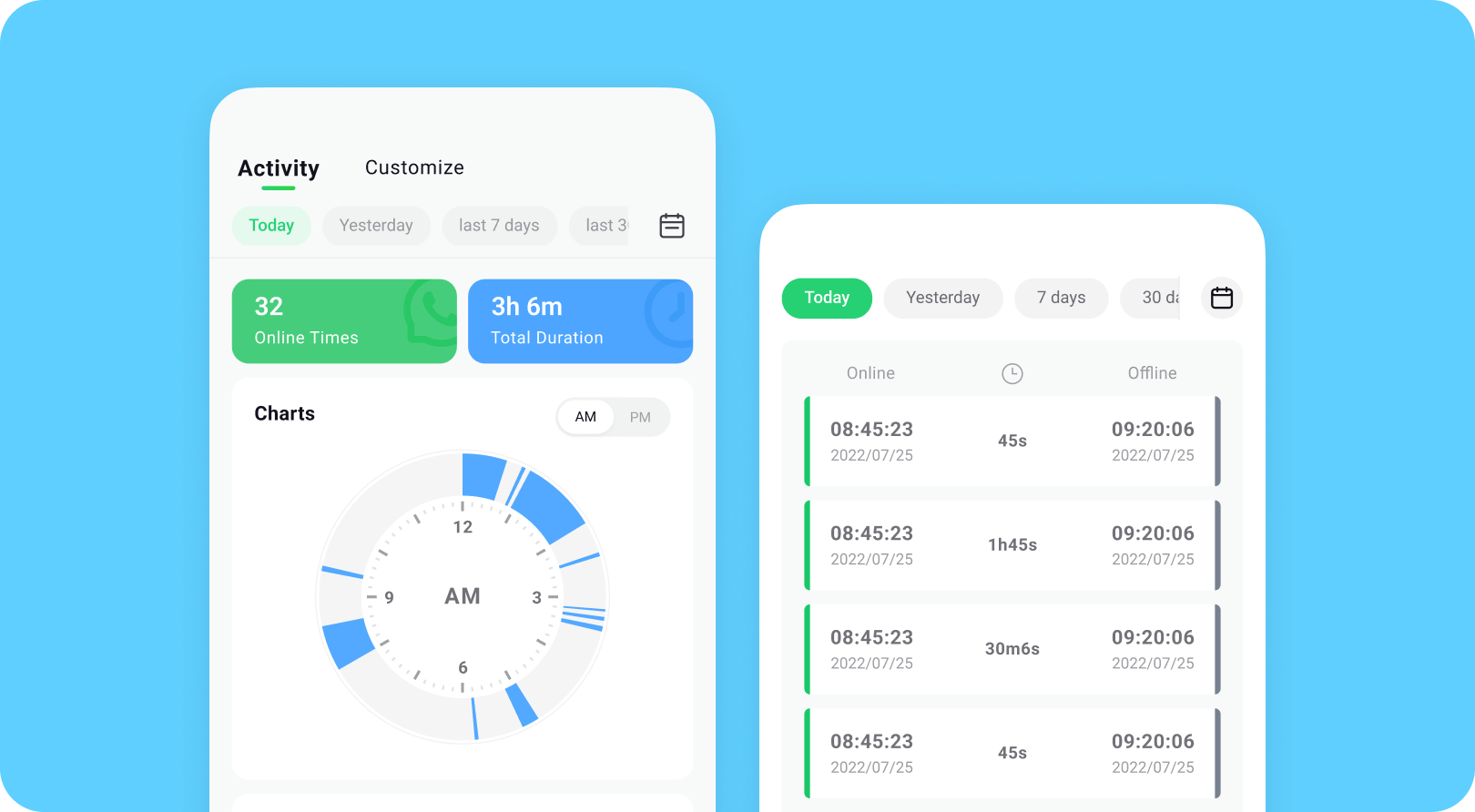
Tracover offers benefits such as privacy protection, clear online activity logs, and easy-to-read reports.
Tracover App - WA Tracker
Track WhatsApp Online Activites Automatically
- Instant Alerts: Real-time notifications for user sign-ins.
- Custom Schedule: Set precise tracking hours and days.
- Chat Compare: Reveals shared online patterns between users.
- Weekly Trends: Visualizes user activity in simple charts.
- Status History: Stores online logs for review and comparison.


Step-By-Step Guide to Use Tracover's WA Tracker:
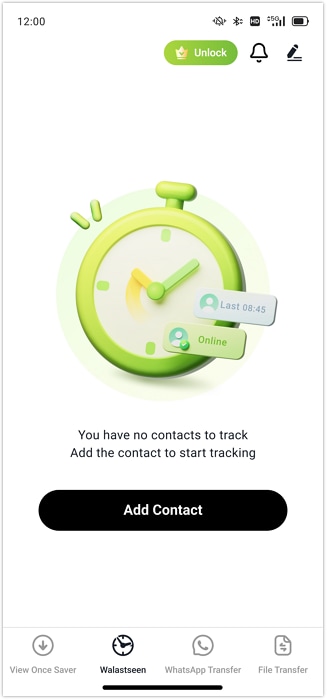
- Step 1: Add WhatsApp Contacts in Tracover
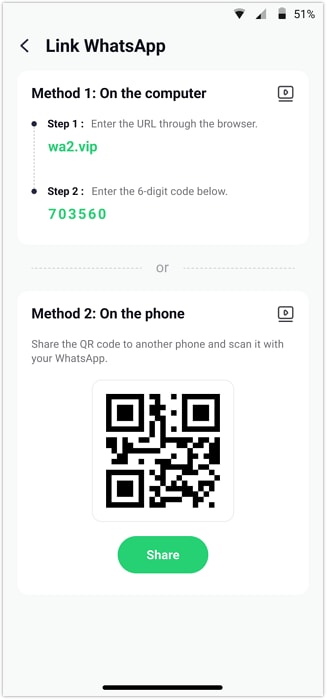
- Step 2: Link Your WhatsApp Account Securely
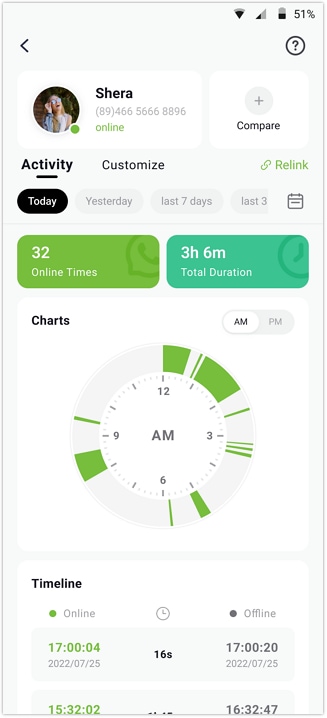
- Step 3: Start Tracking Online and Offline Status
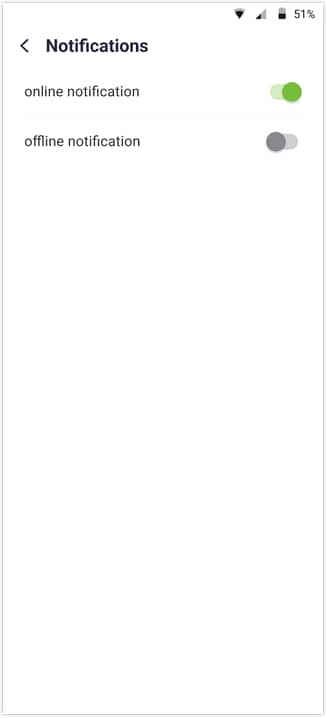
- Step 4: Enable Notifications and Customize Tracking
Open the WA Tracker in Tracover and add the contacts you want to check. You can select contacts from your phone list or enter numbers manually.
Complete the one-time setup to connect your WhatsApp account. Allow access, verify your phone number, and enter the verification code.
Select a contact in WA Tracker, then open the Activity tab. You can view live online/offline timestamps and daily activity trends.
Turn on online/offline alerts in Notification Settings. Set custom tracking hours or compare activity between many contacts.
Part 3: How to Show One Tick on WhatsApp or Make WhatsApp Single Tick but Online
Some users want to control who sees their messages immediately. Knowing how to show one tick on WhatsApp helps you read messages privately without alerting the sender. These methods are useful to protect privacy and avoid pressure to reply.
Method 1: Enable Airplane Mode Before Reading Messages
This method disconnects your device from the internet, letting you read messages offline safely. It works well when you want to check messages privately without being noticed. Here's how to make WhatsApp single tick but online using Airplane Mode to read messages without sending delivery confirmation:
- Step 1: Turn on Airplane Mode to disconnect your phone from the internet.
- Step 2: Open WhatsApp and read the messages while offline safely.
- Step 3: Close WhatsApp completely before turning off Airplane Mode.
- Step 4: Turn off Airplane Mode; the sender will see only one tick.

Method 2: Turn Off Read Receipts
Disabling read receipts prevents blue ticks from appearing, so senders cannot know you read messages. This helps maintain privacy while still letting you read incoming messages anytime. Here's how to show single tick on WhatsApp by turning off read receipts to keep messages appearing as one tick:
- Step 1: Open WhatsApp and go to Settings → Privacy → Read Receipts.
- Step 2: Turn off Read Receipts to prevent showing blue ticks.
- Step 3: You can still see messages, but the sender cannot know.
- Step 4: This keeps messages showing only a single tick even when online.

Method 3: Use Notification Previews or Widgets
Using notifications or widgets lets you read messages without opening WhatsApp, keeping them undelivered. This is helpful for checking messages quickly while maintaining privacy. Here's how to show one tick on WhatsApp through notifications or widgets without triggering delivery:
- Step 1: Turn on WhatsApp notifications on your phone.
- Step 2: Read messages using notification previews or home screen widgets.
- Step 3: Avoid opening WhatsApp to keep messages as a single tick.
- Step 4: This method lets you stay updated without sending delivery confirmation.

Part 4: How to Confirm WhatsApp Message Delivery or Blocking

Seeing a single tick on WhatsApp can often be confusing for users. Learning how to make WhatsApp single tick but online helps you understand message delivery issues clearly. A single tick may indicate that your message failed or the contact has blocked you. Performing additional checks can help confirm whether the problem is blocking or just a temporary delay.
Signs Suggesting Blocking:
- Messages stay on one tick indefinitely, never showing as delivered to the contact.
- The contact's profile photo and last seen information are not visible.
- Calls to the contact do not go through at any time.
Signs Delivery Is Simply Delayed:
- The contact's profile photo is visible and updated regularly on WhatsApp.
- Some of your messages may show two ticks, indicating successful delivery.
- Status updates from the contact are visible and updating as usual.
Conclusion
Seeing WhatsApp single tick but online is usually caused by technical or privacy reasons. It does not always mean the contact has blocked you intentionally. Always check your device, network, and WhatsApp privacy settings before assuming blocking. Learning how to show one tick on WhatsApp can help control message visibility safely.
Tools like Try It Free provide a privacy-friendly way to track online and offline activity. It can also save view-once messages for reference without reading anyone's private chats. Using these methods helps maintain privacy while understanding message delivery and activity patterns. Always use WhatsApp and supporting tools responsibly to protect your data.









Jane Lunes
staff Editor
Generally rated4.5(105participated)