



 TL;DR:
You can privately read WhatsApp messages without triggering blue ticks by turning off read receipts, enabling Airplane Mode before opening the app, or previewing texts via home screen widgets and device notifications.
● Notification and lock screen previews are restricted to short text updates, as they cannot display received images, videos, or lengthy messages.
● Android users have exclusive access to a native WhatsApp home screen widget that allows scrolling through unread messages without ever launching the application.
● The third-party application Tracover operates specifically as a status tracker providing real-time alerts and activity charts for when contacts go online, rather than functioning as a message reader.
Ask AI for a summary
 ChatGPT
 Perplexity
 Gemini
 Claude
 Grok
Grok
Want to read WhatsApp messages without blue tick or opening the chat? Many users prefer checking messages privately before replying. Whether you want to avoid reply pressure, stay focused at work, or simply keep conversations discreet, there are several ways to read WhatsApp messages without triggering the "seen" status.
In this guide, you'll learn how to read WhatsApp messages without blue ticks using practical methods like notification previews, airplane mode, widgets, and privacy settings. We also explain how to see WhatsApp messages without opening the app and introduce a smart tool to Try It Free for deeper activity insights.
Quick Answer: You can read WhatsApp messages without blue ticks by disabling read receipts, using notification previews, enabling airplane mode, or viewing messages from widgets or lock screen notifications.
In this Article

Part 1. Why People Read WhatsApp Messages Without Being Seen
Many users want better control over their chats and message visibility. Understanding how to read WhatsApp messages without blue tick helps them protect personal boundaries. This allows people to manage conversations without feeling pressured or overwhelmed.

Scenario 1: Avoiding reply pressure
Some users read messages to avoid responding before they feel ready. This helps them prepare thoughtful replies without stressing over immediate expectations.
Scenario 2: Checking important messages
People often review urgent information to stay updated without interruptions. This allows them to act while keeping their activity discreet.
Scenario 3: Maintaining privacy and boundaries
Users protect their personal space by controlling message visibility during busy periods. This keeps conversations manageable and prevents unnecessary communication from overwhelming them.
Scenario 4: Managing sensitive conversations
Some conversations feel delicate. Thus, people prefer to read WhatsApp messages without opening. This protects emotional comfort and lets them approach messages when needed.
Part 2. 7 Ways to Read WhatsApp Messages Without Blue Tick
Many users want discreet ways to check chats without sending any alerts. These methods help maintain privacy while keeping message activity completely invisible.
Learning how to read a WhatsApp message without the sender knowing allows safe, private reading. You can also explore how to check WhatsApp messages without blue tick for consistent invisibility across chats. Here are the methods you can use to read messages.
Method 1: Turn Off Read Receipts
Disabling read receipts stops blue ticks from showing after viewing messages. It helps maintain privacy and allows reading messages without alerting contacts. Here's how to do it to keep your activity private. This ensures your contacts cannot see that you read their messages:
- Step 1: Open WhatsApp and tap Settings to access account options.
- Step 2: Select Account, then tap Privacy to find message settings.
- Step 3: Locate Read Receipts and turn the toggle off to hide views.

Method 2: Use Airplane Mode
Airplane Mode prevents WhatsApp from sending seen status to your contacts. It allows reading messages offline and avoiding blue ticks. Here's how to read messages without opening WhatsApp. This works by disconnecting your device before opening chats completely offline.
- Step 1: Wait until new messages arrive on your phone.
- Step 2: Enable Airplane Mode to disable mobile data and Wi-Fi immediately.
- Step 3: Open WhatsApp and read your messages while staying offline.
- Step 4: Close WhatsApp completely, then turn Airplane Mode off.

Method 3: Read Messages Through Notifications
Notifications let you preview messages without opening WhatsApp. This method is useful for short texts and helps avoid triggering blue ticks. Here's how to check messages using notification previews without opening the app. It works best for short messages because the media may not display them.
- Step 1: Swipe down your notification panel to see recent WhatsApp messages.
- Step 2: Read the message preview without tapping to open the chat.
- Step 3: Note that images, videos, or long messages may not appear.

Method 4: Use WhatsApp Pop-Up Notifications
WhatsApp pop-up notifications allow you to preview messages instantly without opening the chat. This helps users read messages quickly while avoiding blue ticks. It works well for short texts and urgent updates.
- Step 1: Open WhatsApp Settings and go to Notifications.
- Step 2: Enable Pop-up notifications for messages.
- Step 3: Read the message preview from the pop-up without opening the chat.
Method 5: Use WhatsApp Widget (Android)
Android users can install the WhatsApp widget to view messages directly on the home screen. This allows reading new messages without opening the app or triggering read receipts.
Method 6: Use Smartwatch Notifications
Smartwatches connected to your phone can display WhatsApp notifications. This lets you read incoming messages discreetly without opening the WhatsApp app.
Method 7: Read Messages From Lock Screen
Both Android and iPhone allow lock-screen notification previews. When enabled, you can read WhatsApp messages instantly without opening the chat or triggering blue ticks.
BONUS TIP: Track WhatsApp Online Status with Tracover
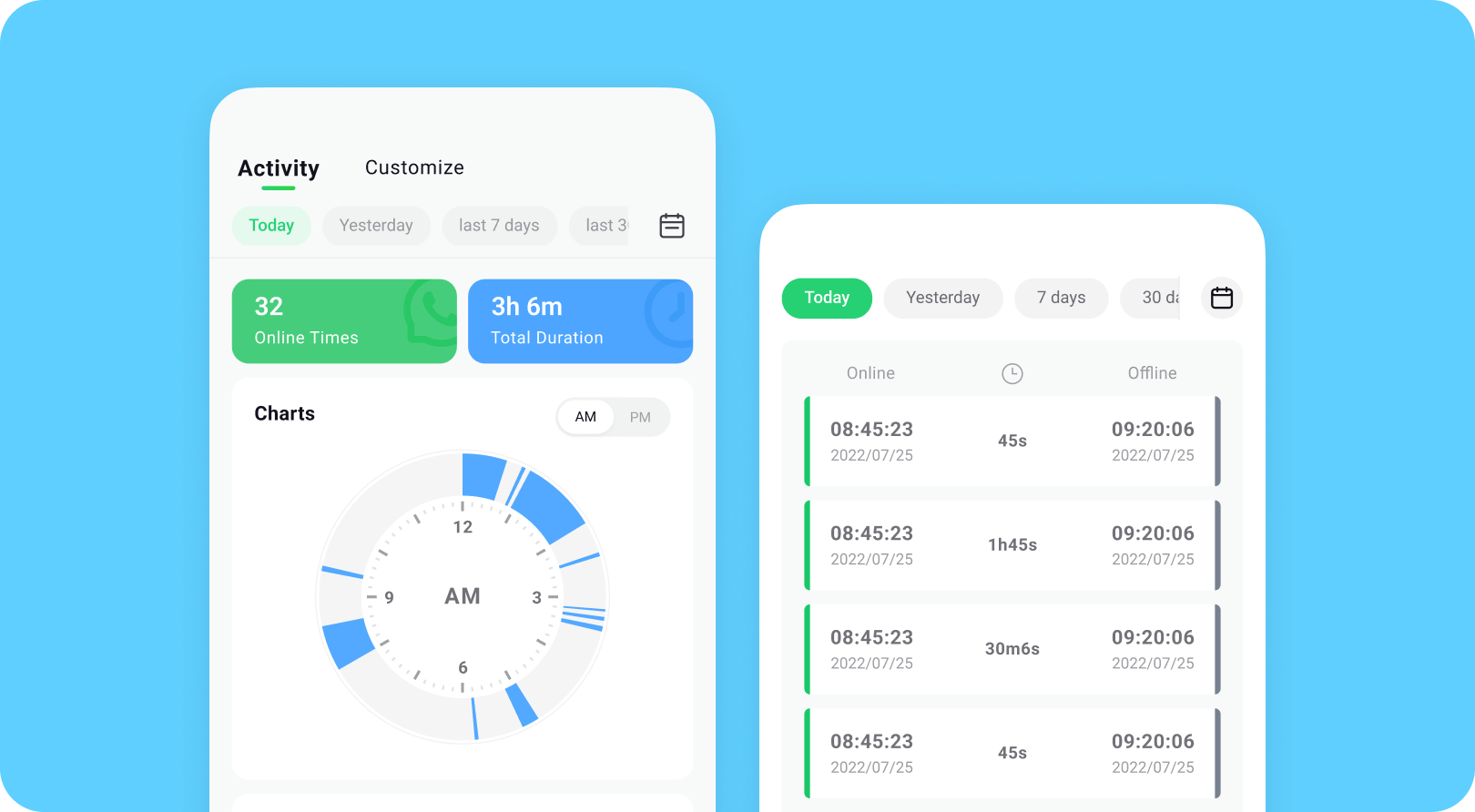
Want a safe way to track WhatsApp activity without alerting anyone online? With Try It Free, users can track WhatsApp online status. You can also see when contacts go online or offline, and get real-time notifications.
Tracover App - WA Tracker
Track WhatsApp Online Activites Automatically
- Instant Alerts: Real-time notifications for user sign-ins.
- Custom Schedule: Set precise tracking hours and days.
- Chat Compare: Reveals shared online patterns between users.
- Weekly Trends: Visualizes user activity in simple charts.
- Status History: Stores online logs for review and comparison.


Step-By-Step Guide:
-
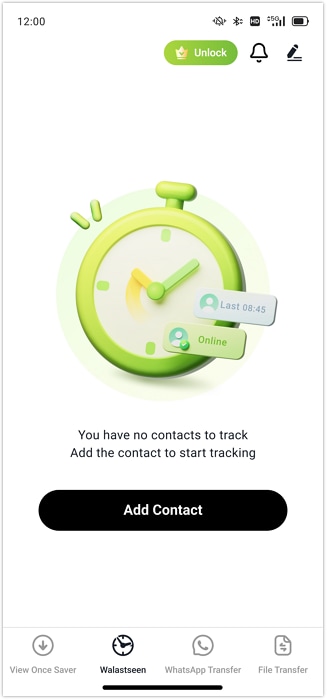
Step 1: Open WA Tracker in Tracover and add WhatsApp contacts to check. Make sure to enter the correct phone numbers with the proper area codes.
-
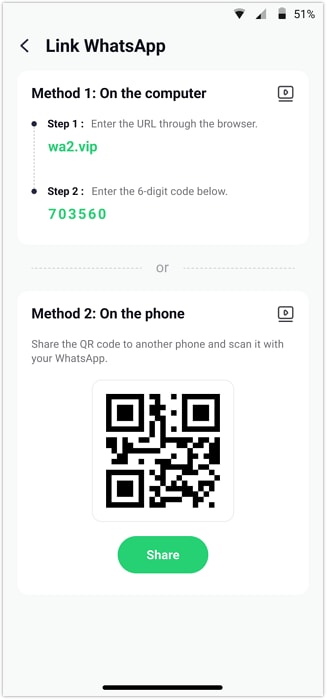
Step 2: Link your WhatsApp account by following the authorization and verification process. This ensures the tracker collects activity data.
-
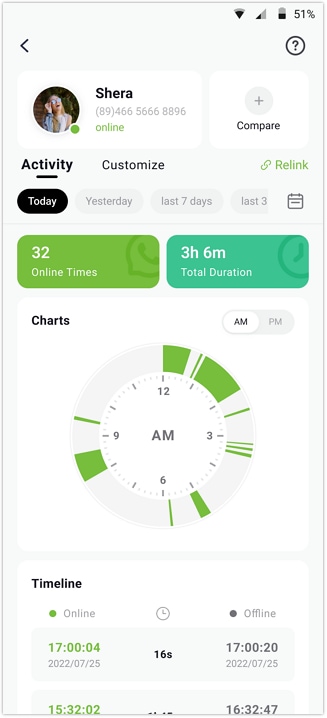
Step 3: Start tracking online and offline status, view activity timelines, and set custom monitoring hours. You can track many contacts and analyze patterns over time.
-
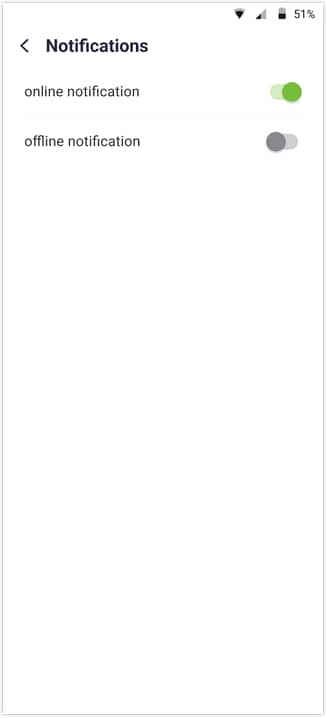
Step 4: Enable notifications to get real-time alerts whenever contacts come online or go offline. Compare activity between many contacts if needed for deeper insights.
Part 3. How to Read WhatsApp Messages Without Opening the App
Some users want to check messages without opening WhatsApp to stay private. Learning how to read WhatsApp messages from another device helps keep chats discreet. People also wonder, "Can someone see my WhatsApp messages from another phone?" — a question these methods help answer.
Method 1: Enable Notification Preview on Lock Screen
Notification previews let users read messages without opening WhatsApp. This works on both iPhone and Android phones. It also allows checking important messages and helps avoid pressure to reply immediately. Here's how to do it:
- Step 1: Open your phone's Settings and go to Notifications for WhatsApp.
- Step 2: Enable Show Previews or Lock Screen Notifications to view messages.
- Step 3: Read new messages on the lock screen without triggering read receipts.

Method 2: Use WhatsApp Widgets (Android Only)
Widgets let you read WhatsApp messages on your home screen without opening the app. They allow checking messages and staying updated without triggering blue ticks. This method works only on Android devices. Here's how to use them:
- Step 1: Long-press the home screen and select Add Widget from the options.
- Step 2: Choose the WhatsApp widget and place it where convenient on your screen.
- Step 3: Read message previews from the widget without triggering blue ticks.

Method 3: Use Smartwatch Notifications
Smartwatches can display WhatsApp notifications, letting users read messages without opening the app. They work with both iOS and Android smartwatches and help track WhatsApp messages. Here's how to set it up:
- Step 1: Pair your smartwatch with your phone and enable WhatsApp notifications.
- Step 2: Check incoming messages on the smartwatch without opening WhatsApp.
- Step 3: Read messages from the smartwatch. This helps answer "can someone see my WhatsApp messages from another phone".

Part 4. Tips to Protect Your WhatsApp Messages and Privacy

Keeping your WhatsApp messages private is essential for protecting personal conversations. While learning how to read WhatsApp messages without blue tick helps you stay discreet, it's equally important to secure your account. By enabling advanced privacy settings and monitoring connected devices, you can prevent others from accessing your chats without permission.
Follow these tips to keep your WhatsApp messages safe and private:
Tip 1: Enable Two-Step Verification
Turn on two-step verification in WhatsApp settings to protect your account. This adds an extra layer of security when logging in.
Tip 2: Check Linked Devices Regularly
Go to Linked Devices in WhatsApp and review all active sessions. Log out of unknown or old devices immediately.
Tip 3: Lock WhatsApp with Fingerprint or Face ID
Use your phone's fingerprint or Face ID to lock WhatsApp and prevent others from opening it. This ensures your chats stay private.
Tip 4: Never Share Verification Codes
Keep your verification codes private. Do not share them with anyone under any circumstances. Sharing codes can allow others to access your WhatsApp account.
Conclusion
There are several ways to read WhatsApp messages without alerting contacts. Such methods include turning off read receipts, using airplane mode, and notifications. Learning how to read WhatsApp messages without blue tick helps keep chats private. These methods let you check messages while avoiding alerts or pressure to reply. They are useful for staying updated on important messages without opening WhatsApp.
For more advanced tracking, tools like Try It Free can help track online or offline activity. It also allows saving view-once messages for reference. Knowing how to read WhatsApp messages from another device can be helpful. But privacy and ethical use should always be considered. Balance convenience with security when using these methods.
FAQs
-
Q: Can you read WhatsApp messages without blue ticks?
A: Yes. You can read WhatsApp messages without blue ticks by disabling read receipts, reading message previews in notifications, or enabling airplane mode before opening the chat.
-
Q: How can I read WhatsApp messages without opening the chat?
A: You can read WhatsApp messages without opening the chat by using notification previews, lock screen alerts, widgets, or smartwatch notifications.
-
Q: Will turning off the internet let me read WhatsApp messages without blue tick?
A: Yes. Turning on airplane mode or disabling the internet allows you to open WhatsApp and read messages without sending blue ticks to the sender.
-
Q: Can someone see my WhatsApp messages from another phone?
A: No. WhatsApp messages are end-to-end encrypted. However, someone could read your chats if they have access to your phone or if your account is linked through WhatsApp Web.









Selena Lee
staff Editor
Generally rated4.5(105participated)