
How to Get Snap Score: Everything You Need to Know

Sep 23, 2026 • Filed to: Device Data Management • Proven solutions
 TL;DR:
Your Snap Score only increases through sending and opening photo or video snaps, posting stories, and maintaining Snapstreaks, whereas text chats, voice notes, and video calls earn zero points.
● Sending a single photo or video snap to multiple friends earns one point per recipient, and having a Snapchat+ subscription can double your points when exchanging snaps with other subscribers.
● Score updates do not always refresh instantly and can take up to a full day to batch process; clearing the Snapchat cache or updating the app can force a server sync if the score remains stuck.
● Purchasing score packages from third-party services is highly discouraged, as paying $7 to $100+ for artificial points carries a severe risk of permanent account bans, stolen login credentials, and financial scams.
Ask AI for a summary
 ChatGPT
 Perplexity
 Gemini
 Claude
 Grok
Grok
Dr.Fone Basic:
Better Control for Your Phone
Manage, transfer, back up, restore, and mirror your device
320 million is the highest Snap Score ever recorded. The user @mustbecris holds that crown. Generally speaking, your Snap Score measures your Snapchat activity. It combines the snaps you send and receive, stories you post, and a few other secret factors, which we will discuss in this article.
Most users score between 1,000 and 200,000. Want yours higher? You're in the right place. This guide explains exactly how to increase your Snap Score without risking your account.

Part 1. How Snapchat Scores Are Calculated?
Snapchat keeps its exact formula secret. But we know the basics from official support pages and user testing. Your Snap Score reflects how active you are on the platform. It never decreases, as you will only experience an increase upon activity.
What Counts Toward Your Score?
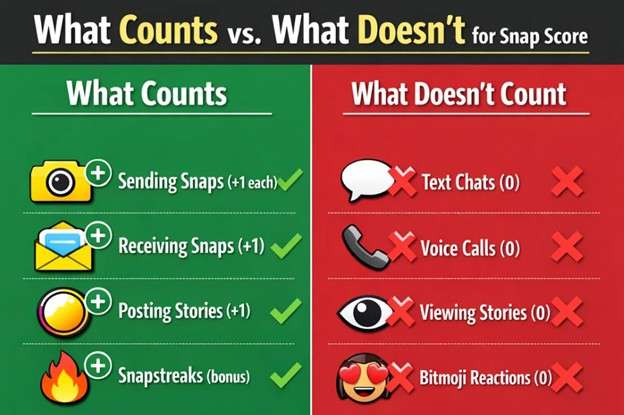
The following points will affect your Snap score:
- Sending Snaps
Every photo or video snap you send earns points. One snap to one friend equals one point. As a result, sending that snap to ten friends will get you ten points. - Receiving and Opening Snaps
Opening snaps from friends also adds to your score. Both sender and receiver benefit from each exchange. - Posting Stories
Adding content to your Story contributes points. The more you post, the more your score grows. - Maintaining Snapstreaks
Consecutive daily snaps with friends may provide bonus points. Streaks signal consistent engagement. - Returning After Inactivity
Some users report a small boost when returning to the app after a break. Your first snap back might earn extra points.
Snap Score Activities at a Glance
|
Activity |
Points Earned |
Notes |
| Sending a Snap | +1 per recipient | Photo or video only |
| Opening a Snap | +1 point | Must actually open it |
| Posting a Story | +1 point | Each story post counts |
| Text Messages | 0 points | Chats don't count |
| Viewing Stories | 0 points | Only posting counts |
Part 2. Does Your Snap Score Increase with Chats?
No, the snap score doesn’t get affected by simple chats. This myth has confused Snapchat users for years. Your score only increases by sending snaps, so text messages and chats do not add to your Snap Score. Period.
Why the Confusion Exists?
People often chat and snap at the same time. When their score rises, they assume texting caused it. This means that their chat didn't increase the score; the snaps did.
What Definitely Doesn't Count?
Text messages in chat earn zero points. Voice notes and video calls? Also zero. Bitmoji reactions and stickers? Nothing.
Learn more about what actually affects your Snap Score in our detailed guide.
Part 3. How to Get a Higher Snap Score?
If you want to increase your snap score, these strategies work consistently without putting your account at risk. These efforts will help you focus on genuine engagement, as Snapchat rewards authentic activity.
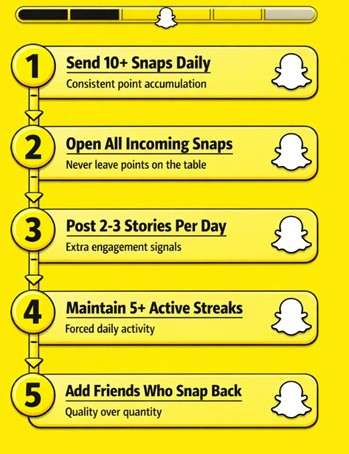
1. Send More Photo and Video Snaps
Every snap you send earns a point. So, the quickest way to earn more snap score is to send snaps to multiple friends for points.
Pro tip: Create a group of active friends. Send snaps to all of them at once.
2. Open Every Snap You Receive
You should regularly watch snaps sent by your friends. So, don't let snaps pile up. Each one you open adds to your score. Make clearing your inbox a daily habit.
3. Post Stories Regularly
As mentioned, story posts also contribute to your score. They also encourage friends to snap you back. Moreover, you can also use Snapchat story saver tools to keep your favorite content.
4. Maintain Multiple Snapstreaks
Streaks require daily exchanges with multiple friends. That forced consistency builds your score steadily over time. Start streaks with friends who actually respond. Inactive partners waste your effort.
5. Add More Friends
More friends mean more opportunities for snap exchanges. Expand your network strategically. But don't add random accounts, as Snapchat detects suspicious activity.
Snap Score Benchmarks
|
Score Range |
Activity Level |
What It Means |
| 1,000 - 50,000 | Moderate | Regular casual user |
| 50,000 - 200,000 | Active | Frequent daily user |
| 200,000 - 400,000 | Very Active | Power user status |
| 400,000+ | Extremely Active | Heavy engagement |
| 1,000,000+ | Elite | Top percentile |
Part 4. Can You Buy Snap Score?
There is no official way to increase your snap score. However, you can get help from services that claim to boost your score for money. You have to be careful, as many sites that claim to boost scores are often scams or use unsafe methods.
How Does Buying Snap Score Services Work?
Third-party services offer Snap Score packages. Prices range from $7 to $100+, depending on the point amount. Some require your username only. Others ask for login credentials, which is a major red flag.
What are the Real Risks of Buying Snap Score?
- Account Suspension or Ban
Snapchat's terms prohibit score manipulation. Getting caught means losing your account on a permanent basis. - Security Vulnerabilities
Services requesting your password put your account at risk. Your personal information could be stolen or sold. - No Real Engagement
Bought points don't equal real friends or interactions. Your inflated number means nothing socially. - Money Wasted
Many services are outright scams. You pay, they disappear without any refund.
Buying vs. Organic Growth Comparison
|
Factor |
Buying Score |
Organic Growth |
| Speed | Instant (hours) | Gradual (weeks/months) |
| Cost | $7 to $100+ | Free |
| Account Risk | High (ban possible) | Zero |
| Real Engagement | None | Yes |
| Sustainability | Risky | Permanent |
Overall, we don't recommend buying the snap score. The risks outweigh any perceived benefits. Build your score legitimately. Although it takes longer, this method protects your account and actually means something.
Part 5. Common Snap Score Problems and Fixes
Sometimes your score gets stuck or jumps unexpectedly. Here are some common issues with Snapchat scoring and their solutions:
Issue 1. Score Not Updating
Snap Score doesn't always refresh instantly. Updates can take hours, and sometimes a full day.
Fix: Close the app completely. Reopen it. Check your profile again.
Still having issues? Check out our guide on fixing Snapchat problems.
Issue 2. Score Jumping Unexpectedly
Snapchat batches updates, so sending 50 snaps might show up later as three separate increases. You don't have to panic, as it's normal behavior.
Issue 3. App Needs Updating
Outdated versions can cause scoring glitches. So, we recommend you always keep your application on the current version.
Issue 4. Cache Issues
Clear your Snapchat cache in settings. This forces a fresh sync with servers.
Part 6. Advanced Strategies for Serious Score Builders
If you want to achieve high snap scores quickly, these tactics push your score higher without breaking any rules.
1. Use Snapchat's Full Feature Set
Explore Discover content. Play Snapchat games. Use lenses and filters. All activity signals engagement.
2. Join Snap Score Groups
Communities exist where users exchange snaps specifically to build scores. Find legitimate ones on social platforms. Avoid any group asking for money or credentials.
3. Time Your Activity
Snap during peak hours when friends are active. This way, you are more likely to get responses, which will result in faster score growth.
4. Consider Snapchat+ Subscription
Snapchat+ offers a Score Multiplier feature. Both users need subscriptions for it to work. Your score can grow twice as fast when snapping other Snapchat+ members.
Want to change your Snapchat location for different filters? Try Dr.Fone Virtual Location for safe location spoofing.

The Bottom Line
All in all, your Snap Score grows through genuine activity. Snaps, stories, and streaks do the work. We suggest you skip the shortcuts and build the snap score the right way. If you are ready to level up your Snapchat game, explore more Snapchat tips and tools at Wondershare Dr.Fone.
 safe & secure
4,624,541 people have downloaded it
Frequently Asked Questions About Snap Score
 Q1. How Much Does Your Snap Score Go Up Per Snap?Q2. What Is the Highest Snap Score in the World?Q3. Can Your Snap Score Go Down?Q4. Do Snap Score Bots Work?Q5. Want to use Snapchat on your PC for easier snapping? Check our guide.Q6. Does Adding Friends Increase Snap Score?Q7. How Can I Check Someone Else's Snap Score?
Dr.Fone Basic:
Better Control for Your Phone
Manage, transfer, back up, restore, and mirror your device


Android Tips
- Android How-Tos
- 1. Get Out of Android Odin Mode
- 2. Android Keyboard Settings
- 3. Get the Most Memory of Android
- 4. Partition SD Card for Android
- 5. How to Get Snap Score
- 6. Exit Android Factory Mode
- 7. Play MP4 files on Android
- 8. Play WMV on Android Phone
- 9. Reboot your Android Phone
- 10. Turn off Safe Mode on Android
- Android Password Find
- 1. Find Passwords Stored On Android
- 2. See Wi-Fi Password on Android
- 3. Show Wi-Fi Password on Android
- Broken Android Manage
- Data Manage
- 1. Top 3 Android Notification Manager
- 2. Edit Contacts on Android
- 3. Import Contacts from CSV File
- 4. Remove Facebook from Android
- 5. Transfer Phone Contacts to SIM
- 6. Unlock Android with Solid Explorer
- 7. Text from Android to Computer
- 8. Manage Audio on Android Device
- 9. Change System Fonts on Android
- 10. View HEIC File on Android
- Android Tricks
- ● Manage/transfer/recover data
- ● Unlock screen/activate/FRP lock
- ● Fix most iOS and Android issues
- Free Download Free Download Free Download




Daisy Raines
staff Editor