Teleport your device anywhere instantly with one click.


 100% Security Verified | No Subscription Required | No Malware


 :

 ChatGPT
 Perplexity
 Gemini
 Claude
 Grok

A useful Monster Hunter Now Sword and Shield build starts with a suitable weapon, armor skills you can actually activate and enough practice to keep attacking without taking unnecessary hits. There is no equipment combination that makes a hunter invincible. A balanced setup must still deal enough damage during the hunt while giving you room to recover from mistakes.
If you searched for a Monster Hunter Now greatsword build, note that Great Sword and Sword and Shield are different weapon types. This guide concerns Sword and Shield: quick close-range attacks, guarding, backsteps and its own special attack. It preserves the original equipment examples while correcting console-style commands and several misleading skill descriptions.
In this article
- Why Is the Sword and Shield a Viable Build?
- More About Sword and Shield
- Critical Skills to Use for Sword and Shield Builds
- Raw Damage vs. Elemental Sword and Shield Builds
- Armors to Use for Sword and Shield Builds
- Weapons and Augmentations for Sword and Shield Builds
- Additional Tips and Combos to Use
- Bonus: How to Quickly Reach Your Sword and Shield Build
Part 1. Why Sword and Shield is a practical choice
Sword and Shield combines short, quick attacks with the option to guard. That makes it approachable for learning a monster's openings: you can land a few hits and respond instead of committing to a long sequence every time. The shield is part of the weapon, not a separate set of body armor that must be purchased piece by piece.
Your armor still matters because it supplies defense and equipment skills. However, blocking is not the same as becoming immune to damage, and a defensive build still has to meet the hunt's damage demands. Choose the weapon's upgrade path and armor together, then improve your response to the target's attacks. Neither a stronger sword nor more defense compensates for ignoring every telegraphed hit.
Part 2. Understand the Sword and Shield playstyle
Think of this weapon as a close-range toolkit rather than a pair of independently equipped accessories. Its value comes from shifting between quick offense and measured defensive actions while remaining near a useful target part.
Quick attacks, an integrated shield and mobile controls
The official controls are built around the phone screen: tap for basic attacks and long-press to guard. While guarding, flick down to backstep. A backstep can lead into a charged slash, and the weapon has follow-ups after a successful guard or perfect evade. These are actions to learn, not armor skills that appear merely because you raise a statistic.
The source's references to separate shields for different body parts and not needing to sheath armor confuse equipment categories. Head, chest, arm, waist and leg pieces are armor slots; the shield belongs to Sword and Shield itself. You do not sheath armor. What matters in an actual fight is how quickly you can recognize an opening, attack and reposition safely.
The official Sword and Shield controls are a more dependable reference than commands copied from a console game. Practice them on the current mobile interface before investing materials around an unfamiliar move.
Why mobility and adaptation matter

Staying close enough to connect attacks does not mean standing still throughout a hunt. Swipe to evade, watch the next attack and return to a favorable position. A short disengagement that avoids a hit can preserve more attacking time than blindly completing a combo and being knocked away.
Adaptation also happens before the fight. Read the monster's weakness information, equip the intended loadout and decide which parts you can reach consistently. Do not rely on the source's suggestion of casually changing weapons during a combo. Change your plan when a monster turns, moves or exposes another part, rather than expecting one fixed attack string to work in every situation.
Part 3. Learn offensive and defensive techniques
Separate player technique from equipment skills. Tapping, guarding and timing an evade are inputs you perform; skills such as Concentration or Offensive Guard come from eligible gear. Both matter, but improving one does not automatically unlock mastery of the other.
Offensive actions to practice
1. Sustained attacks instead of the source's 'Endless Combo'
When a monster is down or otherwise leaves a clear opening, repeated taps execute Sword and Shield's basic sequence. Learn how much of that sequence fits before the next threat. Stop to evade when necessary rather than believing a continuous attack loop is always safe or literally endless.
The source lists Chop, Side Slash, Twin Blade Combo, Lateral Slash and Return Stroke with X/A buttons. That is not a valid phone-control recipe for Monster Hunter Now. The useful idea is sustained damage during a safe opening; the correct mobile execution is to use the current tap-based basic combo and interrupt it when the situation changes.
2. Backstep and charged follow-up attacks
To practice the backstep route, long-press to guard and flick downward. The official guide describes holding after the backstep for a charged slash, with two charge stages, then tapping for follow-up attacks. This replaces the original instruction to hold A and press X, which belongs to a different control scheme.
Do not assume an aerial-looking animation prevents all damage. Longer follow-ups create commitments, so use them when the monster's recovery gives you time. Start with the basic sequence, then introduce the charged option when you can identify a reliable opening.
Defensive habits and supporting equipment
1. Improve armor without abandoning damage
Upgrade the armor pieces you use and inspect their skill descriptions at the intended grade. Headgear, mail, gloves or vambraces, waist pieces and leg armor can contribute different effects. Pick a combination that supports your hunt rather than buying whatever has the largest isolated defense number.
Extra defense can make mistakes less punishing, but it does not guarantee survival. Similarly, Offensive Guard requires a well-timed guard to activate; it is not automatic reflected damage whenever a monster touches the shield. Keep practicing the relevant timing if your chosen equipment depends on that action.
2. Reposition instead of forcing an unsafe combo
Evade toward a position where the next attack can connect without placing you inside the monster's immediate threat. The official mobile guide also describes a Roundslash follow-up after a perfect evade. A successful guard can lead into a counter sequence, but you still need to recognize the appropriate window.
The source's directional Lateral Slash/Return Stroke command string should not be used as a phone-input tutorial. Preserve its tactical purpose: move deliberately, avoid a hit and resume offense from a better angle. Defensive positioning is useful even in a damage-focused build.
Part 4. Compare raw and elemental build priorities

Raw refers to the physical attack component, while an elemental build adds an element chosen for the target. Inspect the monster's listed weaknesses before committing resources. Fire is not universally strong, and a water weakness does not mean the monster instantly fails to survive any water attack.
A general-purpose raw setup can reduce the number of early loadouts you need to maintain. Matching elemental setups can be useful for specific targets, but they require their own weapons, upgrades and supporting skills. Compare practical upgrade levels, not just names, when deciding which setup to bring.
Also distinguish elemental damage from status effects such as poison and paralysis. The Girros and Blooming examples below are not fire, water or other elemental-weakness substitutes. Their status roles and physical attack values need to be evaluated separately.
Part 5. Evaluate the original armor recommendations
Use these pieces as examples of skill roles, not a guaranteed best-in-slot set for every monster in 2026. Check the in-game grade requirements and active skill totals before spending scarce materials.
- Lumu Hat: The source calls this 'Luma Hat'; the official name is Lumu Hat. Its Concentration role is to improve Special Gauge fill rate. That can support more access to your special attack, but it is not a universal damage increase on every ordinary hit.
- Girros Mail: The official listing adds Sneak Attack at Grade 6 and raises it later. Grade is not the same as hunter level or the small upgrade levels inside a grade. Its benefit depends on attacking from behind, so a front-facing playstyle may not use it consistently.
- Barroth Mail: Offensive Guard temporarily raises attack after a well-timed guard. It does not damage the monster merely because you receive an attack. Choose it only if you intend to use the activation condition.
- Barroth Helm: Defense Boost increases defense; it is not a conditional attack buff after blocking. Inspect its complete skill list at your planned grade and weigh defensive comfort against your damage needs.
These distinctions can be checked against the official Concentration, Offensive Guard, Defense Boost and Girros Mail entries. Current in-game equipment details remain the final check for your account.

Part 6. Choose weapons and understand upgrades
The original three weapon lines illustrate different purposes. Compare their damage or status type and material cost first. A visual preference is reasonable, but appearance does not explain an attack bonus or make one weapon best against every opponent.
- Blazing Edge: This Anjanath Sword and Shield line is a fire option. Upgrading raises its listed stats, but it remains a choice to match the encounter rather than a promise to beat every stronger monster. Check the target's weakness before choosing it over another upgraded line.
- Girros Knife: This Great Girros line provides paralysis. The official progression shows Sneak Attack at Grade 8 on its later Malady's Tabar form, not a generic 'level 8' guarantee of maximum damage. Sneak Attack still has a positional condition.
- Blooming Knife: This Pukei-Pukei line supplies poison. The official Datura Blossom progression lists Sneak Attack at Grade 8. The source's claim of an automatic 30% bonus at level 5 is not a correct description of this weapon's unlock.
Official weapon references: Blazing Edge, Girros Knife and Blooming Knife. Their pages distinguish attack, status or element, special-skill level and equipment-skill unlocks.
For the source's 'augmentations' advice, start with the actual forge, upgrade and overgrade options shown in Monster Hunter Now. Do not import a mainline game's augmentation system or assume every weapon accepts an arbitrary extra effect. Plan a reachable next upgrade and matching armor skills before splitting materials across multiple unfinished lines.

Part 7. Use the right combos for the right weapon
Several named moves in the source mix weapon types or other Monster Hunter titles. Keep the tactical idea of exploiting openings, but use Sword and Shield's documented mobile actions rather than trying to reproduce unrelated animations.
- Demon Sky Dance Combo: The original associates this with dual blades. It is not a Sword and Shield touch-input sequence, so do not design a Sword and Shield build around unlocking it.
- Perfect Rush Combo: This is Sword and Shield's special skill in the official mobile guide. Tap the Special Skill button when the Special Gauge is full. It is not a normal combo shared by every sword type.
- Heavenly Blade Dance: The source's claim of an aerial sequence continuing until a target dies is not a reliable Monster Hunter Now Sword and Shield mechanic. Use the weapon's actual charged and special attacks instead.
Then apply the original practical themes with more useful limits:
- Choose a reachable target part. The head can be valuable, particularly when shield hits contribute to a stun, but forcing that position through an incoming attack can waste health. Adjust to the monster and your objective.
- Guard deliberately. Use the shield when appropriate, learn which situations favor evasion and practice timing if your equipment relies on Offensive Guard.
- Practice one sequence at a time. Learn ordinary taps, then backstep follow-ups and special-skill timing. Consistent execution is more useful than memorizing a long list of borrowed move names.
Part 8. Bonus: material planning and virtual-location limits
 Set your map route to simulate GPS movement.
- Set your wanted movement speed.
- HD and large map view to check location.
- Fake GPS location to anywhere.

Building equipment depends on the game's actual material, progression and encounter systems. Plan real visits to safe gathering areas and focus your resources on a usable loadout. A simulated coordinate cannot manufacture a rare drop, increase your combat skill or guarantee access to a particular monster.
Dr.Fone - Virtual Location provides a desktop map for selecting a test position and simulating GPS movement where supported. This is relevant to understanding location-aware app behavior, not a guaranteed shortcut to an ideal hunting build. The game's discipline policy explicitly treats location falsification as cheating, with possible account penalties.
Step 1 Connect an authorized test device
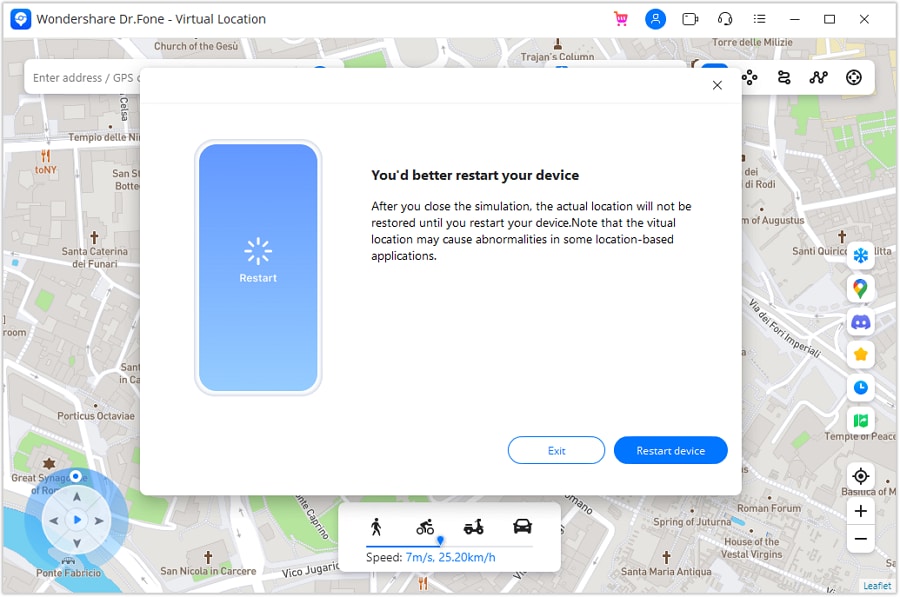
Install the desktop utility, check its current compatibility and connect your own phone with a USB data cable. Complete its authorization prompts. The inherited image below shows the program's restart/restoration reminder, not a cable-connection screen; keep that restoration step in mind before starting.
Step 2 Select the appropriate test mode
Open the Virtual Location map. Choose Teleport Mode for a single coordinate change; use movement modes only for a separate authorized movement test. Do not assume every mode named in an older article is present in your installed version.
Step 3 Search and inspect the destination
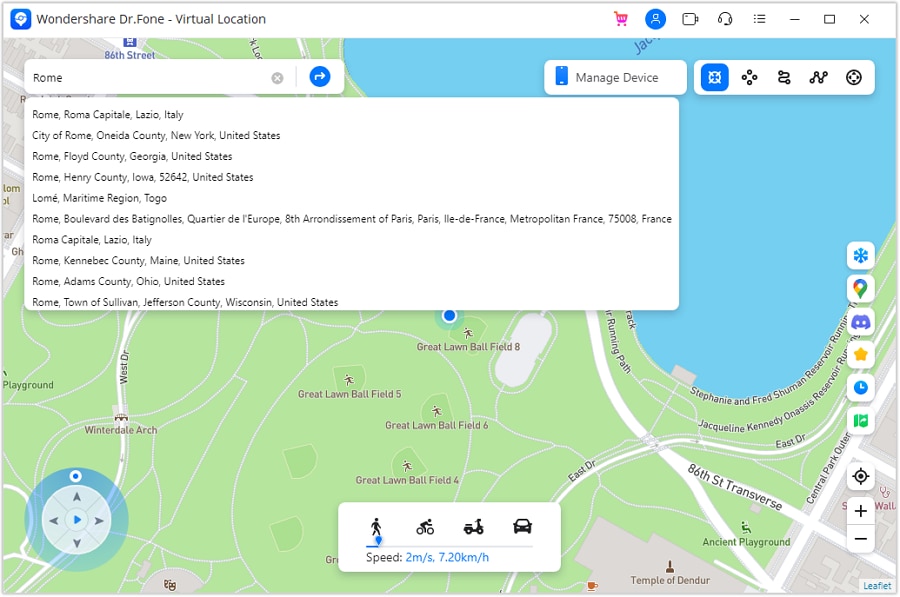
Enter the place you want to test in the search bar and press Enter. Review the map result so the selected coordinate matches the intended location rather than a similarly named place.
Step 4 Confirm and verify the phone's position
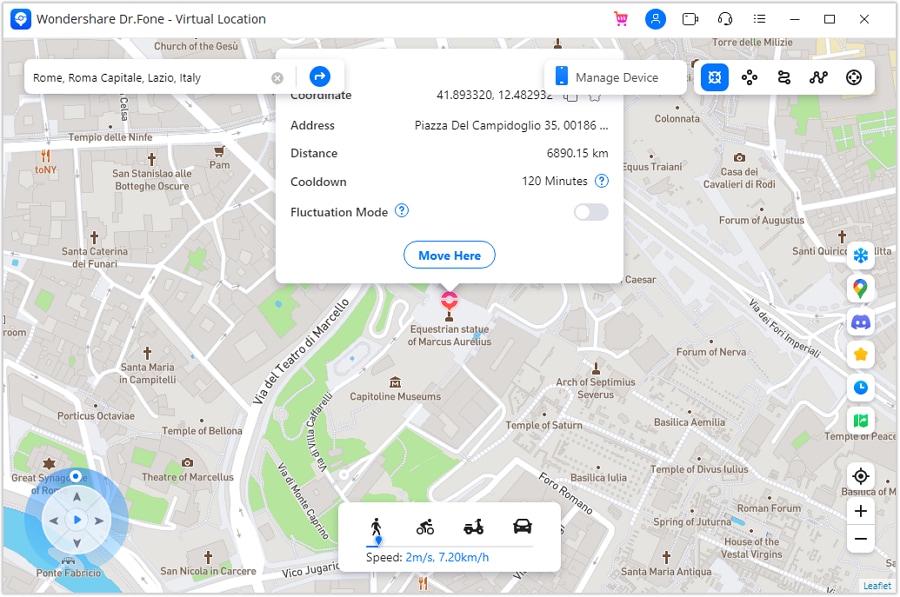
Select Move Here and check a map on the connected phone. This verifies a reported coordinate only; it does not confirm game compatibility, compliance or material rewards.
End the test using the program's instructions, restart the device when prompted and verify its real position before relying on navigation. For Monster Hunter Now progression, use legitimate play and safe physical exploration rather than treating a GPS test as a build-unlocking guarantee.




Conclusion
For a practical Sword and Shield build, first choose a weapon line that fits the encounter and your upgrade resources. Add armor skills whose activation conditions suit your playstyle, keep defense usable and practice the mobile weapon controls. Raw, elemental and status-oriented choices solve different problems; no single named weapon or defensive piece makes every hunt effortless.
Keep this weapon separate from Great Sword and from mainline console combo guides. Dr.Fone - Virtual Location offers a different, location-testing function, but it cannot replace equipment progression, legitimate material collection or combat practice.
FAQ
1. Is Sword and Shield the same as Great Sword?
No. They are separate weapon types with different controls and playstyles. The equipment and touch actions in this guide are for Sword and Shield.2. How do I guard and backstep on a phone?
The official Sword and Shield guide says to long-press for Guard, then flick down for Backstep. X/A console commands are not the mobile input instructions.3. Should I always choose an elemental weapon?
Match the target's weakness and compare the weapons you can actually upgrade. Raw, elemental and poison or paralysis choices have different roles; the most useful option depends on your encounter and resources.4. Can virtual location unlock the perfect build?
No. GPS simulation does not generate materials, guarantee drops or improve combat execution. Using location spoofing in Monster Hunter Now can also lead to account penalties.
 Add Wondershare Dr.Fone as a preferred source on Google