Teleport your device anywhere instantly with one click.


 100% Security Verified | No Subscription Required | No Malware

 :

 ChatGPT
 Perplexity
 Gemini
 Claude
 Grok
A useful Clash of Clans strategy starts with a clear objective: collect resources, improve an attack, protect upgrades, or earn war stars. Those objectives call for different target choices and army plans. A raid that gathers the resources you need can be worthwhile even if it is not a three-star attack, while an organized war requires coordination with the clan.
This guide preserves all nine sections in the original article, despite its old 'top eight' title. The tips cover targets, Gems, recording, armies, vulnerable bases, protection, balanced development, layouts, and clan support. Apply them to your Town Hall and current mode; no universal composition or tool guarantees victory.

In this article
Part 1: Choose Targets That Fit Your Objective
Inspect available loot, Town Hall level, defensive coverage, and the route your troops would need to take before committing. A lower-level opponent is not automatically the best target, and a higher-level opponent is not automatically more profitable. Compare the displayed rewards with what your army can realistically reach.
For resource farming, Goblins or another appropriate collection-focused army may reach exposed resources without destroying the whole base. Expect the tradeoff: a raid chosen for loot can still lose trophies. For a war or a star objective, choose an army and entry that can complete that objective instead of treating every battle as a farming run.
Do not base the decision on the old article's assumption that deploying troops always consumes their training cost. Supercell's official training-system announcement explains the removal of training costs and ordinary troop-training waits. Focus on the mode's actual limits, composition, and outcome rather than outdated army-cost arithmetic.

Part 2: Give Gems a Planned Job
Gems are a premium resource, not direct battle points. For a developing Home Village, additional Builder's Huts can be valuable because extra builders let you work on more upgrades at once. Check what your current progression unlocks and what each purchase actually adds before spending.
Use Gems earned through legitimate game activities deliberately. Compare a permanent account improvement with a short timer skip or a one-time convenience. There is no need to empty your balance simply because you have been attacked; conserving Gems can be a sensible long-term decision.
A Builder's Hut primarily adds building capacity; buying one is not equivalent to strengthening every wall or defense. Separate builder availability from the defensive upgrades those builders may later complete, and keep enough resources ready to make use of them.

Part 3: Record Attacks to Learn From Them
A recording is useful when it answers a tactical question: where the funnel failed, when a spell was late, or which defense diverted your army. Watching a short clip critically teaches more than collecting highlights without reviewing them. Ask a clanmate to comment on a specific decision rather than simply judging the final percentage.
The original walkthrough uses Wondershare's iOS Screen Recorder to mirror an iPhone to a Windows computer and capture gameplay. That is a screen-recording product, not Virtual Location. The desktop instructions are a historical workflow; verify present device support through the product information before installing any software. A modern iPhone's native recording option may be sufficient for reviewing an attack.
How to Record Clash of Clans and Review the Result
Step 1 Choose the recorder appropriate to your device
For the source's desktop workflow, review iOS Screen Recorder, install a supported version, and open it. For a modern iPhone, the built-in Screen Recording control can capture directly to Photos without a desktop application.
Step 2 Connect the mirroring workflow
If using the desktop receiver, connect the iPhone and PC to the same trusted Wi-Fi network. Open the receiving program and check that local network restrictions do not block device discovery. This shared-network step belongs to mirroring, not to the native on-device recorder.
Step 3 Open the correct Control Center controls
The retained screenshots show older iOS 10, 11, and 12 interfaces. On an iPhone with a Home button, open Control Center from the bottom edge; on a current Face ID model, swipe down from the top-right. For desktop mirroring, choose Screen Mirroring or the older AirPlay Mirroring label and select the available receiver. Its name must actually appear; do not assume every current version is called 'dr.fone'.
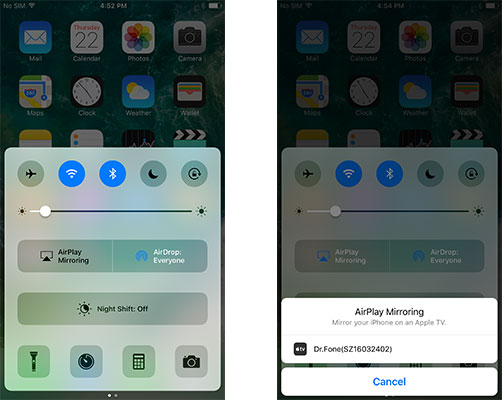

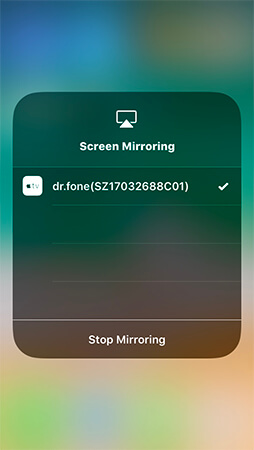

Step 4 Record, stop, and inspect the clip
In the desktop workflow, start recording from the receiver's record control, play the attack, and stop when finished. If using the iPhone's own recorder instead, tap Screen Recording, wait for the countdown, play, then stop from the status indicator or Control Center and open Photos. These are alternative workflows, not controls you must use simultaneously.

Apple's current screen-recording instructions note that native screen recording and screen mirroring cannot be used at the same time. Review the saved video, trim irrelevant waiting, and avoid sharing personal notifications or private clan chat without permission.
Part 4: Build an Army With a Coherent Plan
Select troops, spells, and any available supporting units around a route through the target base. Look at air coverage for an air attack and wall access, splash defenses, and pathing for a ground approach. Your own wall level does not decide whether you must attack by land or air; the target and your unlocked army options do.
Use preparation time in an organized war to scout and coordinate. Preparation Day and Battle Day are separate phases; read the actual war timer instead of treating 'one day before war' as a universal rule for every mode. Agree on the target and intended result before using an attack.
Practice the composition on appropriate opportunities and revise it after observing where it fails. A bigger mixture of troops is not automatically stronger than a focused army whose units and spells support one another.

Part 5: Identify Vulnerable Bases and Coordinate War Targets
An exposed collector, an accessible storage, or a gap in defensive coverage can make a base attractive for a particular attack. A village showing zero war stars is merely unstarred so far; it does not mean the village is undefended. Scout the layout rather than using a star count as a protection indicator.
In clan wars, ask which attacks the team needs. A reliable attack on a suitable opponent may be more helpful than competing with a stronger teammate for the easiest base. Preserve options for cleanup and let clan leadership coordinate assignments when possible.
The source implied that beating one opponent directly exposes weaker clanmates to stronger battles. That is not a reliable general matchmaking rule. Discuss the actual war map and remaining attacks rather than treating one win as an automatic punishment for the rest of the clan.

Part 6: Read Your Shield and Protection Timers
After a defense, check the protection status shown in your village. Do not assume that a fallen Town Hall always grants exactly 12 hours or that every defensive outcome produces the same shield. Protection conditions and the effect of further attacks depend on the current system and mode.
A raid does not leave your buildings permanently broken so that you must spend Gems to repair them before playing again. Use any available protected time to plan upgrades, manage resources, and choose your next action. Check the displayed warning or shield cost before an attack instead of acting on an old blanket rule.
Supercell's Clash Anytime release notes also explain changes to training and shield-related matchmaking. Current in-game timers are the decision point; a historical screenshot is not an entitlement to a fixed protection period.

Part 7: Balance Offensive Progress and Defensive Coverage
Plan upgrades so that your attacks can support the resources needed for development while your defenses cover likely threats. Town Hall, walls, air defenses, and other buildings serve different purposes; spreading resources randomly can leave a practical weakness even when the village's headline level rises.
Keep offense and defense distinct. Cannons and mortars defend the village; they are not troops you equip for a raid. Attacking depends on the army and spell options your account has unlocked, while defensive buildings must be arranged and upgraded in your own layout.
When farming, inspect the loot offered for the actual target and account for Town Hall-related loot rules. When pursuing trophies or war stars, judge the attainable outcome in that mode. Similar Town Hall levels can make useful practice, but attacking an equal-level player is not a universal formula for account experience or victory.

Part 8: Understand Deployment Space, Compartments and Coverage
Look at the deployment boundary in the layout editor and in replays. Buildings influence nearby deployment space, while poorly planned interior gaps can permit an unwanted entry. Do not assume walls alone prevent an attacker from deploying troops in every empty area.
Use compartments to influence ground pathing and force meaningful choices. Defenses should cover one another, with splash damage positioned to punish suitable groups rather than placed only for visual symmetry. Wall-breaking, jumping, air movement, and other army tools mean that extra wall layers are not an automatic defense against every attack.
The original instruction not to build a single Town Hall was misleading: a Home Village has one Town Hall, not several you can duplicate. Decide how to protect that building and critical resources according to the purpose of the base. Avoid putting every valuable defense on the outer edge simply because it is easy to reach there.

Part 9: Ask for Useful Clan Help and Contribute Back
Join a clan whose activity level and expectations match yours. Ask for the eligible donated troops or advice you actually need, and be specific about the attack plan. Requesting 'help' is less actionable than sharing the target, army, and point where your previous attempt failed.
Use friendly challenges and replays to compare approaches before a serious attack. Donations and clan support operate through the game's own systems; a teammate does not simply take over your live multiplayer raid halfway through. Learn which forms of assistance are available in the mode you are playing.
Return the support through appropriate donations, constructive feedback, and agreed war participation. A clan that communicates clearly can coordinate targets and learn from mistakes without promising that every attack will succeed.

Dr.Fone - Virtual Location: Separate GPS Testing From Game Strategy
 Set your map route to simulate GPS movement.
- Set your wanted movement speed.
- HD and large map view to check location.
- Fake GPS location to anywhere.

Dr.Fone - Virtual Location is a GPS-changing and movement-simulation utility for supported devices. Clash of Clans is not a GPS exploration game, so changing a phone's location does not alter village defenses, opponent selection, Gems, troop strength, or war results. It is not required for any of the nine strategy tips above.
If you also have a legitimate location-testing task in a supported app, the utility can set a map destination or simulate a route with available speed controls. That is a separate use case, not a way to record gameplay or gain an advantage in Clash of Clans. Check device compatibility and the destination service's rules before testing.
Step 1 Connect a supported device
Open the desktop Virtual Location module, connect the phone, and complete the required connection prompts.
Step 2 Select a position for an authorized test
Choose Teleport Mode, search for the intended destination, inspect the result, and confirm with Move Here. A route mode is optional if the separate test needs simulated movement.
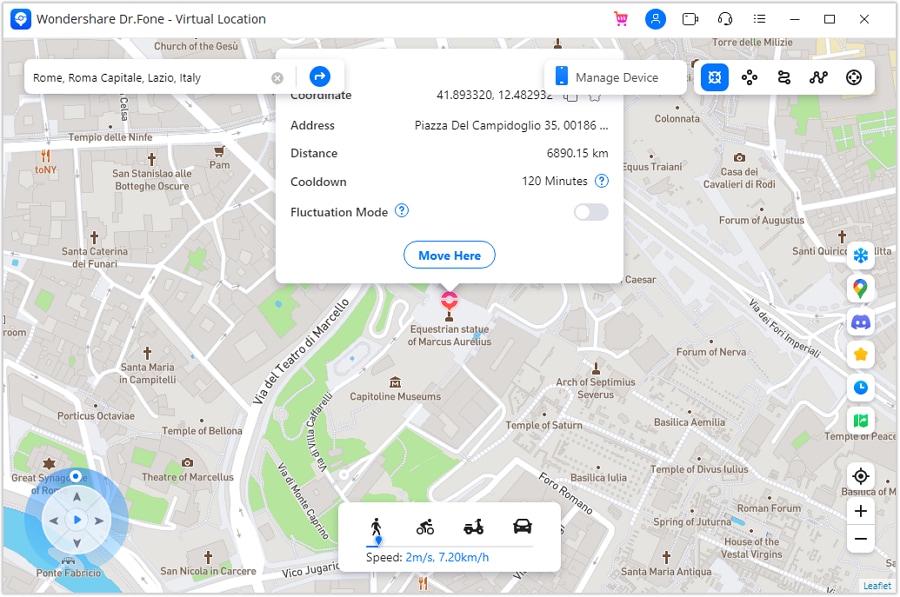
Step 3 Verify and restore GPS
Check the reported position in the phone's Maps app. When finished, follow the application's restart-device guidance to restore the real location and verify it again.
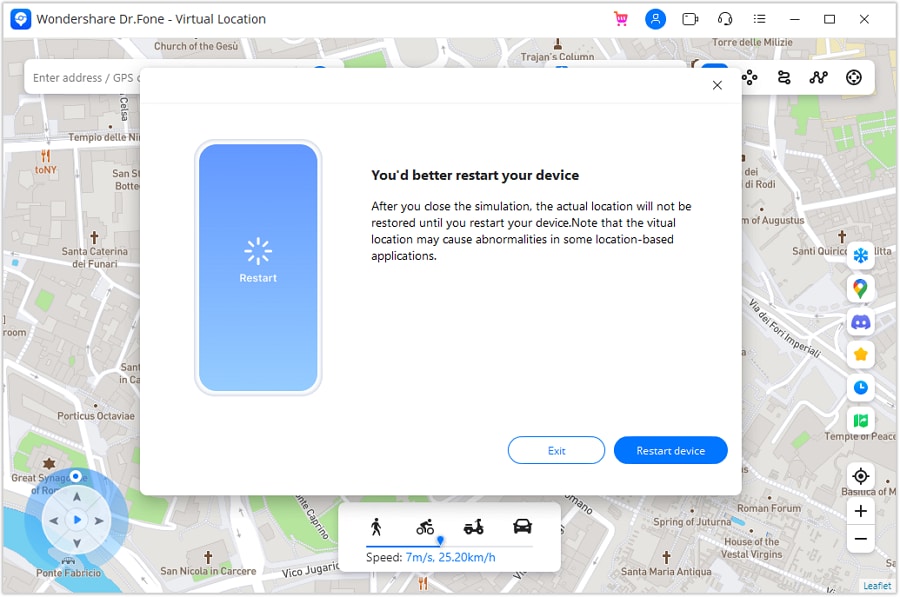
Complete the location test independently of gameplay. For Clash of Clans improvement, return to attack planning, recordings, village design, and clan feedback rather than trying to change GPS.




Conclusion
Choose targets intentionally, spend Gems with a purpose, review attacks, and develop a village and army that support each other. Check the current shield and war timers instead of copying old fixed-time advice. All nine sections work best as a learning routine tailored to your Town Hall, with recording tools kept distinct from GPS utilities and neither presented as a guarantee of victory.
FAQ
1. Should every raid aim for three stars?
No. A resource-farming raid and an organized war attack can have different objectives. Decide which result matters before choosing the target and army.2. Does zero war stars mean a base has no defenses?
No. It means no stars have been earned against that base yet in the displayed context. Inspect the buildings, layout, and available attack plan to assess difficulty.3. Can I use iPhone recording and mirroring together?
Apple says native screen recording and screen mirroring cannot run simultaneously. Choose direct iPhone recording or a supported desktop mirroring-and-capture workflow as alternatives.4. Will a GPS changer improve Clash of Clans matchmaking?
No. GPS simulation does not modify the game's matchmaking, army, village, resources, or battle result. It is a separate device-location function, not a strategy tool for this game.
 Add Wondershare Dr.Fone as a preferred source on Google