 Effortlessly manage data through preview, delete, export, etc.

 100% Security Verified | No Subscription Required | No Malware

 :
: 
 ChatGPT
 Perplexity
 Gemini
 Claude
 Grok
Grok
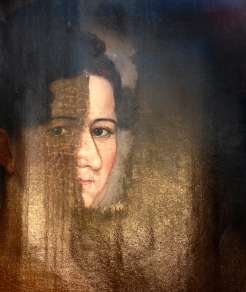
Old photographs are priceless windows to our past, but time often leaves its mark through scratches, creases, and fading. These imperfections can obscure the cherished faces and moments they hold. Losing these visual records to decay can feel like losing a piece of family history.
Fortunately, modern technology provides a powerful solution. This article explores the best apps for photo scratch removal in 2026. Using advanced AI, these tools can digitally repair a scratched picture, restoring it to its original glory with minimal effort. Ready to breathe new life into your treasured memories?
In this article
Why Photo Scratch Repair Is Essential for Preserving Memories
Every scratched photo tells a story, not just of the moment it captured but of its journey through time. From a century-old portrait of your great-grandparents to a faded wedding picture, these heirlooms carry immense sentimental value. Scratches, dust, and damage can feel like losing a piece of that irreplaceable history.
This is where scratched photo repair becomes crucial. By digitally removing imperfections from an old scratched photo, you are not just cleaning an image; you are rescuing a legacy. These restoration tools help preserve precious family memories, ensuring they can be cherished and shared with future generations in pristine condition.
The 5 Best Apps for Flawless Photo Scratch Removal
Damage to old pictures can obscure the important details within them. Thankfully, several powerful applications are designed to fix these issues and restore image quality. These tools leverage intelligent AI to remove scratches from pictures, effectively bringing them back to life. With just a few taps, you can recover and revitalize your most treasured memories. Here are five of the best apps to repair a scratched picture.
1. Dr.Fone App - AI-Powered Old Photo Restoration
The Dr.Fone App excels at repairing old photos by intelligently removing scratches and restoring missing details. Its AI engine analyzes and reconstructs damaged areas, resulting in a smooth, clear finish. The app also enhances faded colors and adjusts brightness, making photos appear natural and vibrant. It sharpens key details, bringing clarity back to every old photo scratch.
Its intuitive, user-friendly interface allows anyone to perform complex restorations without needing technical skills. The process is fast and straightforward, making it easy to fix scratched pictures and preserve your favorite memories.
Dr.Fone App - Old Photo Restoration (iOS & Android)
1-Click Restoration: Bring Old Photos Back to Glory
- Intelligent defect identification and automatic optimization
- Targeted repairs for scratches, stains, fading, and more
- Professional-grade restoration quality
- Efficient & user-friendly



- One-click AI process for restoring damaged photos.
- Automatic scratch and blemish removal.
- Enhances colors and sharpens details in faded pictures.
- Extremely user-friendly for all skill levels.
- Some complex images may require minor manual touch-ups.
- Free version has limited features.
How to Use the Dr.Fone App to Remove Scratches:
-
Step 1Launch the App and Navigate to AI Tools
Open the Dr.Fone App on your device. From the home screen, tap the "Toolbox" icon to enter the AI Toolbox page. Click the blue circle to continue.

-
Step 2Select the Photo Restoration Feature
Within the toolbox, locate and tap on the Old Photo Restoration option. A guide will appear; tap "Select Photo" to browse your device's gallery and choose the image you wish to repair.

-
Step 3Restore and Save the Enhanced Photo
Tap the "Restore" button to initiate the AI-powered process. Dr.Fone will automatically enhance your photo. Once finished, you can use the on-screen slider to compare the before-and-after versions. Finally, tap "Save" to store the restored image on your device.

2. Adobe Photoshop
Adobe Photoshop is the industry standard for professional-grade photo scratch repair. It offers a suite of manual tools, such as the Healing Brush, Clone Stamp, and Patch Tool, which provide meticulous control over the restoration process. This software is ideal for high-quality, detailed editing, allowing users to precisely correct damaged areas and enhance overall image sharpness. Its layer-based workflow enables non-destructive editing for maximum flexibility.
- Unmatched precision and control for detailed restoration.
- Produces professional, high-quality results.
- Extensive features for all types of image editing.
- Steep learning curve for beginners.
- Requires a paid subscription model.
3. VanceAI Photo Restorer
VanceAI Photo Restorer is an online AI photo scratch remover that automates the restoration process. It excels at detecting and repairing scratches, spots, and sepia tones while enhancing overall image clarity and sharpness. The tool also improves faded colors, making old pictures look more vibrant and true to life. It's an excellent choice for users seeking a fast, automatic solution without downloading software.

- Fast, AI-powered restoration without manual effort.
- Simple drag-and-drop web interface.
- Effectively improves colors and overall clarity.
- Requires a stable internet connection for processing.
- Free usage is limited by credits.
4. PhotoWorks
PhotoWorks is a user-friendly desktop photo editor that includes effective tools to restore a scratched picture. It provides step-by-step guides, making it accessible for beginners. Users can manually remove scratches with its built-in Healing Brush and Clone Stamp tools, alongside options to improve overall photo quality. The software also includes robust color correction features to enhance the final image and make it more visually appealing.

- Beginner-friendly interface with guided editing.
- Good balance of manual control and ease of use.
- Includes useful color correction tools.
- Some advanced features require payment.
- Lacks the fully automated AI of competitors.
5. Image Colorizer
Image Colorizer is a versatile AI-powered tool that not only restores old photos but also colorizes them. Its primary function is to remove scratches and enhance image details automatically. This app is particularly effective for transforming black-and-white photos into vibrant, colorful images. It also intelligently adjusts brightness, contrast, and sharpness to improve overall quality, making it a great all-in-one solution.

- Dual-function: repairs photos and adds color.
- Easy-to-use tool for quick enhancements.
- Automatically improves brightness, contrast, and sharpness.
- Colorization results can occasionally be inaccurate.
- Requires an internet connection to function.
Feature Comparison: Which AI Photo Scratch Remover Is Right for You?
With many apps available to remove scratches, choosing the right one depends on your specific needs, skill level, and budget. The table below compares the top five AI photo scratch remover tools to help you make an informed decision.
| App Name | Key Features | Ease of Use | Platform | Best For |
|---|---|---|---|---|
| Dr.Fone App | AI Scratch Removal, Color Enhancement, Detail Sharpening | Easy | iOS & Android | Quick, high-quality mobile restorations |
| Adobe Photoshop | Manual Healing Brush, Clone Stamp, Advanced Layers | Hard | Windows & Mac | Professionals needing precise control |
| VanceAI Photo Restorer | AI Scratch & Spot Removal, Color Correction | Easy | Web Browser | Fast online fixes without software installation |
| PhotoWorks | Guided Restoration, Manual Retouching, Color Correction | Medium | Windows | Beginners who want some manual control |
| Image Colorizer | AI Scratch Removal, Black & White Colorization | Easy | Web, iOS & Android | Restoring and colorizing monochrome photos |
Essential Tips for Achieving Professional Photo Restoration Results
Restoring old photos revives precious memories and brings history to life. Using a scratched photo repair tool effectively can significantly enhance image quality. To ensure the best outcome and prevent common mistakes, follow these essential tips for a high-quality restoration.

- Start with a High-Quality Scan: The quality of your restoration is limited by the quality of your digital file. Scan your physical photo at the highest possible resolution (at least 300 DPI, but 600 DPI is better) to capture all the details.
- Always Work on a Copy: Never edit the original digital scan. Always duplicate the file before you start the restoration process. This ensures you can revert to the original if you make a mistake.
- Choose the Right Tool for the Job: Select an app based on the specific damage. For minor scratches and quick fixes, an automated AI photo scratch remover is ideal. For severe damage or professional work, manual tools like those in Photoshop offer more control.
- Make Subtle Adjustments: Avoid over-editing. Excessive sharpening or saturation can make a photo look unnatural. Apply changes gradually and compare them with the original to maintain a realistic appearance.
- Backup Your Restored Photos: Once you are happy with the result, save the file and create backups. To safeguard your work, always backup the restored images. Tools like Dr.Fone - Phone Backup can help create secure copies of your photos, protecting them from accidental loss.
Conclusion
Restoring scratched photos is a powerful way to bring old memories back to life and preserve your family's history. The evolution of AI photo scratch remover apps has made this process more accessible and effective than ever. The five tools reviewed in this guide all offer excellent features for fixing and enhancing damaged pictures.
Among them, the Dr.Fone App - Old Photo Restoration stands out for its perfect balance of simplicity and powerful AI-driven results. Its intuitive interface and one-click process make it the ideal choice for anyone looking to quickly restore their old pictures without a steep learning curve. Download Dr.Fone today to see your cherished memories in perfect clarity again.
Frequently Asked Questions
-
1. Can AI truly remove all scratches from a photo?
AI is incredibly effective at removing most common scratches, dust, and minor blemishes. For severe damage, such as large tears or areas where the image is completely missing, the AI may struggle to reconstruct the details perfectly. In these cases, results are often a significant improvement but may not be flawless. -
2. Is it better to use an app or a professional photo restoration service?
This depends on the photo's value and the severity of the damage. For most family photos with common scratches and fading, an AI app like Dr.Fone provides excellent, cost-effective results. For priceless, severely damaged, or historically significant photographs, a professional human restorer can offer meticulous, detailed work that an algorithm might not achieve. -
3. What is the difference between scratch removal and general photo enhancement?
Scratch removal specifically targets and repairs physical damage like scratches, creases, and tears. General photo enhancement focuses on improving the overall quality of an undamaged image by adjusting brightness, contrast, color balance, and sharpness. Most restoration apps, however, combine both functions. -
4. Can these apps also fix faded colors or water damage?
Yes, many advanced photo restoration apps are equipped to handle more than just scratches. Tools like the Dr.Fone App and Image Colorizer use AI to analyze faded photos and restore their original color vibrancy. Minor water damage or stains can also be significantly reduced or eliminated, although severe water damage may be more challenging to fix completely.
 Add Wondershare Dr.Fone as a preferred source on Google


