
How to Get a Free iPhone Government Phone (2026 Guide)?

Sep 18, 2026 • Filed to: Device Data Management • Proven solutions
 TL;DR:
Eligible US residents can obtain a free, older-model iPhone through the federal Lifeline program by proving enrollment in qualifying assistance programs like SNAP, Medicaid, or SSI, or by meeting the 135% Federal Poverty Level requirement.
● Apply first through the official National Verifier with your SSN and supporting documents to get an approval ID, then enroll directly with participating regional carriers like AirTalk Wireless, Cintex, or TAG Mobile.
● Carriers do not guarantee specific models and often issue the iPhone 11, X, XR, or Android substitutes depending on current stock, whereas newer devices like the iPhone 15, 16, and 17 are strictly limited to paid upgrades.
● Program retention requires limiting benefits to one per household, utilizing the US-only service at least once monthly, and completing yearly recertifications; afterward, users can manage their device files without iTunes using third-party software like Wondershare Dr.Fone (compatible with iOS 26/iPadOS 26 and the iPhone 17 series).
Ask AI for a summary
 ChatGPT
 Perplexity
 Gemini
 Claude
 Grok
Grok
Dr.Fone Basic:
Better Control for Your Phone
Manage, transfer, back up, restore, and mirror your device
Consider a phone that allows you to be in touch without a high monthly fee. The Lifeline program enables this for many people in the United States. Lifeline is a federal assistance program that assists low-income families in obtaining low-cost or free phone service.
Therefore, this guide will help you understand how Lifeline works, what documents you may need, and how to apply correctly. Once you get your free iPhone government phone, learn how tools like Dr.Fone make data management seamless.
- Part 1. What is a Free Government Phone, and Can It Be an iPhone?
- Part 2. Government Assistance Programs That May Qualify You
- Part 3. How to Check If You Qualify for a Free iPhone Government Phone
- Part 4. How to Apply for a Lifeline iPhone Plan [Step‑by‑Step]

- Bonus Tip. Manage Your New iPhone Data with Wondershare Dr.Fone
Part 1. What is a Free Government Phone, and Can It Be an iPhone?
Know that the Lifeline program is a long-standing FCC program that helps low-income households afford phone or internet service. Eligible users get a monthly discount, and some carriers turn this into a $0 plan with a free phone. Hence, you may qualify by income, about 135% of the Federal Poverty Level, or by enrollment in programs like SNAP, Medicaid, or SSI.
You apply through the National Verifier and pick an approved provider. Moreover, each household can only get one Lifeline benefit. To make it more straightforward, a free iPhone gov phone is usually a basic smartphone or feature phone you get at no cost through a carrier in the US Lifeline program. The phone does not come directly from the government, but through participating carriers who offer it as part of their plan.
Part 2. Government Assistance Programs That May Qualify You
As per Lifeline Support, eligible consumers can save up to $9.25 on phone, internet, or bundle services. Plus, even if no one in your house is on a program, you may still qualify for Lifeline. Hence, other than the income requirement, it offers programs like SNAP and Medicaid, which are further explained below:
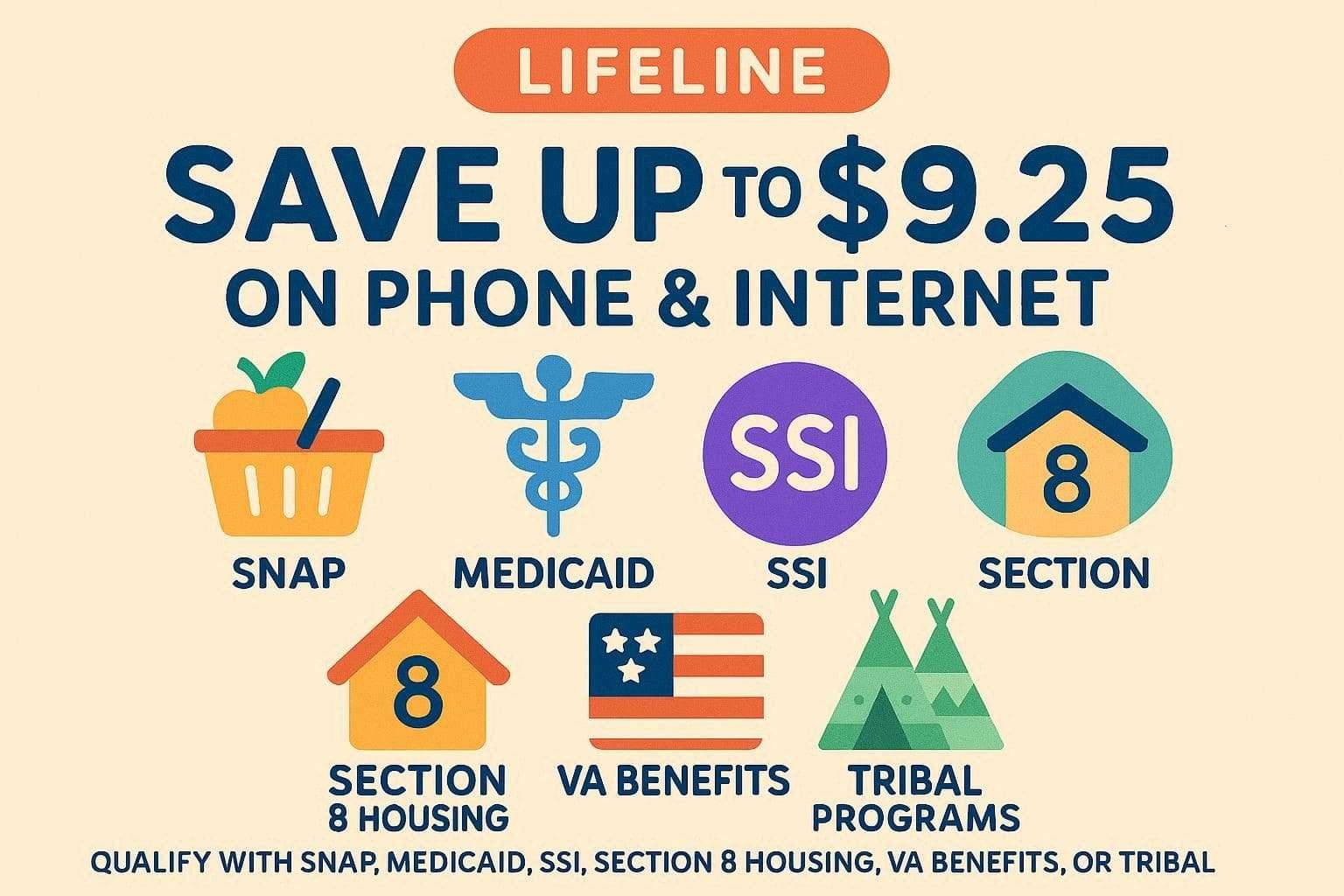
- SNAP (Supplemental Nutrition Assistance Program / Food Stamps)
If you or someone in your household gets SNAP, you usually qualify for Lifeline automatically. SNAP helps low-income families buy food, and you can use your SNAP award letter or EBT card as proof. - Medicaid
Medicaid gives health coverage to low-income people, families, seniors, and people with disabilities. Hence, an active Medicaid card or benefits letter works as proof for Lifeline. - SSI (Supplemental Security Income)
Among all programs, SSI gives monthly money to older adults and disabled people who have little income or resources. Thus, an SSI award letter or benefits statement can qualify your house for Lifeline. - Federal Public Housing Assistance (FPHA / Section 8)
This includes HUD public housing or Section 8 vouchers that help low-income households pay rent. Hence, proof from your housing office or landlord showing FPHA/Section 8 participation works for Lifeline to get a free government iPhone. - Veterans Pension or Survivors Pension (VA Benefits)
These are income-based benefits for eligible veterans, surviving spouses, and dependents. A VA pension or a survivor's letter usually counts as proof for Lifeline. - Certain Tribal programs (For People On Tribal Lands)
Programs like Tribal TANF, Bureau of Indian Affairs General Assistance, or FDPIR help people on Tribal lands. These can give higher Lifeline discounts if you live on qualifying Tribal lands.
Part 3. How to Check If You Qualify for a Free iPhone Government Phone
To know if you qualify for the Lifeline program to get a free gov phone iPhone, review the given checklist. To learn more, the USAC “Do I Qualify?” page lists all programs and income limits by household size.
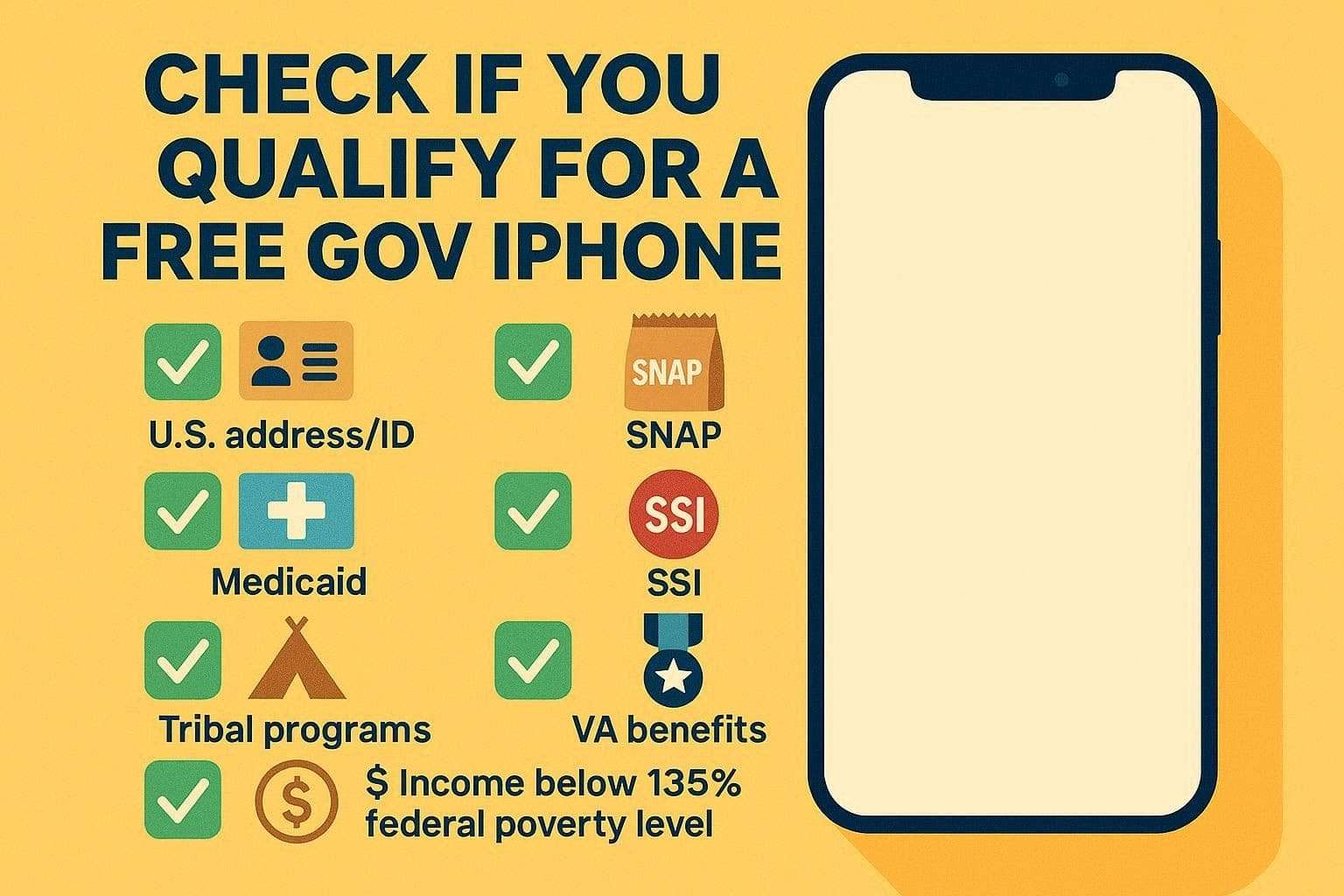
- You need a US address and, usually, a Social Security number or an accepted ID.
- If someone in your household receives SNAP, Medicaid, SSI, FPHA/Section 8, Veterans Pension, or certain Tribal programs such as Tribal TANF or FDPIR.
- You may qualify for a free phone if your household income is at or below 135% of the Federal Poverty Guidelines.
Income Limits Based on Federal Poverty Guidelines (135%)
|
Household Size |
48 Contiguous States, D.C., and Territories |
Alaska |
Hawaii |
| 1 | $21,128 | $26,393 | $24,287 |
| 2 | $28,553 | $35,681 | $32,832 |
| 3 | $35,978 | $44,969 | $41,378 |
| 4 | $43,403 | $54,257 | $49,923 |
| 5 | $50,828 | $63,545 | $58,469 |
| 6 | $58,253 | $72,833 | $67,041 |
| 7 | $65,678 | $82,121 | $75,560 |
| 8 | $73,103 | $91,409 | $84,105 |
| For Each Additional Person, Add: | $7,425 | $9,288 | $8,546 |
iPhone Models You Might Get (And What to Expect)
To further dive into the Lifeline program free iPhone, know that what you get depends on your carrier, state, and available stock. Many Lifeline or ACP carriers offer older iPhones like the iPhone 11, X, or XR as free phones for eligible users.
Newer models, such as iPhone 15, 16, or 17, are usually paid upgrades or limited promotions, not truly free. However, there is no guarantee of a specific model, and even if a carrier advertises an iPhone, you may receive a similar Android phone if iPhones are out of stock.
What’s Included in the Free Government Plan
Hence, if you get an AirTalk wireless free iPhone, what you get each month depends on your carrier and whether you have Lifeline only or a Lifeline+ACP bundle. Most plans, like TAG Mobile, include several GB of high-speed data, usually 25 GB, then slower unlimited data, and also include unlimited talk and text on free plans.
There are also additional options such as voicemail, call waiting, caller ID, and access to 911. Other carriers provide even free international calls or hotspot data to a lot of countries. Therefore, with qualified Lifeline customers, the monthly plan is normally zero, and you only pay for additional features or upgraded phones at a cost.
Common Mistakes and Scams to Avoid
|
Mistake/Scam |
Why It’s a Problem |
What To Do Instead |
| Believing “Free iPhone for Everyone” Ads | Most ads are clickbait or data-harvesting, not real Lifeline offers. | Use only carriers listed on official Lifeline or USAC websites. |
| Paying “Unlock Fees” to Random Sites | iCloud or IMEI unlock claims are often scams and do not work. | Use Apple support with proof of purchase or a legitimate carrier unlock. |
| Giving Out SSN/ID on Non-official Sites | Fake forms can steal identity and benefits. | Enter personal data only on government or trusted carrier portals. |
| Assuming Any Provider Must Give an iPhone | Lifeline provides service discounts, not guaranteed iPhone models. | Check device lists and expect limited or Android options. |
| Signing Up for Multiple Free Phone Programs | Multiple Lifeline lines can cancel all benefits. | Keep only one subsidized phone or plan per household. |
| Ignoring the Fine Print About Upgrade Fees | Hidden device or shipping charges may apply. | Confirm total costs before agreeing and keep written proof. |
| Buying iCloud-locked Phones as “Cheap” | Locked phones are often unusable or stolen. | Buy only devices unlocked at setup or unlocked by the owner in person. |
Part 4. How to Apply for a Lifeline iPhone Plan [Step‑by‑Step]
To get a Lifeline free iPhone, know that the application process is divided into 2 stages. First, you get approved for Lifeline, and then you choose the carrier that offers iPhones on its Lifeline plan. Thus, to know how to fulfil these steps, adhere to the listed guide in detail:
Stage 1. Confirm that You Are Eligible
- Make sure you live in the US and have a US address, as Lifeline only works in the US.
- You may qualify if your household income is at or below 135% of the Federal Poverty Guidelines.
- If you or someone in your household is on SNAP, Medicaid, SSI, FPHA, Veterans Pension, or certain Tribal programs.
Apply Through the National Verifier
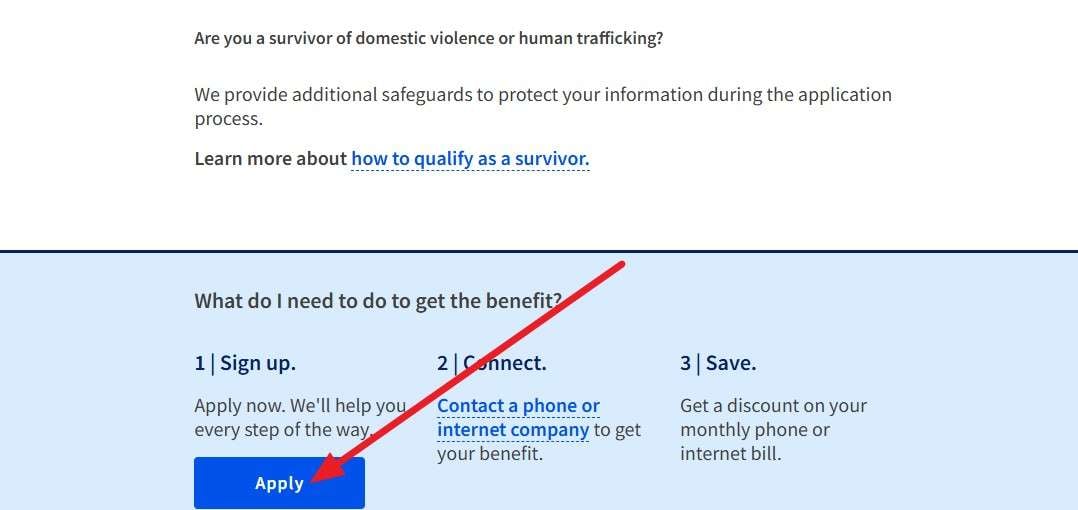
Step 1. Go to the official Lifeline National Verifier page and press the “Apply” button to get a government iPhone for free.
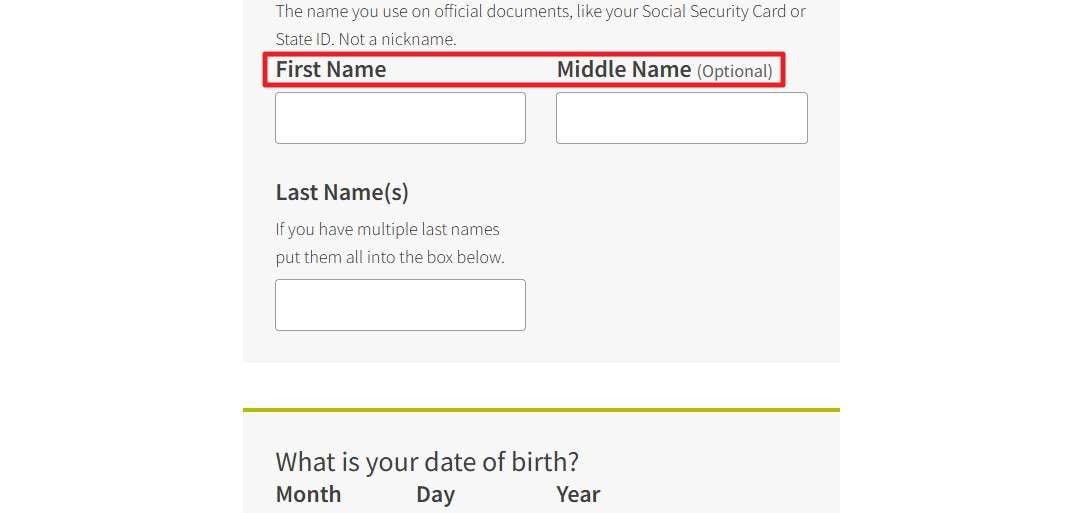
Step 2. Then, create an account and enter your name, birth date, last 4 digits of your SSN (or Tribal ID), and home address. Choose how you qualify, either by income or program, and upload proof if needed. After that, submit the application, wait for approval, and keep your approval ID, as you will need it for the carrier.
Stage 2. Choose a Lifeline Provider That Offers iPhones
After approval, pick a phone provider in your state that accepts Lifeline. Besides, check if they list iPhones as free or upgrade phones for your ZIP code. There is no guarantee of an iPhone, because many providers send low-cost Android phones unless they clearly offer an iPhone.
Enroll in the Lifeline iPhone Plan
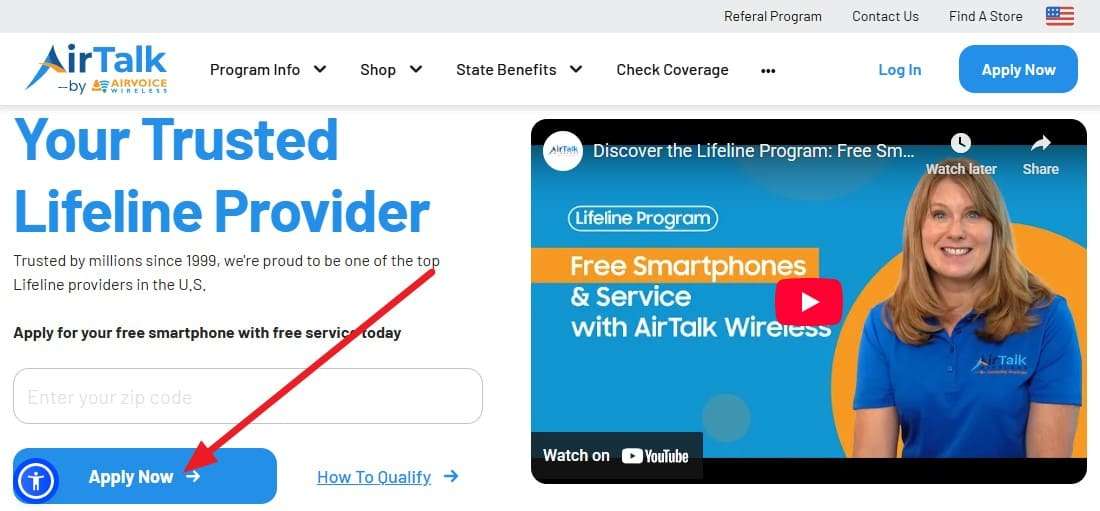
Step 1. Go to the provider’s website, such as AirTalk Wireless, and start their Lifeline application. There, enter the ZIP Code and press the "Apply Now" button to continue.
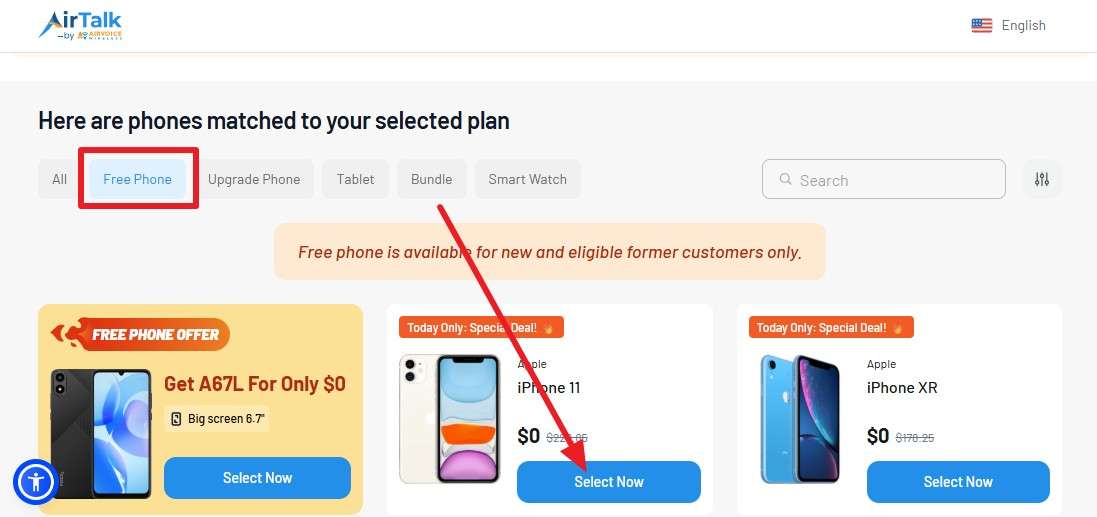
Step 2. Head to the “Free Phone” section and press the “Select” button on the iPhone you seek to get.
Step 3. After that, pick the “Continue” button in the pop-up menu and “Agree” to the Consent form.
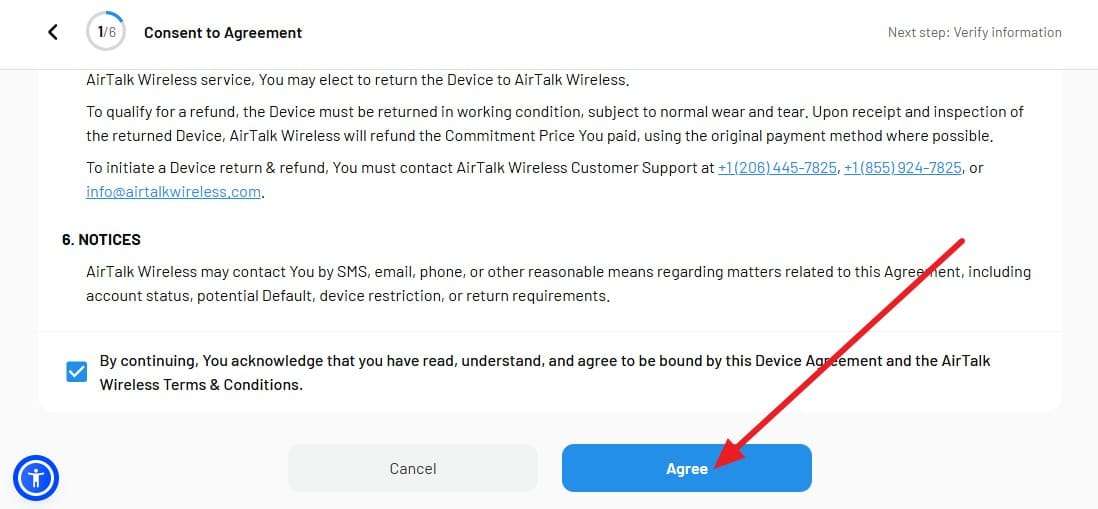
Step 4. Give your approval ID, SSN, and address, and choose a plan and the iPhone option if available. Submit the application, and once approved, the carrier will ship your phone or activate Lifeline on your line.
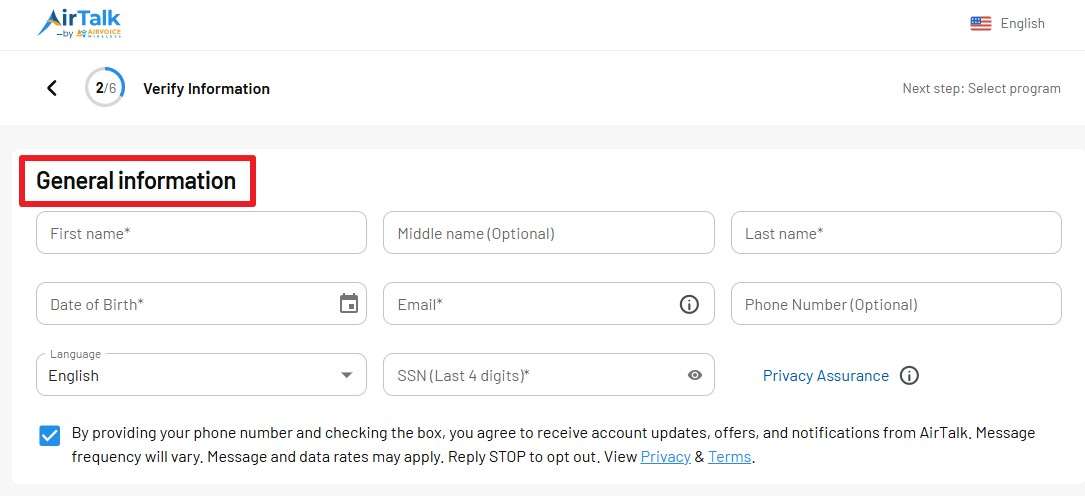
Activate and Keep Your Benefit
Follow the carrier’s steps to activate the phone, and use the line at least once per month to keep the benefit active. Recertify every year when USAC or your carrier asks, or your plan may be cancelled.
Where You Can Get Your Free Government iPhone
Before applying, if you want to know where you can get a free iPhone government phone, here are some options you can try:
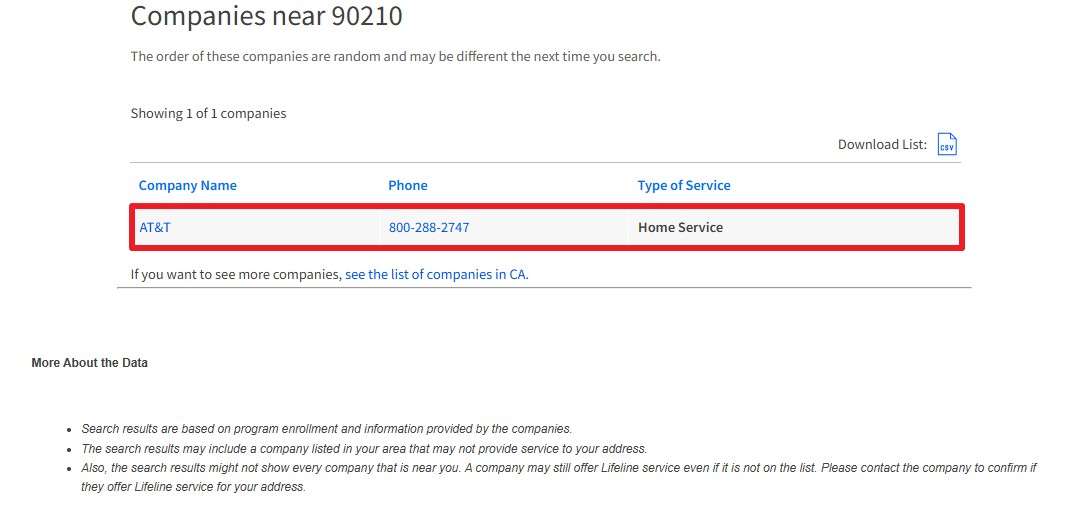
Start with The Official “Companies Near Me” Tool
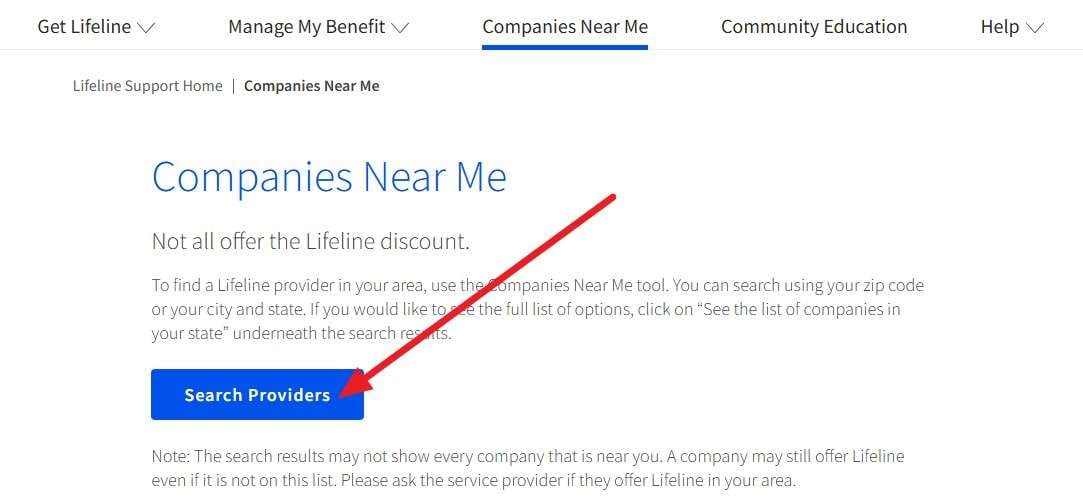
Step 1. Go to the USAC Lifeline “Companies Near Me” page, choose the “Search Provider” option.
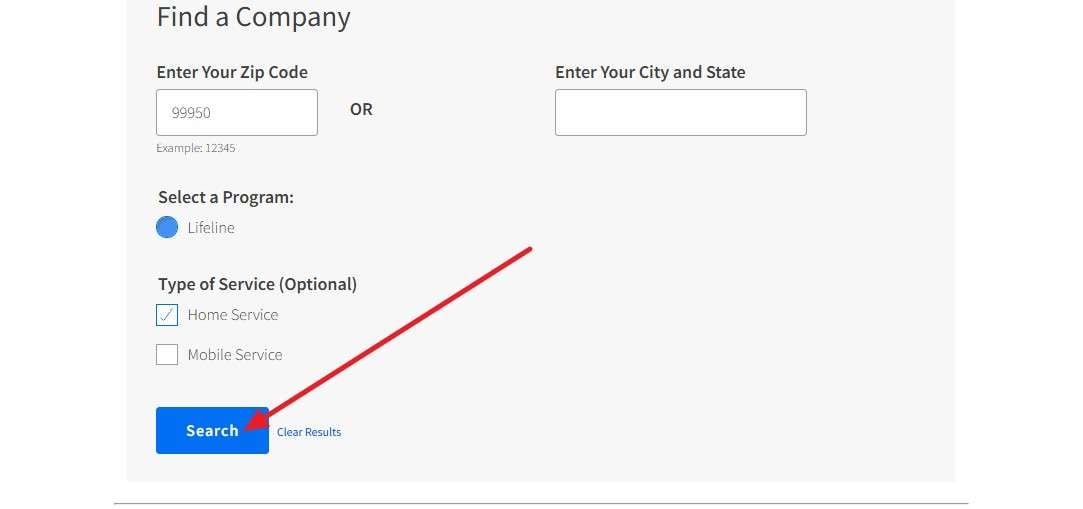
Step 2. Enter your ZIP code or city and state to see all Lifeline providers in your area by clicking the “Search” button. This shows which companies are officially allowed to offer free government phone service in your area.
Look for Carriers That Advertise iPhones
From the list, check provider websites to see who mentions iPhones. Some brands like AirTalk, Cintex, or related providers may offer free or low-cost iPhones (11, 8, XR) for eligible Lifeline or ACP users, sometimes with a small co-pay. Also, TAG Mobile may also show “free government phones, free iPhones, free smartphones” in some states.
Pro Tip. Manage Your New iPhone Data with Wondershare Dr.Fone
Now that you have a gov iPhone for free, you might seek a seamless way to manage the iOS data. Here, Wondershare Dr.Fone allows you to import, export, or drag & drop the data between iOS and PC. One can also use it to move iCloud data across devices or sync music and podcasts between iOS and iTunes.
Hence, offering seamless use in 3 simple steps, data management with this tool requires no iTunes or iCloud. Moreover, Dr.Fone supports iOS 26/iPadOS 26 and iPhone 17 series, and a separate tab for each tool makes management seamless. Not just that, you can preview the data once it's shared across devices. Users can also use it to batch-convert HEIC/HEIF photos to JPEG format, making it a versatile manager.

Wondershare Dr.Fone
Manage Your New iPhone Data with Wondershare Dr.Fone
- Transfer, manage, export/import your music, photos, videos, contacts, SMS, Apps, etc.
- Back up your music, photos, videos, contacts, SMS, Apps, etc., to the computer and restore them easily.
- Transfer music, photos, videos, contacts, messages, etc., from one smartphone to another.
- Transfer media files between iOS devices and iTunes.
- Fully compatible with the newest iOS system.


Guide to Move Data Between Lifeline Free iPhone and PC with Dr.Fone
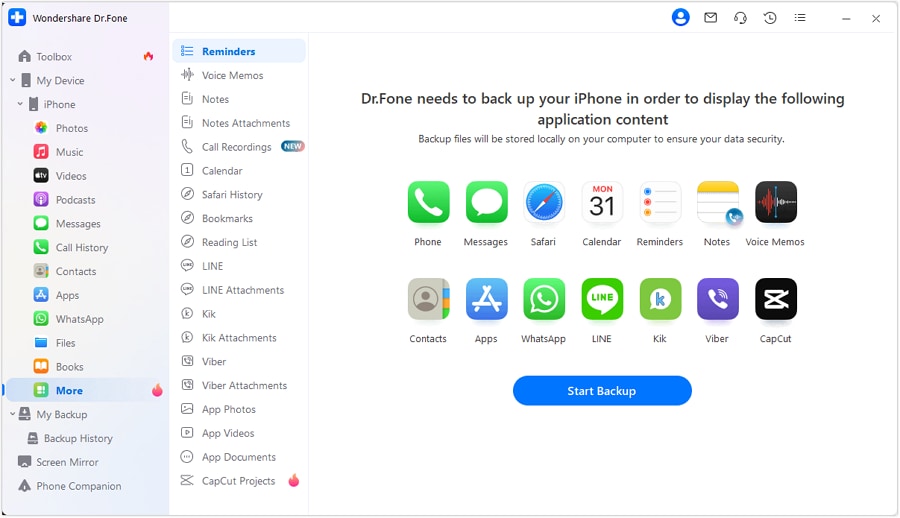
Step 1. Go to the Desired Data Section
If you seek to manage call history, launch the tool, connect the device, and head to the “Call History” section from the left toolbar.
Step 2. Choose to Export or Print the Call History
Choose what you seek to move and pick the “Export” button on the tool. If you want to print it, select the “Print” option and wait until the tool generates a file.

Conclusion
In conclusion, this guide has explained how you can get a free iPhone government phone via the Lifeline program. Application procedures and eligibility criteria are also explained in detail to determine whether you qualify. So, when you get a free iPhone from trusted providers, manage the data with Dr.Fone - Data Manager (iOS).
 safe & secure
4,624,541 people have downloaded it
FAQs
 Q1.Can I get accessories with the phone?Q2. Can I keep the phone forever?Q3. Can I use the phone outside the US?
Dr.Fone Basic:
Better Control for Your Phone
Manage, transfer, back up, restore, and mirror your device


iPhone Transfer
- Data Transfer
- 1. Video from iPhone to External Drive
- 2. Transfer MP4 to iPhone
- 3. Put Wallpapers on iPhone
- 4. Move Photos to SD Card
- 5. Best Apps to Transfer from iPhone to Android
- iPhone to PC
- 1. Transfer Pictures From iPhone to PC
- 2. Transfer From iPhone to Computer
- 3. Transfer Album from iPhone to PC
- 4. Transfer Data from iPhone to PC
- 5. Copy Voice Memo from iPhone to PC
- 6. Apple 'MFi Certified'
- 7. Podcasts from iPhone to Computer
- 8. Transfer Notes from iPhone
- 9. Techniques Used in Mobile Phone Forensics
- 10. Facing Please Unlock iPhone Photos Error
- iPhone to Mac
- 1. Voice memos from iPhone to Mac
- 2. Synce Notes from iPhone to Mac
- 3. Export iBooks to PC and Mac
- 4. Transfer Photos from iPhone to Mac
- 5. Transfer Music from iPhone to Mac
- Computer to iPhone
- 1. AirDrop From Mac to iPhone
- 2. Use AirDrop from Mac to iPhone
- 3. Transfer Data from PC to iPhone
- 4. Transfer Videos from PC to iPhone
- 5. Unsync iPhone from Computer
- 6. Sync iPhone with Multiple Computers
- Transfer to iPhone
- 1. Switch Cards Between iPhones
- 2. Facetime for Android to iPhone
- 3. Transfer Data from Motorola to iPhone
- 4. Samsung to iPhone Transfer
- 5. Transfer iPhone Apps to iPhone
- 6. Clone iPhone/iPad to iPhone
- Transfer from iPhone
- 1. Transfer Video from iPhone to Laptop
- 2. Transfer Data from iPhone to Laptop
- 3. Transfer Notes from iPhone to iPad
- 4. Transfer Data from iPhone to Android
- 5. Switch from iPhone to Google Pixel
- 6. Switch from iPhone to Samsung S10
- 7. Switch from iPhone to Samsung
- 8. Transfer from iPhone to Samsung S20
- iPhone Transfer Tips
- 1. Ford Sync iPhone
- 2. Free Music Download Sites
- 3. Where Do AirDrop Photos and Files Go
- 4. iPhone Transfer Software
- 5. Get a Free iPhone Government Phone
- WhatsApp Transfer
- 1. WhatsApp from iPhone to iPhone
- 2. WhatsApp from iPhone to Android
- 3. WhatsApp from iPhone to Samsung S10
- 4. WhatsApp Messages to iPhone
- 5. WhatsApp from iPhone to Samsung S9
- iTunes Transfer
- ● Manage/transfer/recover data
- ● Unlock screen/activate/FRP lock
- ● Fix most iOS and Android issues
- Free Download Free Download Free Download




Daisy Raines
staff Editor