

How to Unlock a Motorola Phone Password Without a Factory Reset?

Oct 10, 2026 • Filed to: Screen Lock Removal • Proven solutions
 TL;DR:
You can bypass a locked Motorola phone without erasing your data using pre-configured features like Smart Lock, remote tools like Google Find My Device, or third-party software like Dr.Fone - Screen Unlock.
● Smart Lock and ADB commands completely rely on prior configuration, requiring you to have set up trusted locations or enabled USB debugging before losing access to the device.
● Google Find My Device allows you to remotely overwrite the existing lock with a temporary password, but it strictly requires the phone to be powered on, connected to the internet, and logged into your Google account.
● Dr.Fone - Screen Unlock removes the lock screen in 10 to 15 minutes provided the battery is fully charged and USB debugging is active, whereas using Recovery Mode as a last resort permanently wipes all data and triggers a Factory Reset Protection (FRP) lock.
Ask AI for a summary
 ChatGPT
 Perplexity
 Gemini
 Claude
 Grok
Grok
When you’re locked out of your Motorola device, you can regain access without wiping your data with specialized tools and Android features. For example, Dr.Fone – Screen Unlock removes a PIN, pattern, and password without resetting the phone. Other methods include Google’s Find My Device, Smart Lock (if it was enabled beforehand), and ADB commands.
Most default methods (like remote erase or recovery mode) will erase all data, but a professional tool like Dr.Fone can remove the screen lock while preserving your files. Keep reading for detailed steps to learn how to unlock a Motorola phone password without a factory reset.
- Part 1. Top Recommended Method: How to Unlock Motorola Phone Password Without Factory Reset Using Dr.Fone?

- Part 2. How to Unlock a Motorola Phone Password Using Google Find My Device?
- Part 3. How to Unlock a Motorola Phone With Smart Lock? (If Enabled Before Lockout)
- Part 4. How to Unlock a Motorola Phone Without a Factory Reset Using ADB Command?
- Part 5. How to Unlock a Motorola Phone Through Recovery Mode? (Factory Reset)
Part 1. Top Recommended Method: How to Unlock Motorola Phone Password Without Factory Reset Using Dr.Fone?
Dr.Fone - Screen Unlock (Android) makes bypassing the lock easy and data-safe. It supports many phone brands and keeps your photos, contacts, apps, and settings intact during the unlock process. Its simple interface guides you through the process in minutes, with no technical skill needed.
In fact, Dr.Fone offers a “Remove Without Data Loss” option on compatible devices, including Samsung, so your files stay intact while the screen lock is removed. This means you can unlock your Motorola without losing data.
Key Features of Dr.Fone Screen Unlock Android
- Removes all of your screen locks, such as fingerprint and Face ID, within minutes.
- Bypasses Samsung FRP locks without needing your older account password.
- Provides a guided interface so that anyone can use this tool without expertise.
- Delivers device-specific solutions, resulting in a high success rate on supported models.

Dr.Fone - Screen Unlock (Android)
Unlock Motorola Phone Password Without Factory Reset
- Completely unlinked from the previous Google account, it won’t be traced or blocked by it anymore.
- Remove all Android screen locks (PIN/pattern/fingerprints/face ID) in minutes.
- Compatible with various Android models.
- Provide specific removal solutions to promise success rate.


Steps to Unlock Motorola Password with Dr.Fone
Before starting, you need to make sure that your Motorola’s battery is fully charged and USB debugging is enabled. Then carefully follow these steps to unlock the Motorola Android phone password without a factory reset:
Step 1. Access the Screen Unlock Tool
Start the process by opening Dr.Fone on your PC and connecting your locked Motorola via USB cable. Then, select the Screen Unlock option in the Toolbox and choose Android as the device type.

Step 2. Enter the Unlock Android Screen Feature
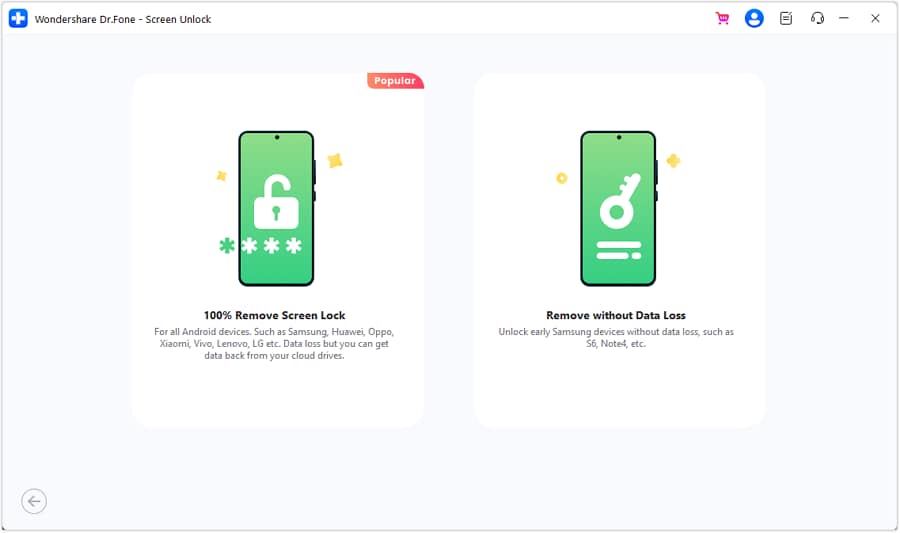
Moving forward, click Unlock Android Screen on the next page and then select your device brand and model. Afterwards, simply choose the Remove without Data Loss option.
Step 3. Verify Your Device Details
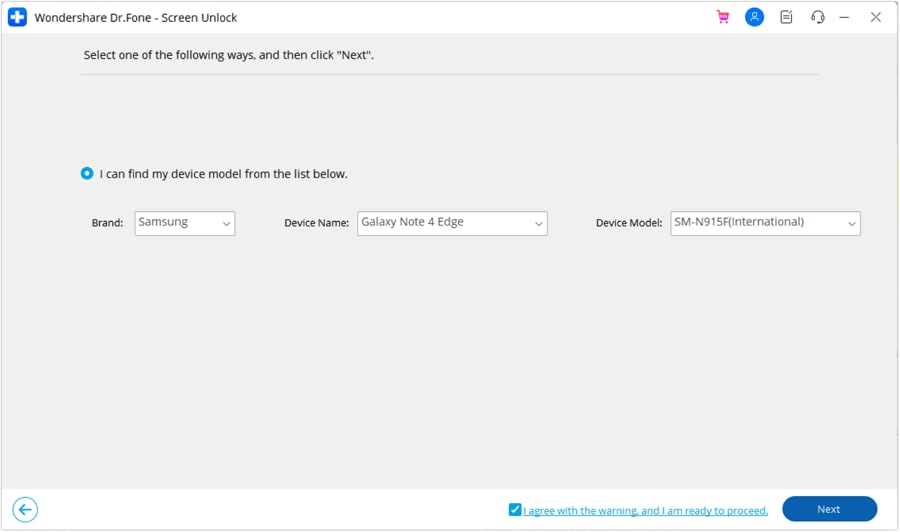
Next, the software will automatically recognize your phone model. Check that the listed brand, model, and related information are correct. Once everything matches your device, accept the warning message and select Next to continue.
Step 4. Confirm and Enter the Download Mode
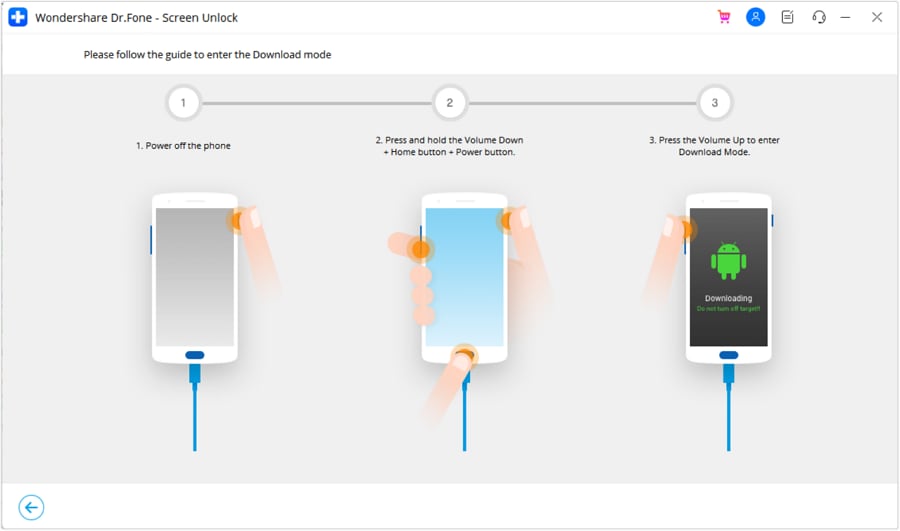
Now, you’ll first be asked to verify the action by typing “000000”, then selecting Confirm to begin. Dr.Fone will guide you to place your Android device into Download Mode based on its model.
Step 5. Complete the Screen Unlock Process
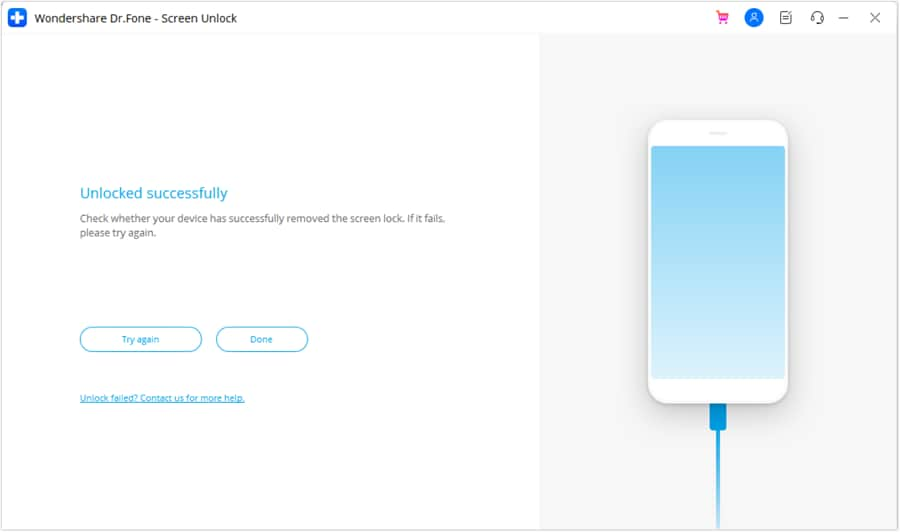
Upon entering this mode, the tool will download the necessary drivers and configuration files while showing real-time progress. After completion, you’ll see a success message. Your phone will reboot unlocked, and all your data will remain intact.
 safe & secure
4,624,541 people have downloaded it
Part 2. How to Unlock a Motorola Phone Password Using Google Find My Device?
Using this method, you get the ability to set a new lock password remotely, so you don’t have to erase files. It works only if your Moto is powered on and connected to the internet. Moreover, you will need to be signed into your account to apply this fix.
Using another device, simply log in and assign a temporary password to the phone. This overwrites the old lock without wiping data, letting you use the new code to unlock. Follow the steps below to unlock a Motorola phone password without a factory reset.
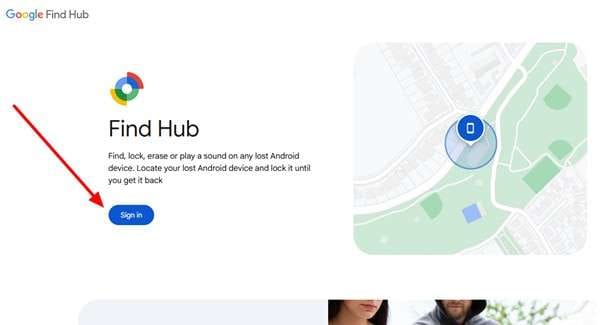
Step 1. To begin, access the Google Find Hub page using any browser and tap Sign In. Now, enter the credentials of the account linked to your locked Motorola phone.
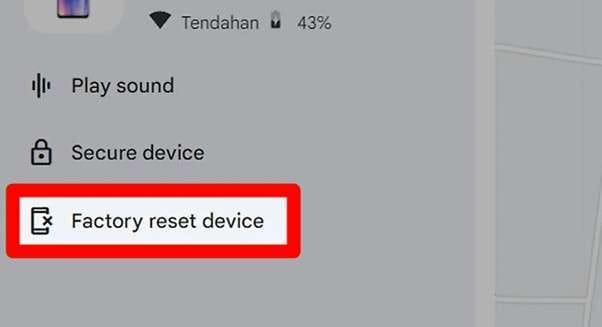
Step 2. From the left panel, choose the option labeled Factory Reset Device under your Motorola device. Moving forward, press Next and re-enter your account credentials to confirm the reset action.
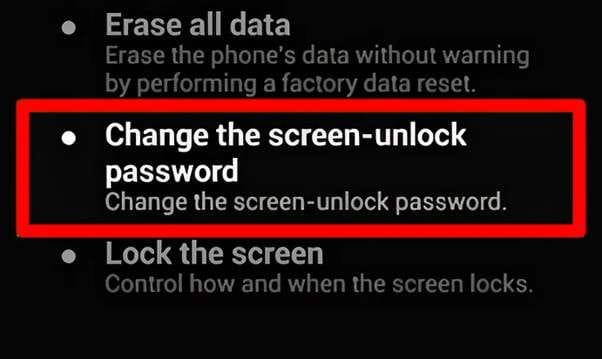
Step 3. Within the Android Device Manager interface, select Change the Screen-Unlock Password and create a new password for your phone.
Part 3. How to Unlock a Motorola Phone With Smart Lock? (If Enabled Before Lockout)
Smart Lock is an Android feature that automatically keeps your phone unlocked in certain “trusted” situations. While using this feature, you can set your Moto to stay unlocked at home. Plus, it even unlocks your phone when connected to a Bluetooth device.
When Smart Lock was enabled, placing the phone in one of those trusted conditions should bypass the lock screen without entering your password. Go through these steps to unlock the Motorola Android phone password without a factory reset:
Step 1. On your Motorola, go to the Settings app and access Security & Privacy. Now, tap on Smart Lock and enter the Trusted Devices screen to add a new device.
Step 2. Using this method, you can even enable a Trusted Place (home location) and On-body Detection to unlock the device.
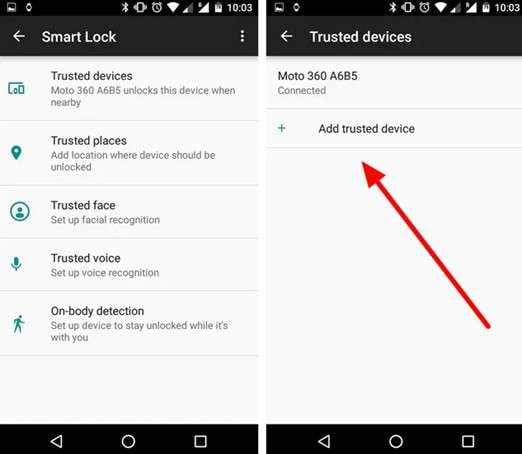
Step 3. When your phone is already in a trusted condition when locked, it will bypass the lock screen automatically. Once unlocked, immediately remove or reset your screen lock in Settings to regain normal access.
Part 4. How to Unlock a Motorola Phone Without a Factory Reset Using ADB Command?
Android Debug Bridge is a developer tool that can remove the lock with the help of a computer. However, this is only possible if you enabled USB debugging on the phone before locking it. When set up, you can issue commands to delete the lock screen’s data.
This method does not erase data, but it requires technical skills for implementation. To unlock a Motorola phone password without a factory reset, follow these steps:
Step 1. After installing Android Platform Tools on your PC, enable USB Debugging on your Motorola and connect it to your PC via USB.
Step 2. On your system’s Command Prompt, run the following command and press Enter.
adb shell rm /data/system/gesture.key
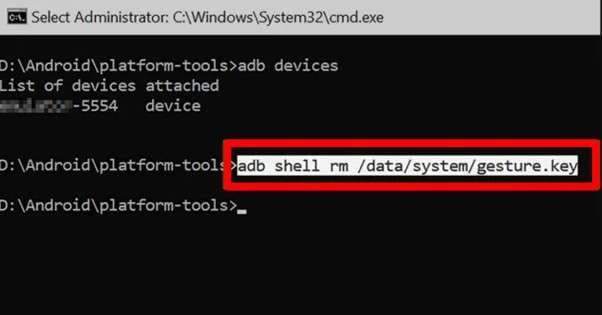
Step 3. After running the command, type adb reboot and press Enter to restart the phone. When the phone reboots, the lock screen should be gone, letting you set a new password or pattern.
Part 5. How to Unlock a Motorola Phone Through Recovery Mode? (Factory Reset)
If all other methods fail, you can use Recovery Mode to perform a factory reset. This will erase all data on the phone, so only use it as a last resort. Before applying this method, always create a backup of important files. To perform this task:
Step 1. Charge the phone’s battery to at least 30% and turn it off. Now, press and hold Volume Down + Power buttons until the bootloader menu appears.
Step 2. Moving forward, use Volume Down to highlight Recovery mode, and then press Power to select it.
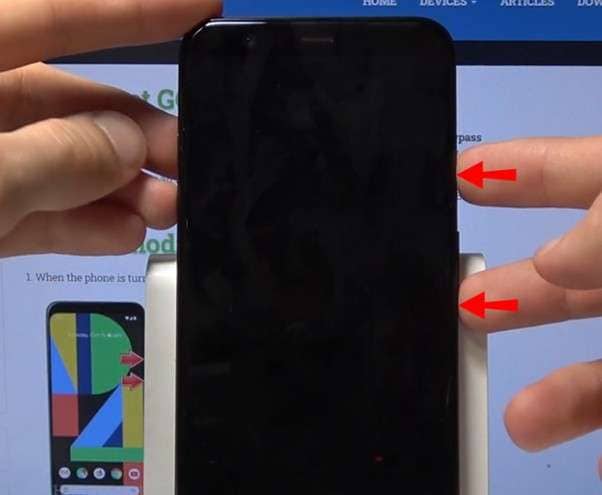
Step 3. If you see an Android robot with an exclamation, hold Power and press Volume Up once to enter the full recovery menu.
Step 4. In the menu, use the volume keys to scroll to the Wipe Data/Factory reset option and press Power.
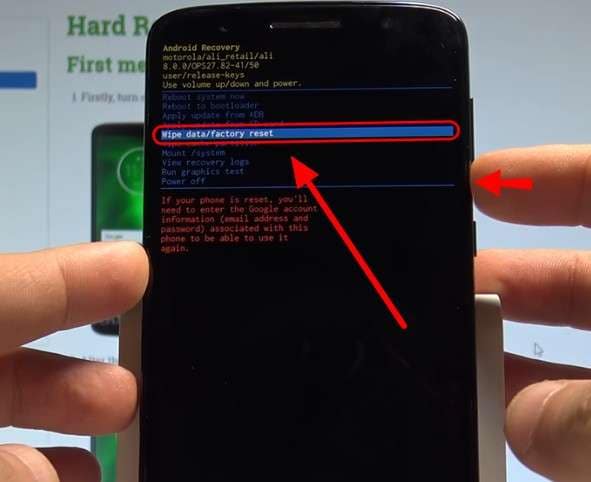
Step 5. On the next screen, select Factory Data Reset and press Power to confirm. Now, wait for the reset to complete and then choose Reboot System Now to restart your phone in its factory state.
Conclusion
In summary, unlocking a Motorola phone password without a factory reset. It is possible to use several methods. Google’s Find My Device or Smart Lock can work if the conditions are right, but they have limitations. On top of that, the ADB approach requires prior setup and technical steps.
However, Dr.Fone – Screen Unlock provides a data-safe solution. It removes the screen lock without erasing your photos or apps. Its guided process and high success rate make it the easiest way to regain access to your phone safely.
safe & secure4,624,541 people have downloaded it
FAQs
 Q1. Can I unlock my Motorola without losing photos?Q2. Does unlocking a Motorola phone void the warranty?Q3. What if I forgot both my password and Google account?Q4. How long does Dr.Fone take to unlock Motorola?


Motorola Manage
- Motorola Transfer
- 1. Download Pictures to PC
- 2. Transfer Motorola to Mac
- 3. Transfer Whatsapp from Moto to iOS
- 4. Transfer Music from Mac to Moto
- 5. Transfer WhatsApp from iOS to Moto
- Motorola Unlock
- 1. Unlock Motorola Without Factory Reset
- 2. Network Unlock Motorola One 5G Ace
- 3. Sim Unlock Moto G Phone
- 4. Unlock Moto Without Factory Reset
- 5. Unlock Motorola Bootloader
- 6. Bypass FRP Lock on Motorola
- 7. Reset Motorola Phone When Locked
- Motorola Repair
- 1. Motorola Won't Power On
- 2. Android App Not Installed Error
- 3. Black Screen of Death Error
- 4. Unbrick Android Phone
- 5. Encryption Unsuccessful Error
- 6. Stuck at Android System Recovery
- 7. Android Won't Turn On
- 8. Android Stuck on Boot Screen
- Motorola Tips
- 1. Turn Off a Motorola Phone
- 2. Mirror Motorola Screen to PC
- 3. Back up Motorola to PC
- 4. Control Motorola from PC
- 5. Format Motorola Phone in 2026
- 6. Reboot Any Motorola Phone
- 7. How to Screenshot on Motorola
- 8. Restart Any Motorola Phone
- 9. Motorola Phone Restore Guide
- 10. Set Up Voicemail on Motorola
- ● Manage/transfer/recover data
- ● Unlock screen/activate/FRP lock
- ● Fix most iOS and Android issues
- Free Download Free Download Free Download



Alice MJ
staff Editor