
Moto FRP Tool Guide 2026: Best Ways to Bypass FRP on Motorola Phones

Oct 24, 2026 • Filed to: Screen Lock Removal • Proven solutions
 TL;DR:
Rightful owners locked out of a Motorola phone by Factory Reset Protection (FRP) can bypass the Google account verification using premium desktop tools like Dr.Fone - Screen Unlock for Android 6.0+ devices, or by exploiting on-device UI vulnerabilities via TalkBack or Wi-Fi microphone permission loops without a PC.
● Dr.Fone – Screen Unlock (Android) provides a guided, three-step FRP bypass via USB for Motorola devices running Android 6.0+, but it requires purchasing a paid premium version to execute the removal.
● Alternative PC utilities like the Moto FRP Tool (MotoReaper) and Android Fastboot Reset Tool require booting the device into Fastboot mode and configuring specific USB drivers, but they primarily support older Android generations and may lack recent security patch support.
● Manual, PC-free bypasses involve forcing an offline setup by either using the TalkBack Braille Keyboard to access the Accessibility Assistant on newer models or repeatedly denying Wi-Fi microphone permissions to reach App Info and disable Google Play Services on low-end devices like the Moto E.
Ask AI for a summary
 ChatGPT
 Perplexity
 Gemini
 Claude
 Grok
Grok
A locked Motorola phone can feel useless after a reset asks for an old Google account. Many owners face this problem after a mistake, a used phone buy, or lost login details. Therefore, this Moto FRP tool guide 2026 helps reduce that stress and shares the best ways to bypass FRP on Motorola phones, with clear, safe instructions.
Here, you will learn about on-device Moto FRP tool options and PC tools made for bypassing FRP smoothly. As you get to know what makes Dr.Fone the best of all, also familiarize yourself with some tricks to bypass the FRP.
- Part 1. Introduction to Moto FRP Unlock Tools
- Part 2. Top 5 Motorola FRP Bypass Tools (With Pros & Cons)
- 1. Dr.Fone – Screen Unlock (Android) — Best Overall Pick

- 2. Moto FRP Tool (Classic Community Tool)
- 3. Android Fastboot Reset Tool
- 4. Hydra Tool
- 5. Aiseesoft Android Unlocker
- Part 3. FRP Bypass Without Tools (When Tools Aren’t Needed)
- Part 4. Why Dr.Fone – Screen Unlock is Recommended for Bypassing Moto FRP
Part 1. Introduction to Moto FRP Unlock Tools
Factory Reset Protection, or FRP, is a Google safety feature on Motorola phones. It asks for the last Google account after a factory reset to stop phone theft. Hence, when a Google account is added on Android 5.1 or later, FRP is enabled automatically. If a reset happens from recovery while the account stays on the phone, setup asks for the same email and password before use.
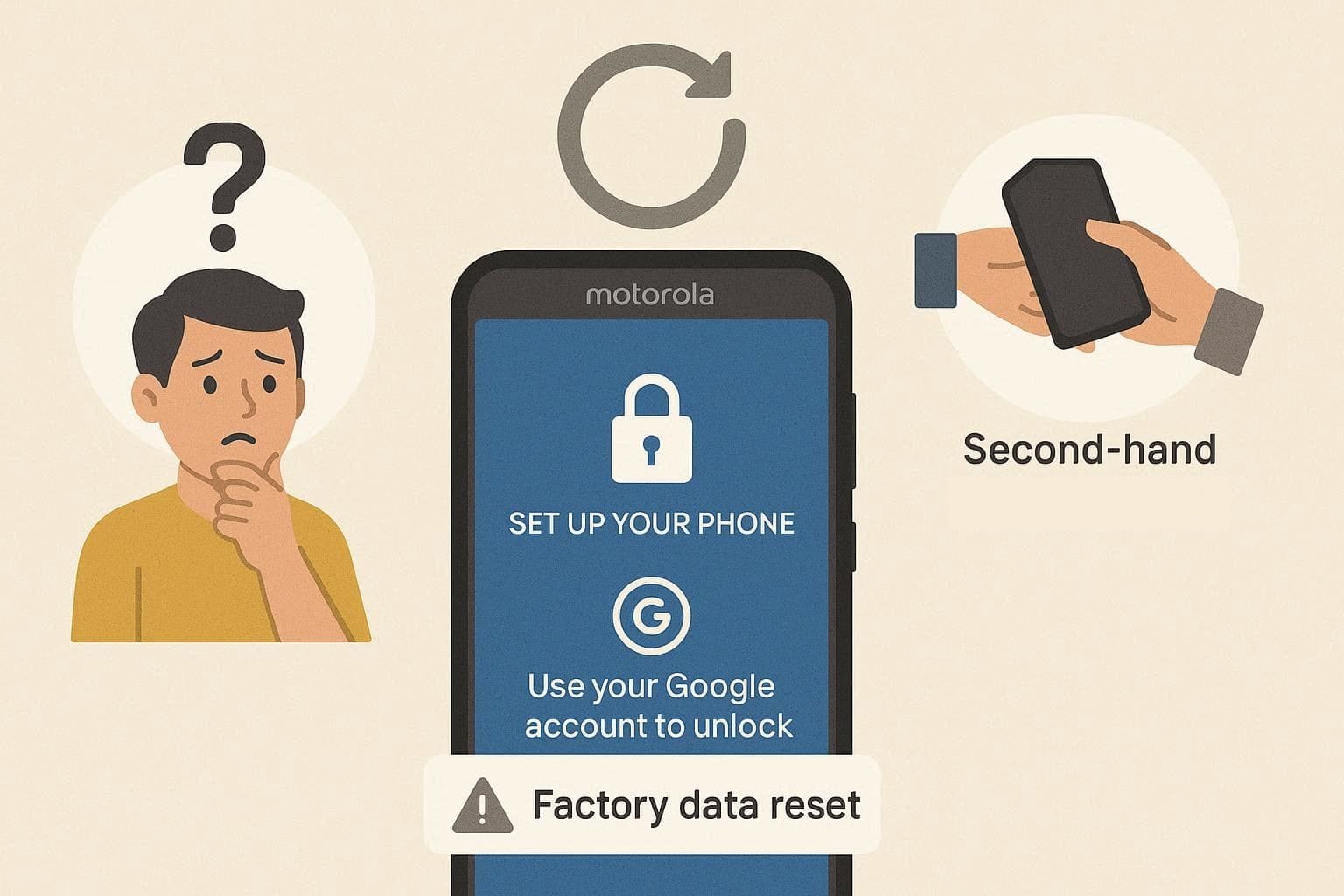
Many owners then seek the Motorola FRP tool due to real issues. Some forget Google login details after a reset, and others buy a used Motorola still linked to the old owner. Not just that, a forced reset can also cause this lock. Thus, when Google account recovery fails, FRP remains the final verification barrier.
How FRP Tools Work on Motorola Phones
Know that an ideal FRP bypass tool for Motorola helps rightful owners pass the Google check after a factory reset. These tools work by changing phone setup rules or by using allowed phone menus. Additionally, some PC tools connect by USB in Fastboot or bootloader mode and remove the Google check without the old password.
Thus, after success, the phone restarts and allows a new Google account to be set up. Overall, a tool detects the phone model and Android version, puts the phone into a special mode, and then clears FRP restrictions.
Part 2. Top 5 Motorola FRP Bypass Tools (With Pros & Cons)
To learn which Moto FRP bypass tool is best and why, adhere to the given details of the 5 best options of 2026:
1. Dr.Fone – Screen Unlock (Android) — Best Overall Pick
Dr.Fone - Screen Unlock (Android) is a reliable Motorola FRP unlock tool for users who are locked out after a factory reset. When your Moto phone asks for the previously synced Google account and you cannot pass the verification screen, Dr.Fone provides a guided way to remove the FRP lock and continue setting up the device.
This tool is designed with a clear desktop workflow, making it easy for users to select the device brand, connect the phone, prepare the required driver, and complete the FRP bypass process. It also supports Moto phones with MTK chips, offering a suitable removal option and a higher success rate for compatible Motorola devices.

Dr.Fone - Screen Unlock (Android)
The Best Unlock Tool to Bypass FRP and Solve Your Screen Locks
- Bypass Google FRP lock on Motorola phones after a factory reset.
- Support Moto devices with MTK chips for a higher unlocking success rate.
- Remove common Android screen locks, including PIN, pattern, password, fingerprint, and face lock.
- Provide guided unlocking solutions for different Android brands and device models.


Guide to Unlock FRP on Moto with Dr.Fone - Screen Unlock (Android)
If you want to use this Motorola FRP unlock tool, follow the simple guide below and keep your device connected with a stable USB cable during the process:
Step 1. Enter the Google FRP Removal Tool
Launch Dr.Fone on your computer and open Screen Unlock from the Toolbox. Choose Android, then select Remove Google FRP Lock to start the FRP bypass process for your Moto phone.

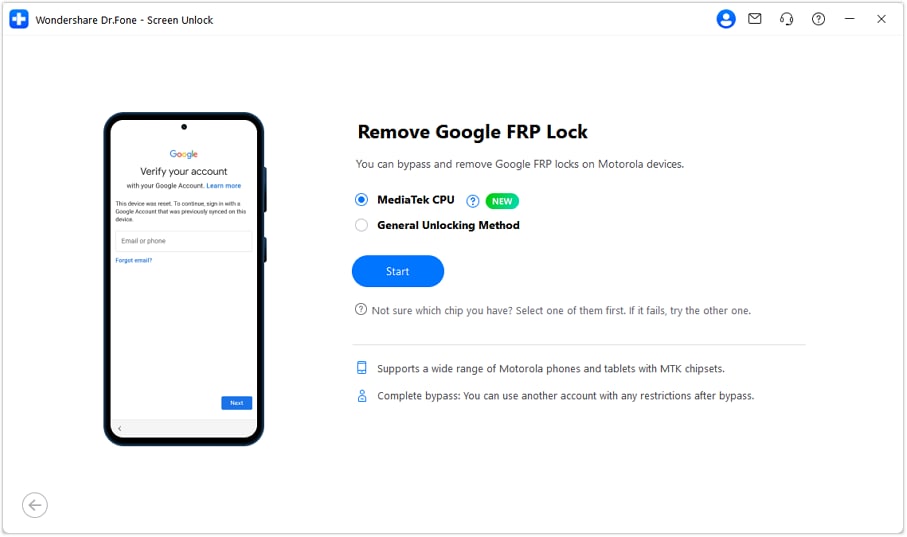
Step 2. Select Motorola and Pick the Suitable Method
From the supported brand list, choose Motorola and click Start. If the program shows different removal options, select MediaTek GPU when your Moto phone uses an MTK chip, then continue to the next step.
Step 3. Prepare the Driver and Reconnect the Phone
Dr.Fone will prepare the required USB driver for the connected Motorola device. Once it is ready, unplug your phone, power it off completely, wait for about 30 seconds, and connect it to the computer again.
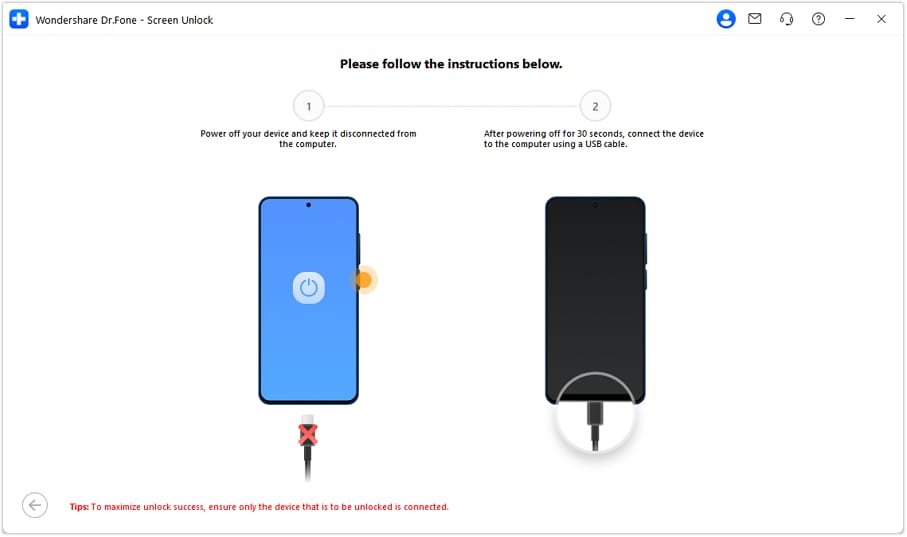
Step 4. Complete the Moto FRP Bypass
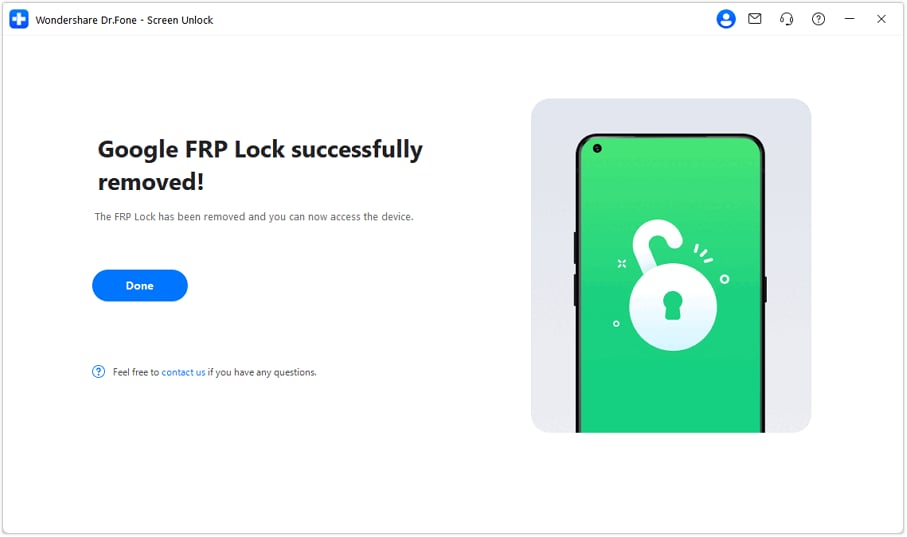
After the phone is detected again, Dr.Fone will begin removing the Google FRP lock. Keep the device connected and avoid using it while the tool is working. When the success message appears, restart your Moto phone and finish the setup normally.
 safe & secure
4,624,541 people have downloaded it
2. Moto FRP Tool (Classic Community Tool)
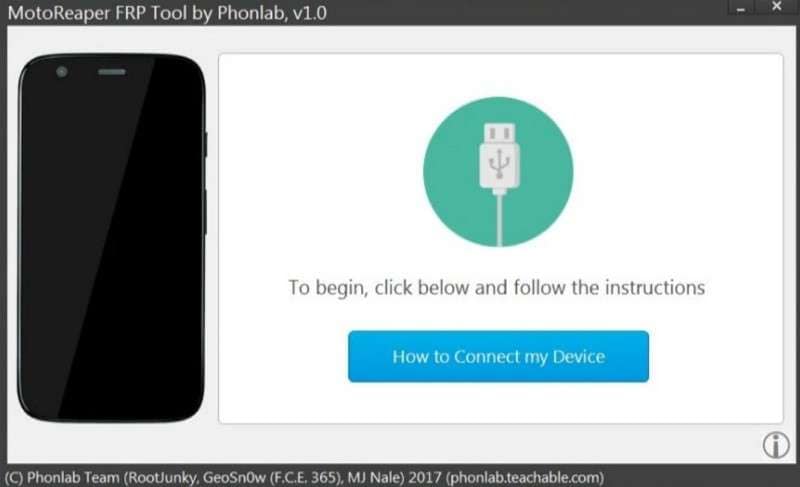
The MotoReaper tool is tailored to remove FRP on Moto G, Moto Z, and many other Motorola lines. It's designed to work with Qualcomm and other chipsets used in many Motorola phones. Once connected through Fastboot mode, it runs scripted steps that may bypass FRP on supported models.
3. Android Fastboot Reset Tool
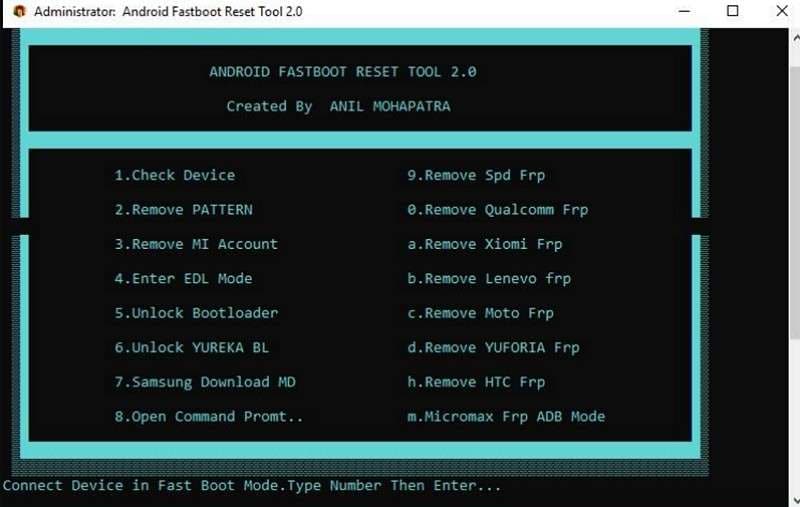
It's a small Windows utility that can bypass FRP and remove screen locks on many Android phones via Fastboot mode. This Motorola FRP tool is menu-based, so you can enter simple numbers as commands and choose an action. Impressively, it can remove pattern/PIN lock, so if both FRP and screen locks are issues, you can address both.
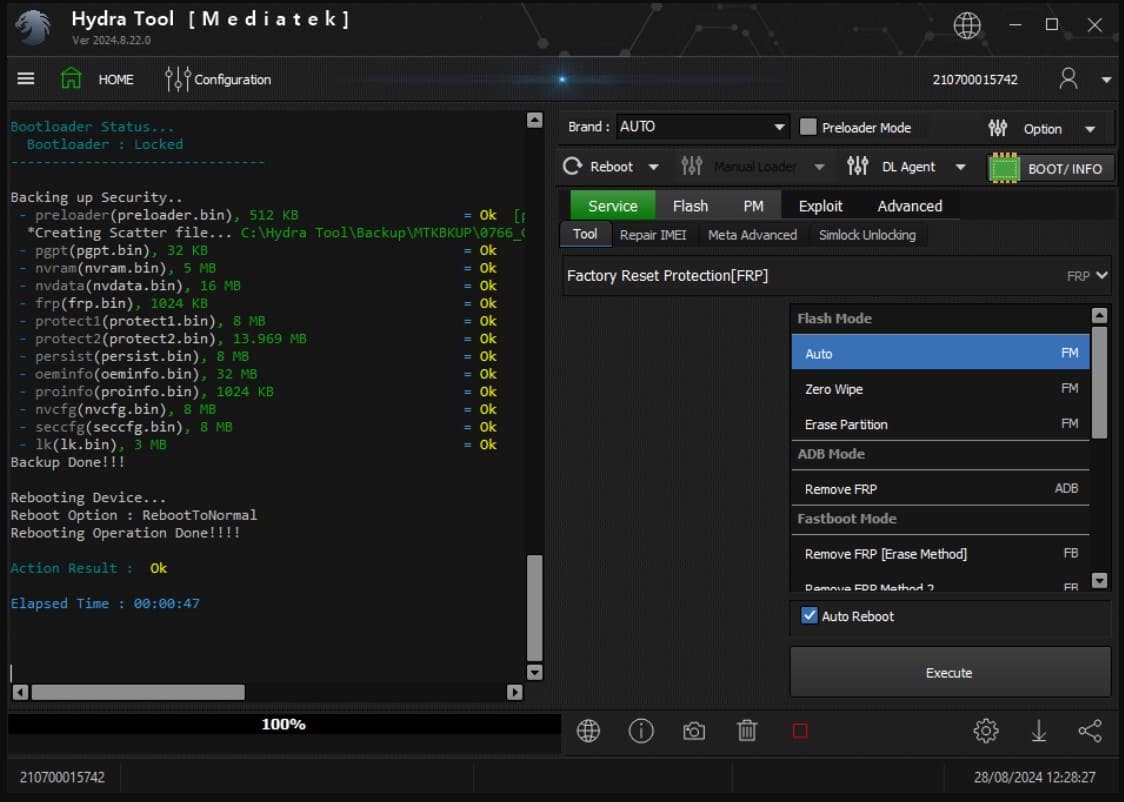
4. Hydra Tool
This is a professional Moto FRP tool that has a dedicated FRP Remove/Factory Reset Protection function in its Android/MTK/Qualcomm modules. It includes additional features such as bootloader unlocking, firmware read/write, and repairing soft-bricked phones with FRP lock removal. The one-click FRP function and brand-specific presets save time compared to manual free methods.
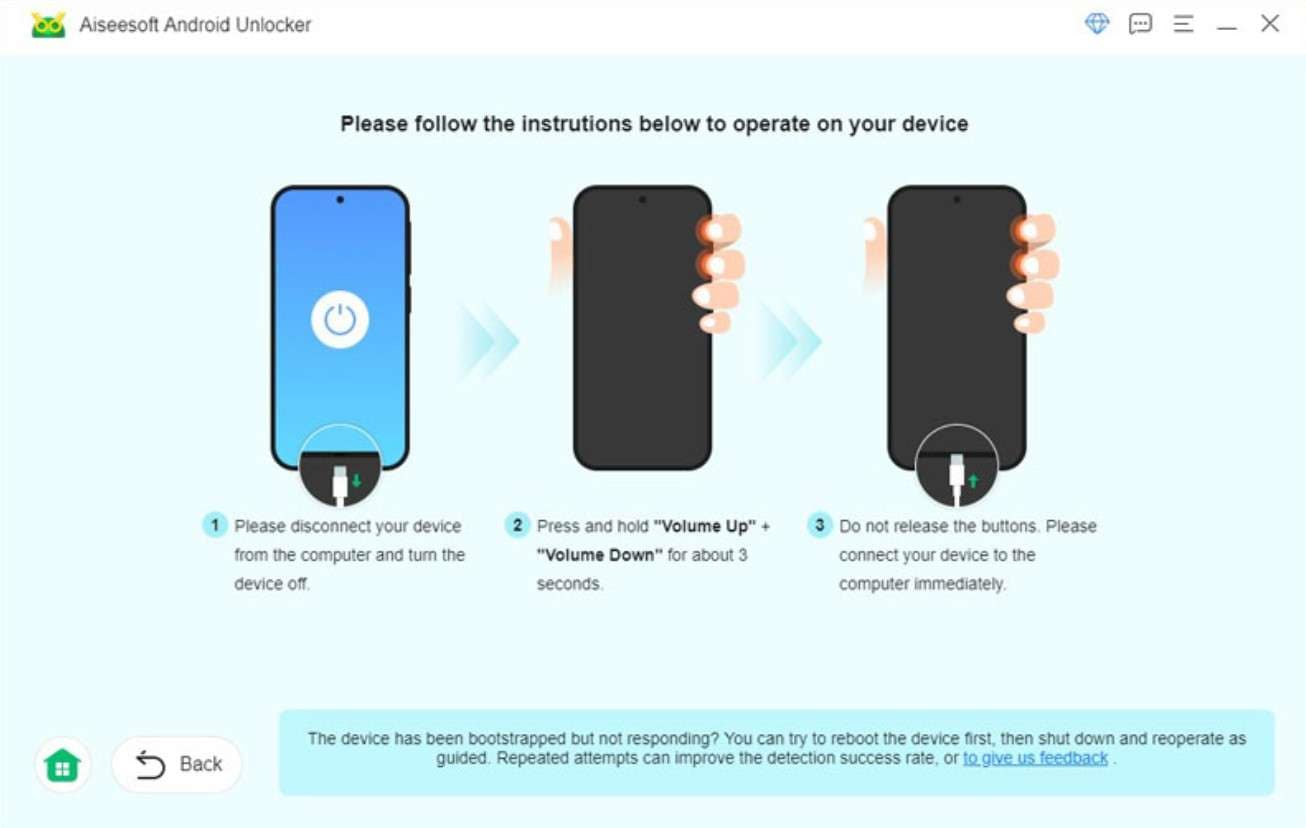
5. Aiseesoft Android Unlocker
It’s another Moto FRP unlock tool that can remove screen locks and some Google account locks (FRP) on Android devices. It works when you forget the original Google account or buy a second-hand phone linked to a previous Google account. The tool is designed as a desktop program for Windows and Mac, allowing a simple USB connection.
Part 3. FRP Bypass Without Tools (When Tools Aren’t Needed)
Other than using the Moto G Play FRP unlock tool, you can also try some tricks to unlock the FRP lock. To that end, this section covers 2 of them with detailed instructions for clarity:
Option 1. Emergency Call/YouTube/TalkBack Browser Methods
Emergency call, YouTube, TalkBack, and browser methods help a rightful owner unlock FRP on a Motorola phone without a PC. They work on many newer Moto models where old tools fail, and the steps follow normal system paths, so the risk stays low. Above all, after accessing Settings, you can stop Google services to enable offline setup. So, to know how you can use any one like TalkBack, adhere to these instructions:
Step 1. Choose the “Vision Settings” option on the Start screen and choose the “TalkBack” option to enable the “Use TalkBack” option.
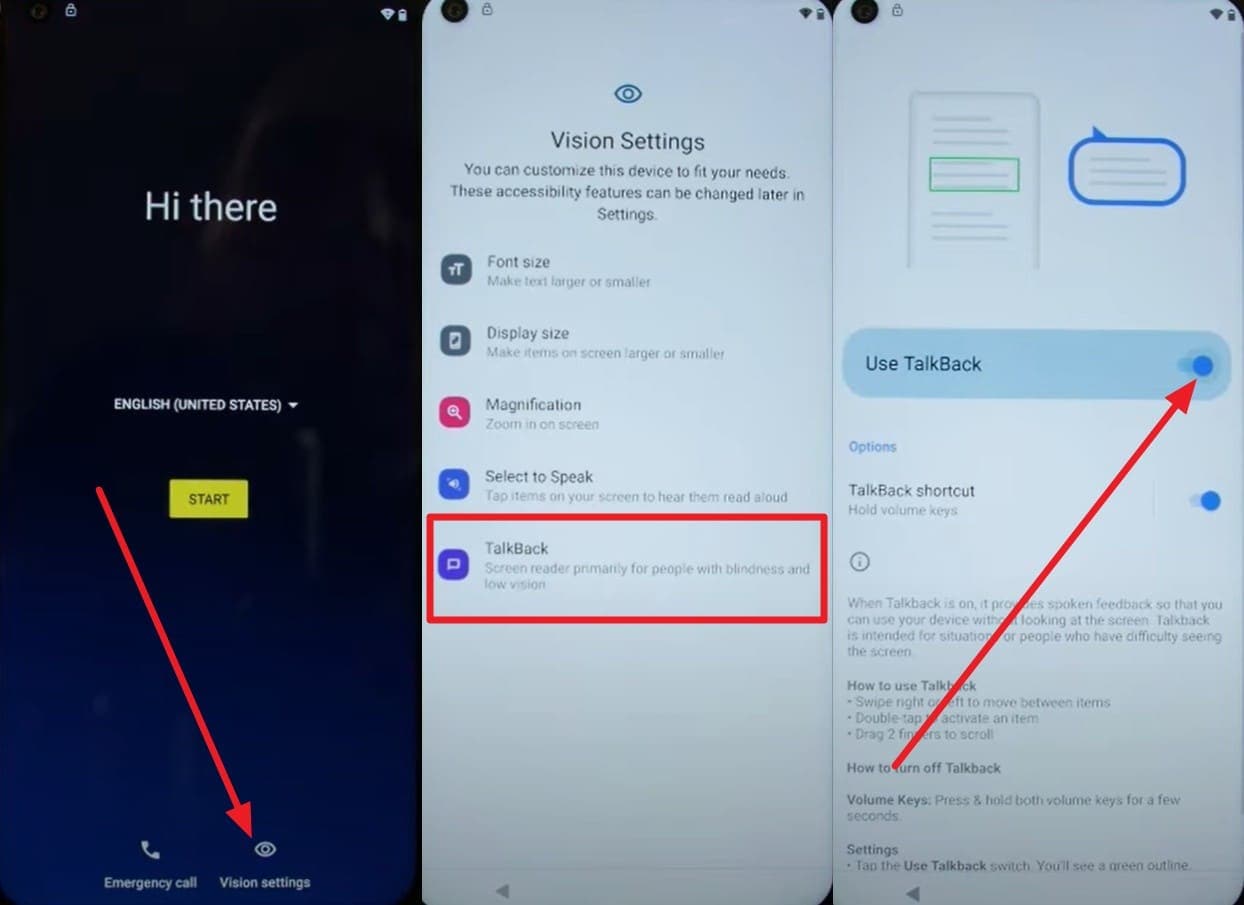
Step 2. After that, draw an “L” shape on the screen and, as you access the “TalkBack Settings,” pick the “Braille Keyboard” option. Choose to “Set Up Braille Keyboard” from settings, and toggle on the “TalkBack Braille Keyboard” option.
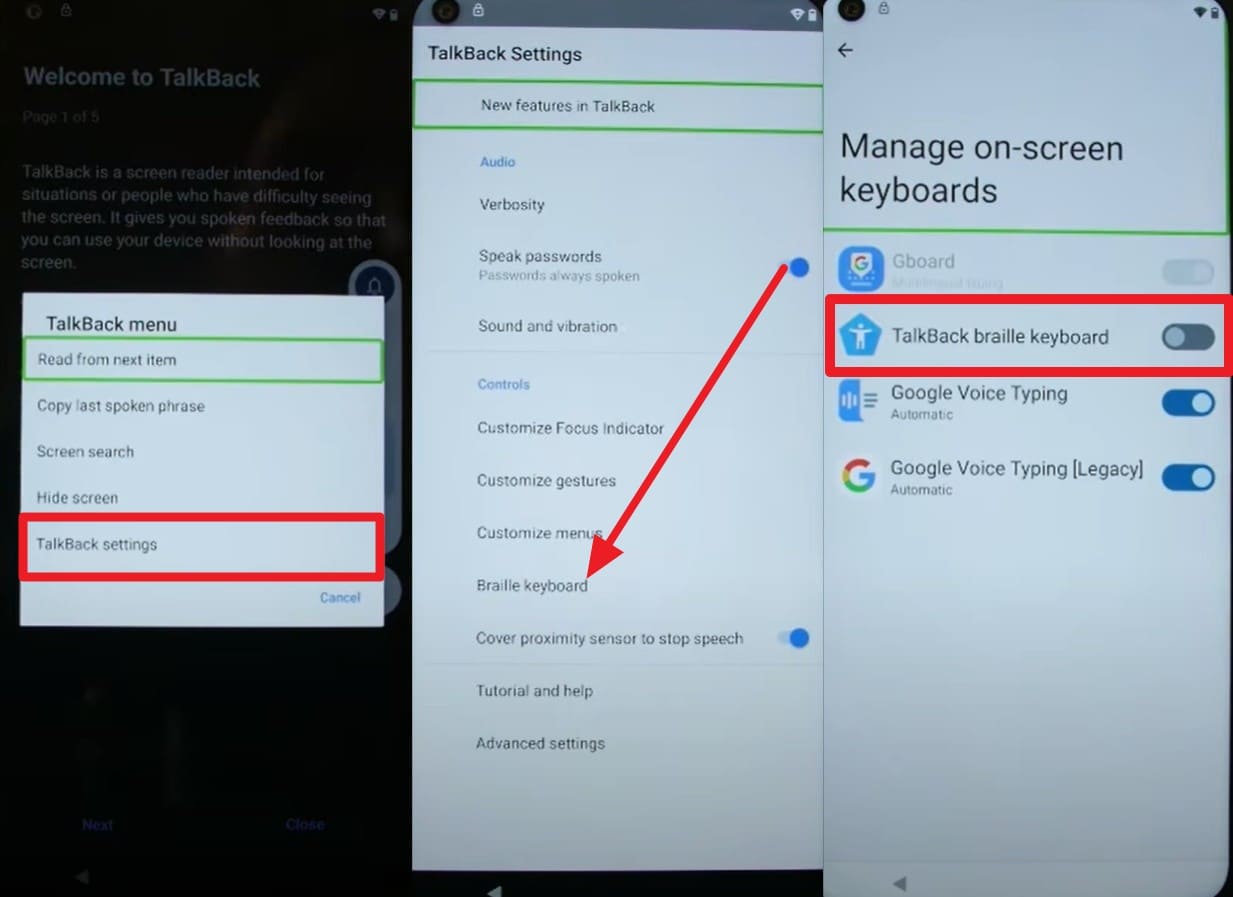
Step 3. Now, disable TalkBack on the Start screen, then choose to connect to Wi-Fi. There, tap the “Globe” icon and pick the “TalkBack Braille Keyboard” option. Tap the “Turn On in Accessibility Settings” in the following screen and fetch the “Accessibility” menu.
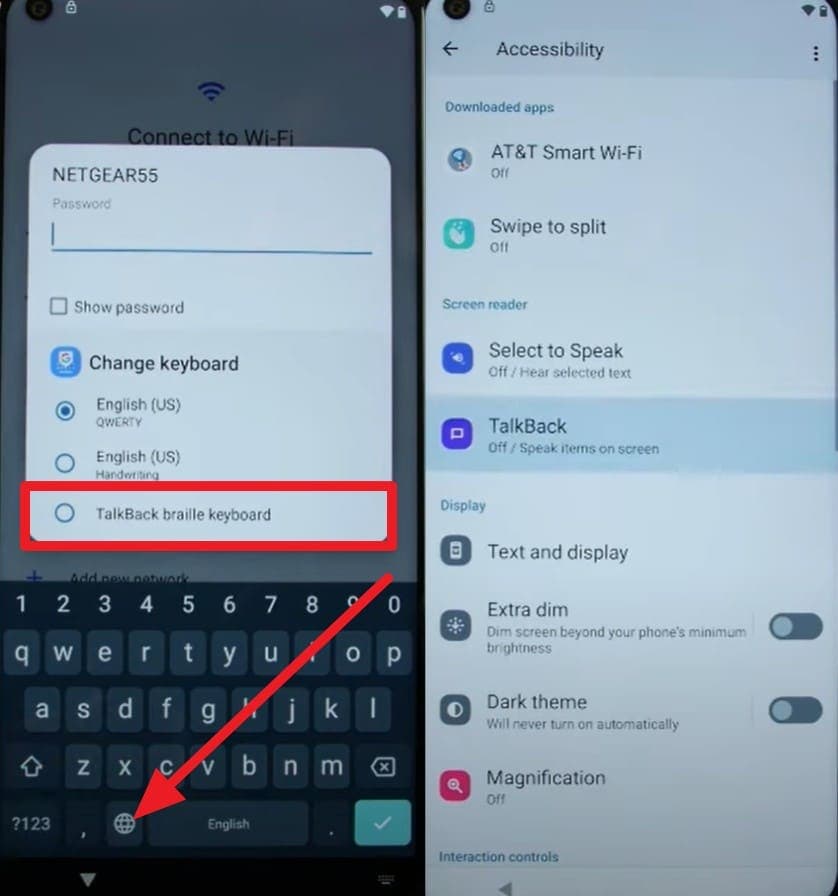
Step 4. On that menu, tap the “Assistant” option, speak “Settings,” and pick the “Open Settings” option. Once directed, pick the apps like Android Setup and Google Play Services to "Disable" and "Force Stop.”
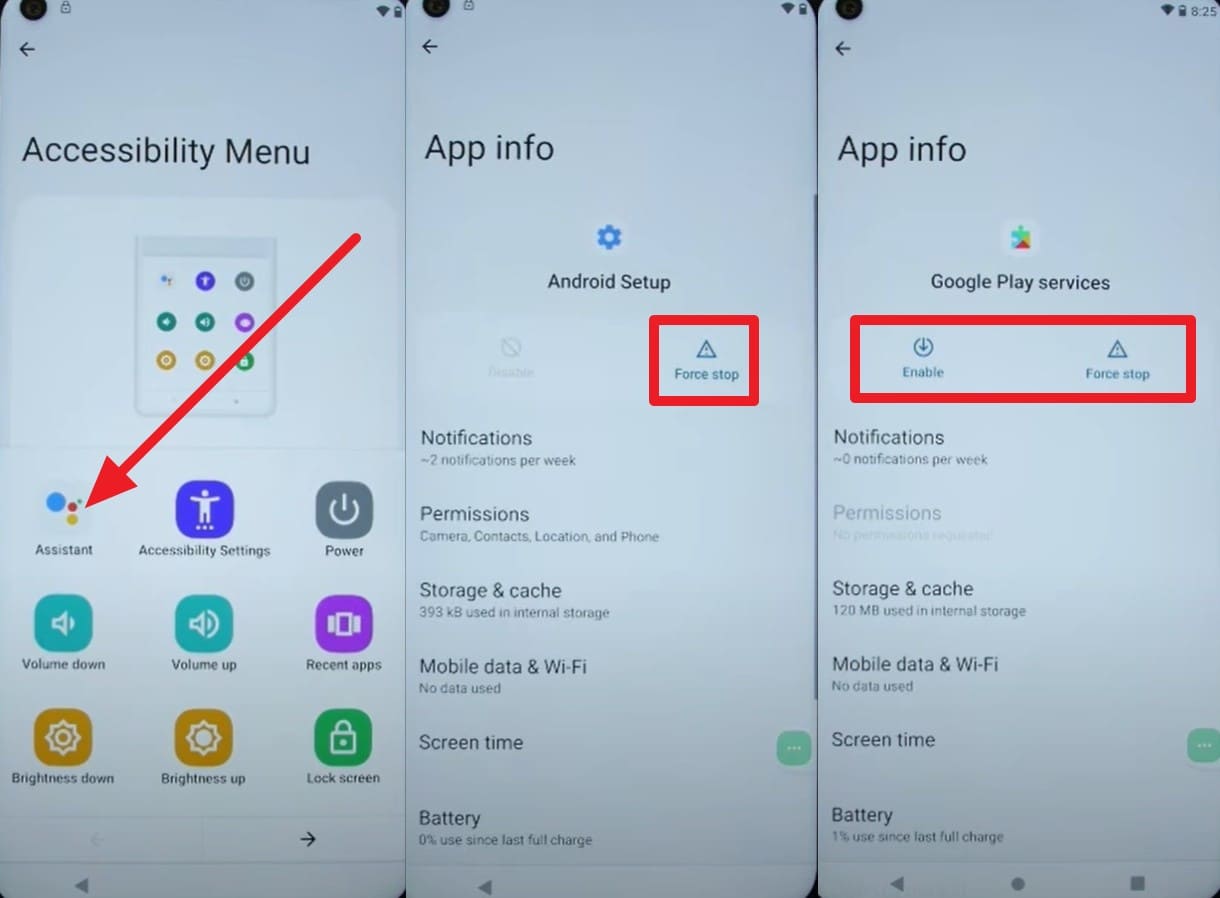
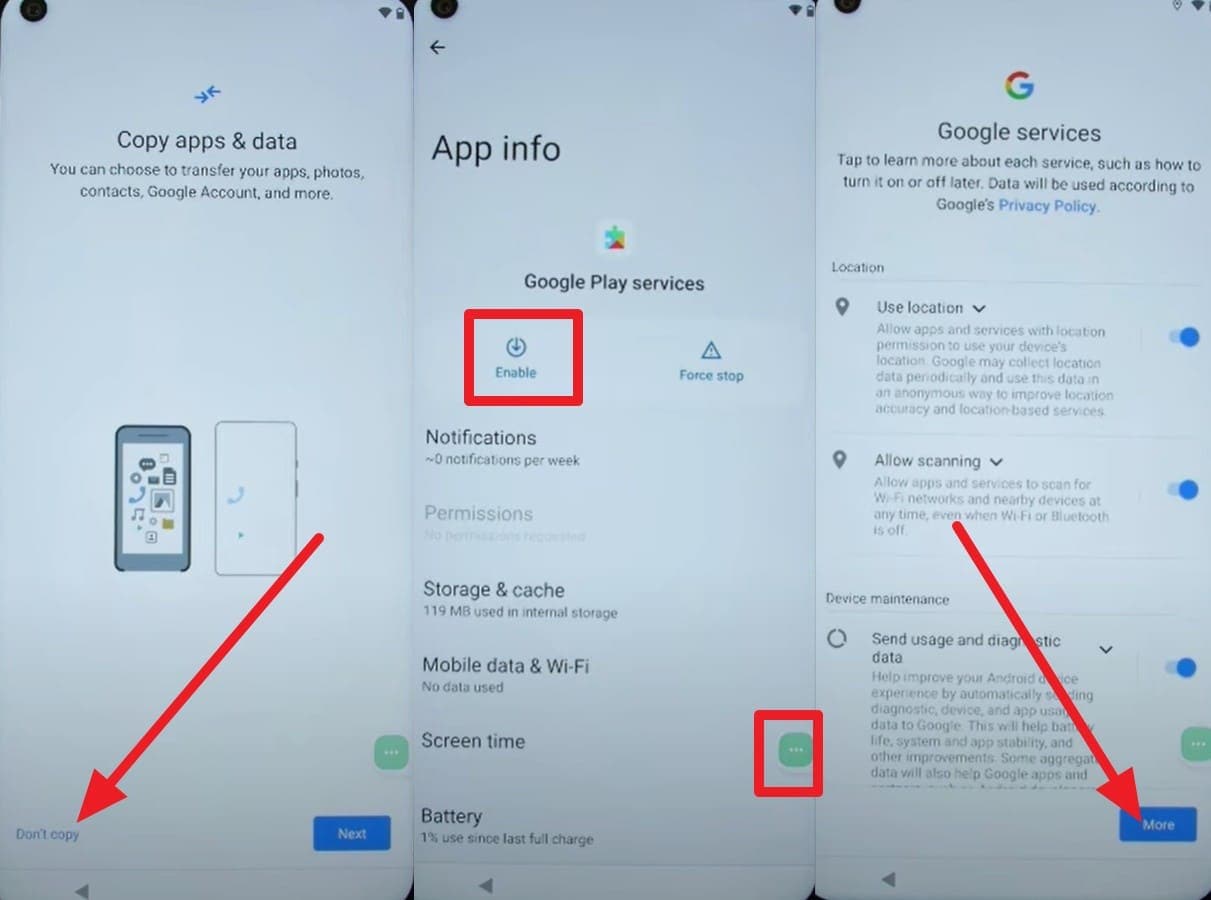
Step 5. Now, go to the setup screen to access the “Just A Moment…” loop screen and choose “Don’t Copy on Apps & Data screen. Tap the “Accessibility” menu, pick “Assistant” quickly, and “Enable” Google Play Services. Once done, choose “More” and “Next” options on the coming interface, skip to add PIN, and wait for FRP bypass. As done, go to settings and choose to erase all data for a clean start.
Option 2. Keyboard + Wi‑Fi Trick
Other than any Moto G30 FRP unlock tool, this trick uses only the Wi‑Fi screen and on‑screen keyboard to reach Settings. Thus, no PC, cable, or extra app is needed, and the steps stay simple and easy to repeat once learned. Besides, this method works well on low‑end Motorola phones, such as Moto E models, and is guided below:
Step 1. While setting up, when you access the “Connect to Wi-Fi” screen, select the “See All Networks” and “Add New Network” options.
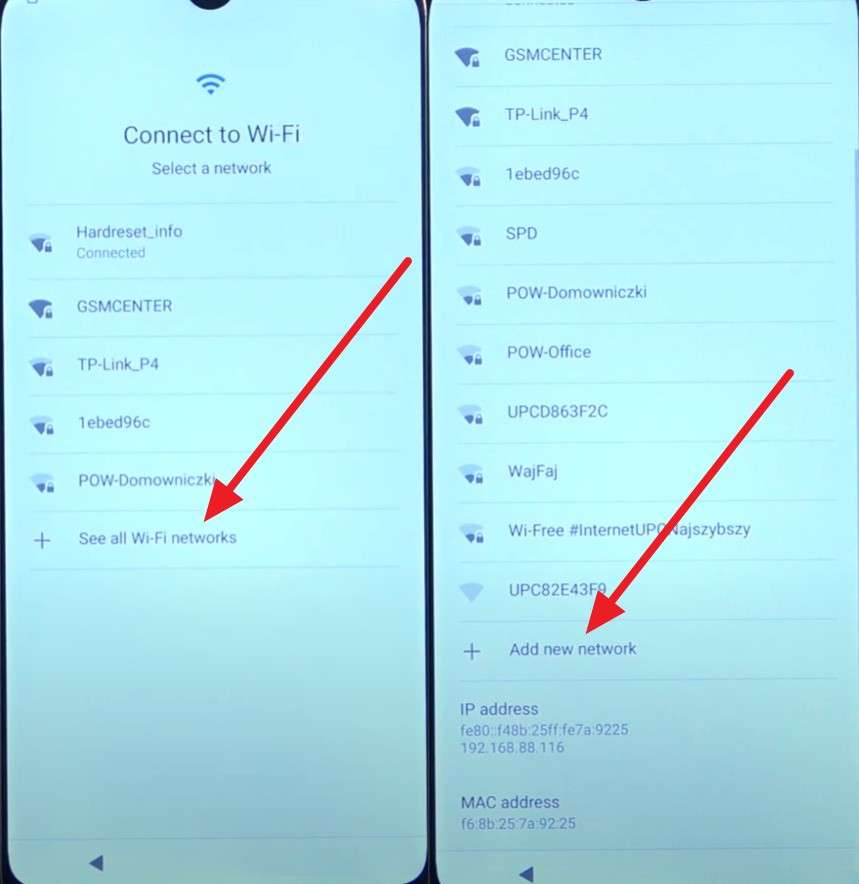
Step 2. Now, press the “Microphone” icon to choose the “Deny” option. Continue doing it multiple times until you get the “Deny & Don’t Ask Again” option in the pop-up. As you press it, tap on the microphone again and choose the “Allow” option.
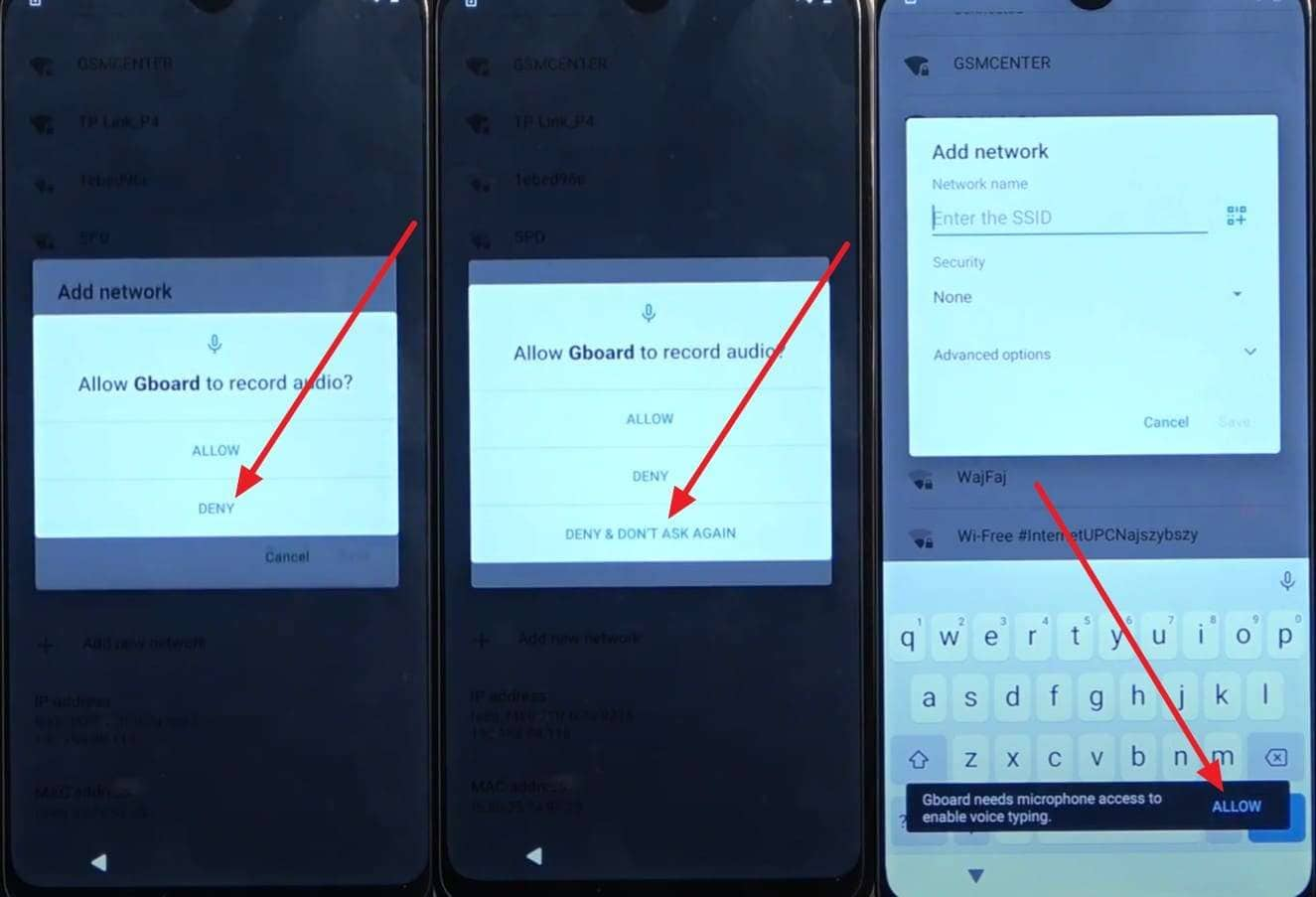
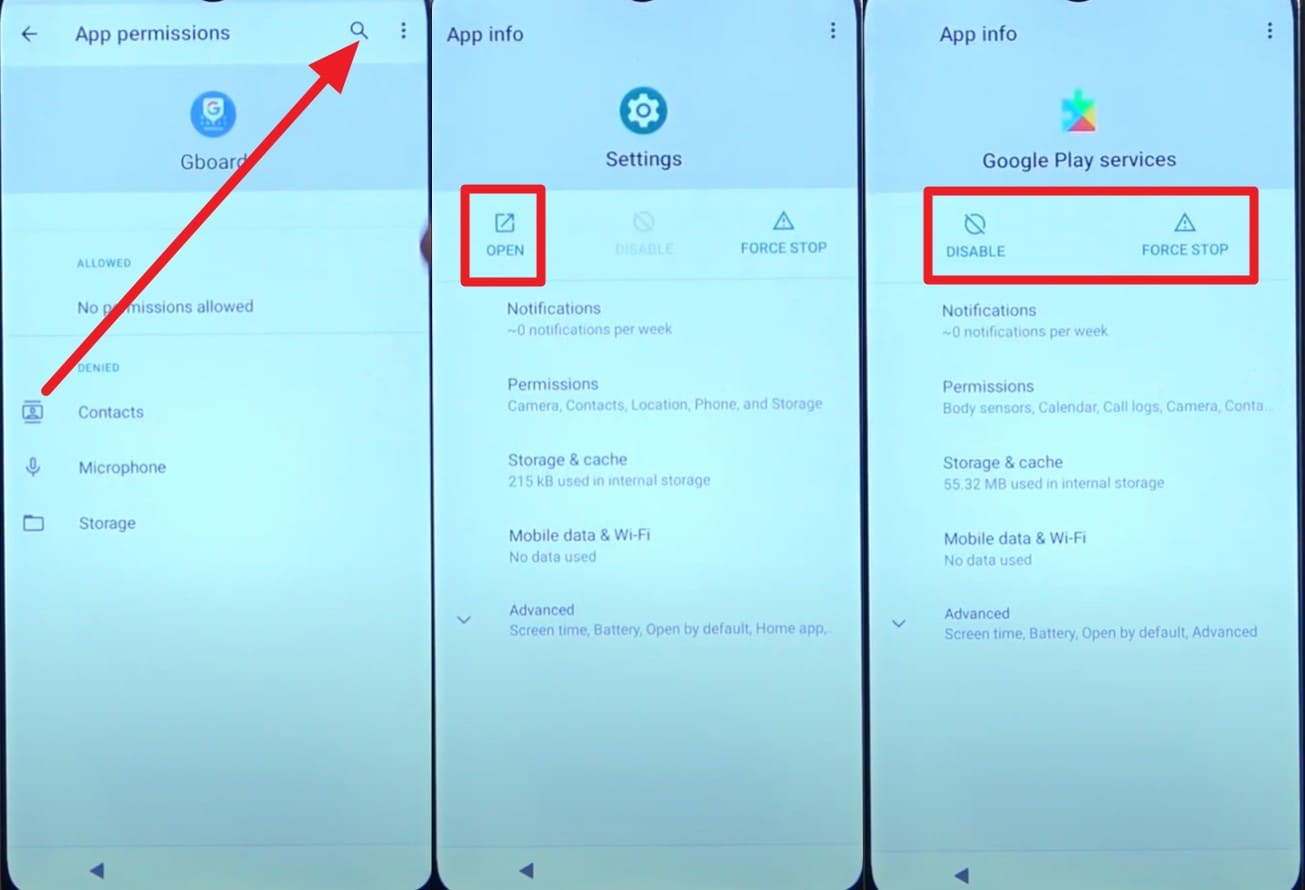
Step 3. Head to “Permissions” now in the App Info interface and press the “Search” icon to type “Settings.” Access the “Open > App and Notifications > App Info” option and choose Google Play Services to “Disable” and “Force Stop” it.
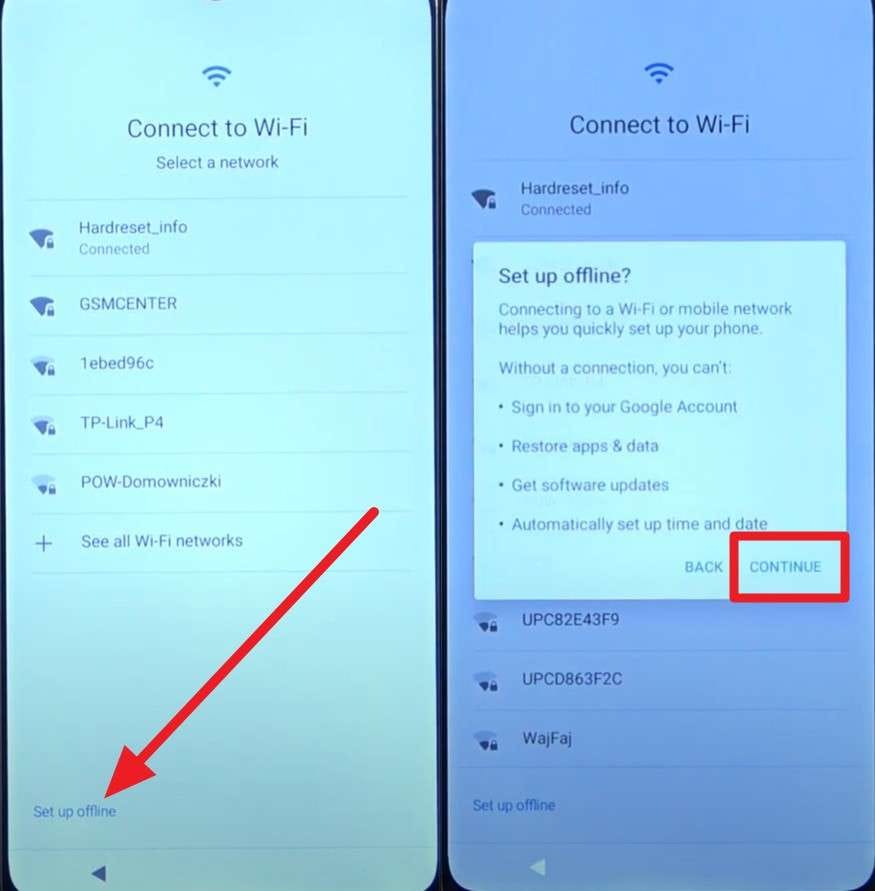
Step 4. Press the “Power” button now to restart the Moto phone, and locate the “Set Up Offline” option on the “Connect to Wi-Fi interface. Follow the same steps you used to locate Google Play Services before and “Enable” it. Going back to the Wi-Fi connection interface, choose “Set Up Offline” and pick the “Continue” option.
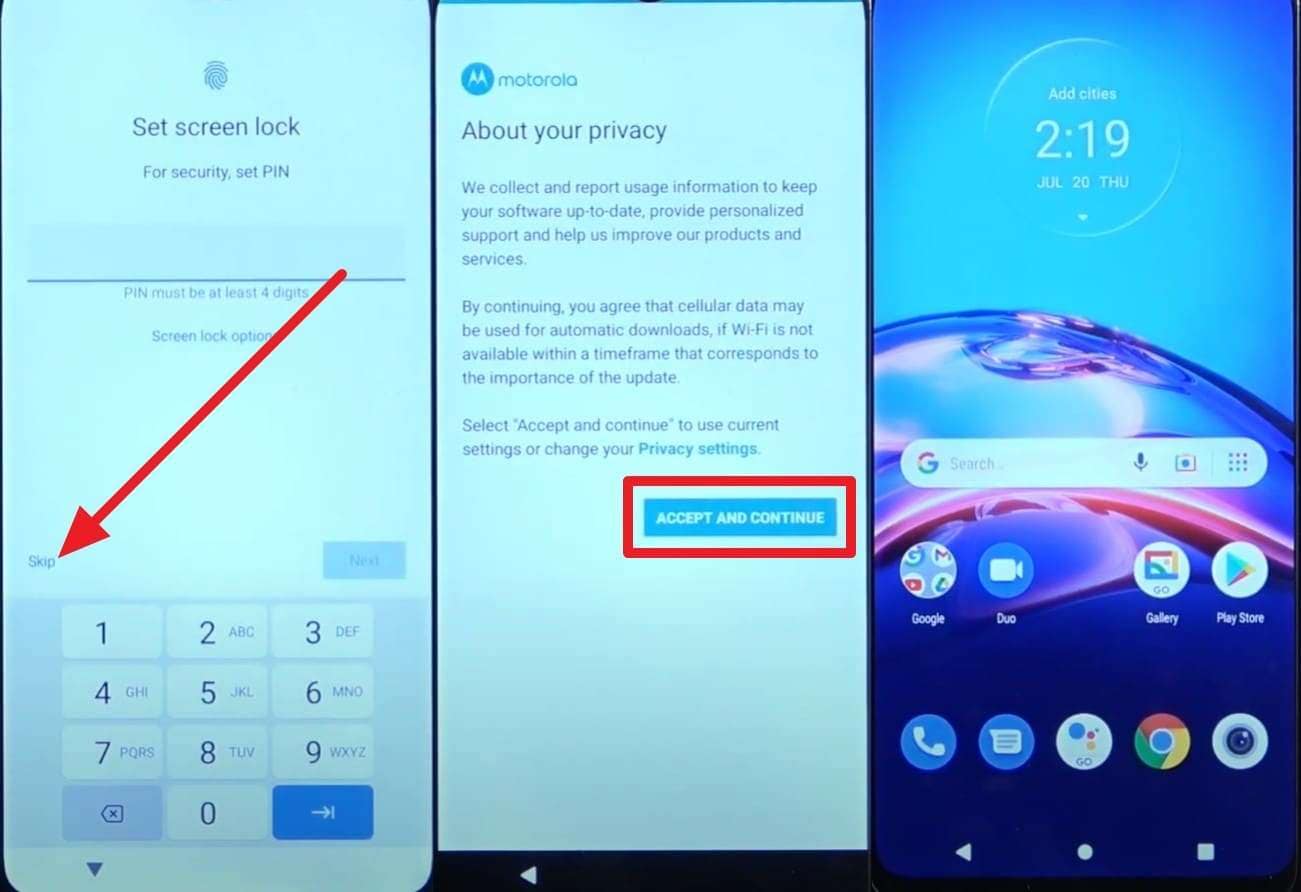
Step 5. When the “Just A Moment…” loop ends, choose the “More” and “Accept” options on the following screens. Pick “Skip” when you are asked to add a PIN, and continue picking the “Accept and Continue > Next > Next > Deny > Next” options to bypass FRP.
Part 4. Why Dr.Fone – Screen Unlock is Recommended for Bypassing Moto FRP
Among all the tricks and Moto G60 FRP unlock tool options, if you have decided to choose Dr.Fone - Screen Unlock (Android), review the given reasons. Here, learn what makes this tool the foremost option to bypass FRP:
|
Reasons |
How It Helps with Moto FRP |
| Wide Device Support | Works with Motorola/Lenovo models on Android 6.0+ alongside many other brands, so one tool covers multiple phones. |
| No Technical Skills Needed | Click‑through wizard (Choose brand > Remove Google FRP Lock > Follow Prompts) instead of ADB/Fastboot commands. |
| Faster and More Reliable | Designed to complete FRP bypass in a few minutes with firmware/config downloads handled automatically. |
| Lower Risk Than Manual Hacks | Avoids random FRP APKs and ad‑hoc exploits that can be insecure or brick the device. |
| Multi‑Purpose Unlock Suite | Can remove screen locks (PIN, pattern, password, Face/ fingerprint), so you get more than just FRP bypass. |
Conclusion
To sum up, this guide has introduced you to some of the best Moto FRP tool options and tricks. However, if you choose to avoid tricky paths, Dr.Fone - Screen Unlock (Android) is recommended as a safe and easy option to bypass FRP. Its guided workflow reduces errors by matching steps to your exact Motorola model and Android version.
safe & secure4,624,541 people have downloaded it
Frequently Asked Questions
 Q1. Who should use a Moto FRP tool?Q2. Why is Dr.Fone considered a safer option for Moto FRP cases?Q3. Can official service centers help after FRP bypass?


Motorola Manage
- Motorola Transfer
- 1. Download Pictures to PC
- 2. Transfer Motorola to Mac
- 3. Transfer Whatsapp from Moto to iOS
- 4. Transfer Music from Mac to Moto
- 5. Transfer WhatsApp from iOS to Moto
- Motorola Unlock
- 1. Unlock Motorola Without Factory Reset
- 2. Network Unlock Motorola One 5G Ace
- 3. Sim Unlock Moto G Phone
- 4. Unlock Moto Without Factory Reset
- 5. Unlock Motorola Bootloader
- 6. Bypass FRP Lock on Motorola
- 7. Reset Motorola Phone When Locked
- Motorola Repair
- 1. Motorola Won't Power On
- 2. Android App Not Installed Error
- 3. Black Screen of Death Error
- 4. Unbrick Android Phone
- 5. Encryption Unsuccessful Error
- 6. Stuck at Android System Recovery
- 7. Android Won't Turn On
- 8. Android Stuck on Boot Screen
- Motorola Tips
- 1. Turn Off a Motorola Phone
- 2. Mirror Motorola Screen to PC
- 3. Back up Motorola to PC
- 4. Control Motorola from PC
- 5. Format Motorola Phone in 2026
- 6. Reboot Any Motorola Phone
- 7. How to Screenshot on Motorola
- 8. Restart Any Motorola Phone
- 9. Motorola Phone Restore Guide
- 10. Set Up Voicemail on Motorola
- ● Manage/transfer/recover data
- ● Unlock screen/activate/FRP lock
- ● Fix most iOS and Android issues
- Free Download Free Download Free Download

 > How-to > Screen Lock Removal > Moto FRP Tool Guide 2026: Best Ways to Bypass FRP on Motorola Phones
Daisy Raines
staff Editor