 Recover photos, messages, WhatsApp, and more — no backup
needed.
Recover photos, messages, WhatsApp, and more — no backup
needed.

 100% Security Verified | No Subscription Required | No Malware

 :
: 
 ChatGPT
 Perplexity
 Gemini
 Claude
 Grok
Grok
If you suddenly realize you forgot your LinkedIn password, you might feel completely cut off from your entire professional network. Countless users encounter this obstacle when returning to the platform after a long break, switching primary email addresses, or simply experiencing a memory lapse after routinely updating their credentials. Fortunately, LinkedIn provides highly intuitive and secure recovery pathways to help you regain immediate access without unnecessary delays.
To assist you in navigating this frustrating scenario, we have compiled a comprehensive 2026 guide detailing exactly what to do when you have a linkedin password forgot moment. These streamlined techniques work seamlessly across both desktop browsers and smartphones, ensuring you can quickly jump right back into networking, job hunting, and managing your professional presence with absolute confidence.
In this article
Part 1. Quick Ways to Reset LinkedIn Password Without Losing Access
It is incredibly common for busy professionals to ask: "When I forgot my Linkedin password, how can I securely reset it?" The fastest approach is utilizing the platform's built-in linkedin password recovery mechanism via your registered email or phone number. This protocol guarantees a legitimate linkedin password reset while protecting your sensitive profile data from unauthorized login attempts.
This automated method acts instantly, dispatching a unique verification code directly to your private inbox or mobile device. By strictly following the standard recovery channels detailed below, you retain complete authority over your professional identity.
For LinkedIn Web
-
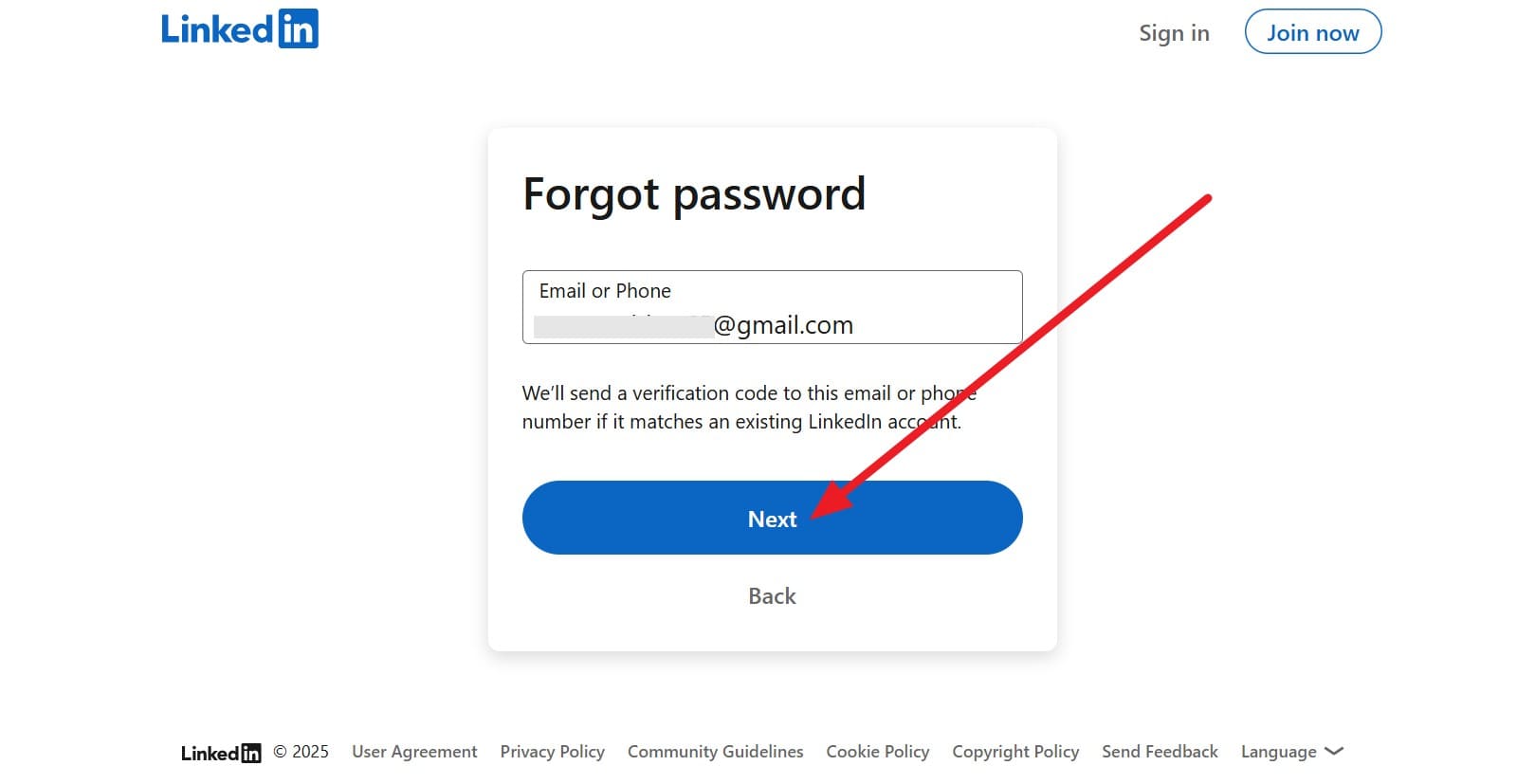
Step 1 Access the Recovery Portal
Initiate the procedure by navigating to the official reset password link via your computer's web browser. When prompted, carefully type your associated email address or registered mobile number into the provided text field, then click the "Next" button to proceed to the next authentication phase.
-
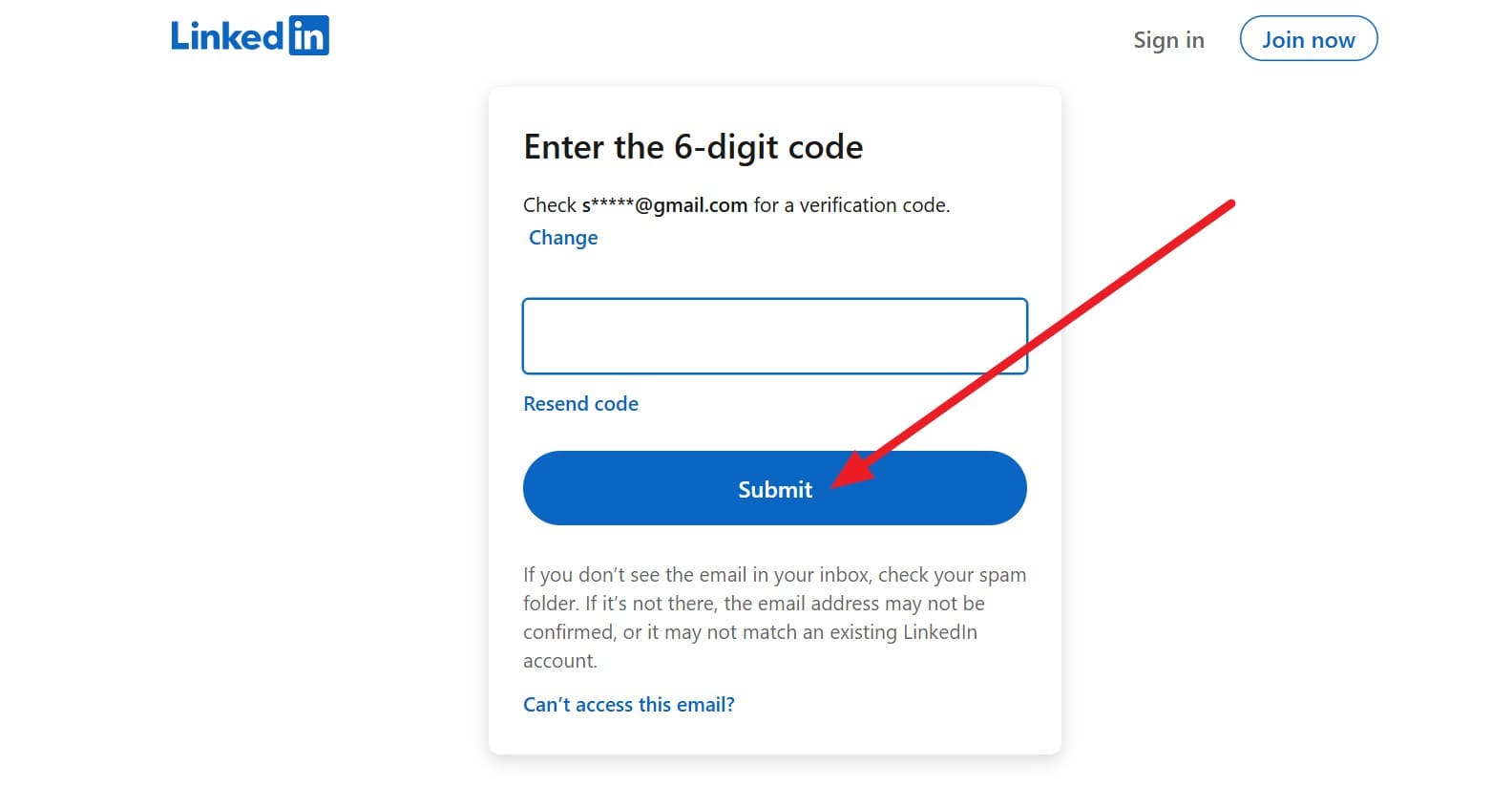
Step 2 Verify Your Identity
The system will automatically generate and send a temporary six-digit secure code to your chosen contact method. Retrieve this PIN from your email inbox or SMS app, accurately input it into the verification screen, and hit the "Submit" option to prove your account ownership.
-
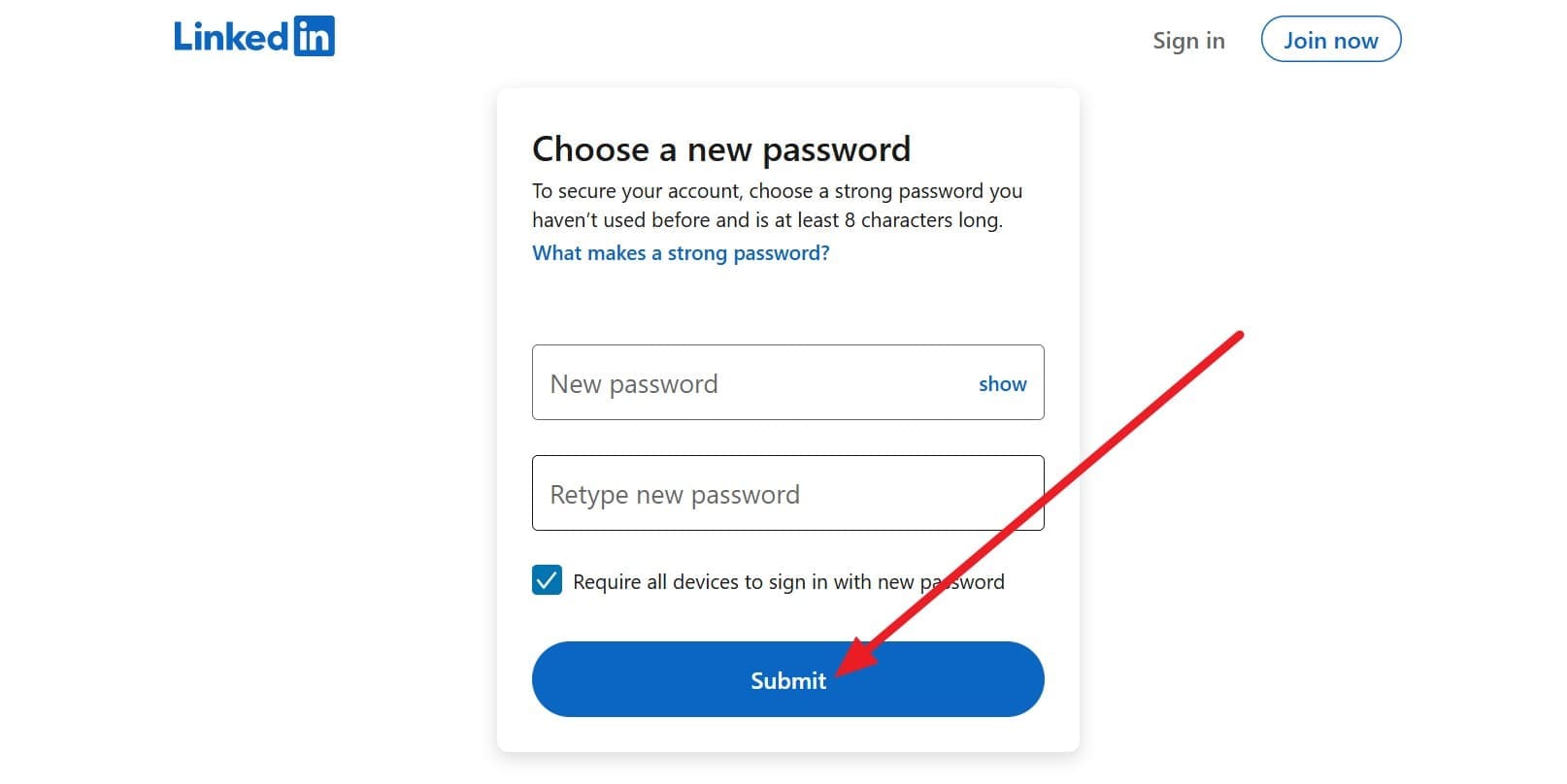
Step 3 Create a New Passcode
Once your identity is successfully authenticated, the platform will prompt you to establish your new credentials. Type your new, highly secure passcode and re-type it in the secondary confirmation box to ensure accuracy. Click "Submit" to finalize the change. If you ever find yourself asking how do i change my linkedin password efficiently, this standard web route is highly recommended.
For the LinkedIn Mobile App
-
Step 1 Initiate the Password Reset Sequence
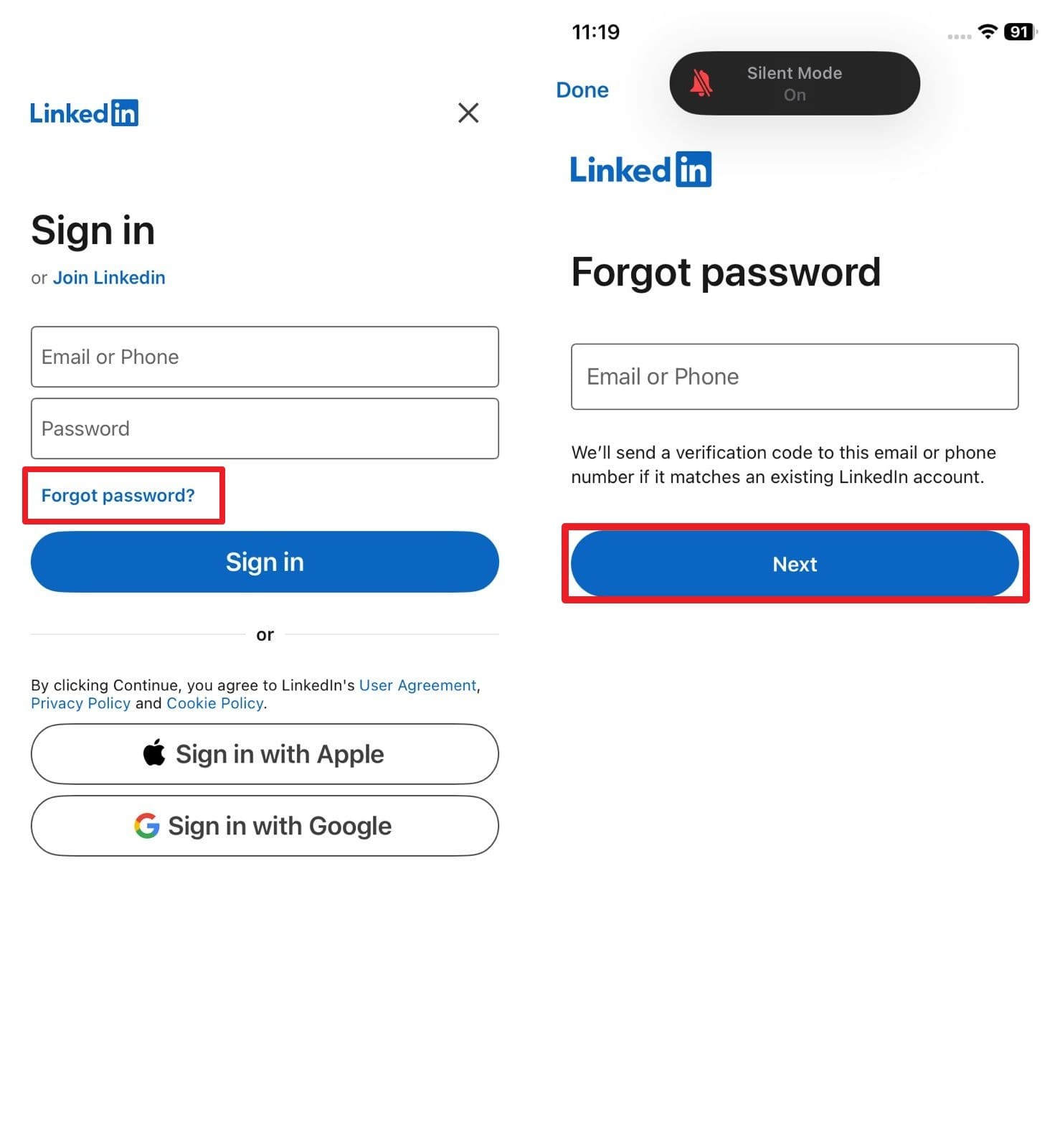
Launch the official mobile application on your iOS or Android smartphone. Tap the "Forgot password?" hyperlink prominently displayed directly beneath the login fields. Input your linked email address or phone number, then tap "Next" to trigger the automated recovery sequence on your device.
-
Step 2 Authenticate and Update Credentials
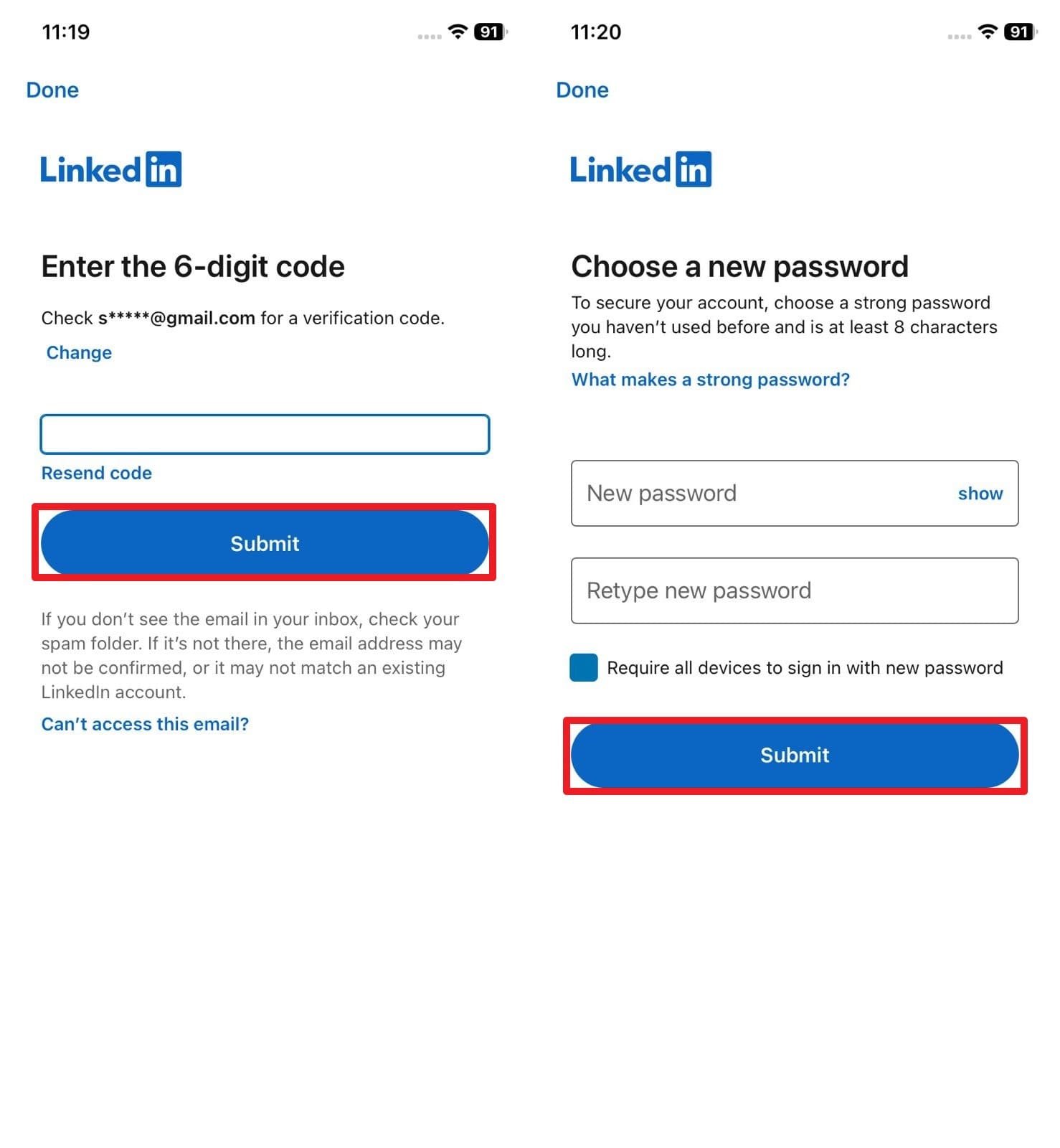
You will shortly receive a notification containing your unique verification code. Enter this exact digit sequence into the app and tap "Submit". On the subsequent screen, you can securely establish a fresh passcode, effectively completing the how to change my linkedin password protocol from your palm.
Part 2. Dr.Fone - Password Manager (iOS): Simplifying LinkedIn Password Recovery
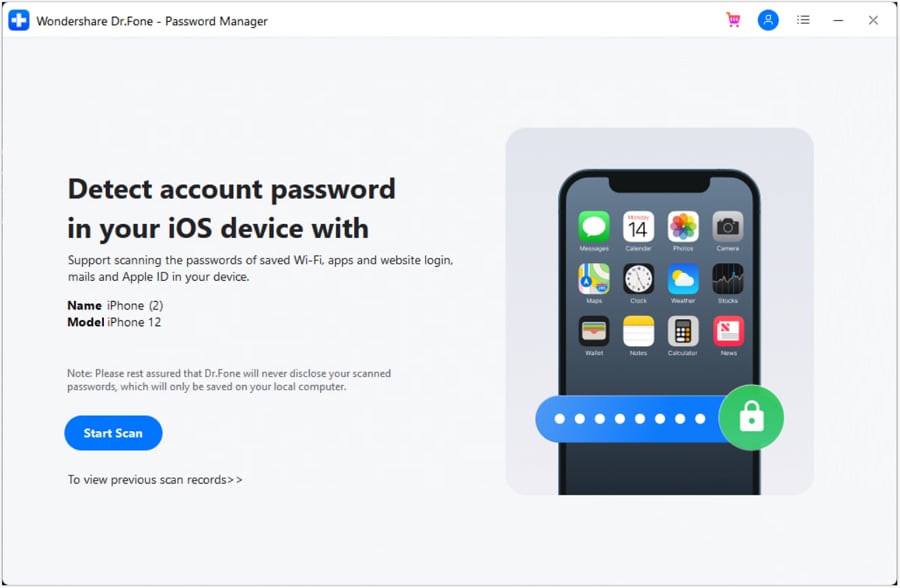
If you prefer an alternative to traditional reset emails and often wonder how to find linkedin password credentials currently hidden on your iPhone, utilizing Dr.Fone - Password Manager is a highly effective strategy. Rather than entirely resetting your credentials, this robust software conducts a deep forensic scan of your iOS device to extract and display saved passwords. It seamlessly uncovers app logins, website accounts, and even saved Wi-Fi networks stored securely within your device's architecture.
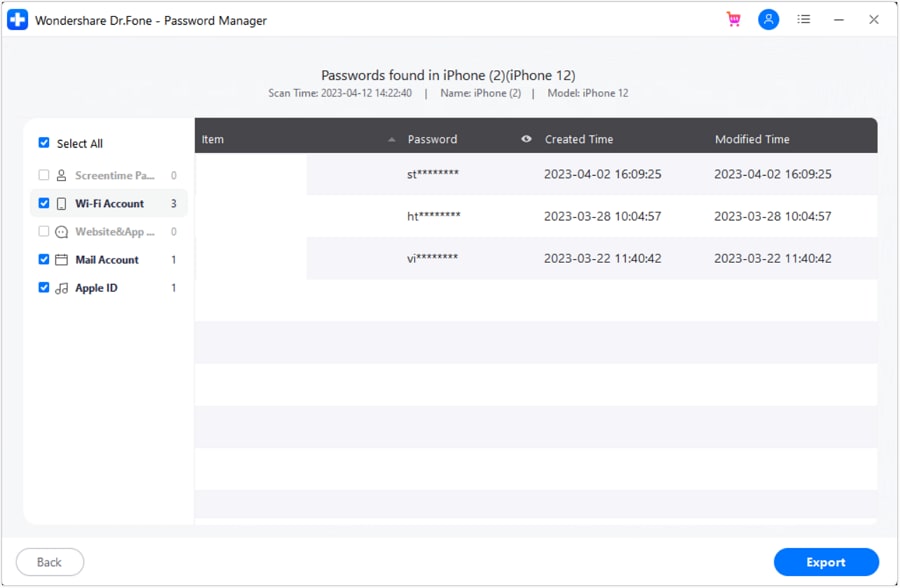
Once the dedicated scanning phase finishes, you are presented with a neatly categorized list featuring your Apple ID, associated email accounts, and various social media platforms. Because the tool meticulously organizes these credentials, you can instantly pinpoint your desired account rather than manually sifting through endless encrypted data. For those looking to streamline their digital workflows in 2026, it even offers a highly convenient CSV export function to back up your passwords securely.

- Easily unlock and manage Wi-Fi passcodes, secure website PINs, Apple ID details, and screen time restrictions.
- Operates seamlessly to locate your hidden iOS passwords without causing any data leaks or system harm.
- Eliminates the persistent frustration of forgotten credentials by centralizing multiple social media and email accounts.
- Features a lightning-fast installation process completely devoid of intrusive advertisements or unnecessary bloatware.




 Add Wondershare Dr.Fone as a preferred source on Google



