 Recover photos, messages, WhatsApp, and more — no backup
needed.
Recover photos, messages, WhatsApp, and more — no backup
needed.

 100% Security Verified | No Subscription Required | No Malware

 :
: 
 ChatGPT
 Perplexity
 Gemini
 Claude
 Grok
Grok
Finding yourself locked out because you forgot your Reddit password can be incredibly frustrating. This login obstacle frequently occurs when users switch to a new smartphone, clear their saved browser credentials, or simply remain logged out for an extended period without a password manager to rely on.
Fortunately, the platform has a streamlined recovery system. By utilizing the official Reddit forgot password page, you can swiftly initiate a password reset using either your registered email address or your exact Reddit username.
Quick Answer: Navigate directly to the official Reddit login screen, click the 'Forgot Password' prompt, input your associated email or username, and check your inbox. Open the secure reset link provided by Reddit to establish a brand-new passcode.
If you are looking for a straightforward, stress-free path back to your favorite subreddits, this comprehensive guide will provide absolute clarity. We will walk you through every critical phase of the reset procedure. Additionally, we will introduce a sophisticated recovery alternative that allows you to extract saved credentials seamlessly if performing a manual reset does not suit your workflow in 2026.
In this article
Part 1. How to Initiate a Reddit Password Reset in Minutes?
When you encounter a login barrier because you forgot your password, the most reliable and immediate solution is to access the official Reddit forgot password page. This dedicated portal enables you to request a secure password reset link by providing either your verified email address or your account's username.
The beauty of this account recovery mechanism is its cross-platform functionality. The reset sequence operates flawlessly on desktop web browsers as well as the official Reddit mobile application, empowering users to restore full account functionality within mere minutes regardless of their preferred device.
Leveraging the native 'Forgot Password' feature eliminates complex technical hurdles. Using a desktop browser offers an expansive view, making it easier to accurately type and confirm a robust new password. Conversely, the mobile app delivers unparalleled convenience, allowing you to resolve login issues while on the go. Below, you will find detailed instructions for navigating both methods once the confirmation link arrives in your inbox:
Reset Reddit Passcode via Browser
-
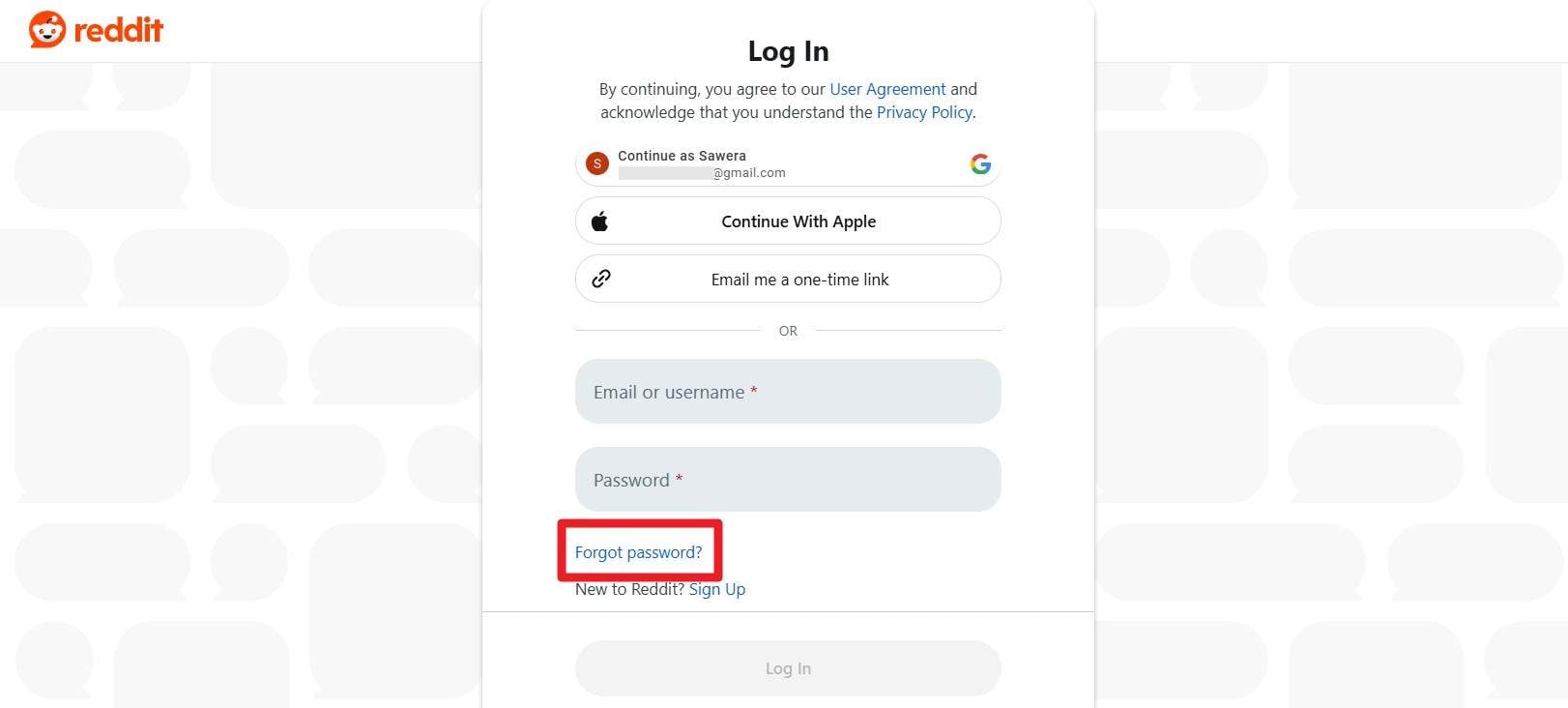
Step 1 Access the Password Recovery Portal
Navigate to the official Reddit login interface and click on the 'Forgot Password' text to be redirected to the Reddit forgot password page. Here, you must type in your registered Email or Username. Click on the 'Reset Passcode' button and wait a few moments for the automated system to deliver a secure reset link to your email inbox.
-
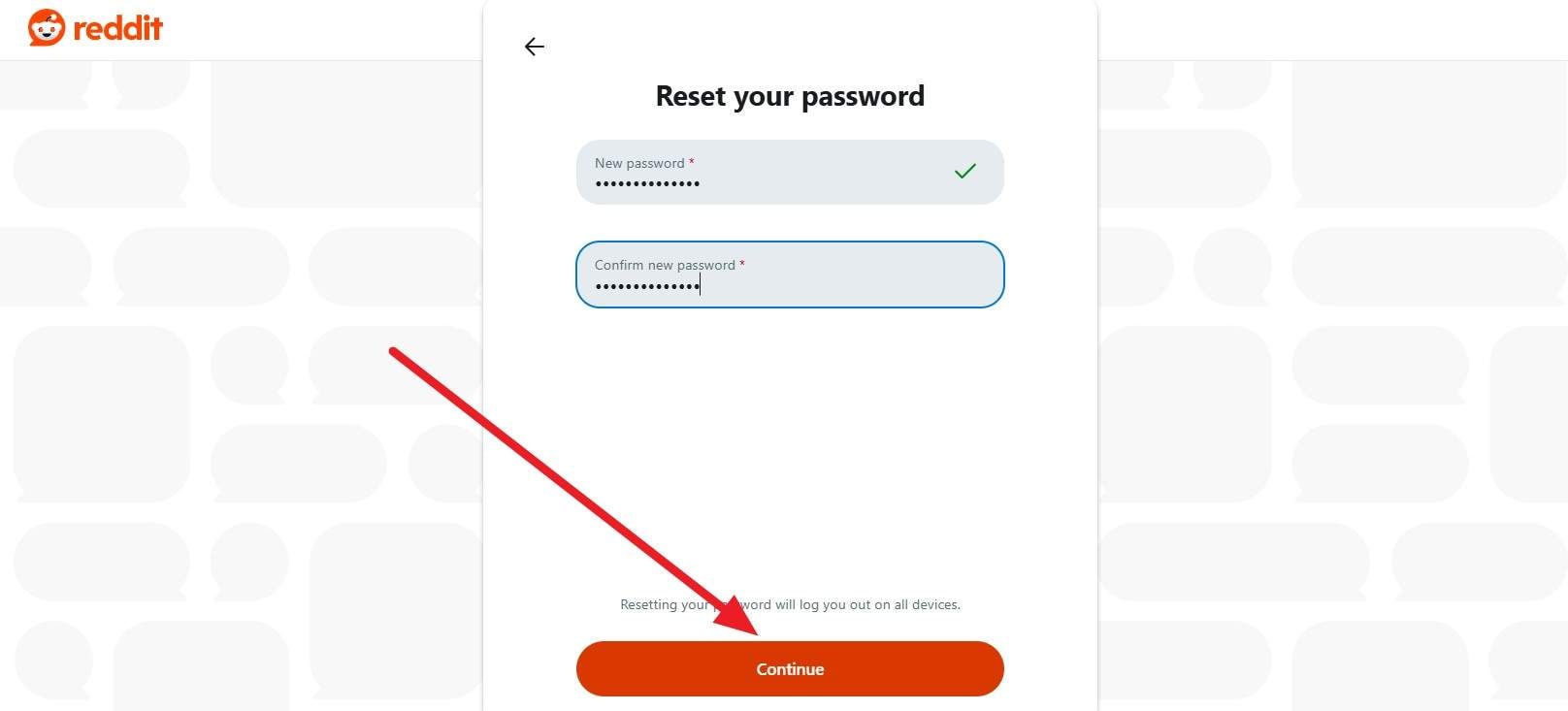
Step 2 Create and Confirm Your New Credential
Access your email client and open the recovery link provided by Reddit. You will be prompted to verify the specific account for which you are resetting the password. Carefully type out your new, robust passcode, enter it a second time for confirmation, and finally, click the 'Continue' button to successfully finalize the reset process.
Reset Reddit Passcode on Mobile App
-
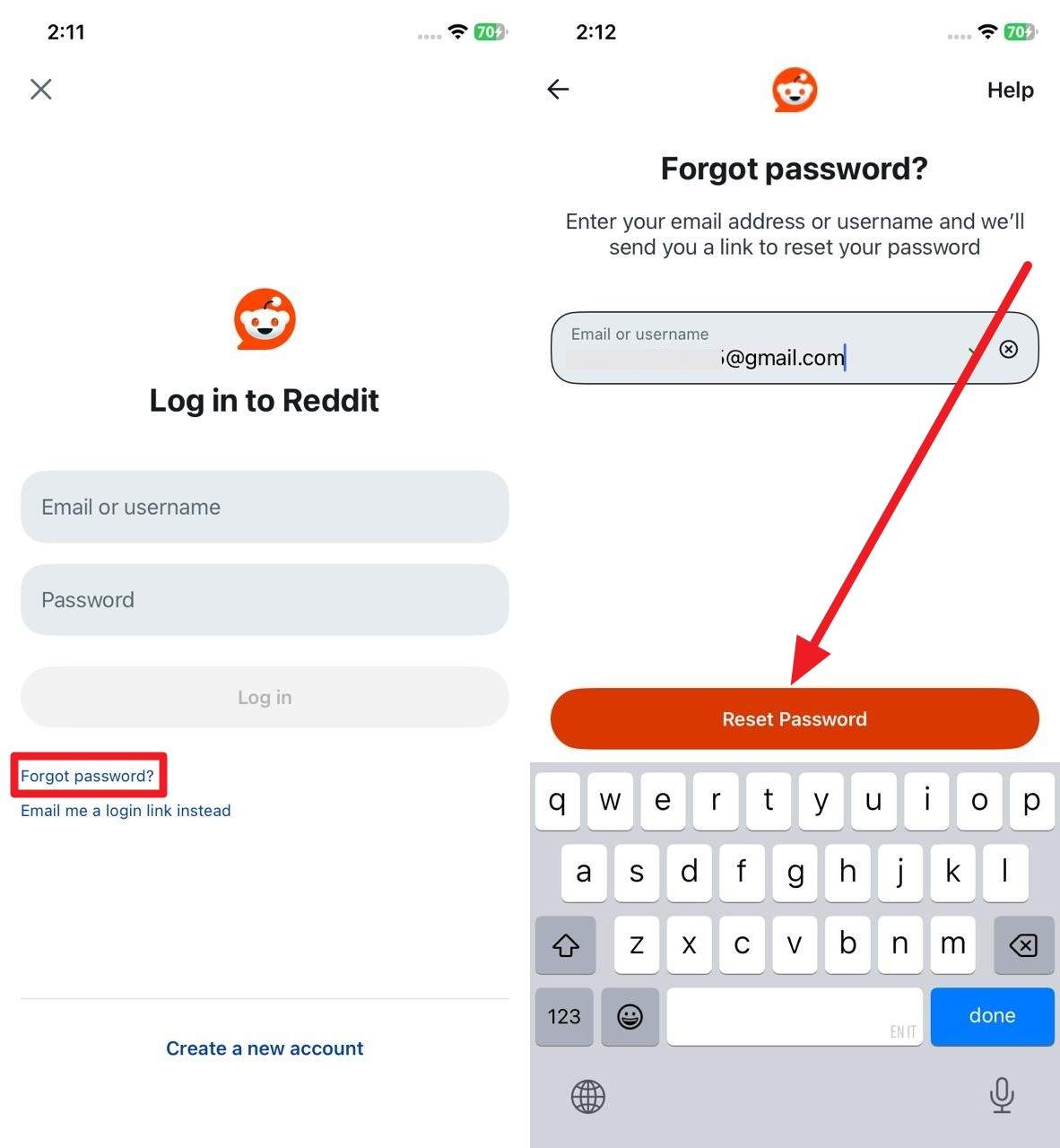
Step 1 Trigger the Reset Request in the App
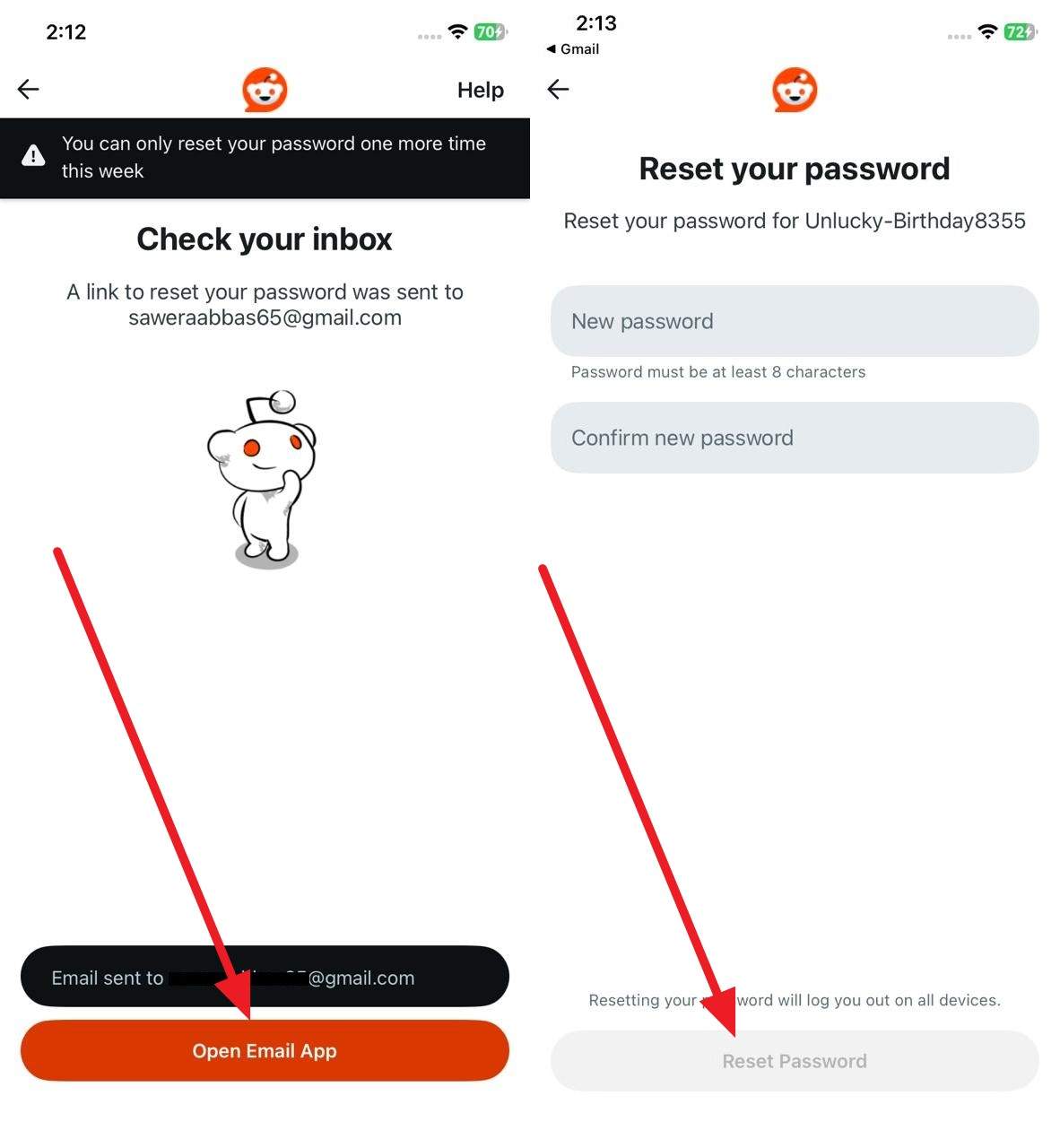
Launch the Reddit mobile application. On the primary login interface, locate and tap the 'Forget password' link. Input your exact 'Email' or 'Username' into the designated text field, then press the prominent 'Reset Password' button to instruct the servers to dispatch an email.
-
Step 2 Finalize the Change via Your Email Client
On the subsequent screen, tap the 'Open Email App' prompt to jump directly to your inbox. Once you locate and tap the official Reset Link, you will be taken to a secure page to define your new credentials. Type in your updated passcode, confirm its accuracy, and tap the 'Reset Password' button located at the bottom of your screen to execute the change.
Part 2. Effortless Ways to Manage & Recover Your Reddit Password | Dr.Fone - Password Manager (iOS)
If you prefer to skip the tedious process of requesting and verifying email reset codes, Dr.Fone - Password Manager offers a remarkably seamless alternative for Reddit password recovery. This specialized utility empowers users to deeply scan their connected iPhone or iPad to unearth passwords previously stored on the device. Through an efficient Quick Scan feature, individuals can instantly retrieve Reddit application logins, associated website credentials, and even saved Wi-Fi networks, all intelligently categorized for rapid access.
Beyond basic recovery, this tool acts as a comprehensive vault, managing an array of security credentials including screen time passcodes, essential PINs, and data tied to Face ID or Touch ID authentication. Despite its powerful capabilities, the software demands zero technical expertise. Users simply connect their iOS device to a PC or Mac, allowing the application to perform an encrypted local scan that guarantees absolute data privacy. Furthermore, this lightweight utility guarantees a clean user experience devoid of intrusive advertisements.
Guide to Recover Reddit Password with Dr.Fone - Password Manager (iOS)
If your ultimate goal is to retrieve your login details without being forced to change Reddit password entirely, follow these streamlined instructions to conduct a secure scan and export your credentials in a convenient CSV format utilizing Dr.Fone:
-
Step 1 Initiate the Scanning Procedure
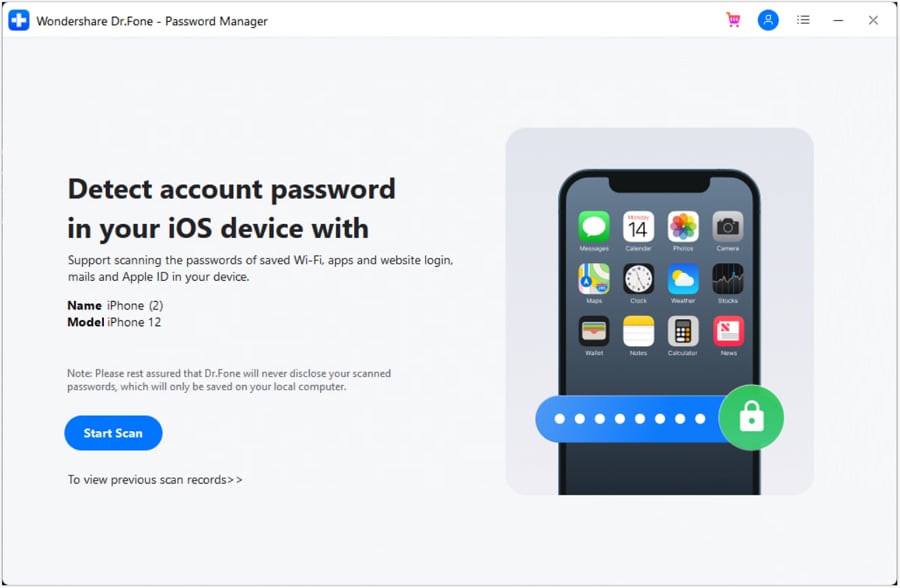
Launch the Password Manager tool on your computer. Once the software successfully detects your connected iOS device, click the 'Start Scan' button. You will be required to input a temporary backup password on your iPhone or iPad to authorize the scan (this will be automatically removed once the procedure concludes). Click the 'OK' button on the prompt, and permit the utility to safely extract your lost Reddit login information.
-
Step 2 Locate and Export Your Reddit Credentials
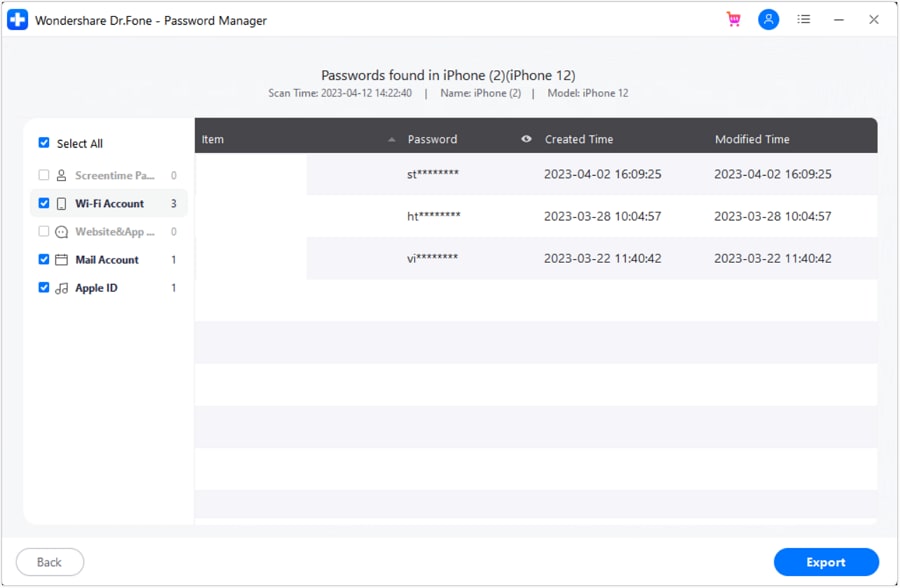
Upon completion of the system scan, navigate through the clearly defined categories on the left-hand panel to pinpoint your specific Reddit passcode. Once identified, select the credential checkbox and click the 'Export' button to safely store the recovered information onto your computer in a structured CSV file for future reference.
Ready to effortlessly retrieve your forgotten logins without navigating complicated reset pages? Download the tool below and regain control of your digital credentials instantly.




Part 3. How to Avoid Forgetting Your Reddit Password Again
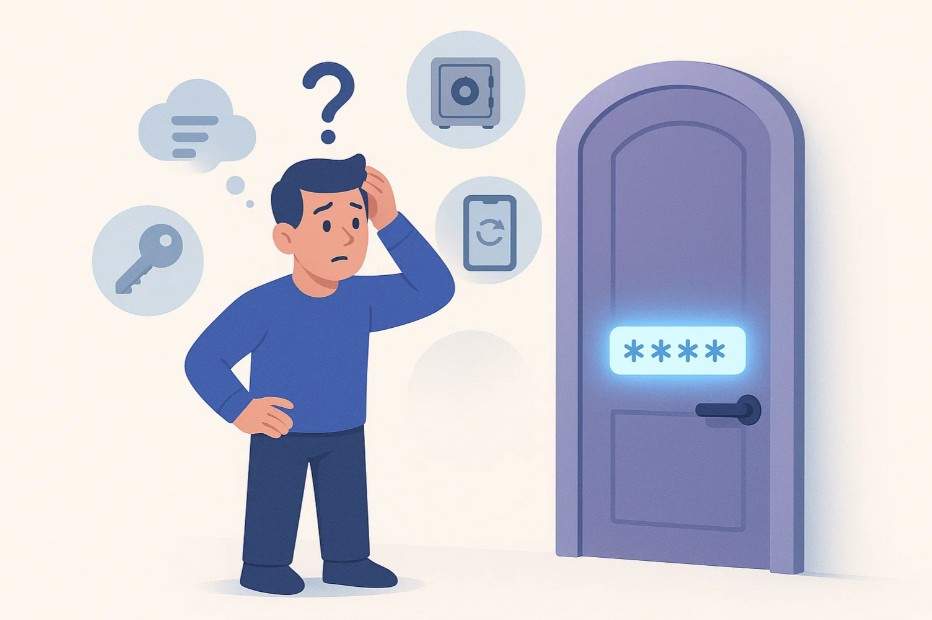
While understanding how to swiftly reset a Reddit password is highly beneficial, repeatedly dealing with lockouts can rapidly drain your patience. By integrating a dedicated password manager into your daily routine and proactively enabling platform-specific recovery options, you can permanently eliminate the need to visit the Reddit forgot password page. Consider implementing the following 5 highly practical strategies in 2026 to bypass repeated resets and preserve uninterrupted access to your favorite online communities:
- 1. Utilize a Reliable Password Manager: A premium password management application safely aggregates your complex logins into an encrypted vault, automatically autofilling them whenever you attempt to sign in. These utilities not only store data but actively generate unbreakable passwords synchronized seamlessly across all your hardware.
- 2. Establish an Unbreakable Yet Memorable Master Password: Because your master password serves as the singular gateway to your entire vault, it must strike the perfect balance between extreme security and personal memorability. A highly effective technique involves combining disparate random words, interspersed with unique symbols and numbers, forming a distinct passphrase.
- 3. Proactively Enable Reddit Recovery Options: Native account recovery configurations are your best fail-safe if you ever misplace your Reddit credentials. Ensure your Reddit profile is firmly linked to a frequently monitored email address to guarantee the prompt delivery of reset links, and activate any supplementary security verifications available.
- 4. Maintain Secure Offline Hints: If relying solely on digital memory causes anxiety, crafting a secure physical backup can act as an excellent secondary safety net. Never write down the complete passcode; instead, jot down a cryptic clue or an obscure hint that holds meaning exclusively to you.
- 5. Cultivate Consistent Login Habits: Developing a regimented routine drastically minimizes the likelihood of password confusion. Opt to access Reddit primarily via dedicated bookmarks or its official app, allowing your password manager to seamlessly handle the authentication. Furthermore, make it a steadfast rule to immediately update your saved vault entries whenever you modify a credential.
Conclusion
If you find yourself in a scenario where you forgot your Reddit password, navigating straight to the official Reddit forgot password page stands as the most efficient and straightforward method to reclaim total access to your account.
Whether you choose to adhere to the standardized email reset steps, uncover saved credentials through iOS scanning tools like Dr.Fone, or implement a robust password manager, you have multiple pathways to regain authority over your Reddit presence and effectively safeguard against future authentication headaches in 2026.
FAQ
-
1. Where is the Reddit forgot password page?
The Reddit forgot password portal is easily accessible directly from the primary Reddit login screen. By clicking the 'Forgot Password' prompt, you will be directed to a page where entering your registered email address or username triggers an automated password reset link delivery. -
2. How do I effectively reset my Reddit password?
To securely reset your credentials, navigate to the official Reddit login interface, click the 'Forgot Password' option, input your associated username or email address, and immediately check your inbox. Clicking the provided recovery link will allow you to generate a completely new password. -
3. What should I do if I do not receive the Reddit password reset email?
If the expected email fails to appear, meticulously check your spam, junk, or promotions folders, and verify that you entered the exact email address tied to your account. Should the message still remain missing, wait a few minutes and attempt to request the recovery link once more. -
4. Is it possible to recover my Reddit account without my email?
If you have lost access to the original email address linked to your Reddit profile, your primary course of action must be attempting to recover that specific email account first. Alternatively, you may need to formally contact Reddit support to verify your identity and establish account ownership.
 Add Wondershare Dr.Fone as a preferred source on Google



