 Recover photos, messages, WhatsApp, and more — no backup
needed.
Recover photos, messages, WhatsApp, and more — no backup
needed.

 100% Security Verified | No Subscription Required | No Malware

 :
: 
 ChatGPT
 Perplexity
 Gemini
 Claude
 Grok
Grok
Imagine the frustration when a user opens the app only to realize they cannot access their profile. Whether the passcode is forgotten, or a malicious actor has triggered a telegram hacked account recovery scenario, losing access to crucial chats, media, and contacts can cause significant stress. Fortunately, Telegram provides several official channels to regain control, ranging from verifying your linked phone number to utilizing two-step verification codes.
Therefore, if you are actively searching for how to recover a Telegram account using your mobile number or a backup recovery email, you are in the right place. This 2026 comprehensive guide will walk you through the entire process. Furthermore, you will discover how specialized tools like Dr.Fone - Password Manager can help you securely retrieve a lost passcode if it was previously saved on your iOS device.




In this article
- Part 1. How to Recover My Telegram Account: Understanding the Basics
- Pro Tip. Easily Restore Forgotten Telegram Passwords on iPhone
- Part 2. How Do I Recover My Telegram Account Using a Phone Number?
- Part 3. How to Recover a Telegram Account Using a Recovery Email
- Part 4. How to Recover a Telegram Account Without Email
Part 1. How to Recover My Telegram Account: Understanding the Basics
Before diving into the exact steps of how to recover my Telegram account, it is crucial to understand the fundamental security mechanisms of the platform. From grasping why accounts suddenly get locked to identifying the critical differences between a deleted profile and a compromised one, this section provides the foundational knowledge you need.
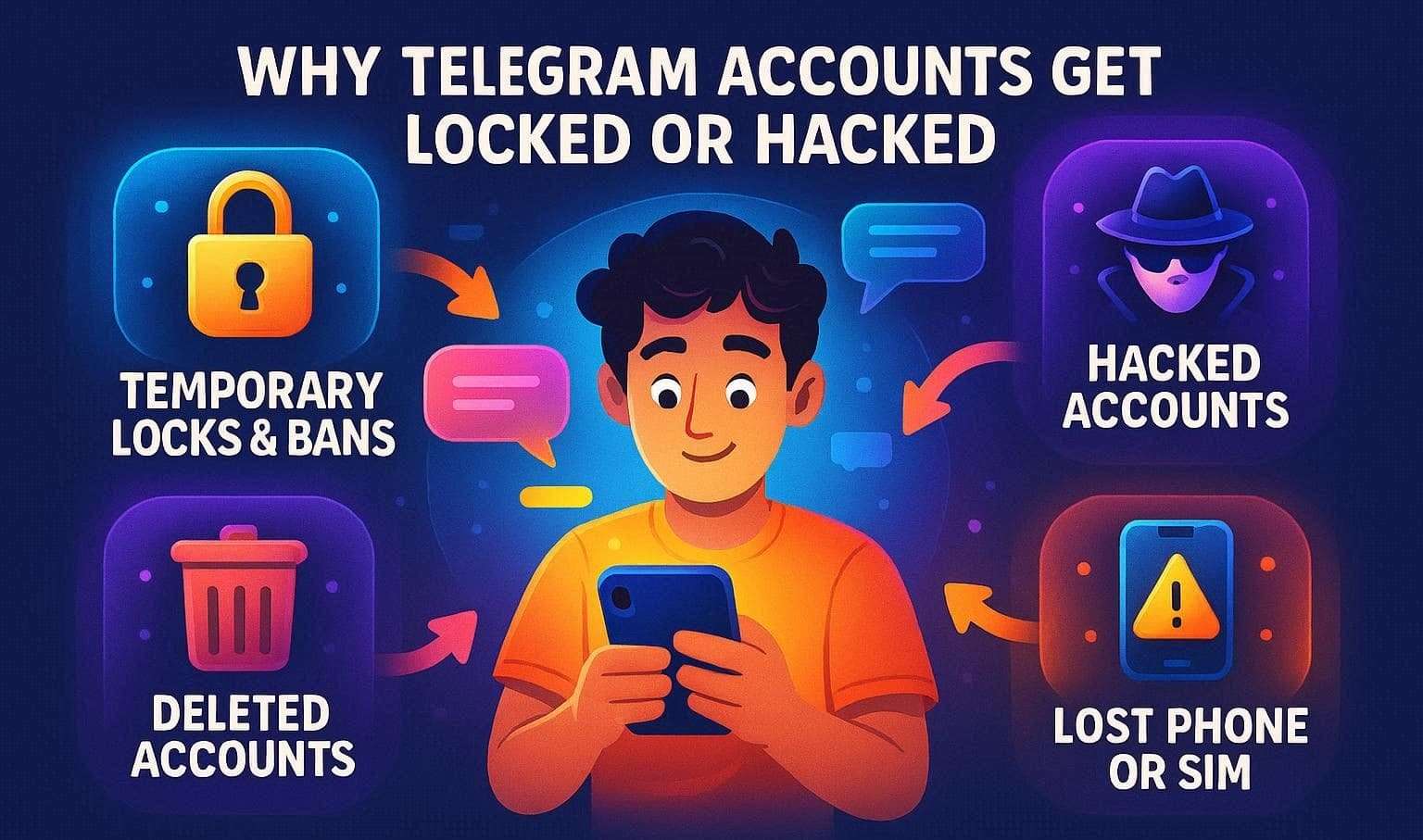
Why Telegram Accounts Get Locked, Hacked, Or Inaccessible
Here are some of the key reasons why users feel the urgent need to recover a Telegram account:
- Temporary Locks and Bans: Telegram employs strict algorithms to block or restrict accounts if it detects unusual activity. This typically includes multiple failed logins, sending mass messages, or exhibiting bot-like behavior.
- Security Freezes: If someone inputs incorrect verification codes multiple times in a row, Telegram's security system temporarily halts login attempts to prevent unauthorized access.
- Hacked Accounts: Cybercriminals can intercept SMS codes, execute SIM swaps, or deceive users through phishing links. Once inside, they can modify account settings, link unauthorized devices, or spam your contacts.
- Deleted Accounts: Accounts that are deleted intentionally by the user or purged automatically due to a long period of inactivity will lose all associated data. Therefore, Telegram cannot restore chats, groups, or media once the deletion is finalized.
- Lost Phone or SIM: Without direct access to the linked mobile number, you cannot receive the mandatory login codes, effectively locking you out of the platform completely.
Password Loss vs Hacked vs Deleted Accounts
Now that you know the underlying causes leading to telegram account recovery, let us identify the specific account issue you are facing and determine if recovery is feasible:
| Scenario | What It Means | Can You Recover Chats? |
|---|---|---|
| Password Lost | You forgot your Telegram two-step verification password, but still possess the linked phone number. | Yes, sometimes, provided you can reset it via your registered recovery email. Otherwise, it is highly unlikely. |
| Account Hacked | An unauthorized individual can log in and control your account, but the account itself has not been deleted. | Yes, if you manage to regain control and terminate other active sessions in time. |
| Account Deleted | The account was terminated either manually or automatically; all data was wiped from Telegram servers. | No, all data is permanently and irreversibly lost. |
Pro Tip. Easily Restore Forgotten Telegram Passwords on iPhone
Before you jump through hoops attempting a manual telegram recover account method, consider whether your password might be safely stored on your iPhone or iPad. In such instances, Dr.Fone - Password Manager (iOS) allows you to effortlessly view saved passwords for apps, Wi-Fi networks, websites, and even Apple IDs. This professional software performs a thorough yet quick scan, enabling you to selectively find and retrieve the exact passcode you need.
Furthermore, this tool allows you to export your credentials into a widely compatible CSV format, ensuring seamless integration with other password managers. The intuitive interface ensures the entire process is completed in just three simple steps, making it perfect for both beginners and tech enthusiasts. Additionally, it offers broad compatibility with the latest iOS and iPadOS versions.
- Unlock and seamlessly manage various app passcodes, PINs, Face IDs, and Screen Time passwords without technical limitations.
- Safely retrieve your stored passwords on any iOS device without risking data leaks or harming existing files.
- Quickly scan and organize complex passwords across various platforms, making email and social account management incredibly simple.
- Enjoy a lightweight software footprint with no intrusive advertisements during the password extraction process.
Guide to View or Export iPhone Telegram Passcode Via Dr.Fone
To successfully perform a telegram password recovery using Dr.Fone - Password Manager, simply follow these structured steps:
-
Step 1 Choose the Password Manager Tool
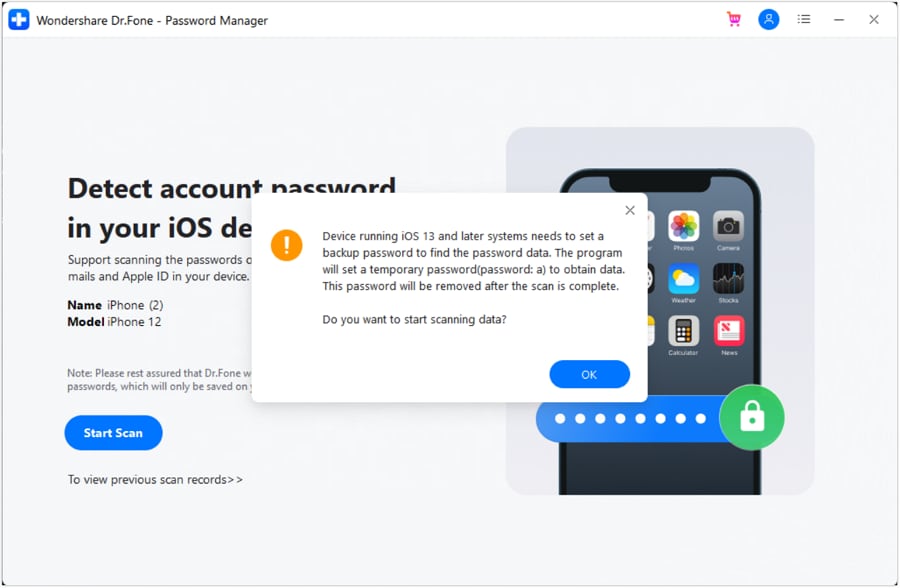
Launch the Dr.Fone application on your computer and select "Password Manager" from the primary Toolbox interface. Connect your iOS device, and press the "Start Scan" button. If prompted to back up your device locally, click the "OK" button to authorize the passcode-locating process.
-
Step 2 Select the Telegram Passcode to View
Keep an eye on the scanning progress bar. Once the scan is fully completed, navigate through the organized categories to locate your Telegram credentials. You can view them directly on the screen or prepare them for extraction.
-
Step 3 Export to a CSV Location
Click the "Export" button at the bottom right corner. Choose your preferred export location to save the newly generated CSV file, allowing you to securely import your credentials into other iOS password management tools.
Part 2. How Do I Recover My Telegram Account Using a Phone Number?
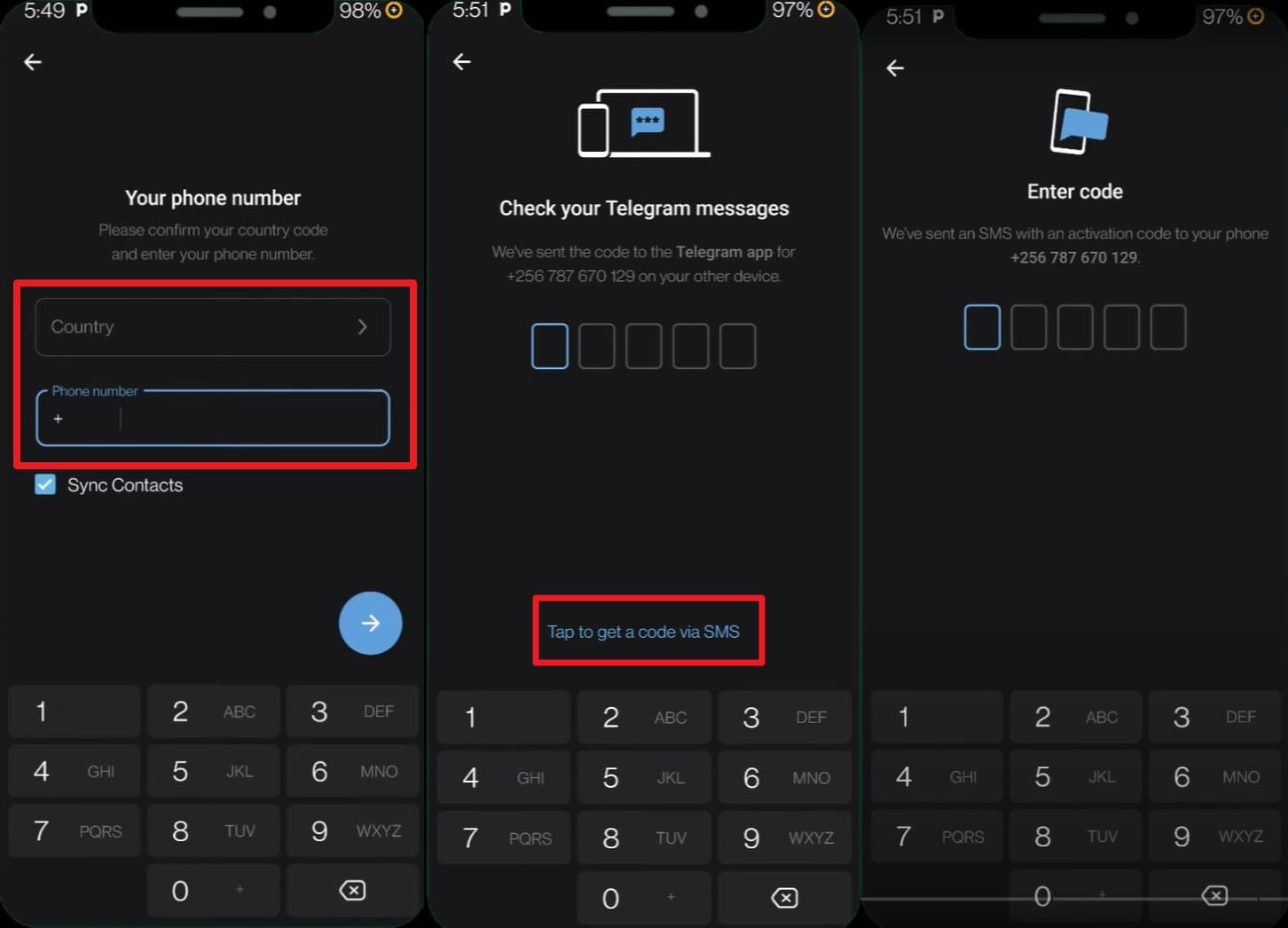
If you are struggling with a forgotten passcode or initiating a telegram hacked account recovery procedure, relying on your registered phone number is the most straightforward method. Telegram inherently uses your tel network and phone digits to verify your identity via an SMS code or automated voice call. Once authenticated, your synced chats, contacts, and cloud data will automatically repopulate on your device.
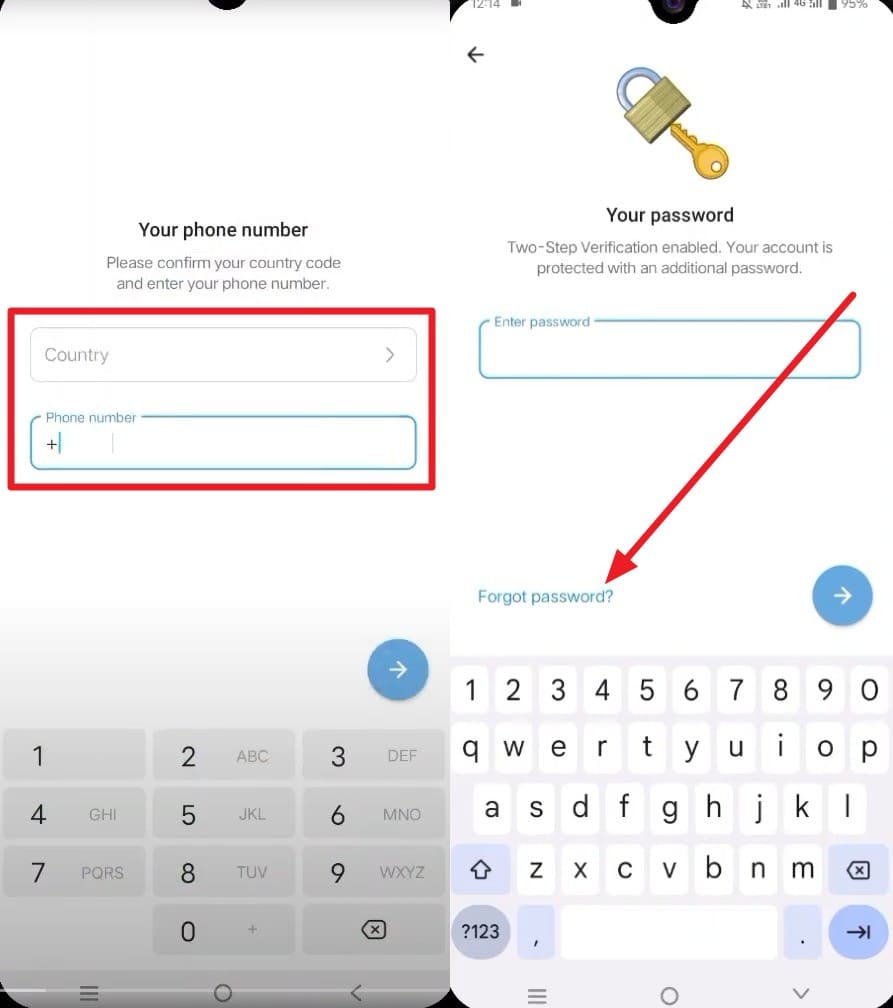
Instructions: Open the Telegram app, select your country code, and input your mobile phone number. Press the "Start Messaging" or "Arrow" icon to proceed. Then, tap the "Tap to Get Code via SMS" option. Enter the exact verification code once it hits your inbox. Following successful verification, the app will authenticate your session and instantly load your chat history from the cloud.
Part 3. How to Recover a Telegram Account Using a Recovery Email
Making a telegram account recovery possible through an email requires you to have previously linked a recovery email address to your two-step verification settings. This email acts as a fail-safe mechanism, allowing you to securely reset the two-step password you misplaced. Keep in mind that you still need your physical phone number to initiate the login process, as the recovery email strictly handles the secondary password reset to confirm your identity.
If you proactively configured an email address and can receive the initial SMS login code, this solution is highly effective. Here is exactly how to bypass and reset your two-step verification barrier:
-
Step 1 Initiate Password Reset
Input your linked phone number to trigger the initial login. When Telegram hits you with the screen requesting your two-step verification password, tap the "Forgot Password?" button located just below the text field.
-
Step 2 Apply Email Verification Code
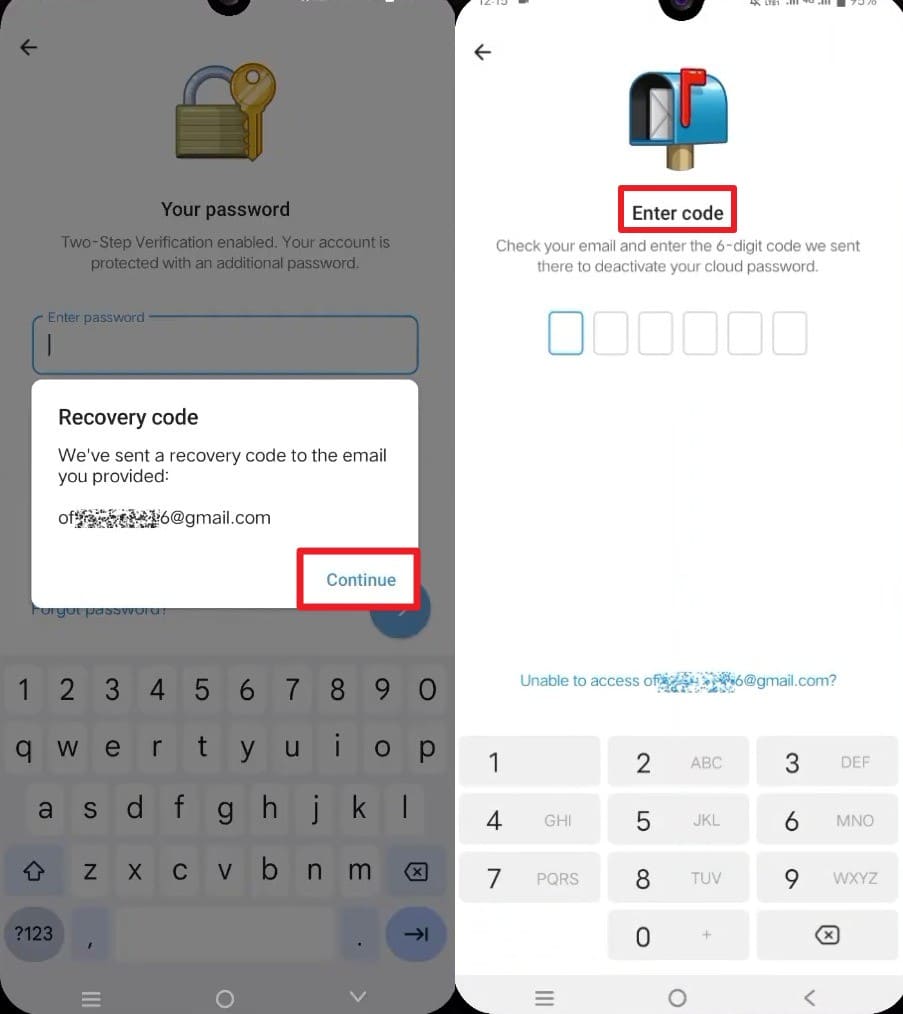
Telegram will promptly dispatch a secure verification code (or a direct link) to your registered recovery email inbox. Enter this exact code into the app. You will then be prompted to establish a brand-new two-step verification password. Once updated, Telegram finalize your login, successfully recovering your account.
Part 4. How to Recover a Telegram Account Without Email
If you find yourself searching for forgot telegram password without email solutions or need to execute a severe recovery protocol without secondary verification tools, you still have a couple of viable lifelines. Consider utilizing the two methods outlined below:
Option 1: Utilize an Already Authenticated Device
The smartest workaround is checking if you left an active Telegram session open on a secondary device, such as a desktop PC, Mac, or tablet. Because that device is already authenticated, it bypasses the need for a fresh SMS or email code. If you locate an active session, navigate directly to Settings > Privacy and Security. From there, you have the power to change your registered phone number, disable the forgotten two-step password, or bind a new recovery email to secure your account going forward.
Option 2: Escalate to Official Telegram Support
When all technical avenues are exhausted, especially in complex telegram hacked account recovery scenarios, contacting Telegram's official support team is your ultimate resort. This is vital if you lack both your active phone number and recovery email. The support staff can investigate server logs, verify your identity, and dictate if manual restoration is possible.
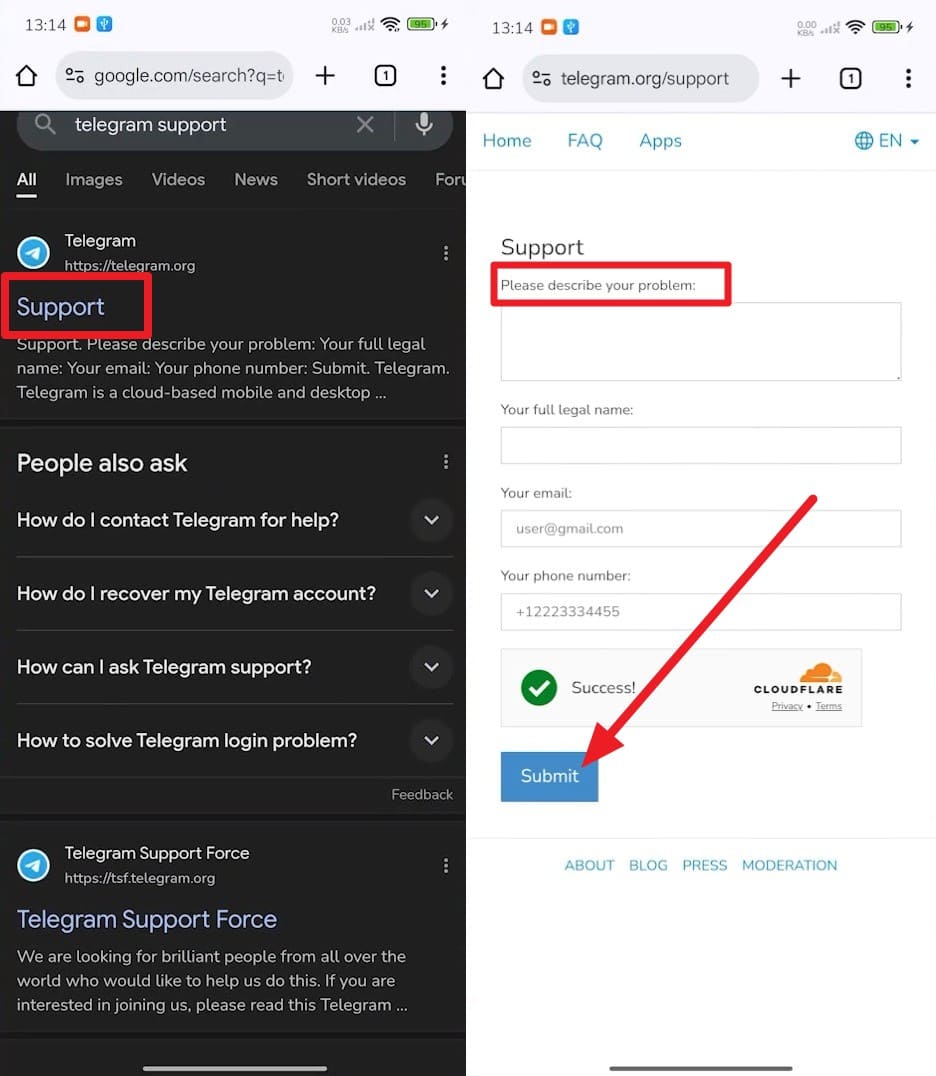
Instructions: Open your web browser and search for the official "Telegram Support" page. Scroll to the "Please Describe Your Problem" text box. Clearly and concisely articulate your lock-out situation, providing necessary identifiable details (without giving away sensitive passwords). Enter your contact email and press "Submit." Keep in mind that response times vary greatly and may take several days or weeks depending on their current ticket volume.
Conclusion
In summary, discovering how to recover your Telegram account can initially seem overwhelming, particularly if you are dealing with forgotten passwords or a compromised profile. By following this 2026 guide, you now understand how to leverage your mobile phone number for direct verification or utilize a registered email to reset an obstructive two-step verification passcode.
If standard authentication fails, always check for active sessions on alternative devices or submit a detailed ticket to Telegram Support. Furthermore, if you suspect your credentials are safely tucked away inside your Apple device ecosystem, Dr.Fone - Password Manager (iOS) remains an invaluable utility to scan, display, and export those crucial login details in just minutes.
FAQ
-
1. How long does it take to recover a Telegram account?
The time frame heavily depends on the specific nature of your problem. Simple login issues utilizing a phone number can take just a few minutes to resolve. Conversely, bypassing a two-step verification reset or dealing with strict security limits could take anywhere from a few days to a full week before full access is granted. -
2. Can I recover my Telegram account without my old SIM card?
No, Telegram's primary security architecture requires you to have direct access to the exact phone number linked to the profile. If you have lost the SIM card, you must urgently contact your mobile service provider to have the number ported to a replacement SIM before attempting recovery. -
3. Does Telegram delete inactive accounts automatically?
Yes, Telegram implements an automated self-destruction protocol that permanently deletes accounts after a predefined period of inactivity (defaulting to 6 months). You should regularly check your auto-delete settings within the Privacy and Security tab to prevent unintentional and permanent data loss. -
4. What happens if my Telegram account is permanently deleted?
If your account is deleted either manually by you or automatically due to inactivity, the process is completely irreversible. All messages, media, contacts, and groups tied to the profile are wiped from Telegram's cloud servers forever, meaning you must create a brand-new account from scratch.
 Add Wondershare Dr.Fone as a preferred source on Google



