Teleport your device anywhere instantly with one click.


 100% Security Verified | No Subscription Required | No Malware

 :

 ChatGPT
 Perplexity
 Gemini
 Claude
 Grok
Pokémon GO #385 is Jirachi, the Steel/Psychic-type Mythical Pokémon. The standard route covered here is the seven-stage Special Research story A Thousand-Year Slumber. Jirachi is a research encounter, not a regular wild spawn that you can locate by changing GPS or checking a community map.
Jirachi's small appearance does not determine its battle value, and its CP depends on level and individual stats. The original 3,090 figure should not be read as a universal maximum or proof that it is the second-strongest Steel type. This 2026 guide separates the actual GO research from older GameCube/GBA distributions and explains why location tools cannot unlock the encounter.
In this article
Part 1: Complete the Jirachi Special Research Quest
A Thousand-Year Slumber is a sequence of Professor Willow tasks that awards items, XP, and the Jirachi encounter. Open the research screen through its binoculars icon and find the Special Research area. The interface and unlocking requirements can change; if the story is not present, check your current research progress and official game support rather than assuming a map tool can add it.
Complete each stage and claim its rewards to reveal the next. Some tasks require particular species, a Buddy evolution, a Pokédex medal, battles, or consecutive daily spins, so preparation matters more than speed. Keep useful Pokémon such as Feebas and the Whismur evolution line, and read the exact wording shown in your account.
-
Step 1 Catch, spin, and add friends
Catch 25 Pokémon, spin ten PokéStops or Gyms, and make three new friends through the game's normal social system. The stage rewards are one Mossy Lure Module, one Magnetic Lure Module, and one Glacial Lure Module. Individual task rewards also include XP and encounters; claim them before advancing.
-
Step 2 Find Whismur and prepare Feebas
Catch three Whismur, evolve a Feebas, and earn the Gold Hoenn medal. Feebas has its own Buddy-related evolution requirement, so inspect its evolution screen before spending resources. The stage rewards are 2,000 Stardust, ten Poké Balls, and three Incense. The original reference to three additional Lures at this stage was incorrect.
-
Step 3 Use Loudred and practice accurate throws
Take a snapshot of Loudred, make three Great Throws in a row, and earn three Candies by walking with your Buddy. Merely making any three throws is not sufficient. The stage rewards are 20 Silver Pinap Berries, 2,000 Stardust, and three Star Pieces. Save a suitable Loudred until its snapshot task has registered.
-
Step 4 Work on Steel and Psychic catches
Catch 50 Steel- or Psychic-type Pokémon, power up Pokémon ten times, and send ten Gifts to friends. These are Gifts sent through the friends system, not food given to a Buddy. The stage rewards are one Fast TM, one Charged TM, and one Premium Battle Pass, historically described as a Premium Raid Pass.
-
Step 5 Complete three different battle objectives
Battle a team leader three times, win against another Trainer seven times, and win five raids. A team leader battle is not the same objective as defeating a Team GO Rocket leader. Confirm each counter after a battle. The stage rewards are three Rare Candy, 20 Ultra Balls, and 3,000 Stardust.
-
Step 6 Take the correct snapshots and keep a spin streak
Take five snapshots of Steel- or Psychic-type Pokémon, make three Excellent Curveball Throws, and spin a PokéStop seven days in a row. You are not asked to photograph Jirachi before receiving it. The curveball task is not described as an in-a-row streak, while the daily PokéStop task is consecutive. The stage rewards are ten Silver Pinap Berries, ten Star Pieces, and 5,000 Stardust.
-
Step 7 Claim the research encounter and final rewards
Collect the final claim rewards and enter the Jirachi encounter when prompted. The listed completion rewards include 20 Jirachi Candy and a Jirachi-themed T-shirt. Use the encounter's onscreen instructions; you do not need a third-party spawn map to reach this part of the story.
Research is legitimate gameplay. A Thousand-Year Slumber is associated with the regular Jirachi encounter, while any Shiny Jirachi offer belongs to a separately announced research opportunity with its own availability and conditions. Do not assume a past paid research ticket is currently sold or that this seven-stage story guarantees a Shiny.
Part 2: Other Jirachi Methods Belong to Different Games
The following three methods appeared in the original article and are retained for context. They concern GameCube and Game Boy Advance titles or a cheat accessory, not ways to add Jirachi to Pokémon GO. A national Pokédex number identifies the species; it does not make distributions interchangeable across games.
Method 1: Pokémon Colosseum US Bonus Disc
The US Bonus Disc includes a Jirachi Special Gift for a compatible English-language Pokémon Ruby or Sapphire save. It requires the appropriate GameCube, GBA, and GameCube–Game Boy Advance link cable. This is a legacy hardware distribution, not a retailer event currently running in GO.
-
Step 1 Prepare the receiving Ruby or Sapphire save
Use a compatible game with the required progress and leave an empty party slot. Save normally and power off the GBA before connecting hardware. Preparing an empty slot does not start a transfer by itself.
-
Step 2 Connect the two consoles
Attach the GameCube–GBA link cable according to the accessory instructions. A generic charging cable is not a substitute. Keep power stable so the save is not interrupted during communication.
-
Step 3 Open the Bonus Disc gift option
Start the correct US Bonus Disc on the GameCube and select Jirachi Special Gift from its menu. Regional versions of the disc have different contents, so another region's disc should not be assumed to provide the same distribution.
-
Step 4 Complete the transfer prompts
Follow the onscreen connection and power instructions and wait until the game confirms completion before disconnecting. Check the recipient party afterward. The original approximate transfer duration is not a reason to interrupt the process on a timer.
The received Jirachi is in Ruby or Sapphire. This procedure does not insert a Pokémon into your mobile GO account, and the availability of old hardware does not remove GO's research requirement.
Method 2: Pokémon Channel in Europe and Australia
Pokémon Channel is a GameCube title developed by Ambrella in which players watch and interact with programming alongside Pikachu. Compatible European and Australian releases include a Jirachi distribution tied to progression in that game. The destination is a supported Ruby or Sapphire save through the link cable, not Pokémon GO.
-
Step 1 Complete the Channel story requirements
Progress through the required programming, obtain the Starlight Projector, and complete the Camp Starlight/Pichu Movie sequence as required by the release. Watching a random broadcast is not a universal unlock.
-
Step 2 Prepare an eligible receiving save
Use a compatible Ruby or Sapphire game with the required Elite Four progress and an available party slot. Verify language and version compatibility rather than assuming every GBA Pokémon cartridge can receive the gift.
-
Step 3 Open the distribution menu
In Pokémon Channel, open Options and follow the Professor Oak/Jirachi sequence. Confirm that you want to proceed and that the receiving party has room when the game asks.
-
Step 4 Follow the link and power prompts
Connect the GameCube and GBA with the proper link cable. Turn on the handheld at the point requested by the game and confirm the connection. Do not substitute instructions for another regional release.
-
Step 5 Wait for completion before shutting down
Let the transfer finish, check the confirmation and the recipient Pokémon, and power off only when instructed. This completes a legacy main-series distribution; it does not unlock GO research or a wild Jirachi spawn.
Method 3: Pro Action Replay Is Not a GO Unlock
Action Replay is a third-party cheat accessory associated with older cartridge games. It is not a Pokémon GO feature and cannot be connected to an iPhone or Android account to add research rewards. Codes vary by cartridge, game revision, region, and cheat hardware; incorrect use can corrupt a save or create an invalid Pokémon.
-
Step 1 Recognize the original hardware-and-code claim
The old description placed a cheat accessory between the GBA and cartridge and entered a code. No verified game-specific code was supplied in the source, so there is no complete validated procedure to reproduce here. Do not invent a universal Jirachi code or treat this as a phone-game method.
-
Step 2 Understand the claimed party-slot behavior
The original text told players to leave the second party slot empty. That is a code-specific assumption, not a property shared by every accessory or game. An empty slot does not make an unknown code safe or a generated Pokémon legitimate.
-
Step 3 Do not assume a universal button shortcut
The source's L + R and level-five claims cannot be used as a general unlock. Those labels refer to handheld controls in a particular cheat setup, not a keyboard command for GO. Use the legitimate research route for your GO collection instead of applying an unverified cartridge cheat.
Part 3: Can Cheating or a Map Unlock Jirachi in Pokémon GO?
No GPS tool or community spawn map substitutes for Jirachi's research encounter. The original promise that you could simply spoof a location and catch Jirachi was misleading. The game's official Gameplay Fairness Policy treats falsifying GPS location as cheating and warns that enforcement can include account termination, sometimes without prior warnings.
3.1: What Dr.Fone - Virtual Location Actually Does
 Set your map route to simulate GPS movement.
- Set your wanted movement speed.
- HD and large map view to check location.
- Fake GPS location to anywhere.
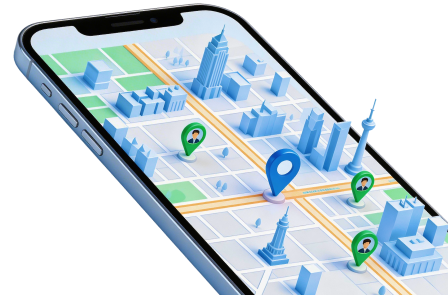
Dr.Fone - Virtual Location provides map-based GPS simulation on supported devices, including selecting a destination and configuring routes. That is a location utility, not a way to create a Mythical encounter, finish server-side research, or change which rewards an account has earned.
Its functions can be useful for permitted location testing in compatible apps, but they do not establish authorization to spoof Pokémon GO. Device and app support vary, and no movement speed, cooldown, or product claim guarantees protection from a strike. Keep the product's GPS capabilities separate from the Jirachi acquisition method.
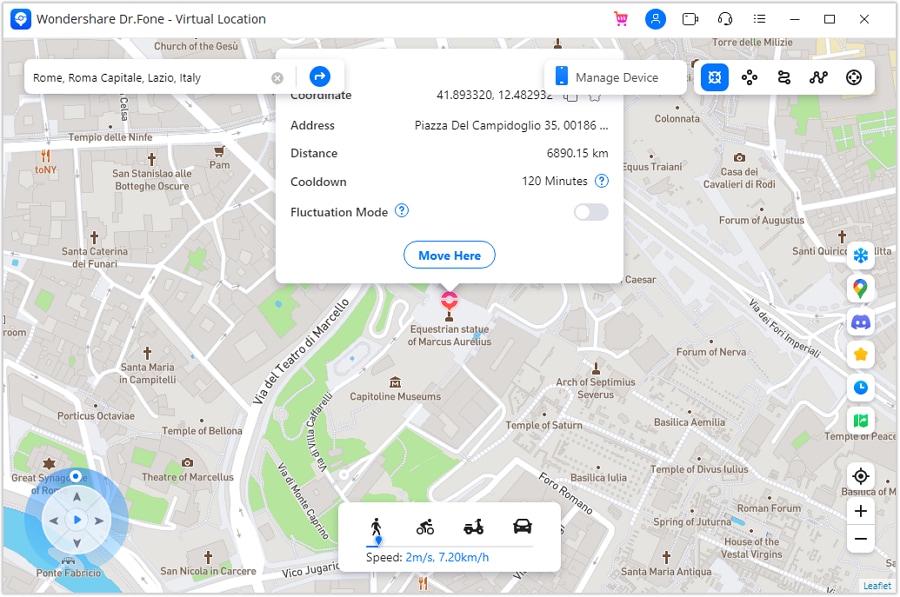
For a permitted test outside gameplay, connect a supported device, choose Virtual Location and Teleport Mode, search a destination, and confirm Move Here. Verify the resulting position in Maps. When finished, follow the restart-device prompt to return to the real GPS position. This sequence tests location simulation; it is not a Jirachi-catching guide.
The original purchase references remain historical links only. They do not confirm a current discount, a present compatibility list, or an offer to unlock research.
End the permitted test by restoring actual GPS and checking Maps. For Jirachi, continue the legitimate research tasks rather than using a changed coordinate as evidence of progress.




3.2: Pokémon GO Maps Cannot Show a Wild Jirachi
Community maps may organize reported encounters or landmarks by country and city, sometimes using location data and map services. Their usefulness depends on freshness, permitted data sources, and the game's current rules. A crowd report does not verify that a species is currently available to your account.
-
Step 1 Check a map's source and permissions
If you use a community reference for permitted local planning, review who maintains it and whether its information is current. Do not install an unofficial game client, hand over your login, or assume a service has authorization because it displays a familiar map.
-
Step 2 Reject a claimed Jirachi spawn
Ordinary reported spawns are different from a research reward. A pin labeled Jirachi does not bypass A Thousand-Year Slumber or grant an encounter. Return to your Special Research screen and follow the actual tasks; do not travel or spoof based on that claim.
Conclusion
To fill Pokémon GO entry #385, complete the eligible Jirachi research and claim the encounter. Keep the seven stages distinct, particularly the Great Throw streak, the correct snapshot types, and the seven-day PokéStop streak. GameCube distributions and Action Replay do not add Pokémon to GO. Dr.Fone - Virtual Location changes supported GPS coordinates, not research rewards, and should not be presented as a safe shortcut around game rules.
Protect your account by using official research and avoiding services that promise to insert rare Pokémon.
FAQ
-
1. Which Pokémon is number 385 in Pokémon GO?
It is Jirachi, a Steel/Psychic-type Mythical Pokémon. The standard research discussed here is A Thousand-Year Slumber, which leads to its encounter after the required stages. -
2. Does stage six require pictures of Jirachi?
No. The task is five snapshots of Steel- or Psychic-type Pokémon, alongside three Excellent Curveball Throws and a seven-day PokéStop spin streak. You are not required to photograph the reward Pokémon before you have obtained it. -
3. Can the US Bonus Disc or Pokémon Channel send Jirachi to GO?
No. Those legacy distributions described here deliver to compatible Ruby or Sapphire saves on GBA hardware. They are separate from a Pokémon GO account and its Special Research encounter. -
4. Can a GPS changer or spawn map unlock Jirachi faster?
Neither creates a research reward or a normal wild Jirachi spawn. GPS spoofing can violate the game's fairness policy and risk penalties. Complete the tasks legitimately instead of relying on a map pin, cheat code, or account-insertion service.
 Add Wondershare Dr.Fone as a preferred source on Google