Teleport your device anywhere instantly with one click.


 100% Security Verified | No Subscription Required | No Malware

 :

 ChatGPT
 Perplexity
 Gemini
 Claude
 Grok
Searching for a Pokémon GO app hack usually leads to two different proposals: changing the phone's GPS position or installing a modified game. Neither becomes approved gameplay simply because it avoids jailbreaking. The game's published rules prohibit location falsification and unauthorized clients, and enforcement can include restrictions, suspension, or termination.
Some time-saving suggestions are ordinary game features, such as appraisal searches or planning evolutions. Others rely on old interface behavior and should not be advertised as reliable 2026 exploits. The comparison below keeps those distinctions clear, explains the original Dr.Fone and TutuApp approaches, and removes promises of risk-free catches or guaranteed progress. No live-game test or current TutuApp installation is claimed.
In this article
Part 1: Pokémon GO Shortcuts and the Claims Behind Them
Evaluate a proposed shortcut by asking what it changes: account data, an ordinary menu choice, a screen animation, or the game client itself. An anecdote about one version is not a guarantee about another. In particular, normal research conditions and reward eligibility are not established solely by what a phone screen appears to show.
Adding friends by removing and re-adding an existing contact
The original proposal tries to satisfy an add-friend task by recycling a contact. Its sequence is straightforward: open your profile, enter the friends list, choose a friend, scroll to Remove Friend, and then send that person another invitation. That describes a workflow, not proof that a current research task will treat the contact as new.
Step 1 Review the actual research requirement
Read the task wording before changing your friends list. A genuinely new connection is the clearer interpretation when a task asks you to make a new friend.
Step 2 Coordinate with the other player
Do not remove someone without their knowledge just to try an unverified shortcut. Re-adding requires their participation and may not immediately complete.
Step 3 Verify the resulting task status
If you have independently chosen to re-add a contact, check the research screen. Do not promise preserved gifts, unlimited task completion, or success merely because the invitation was accepted.
Avoiding the Raid start animation
The empty-party trick proposes creating an empty battle team, entering a Raid lobby, selecting that team, waiting for the battle to begin, and then choosing the real team from a rejoin screen. Its claimed benefit is skipping part of the opening transition. The exact timing depends on interface behavior, so a saved-seconds promise is not justified here.
For dependable preparation, choose an appropriate team before the lobby countdown finishes and maintain a stable connection. A current lobby may offer its own ready controls under the applicable conditions. Entering without a usable team can instead delay participation. Treat the older sequence as an unverified animation workaround, not a way to increase damage automatically or guarantee a solo Raid win.
Removing defending Pokémon through coordinated Gym battles
The source describes three players entering a Gym battle, two leaving, those two opening another battle, and the remaining player starting a third instance. It claims that simultaneous separate battles can remove a defender immediately. This is not a verified current mechanic, and it should not be confused with a Raid Boss encounter simply because both occur at Gyms.
Use normal Gym battles and cooperate openly with other Trainers. The result depends on the defender's state, battle outcomes, and current game behavior. Repeatedly leaving and rejoining does not establish an entitlement to instant removal, and a group should not rely on an old exploit description when planning play.
Getting tomorrow's free Raid Pass by changing the clock
The proposed shortcut changes a device's date and time to a location a day ahead, hoping that the game will issue the next free pass early. A local clock setting is not sufficient evidence that the game has advanced your reward eligibility. The original International Date Line explanation therefore should not be treated as a reproducible way to manufacture additional free passes.
Check the game's current pass rules and any active event bonuses instead. The standard free-pass allowance and special-event offers are game conditions, not permissions created by editing Settings > General > Date & Time. Keep the device time accurate; do not build a daily routine around artificial clock changes or assume tomorrow's allowance has safely been borrowed.
Using IV appraisal to compare Pokémon before investing
Appraisal is an ordinary in-game feature rather than a hack. Review attack, defense, and HP appraisal bars along with the star rating before deciding what to evolve, keep, or transfer. CP and HP are useful visible statistics, but a high current CP alone does not settle every battle or collection decision.
Search your Pokémon storage with 1*, 2*, 3*, or 4* to filter the corresponding appraisal groups; 0* identifies the remaining lowest group. These searches can reduce manual checking when sorting many catches. Match your decision to the intended use rather than assuming that every lower-star Pokémon must be discarded or that star count automatically identifies the best team for every format.
Planning multiple evolutions in one session
The original suggestion groups common candidates such as Weedle, Caterpie, and Pidgey before using a Lucky Egg. The useful principle is preparation: identify Pokémon you genuinely want to evolve, collect the required Candy, and check any special evolution conditions before activating a time-limited experience bonus. A Lucky Egg boosts eligible experience; it does not perform every evolution for you.
Its usual duration is 30 minutes, with event conditions potentially changing the practical plan. Do not assume that closing and restarting the app completes an entire queue. Confirm each result and avoid transferring a Pokémon you meant to retain just to increase the speed of a bulk session.
Skipping the catch animation: verify the catch, not just the exit
The described quick-catch gesture holds one menu control while throwing, then exits before the full capture sequence finishes. It changes what you watch, not the underlying catch result. Interface placement and gesture behavior may change, so the sequence below is an explanation of the original claim rather than a promise that every current release behaves identically.
Step 1 Enter an encounter
Tap the target Pokémon and locate the ball-selection control.
Step 2 Hold the selector gesture
The older technique keeps one finger on the selector while the other hand throws normally. The intended effect is to keep the menu interaction accessible.
Step 3 Release after the ball connects
The original sequence releases the held finger, closes the selector by tapping the screen, and uses the Run icon to leave the encounter early.
Step 4 Check Pokémon storage
Look for the newly caught Pokémon. A marker remaining on the map is not conclusive evidence of failure, and an early exit is not conclusive evidence of success. Re-enter only if another attempt is appropriate.
Part 2: How Dr.Fone - Virtual Location Changes Device Coordinates
 Set your map route to simulate GPS movement.
- Set your wanted movement speed.
- HD and large map view to check location.
- Fake GPS location to anywhere.
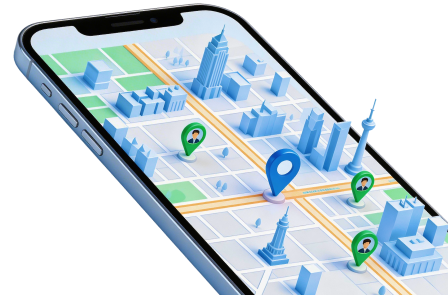
Dr.Fone - Virtual Location is a GPS-simulation tool, not a modified Pokémon GO client. Its destination, route, speed, and joystick features concern the position reported by a supported phone. Check the current device and operating-system requirements before assuming the tool will work on your setup.
Teleporting a phone does not establish that a game will accept the new position or allow access to a particular event. Moving before launching Pokémon GO also does not create ban immunity. Use the following walkthrough to understand the map workflow, while keeping the game's restrictions separate from the software's capabilities.
Step 1 Open the location module
Install the desktop software from its official source, launch it, and select Virtual Location. Connect the supported phone and complete any required connection prompts.
Step 2 Check the current map position
Inspect the location the program shows. Use the available current-location or centering control if you need to bring that point into view. Controls may differ from the older screenshots.
Step 3 Select Teleport Mode and search
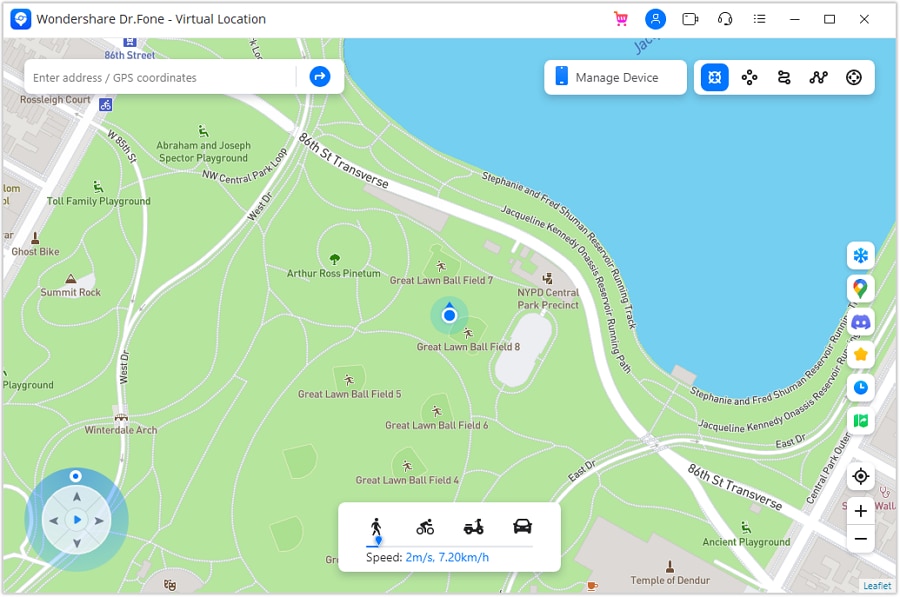
Choose the control labeled Teleport Mode rather than relying on an outdated instruction to click the third icon. Search for the desired destination, such as Rome, Italy, and inspect the returned map pin. Searching alone does not complete the change.
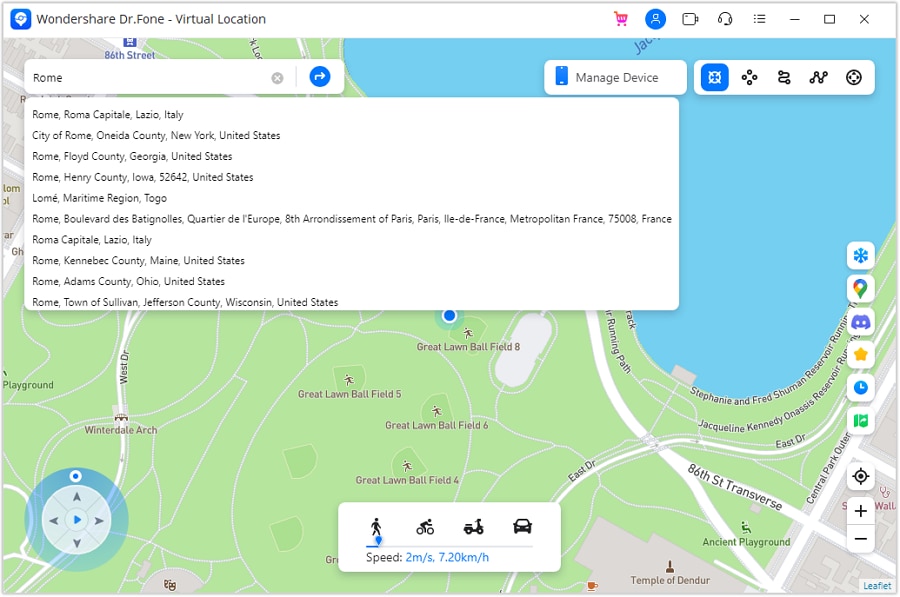
Step 4 Confirm and verify
Select Move Here when the map shows the intended destination. Check the phone's Maps app to verify its reported coordinates. End the test and restart the phone when you need to restore the real location, following the software prompt.
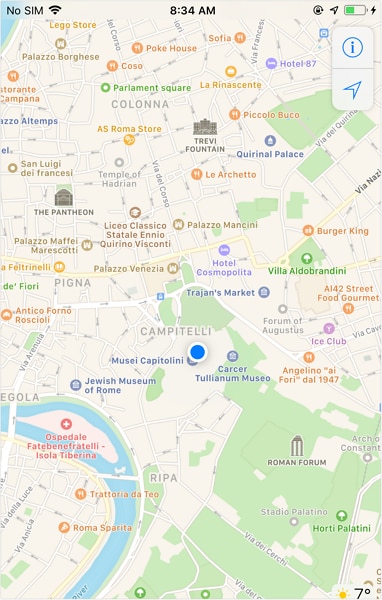
The complete workflow is selection, confirmation, device verification, and restoration when finished. A successful GPS test is not a successful appeal against game rules and should never be sold as a risk-free Pokémon GO hack.




Part 3: TutuApp and Modified Pokémon GO Claims
TutuApp is described in the original workflow as a distributor of third-party or modified iOS applications. That is a different approach from changing device coordinates while retaining the official game. A modified client can introduce compatibility, account-policy, and software-trust concerns. This article does not verify that a current TutuApp catalog offers a functioning Pokémon GO build.
The older sequence makes several claims that need checking before anyone mistakes it for current installation guidance:
Step 1 Safari and the proposed distributor
The source begins in Safari and names tutuapp.com. A named website alone is not evidence that a downloaded package is authentic, current, or safe.
Step 2 Download and developer-trust prompts
It then proposes downloading the distributor and trusting its developer. Do not approve an unknown developer merely because an instruction says Trust. Apple's enterprise-app guidance concerns verified organizational software, not blanket approval of unofficial game packages.
Step 3 Claimed duplicate game icons
The source expects two Pokémon GO icons and suggests selecting either. Catalog layout and availability are unverified, so the presence of an icon must not be treated as proof of a legitimate client.
Step 4 The 'Alpha Tournaments' search claim
The old description next searches that phrase and uses a floating green install icon. Neither the search result nor an install button establishes compatibility with the current game.
Step 5 Repeated trust and map-walking claims
The final proposed steps return to Settings, trust a developer again, and launch a client said to include Tap on Map to Walk. Treat those as unverified features of an unofficial package, not an official Pokémon GO setting or a safe recommendation.
For a legitimate game installation, use the official distribution channel appropriate to your device and region. Do not enter game credentials into a package whose publisher you cannot establish. If developer trust is the concern, read Apple's enterprise-app explanation rather than interpreting a Trust button as a security endorsement.
Part 4: Which Approach Makes Sense?
For ordinary gameplay, the strongest choice is the official client with legitimate planning tools, not a supposedly undetectable hack. Appraisal searches, prepared teams, and thoughtful evolution sessions address efficiency without pretending to override account rules. Old lobby or gesture tricks should be treated as version-dependent claims.
| Approach | What it changes | Main limitation |
|---|---|---|
| Normal game features | Sorting, team preparation, and resource planning | They improve decisions, not guaranteed rewards. |
| GPS simulation | A supported phone's reported coordinates | Location spoofing remains prohibited in Pokémon GO. |
| Modified app distribution | The installed game package | Client authorization and software provenance are concerns. |
The official gameplay fairness policy covers both falsified locations and unauthorized clients. Launching the game after teleporting does not nullify that policy, and a separate account is not a compliance workaround. Do not transfer a risk-free label from one tool category to another.
Conclusion
A useful Pokémon GO guide should distinguish real game features from unverified shortcuts. The GPS workflow explains what a location tool does; the TutuApp discussion explains a different, unofficial-client proposal. Neither justifies guaranteed catches, free-pass creation, or ban protection. Keep the official game, understand its rules, and verify actual results instead of relying on the word hack or no jailbreak.
FAQ
1. Does no jailbreak mean no ban risk?
No. Jailbreaking concerns the device. Pokémon GO's policy separately prohibits location spoofing and unauthorized clients.2. Can changing the phone date guarantee another free Raid Pass?
No such guarantee is established. Use the game's current pass rules and announced bonuses rather than assuming a local clock controls reward eligibility.3. Does exiting a catch animation prove I caught the Pokémon?
No. Check Pokémon storage or the relevant game result. An animation shortcut does not force a successful capture.4. Is teleporting before opening Pokémon GO a safe workaround?
No. The order of launching apps does not exempt GPS falsification from the published fairness rules or guarantee protection against account action.
 Add Wondershare Dr.Fone as a preferred source on Google