Teleport your device anywhere instantly with one click.


 100% Security Verified | No Subscription Required | No Malware

 :

 ChatGPT
 Perplexity
 Gemini
 Claude
 Grok
To start using Zoosk, create a profile through its official website or mobile app, provide accurate account information, add your photos and preferences, and confirm any required email verification. You can explore basic features before deciding whether paid messaging is worthwhile. A subscription, a verification badge, or a location change does not guarantee a compatible partner.
Zoosk has operated since 2007, according to its current About page. Its website now promotes more than 60 million members, which should not be confused with people currently active near you. This guide explains the service, walks through registration and the source's location-testing example, and compares three alternatives without promising dating results.
In this article
Part 1: Understand Zoosk Before Creating an Account
Zoosk is available through a website and mobile apps. Its current About page describes availability in more than 80 countries and translation into 25 languages. Availability and the population of suitable nearby profiles still depend on where you live, so a global membership total is not a measure of local dating prospects.

The original article cited more than 80 million users and a 21–51 age bracket without a reliable basis. The current official membership claim is different, and Zoosk's homepage explicitly includes people over 50. Do not treat the old age range as an eligibility rule, a demographic study, or a reason to exclude older adults.
Registration and profile completion ask for personal details that support account setup and matching. Depending on the screen, these can include a birth date, location, relationship preferences, education, height, body type, ethnicity, and other background information. Answer accurately, but distinguish necessary account fields from optional public profile details. You do not need to publish your precise street address to make a useful dating profile.
Key Matching and Discovery Features
Zoosk's current homepage highlights SmartPick, Carousel, and Advanced Filters. These offer different ways to discover people rather than three guarantees that an algorithm will find a perfect match. Spend time adjusting your profile and preferences before interpreting a recommendation as a strong compatibility signal.

- SmartPick: behavioral matching uses your interactions to refine suggested profiles. The source also mentions filters such as age, education, religion, and ethnicity; inspect the actual options and plan access in your account instead of assuming every filter is available everywhere.
- Carousel: a quick yes-or-no profile-discovery flow provides a more visual alternative to a detailed search. Review a person's available profile information before drawing conclusions from a photo alone.
- Zoosk Live: the source describes mobile-only livestreaming and viewing other people's streams, not a website feature. The current homepage read for this guide does not establish its present availability. Check the installed app and current support information before choosing Zoosk specifically for livestreaming.
For a Zoosk app download, use the Apple App Store or Google Play links reached from the official website. Confirm the publisher and device compatibility; an unrelated download button or a location utility is not the Zoosk mobile installer.
Advantages Worth Evaluating

- International reach: country coverage gives the service a broad potential audience, but it does not mean you will never run out of suitable profiles in a particular location.
- Language choices: the official About page describes 25 languages. Check the language options provided by the version and region you use.
- A free starting point: the official homepage says you can create a profile, add photos, search, receive daily matches, and send likes before paying for messaging access.
- Dating guidance: Zoosk maintains its Date Mix advice pages, which may help with profile writing and conversations. Advice is not a promise of individual success.
- Verification signals: the source describes a green photo-verification badge. Treat any badge as a limited verification signal, not proof that a person is honest, harmless, or free of fraudulent intent.
- Account feedback: the source discusses personalized dating insights. If your account offers them, use the feedback to review your profile, not to infer that a particular edit must produce more matches.
Good safety habits remain necessary even when a profile is verified: protect private information, remain cautious about requests for money, and use the platform's reporting tools when something is suspicious. A badge cannot replace your own judgment.
Limitations to Consider

The most important practical limitation is the distinction between joining and communicating. Zoosk's current homepage says a subscription enables sending and reading messages. Check that the account's free experience is useful to you before committing to a plan, and review whether a desired feature requires an additional purchase.
- Navigation: the source reports that some users wanted a more modern mobile interface. That is a subjective usability concern, not proof that the current app is unusable.
- Age and local fit: do not exclude the service solely because of the source's unsupported 21–51 claim. Inspect actual profiles and preferences relevant to your location and relationship goals.
- Inclusive preferences: evaluate whether the currently offered gender, orientation, and partner-preference options reflect what you need. The original article requested broader choices but did not establish the present option set.
- Paid access: free registration does not imply free access to every messaging, privacy, or visibility feature.
Premium Plans, Coins, and Privacy Controls
The source listed the following subscription examples. They are retained as source references, not quoted as guaranteed current offers. Actual price, currency, taxes, introductory offers, billing period, renewal, and feature inclusion can differ by platform and account. A monthly equivalent is not necessarily the amount collected at checkout.
| Source plan length | Source monthly equivalent | What to verify before paying |
|---|---|---|
| 1 month | $29.95 | Current total, renewal date, and included features. |
| 3 months | $19.98 | Whether the entire term is billed together and what cancellation changes. |
| 6 months | $13.35 | Total commitment, promotion conditions, and renewal price. |
| 12 months | $10.00 | Full-term cost and whether the longer commitment suits your needs. |
The original assertion that all plans have identical features should not replace the current checkout description. Official pages confirm the broad paid-messaging boundary, but a package's exact entitlements must be read where you subscribe.
- Messaging: the source advertises unlimited messages, while the current official description says subscriptions allow sending and reading messages. Check the actual plan terms and who can reply.
- SmartPick: daily suggestions are described for free accounts, with fuller SmartPick access mentioned for subscribers. Do not assume every interaction with a recommendation is free.
- Go Invisible: the source names a private-browsing feature. Verify whether it is offered and included in your package before relying on it; GPS simulation is not an alternative to an in-app privacy control.
- Likes and viewers: inspect the plan's actual visibility tools. The source mentions seeing likes, and official guidance describes subscriber access to profile-view information.
Zoosk Coins are separate from assuming that a subscription unlocks everything. Official free-account guidance mentions optional coin purchases for benefits such as virtual gifts and profile boosts. Read each item's description and cost before spending, because buying visibility does not guarantee a response.
- Premium Messaging: the source describes an add-on that lets non-subscribers answer your messages. Confirm its current availability, duration, and payment method instead of assuming that every recipient can respond.
- Hide & Seek: the source outlines Hide, Seek, and Sneak settings. Hide limits visibility to people you message; Seek makes the profile visible and allows visit notifications; Sneak describes visibility without the same visit disclosure. These are legacy descriptions to check against present account settings, not proof that each option is included with Coins or a plan.
- Boost: paid promotion can increase a profile's visibility where offered. It cannot certify compatibility or ensure a quicker relationship.
Part 2: Register on the Zoosk Website
Prepare an email account you control, accurate basic information, and a suitable profile photo. The retained images show the original registration sequence; field placement and labels can change. If a form asks for additional verification, follow the current on-screen instructions rather than trying to bypass the process.
Step 1 Open a browser
Use your usual browser on a trusted device. Check the site's address before supplying your email or creating a password.
Step 2 Enter through Zoosk's current sign-up route
The source linked the official Zoosk dating website. That legacy registration URL returned an unavailable page during this review. If it does not work for you, open Zoosk's current homepage and choose Join Now, or follow its official app-store link. Do not enter credentials on a lookalike replacement site.
Step 3 Enter the required account details
Complete the available gender and partner-preference fields, supply your real birth date, and create credentials using an email address and a unique password. Review the terms and select Sign Up when ready. The form need not remain on the right-hand side of every screen.

Step 4 Set your city or postal code
Provide the requested location information and continue. Distinguish your profile's stated location from your phone's live GPS coordinates; changing one does not necessarily update the other.
Step 5 Add your own profile photo
Use Upload to choose a clear photo of yourself. If the current flow permits Skip, you can complete that step later, although a complete profile is more informative. Uploading a picture does not automatically mean photo verification has been completed.
Step 6 Complete the profile questions
Answer the background, lifestyle, and relationship questions truthfully, then continue. Review which details will be visible to others. This is a separate step from uploading a photo; the source accidentally numbered both as Step 5.

Step 7 Confirm the account
Check your inbox, including spam or junk folders, and use Zoosk's verification email if requested. Return to the official website or app and inspect your profile and discovery settings before subscribing.
Part 3: Understand Location Testing with Dr.Fone - Virtual Location
 Set your map route to simulate GPS movement.
- Set your wanted movement speed.
- HD and large map view to check location.
- Fake GPS location to anywhere.
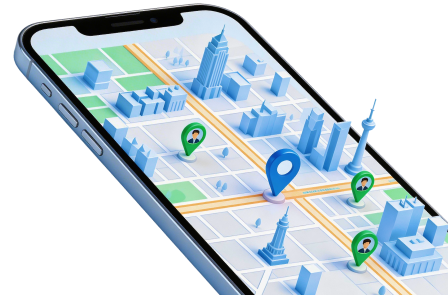
A Zoosk profile location, its search preferences, and a phone's reported coordinates are separate controls. Dr.Fone - Virtual Location can simulate GPS coordinates and routes on supported devices, but that does not establish that Zoosk will rewrite your account city, accept the simulated signal, or show more compatible people. Use Zoosk's own supported settings first.
The original guide's promise of a faster match rate is not justified. A coordinate test cannot activate a paid subscription, hide profile visits, remove country availability restrictions, or guarantee an ideal partner. If you have a legitimate location-testing need on your own supported phone, the source's desktop sequence is explained below with those limits intact.
Step 1 Install the desktop location tool
Review the requirements for Dr.Fone - Virtual Location and install the appropriate computer version. A desktop installer is not the Zoosk app and does not create a dating account.
Step 2 Connect the handset
Launch the software, connect your phone using a suitable data cable, and follow its device-preparation and trust prompts. Check that the connection is recognized before applying any coordinate change.
Step 3 Open Virtual Location
Where the dashboard uses the source layout, choose Toolbox and then Virtual Location. Allow any necessary module resources to finish downloading. Timing depends on the system and connection; it is not guaranteed to take a particular number of minutes.
Step 4 Choose Teleport Mode
In the location window, select Teleport Mode in the upper-right controls. The original screenshot identifies it as the first mode icon; follow the current label if your software's interface differs.
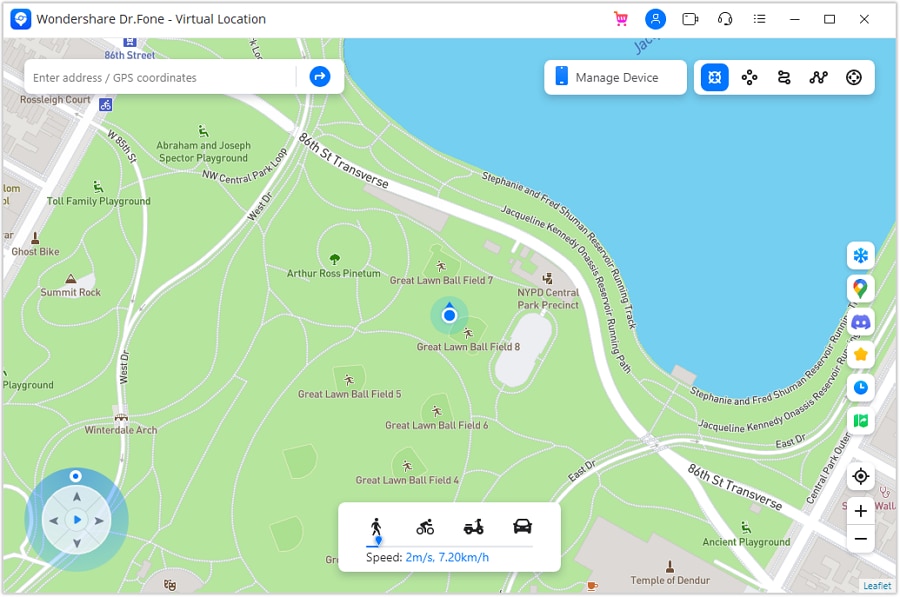
Step 5 Search for the intended test point
Enter the destination in the upper-left search field and choose the matching result. Select a location relevant to your test, not one advertised as certain to produce more dating matches.
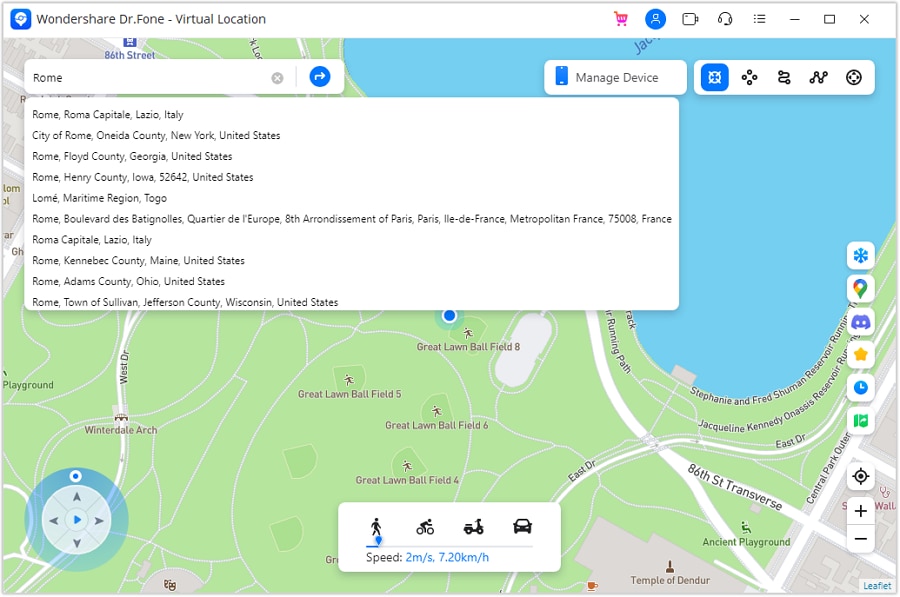
Step 6 Inspect and confirm the destination
Review the displayed coordinate, address, distance, and any timing information in the current interface. Confirm that the point is correct, then choose Move Here. A cooldown indicator does not guarantee another app's approval.
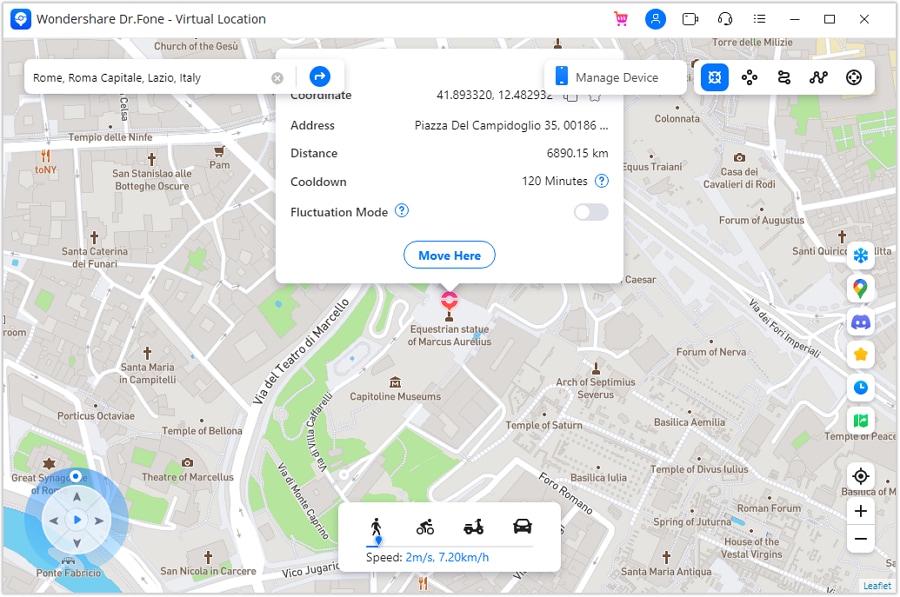
Step 7 Check the result and restore normal reporting
Inspect a map on the phone to verify its reported coordinates. This confirms only the map result, not a Zoosk location update. When finished, close the location session and follow the restart prompt to restore the actual position; verify it again before navigation.
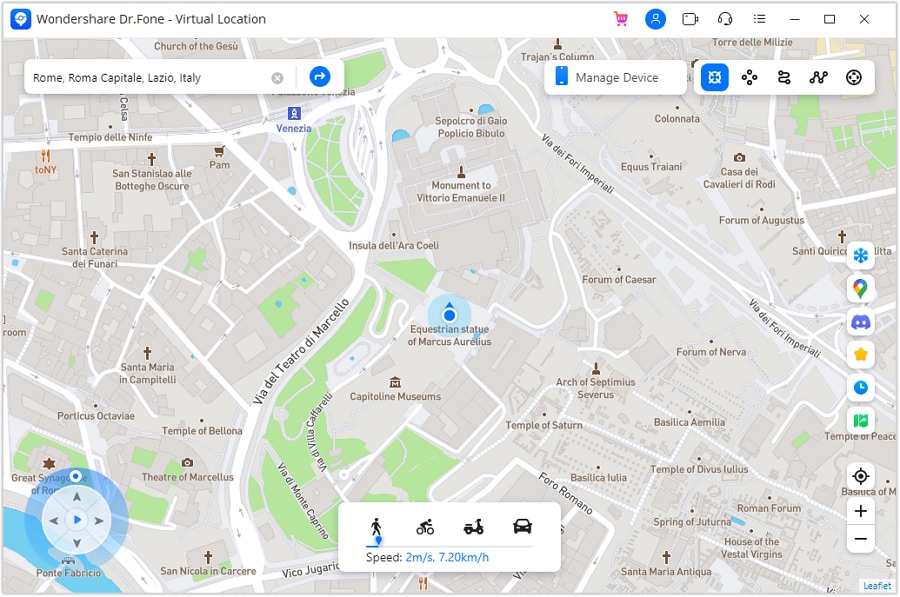
If Zoosk keeps the same search area, review its account location and discovery controls rather than repeating increasingly large GPS jumps. Be honest with people about where you live or intend to meet, and respect the service's rules.




Part 4: Three Alternatives to Consider Alongside Zoosk
If Zoosk is unavailable in your country, not eligible for your device, or poorly suited to your preferences, compare legitimate alternatives offered in your region. A GPS simulator is not a reliable remedy for unavailable service, account restrictions, or a payment requirement. Assess each app's audience, features, privacy settings, and costs on its own merits.
Alovoa

The source presents Alovoa as an open-source platform for dating and meeting new people. That makes it a potentially different approach for someone interested in a simpler community-oriented service. Its homepage could not be reliably loaded during this review, so current availability, registration, and local activity are not confirmed here. Check those points before choosing it as a working replacement.
Bumble

Bumble's current website describes meaningful relationships through Bumble Date and a separate friendship focus through BFF. Compare the relevant mode with your goals, along with current messaging and discovery rules. It may suit someone seeking a different interaction style, but neither a serious-relationship label nor an international presence guarantees a suitable or safe match.
Tinder

Tinder is another option for browsing profiles and meeting people. The original article calls its approach more animated and diverse, but that is a subjective comparison rather than a measured result. Review the local audience, profile preferences, available privacy controls, and paid features instead of assuming one app is inherently better for everyone.
Conclusion
Begin with a complete, accurate Zoosk profile and the free features needed to assess whether the service fits you. Read the actual subscription and optional-purchase terms before paying, and treat verification and recommendations as limited signals rather than guarantees. Dr.Fone - Virtual Location can support a separate GPS test on an eligible device, but cannot promise more matches, anonymous profile visits, or access to unavailable service.
FAQ
1. Can I join Zoosk without paying immediately?
Yes. Official guidance describes free profile creation, photos, searching, daily matches, and likes. A subscription is generally needed to send and read messages; confirm the current account terms.2. Where should I download the Zoosk app?
Follow the Apple App Store or Google Play link from Zoosk's official website. Confirm the publisher and device eligibility. A Dr.Fone desktop download is a separate product, not the Zoosk installer.3. Does photo verification guarantee that a profile is safe?
No. Verification can provide a limited signal about a profile or photo, but it does not establish someone's intentions. Continue protecting private information and reporting suspicious behavior.4. Will changing GPS guarantee more Zoosk matches?
No. Profile location, search settings, app acceptance of coordinates, and other people's preferences are separate factors. GPS simulation cannot guarantee more matches or replace official account controls.
 Add Wondershare Dr.Fone as a preferred source on Google