
How to Download or Convert SoundCloud to MP3 Files [Ultimate Guide]

Sep 18, 2026 • Filed to: Device Data Management • Proven solutions
 TL;DR:
Downloading SoundCloud tracks to MP3 legally requires the creator's explicit permission, which can be done using the native Download File option on a PC or through third-party extraction tools for permitted audio.
● Local MP3 file downloads are explicitly unsupported on the SoundCloud mobile app; offline mobile listening requires a SoundCloud Go or Go+ subscription and restricts tracks to playback strictly inside the application.
● If an authorized track lacks an official download button, web tools like DownCloudMe, MusicVerter, and Klickaud allow URL-to-MP3 conversion at up to 320 kbps, while UniConverter serves as a dedicated desktop alternative.
● Once MP3 files are saved to a computer, they can be bulk imported or exported to mobile devices using Wondershare Dr.Fone, which provides cross-platform data management compatible with Android, iOS 26, iPadOS 26, and the iPhone 17 series.
Ask AI for a summary
 ChatGPT
 Perplexity
 Gemini
 Claude
 Grok
Grok
Dr.Fone Basic:
Better Control for Your Phone
Manage, transfer, back up, restore, and mirror your device
You listen to music on the road, at school, or in bed, but of course, the internet is not always good. A lot of users of SoundCloud would like to save their favorite music to be played at any time, without buffering, to listen to the music in MP3 format. Thus, this guide describes easy, secure methods of downloading or converting SoundCloud to MP3 format, using simple tools and simple steps.
You will know what works and what does not, what should be avoided, and how to ensure high sound quality. Besides, learn how to handle the downloaded songs using Dr.Fone through its smooth import and export capabilities.

Part 1. Overview of SoundCloud and MP3 Basics
SoundCloud is an audio streaming website on which producers post music, podcasts, DJ sets, and songs. Users have the opportunity to listen to audio on a website or mobile application, subscribe to artists, like songs, and create playlists. SoundCloud stores audio posted by artists so that individuals can listen to it at any point on the internet without necessarily saving files on their computers permanently.
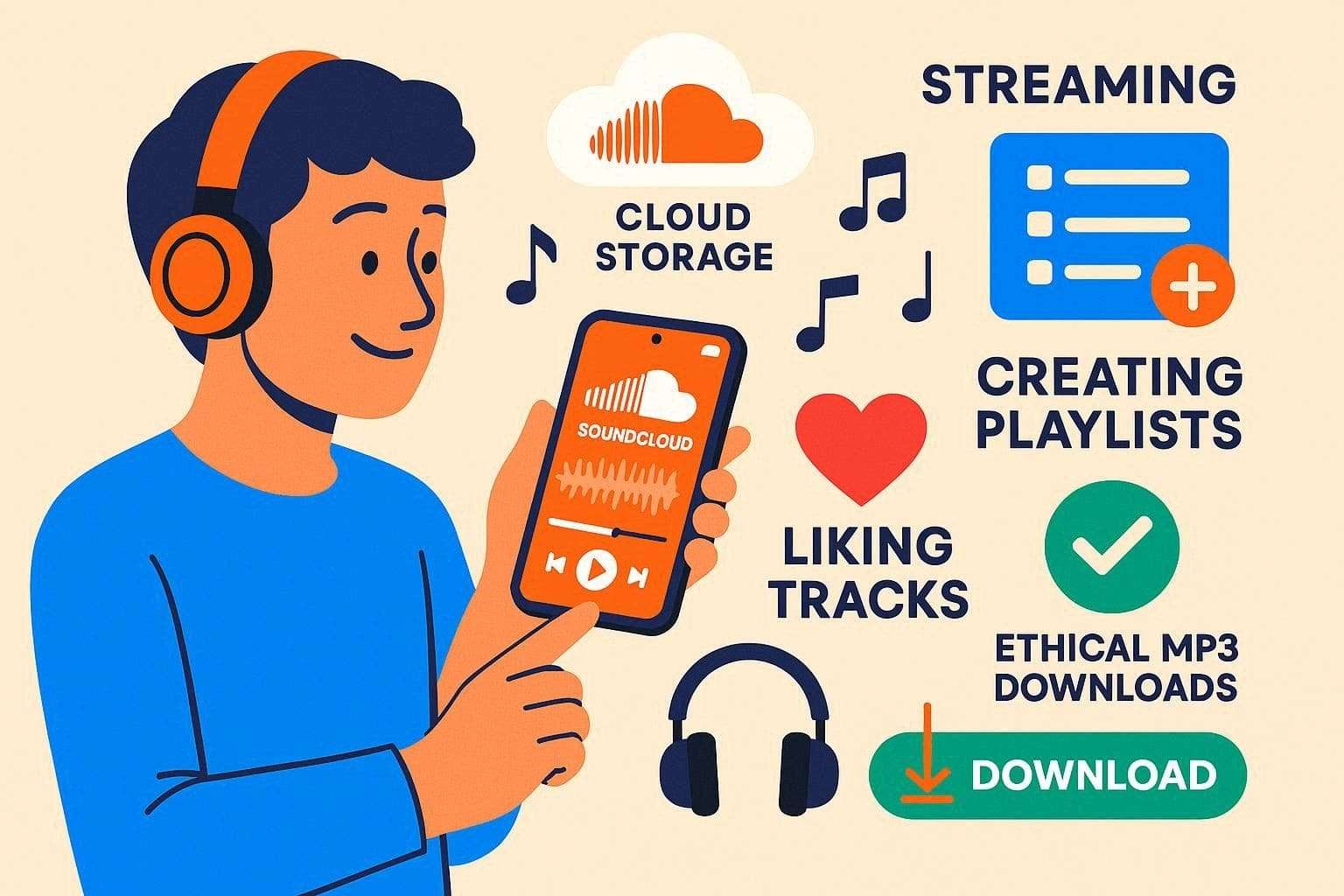
However, remember that not every track on SoundCloud includes a download option. Copyright rules protect creators’ rights, so direct saving is often restricted rather than requiring a SoundCloud to MP3 conversion. You should only save audio when it is clearly permitted, such as your own uploads or tracks that provide an official download button.
Part 2. How to Download Music from SoundCloud Legally?
Having the basics cleared, if you want to save a specific song without MP3 for SoundCloud conversion, this section is for you. Get to know how you can save tracks where it's allowed and where it's not.
Method 1: Direct Download (If Available)
Before you choose to download SoundCloud MP3 tracks via third-party sites, use the official Direct Download button on SoundCloud when it appears on a track page. This option stays safe and reliable because the artist allows file saving. However, on mobile phones, Official help pages say that local file downloads are not supported.
The app focuses on online audio playback, so tracks stay on the platform rather than in normal files on your device. Nevertheless, with a SoundCloud Go or Go+ subscription, you can save tracks, playlists, and your Library for offline use inside the app. So, instead of relying on screen recording or random browser tools that can reduce audio quality, follow the steps below to keep the sound clear and consistent:
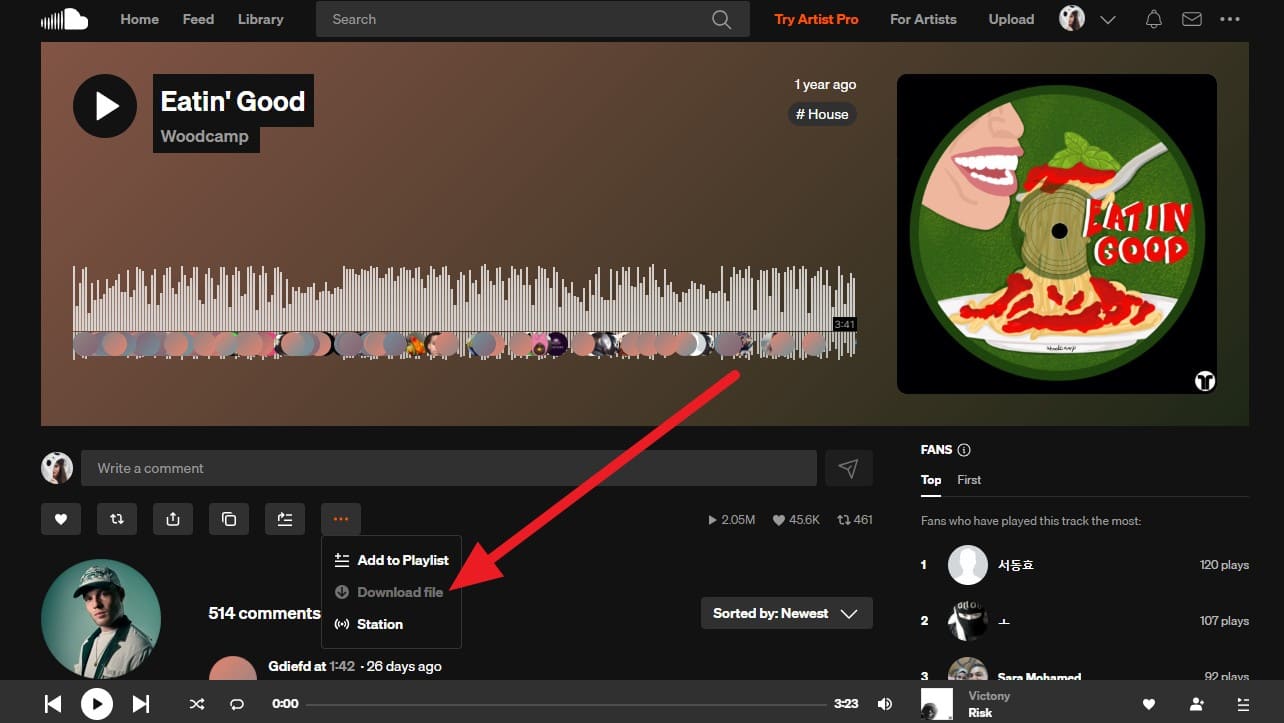
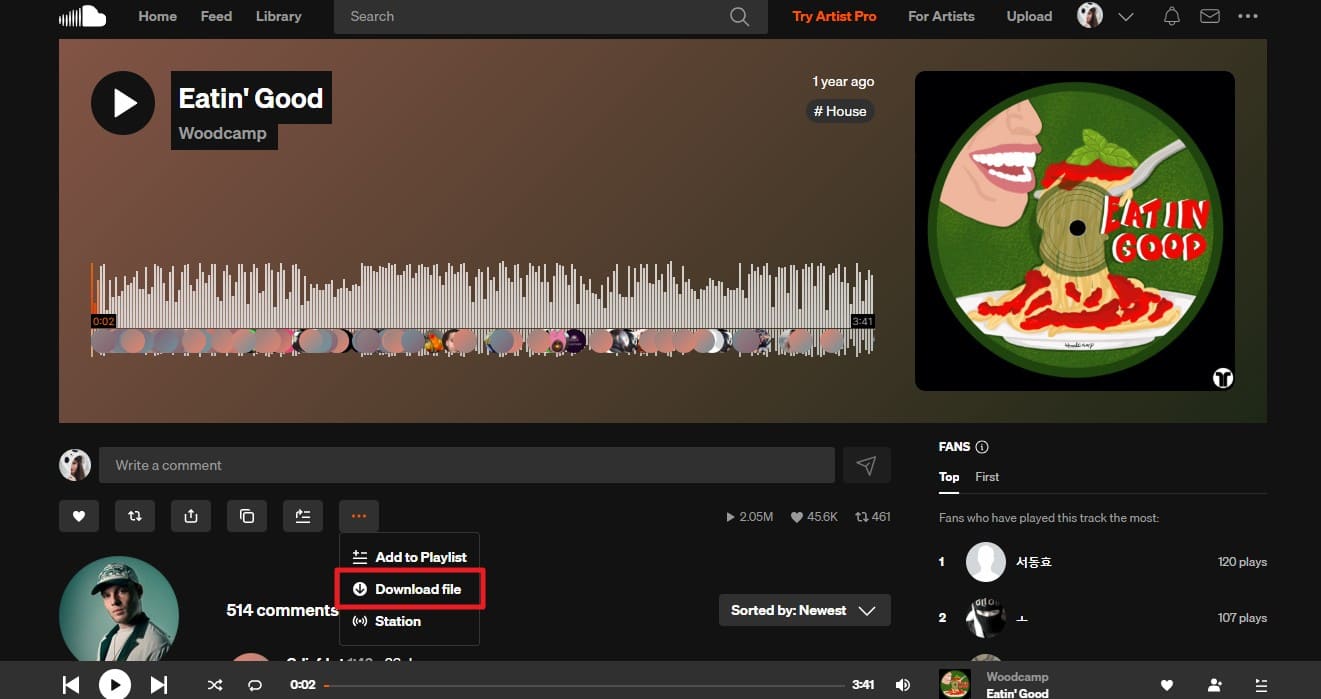
Step 1. As you log in, search for the song on SoundCloud and press the “Three Dots” icon.
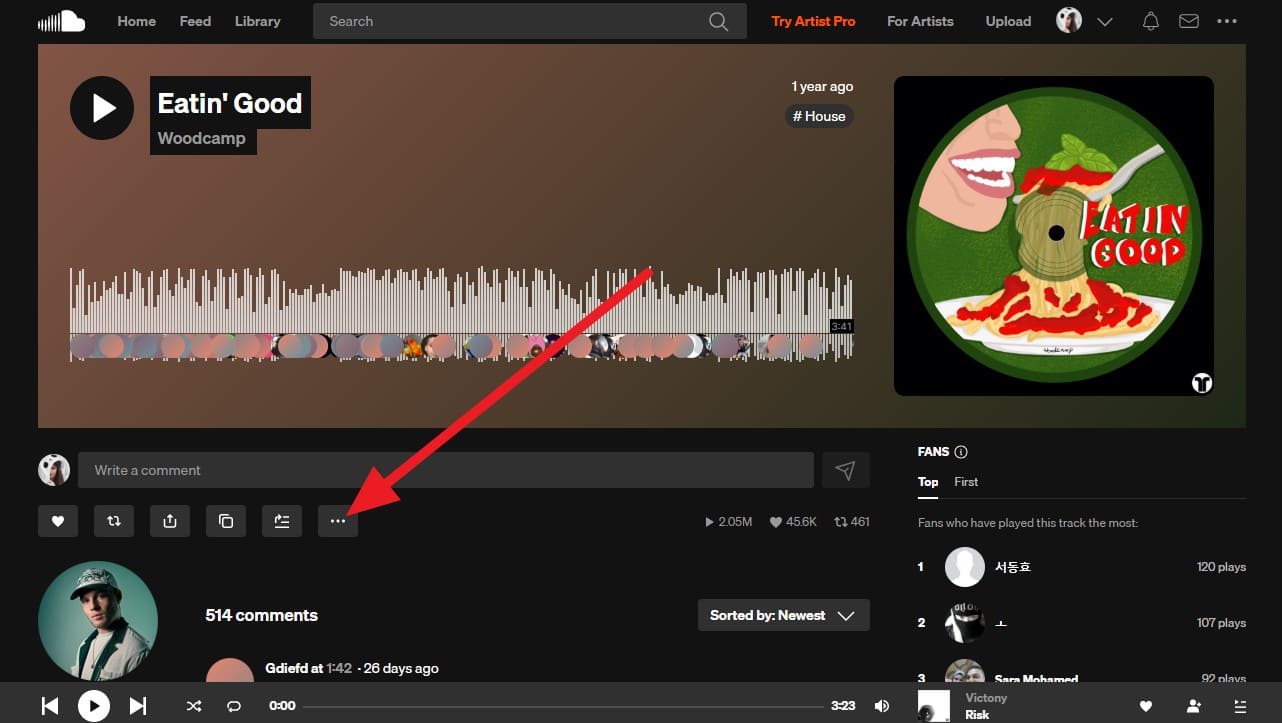
Step 2. After that, pick the "Download File” option to save it automatically on the PC.
Method 2: Using Third-Party Downloaders (For Non-Downloadable Tracks)
To download MP3s from SoundCloud, users can also use third-party downloaders like UniConverter. The tool features a Downloader that lets you paste a SoundCloud track link and save it as an MP3, MP4, AAC, or other format. While doing so, users can have complete control over the process and pick the Save To location. So, having a seamless usage, here is how you can save the song to MP3:
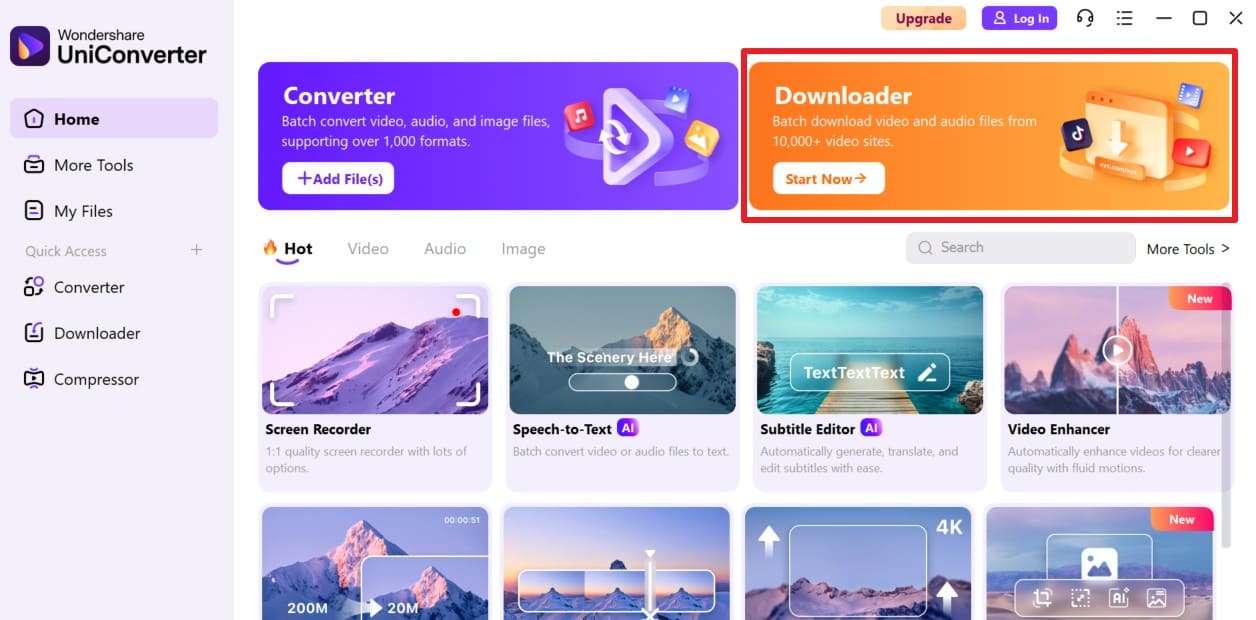
Step 1. Upon launching the tool, pick the “Downloader” tool and press the “Start Now” button.
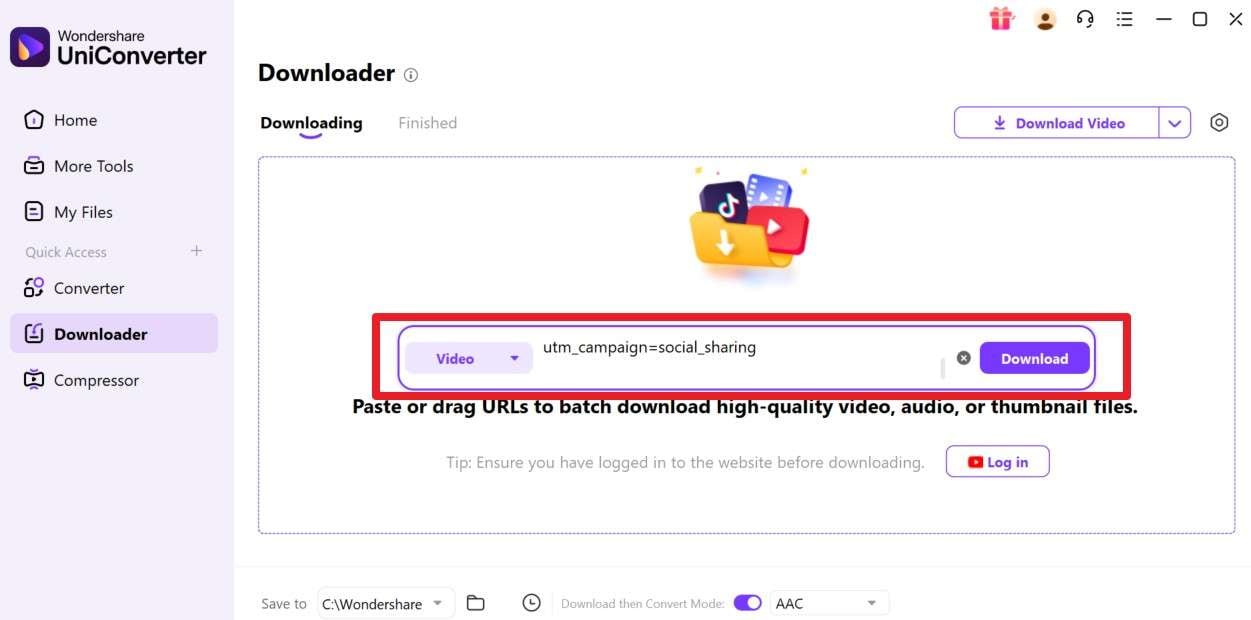
Step 2. Here, paste the link you copied from a certain song and click the “Download” button.
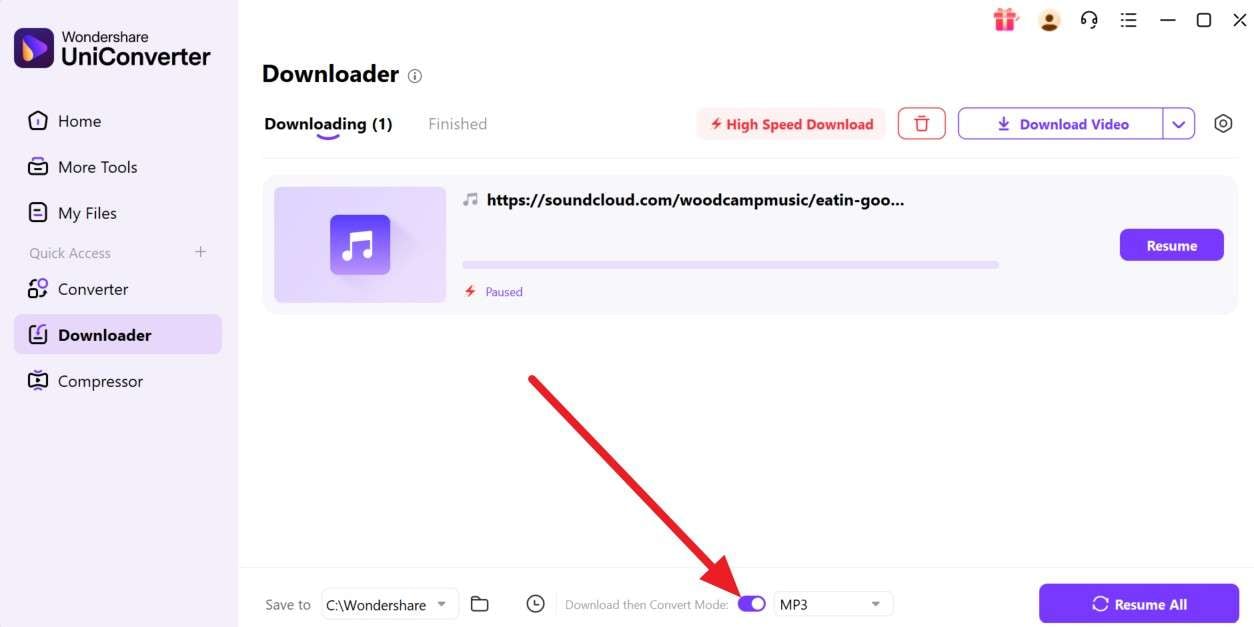
Step 3. When directed to the new window, activate the “Download then Convert Mode” feature and choose the “MP3” option from the pop-up menu. Wait for the tool to finish the download and conversion, or “Pause” the process.
Part 3. Can You Convert SoundCloud to MP3? What’s Allowed?
To further dive into the download SoundCloud MP3 playlist debate, know that you can convert SoundCloud audio to MP3, but you must have permission first. Platform rules say you must not copy, rip, or capture tracks without the creator's approval.
This means MP3 conversion stays acceptable when you download your own uploads and use files that creators offer for free. Additionally, follow Creative Commons rules that allow reuse with proper credit. In addition, third-party “SoundCloud to MP3” tools that grab audio without permission count as ripping, which breaks platform terms. So, always check permissions first to respect creators and avoid legal trouble.
3 Online SoundCloud to MP3 Downloaders You Can Try
- DownCloudMe
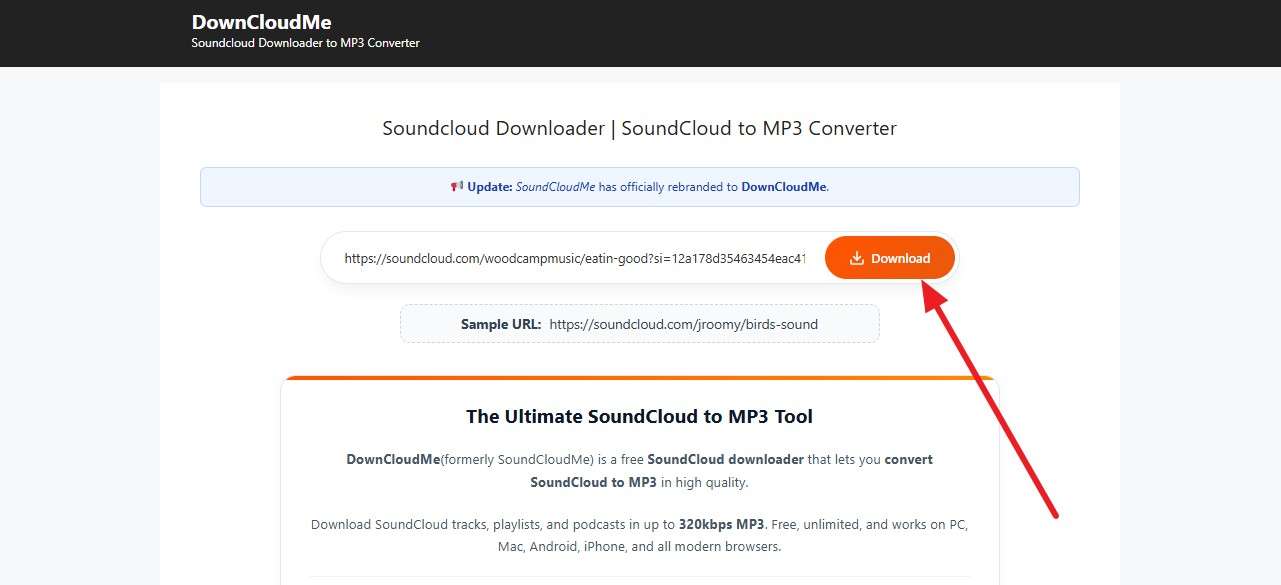
DownCloudMe (formerly SoundCloudMe) works via a simple copy-and-paste link method in most browsers on Windows, macOS, Linux, and mobile devices. The site offers fast downloads and high-quality MP3s, up to 320 kbps, with no sign-up required. Hence, as you check permission before you save any audio, follow the steps to download a SoundCloud song:
Step 1. As you paste the track link in the given textbox, press the "Download" button.
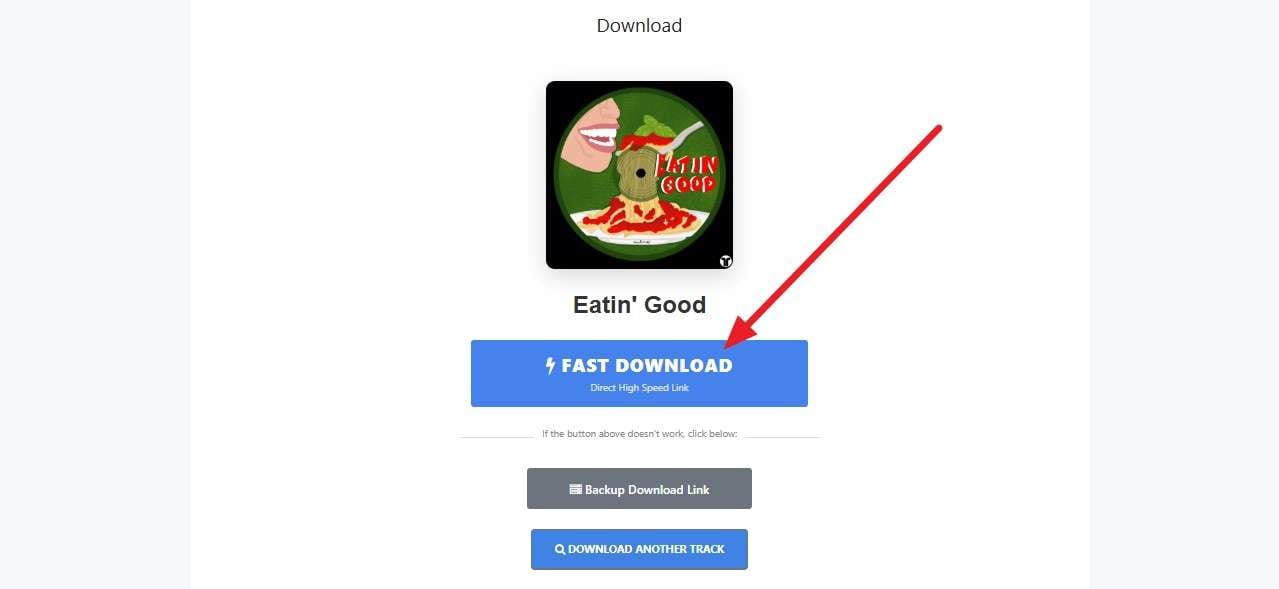
Step 2. Preview and confirm the track on the new interface, and select the “Fast Download" button to continue downloading.
- MusicVerter
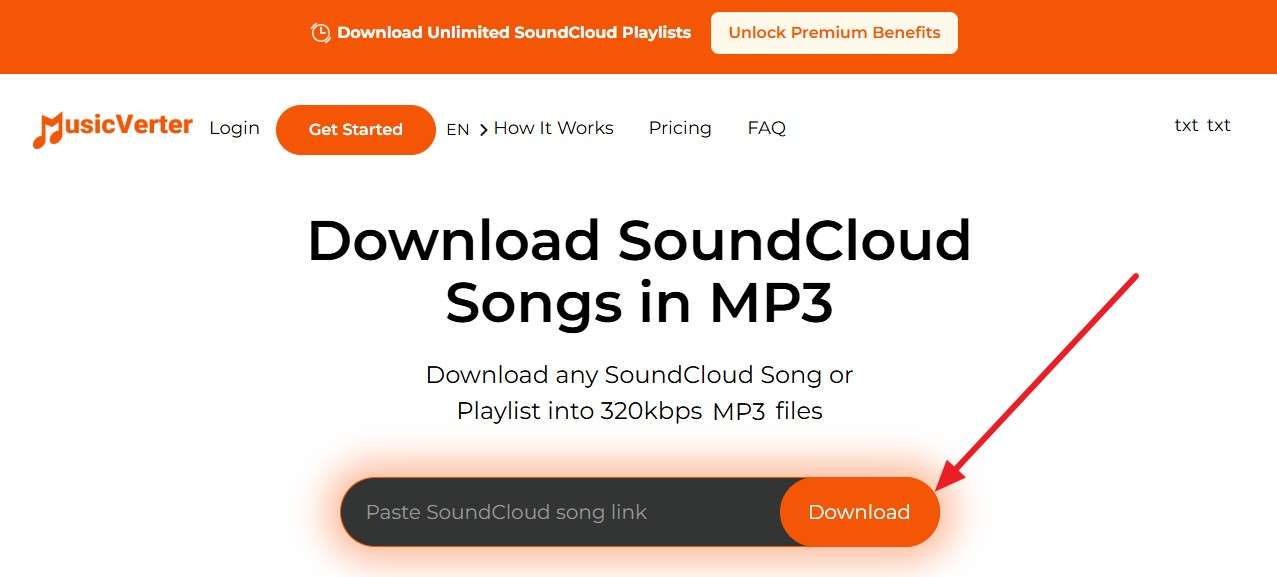
To download a SoundCloud playlist to MP3, this site mainly targets DJs who want tracks for offline access. It focuses on MP3 conversion, offers plan-based unlimited downloads, and includes different tiers, such as a free Starter option and a higher plan. Hence, based on the plan you use, adhere to the given guide to save music in 320kbps:
Step 1. Press the “Download” button after adding the SoundCloud music link to the tool.
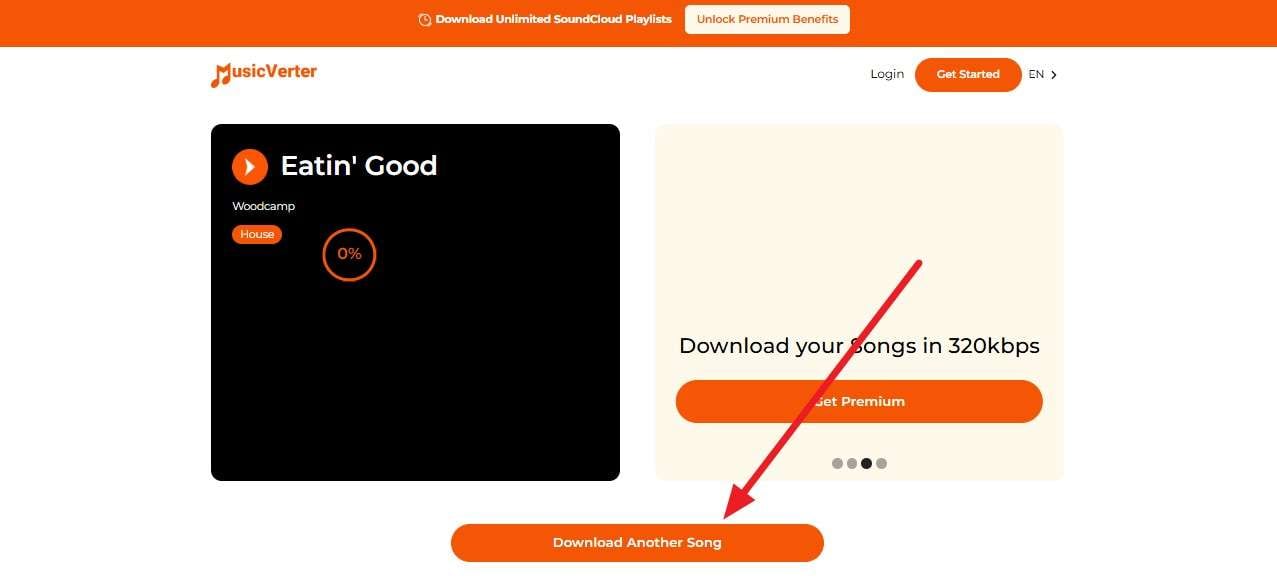
Step 2. Preview the track and wait for the tool to save it to the device, or choose “Download Another Song.”
- Klickaud
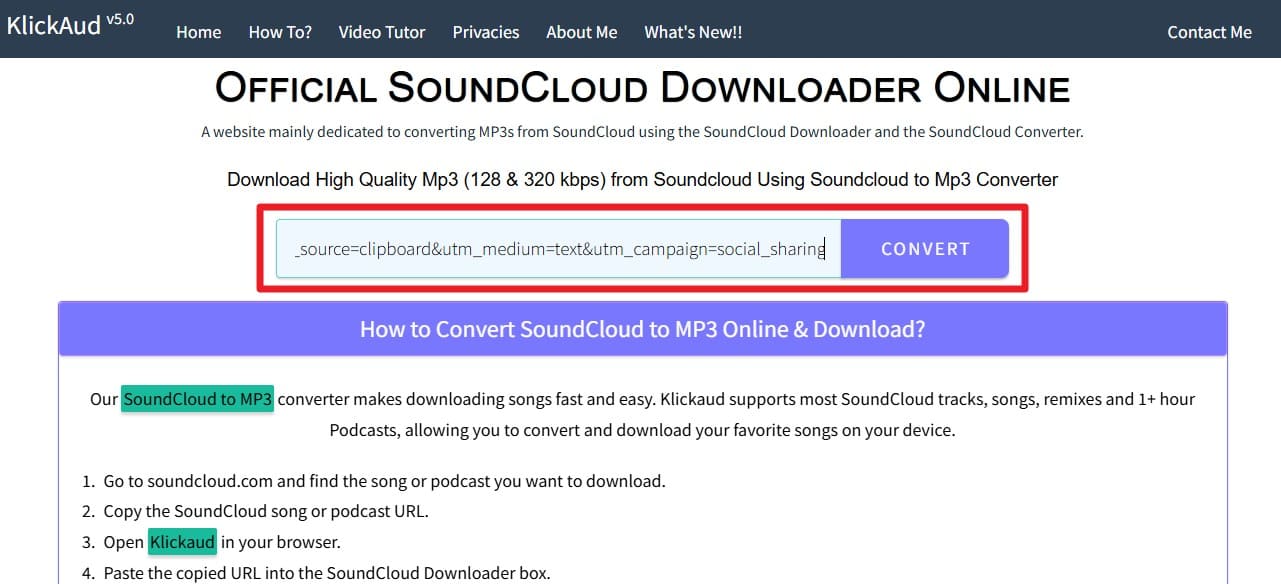
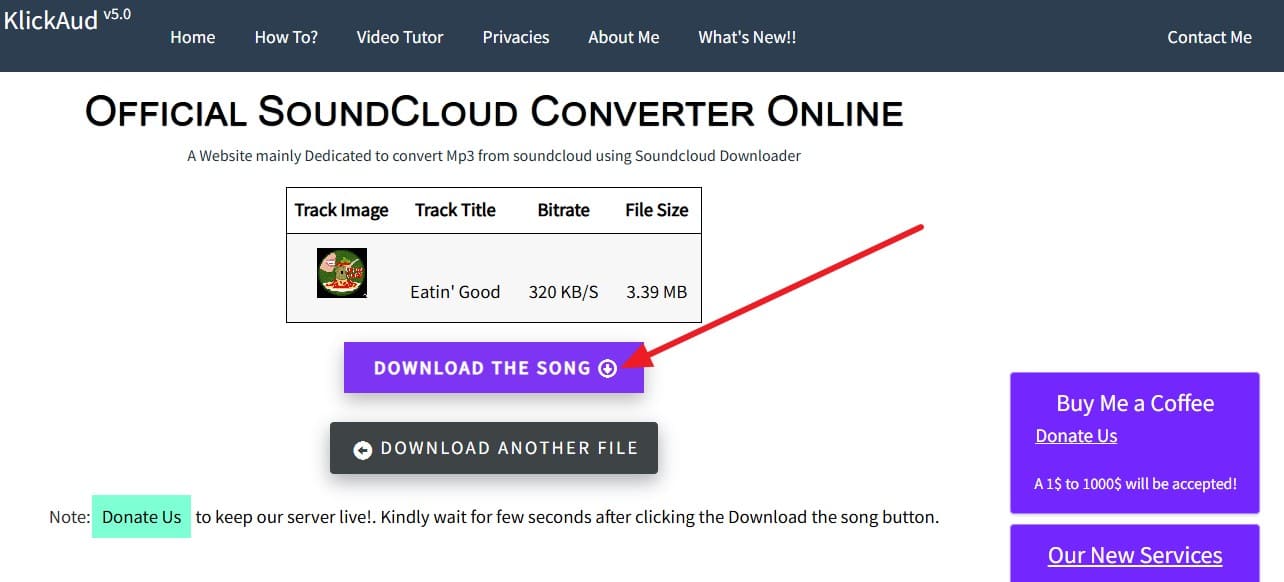
Klickaud is another option to download SoundCloud songs as MP3 and lets users save tracks in 128 kbps or 320 kbps quality through a simple paste-link method. It supports long songs, remixes, podcasts, and even playlists, and shows track details like title, artwork, and duration before download. Furthermore, the tool works on computers and phones without software installation and also offers extras like a Chrome extension, and is guided ahead:
Step 1. Paste the track link on the main page and press the “Convert” button.
Step 2. Confirm it on the new interface and choose the “Download the Song” option.
Pro Tip. How to Manage Your SoundCloud Music & Files with Dr.Fone
Now that you are clear with the SoundCloud to MP3 process, you might seek a seamless way to manage your data across devices. Whether you need to free up storage or just share a downloaded MP3 track on another device, Wondershare Dr.Fone for iOS and for Android is the solution. With simple import, export, or drag-and-drop options, users can move multiple data types in bulk.
Additionally, users can preview the data shared across a PC or another device to verify the accuracy. For iOS, the tool supports iOS 26/iPadOS 26 and iPhone 17 series, and makes data management seamless in 3 simple steps. Android users can even leverage the option to move data between iTunes and Android, with the option to view and control mobile notifications on a PC.
Simple Guide to Manage Your Phone Data on PC with Dr.Fone
Step 1. Access the Phone Manager and Connect Device
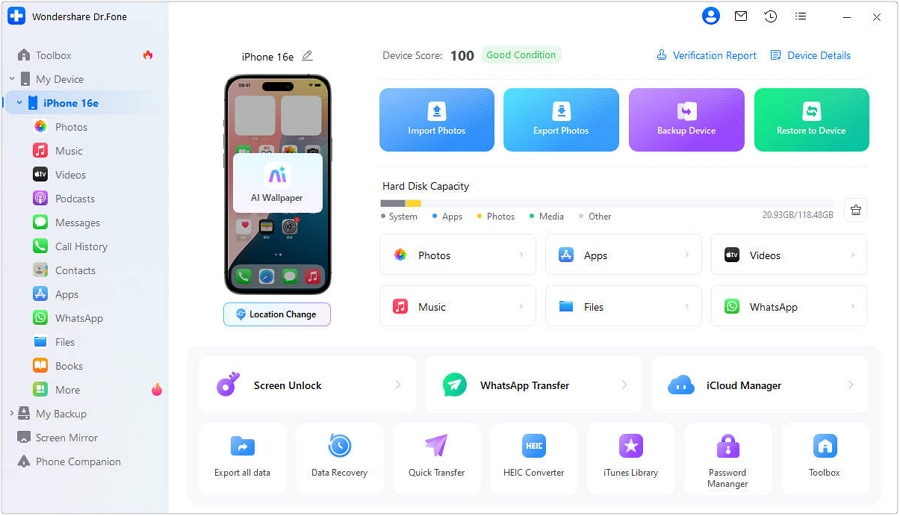
Locate and expand the device under the “My Device” section as you connect it with the tool. Now, you have to access the “Music” tab for managing your SoundCloud files.
Step 2. Add or Export Your SoundCloud Music
Here, you can use the "Add" option to add SoundCloud music files from your computer to your smartphone. Dr.Fone also allows you to move songs from phone to computer using the "To PC" option.

Note: If you are an iOS user and have saved the SoundCloud track as an MP3, follow this guide to move data between your phone and PC.
 safe & secure
4,624,541 people have downloaded it
Part 4. What to Do If You Can’t Find a Download Option - 4 Fixes
During the SoundCloud to MP3 conversion, if you can’t locate the "Download" option, try these solutions:
Fix 1. Check Download Availability
Artists choose whether their music stays downloadable, so a “No Download File” button usually means the track is for streaming only. Note that sometimes the button does not appear because you are not signed in, you use a mobile app, or account limits stop downloads. Hence, a quick check helps you avoid problems with copyright or platform rules before you try any other method.
Fix 2. Request MP3 from Artist
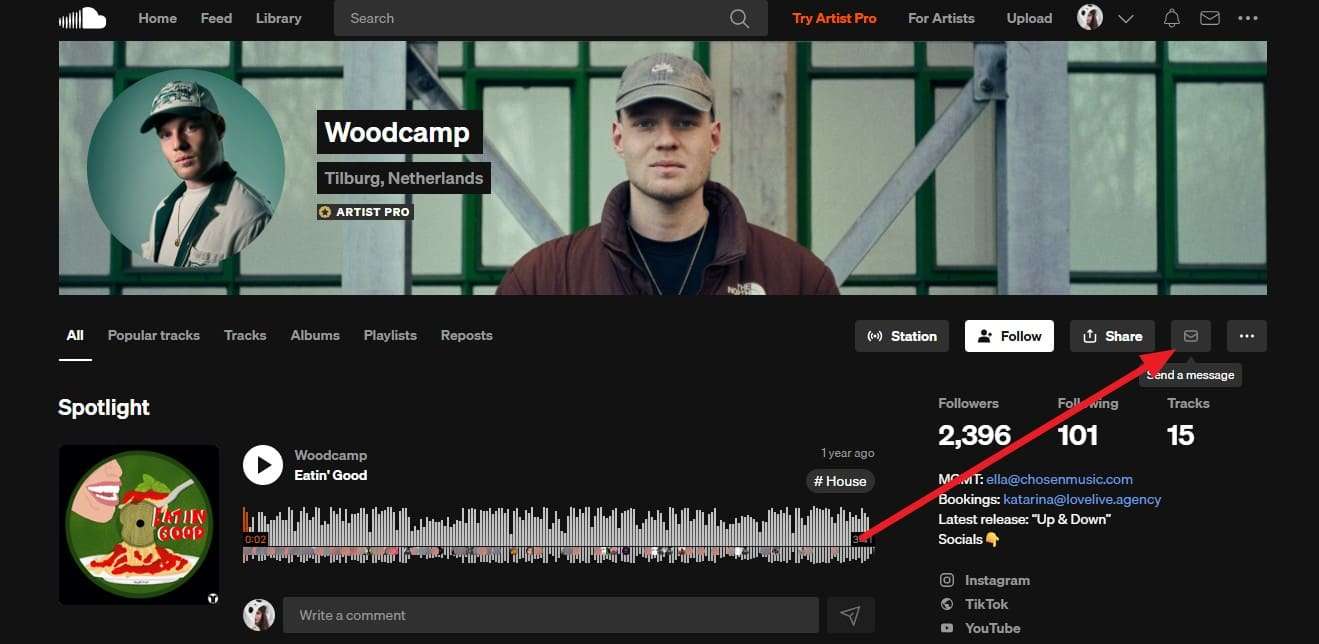
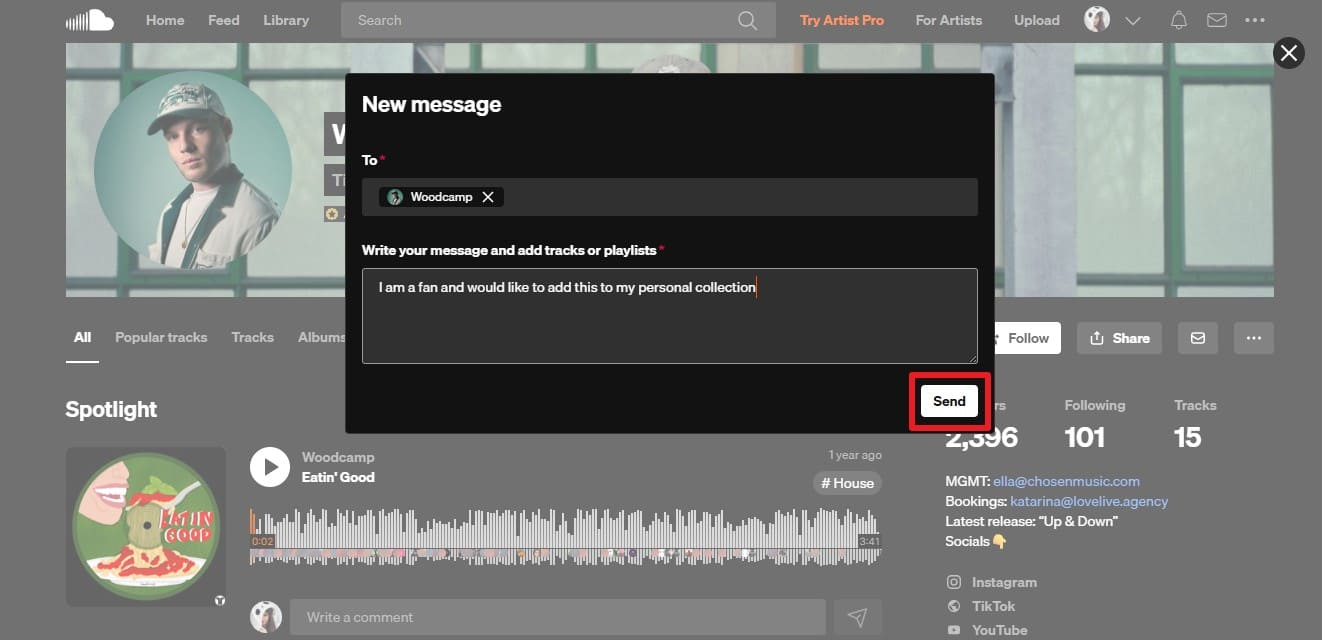
Before opting for MP3 for the SoundCloud conversion option, try asking the artists. Thus, this choice respects copyright and platform rules because the creator decides how their music stays shared. A simple message can lead to a direct file, a store link, or another legal option the artist prefers. So, to know how you can do that, review the 2 simple steps given below:
Step 1. On a particular track you seek to save, press the artist ID and choose the "Send Message" icon.
Step 2. Type a message like “I am a fan and would like to add this to my personal collection” and press the “Send” button. Wait for a response, and if you don't receive one, use reliable online tools to save it.
Fix 3. Organize with Playlists & Likes
Using Likes and playlists is the safest way to save SoundCloud music that you cannot download. Liking a track adds it to your collection, and playlists let you group songs by theme, like study, workout, or DJ sets. This keeps music organized and easy to replay without breaking rules. Above all, it respects the artist’s choices by keeping tracks stream-only, keeping you within SoundCloud’s rules.
Fix 4. Look for Official MP3 Links
Before you download the SoundCloud MP3 playlist, locate the official MP3 links. Many artists sell or share MP3s on platforms like Bandcamp, iTunes, or their own stores, often linked in track descriptions or profiles. Using these official links keeps you fully within SoundCloud rules because the uploader allows downloads outside the platform.
Conclusion
To sum up, this guide has explained the rising need for SoundCloud to MP3 because of the limited “Download File” option in certain tracks. Additionally, a direct and a third-party method to save the file is shared, depending on whether you can or can’t locate this option. Once accessed on the device, it is suggested to use Dr.Fone - Phone Manager for Android and iOS to move music files to PC in 3 steps.
safe & secure4,624,541 people have downloaded it
Frequently Asked Questions
 Q1. Will MP3 conversion reduce audio quality?Q2. Are MP3 files safe to store on my device?Q3. Can I use MP3s for commercial projects?
Dr.Fone Basic:
Better Control for Your Phone
Manage, transfer, back up, restore, and mirror your device


Android Manage
- Android to iTunes/iCloud
- Android to Mac
- 1. Transfer Data from Android to Mac
- 2. Transfer Videos from Android to Mac
- 3. Transfer Files from Android to Mac
- 4. Connect Android with Mac
- 5. Transfer Photos from Android to Mac
- 6. Sync Android with Mac OS X
- Android to PC
- 1. Transfer Files Using USB Cable
- 2. Share Apps for Android to PC
- 3. Transfer Photos to Windows 10
- 4. Transfer Contacts to PC
- 5. Transfer Photos from Android
- 6. Transfer Files from Android to PC
- 7. Backup and Transfer SMS
- 8. Transfer Photos from Android to PC
- 9. Transfer Videos from Phone to Computer
- 10. Best MoboRobo Alternative to Manage and Transfer Data
- iCloud to Android
- 1. Tips to Sync Data to Android
- 2. Set Up iCloud Account on Android
- 3. Transfer iCloud Contacts
- 4. Transfer iCloud Photos to Android
- iTunes to Android
- 1. Transfer iTunes Audio Books
- 2. Sync iTunes Music with Google Play
- 3. Copy iTunes Playlists to Hard Drive
- 4. Transfer Music from iTunes
- Mac to Android
- 1. Transfer Files from Mac to Android
- 2. Send Files from Mac to Android
- 3. Transfer Music from Mac
- 4. Transfer Photos from Mac
- PC to Android
- 1. Transfer Files to Android Wi-Fi
- 2. Transfer Pictures from Computer
- 3. Transfer Files from PC to Android
- 4. Transfer data from Acer device
- Manage Tips
- 1. Where Are Screenshots Saved on Android
- 2. Android File Transfer for Mac
- 3. Android File Transfer Alternatives
- 4. Unsend a Text on Android
- 5. Introduction To Send Anywhere
- 6. Bold PolyBuzz Mod APK
- 7. Fix File Transfer Not Working
- 8. Top 4chan Alternatives
- 9. Sideloadly Review
- 10. Top LibGen Alternative Options
- 11. 1337x Alternatives
- 12. Keep2Share Downloader Review
- 13. Tez Files Review and Best Alternatives
- ● Manage/transfer/recover data
- ● Unlock screen/activate/FRP lock
- ● Fix most iOS and Android issues
- Free Download Free Download Free Download


 > How-to > Device Data Management > How to Download or Convert SoundCloud to MP3 Files [Ultimate Guide]
Daisy Raines
staff Editor