Effortlessly manage data through preview, delete, export, etc.

 100% Security Verified | No Subscription Required | No Malware

 :
: 
 ChatGPT
 Perplexity
 Gemini
 Claude
 Grok
Grok
Cloud storage dynamics are evolving rapidly in 2026. While many platforms prioritize simple document sync, Tez files has carved out a niche for power users who need to host and share massive archives, high-definition videos, and private data sets. However, the experience for free users is often hindered by strict bandwidth throttling and wait timers, leading to a surge in searches for terms like tezfiles downloader and tezfiles bypass tools. Many are hunting for a reliable way to get a tezfile free download without the premium price tag.
This 2026 review dives deep into the technical reality of the platform. We will evaluate current download speeds, the efficacy of the premium link generator tezfiles services, and the security risks associated with bypass methods. Furthermore, we provide a curated list of alternatives for those seeking more robust features or better value for their storage needs.
In this article
Part 1. What are Tezfiles used for in 2026?
Tez files serves as a robust cloud-based file hosting repository. It is specifically designed to facilitate the uploading of high-capacity digital assets and the distribution of those assets via direct, shareable links. This eliminates the technical hurdles of email attachment limits, allowing users to host a file once and distribute it to thousands of recipients effortlessly.
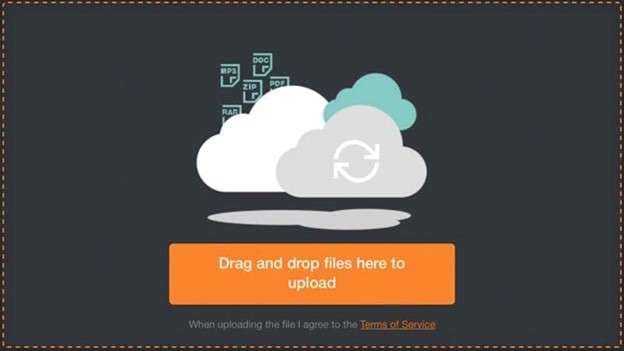
The core utility of Tez Files Com remains focused on several key user needs:
- High-Capacity Storage: Safely hosting massive archives that exceed typical consumer cloud limits.
- Seamless Distribution: Generating unique, permanent links for public or private sharing across forums and social media.
- Optimized Video Hosting: Supporting large-format video playback and transfers without the compression found on social platforms.
- Secure Transfers: Allowing users to download from Tezfiles using encrypted channels to maintain data integrity.
Upon registration, users are granted a personal cloud partition. Whether you are uploading software packages, complex ZIP archives, or multimedia content, the platform generates a private URL. While free accounts provide a gateway to the service, they are intentionally limited. To unlock the full potential and remove the tezfiles downloader speed caps, a premium subscription is usually required for professional-grade performance.
Part 2. Best Tezfiles Premium Link Generator Tools
To avoid the costs associated with official premium accounts, many users turn to a premium link generator tezfiles. These services, often called "leechers," use their own enterprise-level premium accounts to fetch the file on your behalf, then provide you with a high-speed mirror link. In 2026, several tools have emerged as the most consistent performers in this space.
1. OkDebrid Tezfiles Downloader
OkDebrid has gained popularity as a streamlined Tezfiles downloader that converts restricted links into high-speed streams without requiring a manual login for each file.
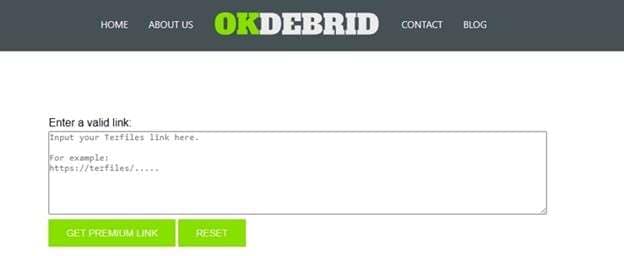
- No registration required for basic link generation.
- Intuitive web UI that focuses on speed.
- Consistently bypasses standard throttled speeds.
- Strict daily file size quotas for free users.
- Server uptime can be unpredictable during peak hours.
2. HotDebrid Tezfiles Premium Downloader
HotDebrid is a multi-host solution that effectively manages Tez files com links alongside dozens of other file hosting providers. It is a favorite for those who need to download tezfiles free without suffering through endless 30-second wait timers.

- Bypasses countdown timers and captcha loops.
- Extensive support for over 50 different file hosts.
- Strong, multi-threaded download speed performance.
- Heavy reliance on ad-monetization (pop-ups).
- Premium features are hidden behind a paywall.
3. AnyDebrid Tezfiles Premium Link Generator
AnyDebrid is a heavyweight in the market, functioning as a comprehensive premium link generator tezfiles. It supports over 100 hosting sites, providing a versatile platform for those with diverse downloading needs.


- Generous Limits: Offers one of the largest file size allowances for non-paying users.
- Rapid Generation: Specialized servers ensure links are processed in seconds.
- Broad Compatibility: Works seamlessly with download managers like IDM.
- Drawback: Excessive captcha challenges can slow down the initial process.
4. YouDebrid Tezfiles Downloader
YouDebrid focuses on simplicity. As a dedicated tezfiles bypass tool, it strips away complex features to offer a direct link conversion service that is easy for beginners to navigate.

- Completely free access with no mandatory subscription.
- One-click link generation for various file types.
- Reliable speeds when servers are under moderate load.
- Visual clutter due to numerous advertisements.
- Lacks advanced API or management tools found in rivals.
Part 3. How to Bypass Tezfiles Download Limit with Tezfiles Downloader
Free access to tez files comes with severe artificial limitations. You may face speed throttling as low as 50 KB/s, mandatory waiting periods of up to 60 seconds, and a restriction that allows only one concurrent file download. For users dealing with multi-gigabyte files, these barriers are insurmountable without a tezfiles bypass strategy.
Using a premium link converter is the most common method to circumvent these restrictions. These tools leverage shared premium bandwidth to generate a direct, high-speed link for your specific file. Follow these steps to execute a successful bypass.
Step 1 Secure the Source URL
Visit the official tezfiles.com page for your file and copy the full URL from your browser's address bar. Ensure the link is valid and publicly accessible.
Step 2 Access a Reliable Generator
Navigate to one of the working generators discussed in Part 2, such as OkDebrid or AnyDebrid. Be wary of clones; only use verified domains.
Step 3 Inject the Link
Find the primary input field (usually labeled "Paste your link here") on the generator's home page and paste your copied Tezfiles URL.
Step 4 Process and Convert
Click the "Generate" or "Convert" button. The system will communicate with its internal premium accounts to fetch the file metadata and prepare a mirror.
Step 5 Finalize the Download
A new, unthrottled tezfiles premium link will be displayed. Click this link to begin your high-speed download directly to your local storage.
Part 4. Top 10 Alternatives to Tezfiles for Secure Storage
While tez files is effective for quick sharing, many users seek alternative platforms that offer better security, larger free tiers, or more advanced collaboration features. If you are tired of searching for a tezfiles downloader, these options provide more stable long-term solutions.
1. Nextcloud: The Self-Hosted Powerhouse
Nextcloud is the gold standard for privacy enthusiasts. It allows you to host your own server, giving you 100% control over your data. It includes integrated office suites, encrypted chat, and mobile sync, making it a superior enterprise-grade alternative to basic file hosters.
2. Dropbox: The Industry Standard
Dropbox offers the most seamless sync engine in the world. With 2GB of free space and advanced features like Delta Sync (which only uploads changed parts of a file), it is perfect for users who need cross-platform access and reliable file versioning.
3. Google Drive: Best for Collaboration
Deeply integrated into the Google ecosystem, Drive provides 15GB of free storage. It excels in real-time document collaboration and AI-driven search, making it the primary choice for students and professional teams.
4. MEGA: The Privacy King
MEGA is famous for its zero-knowledge, end-to-end encryption. Even the service provider cannot see your files. With a generous free tier and ultra-secure sharing links, it is the safest alternative for sensitive data.
5. Filen: Zero-Knowledge simplicity
Based in Germany, Filen offers a modern, privacy-first approach. It uses open-source encryption standards and ensures that only the user holds the keys to their digital vault, all within a minimalist interface.
6. Microsoft OneDrive: Best for Windows Users
OneDrive is baked into the Windows OS. It offers tight integration with Office 365, automatic photo backup, and a "Personal Vault" for extra-sensitive documents, making it a natural choice for home and office users alike.
7. Box: Built for Enterprise
Box focuses on workflow automation and administrative controls. It offers robust e-signature integration and deep security audits, catering specifically to businesses with strict compliance requirements.
8. Koofr: The Cloud Aggregator
Koofr provides a unique 10GB free tier and allows you to connect other cloud accounts (like Drive and Dropbox) to manage everything from a single interface, reducing storage fragmentation.
9. MediaFire: Simple and Fast
For those who just need a basic tezfiles downloader alternative without the fuss, MediaFire offers high-speed public sharing and simple file management without complex corporate tools.
10. Pixeldrain: Minimalist Sharing
Pixeldrain is optimized for speed. It allows for instant image and video previews and provides very fast direct links, making it a popular choice for developers and quick community sharing.
| Platform | Price Model | Core Advantage | Region | Support |
|---|---|---|---|---|
| Nextcloud | Free/Open Source | Full Self-Hosting Control | Germany | All Platforms |
| MEGA | Freemium | End-to-End Encryption | New Zealand | All Platforms |
| Google Drive | Freemium | Ecosystem Integration | USA | Web/Mobile |
| Dropbox | Freemium | Superior Sync Engine | USA | All Platforms |
| Pixeldrain | Freemium | Minimalist Speed | Netherlands | Web/All |
Part 5. Bonus Tip: Manage Downloaded Files with Wondershare Dr.Fone
After utilizing a tezfiles downloader or its alternatives, your device can quickly become cluttered with large archives, duplicates, and media files. Managing these assets on a mobile screen is inefficient and often leads to accidental data loss. To maintain your device's performance, a professional desktop-based manager is essential.
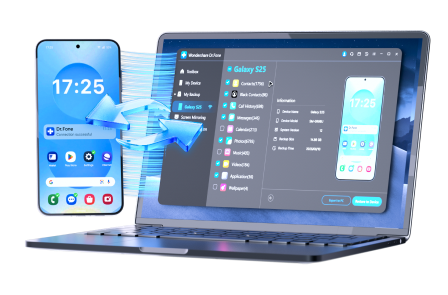
Wondershare Dr.Fone is a comprehensive solution for managing and transferring data between your computer and mobile devices. It allows you to organize your tezfile free download content, backup critical data, and clean up storage with precision.
 Effortlessly manage data through preview, delete, export, etc.
- Transfer all data between devices.
- Robust backup solutions for reliable data protection.
- Mirror screens to PC for meetings, teaching, and control.
Step 1 Connection and Recognition
Launch Dr.Fone on your PC or Mac and select "Device Manager." Connect your phone via USB or Wi-Fi. The dashboard will instantly categorize your photos, videos, and music for easy viewing.
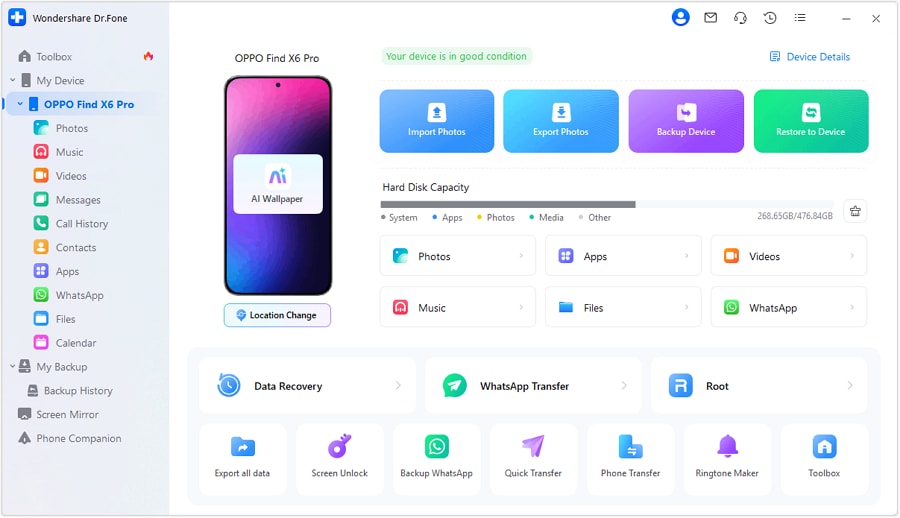
Step 2 Media Curation
Navigate to the "Video" or "Photos" tab. Preview your recent downloads from Tezfiles. You can export high-quality media to your PC to free up phone storage or delete junk files in bulk.
Step 3 Message and Content Backup
Access your SMS or social media history. Dr.Fone allows you to export entire chat threads and their attachments, ensuring your shared files are backed up securely on your desktop.

Step 4 Deep File Management
Use the Explorer tool to browse internal and external storage folders. Move large downloads to organized folders or rename them for better indexing. You can even manage calendars and contacts directly from your keyboard.

Conclusion
In 2026, Tez Files remains a powerful player in the niche world of large-scale file hosting. While its official premium plan is the most stable route, various tezfiles downloader tools like OkDebrid offer a viable tezfiles bypass for casual users. However, for those prioritizing security and zero-knowledge privacy, alternatives like MEGA or Nextcloud are superior options. Regardless of which platform you choose, managing your growing library of files is made easy with tools like Wondershare Dr.Fone, ensuring your device stays optimized and clutter-free.
FAQ
1. Is using a Tezfiles downloader safe for my device?
Most web-based generators are safe for the files themselves, but they often contain aggressive advertisements or redirects that can host malware. Always use a secure browser and avoid downloading .exe files from third-party generators.2. Can I get a Tezfile free download at high speed?
Without a premium account or a working link generator, Tezfiles throttles free speeds significantly. To get high speed for free, you must use a verified premium link generator tezfiles service.3. What is the maximum file size for a free Tezfiles user?
Tezfiles typically allows uploads up to 500MB for free users, but download quotas for these files may vary based on your geographic region and server load.4. What happens if my Tezfiles bypass tool stops working?
These third-party tools rely on shared premium accounts that can be banned by Tezfiles. If one fails, try an alternative generator like HotDebrid or AnyDebrid, or consider the official premium upgrade.
 Add Wondershare Dr.Fone as a preferred source on Google