
Can You Unsend a Text on Android? Yes, Here's How

Sep 23, 2026 • Filed to: Device Data Management • Proven solutions
 TL;DR:
You can unsend a text message on Android if you use RCS or supported messaging apps, but traditional SMS and MMS messages cannot be recalled from the recipient's device once delivered.
● Google Messages features a Delete for Everyone option for RCS chats (introduced in mid-2025) that provides a 15-minute window to recall a text and leaves a deletion placeholder, provided both users have RCS enabled.
● Third-party apps vary in their deletion limits: WhatsApp offers up to 2 days and Messenger allows 10 minutes (both leave a deletion notice), while Telegram permits unlimited silent deletions for private chats without leaving a placeholder.
● For standard SMS, the only physical workarounds are interrupting the sending process immediately via Airplane Mode, using a 5-10 second sending delay in third-party apps like Textra, or utilizing HUAWEI's exclusive 6-second recall between compatible devices.
Ask AI for a summary
 ChatGPT
 Perplexity
 Gemini
 Claude
 Grok
Grok
Dr.Fone Basic:
Better Control for Your Phone
Manage, transfer, back up, restore, and mirror your device
Are you worried about the consequences after sending that text to your boss instead of your best friend? Fortunately, you can unsend a text on Android. However, it depends on the app you are using for messaging.
Google Messages now has a "Delete for Everyone" feature for RCS chats. WhatsApp, Messenger, and Telegram also let you recall messages. However, there are workarounds worth knowing when you want to delete texts from the Messages app.
This article is about everything you need to know about recalling text messages on Android. You'll also get a bonus tip to manage all your texts using a professional tool like Dr.Fone.

Part 1. Can You Delete a Text Message You Already Sent?
It depends on what type of message you sent. Let's break down the difference because knowing this saves you a lot of panic.
SMS and MMS Messages Cannot Be Unsent
Traditional SMS uses cellular networks. Once sent, the message lives on the recipient's device. There's no central server to delete from. You can't get it back when it's in the mailbox.
This applies to default messaging apps on Samsung, Xiaomi, and other Android phones. Read this guide to recover deleted text messages in case you accidentally deleted something important.
RCS Messages Have New Unsend Options
RCS (Rich Communication Services) changed the game. It's the modern replacement for SMS. Google Messages uses RCS by default now. And here's the good news that Google rolled out “Delete for Everyone” in mid-2025.
Both users need RCS enabled, and then you have about 15 minutes to unsend. The recipient sees “Message deleted” as a placeholder. It's not perfect. But it's something. Learn more about managing your Android SMS for better organization.
SMS vs RCS: Key Differences
|
Feature |
SMS/MMS |
RCS |
| Unsend | No | Yes (15 min window) |
| Read Receipts | No | Yes |
| Typing Indicator | No | Yes |
| File Size Limit | 1MB | 100MB+ |
Part 2. How to Unsend a Text Message on Android?
The method depends on your messaging app. Let's walk through each one step by step for detailed messages.
1. Using Google Messages Delete for Everyone
This is the built-in solution for Android users. The following are the steps for using this feature.
Step 1. Launch Google Messages. Find the conversation with the message you regret.
Step 2. Tap and hold the message until a menu appears. You'll see a toolbar at the top of your screen and look for the trash icon.
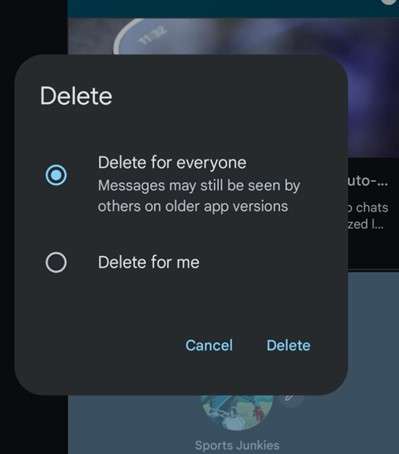
Step 3. Now, press the Trash icon. A pop-up gives you two options. “Delete for me” removes it from your phone only. “Delete for everyone” removes it from all devices. Pick the second one. The chat shows "Message deleted" where your text was.
2. Unsending Messages in WhatsApp
WhatsApp gives you up to 2 days. That's way more generous than most apps.
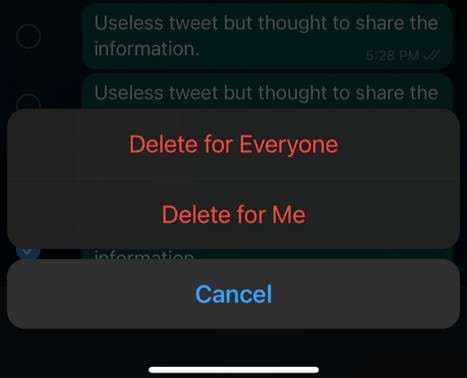
Instructions: Open the chat and long-press the message before tapping the Delete icon. Now, select “Delete for Everyone.” The recipient sees "This message was deleted." They'll know something was there, but won't know about the message.
3. Recalling Messages in Facebook Messenger
Messenger gives you a 10-minute time to delete the messages. Next are the steps you need to follow to delete messages:
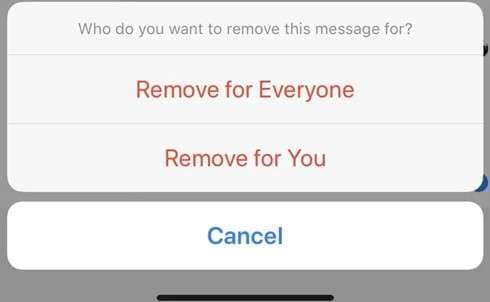
Instructions: Start by opening Messenger and finding your message. Now, long-press it and tap "Remove." Moving forward, choose "Unsend for Everyone." The message disappears, and a small note says, "You unsent a message."
4. Using Telegram's Delete Feature
Telegram wins for flexibility, as personal chats have no time limit for deletion. Follow these steps to delete messages from Telegram:
Instructions: Tap and hold the message and tap the "Delete" icon. Now, choose the "Delete for Contact" option and press “Delete” on the other pop-up.
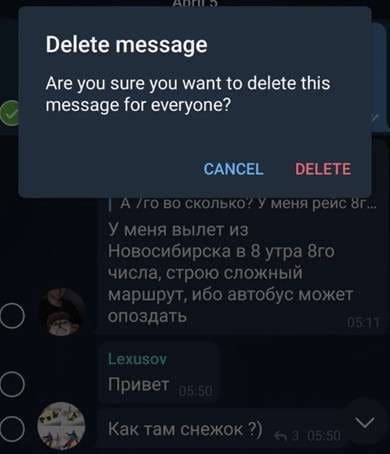
Group chats have a 48-hour limit. However, you can delete a private conversation anytime. Telegram doesn't even show “Message Deleted” on the recipient screen.
Messaging App Unsend Comparison
|
App |
Time Limit |
Shows Notice? |
Works If Read? |
| Google Messages | 15+ minutes | Yes | Yes |
| 2 days | Yes | Yes | |
| Messenger | 10 minutes | Yes | Yes |
| Telegram | Unlimited (DMs) | No | Yes |
Part 3. How to Delete Text Messages From Both Sides on Android?
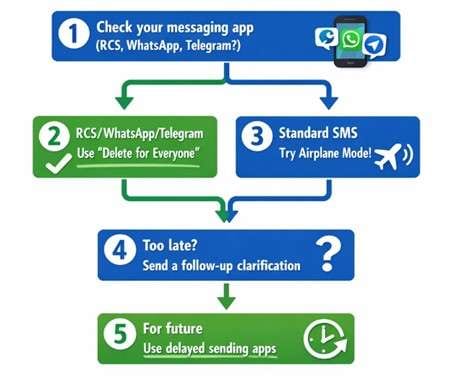
Here are your realistic options for removing messages from both devices.
1. The Airplane Mode Trick
Although not official, this trick works if you have lightning reflexes. For this, send the message and immediately enable Airplane Mode.
Now, check your outbox. If the message shows "sending" (not "sent"), you might catch it. Delete the message from your outbox. But keep in mind that the success rate is low.
2. Using Apps With Delayed Sending
Some apps let you set a delay before sending. Textra and ChompSMS offer delayed sending, in which you can set a 5-10 second delay. Cancel before it actually goes out. It's like a safety net for your thumbs.
3. HUAWEI Message Recall Feature
HUAWEI phones have a unique trick. Some models let you recall within 6 seconds. Double-tap a just-sent message, and the phone attempts to cancel delivery. It only works for very fresh messages. And both parties need HUAWEI devices.
Bonus Tip. Manage All Your Android Texts Like a Pro
Good message management is proactive. Here's a tool that gives you total control over your Android messages.
Why Dr.Fone Basic Changes Everything?
Wondershare Dr.Fone is an all-in-one Android manager. It lets you view, backup, and manage SMS from your computer. No more tiny screen typing, so no more accidental sends. You get a full keyboard, a clear preview, and time to think before hitting send.

Wondershare Dr.Fone
One-Stop Solution to Manage and Transfer Data on Android Phone
- Transfer files between Android and computer, including contacts, photos, music, SMS, and more.
- Manage, export/import your music, photos, videos, contacts, SMS, Apps, etc.
- Transfer iTunes to Android (vice versa).
- Manage your Android device on the computer.
- Fully compatible with the newest Android OS.


Send Messages From Your PC
Type messages on a full keyboard and review before sending. Send to one person or multiple contacts at once. Dr.Fone displays your conversations clearly. You can read, organize, and respond without fumbling on a tiny phone screen.
Backup Important Conversations
Export SMS threads to your computer. Save them as HTML or CSV files. Never lose important messages again. You can back up and transfer SMS from Android to PC in just a few clicks. Perfect for saving business conversations or sentimental texts.
Delete Messages in Bulk
Dr.Fone lets you delete multiple SMS threads at once. Select what you don't need. Hit delete, and no more scrolling through thousands of messages one by one.
Dr.Fone Basic SMS Management Features
|
Feature |
What It Does |
| PC Messaging | Send texts from a computer keyboard |
| Bulk Export | Backup SMS to HTML or CSV |
| Bulk Delete | Remove multiple threads at once |
| Import SMS | Restore backed-up messages |
| Device Support | 6000+ Android models |
The Bottom Line
You can unsend texts on Android, as RCS and messaging apps make it possible. However, a standard SMS will still be lost once delivered. But Google Messages, WhatsApp, Telegram, and Messenger all have your back.
Want total control over your messages? Try Dr.Fone Basic to manage everything from your computer.
 safe & secure
4,624,541 people have downloaded it
Frequently Asked Questions
 Q1. Can I recall a text message after it's been read?Q2. How do I see unsent messages on Messenger Android?Q3. Does unsending a text notify the other person?Q4. What happens if I accidentally delete messages I need?
Dr.Fone Basic:
Better Control for Your Phone
Manage, transfer, back up, restore, and mirror your device


Android Manage
- Android to iTunes/iCloud
- Android to Mac
- 1. Transfer Data from Android to Mac
- 2. Transfer Videos from Android to Mac
- 3. Transfer Files from Android to Mac
- 4. Connect Android with Mac
- 5. Transfer Photos from Android to Mac
- 6. Sync Android with Mac OS X
- Android to PC
- 1. Transfer Files Using USB Cable
- 2. Share Apps for Android to PC
- 3. Transfer Photos to Windows 10
- 4. Transfer Contacts to PC
- 5. Transfer Photos from Android
- 6. Transfer Files from Android to PC
- 7. Backup and Transfer SMS
- 8. Transfer Photos from Android to PC
- 9. Transfer Videos from Phone to Computer
- 10. Best MoboRobo Alternative to Manage and Transfer Data
- iCloud to Android
- 1. Tips to Sync Data to Android
- 2. Set Up iCloud Account on Android
- 3. Transfer iCloud Contacts
- 4. Transfer iCloud Photos to Android
- iTunes to Android
- 1. Transfer iTunes Audio Books
- 2. Sync iTunes Music with Google Play
- 3. Copy iTunes Playlists to Hard Drive
- 4. Transfer Music from iTunes
- Mac to Android
- 1. Transfer Files from Mac to Android
- 2. Send Files from Mac to Android
- 3. Transfer Music from Mac
- 4. Transfer Photos from Mac
- PC to Android
- 1. Transfer Files to Android Wi-Fi
- 2. Transfer Pictures from Computer
- 3. Transfer Files from PC to Android
- 4. Transfer data from Acer device
- Manage Tips
- 1. Where Are Screenshots Saved on Android
- 2. Android File Transfer for Mac
- 3. Android File Transfer Alternatives
- 4. Unsend a Text on Android
- 5. Introduction To Send Anywhere
- 6. Bold PolyBuzz Mod APK
- 7. Fix File Transfer Not Working
- 8. Top 4chan Alternatives
- 9. Sideloadly Review
- 10. Top LibGen Alternative Options
- 11. 1337x Alternatives
- 12. Keep2Share Downloader Review
- 13. Tez Files Review and Best Alternatives
- ● Manage/transfer/recover data
- ● Unlock screen/activate/FRP lock
- ● Fix most iOS and Android issues
- Free Download Free Download Free Download




Daisy Raines
staff Editor