Teleport your device anywhere instantly with one click.


 100% Security Verified | No Subscription Required | No Malware

 :

 ChatGPT
 Perplexity
 Gemini
 Claude
 Grok

Which gay dating app should I try first: Grindr or Scruff?
Choose Grindr if you prefer a nearby-profile grid with direct conversation; consider Scruff if its Match, travel, and event-discovery tools better fit how you connect. Neither is universally better. The number of active people near you, your privacy preferences, and the features available without a subscription matter more than a worldwide registration total.
This Scruff vs Grindr comparison is for adults aged 18 and over. Both serve gay, bi, trans, and queer communities, and neither app determines a person's intentions or relationship goals. Other dating services can also support LGBTQ+ users; the useful distinction here is the experience these two particular apps offer, not an assumption that all alternatives exclude the community.
In this article
- Part 1: Scruff vs Grindr: The First Glance
- Part 2: Grindr and Scruff App Downloads and Ratings
- Part 3: Target Audience and Major Features
- Part 4: How to Unlock More Profiles on Grindr and Scruff in Other Locations?
- Part 5: Pros, Cons, and Difference Between Grindr and Scruff
- Part 6: Pricing and Premium Plans
Part 1: Scruff vs Grindr at First Glance
Both apps use profile discovery and messaging to help adults connect, but their interfaces and optional tools differ. Treat descriptions of one app as more refined, more serious, or only for a certain tribe as subjective stereotypes rather than facts. Evaluate how each works in your own area and what information you are comfortable sharing.
Grindr: Nearby Discovery and Direct Messaging
Grindr is widely known for its location-based grid, where profiles are organized around nearby discovery. Users can send a Tap, start a conversation, use available filters, and save favorites. Distance and visibility depend on the app's settings, service behavior, and the other person's choices; the grid is not a complete list of everyone around you.
The original figures for total users, countries, and languages were historical snapshots, not a current head-to-head measurement. Registered accounts are not the same as active local people, and availability can differ by region. Check the current listing and the app itself instead of treating old totals as proof of better matches.
Scruff: Match, Community, and Travel Features
Scruff combines nearby profiles and chat with its Woof interaction, Match recommendations, and travel or event discovery. Its current store description presents a broader gay, bi, trans, and queer community, not an application restricted to mature gay men or one appearance-based group.
Match and travel tools can be useful if you like a recommendation-led experience or want to plan connections before a trip. That does not guarantee more responsive people or more compatible dates. Compare the active profiles and functions you actually encounter rather than assuming a smaller or larger community is inherently better.
Part 2: App Downloads, Ratings, and Device Requirements
Download from the official stores and verify the publisher before installing. Ratings, subscription offers, and minimum operating systems change by release and storefront. At the U.S. App Store check on November 9, 2026, both listings displayed 4.4 out of 5; that observation is not a universal score across Android, countries, or future updates.
Grindr Downloads and Ratings
Grindr is available for iOS and Android where supported. The checked U.S. iPhone listing required iOS 15 or later, replacing the source's obsolete iOS 10 minimum. On Android, use Google Play's compatibility result for your actual device rather than relying on the older Android 4.4 statement.
Google Play listing: https://play.google.com/store/apps/details?id=com.grindrapp.android&hl=en_IN
Apple App Store listing: https://apps.apple.com/us/app/grindr-gay-chat/id319881193
Review the latest feedback, update history, and privacy disclosure alongside the score. Performance reports may depend on the phone, network, region, and release, so a single rating does not establish that the app will load quickly or meet your privacy needs.
Scruff Downloads and Ratings
Scruff also has official iOS and Android listings. The checked U.S. iPhone listing required iOS 18.0 or later, not the original iOS 12.2 minimum. Verify the current store requirement before assuming that an older iPhone can install the latest release. Android eligibility should likewise be checked on the actual device.
Google Play listing: https://play.google.com/store/apps/details?id=com.appspot.scruffapp&hl=en_IN
Apple App Store listing: https://apps.apple.com/us/app/scruff-gay-dating-chat/id380015247
Use reviews to identify patterns relevant to you, such as accessibility, messaging reliability, or account support. Do not infer that a score difference proves one interface is objectively better or that a higher rating guarantees safety.
Part 3: Audience and Main Features
Both services support adults with different identities, preferences, and reasons for connecting. Someone may be looking for conversation, friendship, dates, travel recommendations, or another mutually agreed connection. A profile label is not consent, and an app's reputation is not a reliable way to predict an individual's expectations.
What Can You Do on Grindr?
- Browse nearby: The grid uses location to organize discovery and can refresh as the app updates your position. It does not expose every account or override a person's privacy settings.
- Review visible distance and activity: An indicated distance depends on available location information and display choices. Treat it as sensitive, approximate context rather than proof of a person's exact address.
- Start a conversation: Use Taps or direct messages and the media formats supported by your app version. A contact attempt does not create an obligation to respond.
- Manage photos and albums: Current listings describe profile images and private albums that can be shared or unshared. Use selective sharing and assume a recipient may still retain information they have seen.
- Organize and protect your experience: Favorites, blocking, and reporting help manage contacts. They are separate from deleting an account or guaranteeing removal of information already shared.
- Use profile details and filters: Tags and available preferences can narrow discovery. The exact filter set and access tier can change, so inspect the version you are using.
What Can You Do on Scruff?
- Browse and react: View nearby or otherwise available profiles, send a Woof, and message people through the app.
- Share selectively: Messaging and private albums support controlled photo or media sharing, with options varying by version and plan. Access should always be intentional.
- Use Match: The app presents a stack of suggested profiles based on its matching system. You can indicate interest or pass without assuming that recommendations are guaranteed compatibility.
- Choose Ask Later: The current store description includes deferring a Match decision and seeing that profile again later.
- Plan travel and discover events: The source's Venture and Events subjects are now presented in the checked store description under SCRUFF Explore. You can browse events and indicate travel plans where supported.
- Communicate availability and boundaries: Profile options, including hosting-related details where available, provide context but do not replace a clear conversation about expectations or a safe meeting plan.
Part 4: Viewing Profiles in Other Locations
Start with each app's own Explore, search, or travel tools. The original claim that both free apps show only nearby people was too broad, and feature availability depends on the service and plan. Official remote discovery is not the same as changing the GPS position of your phone.
Dr.Fone - Virtual Location is a separate GPS utility for supported devices. It may affect how a compatible location-based app reads coordinates, but it does not unlock paid filters, private albums, blocked profiles, or subscription entitlements. Do not assume it guarantees more profiles or access without premium membership.
Dr.Fone - Virtual Location: Supported GPS Simulation
 Set your map route to simulate GPS movement.
- Set your wanted movement speed.
- HD and large map view to check location.
- Fake GPS location to anywhere.
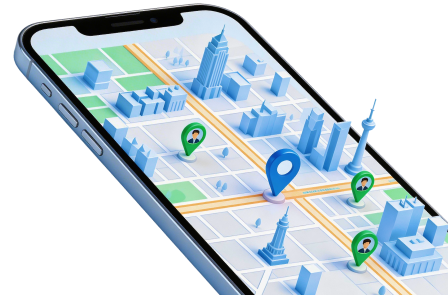
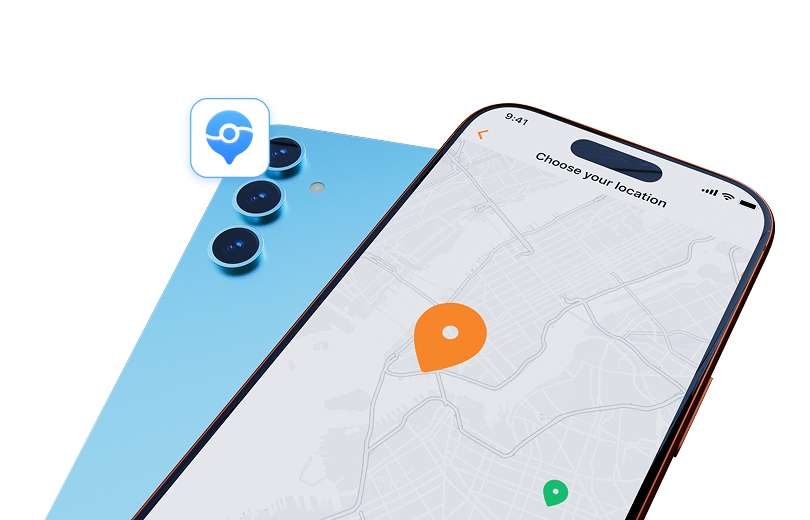
The map-based workflow in Dr.Fone - Virtual Location lets you select a destination by place name or coordinates and confirm the new point on a connected supported phone. Route and joystick options provide additional simulation controls where available. Compatibility and setup requirements vary by device and system version; check them before installing.
A different GPS reading does not provide anonymity or change a dating app's server-side access rules. It is not a VPN, does not conceal all identifying data, and cannot grant permission to access someone else's private content. Use location simulation only where permitted, and be transparent about travel or whereabouts when that information matters to another person.
The original related guides for Pokemon Go, Snapchat, Instagram, and Facebook remain references, not proof that those services permit GPS manipulation or that current versions behave the same way.
-
Step 1 Prepare the supported phone connection
Install the appropriate official edition, open Virtual Location, connect a phone you control, and complete authorized setup prompts. Check the selected device and current map position.
-
Step 2 Select and verify a destination
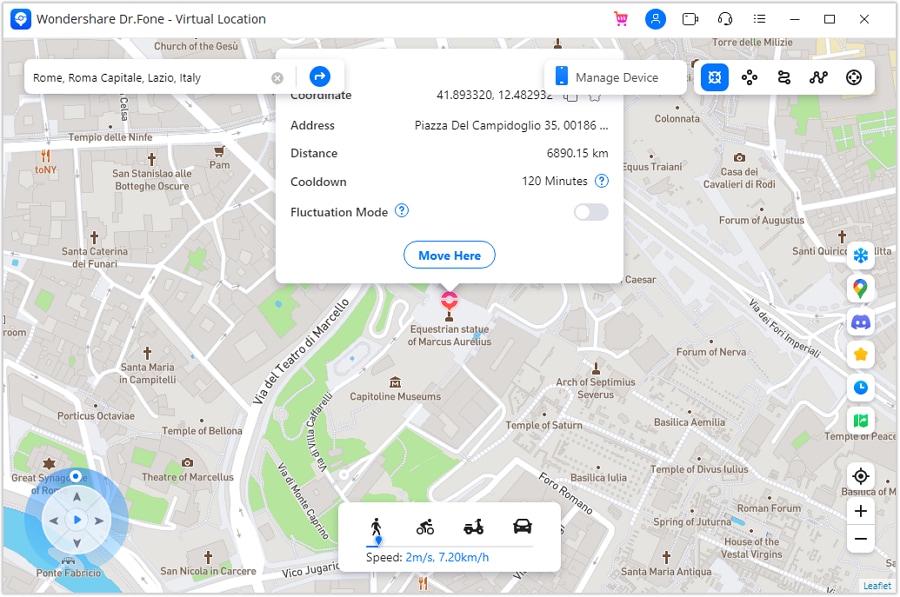
Choose Teleport Mode, search a city, address, or coordinates, inspect the result, and confirm Move Here. Open Maps on the phone to verify the selected point. A changed desktop pin alone does not establish what a dating service will display.
-
Step 3 Check permitted app behavior and restore the location
If the app's terms permit your intended test, check its visible location-dependent behavior without expecting new account permissions. If route simulation is relevant, configure selected points and speed in the supported route controls. Finish by following the software's restart-device instructions to restore actual GPS and recheck Maps.
Complete the permitted test and restore the real position before using location for navigation or arranging a meeting. Native travel tools are the more direct option when you simply want to signal an upcoming trip without representing simulated coordinates as your present whereabouts.




Part 5: Pros, Cons, and Differences Between Grindr and Scruff
The practical comparison depends on local activity, the functions you use, and your privacy priorities. The lists below preserve the original decision points without treating subjective speed, audience stereotypes, or an old price as universal facts.
Grindr Pros
- A familiar nearby-grid experience with direct messaging and Taps.
- Visible activity or distance context where the relevant settings and features allow it.
- Native Explore and premium discovery options for looking beyond the immediate area, subject to current access rules.
Grindr Cons
- Performance can vary by device, network, and release; test it on your phone rather than assuming fast or slow loading.
- Location and sensitive profile data require careful privacy choices. Historical privacy controversies are a reason to review current policies, not proof of an ongoing breach in your account.
- Some discovery, visibility, and convenience features require a paid tier, which may not be worthwhile for your usage.
Scruff Pros
- Match and Ask Later provide an alternative to relying entirely on the nearby grid.
- Travel and event discovery can be useful for planning community connections before a trip.
- Rich profiles and private albums provide several ways to share interests and manage selected content.
Scruff Cons
- A smaller active pool in your specific town can limit discovery, even when worldwide registration figures look large.
- Available filters and premium limits may not match your preferences. Compare the actual filter screen instead of assuming Scruff always has fewer filters than Grindr.
- An interface you like does not guarantee responsive contacts, compatibility, or safety.
Key Differences to Compare Before Choosing
| Decision point | Grindr | Scruff |
|---|---|---|
| Discovery style | Nearby grid, tags, filters, and Explore options. | Nearby browsing plus Match, Ask Later, and Explore travel/event tools. |
| Audience near you | Check actual local activity rather than assuming universal dominance. | Check the local pool without relying on age or appearance stereotypes. |
| Travel and events | Remote discovery can help plan conversations within its current limits. | Travel plans and event browsing are prominent in the current listing; creating an event is not assumed to be available to everyone. |
| Messaging and private media | Direct chat, albums, and tier-dependent controls. | Chat, private albums, video features, and plan-dependent controls. |
| Chat continuity | Check the current backup or transfer process for your platform. | The current listing describes cross-device message, photo, and video sync; the original blanket claim that chats cannot be preserved is misleading. |
| Price and interface | Compare the actual offer and test usability on your device. | Do the same; neither a lower worldwide price nor universally better responsiveness is established here. |
If you need specific backup behavior, verify it before changing phones or deleting an app. A historical reference to Google Drive on one platform is not a promise of universal backup, cross-platform restoration, or a feature absent from the other service.
Part 6: Pricing and Premium Plans
Both apps offer free entry points and optional paid features. Prices vary by country, currency, store, subscription duration, promotion, and sometimes the particular offer shown to an account. The original monthly amounts are not reliable universal 2026 prices. Read the purchase sheet for the total, term, renewal rate, and cancellation process before confirming.
Grindr Unlimited: Compare It with XTRA
Unlimited is the higher Grindr tier and includes XTRA features plus additional visibility and messaging tools. The checked official store listing places the up-to-600-profile grid under XTRA and describes Unlimited as offering unlimited profiles, so the original 600-profile Unlimited description mixed the tiers.
- Advertising: The subscription descriptions include removal of third-party ads; that is not the same as making the service collect no data.
- Discovery: Grid access, filters, and global Explore interaction depend on the tier and current service rules.
- Viewed Me and activity tools: Unlimited includes access to its Viewed Me list and other listed convenience features.
- Incognito: This is the app's own visibility feature. It has a defined in-app scope and is not complete anonymity from the service or someone you communicate with.
- Unsend and expiring photos: These controls manage content in the app but cannot guarantee that a recipient has never copied, photographed, or otherwise retained information.
- Favorites, blocks, and filters: Check the current limits and availability; do not assume every number in an older comparison is unchanged.
Review the current local price rather than relying on the source's $29.99 example. Cancel or manage renewal through the purchase platform according to its terms; uninstalling the app alone is not a subscription-cancellation method.
Scruff Pro: Browsing, Search, and Album Controls
Scruff Pro expands browsing, search, messaging, and album tools. Its official support descriptions include up to 25,000 favorites, up to 1,000 nearby profiles, and expanded Match stacks, but verify the current in-app offer before treating a limit as a permanent entitlement.
- Browsing visibility: Stealth controls can keep a profile view out of the other person's Looks list when enabled; they do not erase all service records or make conversations anonymous.
- Search and travel: Expanded search and location-based discovery help find profiles in other places, within the app's actual controls rather than a promise to rewrite all account location signals.
- Albums: Pro offers additional private-album storage or sharing capabilities. Share only material you are comfortable letting the recipient see.
- Favorites and nearby grid: Higher limits can be useful for frequent browsing, but a larger grid does not guarantee active or compatible contacts.
- Match and insights: Expanded recommendations and profile information add context, not a guarantee of mutual interest.
- Promotions and notifications: Settings can reduce supported ads, promotions, or noncritical announcements; inspect the specific controls rather than assuming every communication disappears.
The source's $19.99 monthly example is not a global quote. Compare the actual duration and renewal amount with Grindr's relevant tier, not just two differently packaged prices. Both apps' subscription settings should be reviewed before a trial or paid period renews.
Conclusion
For Scruff vs Grindr, start with the discovery style and local community that suit you. Grindr's nearby grid and direct chat may fit one person, while Scruff's Match and travel/event tools fit another. Check device compatibility, try available free functions, and evaluate paid features against their current terms. Dr.Fone - Virtual Location is a separate supported GPS utility, not a way to unlock subscriptions, access private profiles, or guarantee anonymity.
Protect sensitive location and profile information, respect consent, and make any first meeting in a safe public setting.
FAQ
-
1. Is Scruff better than Grindr?
Not for everyone. Compare local activity, nearby-grid browsing, Match, travel tools, privacy controls, and the functions you can use without paying. Neither app guarantees responsive people or a particular kind of relationship. -
2. Which app is cheaper?
The answer depends on the plan, purchase duration, store, region, and offer. Compare current checkout totals and renewal rates for equivalent features; the historical monthly examples are not universal prices. -
3. Can Virtual Location unlock premium or private profiles?
No. GPS simulation does not grant subscriptions, bypass blocks, or authorize private-album access. Use each service's own discovery tools and respect the other person's sharing choices. -
4. Do Incognito, Stealth, or expiring photos guarantee anonymity?
No. These are service-specific visibility or media controls with defined limits. They do not conceal every identifier from the provider or ensure that someone has not retained information you shared.
 Add Wondershare Dr.Fone as a preferred source on Google