

Does a Factory Reset Remove the iCloud Activation Lock? Discover the Truth

Oct 08, 2026 • Filed to: Screen Lock Removal • Proven solutions
 TL;DR:
A factory reset does not remove the iCloud Activation Lock because this security feature is permanently tied to the device's unique identifier and original Apple ID on Apple's servers rather than local system settings.
● Legitimate owners can lift the lock by submitting proof of purchase to Apple Support, while second-hand buyers can have the previous owner remotely erase the device via iCloud.com or the Find My app provided the phone has an active internet connection.
● Users without the original credentials can use Wondershare Dr.Fone - Screen Unlock (iOS) on Mac or Windows to bypass the lock without a password or jailbreak for iPhones (5S-17 Pro Max) and iPads (2013-2025 versions).
● Executing the software bypass requires the device to remain physically connected to the computer while undergoing multiple necessary reboots before local access is fully restored.
Ask AI for a summary
 ChatGPT
 Perplexity
 Gemini
 Claude
 Grok
Grok
If you’ve ever wondered, “Does a factory reset remove the activation lock?” the answer is no. Even after a factory reset, the iCloud activation lock remains intact. This is because the lock is tied to your device's unique identifier and Apple ID, not the system settings. Activation lock is a security feature designed to prevent unauthorized access to your iPhone, even if it’s reset. It can be frustrating if you’ve purchased a used iPhone or are trying to recover your own but can’t access it without the original Apple ID credentials.
The good news is that there are effective ways to remove the iCloud lock without relying on a factory reset. This article will comprehensively answer this question and give you more viable solutions to help remove the iCloud lock.
- Part 1: Does Factory Reset Remove Activation Lock or iCloud Lock on Your iPhone?
- Part 2: How to Remove iCloud Activation Lock Without Factory Reset?
- Part 3: What If You Are the Second Owner?
- Method 1: If You Can Meet the Previous Owner
- Method 2: If You Can Contact the Previous Owner Remotely
- Part 4: How to Instantly Remove iCloud Activation Lock Without a Password?

Part 1: Does Factory Reset Remove Activation Lock or iCloud Lock on Your iPhone?
No, your iPhone's activation lock and iCloud lock will remain intact even after a factory reset. You need to be familiar with the inner workings of Activation Lock to grasp the reasoning behind it. Your Apple ID and passcode are safely stored on Apple's servers when you set one up for your device.
When you do a factory reset to remove the activation lock, Apple checks its records for the entered passcode. Gain access to the iPhone by verifying the passcode. Since your iPhone's activation lock is associated with Apple's servers, resetting it to factory settings will only fix problems on your device and not on Apple's end. Unlocking an iPhone that is iCloud-locked cannot be accomplished through a factory reset.
🔓 Tips: Stuck on iCloud Activation Lock and can’t access your iPhone or iPad? Dr.Fone Online Unlock - iCloud Unlock helps you check eligibility and unlock online.
- Works for iPhone XR → 17 Pro Max and iPads from 2019 onward.
- Compatible with iOS versions 18.6–26.1 (except 18.7.3).
- Built for hard-to-unlock A12 chip iPhones, with high success.
- Get results in 1-60 seconds—or get a full refund.
🚀Take the quickest path back to your device—unlock iCloud online now.
 safe & secure
Part 2: How to Remove iCloud Activation Lock Without Factory Reset?
You can unlock the iCloud Activation Lock without needing a factory reset. Here are the available methods:
Method 1: Use Your Apple ID and Password
If you restored your iPhone through iTunes without signing out of iCloud, you will see the Activation Lock screen. Simply enter your Apple ID and password to unlock the device.
- Forgot your Apple ID? Visit iforgot.apple.com/appleid to retrieve it.
- Forgot your password? Reset it at iforgot.apple.com/password/verify/appleid

Method 2: Contact Apple Support
If you are the rightful owner, you can reach out to Apple Support for help removing the Activation Lock. You have several ways to contact them, including the Apple Support App, Twitter, Live Chat, or the customer care number.
You'll need proof of purchase, and even if your device is out of warranty, Apple may not charge you for unlocking it.

What If You Are the Second Owner?
If you bought a second-hand iPhone, removing the Activation Lock will depend on whether you can reach the previous owner. Often, they may have forgotten to remove their Apple ID from the device. Here’s how to proceed:
Method 1: If You Can Meet the Previous Owner
If you can meet them in person, follow these steps to remove the Activation Lock:
- Ask them to unpair any Apple Watch connected to the device.
- Offset Find My iPhone under the Settings menu, then go to Apple ID.
- To log out of iCloud and iTunes & App Store, click to Settings, choose Apple ID and press Sign Out.
- Lastly, to erase all content and settings, enter the passcode and proceed to Settings, choose General, and click Reset.

Once complete, the iPhone will be reset, and you can set it up with your own Apple ID or create a new one.
Method 2: If You Can Contact the Previous Owner Remotely
If meeting the previous owner is not possible, ask them to help remotely. They can remove the Activation Lock by:
- Logging into iCloud.com, select All Devices, choose your iPhone, and click Erase iPhone followed by Remove from Account.
- Alternatively, they can use the Find My app on another iOS device. After logging in, they need to select the iPhone, choose Erase This Device, and then Remove from Account.

For these processes to work, ensure the device is connected to the internet (via Wi-Fi or cellular data). Once done, you can set up the iPhone with your own Apple ID or a new one.
Part 4: How to Instantly Remove iCloud Activation Lock Without a Password?
Many users wonder: “Does a factory reset remove the iCloud Activation Lock?”
Unfortunately, the answer is no. A factory reset won’t bypass Activation Lock because the lock is tied to the original Apple ID. So if you bought a used iPhone and can’t reach the previous owner—or you forgot your Apple ID yourself—you’ll still be stuck on the Activation Lock screen.
The good news? You can still regain access quickly with the right tool.
Wondershare Dr.Fone - Screen Unlock (iOS) offers a fast and reliable way to bypass the iCloud Activation Lock without a password. Thanks to its advanced local unlock technology and high success rate, the software automates the entire process and guides you step by step—making it simple even for beginners.
Dr.Fone - Screen Unlock (iOS)
Remove iCloud lock on iPhone Without Hassle.
- Instant Unlock — No Waiting, Get Access Right Away!
- Unlock Activation Lock for iPhones (5S-17 Pro Max) & iPads (2013-2025 Ver.)
- No Jailbreak Needed! Super Easy Operation, Perfect for Beginners.
- Local Unlock Tech — 100% Secure & Worry-Free.
- The newest iPhone 17 series & iOS 26 supported.



Instantly Bypass iCloud Activation Lock Without Using a Password
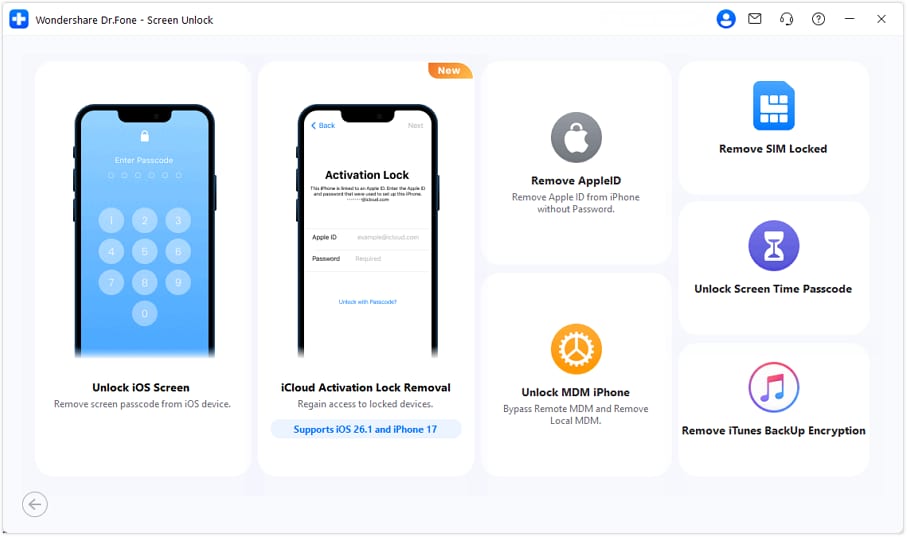
Step 1: Download and install the latest version of Wondershare Dr.Fone on your computer. Open it and go to Toolbox > Screen Unlock > iOS, then choose iCloud Activation Lock Removal to begin.
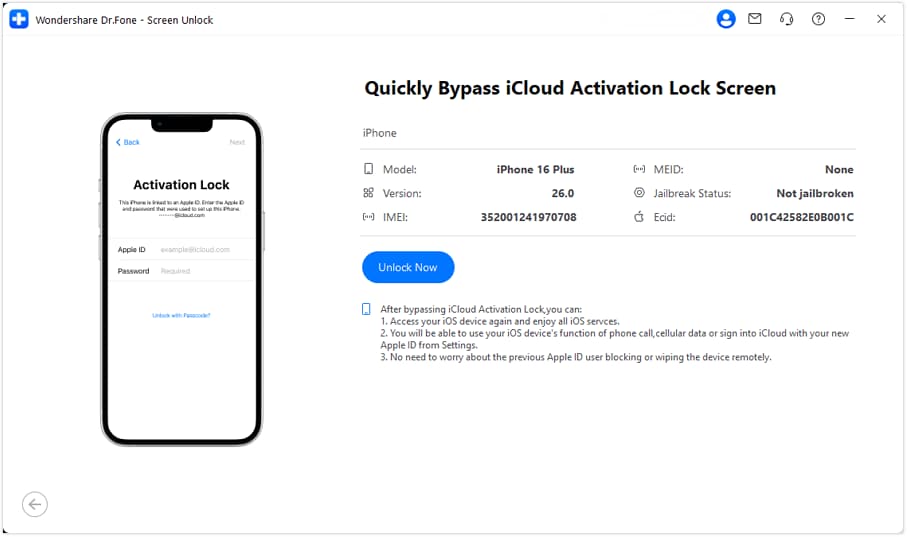
Step 2: Connect your iPhone or iPad to the computer. Once the tool detects your device, review the displayed information and click Unlock Now. Read the notes carefully, agree to the terms, and continue.
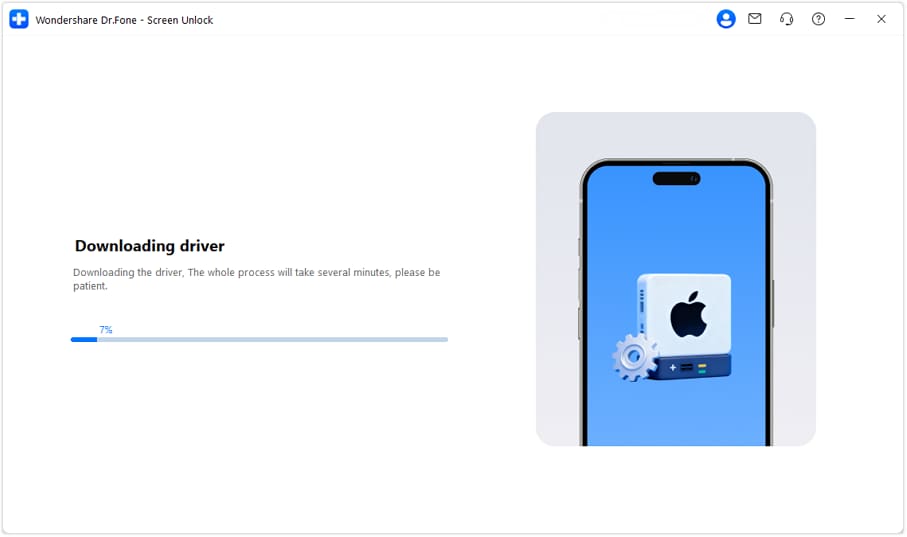
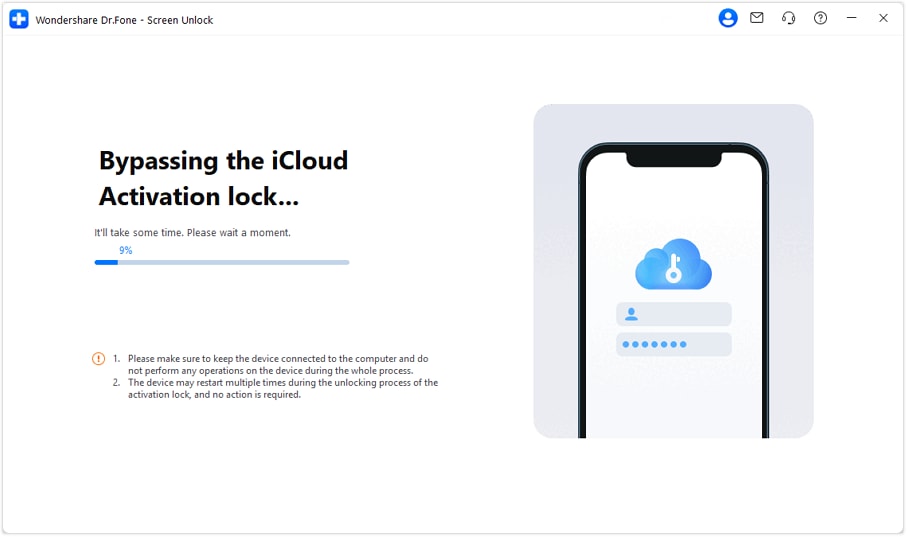
Step 3: Dr.Fone will automatically download and install the required driver. After installation, the software will start bypassing the iCloud Activation Lock. Keep your device connected and avoid using it during the process. Multiple reboots are normal.
Step 4: When the bypass is finished, a success message will appear. After the device completes its final reboot, you can enter your iPhone or iPad normally without the Activation Lock.
safe & secureConclusion:
This article answers the question, "Does a factory reset remove the activation lock?" It also mentions some easy solutions to remove the iCloud lock without a factory reset.
To sum up, an iPhone factory reset cannot remove the activation lock; however, all personal data can be erased. It may be necessary to use expert tools like Dr.Fone or the original owner's credentials to unlock the device. Trusted Dr.Fone - Screen Unlock (iOS) is a real tool that unlocks the device rather quickly, within a few straightforward steps, even if the user does not have access to the original Apple ID.


iCloud Unlock
- Remove Apple/iCloud Account
- 1. Remove iCloud Account
- 2. Remove iCloud from iPhone
- 3. Use This iPhone To Reset Apple ID
- 4. Unlock Apple Watch iCloud/Apple ID
- 5. Unlock iCloud Lock on iPhone/iPad
- 6. Unlock iCloud Account No Password
- 7. Reset Apple ID and Apple Password
- 8. Delete iCloud Account No Password
- 9. Does Factory Reset Remove the iCloud Activation Lock
- 10. Does Find My iPhone Work When Phone Is Dead
- Bypass Activation Lock (Specific)
- 1. Bypass iCloud Lock on iPhone 4/4S
- 2. Bypass iCloud Lock on iPhone 5/5S/5C
- 3. Bypass iCloud Lock on iPhone 6/6S/7
- 4. Bypass iCloud Lock on iPhone SE
- 5. Bypass iCloud Lock on iPhone 8
- 6. Bypass iCloud Lock on iPhone XS/XR/X
- 7. Bypass iCloud Lock on iPhone 11/12
- 8. Bypass iCloud Lock on iPhone 13
- 9. Bypass iCloud Lock on iPhone 14
- 10. Bypass iCloud Lock on iPad 2/3
- 11. Bypass iCloud Lock on iPad 4/Mini
- 12. Bypass Activation Lock in iOS 9.3
- 13. Bypass Activation Lock iOS 14
- 14. Remove Activation Lock iOS 15
- 15. Bypass Activation Lock iOS 16
- 16. Bypass iCloud Activation Lock iOS 18
- Bypass Activation Lock (General)
- 1. Unlock iCloud Activation Lock
- 2. Unlock Activation Lock Online
- 3. Remove iCloud Activation Lock
- 4. Bypass Activation Lock on iPhone
- 5. Bypass Activation Lock on iPod
- 6. Bypass Activation Lock on iPad
- 7. Bypass Activation Lock on Mac
- 8. Bypass iCloud Lock on Apple Watch
- 9. Remove iCloud Lock With IMEI
- 10. Remove Without Previous Owner
- Activation Lock Bypass Tools
- 1. iCloud DNS Bypass Guide
- 2. Top 7 iCloud Bypass Tools
- 3. Bypass iCloud By Checkra1n
- 4. iCloud Bypass Tool Version 1.4
- 5. Top 10 Apps to Unlock Your iCloud
- 6. iCloud Unlocker Download
- 7. iCloud Unlock Deluxe Software
- 8. DarkRa1n iCloud Bypass Tool
- 9. Mina Activator Review
- 10. iUnlocker Check iCloud
- Recover iCloud Password
- iCloud Unlock Tips
- 1. Check iCloud Activation Lock Status
- 2. Fix iCloud Lock on iPhone and iPad
- 3. Jailbreak iCloud Locked iPhone
- 4. Can You Sell Locked iPhones
- 5. iPad Stuck On Activation Lock
- 6. This iPad is Linked to an Apple ID Problem
- 7. Fix iPhone Locked After Update
- Turn Off Camera Sound
- ● Manage/transfer/recover data
- ● Unlock screen/activate/FRP lock
- ● Fix most iOS and Android issues
- Free Download Free Download Free Download


 > How-to > Screen Lock Removal > Does a Factory Reset Remove the iCloud Activation Lock? Discover the Truth
Alice MJ
staff Editor