
Mina Activator Review Complete Guide and Features

Oct 10, 2026 • Filed to: Screen Lock Removal • Proven solutions
 TL;DR:
Mina Activator is a macOS-exclusive iCloud bypass utility restricted to A6 Apple devices like the iPhone 5 and 5c on iOS 7-12, prompting users with newer models to rely on secure alternatives like Dr.Fone - Screen Unlock (iOS).
● Operating the Mina tool requires submitting your device IMEI or serial number to a remote server and waiting one to five days for batch processing, which carries inherent risks of unauthorized network blocking or device cloning.
● Attempting to use unauthorized or cracked Windows versions of Mina Ramdisk exposes users to malware, as the legitimate software is strictly limited to Mac environments and official developer downloads.
● Dr.Fone - Screen Unlock (iOS) bypasses the iCloud lock immediately without requiring sensitive device data sharing, supporting a much wider range of hardware from the iPhone 6S to iPhone X operating on iOS 12 through 16.7 for both Windows and Mac users.
Ask AI for a summary
 ChatGPT
 Perplexity
 Gemini
 Claude
 Grok
Grok
Mina Activator is widely discussed as an iCloud bypass tool designed to help unlock Apple devices stuck on the Activation Lock screen. Many users search for tools like mina ramdisk activator, minahello download, or mina icloud bypass tool when they cannot access their iPhone or iPad due to forgotten Apple ID credentials.
This guide explains how Mina Activator, Mina Ramdisk, and related tools such as mina activador or minausb icloud bypass work. We will also review compatibility, risks, and provide a safer unlocking option if the mina iphone bypass tool does not work as expected.
If you want to understand the real capabilities of the mina tool and how it compares with modern iCloud unlock solutions, keep reading.

Part 1: What Is Mina Activator?
Mina Activator is a third-party iCloud activation lock bypass tool developed to unlock Apple devices that remain locked after a reset. Many users refer to this software as the Mina iCloud bypass tool or Mina Ramdisk activator because it uses a ramdisk-based method to interact with the device during the activation process.
This solution is particularly useful for individuals locked out of their iPhones or iPads due to forgotten Apple ID credentials or for those who have purchased second-hand devices with unresolved activation locks. It offers support for a variety of Apple products, including iPhones, iPads, and iPods, running diverse iOS versions.
1-1. Mina Activator: Advantages and Disadvantages
When considering tools for bypassing iCloud activation locks, Mina Activator stands out as a widely discussed option. However, like any software, it comes with its own set of benefits and limitations that potential users should carefully evaluate.
|
Pros |
Cons |
| It works seamlessly with iPhone 5 and 5c, and select iPads operate on iOS 7-12. | Exclusively supports A6 devices, limiting its range of compatibility. |
| It offers a straightforward, beginner-friendly interface, eliminating the need for technical skills. | It does not offer Mina Ramdisk Activator Windows 10 functionality, as it only runs on macOS. |
| Safe to use when obtained from authorized Mina Activator download sources. | Users may need to provide sensitive device information for operation. |
| Falls short of the reliability offered by alternative tools in the market. |
Although Mina Activator Mac can bypass iCloud locks, the restricted compatibility, security risks, and inconsistent success rates might make it less appealing for some users.
1-2. Is It Safe to Use Mina Activator?
Using the Mina Activator tool or similar utilities like MinaUSB iCloud bypass can work in certain cases, but users should understand the potential risks. Since these tools interact with device identifiers and firmware components, downloading the Mina Activator download package from unofficial sources may expose users to malware or data theft.
Downloading it from the developer’s website or a trusted seller minimizes risks and ensures the software is free from malicious components. However, exercising caution is essential to protect your data.Key Safety Concerns
1. Official Source Only
Always rely on links provided by the official developer or reputable sellers for the Mina Activator download. Reports of scams, particularly on platforms like Twitter, highlight the risks of unofficial links.
2. Sharing IMEI or Serial Number
To use tools like Mina Ramdisk Activator Latest Version, you must provide your device’s IMEI or serial number. This data registers your device on the server, creating a tailored solution for your iDevice.
3. Risks of Sharing IMEI
While this process has legitimate uses, sharing your IMEI can expose you to risks such as:
- Unauthorized tracking of your phone.
- Creation of duplicate devices with malicious intent.
- Blocking your device from network access.
- Accessing sensitive information, such as banking details or messages.
🔓 Tips: Stuck on iCloud Activation Lock and can’t access your iPhone or iPad? Dr.Fone Online Unlock - iCloud Unlock helps you check eligibility and unlock online.
- Works for iPhone XR → 17 Pro Max and iPads from 2019 onward.
- Compatible with iOS versions 18.6–26.1 (except 18.7.3).
- Built for hard-to-unlock A12 chip iPhones, with high success.
- Get results in 1-60 seconds—or get a full refund.
🚀Take the quickest path back to your device—unlock iCloud online now.
 safe & secure
Part 2: How to Safely Access Mina Activator Free Download
Finding a secure Mina Activator download or MinaHello download link is critical when attempting to use the Mina bypass ecosystem. Many websites claim to provide the Mina iCloud bypass tool, but unofficial downloads often contain modified installers or unsafe scripts.
While the idea of downloading cracked versions might be tempting, it often comes with severe downsides, including malware infections and potential legal troubles.Tips for Safe Usage of Mina Activator
1. Stick to Official Sources
Always download the Mina Activator tool from official platforms or authorized sellers. This ensures a secure installation and minimizes vulnerabilities.
2. Avoid Cracked Versions
Cracked versions of Mina Activator Windows or Mina Ramdisk Activator might seem cost-effective but usually carry harmful malware or spyware. These unauthorized downloads could also lead to legal issues, compromising both security and peace of mind.
3. Consider Alternative Tools
If the price of official tools feels prohibitive, explore affordable alternatives like Dr.Fone - Screen Unlock (iOS). These tools offer similar functionality without exposing users to the inherent risks of cracked software.
Part 3: Step-by-Step Guide to Using Mina Activator for iCloud Bypass
Bypassing the Activation Lock using the Mina Activator tool usually involves installing the Mina Ramdisk environment and registering your device identifier on the Mina server. The following steps outline how the typical Mina iPhone bypass process works.
Here’s a concise guide to help you through.Step 1: Download and Install
Get the Mina Activator download from the official seller’s link to ensure safety. Install the tool on your Mac computer or laptop.
Step 2: Connect Your Device
Launch the tool and connect your iDevice to the computer using a USB cable. Click "Activate Your Device" to check compatibility.

Step 3: Register Your Device
If compatible, register your device’s IMEI or serial number on the server. Make the required payment and ensure you select the correct model.
Step 4: Wait for Processing
Batch processing usually takes 1 to 3 days or up to 5 days in rare cases. You’ll receive a notification when it’s ready.
Step 5: Download Firmware
Reconnect your device and reopen the tool. Download the additional firmware prompted by the software.
Step 6: Bypass iCloud Lock
Click "Activate Your Device" again to complete the iCloud bypass. Keep your device connected until the process is finished.
Step 7: Reboot and Setup
After activation, your device will reboot automatically. Proceed with the initial setup without needing an Apple ID or password.
Part 4. Secure Alternative to Mina Activator: Dr.Fone - Screen Unlock (iOS)
While the Mina Activator ecosystem—including tools like Mina Ramdisk, MinaUSB iCloud bypass, and Mina activador—is widely discussed online, their reliability varies depending on device compatibility and firmware versions.
Unfortunately, the Mina Activator tool is not the most reliable option for bypassing the Activation Lock. The internet is flooded with cracked or cloned versions, significantly increasing the risk of hacking, malware, and other security threats.What If Mina Activator Fails?
If you cannot bypass iCloud Activation Lock using Mina Activator, consider a safer and more efficient alternative like Dr.Fone - Screen Unlock (iOS). This tool is designed to remove iCloud Activation Locks without requiring an Apple ID or password.
Dr.Fone is ideal for scenarios such as:
- Unlocking second-hand devices.
- Regaining access to your locked device.
- Activating devices when other methods fail.
Key advantages of Dr.Fone
Wide Device Compatibility: Dr.Fone supports a range of Apple devices, including iPhones 6S to X and select iPads. It works seamlessly with iOS versions 12 to 16.7, making it versatile for many models.
High Success Rate: Users frequently report a high success rate when bypassing activation locks. This makes Dr.Fone a trusted and reliable choice.
User-Friendly Interface: The software features an intuitive design. Even those without technical skills can use it easily.
Regular Updates: Dr.Fone receives regular updates to stay compatible with the latest iOS versions. These updates also enhance its performance and features.
Reliable Customer Support: The tool offers responsive customer service. Users can get timely assistance when needed.
While Mina Activator has its merits, Dr.Fone provides a more secure and consistent solution for removing iCloud Activation Locks. Follow the step-by-step guide to use Dr.Fone - Screen Unlock (iOS)'s iCloud activation unlock feature:

Dr.Fone - Screen Unlock (iOS)
Secure Alternative to Mina Activator: Dr.Fone - Screen Unlock (iOS).
- Simple, click-through, process.
- Remove screen passcodes, Face ID, Touch ID and Apple ID at ease.
- Bypass iCloud Activation Locks without Password.
- Bypass MDM and screen time without data loss.
- Supports the latest iOS version fully!



Step 1: Download and Install Dr.Fone
To begin, you need the Dr.Fone - Screen Unlock (iOS) tool, a trusted iCloud activation lock bypass tool. Follow these steps:
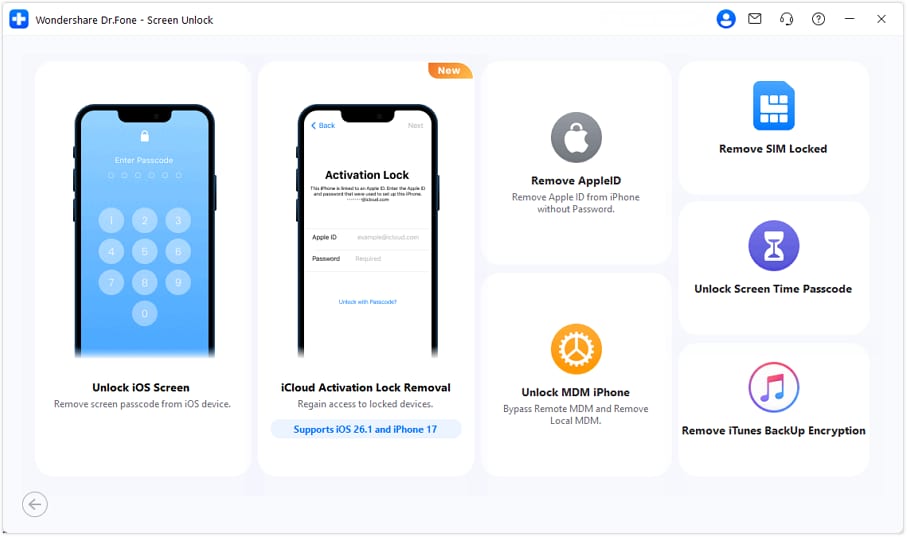
Visit the Wondershare website and download the latest version of Dr.Fone. Install the software on your computer. Launch the program, and from the main interface, go to the Toolbox. Select Screen Unlock and then choose the iOS option to prepare for unlocking.

Step 2: Set Up iCloud Activation Lock Removal
Connect your iOS device to the computer using a compatible USB cable. From the menu, select the Remove iCloud Activation Lock option. This step sets up your device for the unlocking procedure.
Step 3: Start the Unlocking Procedure
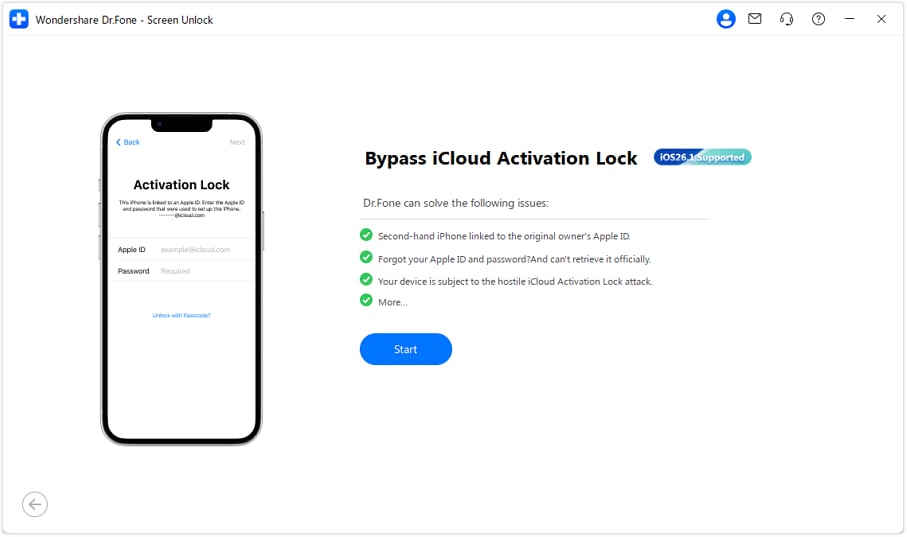
Click the Start button to begin the unlocking process. Dr.Fone will automatically detect your device and begin the iCloud unlock process. Sit tight as the software processes your request—this step may take a few minutes depending on your device’s configuration.
Step 4: Finalize the Unlocking
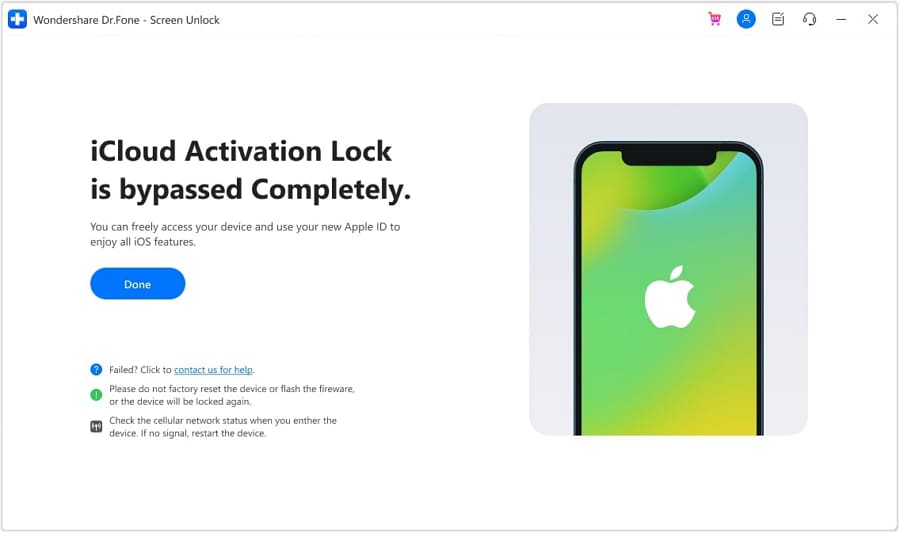
A success message will appear on the screen, confirming that the Activation Lock has been bypassed. Click Done to conclude the procedure. Now, you can set up your device with a new Apple ID and use it without restrictions.
Conclusion:
Unlocking iCloud Activation Lock can be tricky. Tools like Mina Activator provide a solution but come with limits in reliability and security. While it works for some, its risks and compatibility issues might not suit everyone.
A safer choice, like Dr.Fone - Screen Unlock (iOS), offers better security, ease of use, and broader device support. Dr.Fone’s features, including regular updates and a high success rate, make it a solid alternative. It helps bypass activation locks without risking your data or device. For those seeking efficiency and safety, exploring such reliable tools is a smart approach.
safe & secure4,624,541 people have downloaded it
FAQs
 Q1. What is Mina Activator and how does the Mina iCloud bypass tool work?Q2. Is MinaHello download safe for unlocking iPhones?Q3. Does MinaUSB iCloud bypass support all iPhone models?Q4. What is the safest alternative to the Mina Activator tool?


iCloud Unlock
- Remove Apple/iCloud Account
- 1. Remove iCloud Account
- 2. Remove iCloud from iPhone
- 3. Use This iPhone To Reset Apple ID
- 4. Unlock Apple Watch iCloud/Apple ID
- 5. Unlock iCloud Lock on iPhone/iPad
- 6. Unlock iCloud Account No Password
- 7. Reset Apple ID and Apple Password
- 8. Delete iCloud Account No Password
- 9. Does Factory Reset Remove the iCloud Activation Lock
- 10. Does Find My iPhone Work When Phone Is Dead
- Bypass Activation Lock (Specific)
- 1. Bypass iCloud Lock on iPhone 4/4S
- 2. Bypass iCloud Lock on iPhone 5/5S/5C
- 3. Bypass iCloud Lock on iPhone 6/6S/7
- 4. Bypass iCloud Lock on iPhone SE
- 5. Bypass iCloud Lock on iPhone 8
- 6. Bypass iCloud Lock on iPhone XS/XR/X
- 7. Bypass iCloud Lock on iPhone 11/12
- 8. Bypass iCloud Lock on iPhone 13
- 9. Bypass iCloud Lock on iPhone 14
- 10. Bypass iCloud Lock on iPad 2/3
- 11. Bypass iCloud Lock on iPad 4/Mini
- 12. Bypass Activation Lock in iOS 9.3
- 13. Bypass Activation Lock iOS 14
- 14. Remove Activation Lock iOS 15
- 15. Bypass Activation Lock iOS 16
- 16. Bypass iCloud Activation Lock iOS 18
- Bypass Activation Lock (General)
- 1. Unlock iCloud Activation Lock
- 2. Unlock Activation Lock Online
- 3. Remove iCloud Activation Lock
- 4. Bypass Activation Lock on iPhone
- 5. Bypass Activation Lock on iPod
- 6. Bypass Activation Lock on iPad
- 7. Bypass Activation Lock on Mac
- 8. Bypass iCloud Lock on Apple Watch
- 9. Remove iCloud Lock With IMEI
- 10. Remove Without Previous Owner
- Activation Lock Bypass Tools
- 1. iCloud DNS Bypass Guide
- 2. Top 7 iCloud Bypass Tools
- 3. Bypass iCloud By Checkra1n
- 4. iCloud Bypass Tool Version 1.4
- 5. Top 10 Apps to Unlock Your iCloud
- 6. iCloud Unlocker Download
- 7. iCloud Unlock Deluxe Software
- 8. DarkRa1n iCloud Bypass Tool
- 9. Mina Activator Review
- 10. iUnlocker Check iCloud
- Recover iCloud Password
- iCloud Unlock Tips
- 1. Check iCloud Activation Lock Status
- 2. Fix iCloud Lock on iPhone and iPad
- 3. Jailbreak iCloud Locked iPhone
- 4. Can You Sell Locked iPhones
- 5. iPad Stuck On Activation Lock
- 6. This iPad is Linked to an Apple ID Problem
- 7. Fix iPhone Locked After Update
- Turn Off Camera Sound
- ● Manage/transfer/recover data
- ● Unlock screen/activate/FRP lock
- ● Fix most iOS and Android issues
- Free Download Free Download Free Download



James Davis
staff Editor