


 TL;DR:
Android 17 Beta 4 is the final scheduled testing milestone focusing on privacy, security, and continuity, and is recommended only for developers or enthusiasts using a secondary device rather than a primary daily driver.
● Platform changes prioritize functional maturity over visual redesigns, introducing a restrictive Contact Picker for precise data privacy, Advanced Protection Mode, multi-device Handoff, and PQC APK signing for developers.
● Mainstream users should avoid installing this build on their only phone, as the pre-release environment still carries compatibility risks that can disrupt essential banking, work, or identity applications.
● Samsung testers must verify active Google accounts and credentials before factory resetting to avoid Factory Reset Protection (FRP) locks; if a device gets blocked at setup, Dr.Fone Online Unlock provides an IMEI-based fallback after official recovery methods are exhausted.
Ask AI for a summary
 ChatGPT
 Perplexity
 Gemini
 Claude
 Grok
Grok
 Remove your FRP lock safely
Android 17 Beta is Google's public pre-release track for the next major Android version. Right now, the short answer is simple: it has reached Android 17 Beta 4, and the release is more about security, privacy, continuity, and platform refinement than flashy redesigns.
For developers, that makes Android 17 Beta highly relevant. For regular users, the more practical question is should you install Android 17 Beta on a real phone. This guide explains both.
Table of Contents

Part 1. What Is Android 17 Beta, and Why Does Beta 4 Matter
That wording immediately tells you who Android 17 Beta is really for:
- developers preparing apps for the next Android version
- testers checking behavior and compatibility
- enthusiasts who want early access to new platform changes
It is not the same thing as a finished public release.
The second key fact is that Android 17 Beta has already reached Beta 4.
That matters because Beta 4 is where the conversation shifts. Early beta coverage usually asks what is new. Beta 4 coverage should ask what is mature enough to test seriously.
Android 17 Beta timeline at a glance
| Release stage | What it means |
|---|---|
| Beta 1 | First broad public beta with major platform changes |
| Beta 2 | More API validation and compatibility work |
| Beta 3 | Platform behavior becomes more stable |
| Beta 4 | Final scheduled beta and near-final testing environment |
Google's official release notes show that Beta 1 was released on February 13, 2026. The same page also notes that Android 17 Beta was still in active development at that stage, meaning the system and apps "might not always work as expected." That warning is one of the clearest reasons mainstream users should still be careful with beta installs.
What Beta 4 means in practical terms
For most readers, Beta 4 means three things:
- the overall feature set is now much clearer
- developers should already be doing serious compatibility testing
- general users should still separate "near-final" from "fully stable"
In other words, Beta 4 is a strong testing milestone, not a promise that every app and every workflow will behave exactly like the final public release.
Part 2. What Are the Most Important Android 17 Beta Features
A lot of Android beta articles get lost in API lists. For most readers, the better question is simpler: which Android 17 Beta changes actually matter in daily use or future app behavior?
Android 17 Beta new features that matter most
| Feature | Why it matters | Who benefits most |
|---|---|---|
| Android Contact Picker | Lets users share selected contact data instead of broad contact access | Privacy-conscious users and app developers |
| Android Advanced Protection Mode | Adds stronger protections for higher-risk users | Security-focused users |
| Handoff | Improves cross-device continuity | Multi-device users |
| Dedicated Assistant volume stream | Separates assistant audio from standard media volume | Everyday users |
| PQC APK Signing | Adds future-facing protection for signing identity | Developers and enterprise teams |
| ProfilingManager triggers | Helps debug cold starts, OOMs, and CPU issues | Developers |
| JobDebugInfo APIs | Helps explain why scheduled jobs are delayed | Developers |
| Semantic color APIs | Standardizes color meaning in live updates and alerts | Developers and UI teams |
These feature categories come directly from Google's Android 17 feature documentation, but grouped this way they are easier to evaluate from a user and product perspective.
The biggest user-facing themes
If you strip away the technical detail, Android 17 Beta is really pushing three themes.
1. More precise privacy controls
The new Contact Picker is a strong example. Instead of asking for broad contact access, apps can request much more limited contact sharing. This is a meaningful change because it reflects a platform trend toward more selective data exposure.
2. Stronger security by design
Android Advanced Protection Mode is one of the clearest signals in the release. Google presents it as a more powerful security configuration for users who want tighter controls, including stronger protection against risky installation or data paths.
3. Better continuity across devices
Handoff matters because it shows Android moving further toward connected multi-device experiences. It is less flashy than a redesigned home screen, but arguably more important over time.
Developer-facing changes that still affect normal users
Some Android 17 Beta updates are developer-focused, but they still shape the real experience people feel on devices.
Examples include:
- lock-free MessageQueue changes intended to reduce missed frames
- generational garbage collection improvements
- new profiling triggers for cold starts, out-of-memory events, and excessive CPU use
- stricter notification view limits to reduce memory overhead
These are not "wow feature" headlines, but they matter because they influence smoothness, responsiveness, and app stability over time.
Part 3. Should You Install Android 17 Beta on Your Main Phone
This is the question most non-developers really care about.
The short answer is: probably not, unless you have a clear reason.
Google's release notes for Android 17 Beta 1 explicitly say the platform is still in active development and apps or system behavior "might not always work as expected." Beta 4 is clearly much closer to release quality, but Google still frames the program as a testing track.
Who should install Android 17 Beta?
| User type | Good fit? | Why |
|---|---|---|
| Android developers | Yes | They need early testing against API level 37 |
| Tech reviewers and enthusiasts | Usually yes | They accept some bugs in exchange for early access |
| Main-phone everyday users | Usually no | Stability and compatibility matter more |
| Business or managed-device users | Usually no | Internal validation comes first |
Reasons to try it
You may want Android 17 Beta if:
- you build or test Android apps
- you review software or devices
- you have a spare phone for experiments
- you specifically want to track Android platform changes before release
Reasons to wait
You should probably wait if:
- you only have one phone
- you rely heavily on banking, work, or identity apps
- you do not want to troubleshoot compatibility issues
- you are mainly curious rather than actively testing
A practical Beta 4 perspective
Beta 4 deserves attention because it is close enough to final behavior to be meaningful. But "near-final" is not the same thing as "final."
Google's Beta 4 blog post highlights platform changes tied to memory limits, anomaly detection, and app behavior. Some of those changes may be invisible in a changelog, but visible in everyday use when an app behaves differently on a beta build than on a stable one.
That is why the most practical recommendation is still simple:
- use Android 17 Beta on a test device if you need it
- avoid putting it on your only critical phone unless you accept the risks
Part 4. What Does Android 17 Beta Say About Google's Direction
Every Android beta says something about platform priorities. Android 17 Beta suggests that Google is prioritizing controlled access, default-safe behavior, and cross-device continuity more than dramatic surface-level novelty.
That direction becomes clear when you line up the main features:
- Contact Picker reduces broad data exposure
- Advanced Protection Mode strengthens device security
- PQC APK signing looks ahead to long-term trust and signing integrity
- Handoff supports cross-device flow
- Assistant volume separation refines daily usability without adding interface clutter
This is why Android 17 Beta feels more like a maturity release than a visual reinvention. The system is not trying to impress only through appearance. It is trying to become more deliberate in how it handles permissions, security, and connected experiences.
That may sound less dramatic than a major UI overhaul, but it is often how platforms actually improve in meaningful ways.
Part 5. A Quick Note for Samsung Users Testing Android 17 Beta
If you are using Samsung hardware for Android testing, there is one practical point worth remembering before resets, device handoffs, or resale: device protection still matters.
Google's official documentation says that after a factory reset on a protected device, users may need to verify ownership with their screen lock or a previously synced Google account. In simple terms, if you reset a Samsung test device casually and forget which account was on it, setup can become much more difficult later.
Before resetting a Samsung device used for testing, it is smart to check three things:
- which Google account is currently active
- whether the lock screen credentials are available
- whether accounts have been removed properly before resale or handoff
If a Samsung Test Device Gets Stuck on FRP After Reset
If you upgrade a Samsung device to Android 17 Beta and later run into FRP during setup, the first step should still be the official route:
- try the previously synced Google account
- recover that account if you no longer remember the details
Google's support documentation is clear that a protected Android device may require a previously added Google account after a factory reset.
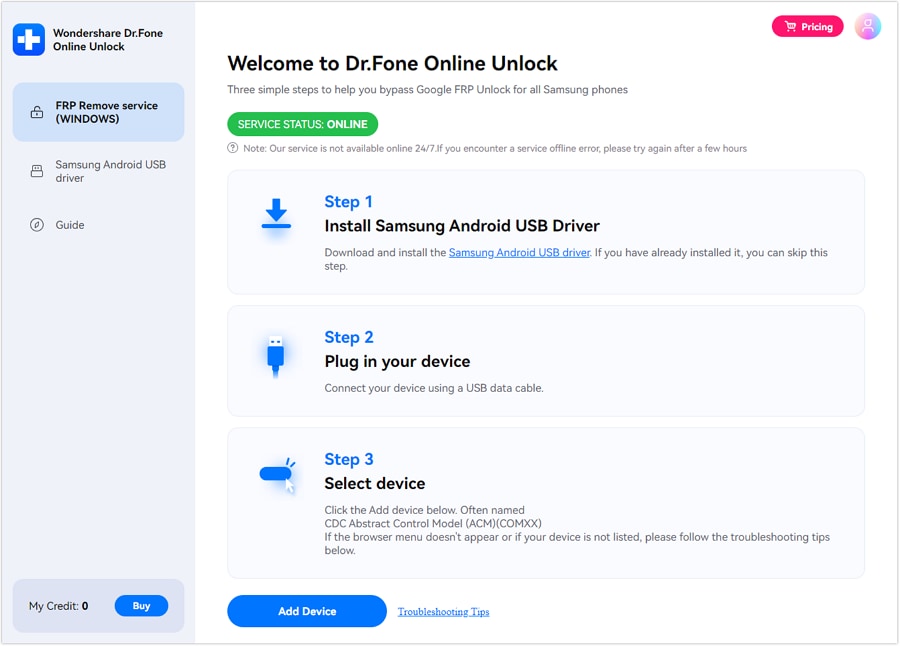
If that path is not practical—especially for used devices, repair-return units, or time-sensitive testing—Dr.Fone Online Unlock is worth mentioning more clearly here as a Samsung-specific follow-up option. According to its official page and guide, it provides an online Samsung FRP Removal workflow built around IMEI or serial number identification, and the vendor positions it as compatible with Samsung device families across newer Android generations.
Dr.Fone Online Unlock
Easily bypass Samsung FRP, remove Xiaomi account locks, and check IMEI with one trusted tool — fast, secure, and user-friendly.
- One-click Samsung FRP removal, no tech skills required.
- Unlock iCloud & SIM lock easily and safely.
- Unlock Xiaomi devices without a password.
- Supports 20+ different types of IMEI checks.
- Free IMEI check with no login, no ads, and instant access.
- Fully mobile-optimized for effortless on-the-go access.
Verify your device info safely in one clickThat makes it a reasonable resource for Samsung users who do not want to rely on outdated forum tricks after an Android 17 Beta reset leaves the device blocked at setup. In this article, it should be understood as a practical Samsung-specific fallback, not the main story of Android 17 Beta itself.
Remove your FRP lock safelyConclusion
Android 17 Beta is best understood as a refinement release with real strategic weight.
It has now reached Android 17 Beta 4, which makes it highly relevant for developers and much easier for general readers to evaluate. The biggest themes are privacy, security, continuity, and platform maturity, not dramatic visual reinvention.
If you are a developer, reviewer, or Android enthusiast with a spare device, Android 17 Beta is worth paying attention to now. If you depend on one phone for everything, waiting is still the safer choice.
For Samsung users, there is one extra practical takeaway: test devices should be managed carefully before resets. And if an Android 17 Beta reset later leads to a Google FRP lock, the best order is still official account recovery first, followed by a Samsung-specific fallback such as Dr.Fone Online Unlock when the normal path is no longer practical.
That is probably the clearest bottom line: Android 17 Beta already tells us a lot about where Android is going, but it also reminds us that testing newer software works best when device management is just as careful as feature exploration.
Remove your FRP lock safelyFAQs
-
Q: What is Android 17 Beta mainly focused on?
A: Android 17 Beta is mainly focused on privacy, security, continuity, and developer tooling rather than a dramatic visual redesign. Official highlights include Contact Picker, Advanced Protection Mode, Handoff, PQC APK signing, and improved profiling tools.
-
Q: What does Beta 4 mean in practical terms?
A: Beta 4 is the last scheduled beta in the Android 17 Beta cycle and a major stability milestone. In practice, that means developers should be doing near-final compatibility work, while users should still remember that it is part of a testing program rather than a finished public release.
-
Q: Is Android 17 Beta ready for daily use?
A: For some enthusiasts and testers, maybe. For most mainstream users relying on one main phone, probably not yet. Google's release notes make it clear that beta software may not always work as expected, even if later betas are much closer to final quality.
-
Q: Which Android 17 Beta features matter most to regular users?
A: The most relevant features for regular users are probably Contact Picker, Advanced Protection Mode, Handoff, and the dedicated Assistant volume stream. These are the changes most closely tied to privacy, safety, and daily usability.
-
Q: Should Samsung users try Android 17 Beta on a primary device?
A: Only if they are comfortable with testing risk. Android 17 Beta Samsung users should be especially careful with account management before resets, because device protection and FRP-related verification can still create setup friction after a factory reset.



Alice MJ
staff Editor
Generally rated4.5(105participated)