


 TL;DR:
You can unlock an eligible, fully paid-off Optus phone for free by submitting your IMEI (found by dialing *#06#) on the Optus Network Unlock webpage or by texting MENU to 9999 using an Optus SIM.
● Official unlock codes are generally provided instantly upon submission, but the process will take 5 to 10 business days if Optus must retrieve the specific code from the device manufacturer.
● Completing the official unlock requires inserting a non-Optus SIM card to trigger the unlock code prompt and rebooting the device to finalize the network switch.
● Dr.Fone Online Unlock is the most suitable alternative for second-hand phone buyers or users lacking an Optus account, as it bypasses eligibility restrictions remotely without requiring a factory reset.
Ask AI for a summary
 ChatGPT
 Perplexity
 Gemini
 Claude
 Grok
Grok
 Verify your device info safely
Switched carriers or opted for a second-hand phone and then found it locked to Optus? This is a frequent matter because a SIM-locked phone will only work with Optus unless it is officially unlocked. The Australian carriers, like Optus, put these locks in devices to control sales and to ensure network compatibility, but it can be a bit of a limitation when you want to change networks or use a local SIM while traveling.
This article is primarily aimed at Optus customers who plan to change their carriers, travelers in need of a local SIM, or second-hand phone buyers who possess a locked device. It presents the principal means to unlock an Optus phone, in both its official and unofficial forms, as well as a quick online method using Dr.Fone Online Unlock. Let's find out how to unlock Optus phone.
In this article

Part 1. What Does It Mean When Your Optus Phone Is SIM Locked?
A SIM lock signals that the device will only work with Optus SIM cards. Basically, the phone is linked to the Optus network and will not be compatible with SIM cards of other networks until the product is unlocked. Usually, this happens if you buy a phone from Optus by signing a contract or a payment plan.
Don't mix up a SIM lock with an iCloud lock. While a SIM lock is connected to the network and limits the use of the carrier, an iCloud lock is Apple's feature that blocks others from accessing the device. Devices with SIM lock can be iPhones, Samsung phones, Google Pixel models, and any other Android smartphone that was purchased directly. Typical indications are error messages like "SIM not supported, "Invalid SIM, " or "SIM card from a different network."
Optus' Policy
As per the Optus policy, a mobile handset can be unlocked only when the device is completely paid off or after fulfilling a certain period of usage. Prior to initiating the unlocking procedure, it would be wise to make sure that the phone is really SIM locked or not by simply putting a SIM card from a non-Optus operator and seeing if any error message regarding the network is displayed.
Part 2. How to Unlock Optus Phone (Official Methods)
Prior to freeing an Optus phone from its lock; a couple of rapid verifications will save you time and prevent mistakes. Confirm that the handset was purchased from Optus, verify the eligibility for unlocking, and keep the IMEI number handy by typing *#06#.
Additionally, be sure to have a non-Optus SIM card at hand for trying out the phone after the unlocking.
Before you unlock your Optus phone (Quick checks)
- Confirm the phone was purchased from Optus
- Check if any payment plan is fully paid or eligible for unlock
- Note down IMEI number (*#06#)
- Update phone software to the latest version
- Keep a non-Optus SIM card ready for testing
- Ensure stable internet or mobile connection for processing
Method 1 — Unlock via Optus official request for free
The most dependable and cost-free way to unlock your Optus device is through the official method provided by Optus, assuming you meet the criteria for the service. You can either fill out the unlock form on Optus' website or send a text message. After the validation of your request, you will receive either the unlock code or a confirmation message to get rid of the network lock.
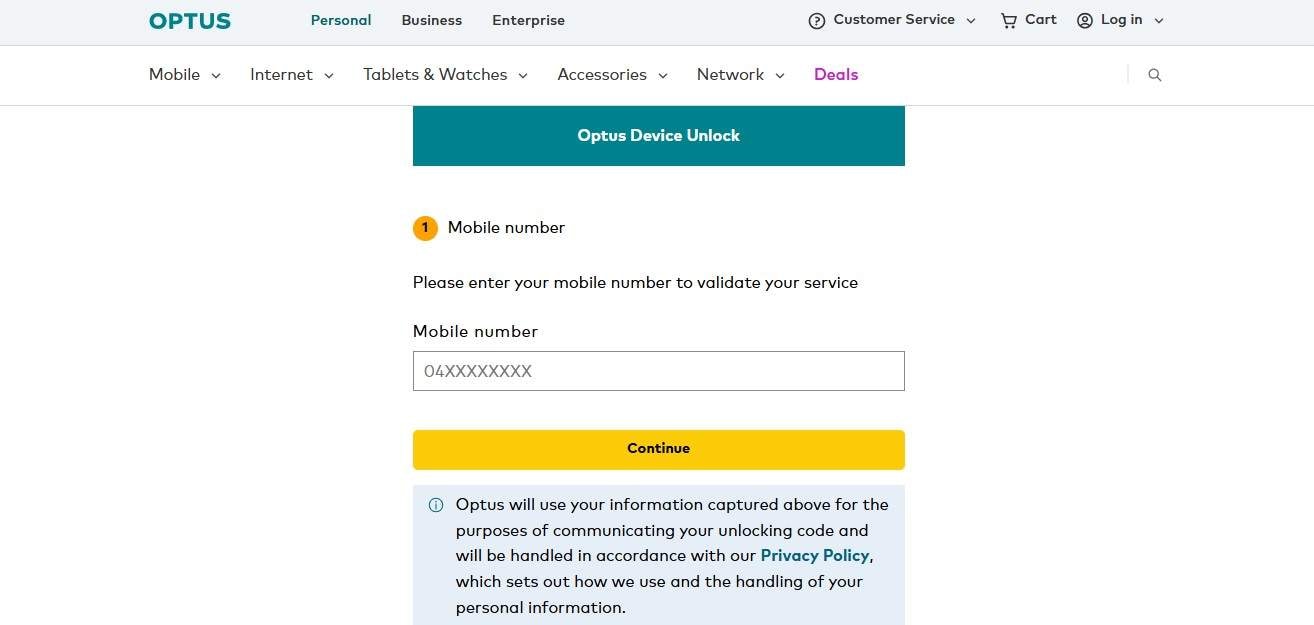
- Step 1. Go to the Optus Network Unlock page or simply select the SMS feature on your Optus handset Key in your device IMEI number (*#06# to get the IMEI).
- Step 2. Send the unlock request and recheck the device details.
- Step 3. Get the unlock code or the confirmation message from Optus.
- Step 4. Put a SIM card from another network and type in the unlock code when asked. Power off and power on the handset to affect the unlocking.
Method 2 – How to Unlock Optus Mobile Using Unlock Code
Optus offers an official unlocking code to remove the network lock on your phone if it is eligible. They provide the code either by publishing it on the Network Unlock webpage or by sending it via SMS after you have submitted your IMEI. Sometimes, if the code is not available immediately, Optus may have to request it from the phone manufacturer, which might take 5 to 10 working days. After you get it, you can proceed to unlock the phone.
- Step 1. Visit the Optus Network Unlock page or send a text with the word MENU to 9999 (only works with Optus SIM) and follow the instructions.
- Step 2. Enter your phone's IMEI number (You can find it by dialing *#06#; if two IMEIs are shown, choose IMEI 1 only). Submit your request and make a payment, if necessary.
- Step 3. Get the unlock code via SMS or the Optus system.
- Step 4. Put a SIM card from a different carrier than Optus and enter the unlock code when asked.
- Step 5. Reboot your phone to finalize unlocking.
Method 3 — Unlock via Optus store or customer support
In addition to online unlock, you also have the option to call Optus customer support or go to a physical Optus store to get your Optus phone unlocked. This way is very suitable if you need a person-to-person interaction or a phone call, or if the online way doesn't work for you. After providing the IMEI number and other details, the Optus people can unlock your phone.
Method 4 — Unlock using your carrier transfer (switching to another Australian carrier)
In several cases, changing over to a different Australian network like Telstra or Vodafone might be the right move to finish the unlocking process, particularly if the handset is already qualifying for Optus.
Part 3. How to Unlock Optus Phone Online(Fast Alternative)
Dr.Fone Online Unlock provides a quicker and more versatile alternative when Optus's official methods are slow, unreachable, or require account access. The platform does not need an Optus account to work, and it is compatible with a huge variety of phones, including iPhones and top Android brands like Samsung, Google Pixel, Xiaomi, etc. All you have to do is provide your phone's IMEI and carrier info, and the system will unlock your phone remotely, often delivering results in a matter of minutes instead of waiting days for manual processing.
It comes in handy for users who buy second-hand Optus phones, or those only using out-of-contract devices, and those scenarios to implement an urgent unlock before international travel. Also, unlike other methods, it does not require factory resetting, jailbreaking, or sending the phone anywhere.
Dr.Fone Online Unlock
Easily bypass Samsung FRP, remove Xiaomi account locks, and check IMEI with one trusted tool — fast, secure, and user-friendly.
- One-click Samsung FRP removal, no tech skills required.
- Unlock iCloud & SIM lock easily and safely.
- Unlock Xiaomi devices without a password.
- Supports 20+ different types of IMEI checks.
- Free IMEI check with no login, no ads, and instant access.
- Fully mobile-optimized for effortless on-the-go access.
Verify your device info safely in one clickSteps to unlock Optus phone online using Dr.Fone Online Unlock
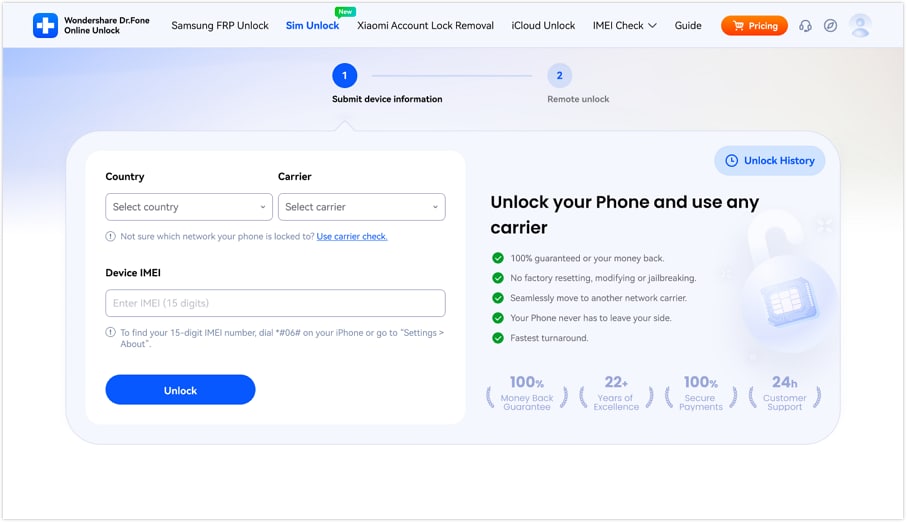
- Step 1. Launch the official Dr.Fone Online Unlock webpage, locate and click on "Remove SIM Lock Online", afterward select your Country and Carrier (Optus) from the two dropdown menus. Type your IMEI number into the "Device IMEI" box and press "Unlock".
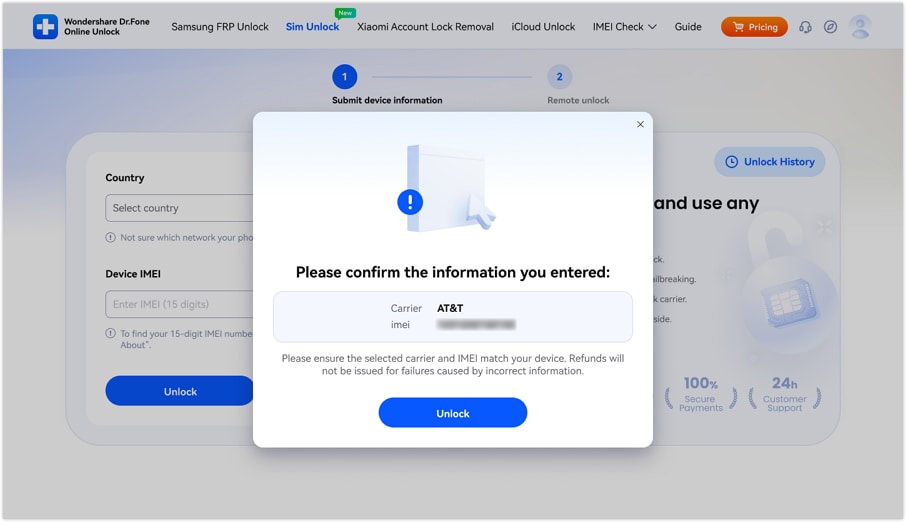
- Step 2. In the following window, double-check your carrier and IMEI information shown in the pop-up.
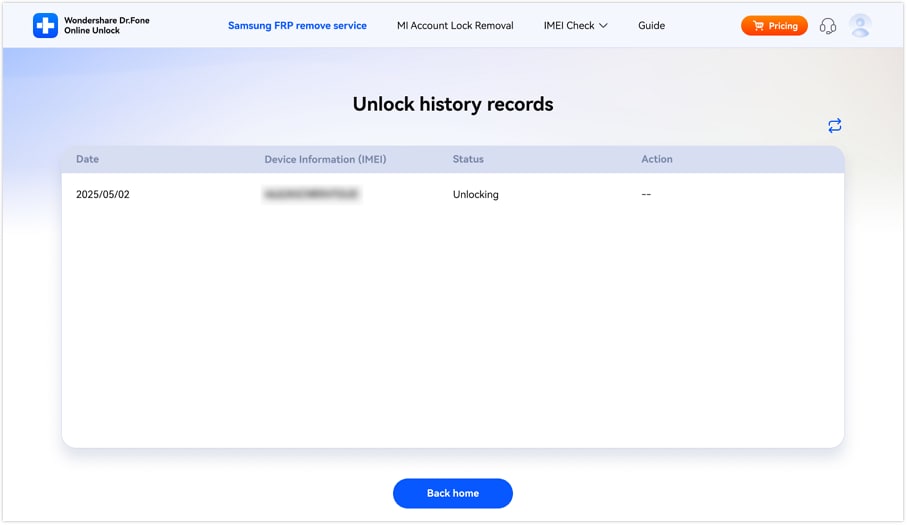
- Step 3. Stand by for the procedure to be finished, afterward, verify your unlock result by email or clicking "Unlock History" on the website
Verify your device info safelyPart 4. Troubleshooting — What to Do If Your Optus Unlock Isn't Working
Sometimes, trying to unlock an Optus phone might not work smoothly. Here are probably the most common issues and their easy fixes.
If the message "Device unlock request denied" pops up, it probably means that your phone is ineligible for an unlock. Examples of reasons include an unpaid phone plan, handset not originally from Optus, or incorrectly entered IMEI details. First, you will have to check your eligibility and then contact Optus to discuss or challenge the request.
It is well possible that even after your phone has been unlocked, you will still receive a message "SIM not supported". One simple thing you can do is to remove and re-insert your non-Optus SIM card.
IMEI unrecognized issues are quite frequent and the best thing would be to confirm that you have written the IMEI number correctly (15 digits) by pressing *#06# first. Persistent problems can be due to the handset being blacklisted or the unlock registration not being properly performed, therefore these issues can prevent the unlocking.
In case you cannot get an Optus unlock or it keeps failing, you may want to rely on a trusted alternative such as Dr.Fone Online Unlock. It does not depend on any carrier restrictions and is a real lifesaver when it comes to second-hand devices, unsupported models, or emergency unlocking.
Conclusion
Unlocking an Optus phone is fairly simple work if you pick the right method. The most reliable and secure way is to do the official Optus unlocking process, especially if the phone was bought directly from the carrier. For a quicker and more versatile approach, particularly when dealing with second-hand or non-supported devices, platforms such as Dr.Fone Online Unlock come in handy. Since there are various options available, from filing an official request to using online methods, the process of unlocking a SIM and moving to another network is indeed the simplest it has ever been.
Verify your device info safelyFAQs
-
Q: How to unlock Optus phone for free?
A: The official Optus unlock method is free for eligible devices. Simply submit a request through the Optus Network Unlock page or via SMS and receive your unlock code if the device meets requirements.
-
Q: How long does it take to unlock Optus mobile?
A: In many cases, the unlock code is provided instantly after submission. If the code is not available, it may take around 5–10 business days as Optus may need to obtain it from the manufacturer.
-
Q: Can I unlock Optus phone without code?
A: Some devices, especially newer iPhones, may unlock automatically when activated without asking for a code. Besides that, online services such as Dr.Fone Online Unlock can carry out the whole process remotely and you don't have to manually enter a code.
-
Q: Is unlocking legal?
A: Yes, unlocking a phone is legal in most regions, including Australia, as long as the device is fully paid off and not reported lost or stolen.





Julia Becker
staff Editor
Generally rated4.5(105participated)