

 TL;DR:
Verifying an Apple device's iCloud activation lock status requires running its IMEI number through checker tools to confirm if the hardware remains linked to an owner's account prior to purchasing.
● Dr.Fone Online Unlock best serves non-technical buyers needing free checks and ECID-based iCloud bypass options, while iUnlocker and SICKW.COM target resellers requiring bulk checks or API access via paid credits.
● The checking process requires only the device IMEI and a stable internet connection, bypassing the need for physical device access or Apple ID credentials to protect personal data.
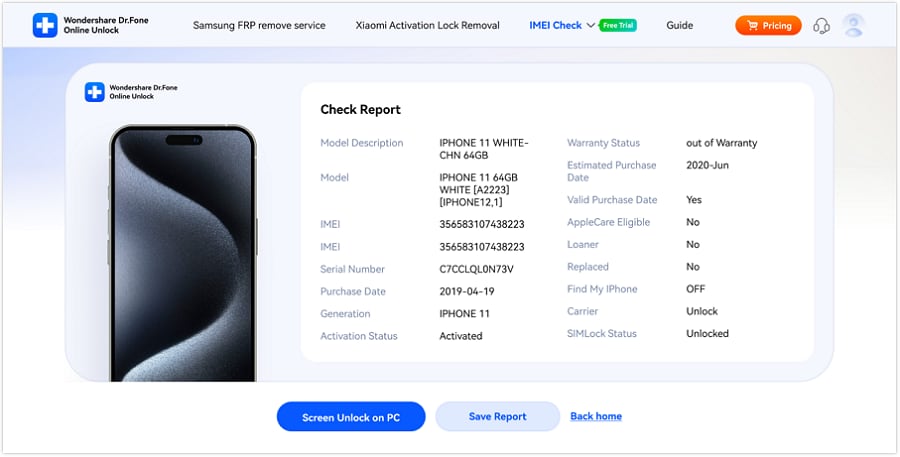
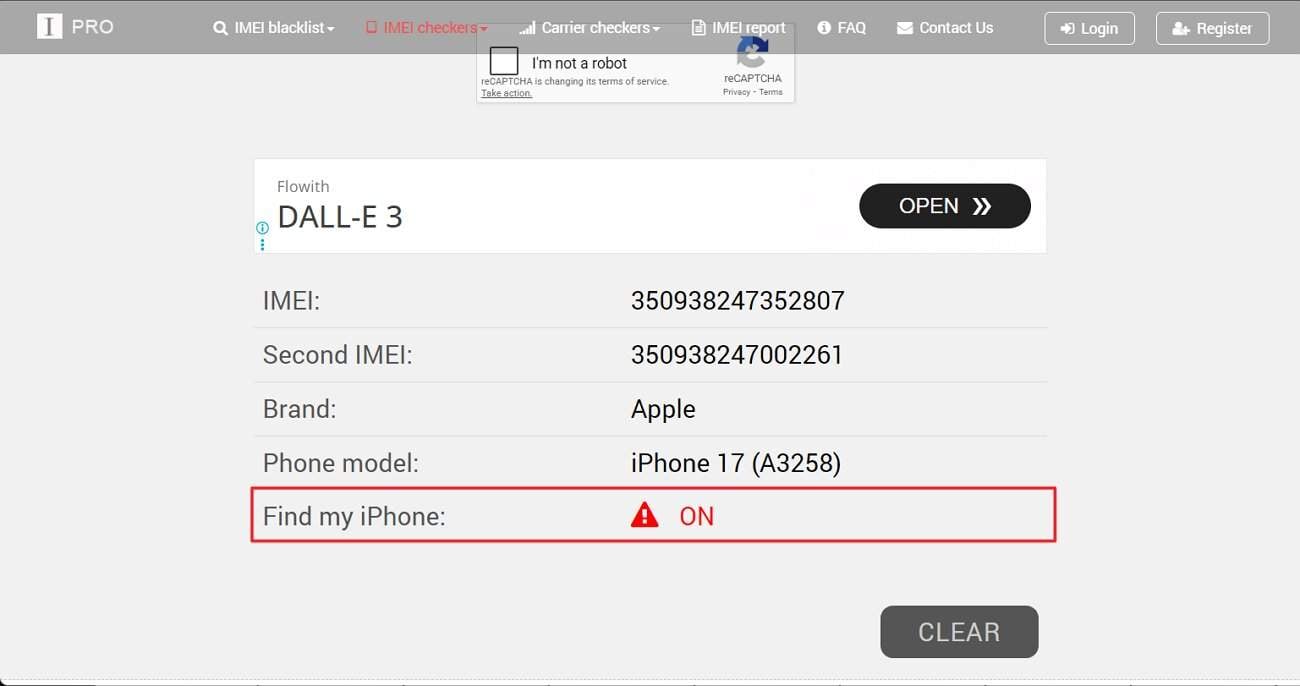
● When reviewing the final verification report, a "Find My iPhone" field displaying an "ON" status directly confirms that the activation lock is currently enabled on the device.
Ask AI for a summary
 ChatGPT
 Perplexity
 Gemini
 Claude
 Grok
Grok
Being locked out of an iPhone can feel frustrating and confusing for many users. People often buy used devices or forget details and face the Activation Lock screen. This lock blocks apps, photos, and even basic phone use on the device. As a result, a working phone can suddenly feel useless and unreliable.
Therefore, checking the lock status before use becomes very important for buyers. In this guide, the top 6 activation lock status checker tools are explained clearly. Moreover, explore how Dr.Fone Online Unlock is a reliable option for status checking.
 Verify your device info safely in one click
In this article

Part 1. How an Activation Lock Status Checker Works
An activation lock status checker identifies whether an Apple device remains linked to iCloud. Initially, the tool requires the device IMEI for verification. Next, this information is securely matched against Apple activation records. As a result, the system confirms the current activation lock status accurately. This process helps users detect locked devices before setting up resale or purchase. Consequently, IMEI-based verification provides reliable results without accessing the device. Therefore, users can make informed decisions before proceeding further.
Benefits of Using IMEI for iCloud Lock Verification
The following section explains why IMEI-based verification remains the most reliable approach:
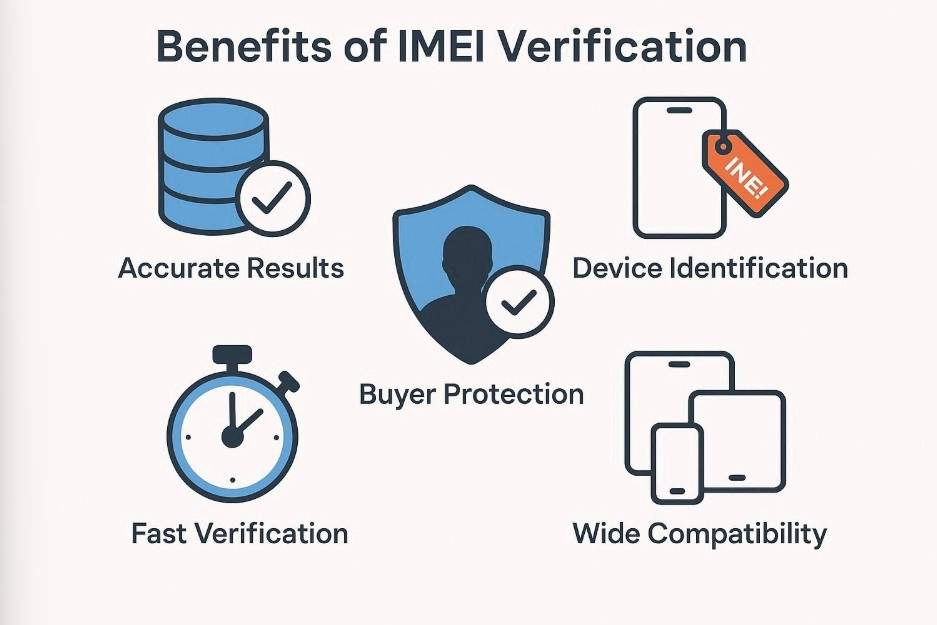
- Accurate Results: IMEI connects directly with Apple databases for reliable activation lock status check. This reduces incorrect results and avoids misleading third-party information online.
- Device Identification: Every IMEI number uniquely identifies a specific iPhone or iPad device. This ensures the activation lock checker matches results to the correct hardware.
- Buyer Protection: Checking IMEI helps buyers avoid purchasing iCloud-locked or blocked devices. This prevents financial loss and ownership problems after purchase.
- Fast Verification: IMEI-based activation lock check delivers results within seconds. Users do not need device access or login credentials to verify status.
- No Data Exposure: IMEI-based activation lock checker tools do not require Apple ID credentials during verification. This helps protect personal data and reduces privacy risks.
Part 2. Step-by-Step Activation Lock Checker Guide for iPhone and iPad
This section explains the top 6 activation lock checker tools, including step-by-step guides for checking iPhone and iPad:
1. Dr.Fone Online Unlock
Best For: Users needing quick activation lock checks and online iCloud unlock options.
Dr.Fone Online Unlock is designed specifically for checking complete Apple device details with accuracy. It also functions as an activation lock checker, allowing users to confirm whether an iPhone or iPad is linked to iCloud using IMEI details. This helps buyers and sellers verify device usability before setup, resale, or purchase, reducing risks associated with locked Apple devices. Alongside lock status checks, Dr.Fone Online Unlock also provides an online iCloud Activation Lock bypass option for supported devices. This process works through ECID-based device identification, enabling secure activation handling without exposing personal iCloud account data. With guided steps and clear results, users can check activation lock status confidently and avoid setup issues or purchase risks without technical difficulties.
Dr.Fone Online Unlock
Easily bypass Samsung FRP, remove Xiaomi account locks, and check IMEI with one trusted tool — fast, secure, and user-friendly.
- One-click Samsung FRP removal, no tech skills required.
- Unlock Xiaomi devices without a password.
- Supports 20+ different types of IMEI checks.
- Free IMEI check with no login, no ads, and instant access.
- Fully mobile-optimized for effortless on-the-go access.
Verify your device info safely in one click
Guide to Use Dr.Fone Online Unlock to Check Activation Lock Status
The following guide walks through checking the activation lock status with Dr.Fone Online Unlock:
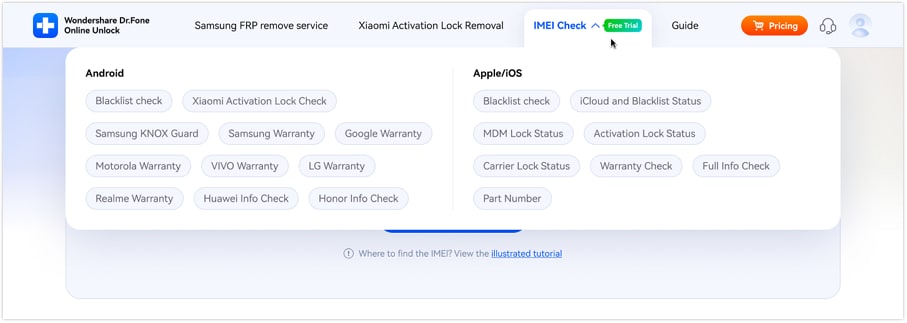
- Step 1. Access the IMEI Check Interface to Proceed
Open the Dr.Fone Online Unlock tool and navigate to the top menu. Then, expand the "IMEI Check" drop-down menu and select the "iCloud and Blacklist Status" option. - Step 2. Add IMEI and Start the Check
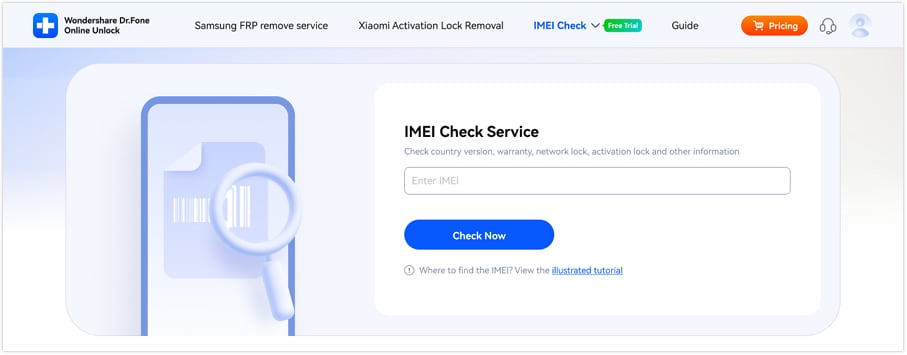
Now, in the "Enter IMEI" field, carefully type the device IMEI number. After confirming the number is correct, click the "Check Now" button. - Step 3. Review the Check Report Results
Once completed, the "Check Report" page appears on the screen. Now, review details like "Activation Status," "Find My iPhone," and carrier status. After that, use "Save Report" to keep results or "Back home" to exit.
 Verify your device info safely in one click
2. iUnlocker
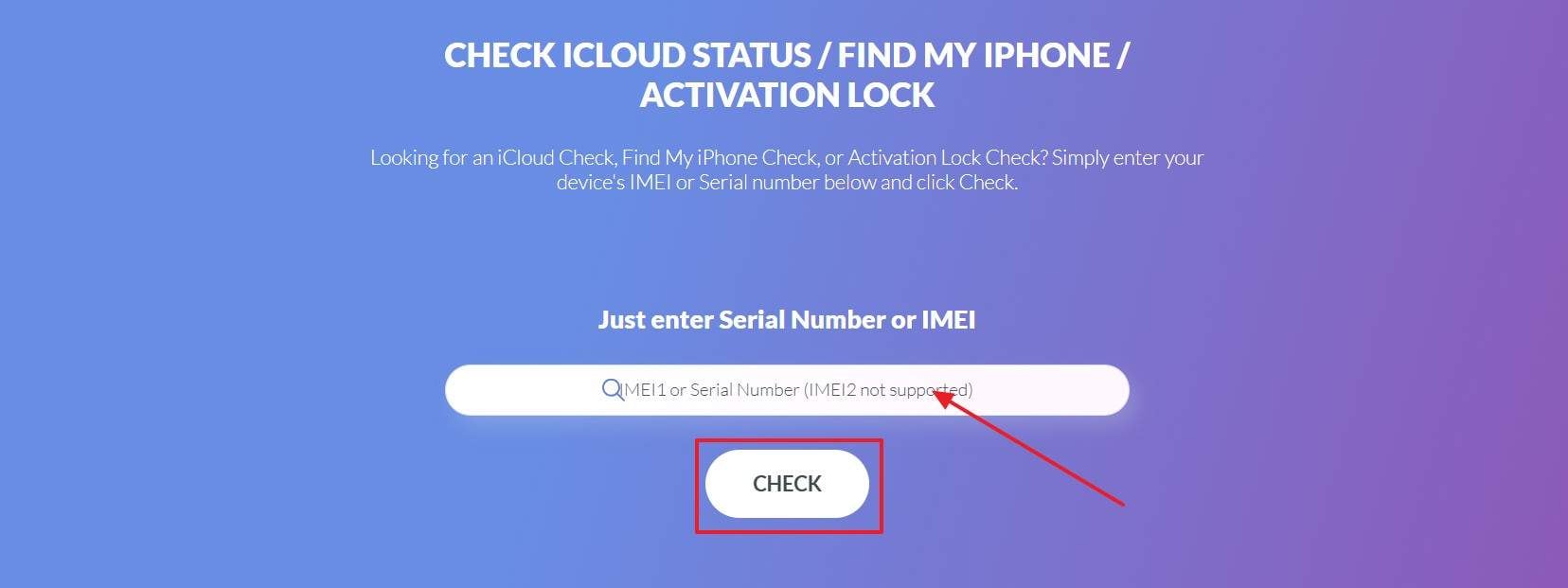
Activation lock status checkers like iUnlocker help users verify iCloud lock information safely. This online service allows IMEI-based checks without needing device access or login details. Moreover, iUnlocker provides clear activation lock results based on third-party system data sources. Buyers usually use it to verify the position of devices and then proceed to buy second-hand iPhones or iPads. A step-by-step method of checking iCloud lock information is as follows:
- Step 1. Enter the device "IMEI" into the search box carefully. After confirming the number is correct, click the "CHECK" button to start the verification process.
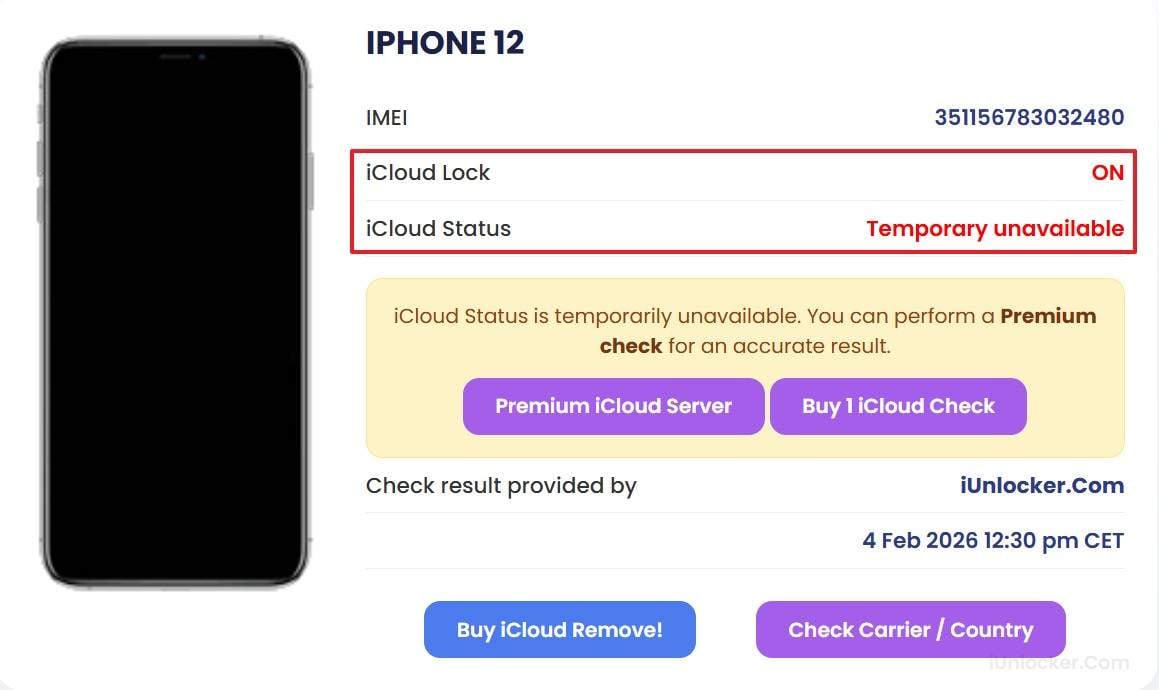
- Step 2. Next, wait for the results page to load and review the device information displayed. Here, check details like "iCloud Lock" and "iCloud Status" to understand the lock condition.
3. IMEI24
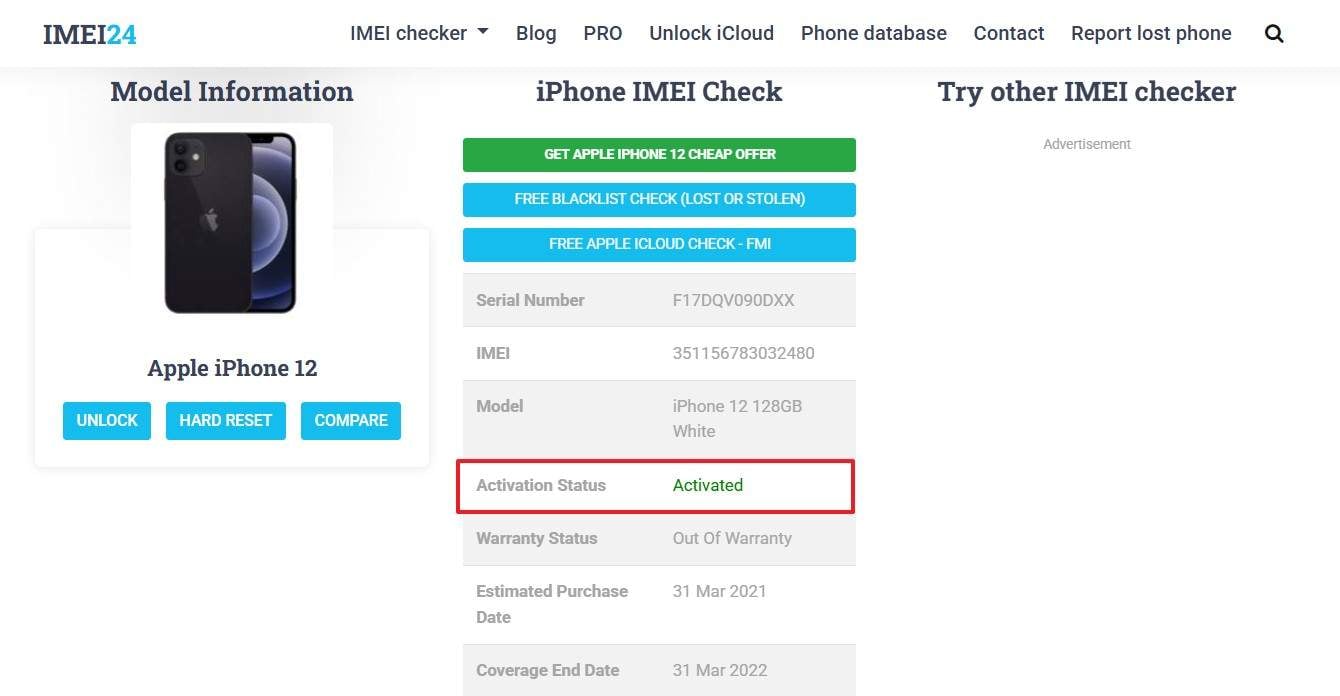
IMEI24 offers a detailed device info report that includes activation lock status checks. It uses the device IMEI to pull data from public systems and global device records. Additionally, the tool shows device model age, warranty status, and carrier details in one place. This makes IMEI24 useful for buyers who need more context than just activation lock results. Now, adhere to the steps below to try this tool effectively:
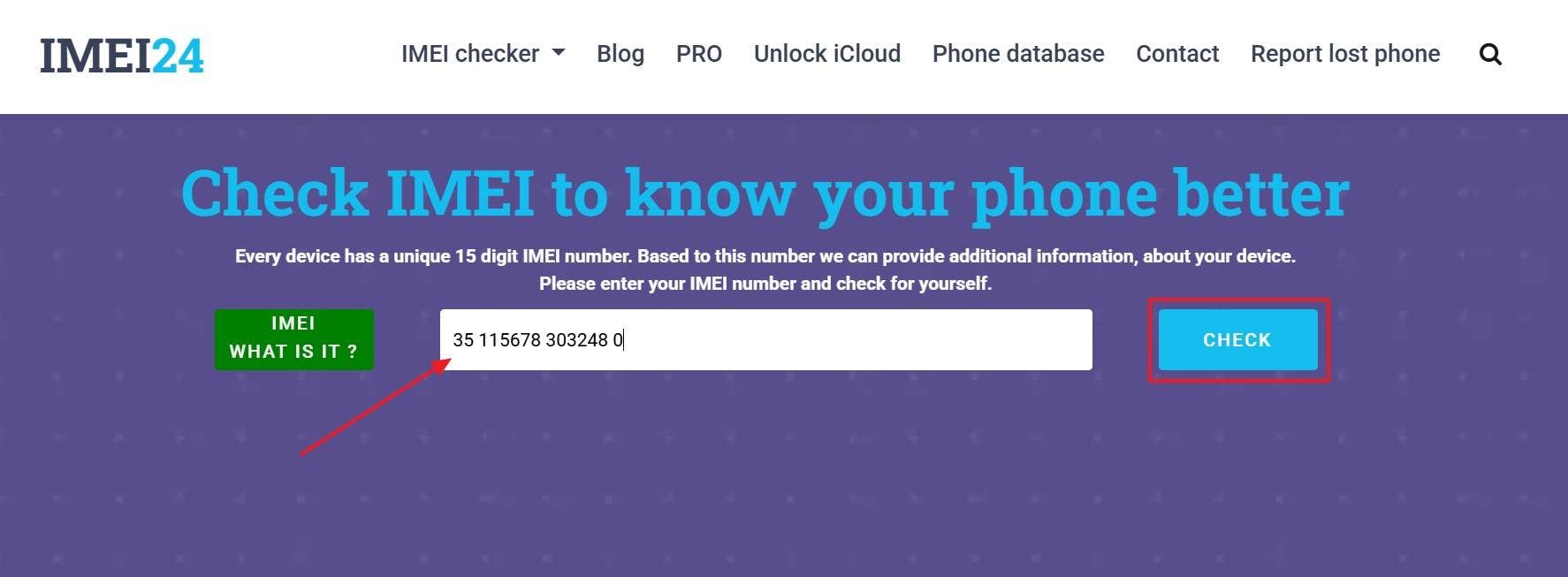
- Step 1. To start, open the IMEI24 website and locate the main input field on the homepage. Then, enter the device's "IMEI" number into the provided box and press the "CHECK" button.
- Step 2. Afterwards, wait for the results page to load and review the device details displayed. Here, check the "Activation Status" field to confirm whether the device is activated.
4. IMEICHECK.COM
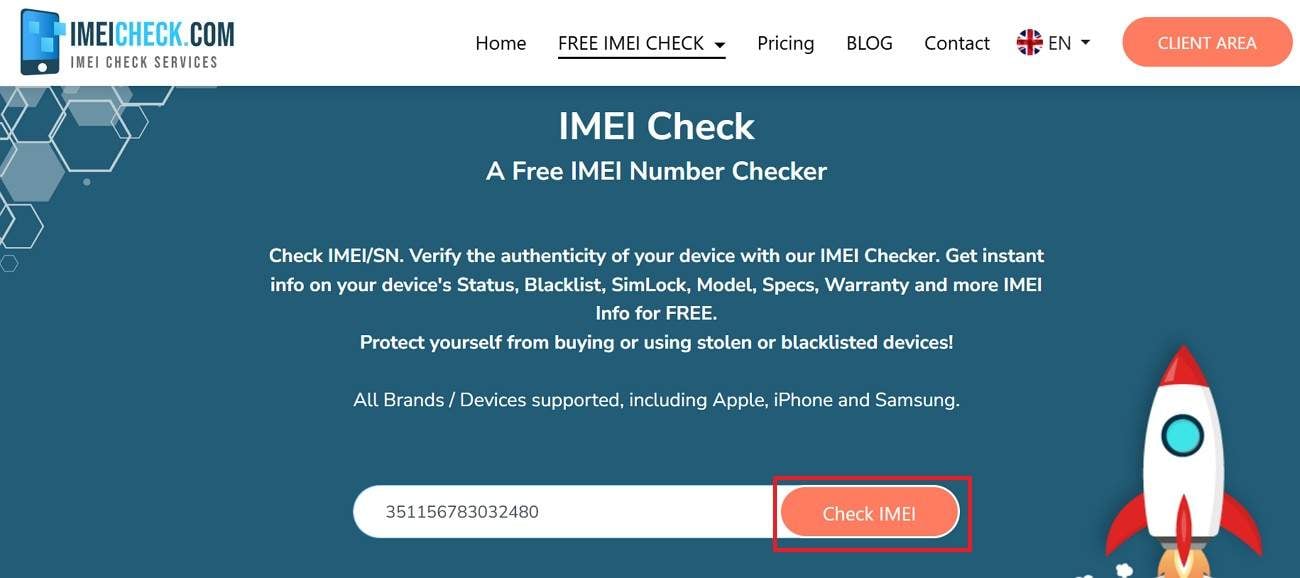
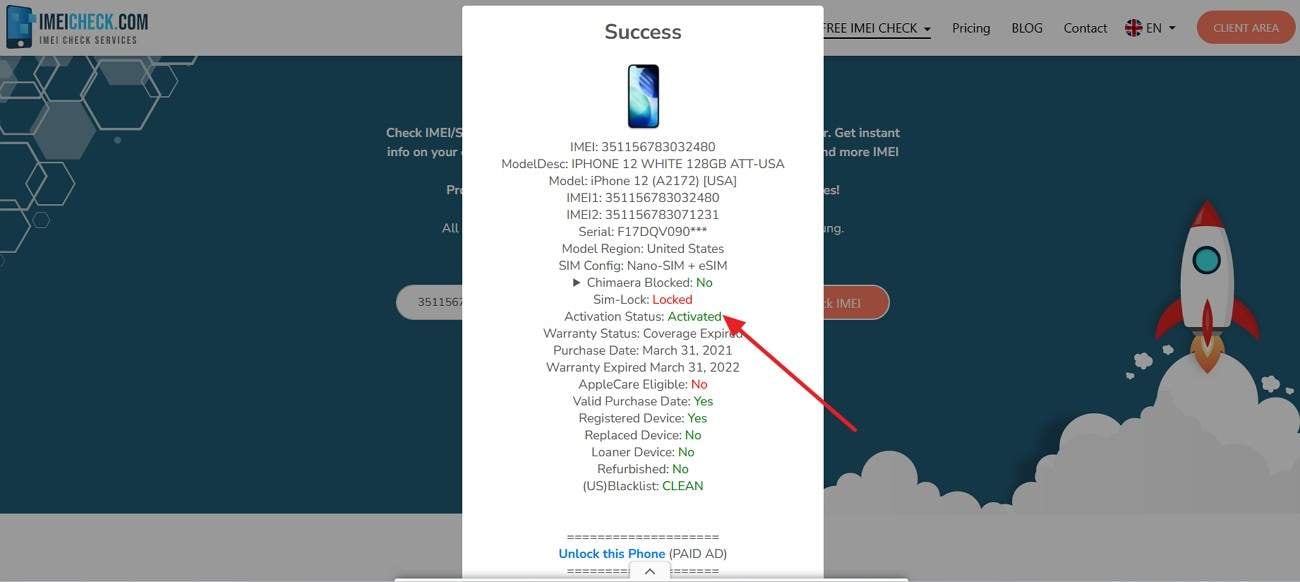
This online service provides detailed Apple device reports using IMEI numbers. It assists users in checking the activation lock status, carrier, and blacklist information. Moreover, this activation lock checker provides the results in a clear and understandable report. It is used by many buyers to read about iPhone information prior to buying used items. To try this tool with ease, follow the steps mentioned below:
- Step 1. Upon accessing the tool, enter your "IMEI Number" in the field and click the "Check IMEI" button to proceed
- Step 2. Later, wait for the confirmation screen to appear, showing "Success" at the top. Now, review the detailed report displayed on the screen to check the activation lock status.
5. SICKW.COM
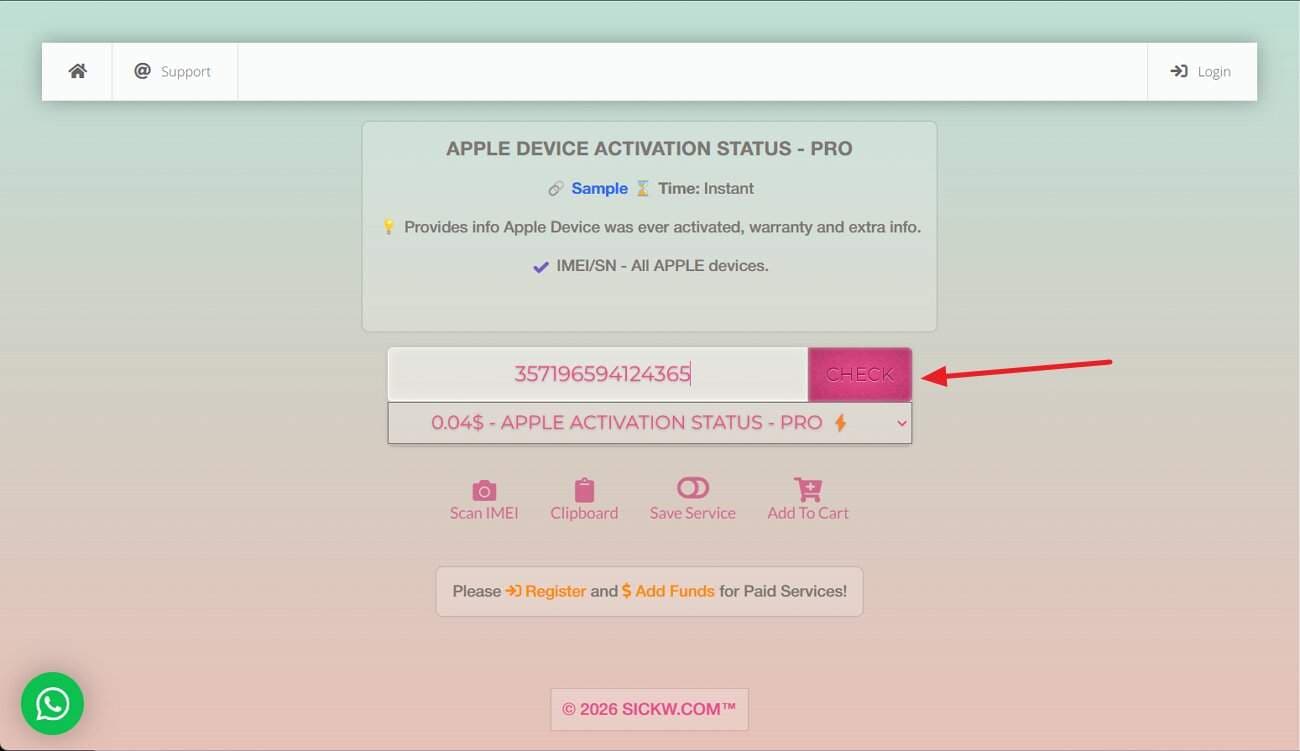
SICKW.COM operates as a credit-based lookup platform offering detailed device reports. Users select specific checks, such as iCloud status, blacklist history, or carrier information, before paying per report. Notably, it also functions as an activation lock status checker by returning lock results tied to Apple databases. Let's walk through the steps below to try this tool to check the activation lock status:
Instructions: After accessing the website, select the "Apple Activation Status – PRO" from the drop-down menu and add the IMEI number. Now, press the "Check" button and let the server retrieve the data for your iPhone.
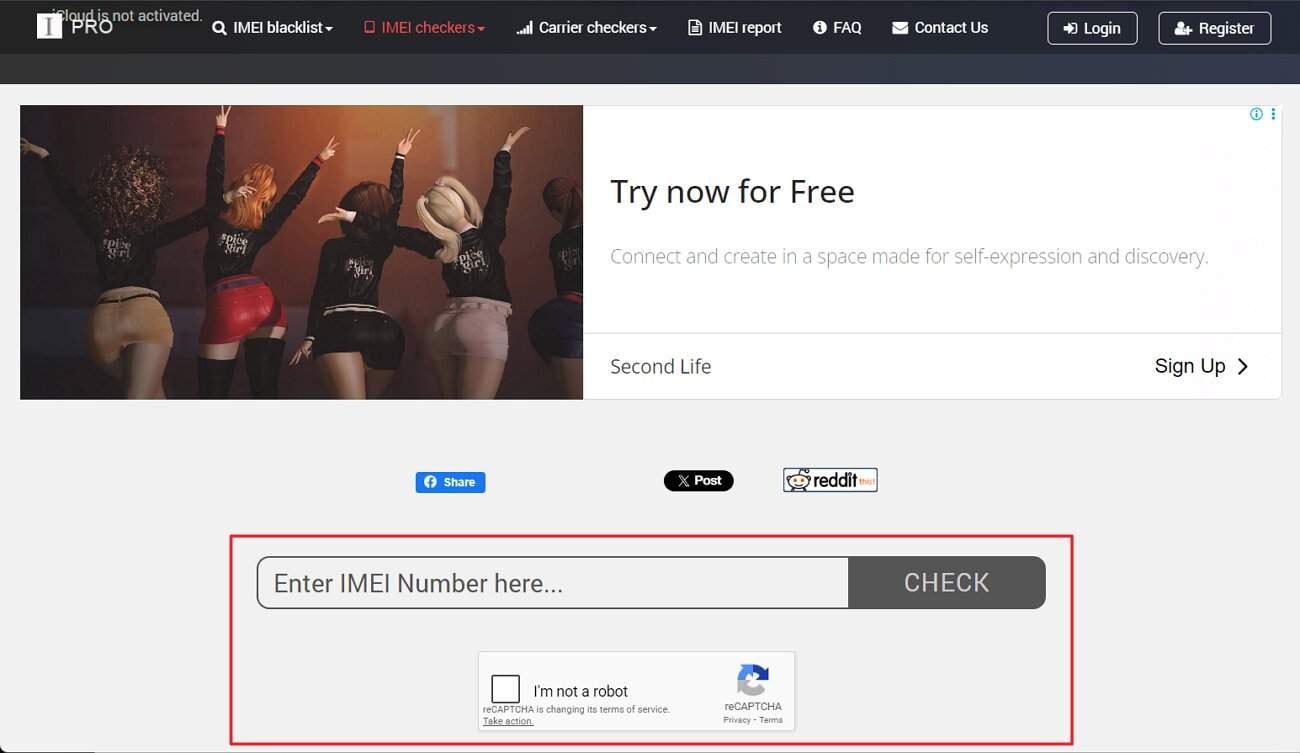
6. IMEI Pro
Being an activation lock checker, this online tool helps users review important iPhone details using IMEI numbers. It shows carrier lock, warranty, and device status information clearly. Meanwhile, buyers can confirm lock conditions before purchasing used devices, reducing risks linked to iCloud-locked or restricted phones. Now, let's move forward to the step mentioned below to try this tool:
- Step 1. Open the iCloud IMEI Check page, enter the device IMEI number, and click "Check" and wait for results.
- Step 2. If this tool shows that Find My iPhone is "ON," then it means that the iCloud activation lock status is enabled.
Part 3. Comparison: Top Activation Lock Checker Tools at a Glance
With the basics covered, the following table shows how each activation lock checker performs at a glance:
| Tool | Ease of Use | Result Clarity | Check Speed | Accuracy Level | Ideal User Type | Performance Summary |
|---|---|---|---|---|---|---|
| Dr.Fone Online Unlock | Very High | Very Clear | Fast | High | General buyers and non-technical users | Best overall balance of clarity, guidance, and reliability |
| iUnlocker | High | Clear | Fast | Medium-High | Resellers checking multiple devices | Strong bulk-check option with moderate learning curve |
| IMEI24 | Medium | Detailed but Complex | Medium | Medium | Users needing a simple device background | Informative but less beginner-friendly |
| IMEICHECK.COM | High | Clear | Fast | Medium | Users wanting quick single-device checks | Simple and fast for basic verification |
| SICKW.COM | Low | Technical | Medium | Medium-High | Advanced users and businesses | Powerful but complex and credit-based |
| IMEI Pro | Medium | Basic | Fast | Medium | Casual buyers doing quick checks | Functional but limited in detail |
Dr.Fone Online Unlock stands out as the top choice due to its guided process and clear activation lock results. Besides, it offers the most user-friendly and reliable experience among all the tools compared.
Conclusion
To conclude, using an activation lock status checker helps buyers avoid costly mistakes with used Apple devices. Each tool offers different strengths, depending on checking needs and experience levels. Among them, Dr.Fone Online Unlock stands out for its guided process and clear results. It provides a reliable way to verify lock status and manage activation issues confidently.
Verify your device info safely in one clickFAQs
-
Q: What does an activation lock status checker do?
A: An activation lock status checker indicates whether an Apple device may still be linked to an iCloud account. This helps buyers avoid locked phones before resale or purchase.
-
Q: How does IMEI-based activation lock checking work?
A: IMEI verification checks device records against Apple systems without needing device access. It provides quick activation lock results for iPhones and iPads worldwide today.
-
Q: Why should buyers check the activation lock status before purchase?
A: Checking the activation lock status is important when buying used Apple devices online. It prevents financial loss and ownership issues caused by iCloud-locked phones.
-
Q: Why is Dr.Fone Online Unlock the most recommended option?
A: Dr.Fone Online Unlock is recommended because it offers guided steps, clear activation lock status results, and a user-friendly process that helps buyers make safer purchasing decisions.




Ahmed Absal
staff Editor
Generally rated4.5(105participated)