
![How to Unlock Phone from EE: Step-by-Step Methods [2026]](https://images.wondershare.com/drfone/article/2026/03/how-to-unlock-ee-phone-1.jpg)

 TL;DR:
Most EE phones purchased after December 2021 are already unlocked, while older devices can be permanently unlocked for free via the EE website or by calling 150 provided the account meets the 6-month minimum term with no outstanding balances.
● Second-hand device owners must call 0800-956-6000 to process manual requests, which requires original account security information and proof that the phone is not blacklisted.
● To verify the unlock status if a new SIM fails, iOS users should check for a No SIM Restrictions message in their settings, and Android users must ensure available carriers appear when toggling the Automatically Select Network option.
● Dr.Fone Online Unlock offers a permanent, warranty-safe alternative that removes EE restrictions within 24 hours using only the IMEI number, making it ideal for users who lack original owner details or face official rejection.
Ask AI for a summary
 ChatGPT
 Perplexity
 Gemini
 Claude
 Grok
Grok
 Verify your device info safely
According to EE and industry-wide rules in the UK, all devices sold directly by EE since December 2021 have been unlocked. Despite that, many users still find their handsets restricted to a single carrier just because they are using older models. Nevertheless, the EED lock prevents you from grabbing a better deal or using a local SIM card to avoid high roaming charges while traveling abroad. Luckily, whether you have an older contract device or a second-hand phone, there are several proven ways to break these digital chains. From using carrier requests to effective, time-oriented solutions like Dr.Fone Online Unlock, this guide will explain how to unlock an EE phone with a few taps. Reclaim your phone's potential and discover what makes Dr.Fone Online Unlock the best option of all.
In this article

Part 1. Do You Actually Need to Unlock Your EE Phone?
While learning how to unlock a phone from EE, it's important to know that you do not need to unlock an EE phone if it was purchased after December 2021. In addition to the older model, if you want to switch networks, use a local SIM abroad, or sell your phone later, you need to unlock the device. Given these situations, know if you need the basic EE unlocking requirements mentioned below:
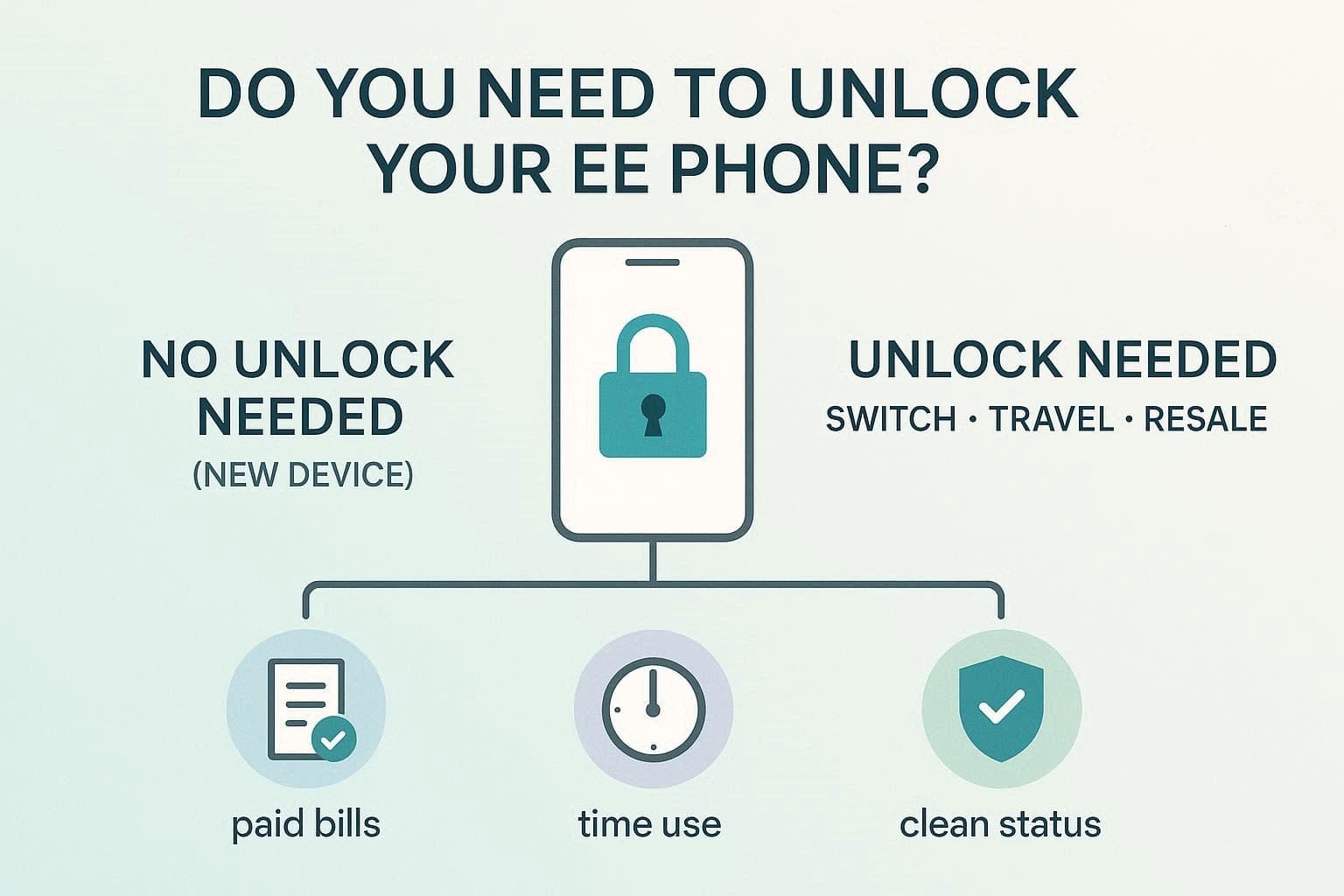
- Your monthly mobile bills must be paid in full, with no outstanding balance.
- You must have owned your pay-monthly device for at least 6 months.
- The phone cannot be reported as lost, stolen, or currently blacklisted.
- The device should ideally be purchased directly from an official EE store.
- Unlocking is always free if you have finished your minimum term agreement.
- Your account must not have any recent flags for suspicious or fraudulent activity.
Part 2. How to Unlock a Phone from EE Using Official Methods (Step-by-Step)
Being cleared on the EE unlocking, review this section and find how to unlock a phone from EE in simple, practical ways:
Method 1: Request Unlock via EE website
This is the most efficient way to unlock your device, as you just have to use the official EE Unlock Online Portal. Furthermore, the solution is available 24/7, and the progress bar guides you through each process in detail. The representative later mails the unlock code with detailed instructions so that you can finalize the process and use any SIM card immediately, as guided:
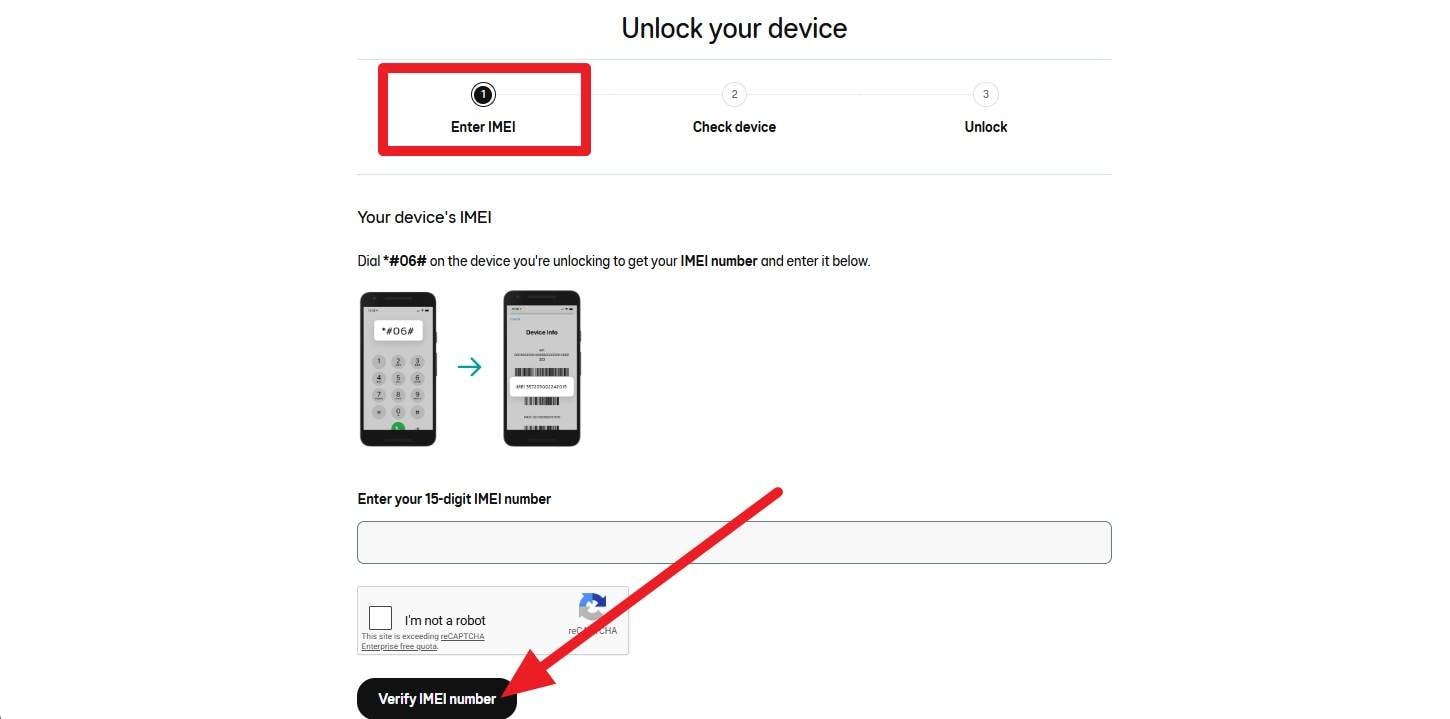
- Step 1. Within the "Enter IMEI" tab, add the 15-digit IMEI number in the given field and tap the "Verify IMEI Number" option after authentication.
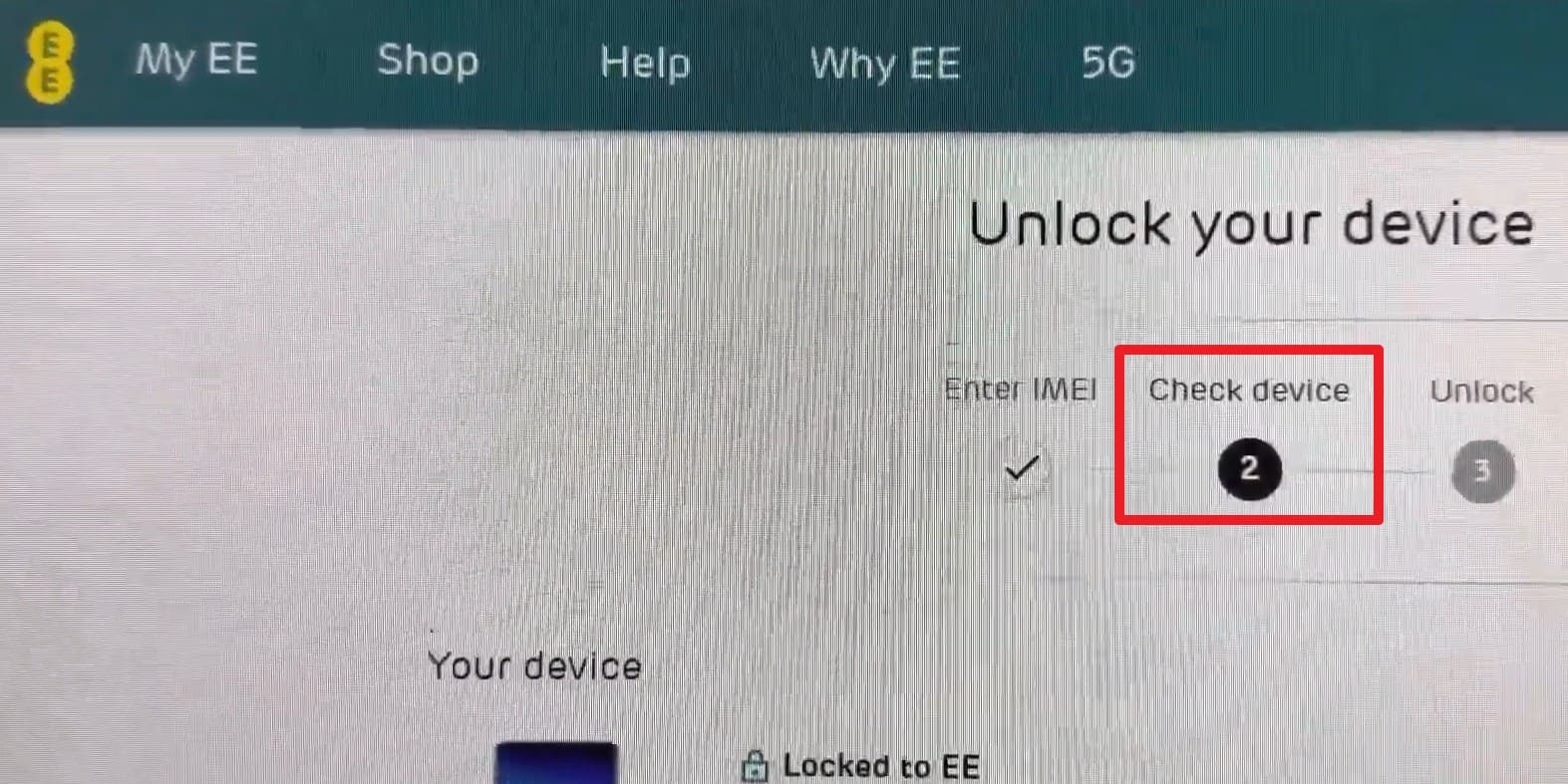
- Step 2. When directed to the "Check Device" tab, press the "Unlock This Device" button after the IMEI detection.
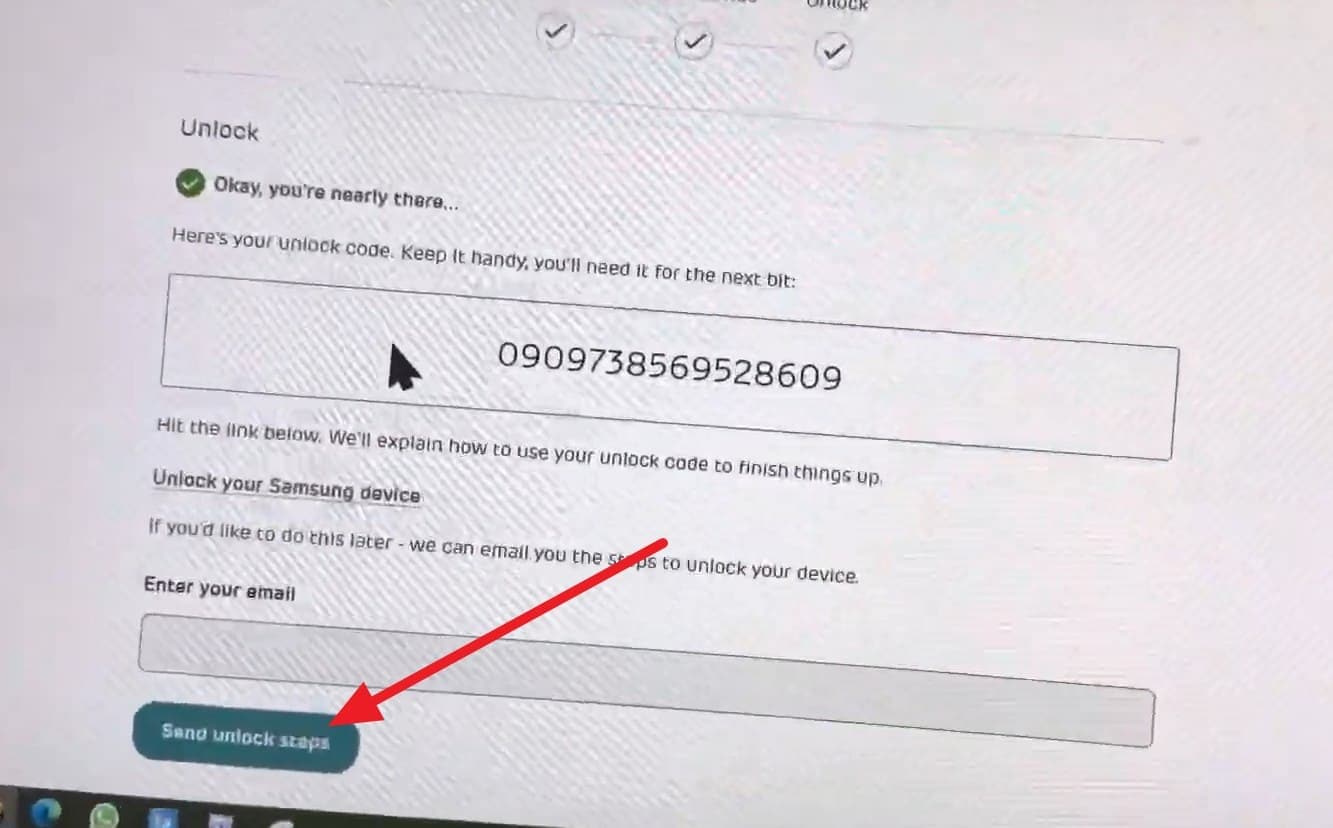
- Step 3. Finally, navigate to the "Unlock" tab to get the code, then add your email details. After that, press the "Send Unlock Steps" button, and the EE support team will email you the final activation instructions.
Method 2: Contact EE support
While learning how to unlock an EE phone, if you prefer to speak with the representative, try this option. It is also effective when the online form isn't recognizing your device; you can call their customer service team directly with various key combinations. So, as you try the mentioned keys, the representative will process the request and provide a timeline for the unlock code or remote activation:
- Dial 150 from your EE mobile or 07953 966 150 from any other phone.
- If you are a small business customer, call 345 from your handset.
- For second-hand devices, you may need to call 0800-956-6000 and provide the agent with your IMEI details and account security information.
Part 3. What to Do If Your EE Phone Unlock Is Rejected or Not Working?
Let's say you tried both ways on how to unlock a phone EE, but either the portal fails to recognize the IMEI, support doesn't respond, or the request gets rejected. Regardless of the situation, get to know what fixes or workarounds you can try to unlock the EE device:
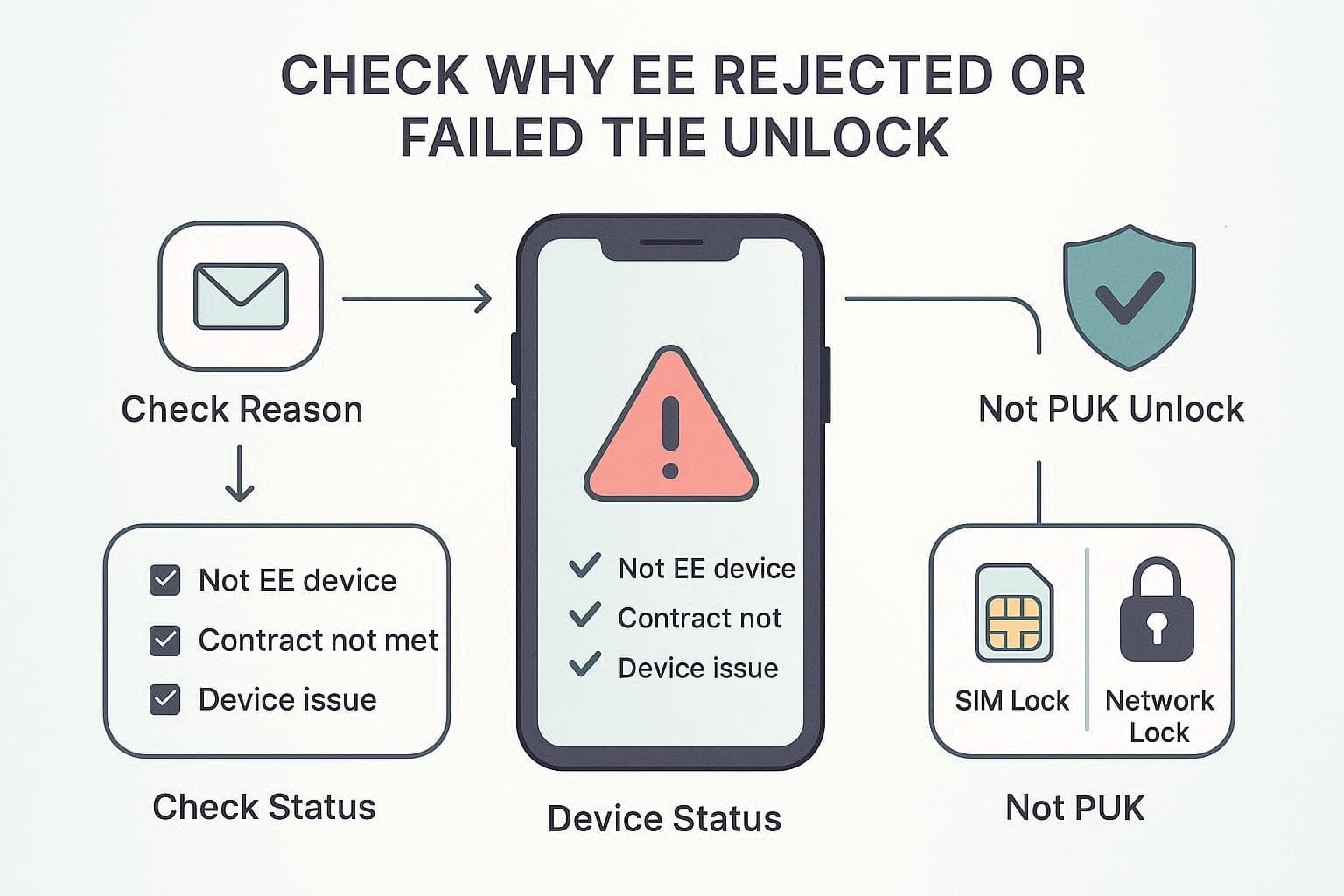
1. Check Why EE Rejected or Failed the Unlock
First, read the EE mail and see the reason, like not on EE, contract not met, or device issues. This is important because the EE unlock is only possible when purchased directly from the EE and not reported as lost or stolen. Additionally, do not mix PUK with unlock, as PUK only fixes SIM lock and does not allow other networks.
2. Fix Common Problems and Try Again
Aside from the email rejection, find out if you faced any issues while trying ways on how to unlock a phone from EE.
- If The Minimum Term Is Not Met: Wait until about 6 months of use or contact support for a possible exception.
- If the Device Is Second-Hand: EE may unlock it if it has an EE history and a clean status, but proof may be needed.
- If The Online Unlock Page Fails: Contact the Mobile Care via 150 or 07953 966 250 for a manual unlock request.
3. When EE Says It's Unlocked, But Another SIM Still Doesn't Work
Even after EE confirms the phone is unlocked, you may still encounter issues when inserting another SIM card. If so, try the mentioned ways and see if any of these help with the EE unlock confirmation:
Way 1: Double‑check If the Phone Is Unlocked
Sometimes system updates, network refresh, or SIM issues can cause confusion even after approval. Hence, this action confirms the exact unlock status and avoids unnecessary support calls. To know how you can do so, while learning how to unlock an EE phone properly, here are the steps:
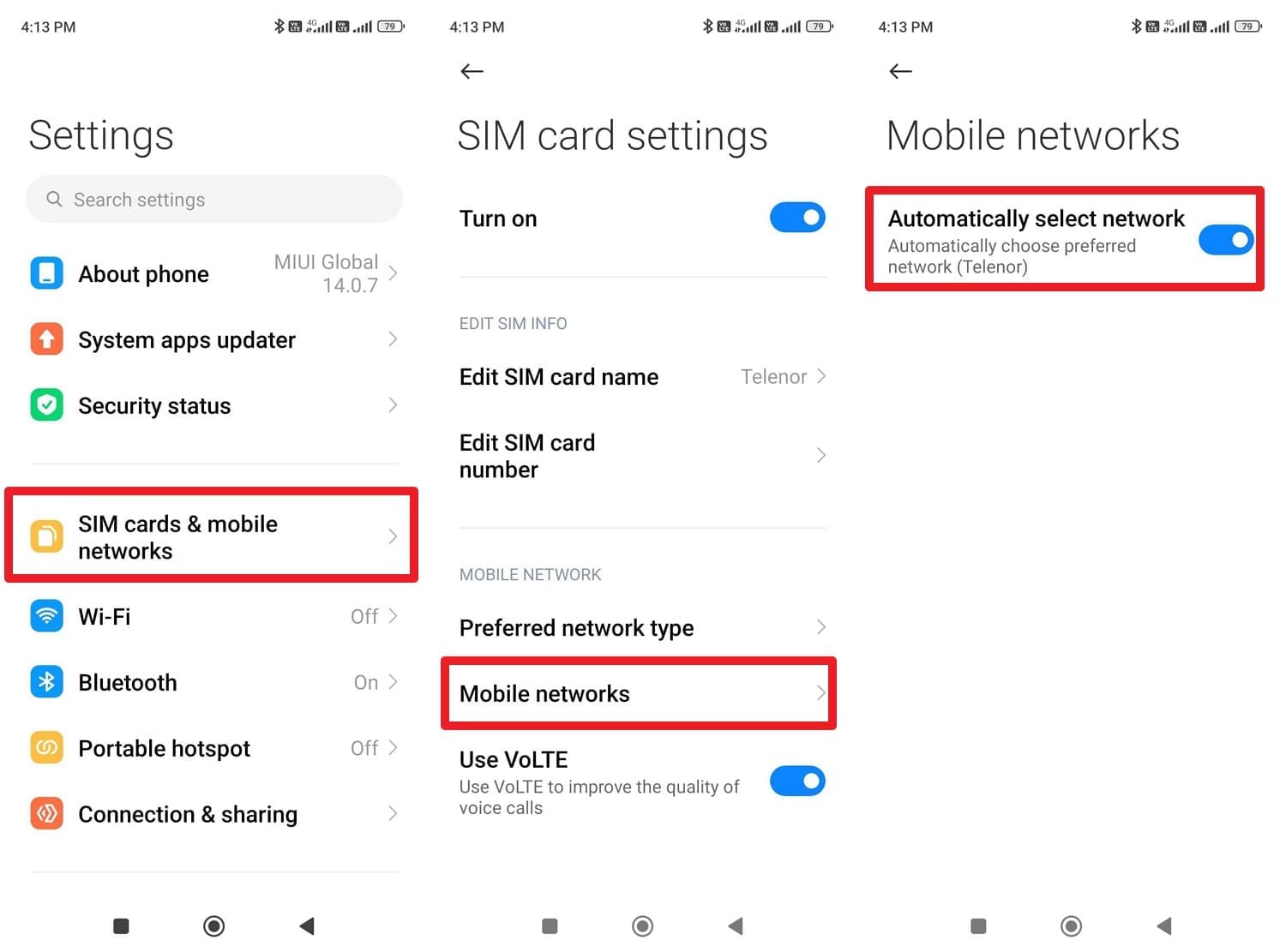
For Android
Instructions: Tap "SIM Cards & Mobile Networks" in the settings, then select the SIM you want to confirm from the listed options. After that, choose the "Mobile Networks" option and toggle the "Automatically Select Network" option. If you get a list of available carriers, the phone is unlocked.
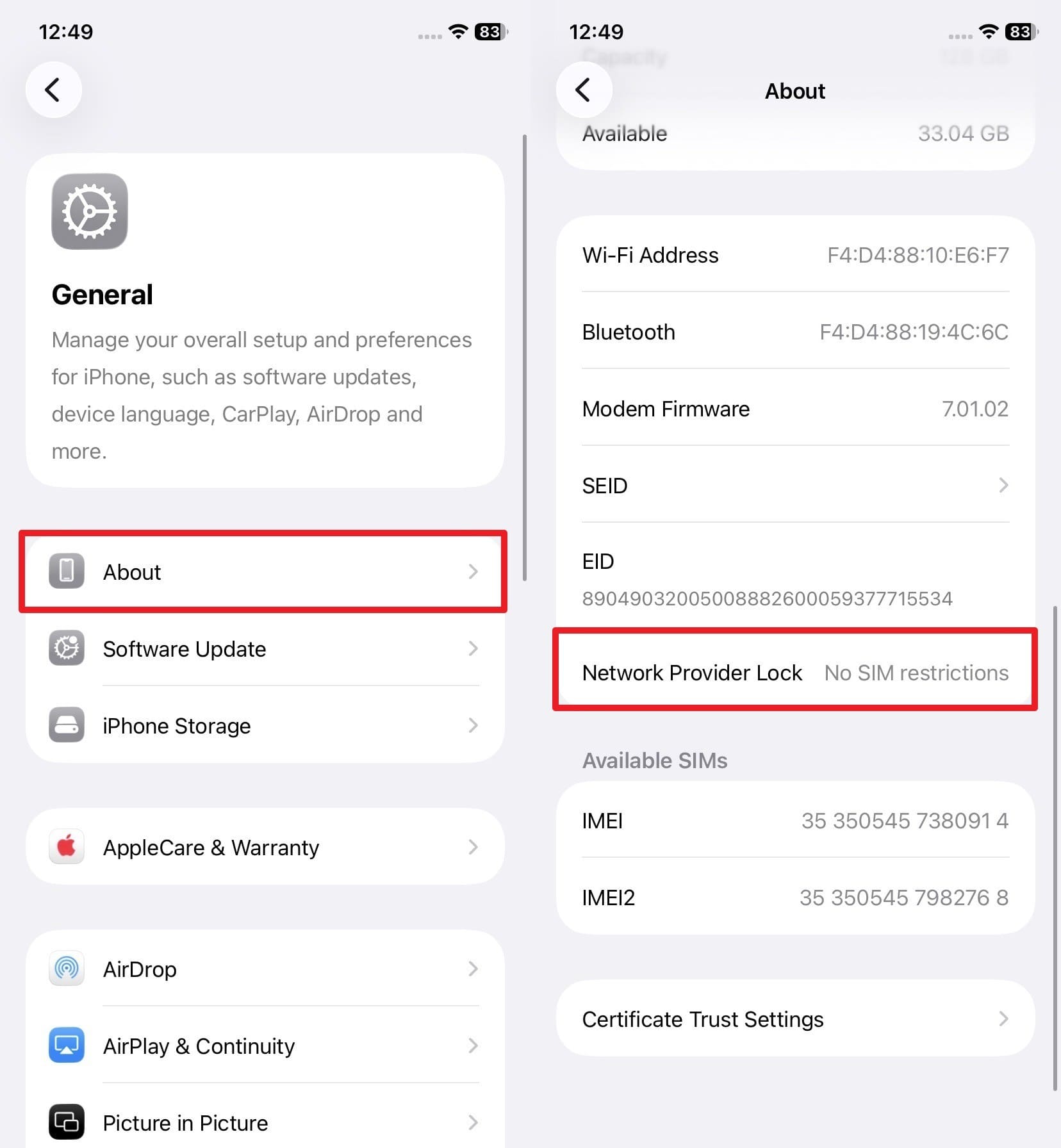
For iPhone
Instructions: Locate the "Network Provider Lock" option in the "About" settings as you choose the General option. If this section says "No SIM Restrictions," it is likely unlocked.
Way 2: Try a Different SIM and Restart
There are chances that the first SIM may have issues, or the network may not refresh right away. So, use another non-EE SIM to check if the first one has a problem, then restart the phone. Through this, you will be able to detect SIM faults, refresh network settings, and confirm true unlock status without extra support.
4. Last‑Resort Alternatives (If EE Can't or Won't Unlock)
If you still face the EE unlocking issue and wonder what went wrong, use the online IMEI-based service to learn how to unlock a phone on EE. Dr.Fone Online Unlock is the most reliable option here, as it lets you remove SIM restrictions from EE devices in 0-24 hours with a 100% success rate. This tool is fully optimized for mainstream and older models, including Apple, Samsung, Nokia, Sony, and ASUS. In addition, the tool supports major carriers such as AT&T and EE across all upcoming updates. Most of all, the unlocking request is submitted to the cloud, keeping the data completely safe throughout the process. The unlock stays active forever, even after you update your phone's software, and it only needs your IMEI details to remove the EE lock in 2-3 simple steps.
Dr.Fone Online Unlock
Easily bypass Samsung FRP, remove Xiaomi account locks, and check IMEI with one trusted tool — fast, secure, and user-friendly.
- One-click Samsung FRP removal, no tech skills required.
- Unlock iCloud & SIM lock easily and safely.
- Unlock Xiaomi devices without a password.
- Supports 20+ different types of IMEI checks.
- Free IMEI check with no login, no ads, and instant access.
- Fully mobile-optimized for effortless on-the-go access.
Verify your device info safely in one clickHow to Unlock an EE Phone Using Dr.Fone Online Unlock
While having the option to review your added details and monitor the unlocking history, learn how to unlock a phone with EE on Dr.Fone Online:
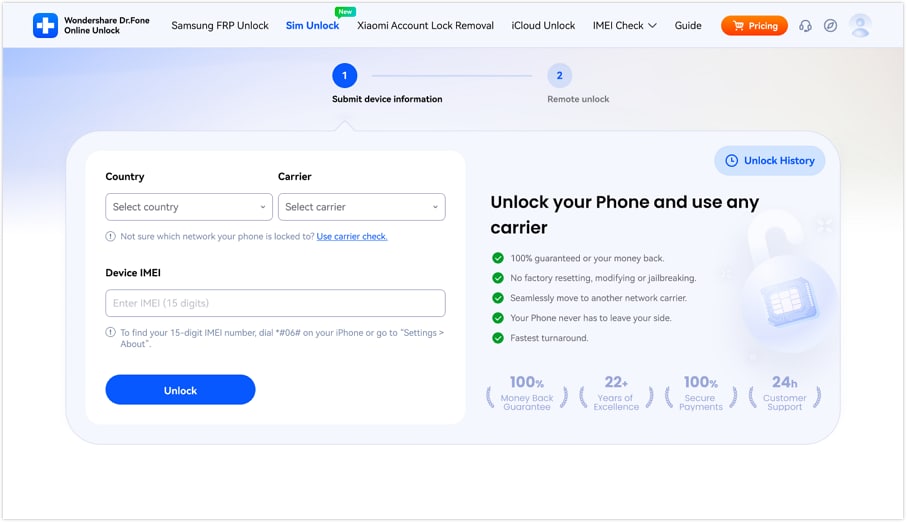
- Step 1. Add Details on the Dr.Fone SIM Unlock Page
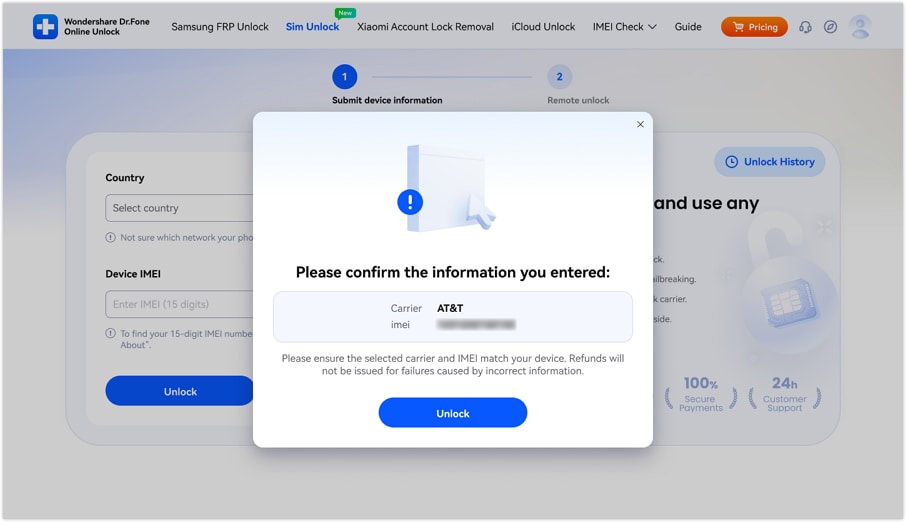
Add the carrier, IMEI, and country details on the official Dr.Fone SIM Unlock website page and press the "Unlock" button.
- Step 2. Confirm the Details & Submit EE Lock Request to Cloud
After that, confirm the details in the popup window, and the tool will submit the EE lock removal request to the cloud.
- Step 3. Access the Dr.Fone Unlocking History for EE Devices
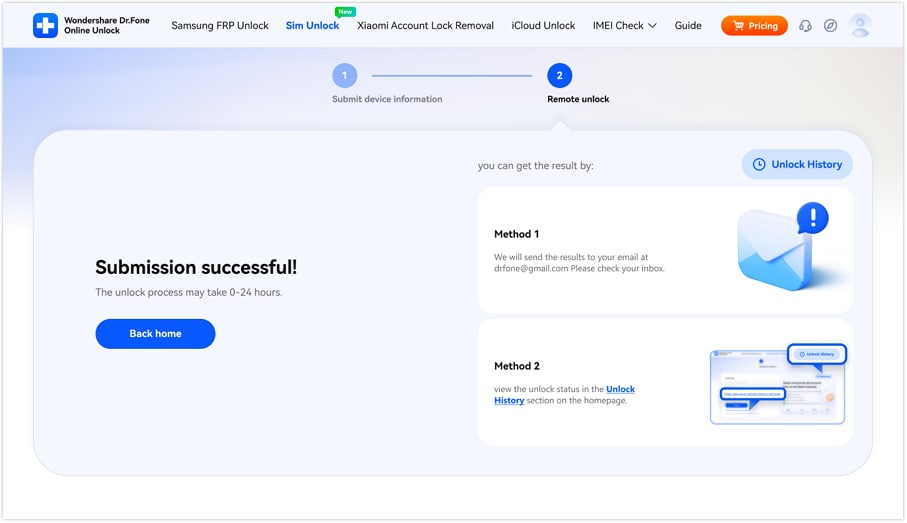
Within 0-24 hours, the lock will be bypassed, and you can use the 2 mentioned ways to monitor the progress.
Conclusion
Many users wonder how to unlock an EE phone, mainly for devices bought before December 2021. Therefore, this guide has explained 2 official ways that can cause the unlocking confirmation issues if the requirements are not met. To save you from this hassle, it is suggested to double-check the lock status and use Dr.Fone online Unlock to remove the EE lock within 0-24 hours.
Verify your device info safelyFAQs
-
Q: Can I unlock my EE phone if I am not the original owner of the device?
A: Official EE requests usually require the original account details to process a network unlock for any phone. However, you can use Dr.Fone Online Unlock to bypass these restrictions in 0-24 hours without needing any information from the owner.
-
Q: Will my phone stay unlocked forever after I perform a factory reset or a software update?
A: The unlock is permanent because it changes your device's status in the official global manufacturer database. Consequently, you can update your software or reset your phone settings without ever losing your network freedom.
-
Q: Does removing the network lock on my EE handset void my existing manufacturer's warranty?
A: Using official methods or IMEI-based tools like Dr.Fone Online Unlock ensures that your hardware warranty remains fully valid and completely protected. Therefore, you can safely unlock your device without worrying about losing your technical support or repair coverage.





Alice MJ
staff Editor
Generally rated4.5(105participated)