

 TL;DR:
To restore access to an Airtel SIM, you must input a carrier-provided PUK code for PIN-locked cards, resolve account suspensions via the Airtel Thanks App, or contact the original smartphone carrier to remove device-level network locks.
● Exceeding 3 incorrect PIN entries triggers a PUK lock, and failing to enter the correct PUK code within 10 attempts will permanently disable the SIM card.
● SIMs blocked due to pending KYC verification or severe account restrictions cannot be fixed online and require visiting a physical Airtel store with an original ID.
● Devices displaying a "SIM not supported" error can be diagnosed by entering the 15-digit IMEI into Wondershare Dr.Fone Online Unlock to check for hidden carrier locks or blacklist status.
Ask AI for a summary
 ChatGPT
 Perplexity
 Gemini
 Claude
 Grok
Grok
There is hardly anything more aggravating than putting your Airtel SIM in and the display showing "SIM locked", "Enter PUK", or still worse, no signal. It can also be that a damaged SIM or network lock might cause the disconnection of your service without any call, text, or data.
The point is to know what you've got. In most cases, a locked SIM is caused by the entry of the wrong PIN several times and can be unlocked via the PUK; on the other hand, a blocked SIM is a state whereby Airtel has blocked your SIM for reasons such as nonpayment, inactivity, or security issues. With this detailed guide, you will be able to recognize a problem instantly and fix it accordingly. Let's learn how to unlock Airtel SIM!
 Verify your device info safely in one click
In this article

Part 1. How to Identify Why Your Airtel SIM Is Locked or Blocked
1.1 PIN / PUK lock
When a phone requests a PIN or displays messages like "SIM locked" or "Enter PUK code, " it indicates that the SIM is locked due to too many wrong PIN entries. In most cases, this occurs after 3 failed attempts.
1.2 Airtel SIM blocked
If you are not getting any network signal or seeing messages such as "SIM not provisioned" or "No service", it is likely that Airtel has blocked your SIM due to unpaid bills or prolonged periods of inactivity.
1.3 Network lock
A network lock is a restriction that limits your phone to operate only with a single carrier. If you bought your phone on contract with a carrier or it has been locked to a certain network, the phone will most likely not accept your Airtel SIM.
Part 2. How to Unlock Airtel SIM Using PIN or PUK Code
If your Airtel SIM gets locked after you enter the wrong PIN several times, there is no need to worry as it's one of the most common and fixable issues.
- Step 1. Check what your phone is asking for
Switch the phone on and read the screen message. If it's "Enter PIN, " then you still have a few tries left. If it says "Enter PUK code, " then the SIM is locked and will need the PUK code to unlock. - Step 2. Input the correct PIN (if you have it)
If you have the PIN, type it in very carefully. Usually, only 3 tries are allowed for a SIM card so, you should not guess. If you are not sure, go to the next step rather than trying and getting the card locked. - Step 3. Request your PUK code from Airtel
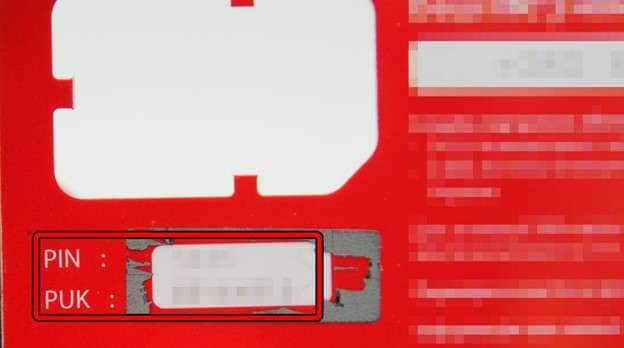
The fastest way to get your PUK is by logging in your Airtel account, checking the box that the SIM came in, or calling Airtel customer service. This PUK is a code that is different for every SIM.
- Step 4. Enter the PUK on your device
When the system asks you, make sure you type the PUK code. Normally, you will be given up to 10 attempts to enter a PUK, but be warned, if you take too many attempts afterward, it will block your SIM.

- Step 5. Choose a new PIN
After your PUK is accepted, you will be prompted by your phone to generate a new SIM PIN. It must be strong yet easy to remember, and you will have to enter the new PIN twice to verify it. - Step 6. Restart your phone and check the SIM
When you have selected the new PIN, switch it off and on the device. The SIM should now be unlocked and function normally. If you have any more problems, then you should get in touch with Airtel to seek more help.
Part 3. How to Unblock Airtel SIM Card Online or Offline
If your Airtel SIM has been blocked due to issues with your account, for example, if it has been inactive or you have unpaid dues or there have been security points, then the only method of retrieving it is via Airtel official channels.
3.1 How to Unblock Airtel SIM Online
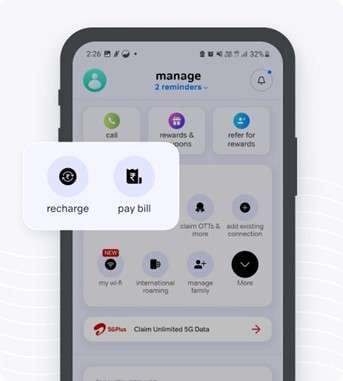
Method 1 – Airtel Thanks App
Method 2 – Airtel self-care portal (Official Website)
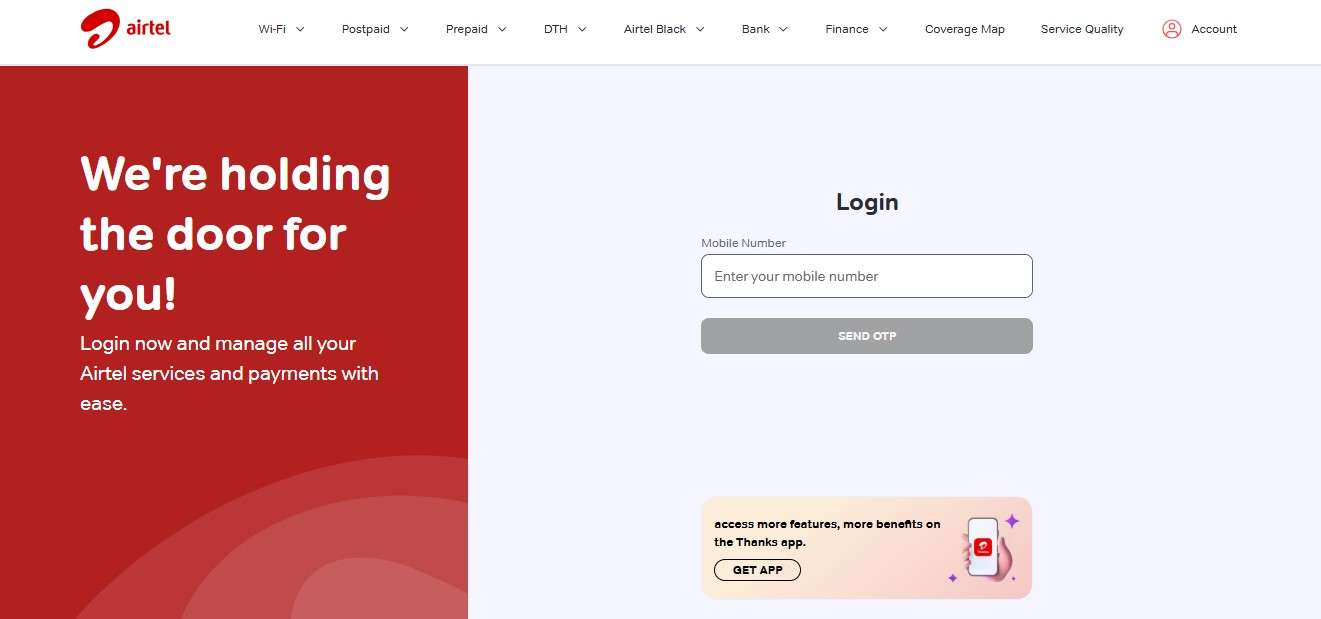
If you want to use a web browser, Airtel's official self-care portal can give you the same kind of control as the app.
- Step 1: Go to the official Airtel self-care website. Enter your mobile number and then the OTP to log in.
- Step 2: Head over to the account or service status section.
- Step 3: Check for any suspension warnings or verification needs.
Method 3 – Customer Care Chat
However, if your Airtel SIM is blocked and the app or website doesn't help, contacting customer care chat might be the right way. You will be linked to Airtel support, a chatbot or the agent will verify your number, identify the issue, and walk you through the steps to solve it.
3.2 How to Unblock Airtel SIM Card Online Offline
In case online options are unsuccessful or your SIM has been blocked completely, the easiest and most reliable method to recover your service would be offline support.
Visiting Airtel Store
If your SIM is blocked or totally inactive, an official Airtel store will be the fastest and most reliable offline solution. In-store representatives will be able to check your SIM status in their database system, carry out your identity verification, and provide you with the necessary help in reactivating your SIM or issuing a replacement SIM if required.
Call Airtel Support from Another Number
Airtel customer support can also be reached on a different, active phone line to solve SIM problems. All you need to do is dial their customer service line, state that your SIM is blocked and give your registered Airtel number along with some identity details for confirmation.
Part 4. How to Unlock Airtel SIM in a Network Locked Android Phone
It might happen that your Airtel SIM is completely fine, and the real problem is that your phone is locked only to one carrier. This is quite a usual scenario for the phones bought on contract or imported from certain regions.
Check if your phone is locked
Always start by finding out if your phone is locked to a single carrier or not.
- Step 1. Power off your device. Use a SIM card of another carrier (not Airtel)
- Step 2. Switch your phone back on. If the device displays "SIM not supported" or fails to detect the SIM, then the phone is network locked.
- Step 3. When the new SIM works, your phone isn't locked, and the problem lies with the Airtel SIM instead.
Contact the original carrier
If your phone is locked to a network, only the original carrier from which it was purchased can solve the problem. They might request your phone's IMEI number and proof of ownership, and if your device qualifies, you can be given an unlock code, or your phone could be unlocked remotely to work with your Airtel SIM.
Use manufacturer unlock options
Certain smartphone manufacturers offer unlocking features officially after the user has satisfied some conditions, such as finishing a contract period or paying off the device entirely. In such a scenario, you can look up your phone's settings or check out the manufacturer's official support website to find out if there is a "device unlock" or "network unlock" option present.
Bonus Tip: How to Check Airtel SIM Lock or Device Status with IMEI
If you're still wondering why your Airtel SIM isn't working, it could be that checking your phone's IMEI will clear up your doubts immediately. The IMEI is like an ID for your device and can bring to light troubles that you won't find by just looking at the screen. By a simple IMEI check, you can detect if your phone has SIM lock, is blacklisted, or tied to a particular carrier, problems with activation, or even if it's incompatible with certain networks, thus you can avoid trial-and-error fixes.
One proven option is Dr.Fone Online Unlock, a free online service that works for both Android and iOS by analyzing 20+ types of device data. Just provide your IMEI and in a moment, it will give a thorough report including carrier lock status (mainly for iPhones), blacklist records, and overall device condition, while respecting your privacy by not storing your data.
Dr.Fone Online Unlock
Easily bypass Samsung FRP, remove Xiaomi account locks, and check IMEI with one trusted tool — fast, secure, and user-friendly.
- One-click Samsung FRP removal, no tech skills required.
- Unlock iCloud & SIM lock easily and safely.
- Unlock Xiaomi devices without a password.
- Supports 20+ different types of IMEI checks.
- Free IMEI check with no login, no ads, and instant access.
- Fully mobile-optimized for effortless on-the-go access.
Verify your device info safely in one clickHow to Check SIM Lock Status using Dr.Fone Online Unlock
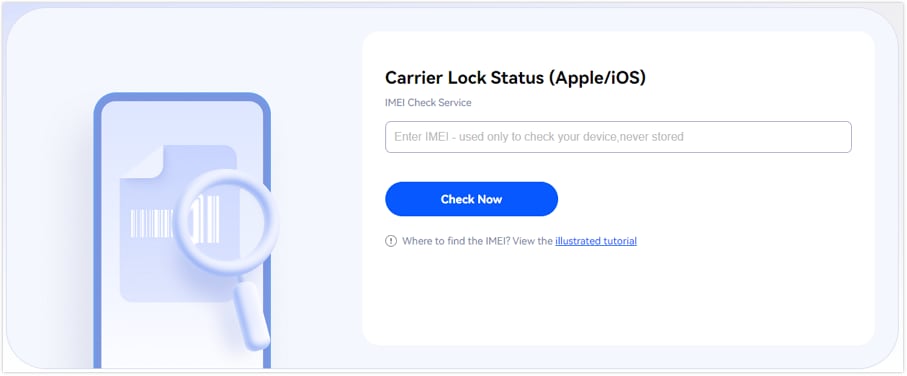
- Step 1. Navigate to the Dr.Fone SIM Unlock page. Find "IMEI Check" section, type your IMEI number, and press "Check Now" to find out if your phone is locked to a carrier.
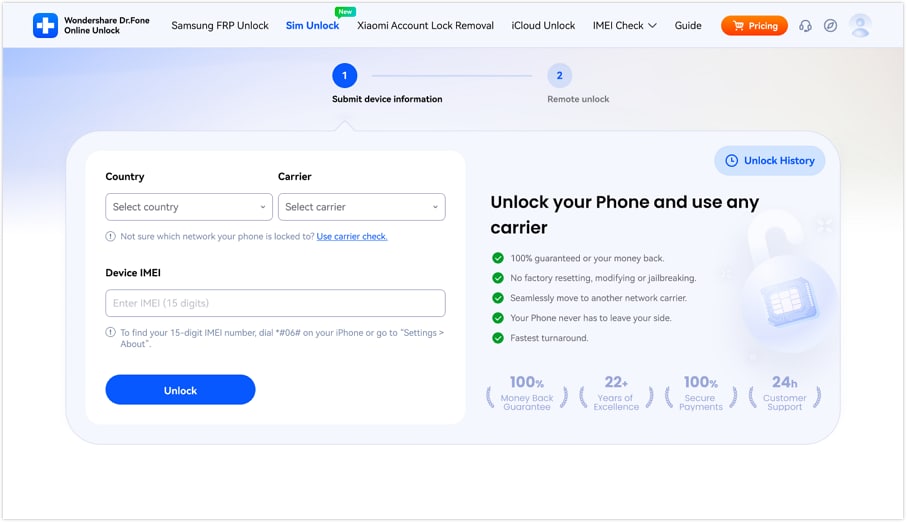
- Step 2. Select your country from the "Country" drop-down menu, then pick your network from the "Carrier" drop-down. Enter your 15-digit IMEI number into the "Device IMEI" box and click the "Unlock" button.
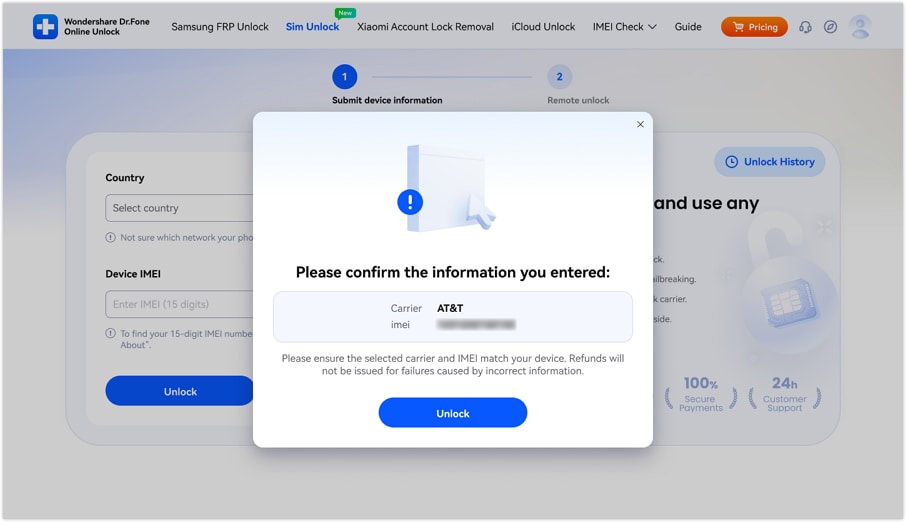
- Step 3. You'll get a pop-up window asking for confirmation. Double-check your IMEI and carrier info before clicking the "Confirm" button to move on with the process.
Verify your device info safely in one clickPart 5. Troubleshooting: What If the SIM Is Still Blocked?
- SIM not activated even after unblock request: Activation can sometimes take time. So, to fix it, you can take out your SIM and put it back, turn your phone off and on.
- Outstanding dues are not cleared: If you have not paid your bills, your SIM may always be blocked. You can see your dues and pay them through the Airtel Thanks App or any other official payment method.
- KYC issue: If your SIM requires you to verify your details, you will have to go to an Airtel store with your original ID (CNIC/passport) to do the KYC again.
- SIM permanently deactivated: Due to a very long time without usage or heavy restrictions, your SIM might be totally disabled. You can buy a substitute SIM card for the same number (depending upon availability and rules).
- Device-level issue: If all is fine with your SIM, then the fault could be with your mobile phone. Get Wondershare Dr.Fone Online Unlock to test the blacklist status or carrier locks and make sure it is not a problem with the phone.
Conclusion
Wondering how to unlock an Airtel SIM? Encountering a locked or blocked Airtel SIM might be quite annoying, but most of the time, the solution may be easier than you think. It doesn't matter if it is a PIN/PUK lock, blocking due to account issues, or restriction on the device level; the main thing is to pinpoint the exact reason first. If you wish to get rid of guessing work and identify the problem more quickly, downloading and using an IMEI checker such as Dr.Fone Online Unlock would help a lot. It instantly tells you whether your phone is still locked to a particular carrier, blacklisted, or has any other issues with compatibility. So you would know the right course of action and not waste any time.
Verify your device info safely in one clickFAQs
-
Q: How can I unlock Airtel SIM without PUK code?
A: If your SIM is requesting a PUK code, then one of the safest ways to unlock it without a PUK code is not to. The entry of random codes can lead to the permanent blocking of your SIM. The best thing you can do is to get your PUK from Airtel customer care, through the app, or from your SIM pack, etc.
-
Q: Is it possible to unblock my Airtel SIM without going to the store?
A: Actually, you can unblock your SIM yourself using the Airtel Thanks App, the official website, or customer care chat in many cases. Still, if your SIM need's identity verification or is fully deactivated, then you really need to go to the store.
-
Q: Does it cost to unblock Airtel SIM?
A: They might not charge anything if the unblocking is just a result of minor issues like payment clearance. On the other hand, if they have to physically change or re-issue the SIM, there might be a small fee as per the policies and local conditions of Airtel.




James Davis
staff Editor
Generally rated4.5(105participated)