

 TL;DR:
Resolving a Factory Reset Protection (FRP) lock on a Samsung device running Android 17 Beta requires authenticating with the previously synced Google account, providing proof of purchase to authorized support, or using a compatible online removal service.
● If you must reset your Google account password during recovery, Google may apply a cooldown period that prevents the new password from unlocking the device immediately.
● Dr.Fone Online Unlock provides a web-based alternative that can remove the FRP lock in 1 to 30 minutes via IMEI or serial number submission, specifically supporting Samsung A, M, F, S, Z, Fold, and Flip series on Android 15, 16, and 17 Beta 1–4.
● Bypassing the lock through a third-party online service is best suited for second-hand phones tied to an old owner's account or repair-return inventory where official recovery paths are impractical.
Ask AI for a summary
 ChatGPT
 Perplexity
 Gemini
 Claude
 Grok
Grok
|
Aspect |
Android 16 (Stable) |
Android 17 (Beta) |
| FRP Detection | Normal | More Aggressive |
| ADB Access | Enabled | Blocked by Default |
| Chipset Unlock | Samsung M-series | Working |
 Remove your FRP lock safely
If your Samsung phone asks for a previously synced Google account after a reset, you are most likely seeing Factory Reset Protection, or FRP. This is not just an Android 17 Beta quirk. It is part of Android's anti-theft system designed to verify ownership after a protected device is reset.
For most legitimate owners, the best path is straightforward: try the previous Google account first, then account recovery, then authorized support, and only after that consider a supported online Samsung FRP removal workflow.
In this article

Part 1. What Triggers FRP on a Samsung Phone Running Android 17 Beta?
FRP usually appears when a Google account is linked to the phone, device protection is active, and the phone is reset in a way that requires ownership verification. In practice, this often means a Recovery-mode reset, a remote erase, or a used device that still has the previous owner's account attached.
That is why FRP can feel confusing. The phone may look reset, but Android still wants proof that the person setting it up is the rightful owner.
It is also important to separate FRP from Android 17 Beta itself. Google's Android 17 Beta pages emphasize privacy, security, continuity, and performance changes such as Contact Picker, Advanced Protection Mode, and Handoff. They do not frame FRP as a newly redesigned Android 17 Beta feature.
Common FRP trigger scenarios:
| Situation | FRP risk | What the phone usually asks for |
|---|---|---|
| Reset through Settings while you still have access | Lower | Screen lock confirmation or standard reset confirmation |
| Reset through Recovery mode | High | Previous Google account or credentials |
| Remote erase on a protected device | High | Google account verification during setup |
| Used Samsung phone still tied to old owner | High | Previous owner's Google account |
The table above reflects the behavior described by Google and Samsung support documentation.
Part 2. Which Recovery Option Should You Try First?
The safest way to approach Android 17 Beta FRP on Samsung is to follow a recovery order instead of testing random tricks.
Recommended order
- Sign in with the previously synced Google account
- Recover the Google account if you forgot it
- Contact authorized service support with proof of purchase
- Use a supported online Samsung FRP removal workflow if needed
This order works because it starts with the cleanest and most official route, then moves toward more specialized options only when necessary.
Recovery options compared
| Recovery option | Best for | Difficulty | Typical time | Notes |
|---|---|---|---|---|
| Previous Google account login | Original owner with account access | Low | Fastest | Official first-choice route |
| Google account recovery | Owners who forgot email or password | Medium | Medium to slow | Password reset may not work instantly |
| Authorized Samsung service support | Owners with proof of purchase | Medium | Medium | Useful when account recovery fails |
| Online Samsung FRP removal | Supported Samsung devices where direct account recovery is not practical | Low to medium | Usually faster if supported | Best when compatibility is confirmed |
Remove your FRP lock safely
Part 3. How to Bypass Android 17 Beta FRP on Samsung Phone: 2 Methods
If you are stuck on the Google verification screen, these two Android 17 Beta FRP unlock methods cover the most practical next steps for Samsung users. The first method follows the safest recovery path for legitimate owners, while the second offers a more direct and easier online Samsung FRP removal option for all supported devices.
Method 1: How to Recover Access to a Samsung Phone Locked by Android 17 Beta FRP
- Step 1: Confirm ownership and collect device details
Before trying any solution, prepare the basics:
- Samsung model name
- Android version or beta build, if known
- IMEI or serial number
- likely Google account details previously used on the phone
- proof of purchase, if available
This helps whether you choose account recovery, service support, or an online FRP removal workflow.
- Step 2: Try the previous Google account
If the device is yours and you still know the original Google account, try that first. Google states that setup can accept a Google account that was previously added and synced to the device as an account or user.
This is usually the fastest and lowest-risk solution.
- Step 3: Recover the account if you forgot it
If you do not remember the account or password:
- start Google account recovery
- verify the recovery phone number or email
- reset the password if necessary
- wait if the new password does not work immediately
Samsung specifically notes that Google may require a cooldown period before a newly changed password can unlock the phone after FRP is triggered.
- Step 4: Move to a Samsung-specific solution if the account route is blocked
This is where many real-world cases start to differ from the official ideal path.
Common examples include:
- you bought a used Samsung phone and the seller did not remove the account
- you handle refurbished or repair-return devices
- you cannot complete account recovery in a reasonable time
- you need a clearer workflow than forum-based trial and error
In those situations, a Samsung-specific online FRP removal service can make more sense than relying on outdated bypass methods written for much older Android versions.
Method 2: How to Bypass Android 17 Beta FRP Using Dr.Fone Online Unlock
If you want a more direct path, Dr.Fone Online Unlock is one of the clearest Samsung-focused options to evaluate.
According to the official page, the Samsung FRP removal feature is designed as an online workflow rather than a long chain of manual workarounds. The official product page states support for Samsung devices across major Android generations, and the product information you provided further specifies support for Android 15, Android 16, and Android 17 Beta 1–4, along with Samsung A / M / F / S / Z / Fold / Flip series models. The same vendor information also states a typical removal time of 1–30 minutes and a simple process based on IMEI or SN submission.
That makes it especially relevant for readers who do not need another generic definition of FRP, but a practical Samsung-specific option that matches newer software generations.
Dr.Fone Online Unlock
Easily bypass Samsung FRP, remove Xiaomi account locks, and check IMEI with one trusted tool — fast, secure, and user-friendly.
- One-click Samsung FRP removal, no tech skills required.
- Unlock iCloud & SIM lock easily and safely.
- Unlock Xiaomi devices without a password.
- Supports 20+ different types of IMEI checks.
- Free IMEI check with no login, no ads, and instant access.
- Fully mobile-optimized for effortless on-the-go access.
Verify your device info safely in one clickHow to Use Dr.Fone Online Unlock for Samsung FRP Removal
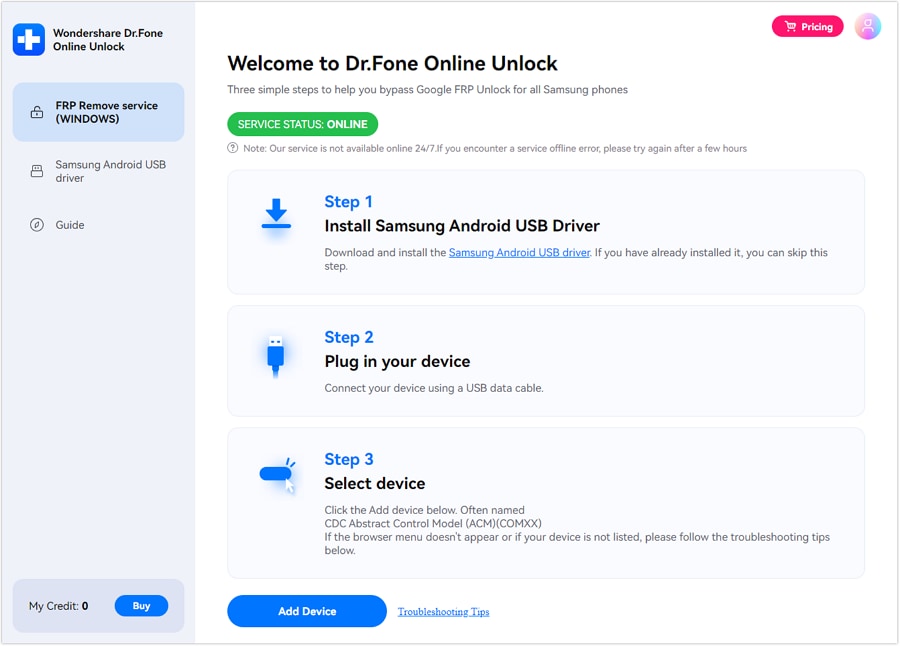
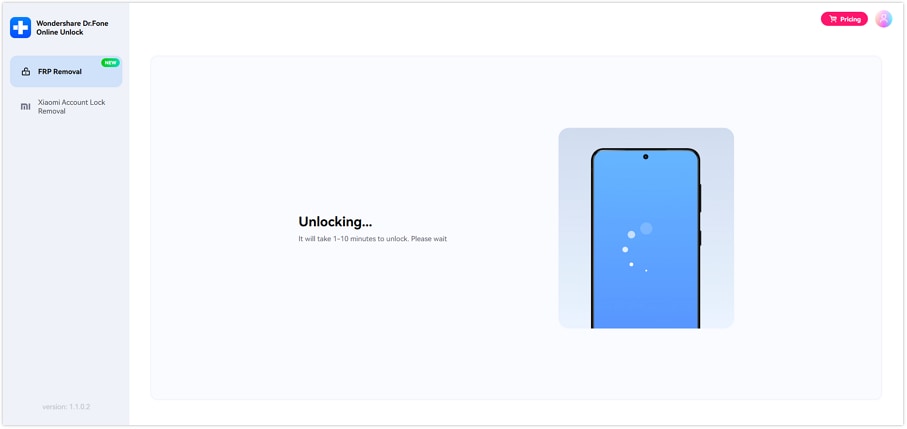
Based on the official guide, the process can be summarized in 4 steps:
- Step 1. Open Dr.Fone Online Unlock and choose "FRP Removal."
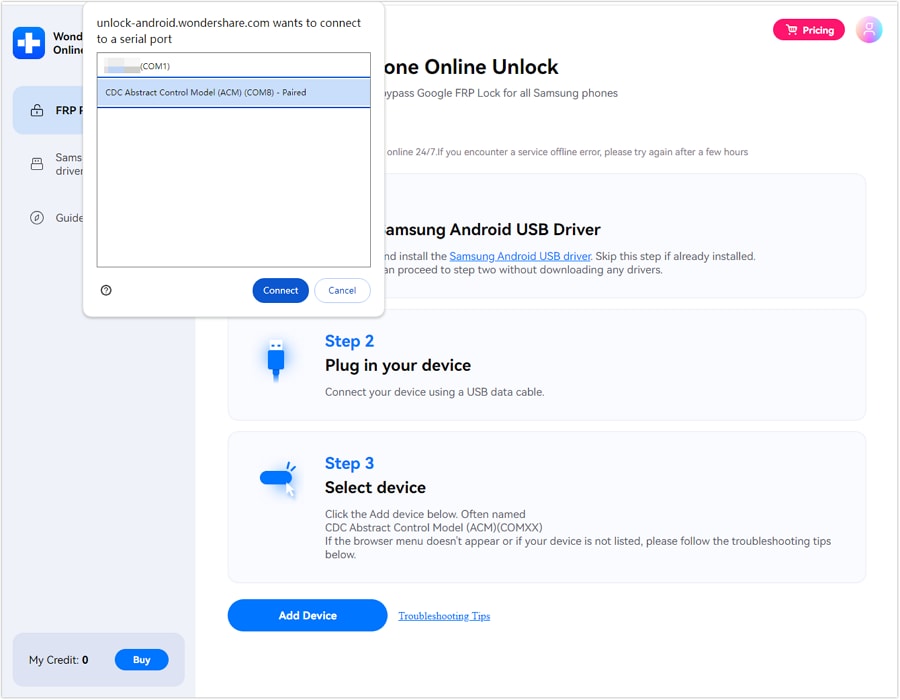
- Step 2. Enter the Samsung device IMEI or serial number, or let the platform read it after connection if available.
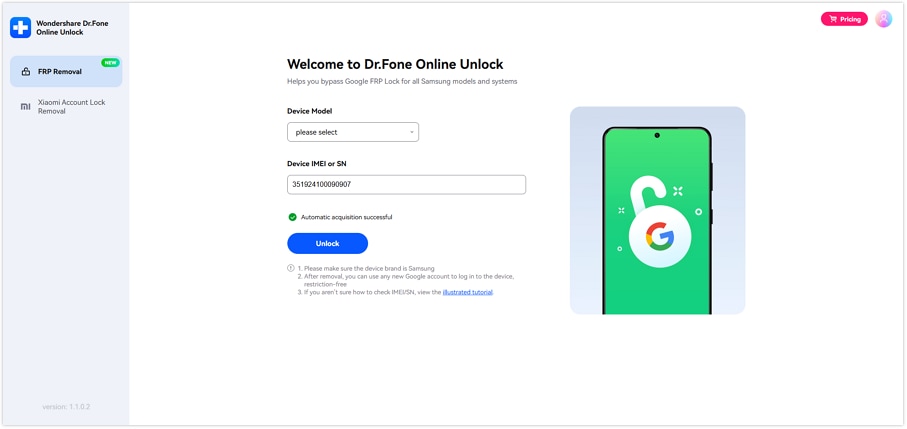
- Step 3. Click "Unlock" to begin the online removal process. The guide says the workflow continues in the cloud after device confirmation.
- Step 4. Complete device activation after the platform confirms that the FRP lock has been removed.
Remove your FRP lock safelyWhen Does Dr.Fone Online Unlock Make the Most Sense?
Not every user needs an online FRP removal service. But some situations fit it better than others.
Quick-fit summary
| Scenario | Why an online Samsung FRP workflow helps |
|---|---|
| Used phone with old account still linked | Faster than waiting on the previous owner |
| Repair-return inventory | Easier to repeat across multiple devices |
| Supported newer Samsung device | More relevant than legacy bypass tricks |
| Need a simple workflow | Clearer steps and device-based identification |
Dr.Fone stands out here not because every user must use it, but because its official materials clearly describe Samsung FRP removal, present a web-based workflow, and focus on supported Samsung device families instead of making vague unlock claims.
Conclusion
FRP on a Samsung phone running Android 17 Beta is best treated as a recovery workflow, not a guessing game.
The most reliable order is:
- use the previous Google account if possible
- try Google account recovery if needed
- contact authorized support if ownership can be documented
- move to a Samsung-specific online solution when the earlier routes are not practical
That logic is what makes this issue manageable. It turns a frustrating lock screen into a decision tree with clear next steps.
And if you do need an online route, Dr.Fone Online Unlock is a practical option to evaluate because its Samsung FRP removal workflow is explicitly documented, web-based, and built around supported Samsung devices rather than generic unlock language.
Remove your FRP lock safelyFAQs
-
Q: Does Android 17 Beta change how FRP works?
A: Not in any way highlighted by the official Android 17 Beta overview reviewed here. Google's Android 17 Beta documentation focuses on privacy, security, continuity, and developer changes, not a major FRP redesign.
-
Q: Can I remove FRP without the previous Google account?
A: Sometimes yes, but it depends on the situation. The official first route is still the previously synced Google account. If that is not available, account recovery, proof-of-purchase support, or a supported Samsung-specific online solution may be more realistic.
-
Q: Is online Samsung FRP removal realistic on Android 17 Beta devices?
A: It can be, if the device is supported and the service is Samsung-specific. That is why Dr.Fone Online Unlock is relevant here: its official site and guide directly address Samsung FRP removal.




James Davis
staff Editor
Generally rated4.5(105participated)