

 TL;DR:
The iPhone ECID (Exclusive Chip ID) is a private, unalterable 64-bit hardware identifier used internally by Apple for firmware verification and system security, rather than for carrier unlocking.
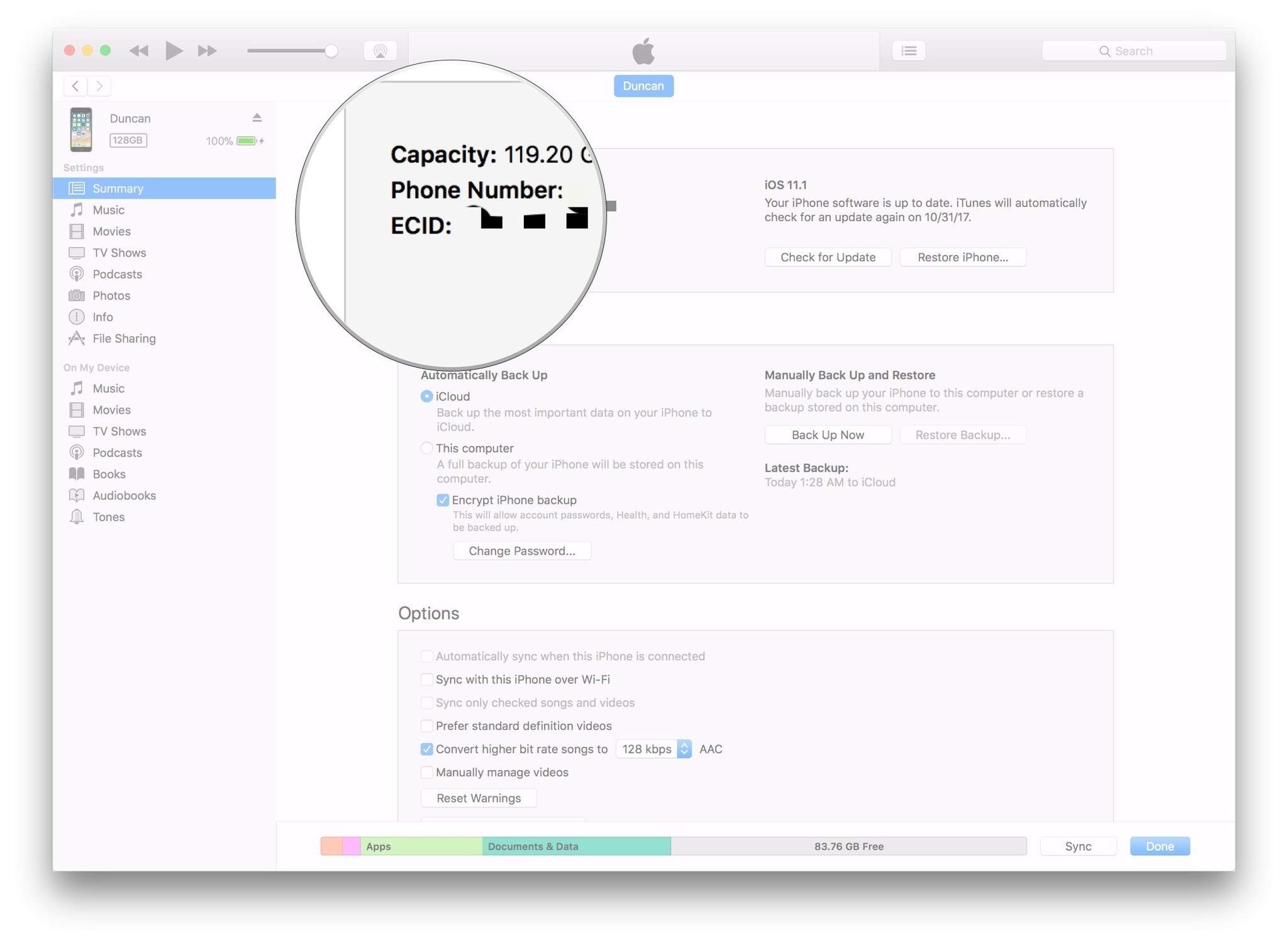
● You cannot view the ECID directly on the iPhone or online; retrieval requires connecting the device to a computer and clicking the Serial Number field in either iTunes for Windows or Finder for macOS Catalina and later until the code appears.
● Unlike the IMEI used for cellular networks or the Serial Number used for warranties, the ECID lacks the capability to track a device, bypass iCloud activation, or remove carrier restrictions.
● Removing a carrier SIM lock requires submitting the device's 15-digit IMEI number to online services like Wondershare Dr.Fone Online Unlock, which process the request in 0 to 24 hours without requiring an Apple ID or jailbreak.
Ask AI for a summary
 ChatGPT
 Perplexity
 Gemini
 Claude
 Grok
Grok
 Verify your device info safely
Unlock guides, restore logs, or Apple forums might have mentioned the acronym "ECID" to you. The question is, what does it actually mean? And why does it matter to anyone? ECID or Exclusive Chip ID is a unique 64-bit number written inside every iPhone. You can think of it as the device's fingerprint, i.e., no two iPhones have the same ECID. Besides, it is a key element in how Apple checks and allows iPhone firmware and restores, along with security operations.
In this article, you will get to know exactly what is ECID, why it is important to you, and also how to find ECID on iPhone without any hassle.
In this article

Part 1. How to Find Your ECID on iPhone
Doing an iPhone ECID check requires getting this unique identifier first. Since Apple doesn't directly show ECID in the settings, you can still get it through well-known tools and methods. We are going to show you one of the most trustworthy and popular ways of getting your ECID with iTunes on a Windows PC.
Method 1: Via iTunes (Windows)
One of the easiest ways to find your iPhone's ECID is through iTunes, especially if you already connect your device to iTunes for backup or sync purposes. It's not directly visible, but you can get it from the device information with just a few steps.
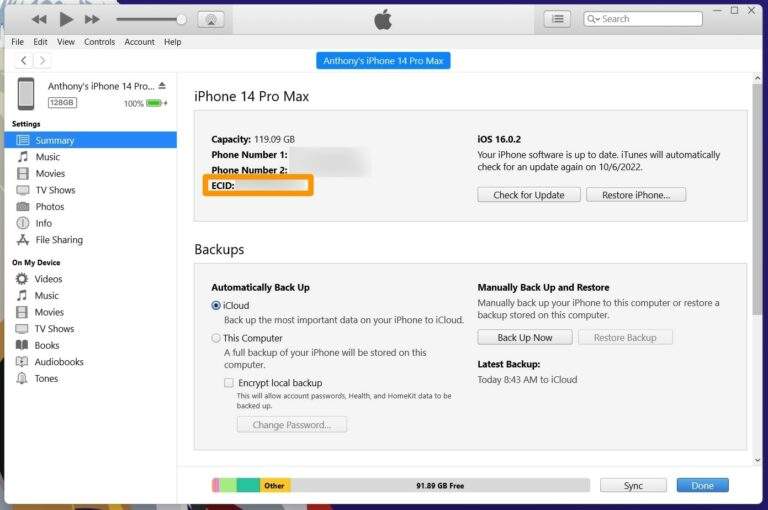
- Step 1. Download and run iTunes on your Windows PC. Plug your iPhone into the PC with a USB cord.
- Step 2. Select the device icon when you see it in iTunes. On the Summary tab, keep clicking on the Serial Number field until it changes to ECID.
- Step 3. After the ECID is displayed, copy it by right-clicking for future use.
Method 2: Via Finder (Mac, macOS Catalina+)
If you have a Mac with macOS Catalina or a later version, you won't find iTunes there anymore because the features of iTunes are now part of Finder. However, you can still get the ECID of your iPhone in Finder almost the same way as before.
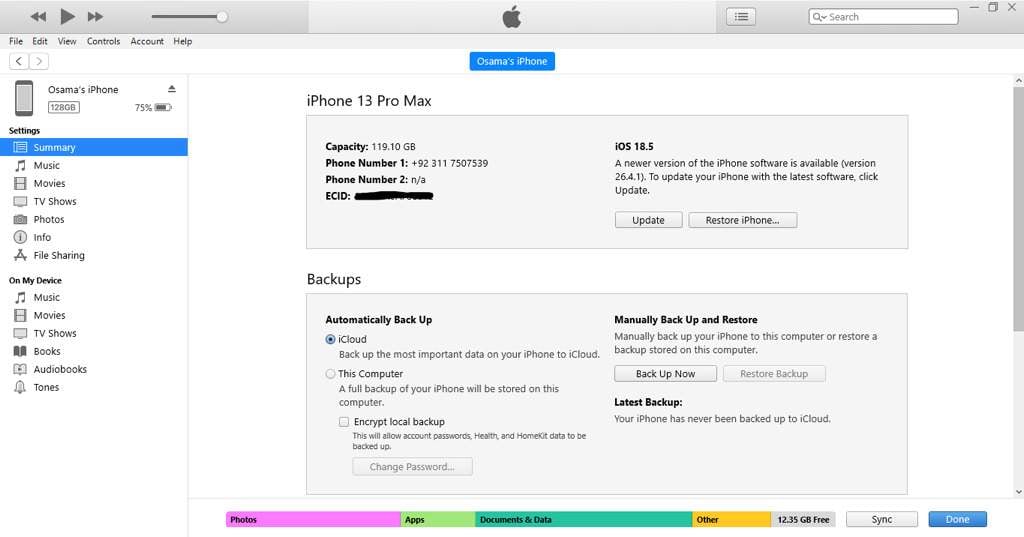
- Step 1. Use a USB cable to connect your iPhone to your Mac. Launch Finder and click on your iPhone in the sidebar.
- Step 2. Now, under the "General" tab, you will see the device info section. Hit the "Serial Number" box several times and it will reveal the ECID.
- Step 3. Paste the ECID and remember where you save it for later use.
Method 3: Via iCloud.com
In case your computer is not readily available or you prefer a remote way to quickly check device details, iCloud can assist you, however, it should be kept in mind that ECID is not shown directly through this method. Basically, this approach serves the purpose of verifying a device identity just prior to the use of other ECID acquisition methods.
- Step 1. Hit up iCloud.com and log in there using your Apple ID. Press "Find iPhone" (or "Find My").
- Step 2. Pick out your iPhone from the list of devices.
- Step 3. Note down the device information, like model and serial number.
Your next step is that you almost certainly then consult with the various other resources (for instance, iTunes or Finder) to carry out the accurate and precise retrieval of your ECID.
Method 4: DFU mode/recovery mode
For advanced users who desire to know their device's detailed information like ECID, they will need to enter DFU (Device Firmware Update) or Recovery Mode. This not only allows them to get device info through system logs but also via third-party software. This method is particularly helpful when your iPhone is dead or unresponsive in the middle of a restore operation.
- Step 1. First, connect your iPhone to a computer and launch iTunes (Windows) or Finder (Mac).
- Step 2. Quickly press and release the Volume Up button, then Volume Down, then press and hold the Side button until the recovery mode screen appears.
- Step 3. Get hold of the device logs or employ suitable tools to reveal detailed information including your ECID.
Part 2. What Is ECID on iPhone (What It Can and Cannot Do)
Knowing what is ECID on iPhone can be quite helpful since it is frequently mentioned in unlock. However, this is one of the most common iPhone identifiers people mistakenly refer to as others. ECID is a very tightly defined element in the Apple ecosystem. In fact, you are very unlikely to use it in any direct way during everyday iPhone operation.
What Does ECID Stand for?
The acronym ECID means Exclusive Chip ID. It is a unique hardware number that is allocated to each Apple device when it comes off the assembly line. At the same time, Apple implants the ECID irrevocably into the chip of an iPhone. It is impossible to alter or erase it. You may compare it with a fingerprint; a pair of iPhones anywhere in the world will never have the same ECID.
Difference Between ECID, IMEI, and Serial Number
People assume all three are the same as ECID when there are three different identifiers that are not necessarily interchangeable. From Apple's point of view, ECID is its secret code for hardware identification. Cellular carriers identify devices by IMEI to provide network services through phones. Serial Number is the code to identify physical products for warranty, customer service, and Apple products and services. To differentiate these identifiers further, ECID is private and secret, whereas IMEI and Serial Number are public.
What Is ECID on iPhone Used For?
ECID is a unique identifier that Apple uses in its backend system, primarily for security purposes. One of its functions is to verify firmware and confirm the installation of the authorized iOS version only. Also, the saving of SHSH blobs is not possible without these blobs enabling limited downgrades of iOS versions. Further, ECID is used for authentication of the device, so Apple can make sure that the requests for firmware updating come from a real device. Moreover, the unlocking or jailbreaking scenarios with a different method may still refer to ECID for confirmation.
What ECID Cannot Do
Because of its nature, ECID isn't your iPhone unlocking code. Neither will it, bypass iCloud activation or remove SIM locks. IMEI tracking capabilities are not present in ECID usage, nor does it change normal user features like making calls, downloading apps, or altering settings. In fact, ECID is a background identifier that the system uses for verification purposes. It is not a direct simulated unlocking or security bypassing tool.
Part 3. How to Check and Unlock iPhone SIM Lock (Without ECID)
Before going deeper into technical identifiers such as ECID, it would be wise to keep in mind that SIM lock status can be checked and removed even without it. Using your device's IMEI, modern online tools are making this procedure much easier. Dr.Fone Online Unlock is one such tool. It is a web-based service that wants to help users free their devices from the carrier without requiring an Apple ID, jailbreak, or technical expertise.
Dr.Fone Online Unlock
Easily bypass Samsung FRP, remove Xiaomi account locks, and check IMEI with one trusted tool — fast, secure, and user-friendly.
- One-click Samsung FRP removal, no tech skills required.
- Unlock iCloud & SIM lock easily and safely.
- Unlock Xiaomi devices without a password.
- Supports 20+ different types of IMEI checks.
- Free IMEI check with no login, no ads, and instant access.
- Fully mobile-optimized for effortless on-the-go access.
Verify your device info safely in one clickHow to Remove a SIM Lock Online: Detailed Instructions
- Step 1. Find out if your device is locked to a carrier
Use a web browser and visit the Wondershare Dr.Fone SIM Unlock webpage. Input your IMEI number and check if your is locked to a carrier by utilizing the free IMEI checking tool.
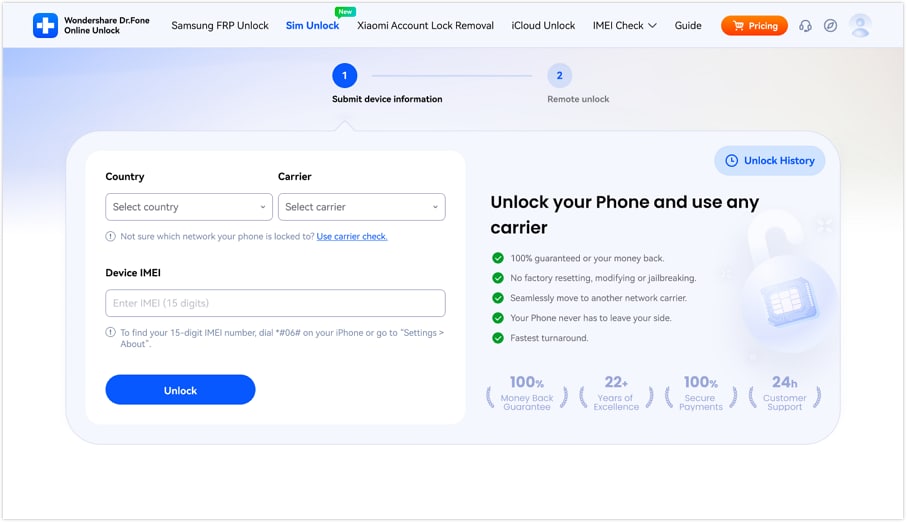
- Step 2. Provide information about your device
First, choose your Country and Carrier from the dropdown menus, then type your 15-digit IMEI number in the box provided. Hit the Unlock button to send your request for unlocking.
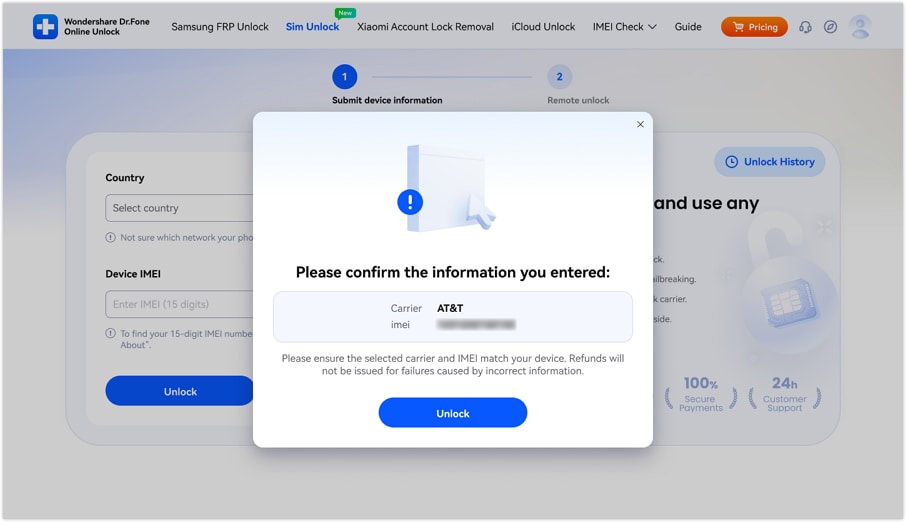
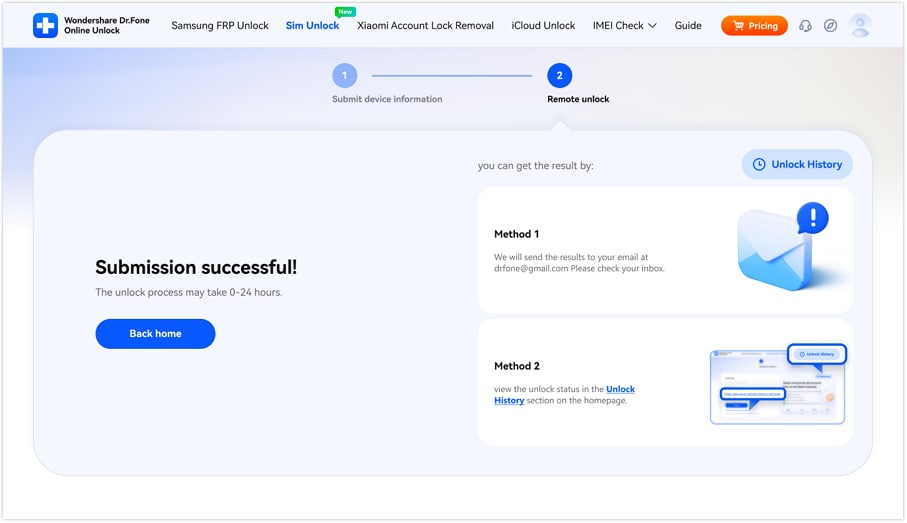
- Step 3. Unlock confirmation
After you have submitted your details, the system will work on your request through the cloud process (normally it takes around 0 to 24 hours). When your SIM unlock is done, and your iPhone can work with any carrier, you will be informed via email.
Verify your device info safelyConclusion
iPhone ECID check is a hardware-level identifier which serves mainly for Apple's internal use such as verification, firmware validation, and other advanced technical processes. Though it is indeed a significant component for system-level operations, i.e., SHSH blobs and device authentication, basically, it is something normal users rarely require for their daily usage or even SIM unlocking.
If your goal is to safely and quickly remove a SIM lock, the simplest way would be to use a reliable IMEI-based service such as Dr.Fone Online Unlock. You can use it to find out what's the carrier status is as well as send an unlock request within minutes without any need for jailbreak, Apple ID, or complicated technical steps. So, it can serve as a handy option for those who simply wish to change the network without getting involved with ECID or other complicated system tools.
Verify your device info safelyFAQs
-
Q: Can I check iPhone ECID online?
A: ECID cannot be checked online. It is embedded in the hardware of the device and can only be retrieved through a computer using iTunes or Finder.
-
Q: Is ECID the same as IMEI?
A: ECID and IMEI are two different kinds of identifiers. Apple uses ECID internally for system verification, whereas IMEI is used by mobile networks to identify devices on cellular networks.
-
Q: How to find ECID on iPhone without computer?
A: You are not able to find iPhone ECID directly without a computer. Apple doesn't reveal it in iOS settings or any other built-in feature.
-
Q: Do I need ECID for SIM unlock?
A: ECID is definitely not necessary for SIM unlock. Most unlock services will work on the basis of your IMEI number, which is sufficient for carrier unlocking processes.




Ahmed Absal
staff Editor
Generally rated4.5(105participated)