
![How to Unlock an O2 Phone: 5 Proven Methods Explained [2026]](https://images.wondershare.com/drfone/article/2026/03/how-to-unlock-o2-phone-1.jpg)

 TL;DR:
O2 provides free device unlocking for Pay Monthly and Pay As You Go customers whose accounts are in good standing, which can be requested via the My O2 app, an online web form, or by dialing 202 or 4445 with your IMEI number.
● Devices purchased after 1 August 2018 are typically already unlocked, but if you own an older locked model like Alcatel or Doro, you must be the original purchaser located in the UK with no overdue balances or blacklist reports to qualify for the official process.
● Official O2 requests require 3 to 5 business days to process and are finalized by inserting a non-O2 SIM card, which prompts a Network Unlock Code entry on Android devices or an automatic activation over Wi-Fi on iPhones.
● If O2 rejects your official request due to contract terms or account mismatch, Dr.Fone Online Unlock serves as a fallback that processes cloud-based unlocks in 0 to 24 hours, whereas alternative third-party services like DirectUnlocks involve indefinite wait times and higher fees.
Ask AI for a summary
 ChatGPT
 Perplexity
 Gemini
 Claude
 Grok
Grok
 Verify your device info safely
In 2026, the UK mobile market is more open than ever, with O2 leading the way by selling most of its modern smartphones completely unlocked. However, technology can still throw a curveball, and you may find yourself with an older model. You might get a specific device, like an Alcatel or Doro, or a refurbished phone that still bears the restrictive "O2 Only" digital seal.
This lock can quickly turn your versatile smartphone into a restricted device, preventing you from using a cheap local SIM abroad or switching to a better plan. While O2 is usually helpful, their official paths can be slow or blocked by contract terms or account history. Nevertheless, this guide explains how to unlock an O2 phone using official methods or Dr.Fone Online Unlock, which is the best choice when the request is rejected.
In this article

Part 1. Can You Unlock an O2 Phone? (Eligibility & Requirements)
Yes, you can unlock O2 regardless of whether you are a Pay Monthly or Pay As You Go user. Since UK regulations (Ofcom) made free unlocking mandatory from 1 August 2018, most older models, such as Alcatel and Doro, may still be subject to restrictions. So, if you have any and wonder how to unlock an O2 phone, see if you meet the mentioned requirements:
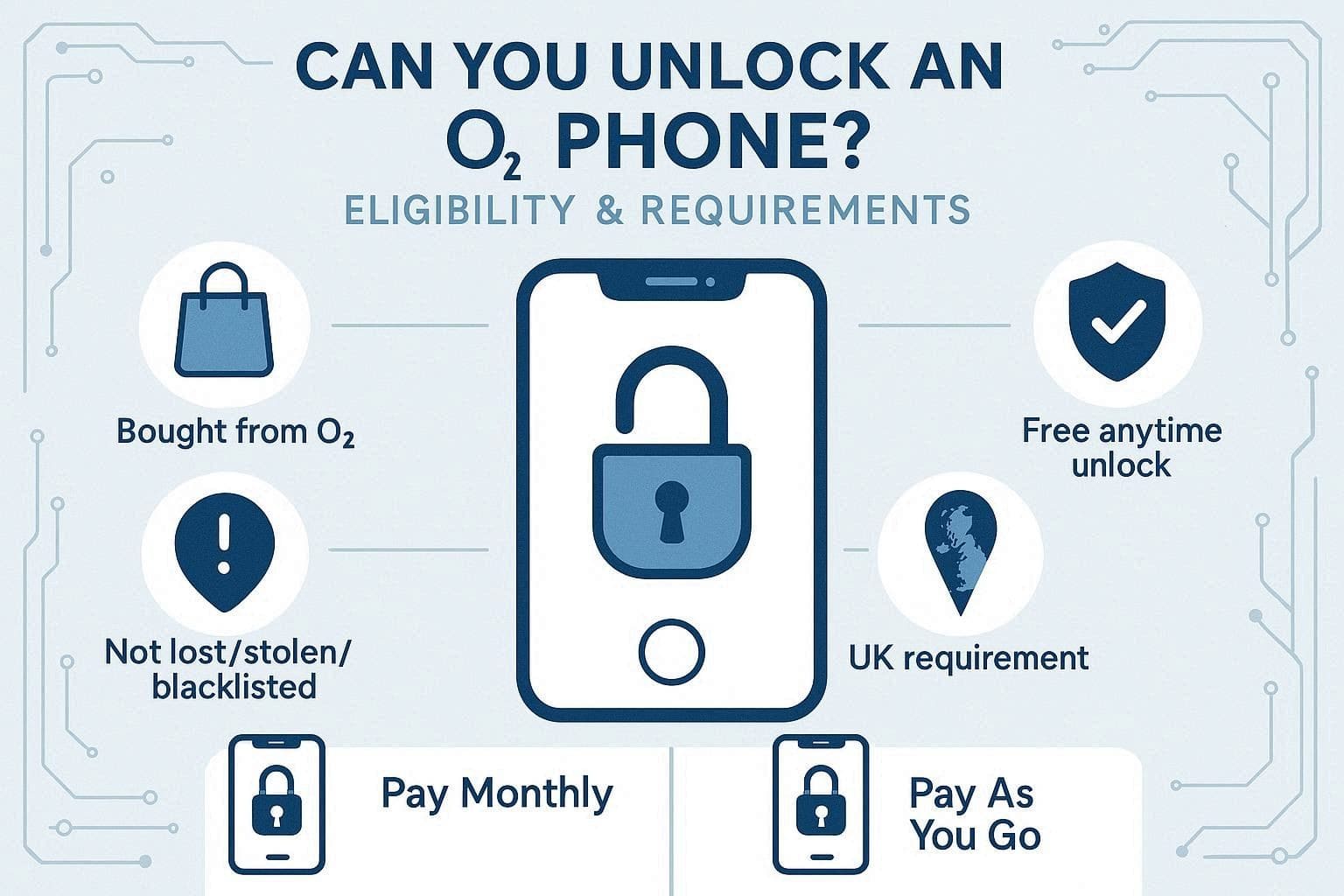
Official Eligibility Criteria:
- You must have bought the device directly from O2.
- The account must be in good standing with no overdue payments.
- You can request an unlock at any time during your contract for free.
- The device must not be reported as lost, stolen, or blacklisted.
- You generally need to be in the UK to complete the official unlocking process.
Pay Monthly vs. Pay As You Go (PAYG):
- Pay Monthly: You can unlock the device for free at any time, even on day one of your contract.
- Pay As You Go: The unlock is available at any time, free of charge, even if you insert a non-O2 SIM into your device.
Part 2. How to Unlock an O2 Phone Using Official Methods
Let's say you comply with all the requirements, and the next question that pops up in your mind is: How do I unlock my phone from O2? In this regard, review the mentioned ways and learn what information you will need to continue O2 unlocking:
Method 1: Via Phone (Recommended)
This is the most reliable way, as you directly speak with the expert in O2 customer service. Hence, this is particularly useful if you have a complicated account or a specialized device. So, to know what the key combinations are for Pay Monthly and Pay As You Go, adhere to the details given below:
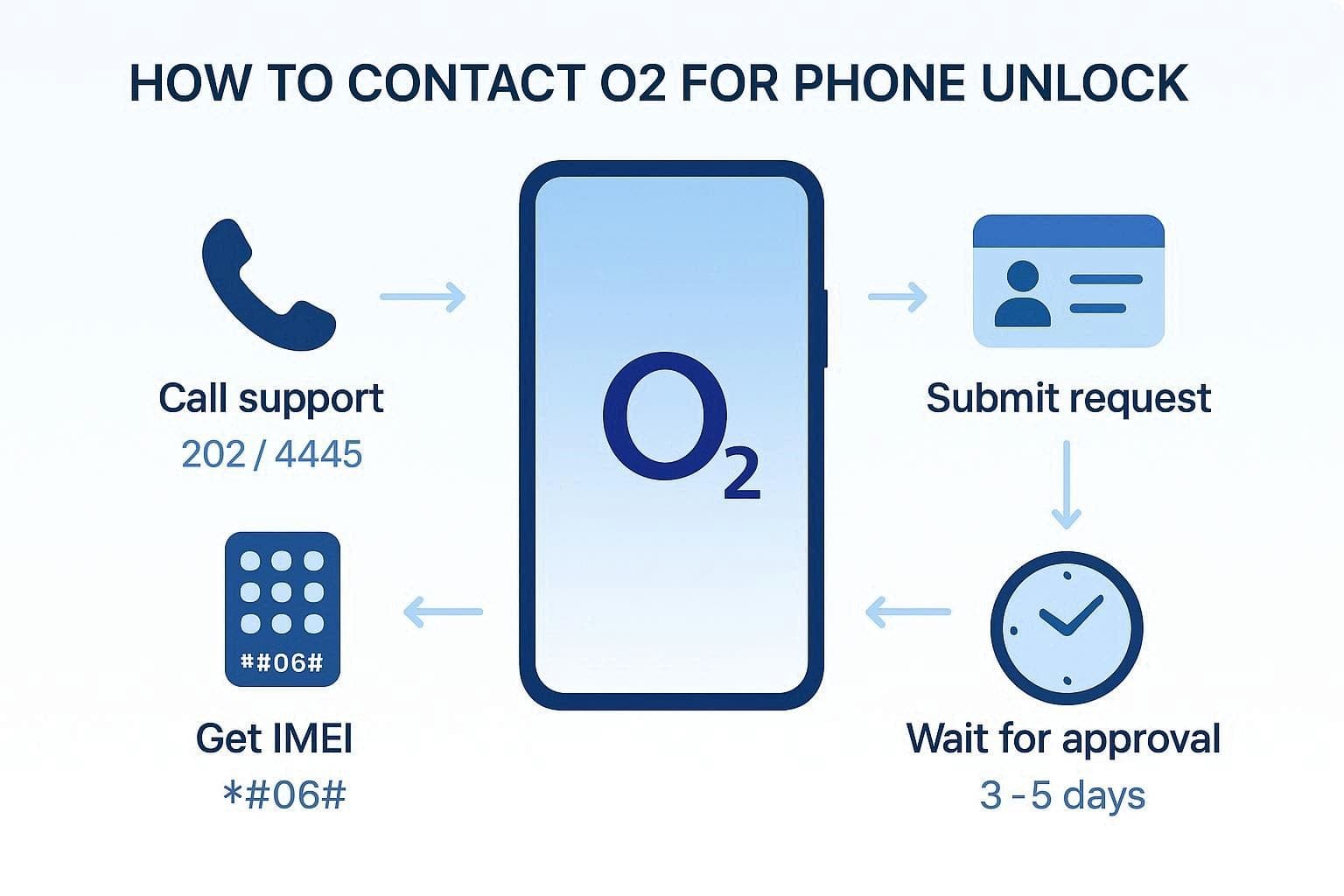
Instructions: Dial 202 from your Pay Monthly O2 phone or call free on 4445 from a Pay As You Go O2 phone. Once connected, provide your IMEI by dialing *#06# and the account details. Later, the representatives will submit the request, which will typically take 3 to 5 business days to process.
Method 2: Via My O2 App
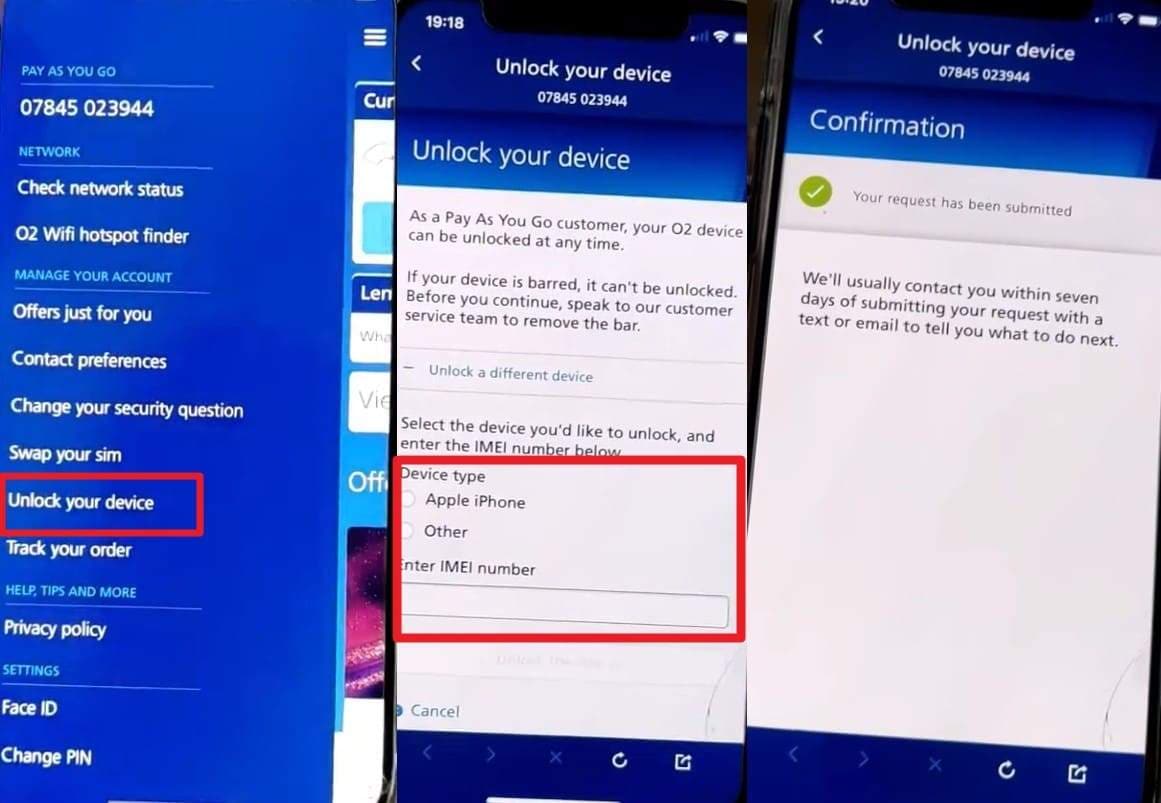
While learning how to unlock a phone on O2, you can also use the My O2 application if you prefer a digital approach. It lets users handle accounts, bills, upgrades, and unlock requests in one app. Additionally, users can choose from device types details for better control and get real-time updates on status and unlock progress. So, to know how you can use this effortlessly, here is the guide for you:
Instructions: Tap the Hamburger icon on the app to choose the "Unlock Device" option from the menu. After that, select the device type as the app loads the details, and add the IMEI. Upon doing so, choose the "Unlock Device" button, and you will usually receive a confirmation text once the unlock is finalized.
Method 3. Via Web Form
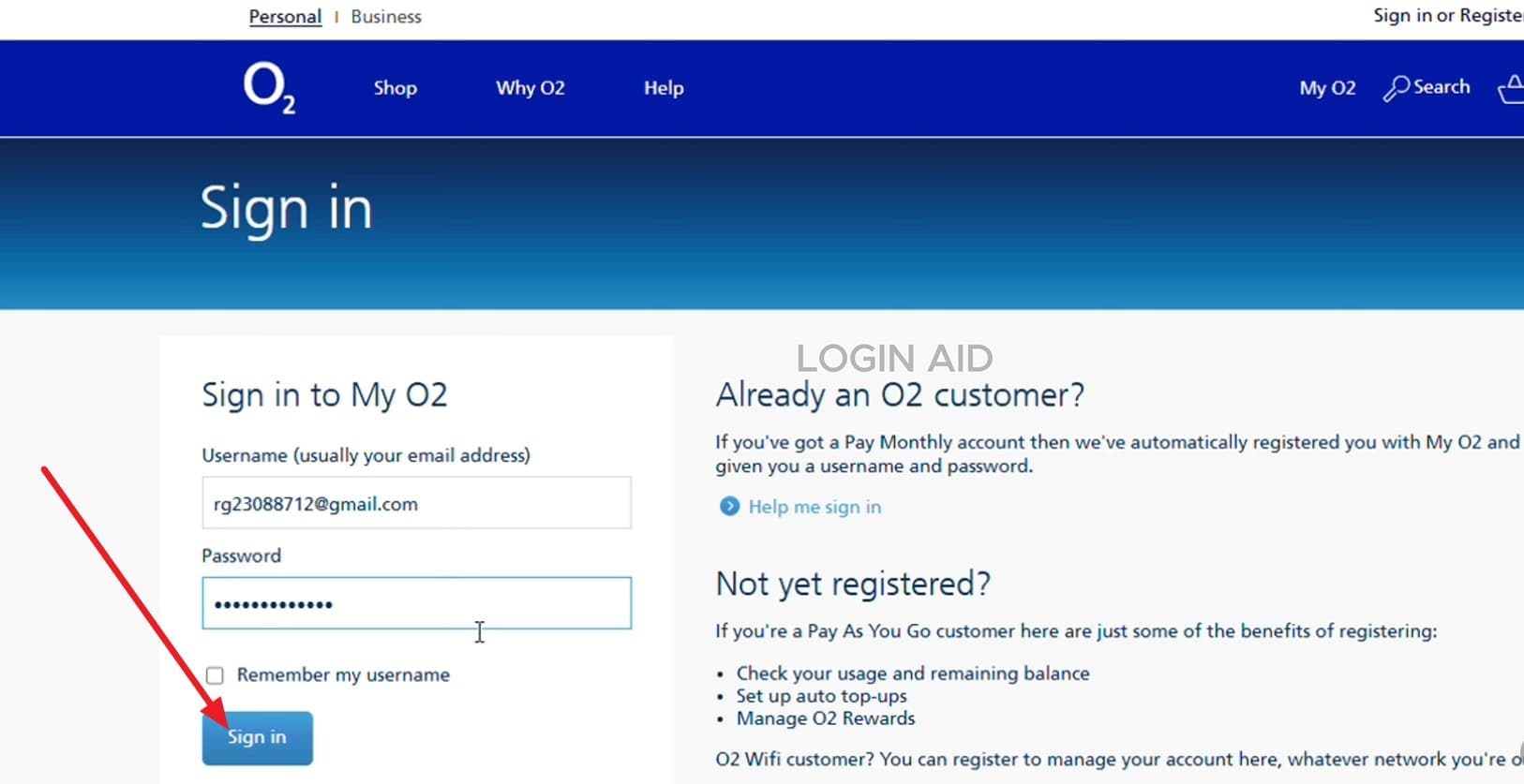
Online form submission is another convenient method that gives access, stability, and clearer options for device unlock requests. Furthermore, it works on any device and sometimes shows additional unlock options and business tools that are not visible in the app. Since you also add pay monthly/PAYG and IMEI details with better control, the following are the steps on how to unlock an O2 phone online:
Instructions: Sign in to the O2 online account and in the "Device and SIM Support" section, choose "Unlocking an O2 Mobile to Use on a Different Network." Now, access the online unlock form and enter your pay monthly/PAYG details, along with your IMEI and device type. Submit the form and wait for O2 to process the request and email you confirmation or an unlock code.
How to Finalize the Unlock?
As you try the 3 given ways and resolve the query on how to unlock an O2 phone, it's time to finalize the process. In this regard, adhere to the mentioned unlocking confirmation ways for Android and iOS to determine if the device is fully functional:
For iPhone:
Insert a non-O2 SIM card (Vodafone, Three, or EE), then connect to Wi-Fi. If it doesn't unlock automatically, go to the Settings > General > About. When prompted, enter the Apple ID and passcode, then refresh the activation policy. To check your status, go to Settings > General > About > Network Provider; it must show "No SIM Restrictions."
Note: Normally, you don't need to enter your Apple ID for an O2 network unlock. It is only needed if Apple security features like Activation Lock are involved.
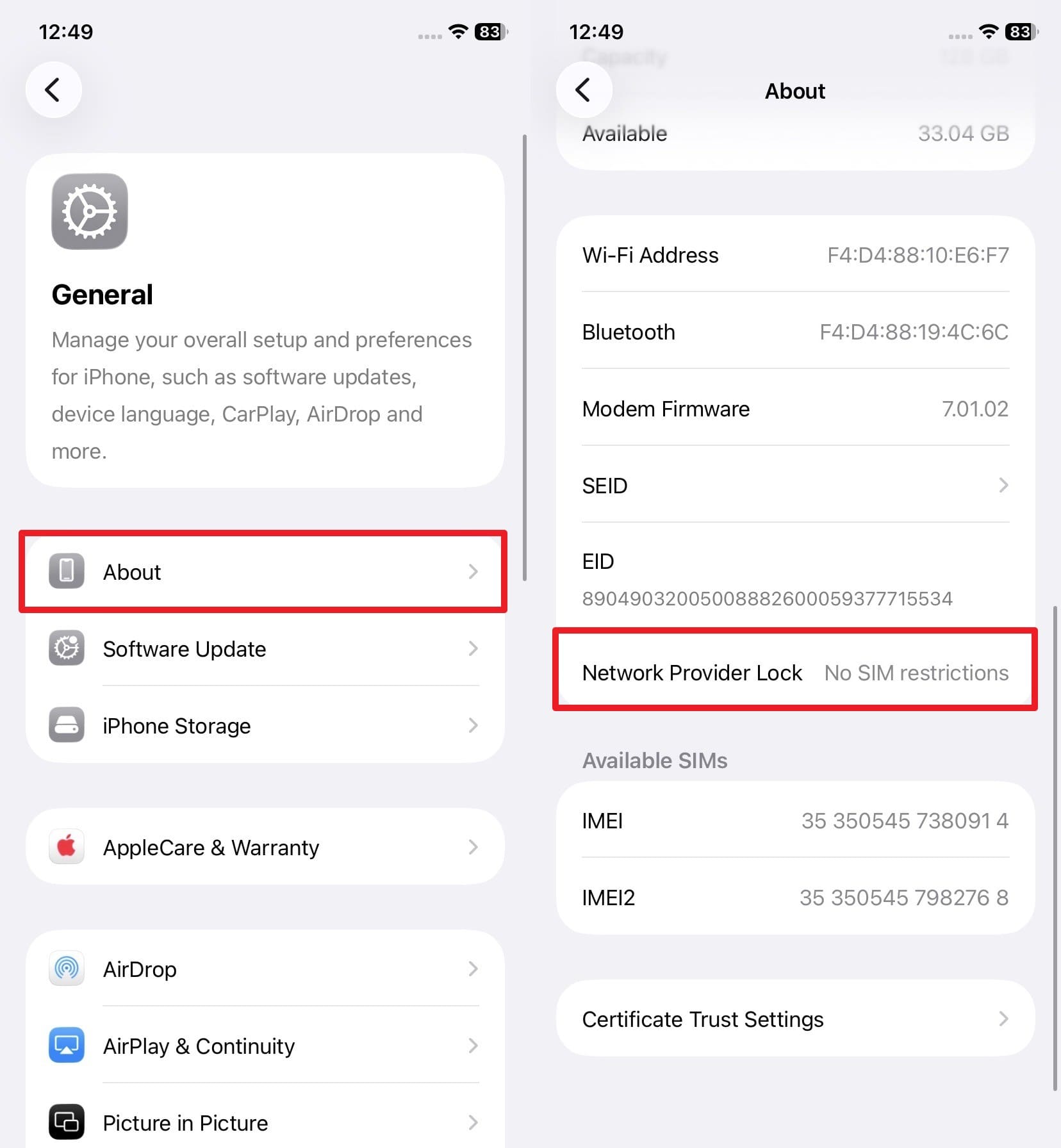
For Android:
If you receive a Network Unlock Code (NUC) via email, type it into the prompt that appears when you restart with the new SIM.
Part 3. How Do I Unlock My Phone from O2 if Official Methods Don't Work?
Even though you know how to unlock my phone from O2, most of the time the methods fail, and the request gets rejected. So, to know why this happens and what to do instead, this section will help you out.
Why Your O2 Unlock Request Was Rejected
Review the reasons mentioned and determine what led to your unlocking request being rejected:
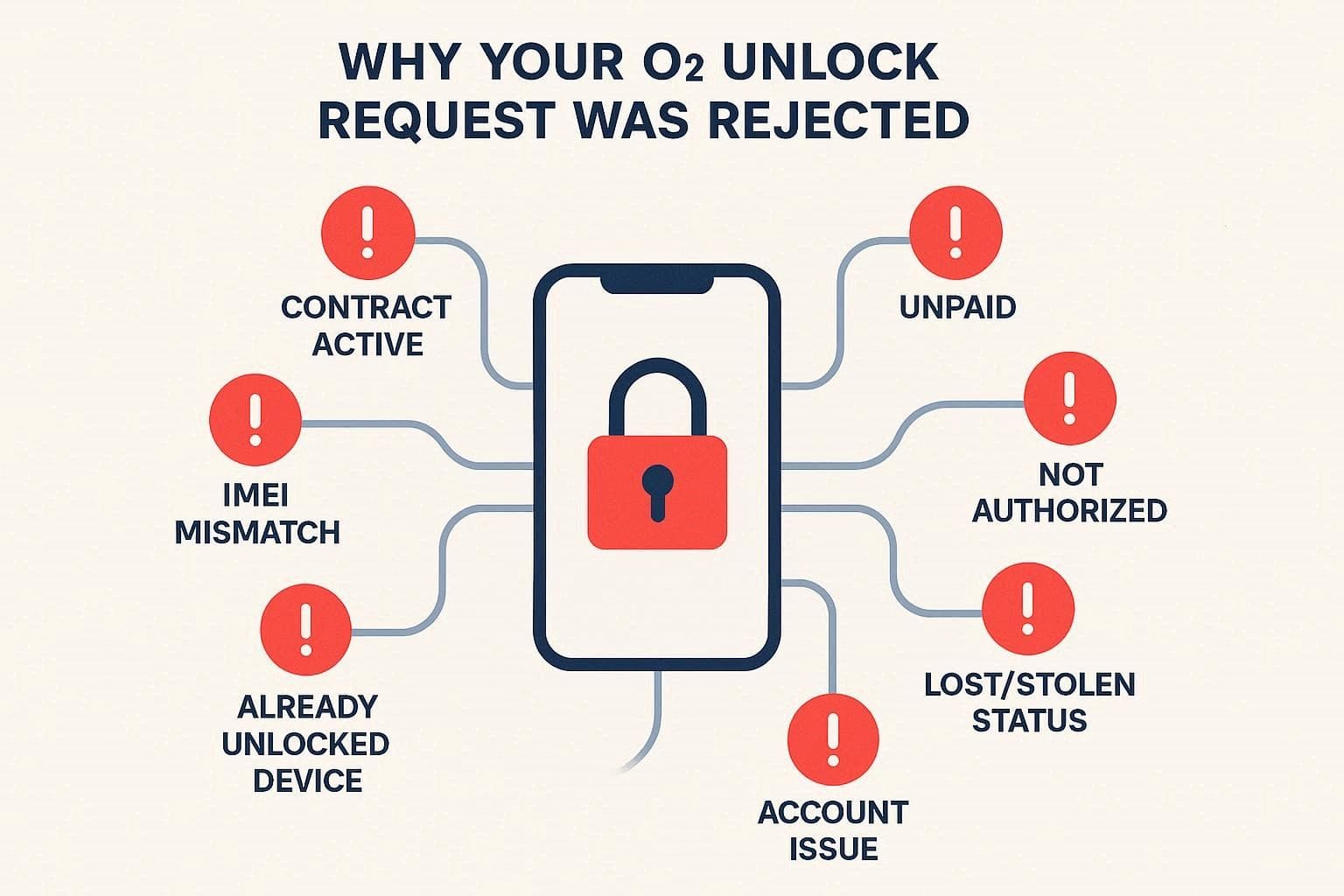
- The phone is still within the minimum term, or the device balance remains unpaid during the contract period.
- You are not the original main account holder authorized to approve unlock requests.
- Phone reported lost, stolen, or blacklisted on the national security or fraud lists database.
- Account problems, overdue bills, suspended status, or restricted usage block the approval process.
- Wrong details, IMEI mismatch, tariff type, or account data cause rejection system error.
- The phone is already unlocked or locked to a different network, so O2 declines the request.
After the rejection, immediately check your O2 email or text to find the exact reason for the rejection. Then, fix the issue by paying any due bills, completing the minimum term, or asking the original account holder to submit the request. If you can't do any of this due to numerous reasons, use third-party online IMEI-based unlocking services as a last resort, as mentioned below:
1. Dr.Fone Online Unlock
Dr.Fone Online Unlock uses your IMEI details and claims to bypass the SIM restrictions within 0-24 hours. Regarding usage, the tool features an intuitive interface in which the unlocking request is submitted to the cloud. Most of all, the unlock remains intact forever, even after performing factory resets or software updates. All this can be done in 2-3 simple steps with detailed guidelines, making it an ideal choice for novices.
Not to mention, the tools require no unlock confirmation, unlike the My O2 app; after approval, the process is safe, keeping all the data intact. It also maintains your phone's original warranty and system integrity by avoiding risky software hacks. By using advanced cloud technology to ensure consistent results across various smartphone models, it claims to offer a 100% success rate. Plus, the Unlocking History and Preview option offers better controls.
Dr.Fone Online Unlock
Easily bypass Samsung FRP, remove Xiaomi account locks, and check IMEI with one trusted tool — fast, secure, and user-friendly.
- One-click Samsung FRP removal, no tech skills required.
- Unlock iCloud & SIM lock easily and safely.
- Unlock Xiaomi devices without a password.
- Supports 20+ different types of IMEI checks.
- Free IMEI check with no login, no ads, and instant access.
- Fully mobile-optimized for effortless on-the-go access.
Verify your device info safely in one clickDetailed Guide to Unlock O2 Devices Using Dr.Fone Online Unlock
Upon review, if you want to learn how to unlock my phone O2 using this online service, review the given guide:
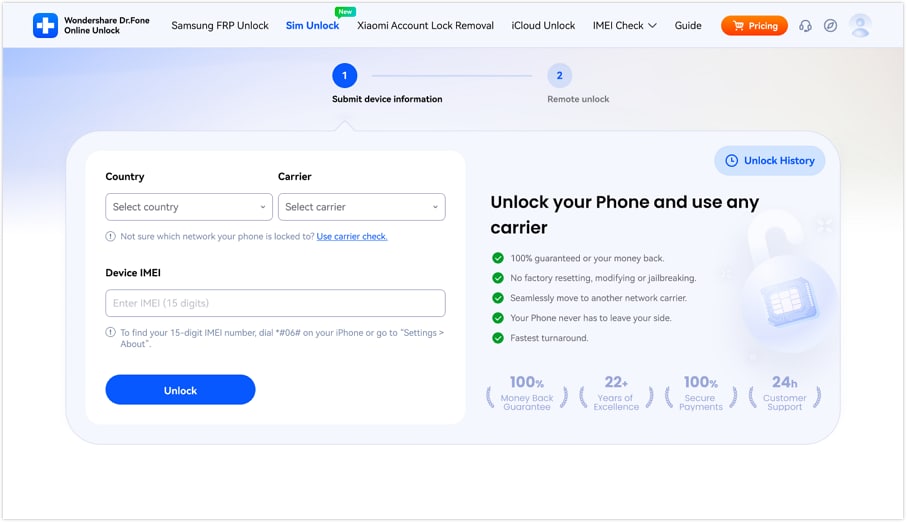
- Step 1. Choose Dr.Fone SIM Unlock Tool and Add Details
As you are directed to the official Dr.Fone SIM Unlock website page, fill in the details for "Country, Carrier, and IMEI", and press the "Unlock" button.
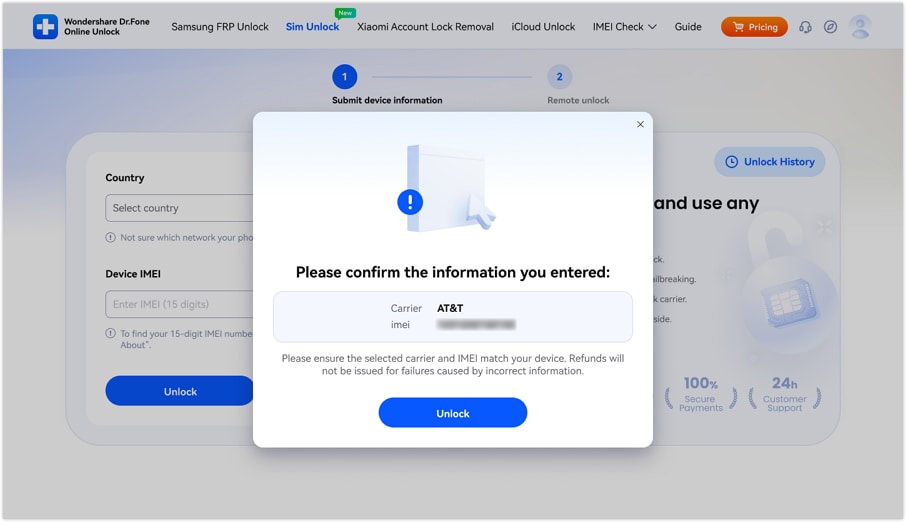
- Step 2. Confirm the Details on Dr.Fone SIM Unlock
The tool will ask you to confirm the added details, review them, and tap "Unlock" to continue.
- Step 3. Submit the Cloud Request & Monitor the Unlocking History
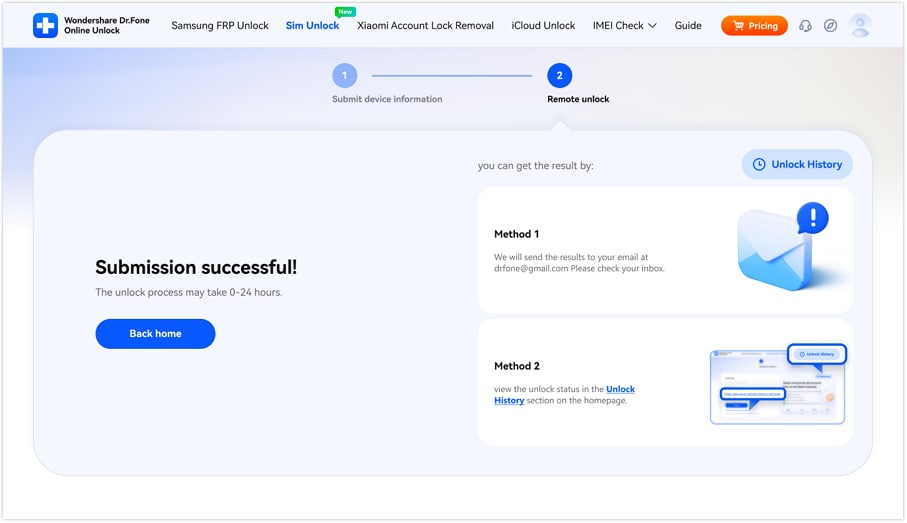
This will enable Dr.Fone to submit the O2 device unlocking request to the cloud. After 0-24 hours, as the tool unlocks the phone, choose the preferred method to monitor the unlocking history.
Verify your device info safely2. DirectUnlocks
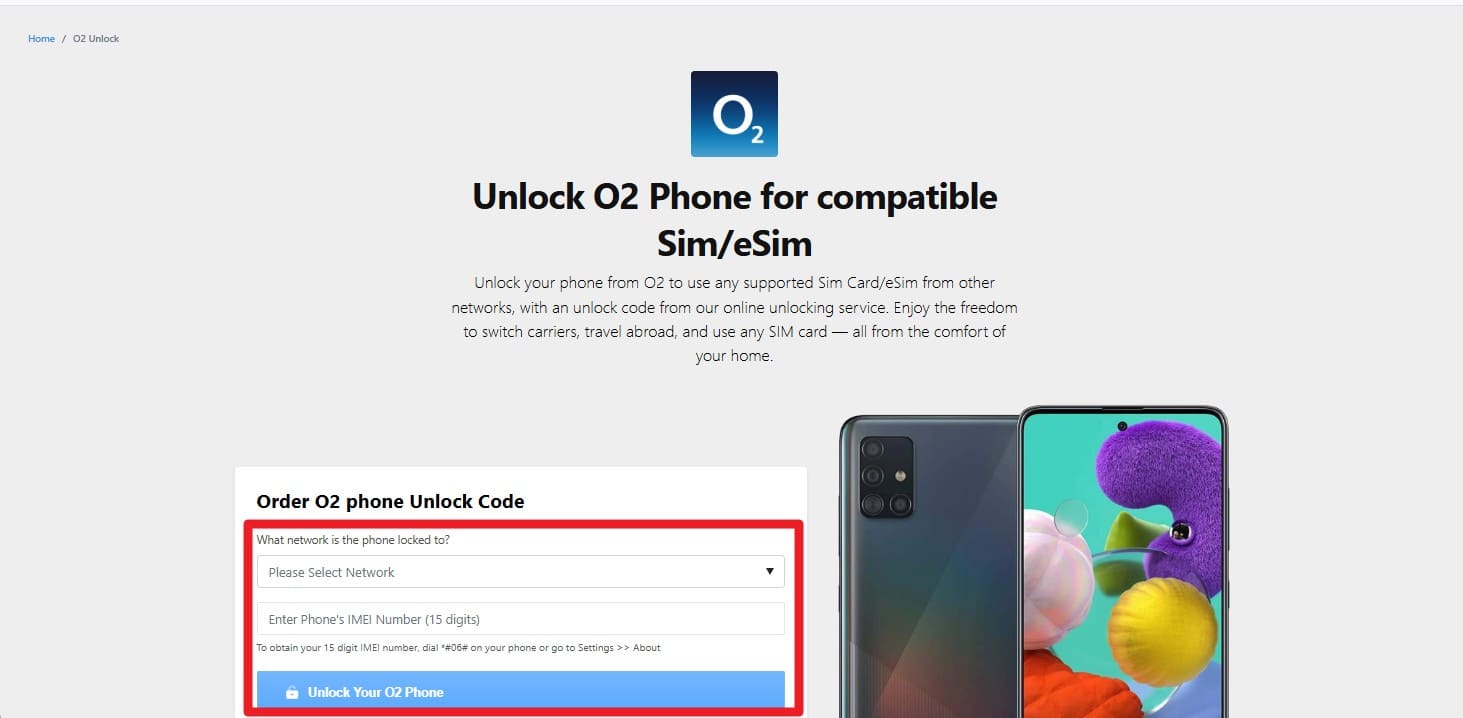
You can also use this online service to learn how to unlock your phone from O2. This tool works for every iPhone and Android device currently locked to the O2 network and uses the official approach. While keeping the manufacturer's warranty intact, the user's IMEI details are provided, and real-time tracking of the unlock process is available. So, to know how you can use this tool, follow the simple instructions given ahead:
Instructions: Pick the "What Network is Tte Phone Locked To?" option and add the IMEI details. After that, press the "Unlock Your O2 Phone" button, and the system securely contacts O2 to begin the unlocking process. Since the timing depends on the O2 policy, you will be notified via email or push notification as it completes.
Cons
- Service fees can be much higher than competing tools.
- Unlocks often take several days to finalize and complete, with no set timeframe.
- Some older devices might not be compatible with their system.
- Users sometimes report failed attempts on specific carrier models.
Conclusion
If you are using an Alcatel or Doro phone purchased before 1 August 2018, your quest to know how to unlock an O2 phone is evident. Therefore, this guide has offered 3 simple and official methods, yet bound to the O2 requirements. Since request rejections are unpredictable, using an online service like Dr.Fone Online Unlock is recommended. This is because the tool supports older models and massive carriers and claims to unlock O2 devices within 0-24 hours, making it a better option than DirectUnlocks.
Verify your device info safelyFAQs
-
Q: Is it legal to unlock my O2 phone?
A: It is fully legal in the UK to unlock any mobile device for your personal use. However, you must still pay your monthly bills until the original service contract term ends.
-
Q: How do I find my IMEI number?
A: On the phone, dial *#06#, and the IMEI details are displayed on the screen, which is necessary for any unlocking method you choose. Alternatively, check the settings menu under the About section to find the unique 15-digit code.
-
Q: Does unlocking my phone void the warranty?
A: Official carrier requests keep your manufacturer's warranty completely intact while removing the network lock on your device. However, the request can be rejected most of the time, so you can use the Dr.Fone Online Unlock tool. It will submit the cloud request and unlock the O2 device within 0-24 hours, without affecting the warranty.





Alice MJ
staff Editor
Generally rated4.5(105participated)