

TikTok Video Under Review? Meaning, Fixes, Timeframe & How to Save Your Drafts
iPhone Backup
- iPhone Data Backup
- 1. Back up iPhone in Recovery Mode
- 2. Back Up iPhone With/Without iTunes
- 3. Back up iPhone to Mac
- 4. Back up iPhone/iPad to Computer
- 5. Back up iPhone to Mac Catalina
- 6. Back up Jailbreak Apps And Restore
- 7. iPhone Backup Software
- 8. Back up iPhone/iPad Easily
- 9. Back up iPhone/iPad in DFU Mode
- 10. Back up iPhone Apps and App Data
- 11. Back up Notes on iPhone and iPad
- 12. Back up iOS to External Hard Drive
- 13. Export Notes from iPhone to PC/Mac
- 14.Back up iPhone Photos to Google Photos
- 15. Back Up Your iPhone Voicemails
- 16. Back Up to External Drive
- 17.How to Back Up to NAS
- 18.Back Up iPhone With Broken Screen
- 19.Back Up iPhone to Google Drive
- 20.Buy Used iPhones
- 21.Sell Used Phone for Cash
- 22.Sell Used iPhone for Dollar
- 23.How Much is My iPhone Worth
- iPhone Data Recovery
- 1. Recover iPhone Data Without Backup
- 2. Restore Calendar on iPhone
- 3. Recover Call History on iPhone
- 4. Recover iPhone Lost Data
- 5. Restore iPhone in Recovery Mode
- 6. Undelete iPhone Backup Files
- 7. Recover Deleted iPhone Messages
- iPhone Data Restore
- 1. Restore iPhone from iTunes Backup
- 2. Restore iPhone after Downgrade
- 3. Restore iPhone from Backup
- 4. Restore iPhone from iPad Backup
- 5. Restore iPhone from DFU Mode
- 6. Restore iPhone Deleted Text Message
- iPhone Backup Problems
- 1. Find iPhone Backup Location on Mac
- 2. iPhone Backup Password Never Set
- 3. iPhone Backup Password Forget
- 4. iCloud Backup Taking Forever
- 5. iPhone Won't Backup to iCloud
- 6. iTunes Won't Backup iPhone
- iPhone Restore Problems
- 1. iTunes Stuck on Verifying iPhone
- 2. Not Space to Restore iPhone Backup
- 3. iTunes Backup Not Restoring
- 4. iPhone Won't Restore
- WhatsApp Backup & Restore
- 1. WhatsApp from Google Drive to iOS
- 2. Restore Old WhatsApp Backup
- 3. Restore WhatsApp Chat on iPhone
- 4. Retrieve WhatsApp Chat History
- 5. See Deleted Messages on WhatsApp
- 6. Restore WhatsApp Stuck on iPhone
- 7. iPhone WhatsApp to Google Drive
- 8. Back Up WhatsApp on iPhone
- 9. Backup WhatsApp Data before Changing Number
- iPhone Backup Tips
- 1. Extract Data From iPhone
- 2. Encrypt iPhone Backup
- 3. Reset iPhone Backup Password
- 4. Extract iPhone Backup in Win 10
- 5. How Long take iPhone to Backup
- 6. Find iPhone Backup Location
- 7. iPhone Backup Password
- 8. View iPhone Backup on Computer
- 9. iPhone Backup with iTunes/iCloud
- 10.Check Last Backup on iPhone
- 11. How To Backup Foldable iPhone
- 12. Best Backup Chargers for iPhone
- 13. Speed Up Your iPhone Backups
- 14. Save Data When iPhone Disabled
- ● Manage/transfer/recover data
- ● Unlock screen/activate/FRP lock
- ● Fix most iOS and Android issues
- Free Download Free Download Free Download


Oct 22, 2026 • Filed to: Backup & Restore Solutions • Proven solutions
 TL;DR:
A TikTok video under review notification indicates the platform moderation system is temporarily checking your content for guideline violations, a process that usually resolves within one to two days and can be addressed by editing risky content or submitting an in-app appeal.
● A promotion under review status differs from a standard video review by specifically scrutinizing boosted posts for advertising policy compliance, age-restricted targeting verification, and incomplete billing or payment issues.
● To prevent automatic AI detection or human moderation flags under the September 2025 Community Guidelines, creators must strictly disclose realistic AI-generated media, use approved audio, and avoid regulated goods.
● If an account faces temporary restrictions or clip removals, creators can prevent the loss of local drafts and unpublished business assets by using Dr.Fone - Phone Backup to selectively save and export iOS or Android data via USB or Wi-Fi.
Ask AI for a summary
 ChatGPT
 Perplexity
 Gemini
 Claude
 Grok
Grok
Dr.Fone Basic:
Better Control for Your Phone
Manage, transfer, back up, restore, and mirror your device
You put up a TikTok post, but a notification pops up: "This video is under review and cannot be shared."
TikTok is basically verifying your content on a temporary basis to ensure that it complies with community guidelines. Even though most of the review checks are automatically done and quickly, they might delay the visibility of your video, lower the number of people who see it, or even stop the promotion of your video.
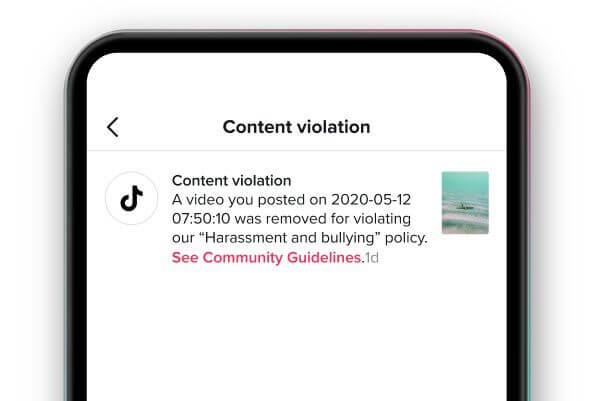
For content creators and businesses, the consequence may be missing the wave of a trend, low engagement, and losing the streak, especially when time is of the essence. That's why it's a good idea to have a backup of your TikTok drafts and even the videos that have been published, in case your content gets compromised for any reason. This article will explain why TikTok videos go under review, how long it usually takes, how to fix it quickly, whether it impacts promotion, and how to protect your content with Dr.Fone - Phone Backup.
- Part 1: Why Is My TikTok Video Under Review?
- Part 2. How to Fix "TikTok Video Under Review" (Step-by-Step Guide)
- Part 3. How to Back Up Your TikTok Drafts & Videos (So You Don't Lose Them)

- Part 4. Why Is My TikTok Promotion Under Review? (For Ads & Boosted Posts)
- Part 5. How to Prevent "TikTok Video Under Review" in the Future
Part 1: Why Is My TikTok Video Under Review?
1.1 What Does "TikTok Video Under Review" Mean?
If your TikTok video under review says, "under review," it's a sign that the platform's moderation system is double-checking your content before letting it fully appear or be shared.
Such a review is usually initiated by an AI detection system starting it automatically or content being flagged so a human reviewer steps in. During an investigation, your video might not be advertised on the "For You" page, not be sharable, or even temporarily disappear, just in case you think the video is totally fine. Generally, such a case is merely a part of the standard safety measures, not a full ban.
1.2 Common Reasons TikTok Puts Your Video Under Review
Under TikTok Community Guidelines (effective September 2025), your video may be reviewed if it touches on sensitive or restricted areas:
- Violence, hate speech, or harassment: Threats, foul language, or attacks on basis of race, religion, gender
- Nudity or sexualized behavior: Pornographic and sexually suggestive content.
- Graphic or disturbing scenes: Depictions of blood, wounds, or scenes of horror
- Misinformation or election-related claims: Issues check the quick response to false and/or misleading information that causes or at least has the potential to cause harm.
- Unlabeled AI or edited media: It is a must for realistic AI-generated or manipulated content to come with disclosure.
- Copyright or unoriginal content: Use of copyrighted music, clips, or videos without the owner's consent can be the cause of a review.
- Fake engagement or spam tactics: Likes purchasing, cueing misleading captions, or habitually posting the same types of content may attract the moderators' attention.
- Regulated goods or undisclosed promotions: Promotion of a product subject to restrictions or a failure to mark a paid partnership may result in a review.
- Privacy or security violations: The act of sharing personal data or attempting to counteract or trick the system could cause an immediate investigation.
1.3 How Long Does "TikTok Video Under Review" Take?
Normally the process lasts for a day or two, particularly if the material review is done manually. A limitation, deletion, or technical glitch might be the case if the video is under scrutiny for a very long time.
Part 2. How to Fix "TikTok Video Under Review" (Step-by-Step Guide)
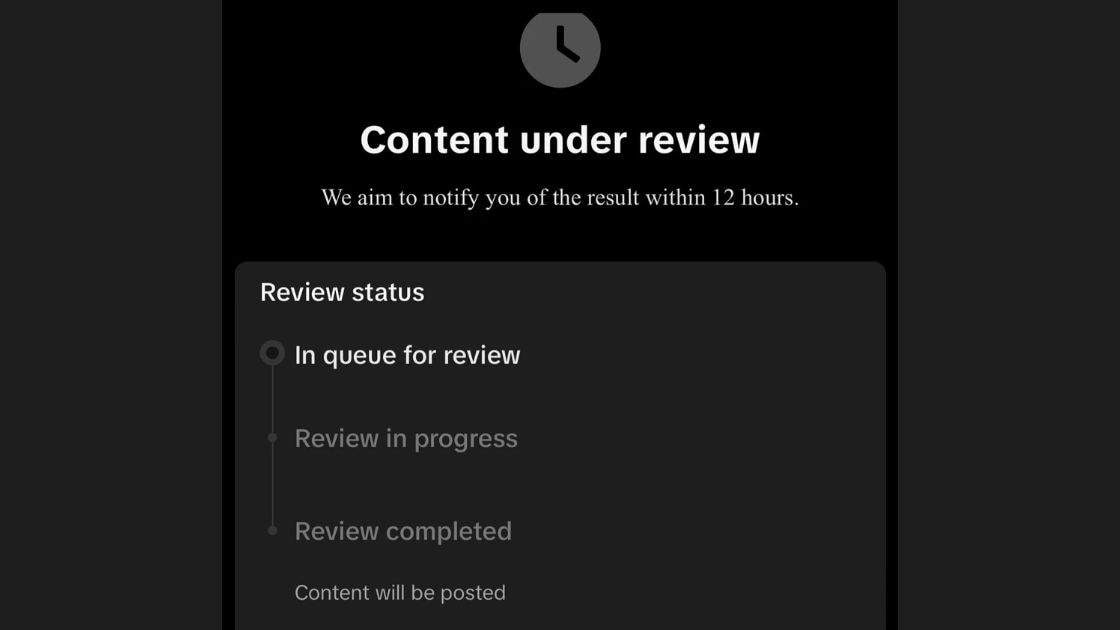
1: Check TikTok Notifications
The very first thing you should do is to open your notifications or inbox on TikTok. Often, TikTok will tell you the reasons for your video being reviewed or flagged.
2: See Community Guidelines
Carefully examine TikTok's community guidelines. In case the contents of your video are against the guidelines, you should edit the video and take out the parts that can be considered as risky.
3: Appeal the Decision
When you think that your video was wrongly flagged, you can appeal the decision through the app.
Part 3. How to Back Up Your TikTok Drafts & Videos (So You Don't Lose Them)
Depending on the circumstances, a TikTok clip removal after an appeal may not only cause you to lose a few short clips but it could also heavily affect the volume of content you have as a creator or a business. If your TikTok video under review gets rejected, removed, or your account faces temporary restrictions, you risk losing:
- Draft videos – These are the clips saved locally on your device that have not yet been uploaded. When you lose these videos, it is the same as if you have lost the whole starting point.
- Edited but unpublished clips – These are the polished videos from which you have spent hours editing but have not been made public. Every change and effect could be lost without your backup.
- Campaign creatives – Promotional videos made for marketing, collaborations, or brand campaigns. Losing them can interrupt your schedules and partnerships.
- Business video assets – These are the necessary contents for a TikTok campaign, such as product displays, brand storytelling, or advertisements. The loss of these video materials can directly have an adverse effect on your reach and revenue.
Sometimes, iCloud or Google Drive might not be enough as backup failures, storage limits, and the hassle of recovering specific files can occur. A more dependable and flexible solution for content creators is Dr.Fone – Phone Backup.
Dr.Fone – Phone Backup (All-in-One Solution)
Imagine losing your drafts and the videos you've been working on when your TikTok videos, CapCut videos, or any other creative assets get rejected, deleted, or your account has certain restrictions. That is indeed a big disappointment. It would be great if we could not only depend on iCloud or Google backups but also have Dr.Fone - Phone Backup as a smarter and more reliable solution for creators. It assists you in backing up, restoring, and exporting your data from iOS and Android selectively which makes sure your photos, videos, app-data and even the campaign creatives are always safe.

Wondershare Dr.Fone
Selectively backup your iPhone contacts in 3 minutes!
- One-click to backup the whole iOS device to your computer.
- Enable scheduled Wi-Fi backups to automatically protect your iOS data without manual effort.
- Allow previewing and selectively export contacts from iPhone to your computer.
- No data loss on devices during the restoration.
- Works for all iOS devices. Compatible with the latest iOS version.



How to Backup TikTok TikTok Drafts & Videos
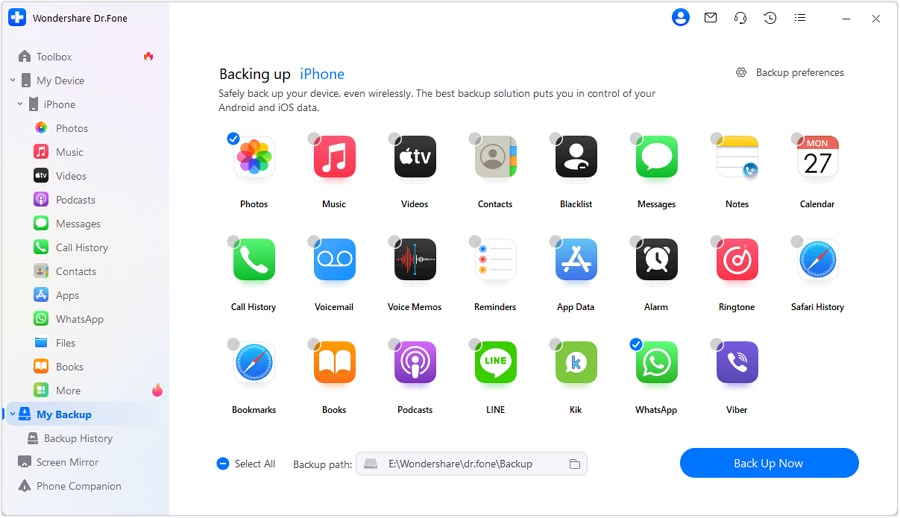
Launch the app and navigate to the "My Backup" tab on the left pane. Connect your device through USB or Wi-Fi and press the "Back Up Now" button. Dr.Fone will scan your device to find all the supported data, such as photos, videos, messages, WhatsApp, LINE, Viber, call history, app data, etc., and start backing up the data.
 safe & secure
Part 4. Why Is My TikTok Promotion Under Review? (For Ads & Boosted Posts)
4.1 "promotion under review" vs regular video review
TikTok posting the message "Promotion Under Review" means they are especially scrutinizing your ad or boosted post against their advertising policies, rather than just looking at it through the lens of general community guidelines.
4.2 Common reasons your promotion is under review (or delayed)
- Policy compliance checks: TikTok ensures that your advertisement does not have any of the forbidden contents that are listed in the prohibited contents.
- Targeting & audience verification: If the promotion is done using a custom audience or if it contains age-restricted content, then it will probably be subject to more detailed scrutiny.
- Payment or account issues: Approval of your promotion can be delayed in case the billing is incomplete, cards have expired, or there are restrictions on the account.
4.3 What you can do
Being in suspense during the review is not fun but here are some things you can do to make the most of the situation:
- Make sure that your promotion is really in line with TikTok's ad policies and guidelines.
- Make sure that your payment methods, campaign objectives, and target audience are spot-on.
Part 5. How to Prevent "TikTok Video Under Review" in the Future
- Make original content: Reposting or copying videos may result in review flags, so it's better to create original content.
- Stay away from copyrighted sounds: Use only music and audio that TikTok allows.
- Don't repeat hashtags that have been flagged: Make sure your hashtags are safe and compliant by checking them.
- Avoid sensitive issues: Controversial or policy-violating topics may cause the account to be monitored further.
- Confirm your business account: Your account should be verified if you are planning to run any promotions or ads.
Conclusion
Getting a message that says "TikTok video under review" is annoying. Still, understanding what caused it and taking the right steps will help you save time and keep your promo safe. Following the TikTok rules, creating pure new content, staying away from copyrighted or flagged stuff, and confirming your business account are the things that will help you to have a minimum of review delays and a smooth campaign. Using a backup tool Dr.Fone - Phone Backup to keep a copy of your creative work being done is very helpful: even if a video gets removed or restricted, your work is still there, hence, it can be reposted. Being knowledgeable and ready is the trick to successful TikTok promotion.
safe & secureDr.Fone Basic:
Better Control for Your Phone
Manage, transfer, back up, restore, and mirror your device


 > How-to > Backup & Restore Solutions > TikTok Video Under Review? Meaning, Fixes, Timeframe & How to Save Your Drafts
Julia Becker
staff Editor