 Effortlessly manage data through preview, delete, export, etc.

 100% Security Verified | No Subscription Required | No Malware

 :
: 
 ChatGPT
 Perplexity
 Gemini
 Claude
 Grok
Grok
Several times you might have heard about the Samsung Reset Code, a term that is interchangeably used as the Master Reset Code. In the rapidly evolving landscape of mobile technology in 2026, understanding these built-in functionalities is crucial for managing your device.
In this guide, you will learn and understand what the Samsung Reset Code is all about, why it holds importance, and what underlying risks you face when using it. Later in this article, you will also discover exactly how to use a Samsung reset code step-by-step and identify the specific situations where it proves to be the most useful.
In this article
Part 1. What Is Samsung Reset Code?
The Samsung Reset Code, also widely known as the Master Reset Code, is a specific combination of asterisks (*), hash signs (#), and numeric characters. When applied through your phone's dialer, it forcefully hard resets Samsung mobile phones or tablets. This means it restores the phone entirely to its factory default settings while permanently erasing all your data, apps, and accounts from it.
The Samsung reset code is a feature integrated specifically into Samsung's firmware. This means it is unique to its brand only. In other words, the Samsung reset code works exclusively on Samsung devices. If you attempt to dial these numbers on mobile phones from any other brand, the output is null, and nothing will happen.
Because of rapid advancements in mobile technology, the master reset code for Samsung smartphones has occasionally changed to remain applicable to all new models available in the market. Even though an older Samsung reset code might not work on the newest flagship models, older phones can still be effectively hard reset using the legacy codes.
At present, there are three primary Samsung reset codes, and your specific device model may respond to one of these. The three standard Samsung reset codes are:
- *2767*3855# (Frequently used for new Samsung phone models)
- *2767*2878# (Alternative code for new Samsung phone models)
- #*7728# (Typically used for older Samsung phone models)
Part 2. What Is the Result of Using the Samsung Reset Code?
The answer to this question is simple, straightforward, and slightly alarming if you are unprepared. As soon as you apply the Samsung reset code on your Samsung smartphone, the phone initiates the hard reset process instantaneously. However, the most critical downside of using this code is that it never displays any confirmation box or warning message before initiating the wiping process.
Since many Samsung users are not fully aware of this disastrous behavior of the Samsung reset code, they accidentally end up destroying all their personal data just because they wanted to check if the code was correct or active.
That being said, it is strongly recommended to use the Samsung reset code with extreme caution. You must always ensure that the personal and important information on your phone is backed up to a separate device or cloud storage before you even open your dialer to type it.

If you want to ensure your data is perfectly safe before experimenting with any reset codes, utilizing a robust backup solution is highly recommended.
 Effortlessly manage data through preview, delete, export, etc.
- Transfer all data between devices.
- Robust backup solutions for reliable data protection.
- Mirror screens to PC for meetings, teaching, and control.
Part 3. How to Use the Samsung Reset Code?
Using the Samsung reset code on Samsung mobile phones is a fairly simple process. As long as the device is powered on and accessible, you can execute the command in just a few steps. All you need to do is follow the instructions below:
-
Step 1 Power on the Device
Ensure that your Samsung smartphone has sufficient battery and power it on. Unlock the screen if it is protected by a PIN, pattern, or biometric lock.
-
Step 2 Access the Phone Dialer
If not already available on the Home screen, open the Apps drawer and tap the standard Phone/Dialer icon.
-
Step 3 Open the Keypad
If the app opens to your recent calls or contacts, tap the Keypad option from the bottom or top menu to reveal the numeric buttons.
-
Step 4 Enter the Reset Code
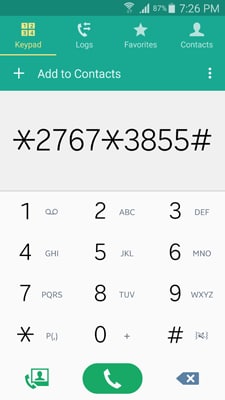
On the Keypad interface, carefully start typing the Samsung reset code that is applicable for your specific Samsung phone model (e.g., *2767*3855#).
-
Step 5 Wait for the Reset
Normally, the hard reset process initializes as soon as you type the last character (usually the # sign) of the reset code. If it doesn't automatically trigger, you can tap the Call button to manually start hard resetting your Samsung smartphone.
Part 4. Learn More about Samsung Hard Reset Code
As discussed above, resetting your Samsung smartphone using the hard reset code is an extremely simple process with only one major drawback: it doesn't prompt any confirmation box for your consent.
Also, a crucial limitation is that you can use the Samsung reset code on your Samsung smartphone only when your phone is in a working condition and is capable of accepting the dialer inputs you give to it. In case the phone is not responding to your touch inputs, is stuck on a boot loop, or has been permanently locked due to a forgotten password or disabled screen, this method is completely useless. When you cannot access the dialer, other methods to hard reset or unlock the phone must be utilized.
- Unlock Android phone in seconds.
- Remove PIN, pattern, password, fingerprint.
- Bypass Google FRP lock easily.
- Works on all Android brands & models.
- No tech skills required – user-friendly.

Apart from the master reset code that hard resets the Samsung phones, there are several other diagnostic and secret codes that you can type on your phone to get system information that is otherwise not visible or readily available for end-users. You are highly suggested to use those advanced codes only when you are a tech pro or if you have some advanced knowledge about how Android phones operate under the hood.
The other unique codes that can be applied on Samsung phones can be found in the following external links. These links contain detailed articles written by other mobile 'gurus' and can give you in-depth, safe information about what each code executes:
Part 5. All Samsung Secrets Codes
If you want to dig deeper into the world of Samsung dialer commands beyond just the Samsung reset code, various community forums and tech blogs have compiled exhaustive lists over the years.
This first referenced article is written by one of the senior members of XDA-Developers. XDA-Developers is a highly trusted source to get if not complete, at least most of the credible information about Android devices, custom tweaks, and secret tips and tricks to perform various tasks when using the Android operating system.
You can read more here: http://forum.xda-developers.com/galaxy-s2/general/samsung-secrets-codes-t2357184
Samsung Mobile : Secret Codes List
This article contains many secret codes that you can execute on your Samsung smartphone to perform some important background tasks and diagnostic checks. In case some codes fail to work on your specific phone model, you can check the comments posted by the end-users. Many comments contain valuable information about code execution by changing a few characters while typing the code to match modern OS requirements.
You can read more here: http://123techguide.blogspot.in/2012/01/samsung-mobile-secret-codes-list.html#axzz3efDGeQzW
Some Useful and Interesting Codes for Smartphones
There are many codes that are universal in nature and can be executed on multiple smartphones regardless of their manufacturers. This article contains many such universal secret codes for smartphones along with the exact output they give or the hidden system action they perform when executed.
You can read more here: http://www.smartmobilephonesolutions.com/content/some-useful-and-interesting-smartphone-codes
Even though the Samsung reset code is the easiest method to hard reset your phone directly from the keypad, always remember that if your phone has important data that you cannot afford to lose, you must back up the information before hitting that final dial character.
Conclusion
The Samsung reset code is a powerful built-in tool that allows users to perform a master factory reset directly through their device's dialer application. While it offers unparalleled convenience and speed, its instant execution—without warning prompts—makes it a highly risky feature for those who are unprepared. Whether you use the classic codes for older devices or modern strings for current flagships, it is imperative to secure a complete backup of your device beforehand and understand that this process requires an unlocked screen to input the characters.
FAQ
-
1. Can the Samsung reset code bypass a forgotten lock screen?
No, the Samsung reset code cannot bypass a forgotten PIN, pattern, or password. Because the code must be typed into the phone's primary dialer application, you must first be able to unlock the phone and access the home screen. If you are locked out, you will need to use alternative methods like recovery mode or specialized unlocking software. -
2. Will the Samsung reset code delete data on my SD card?
Generally, the master reset code targets the internal storage of the device, wiping apps, settings, messages, and internal media. However, to be absolutely safe, it is highly recommended to physically remove the MicroSD card from the device before entering any hard reset code to prevent accidental formatting. -
3. What should I do if the Samsung reset code does nothing when I dial it?
If nothing happens after entering the final '#' character, try pressing the call button. If it still fails, it means your carrier or specific firmware version may have disabled secret dialer codes for security reasons. In such cases, you will need to perform a factory reset via the standard Settings menu or through Android Recovery Mode.• Settings Method: Go to Settings > General Management > Reset > Factory Data Reset.• Recovery Method: Turn off the phone, hold the Volume Up and Power buttons, and select 'Wipe data/factory reset'. -
4. Does using a Samsung reset code remove my Google account (FRP)?
No. While the reset code wipes the user data, modern Samsung devices running Android 5.1 and above are protected by Factory Reset Protection (FRP). After the device reboots from the master reset, it will still ask you to log in with the previously synced Google account to prove ownership before you can set it up again.
 Add Wondershare Dr.Fone as a preferred source on Google



