
How to Get Free Ringtones on iPhone: Easy & Legal Methods

Jul 01, 2026 • Filed to: Device Data Management • Proven solutions
 TL;DR:
You can legally set free custom ringtones on an iPhone by converting unprotected audio files into the mandatory .m4r format using native tools like GarageBand, third-party sound libraries, or desktop software like Wondershare Dr.Fone.
● Apple's system strictly limits custom ringtones to a duration of 30 to 40 seconds and blocks the conversion of digitally protected tracks from Apple Music.
● GarageBand provides a completely on-device method to import local audio files, trim the track to under 30 seconds, and export it directly into the iPhone's default Sound settings.
● Wondershare Dr.Fone offers a desktop alternative that bypasses manual syncing steps and third-party app ads, allowing direct ringtone creation and transfers for devices up to the iPhone 17 and iOS 26.
Ask AI for a summary
 ChatGPT
 Perplexity
 Gemini
 Claude
 Grok
Grok
Dr.Fone Basic:
Better Control for Your Phone
Manage, transfer, back up, restore, and mirror your device
The alerts and calls make phones feel noisy and hard to enjoy daily again. Many people want sounds they like without paying or breaking simple phone rules. The good news is that you can explore legal apps and simple steps to create or add unique ringtones.
Tools like Dr.Fone also let you turn your music into custom iPhone ringtones and set them directly on your device with ease. So, this guide shows easy options to learn how to get free ringtones on iPhone safely and keep things legal.
- Part 1. How to Get Free Ringtones on iPhone: What You Should Know First
- Part 2. How to Get a Ringtone on iPhone for Free with Ringtone Apps
- Part 3. How Do I Add Ringtones To My iPhone?
- Part 4. Free Ringtones on iPhone and Android: The Easiest Way With Dr.Fone

- Part 5. Can You Have a Custom Ringtone Directly on an iPhone For Free?
Part 1. How to Get Free Ringtones on iPhone: What You Should Know First
Before adding tones, you should know Apple's rules, limits, and safe options first. Free ringtones usually come from app websites or your own audio clips available online. Many users ask, how do you get free ringtones on iPhone, legally, without paying. Apple allows GarageBand and imports, but limits tone length and file type usage.
What “Free Ringtones” Really Mean on iPhone
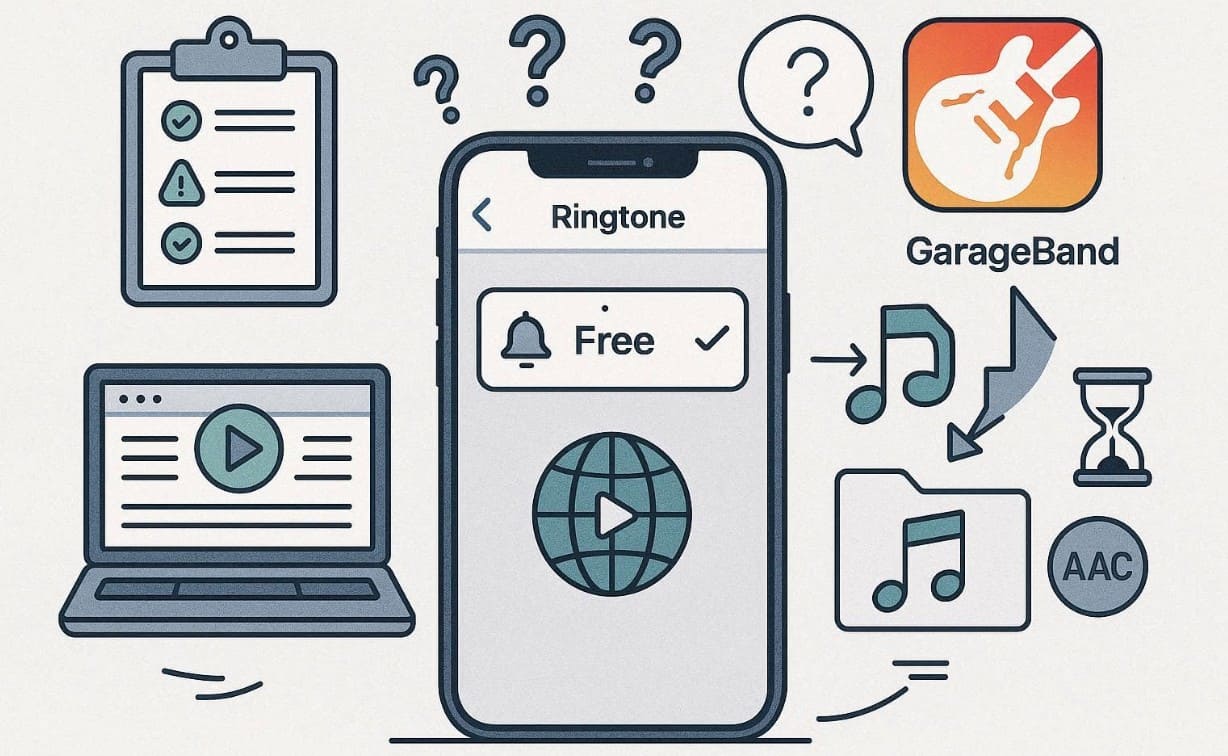
When people search for how to get a ringtone on iPhone for free, the term "free" varies. Many ringtone apps use ad limits or coins instead of charging money directly. Alongside, websites may allow downloads but still need extra steps to add tones correctly. Therefore, understanding these limits helps avoid confusion and choose the right free option.
Apple’s Ringtone Rules and Your Customization Options
Apple controls ringtone creation to keep phones stable and protect music rights. Below, you will explore a few limitations to help you customize sounds without issues:
- Length Limit: Ringtones must stay within 30 to 40 seconds for proper use. Thus, longer tones won’t appear correctly in settings or may fail to sync properly.
- File Format: Apple supports only the .m4r format for recognized ringtone files on iPhones. Other formats might not transfer correctly or will show as unsupported during setup.
- Add Location: You manage ringtones inside sound settings, not directly through music apps. This keeps songs and ringtones separate to avoid mistaken changes during daily use.
- Music Restriction: Songs from Apple Music can’t become ringtones since they are digitally protected. You must use unprotected sound files saved separately before editing them.
- Custom Option: You can make ringtones using GarageBand or other iTunes-compatible apps. Hence, this gives control over tone style and final placement on your phone.
Part 2. How to Get a Ringtone on iPhone for Free with Ringtone Apps
When you are wondering how I can get free ringtones for iPhone, several apps can help you. So, the following apps let you browse and download unique tones without paying money:
1. Zedge
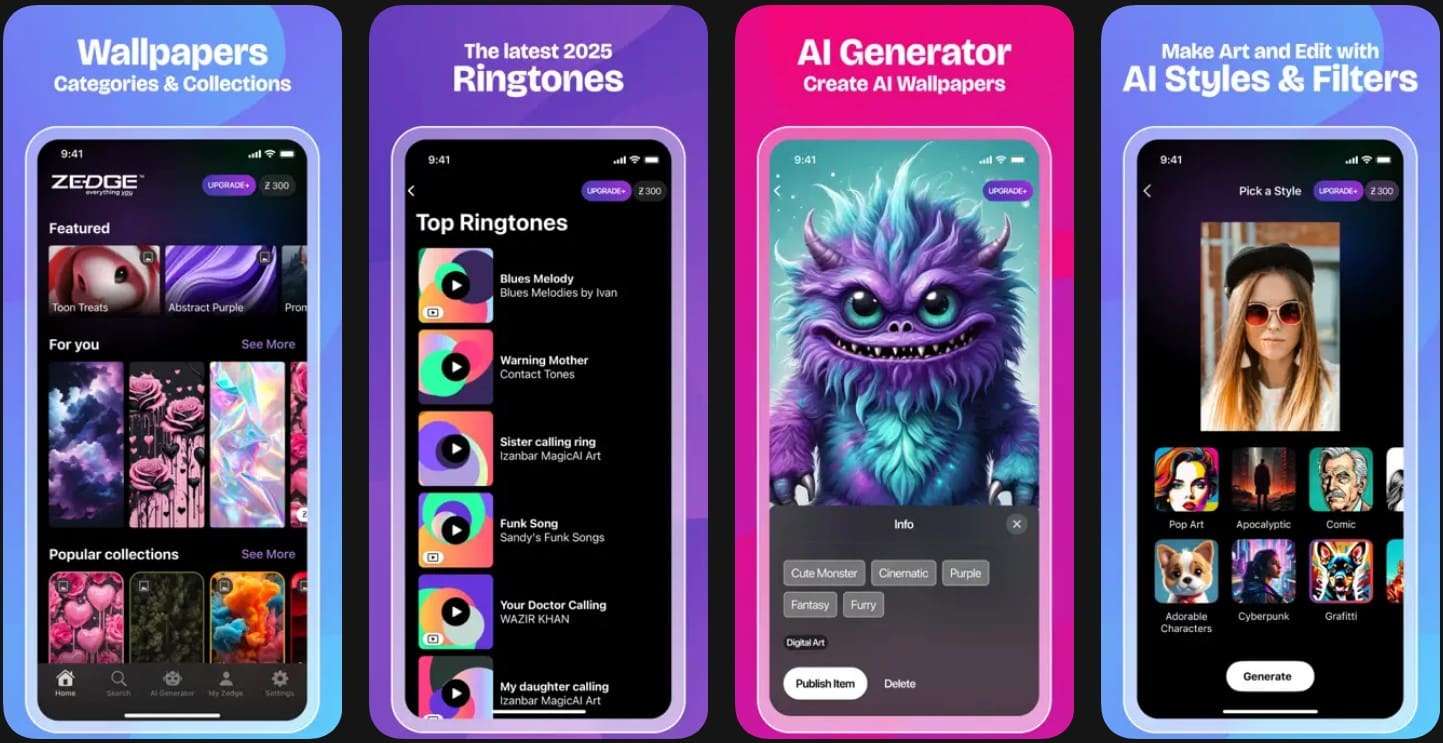
Zedge makes it easy for anyone who is asking, how can I get free ringtones on iPhone. It offers thousands of free tones and famous audio clips for all tastes. You can also set custom alerts or even alarms on your phone. Besides, the app enables users to set their preferred tone for a specific contact directly.
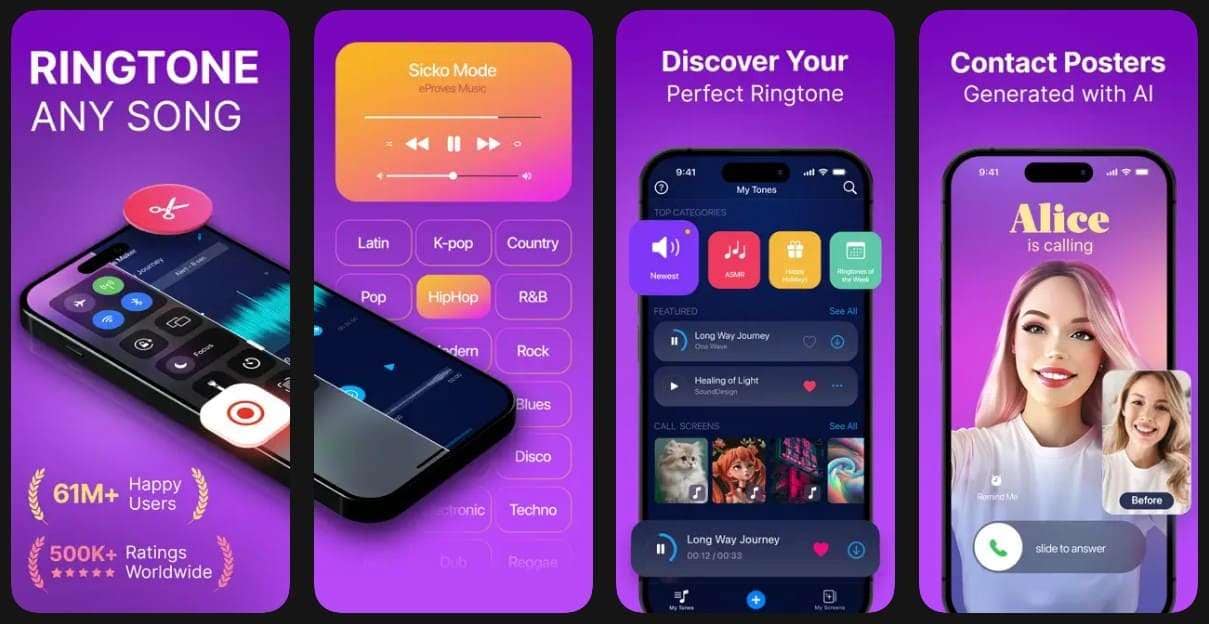
2. RingTune
This app provides a large collection of ringtones, including famous OSTs and ASMR. It updates every two weeks with new seasonal or holiday tone collections for variety. The app’s “My Collection” feature organizes saved, edited, and customized tones. Thus, it’s an excellent option for users exploring how to get ringtones for iPhone for free.
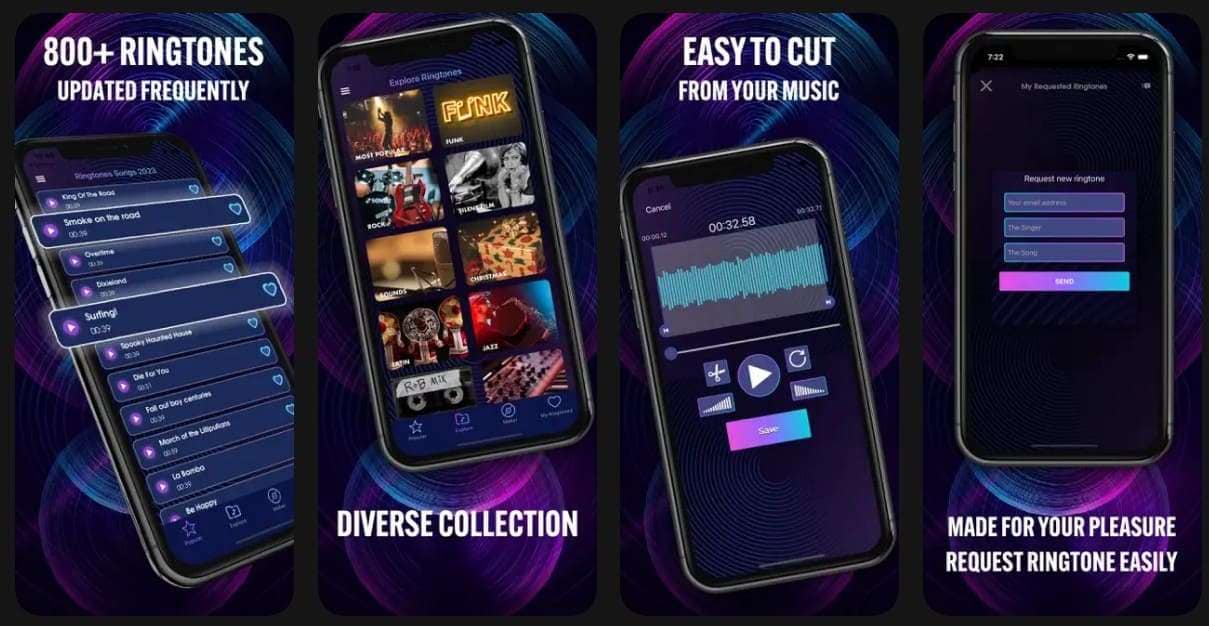
3. Music Ringtone
Music Ringtone offers over 1000 tones across 25 musical genres and styles. It provides famous tones like Bollywood or alarms, and updates weekly to add user‑requested ringtones. In addition, users can download and reuse ringtones offline as alarms or notifications. Hence, it’s another practical choice for users exploring how to get free ringtones.
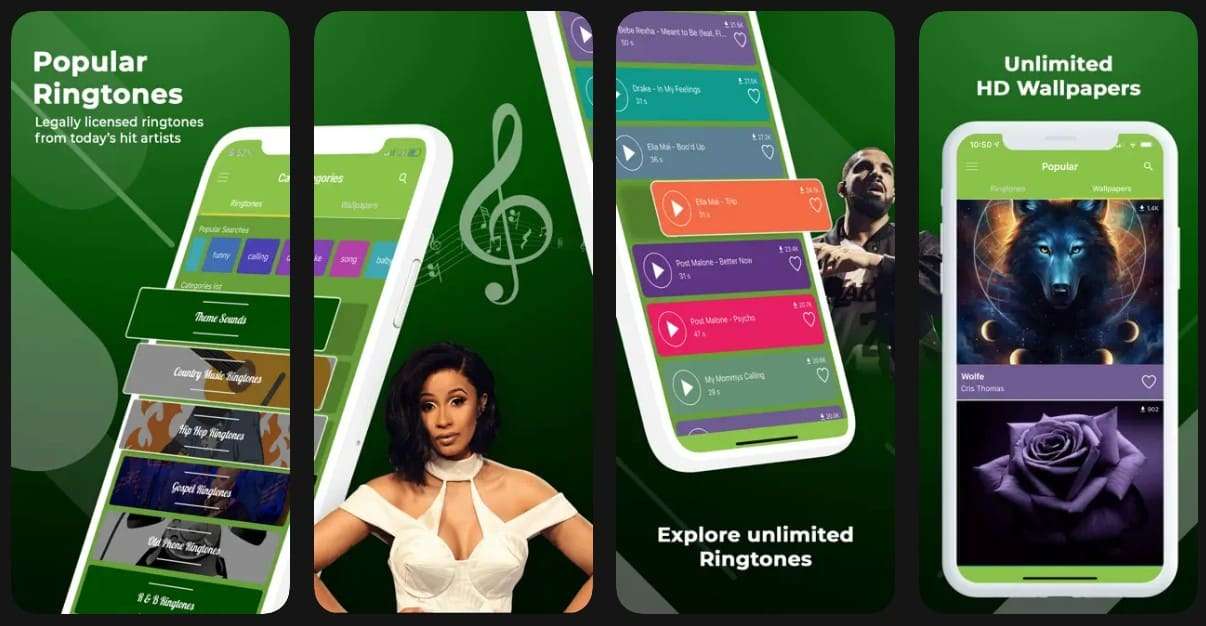
4. Cool Music Ringtones
Another app that provides a vast library, like Pop and R&B, is Cool Music Ringtones. Moreover, it includes tracks from famous artists and weekly refreshed trending music lists. Extra sound packs include animal and funny tones for alerts. While learning how to download ringtones for free on iPhone, licensed ringtones ensure HD audio tones.
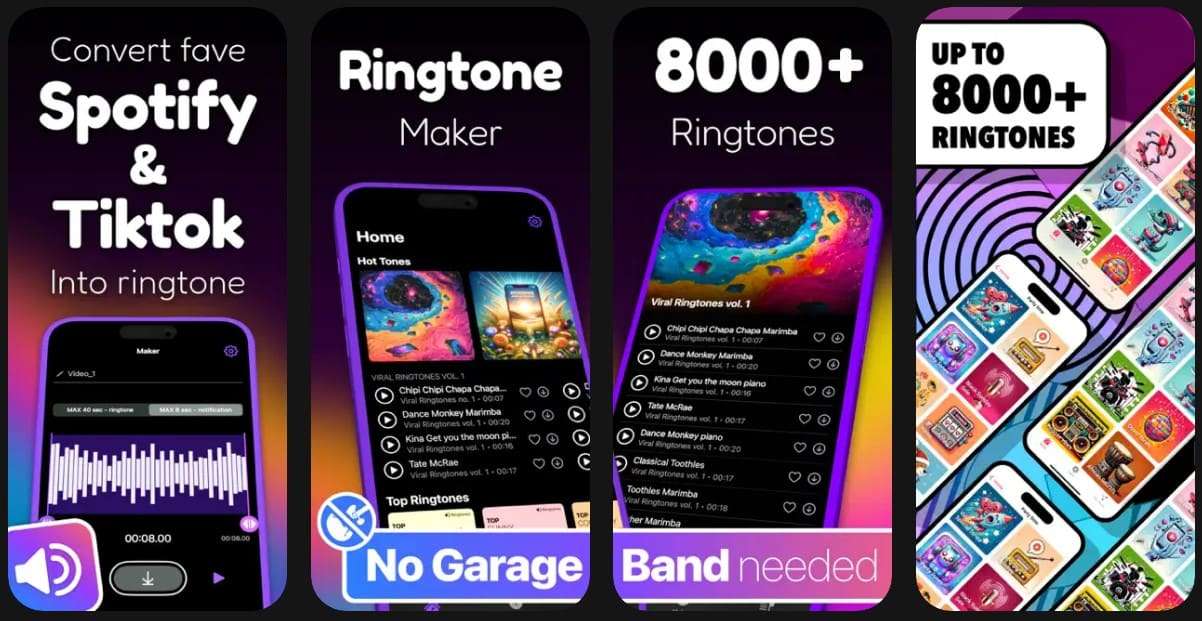
5. Ringtones For iPhone
Ringtones for iPhone offers 8000+ unique tones across several dynamic styles. Its vast soundboard features categorized tones designed for a global audience. Apart from that, a built‑in recorder lets users capture custom voices or ambient sounds. It lets users convert personal audio into iPhone-compatible ringtone files.
Part 3. How Do I Add Ringtones To My iPhone?
Adding ringtones is the next step after finding or creating the perfect sound. Besides, iPhones need audio converted into short ringtone files before appearing in the sound settings. Nonetheless, newer iOS versions simplify this process directly on the phone without computers.
Older iOS versions still rely on GarageBand or computers for proper ringtone setup. Anyhow, whenever someone asks, how can I get a free ringtone, go through the steps below:
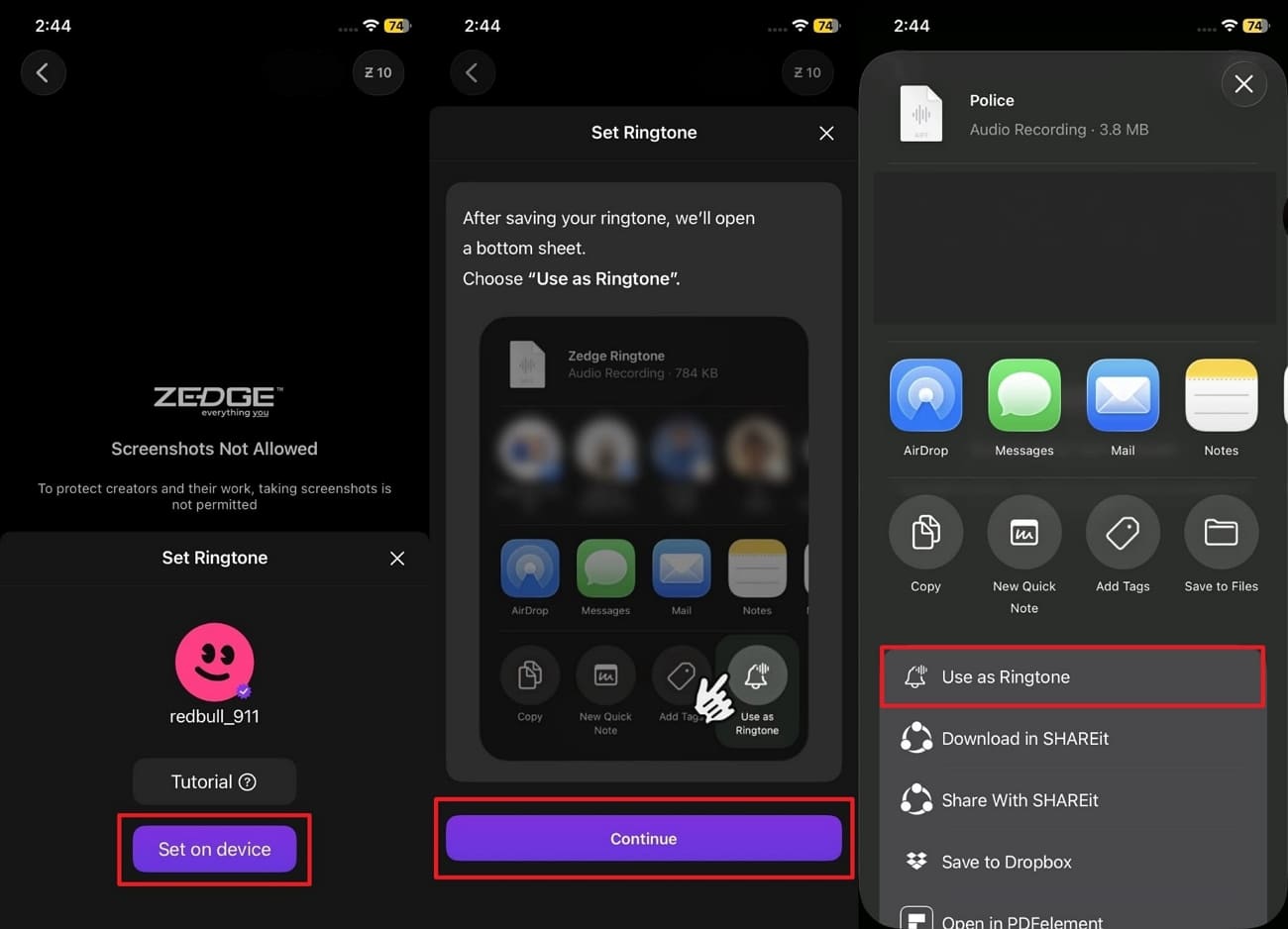
Instructions. As you find your favorite ringtone on apps like “Zedge,” tap the “Set On Device” button. Then, press the “Continue” button and then choose “Use as Ringtone” to apply it.
Part 4. Free Ringtones on iPhone and Android: The Easiest Way with Dr.Fone
Apart from the above, managing ringtones across iPhone feels confusing when free options fail or feel limited. Yet, Wondershare Dr.Fone solves the hassle of manual ringtone transfers for busy users. It helps beginners learn how to get ringtones for iPhone for free. A dedicated ringtone maker option keeps all sound tools in one clear place. Plus, you can import local music directly from your computer without format problems.
In addition, it allows you to use existing device music for faster ringtone creation. Its simple selection tools help choose exact songs without confusing menus or settings. Besides, the tool’s native trimming feature lets you adjust ringtone length to match phone rules. It even supports the latest iPhone 17 and iOS 26 without compatibility issues. Moreover, you can use the fade-in and fade-out options to create more pleasant ringtones.

Wondershare Dr.Fone
Custom Ringtone Directly on an iPhone For Free
- Transfer, manage, export/import your music, photos, videos, contacts, SMS, Apps, etc.
- Back up your music, photos, videos, contacts, SMS, Apps, etc., to the computer and restore them easily.
- Transfer music, photos, videos, contacts, messages, etc., from one smartphone to another.
- Transfer media files between iOS devices and iTunes.
- Fully compatible with the newest iOS system.


Guide to Generate Free Ringtones for iPhone with Dr.Fone Basic
Review the given detailed guide to understand how to get ringtones for free on iPhone via Dr.Fone Basic:
Step 1. Access the Ringtone Maker to Create a Ringtone
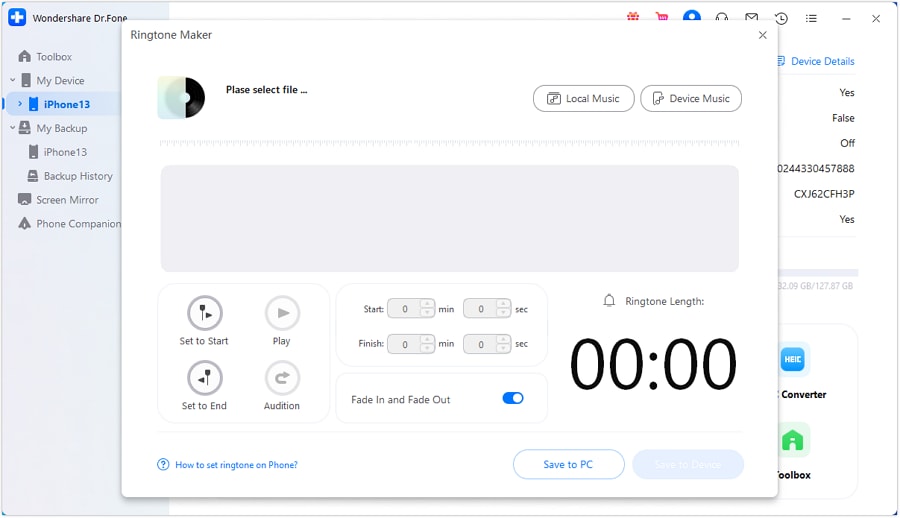
Connect your iPhone to the PC/Mac and then access your detected device. Afterward, opt for the “Ringtone Maker” feature. Here, either click the “Local Music” or “Device Music” button to import your desired music file.
Step 2. Choose Your Desired Ringtone [For Device Music]
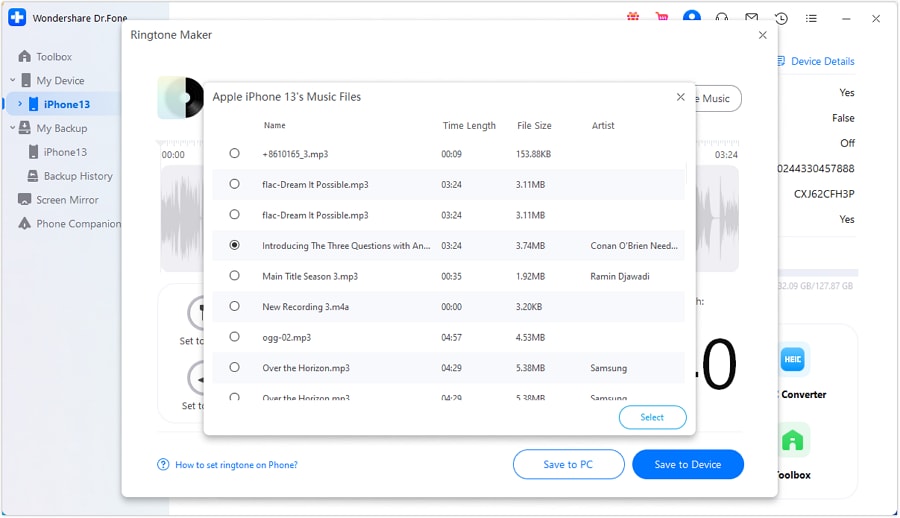
If you have selected the “Device Music” option, confirm your desired music and press the “Select” button.
Step 3. Add the Ringtone to Your iPhone
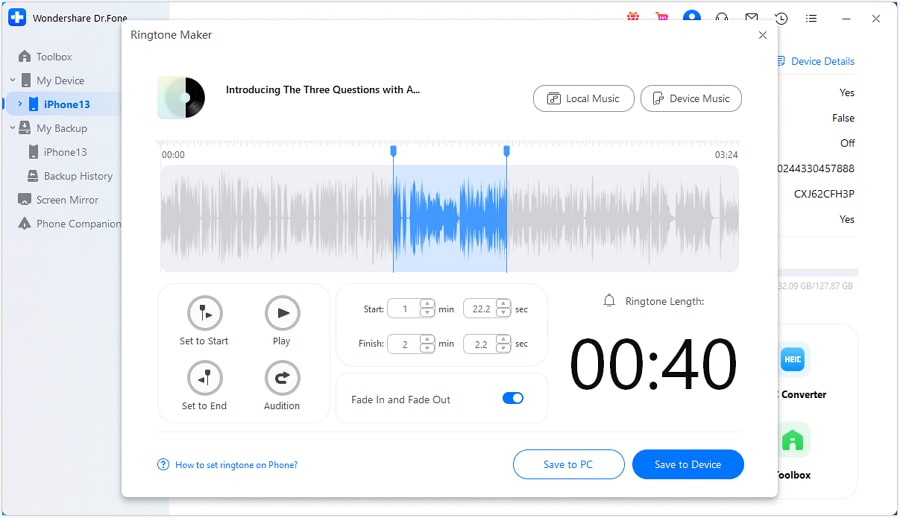
You can then trim your ringtone to set it under 40 seconds and even apply some other customization settings. Subsequently, click the “Save To Device” button to directly import it to your iPhone.
 safe & secure
4,624,541 people have downloaded it
Part 5. Can You Have a Custom Ringtone Directly on an iPhone For Free?
You can create custom ringtones directly on your iPhone for free using GarageBand. Many users search for how to get free ringtones without extra costs or computers successfully. Apple’s free GarageBand app turns short audio clips into iPhone ringtones easily. Just trim clips to 30 to 40 seconds and follow the simple export steps. This keeps everything legal while respecting Apple’s format rules and rights.
Free Ringtones on iPhone: Customize Call and Notification Sounds with GarageBand
This free Apple app turns personal audio files into ringtones directly on the device. Upon exporting, tones appear in sound settings for calls, texts, alarms, and notifications. After learning how to download ringtones for free on iPhone, let’s explore how you can customize them:
Step 1. As you open the “GarageBand” app, tap the “Tracks” icon from its main screen. Afterward, opt for the “Loop Browser” icon that appears next to the “Gear” icon.
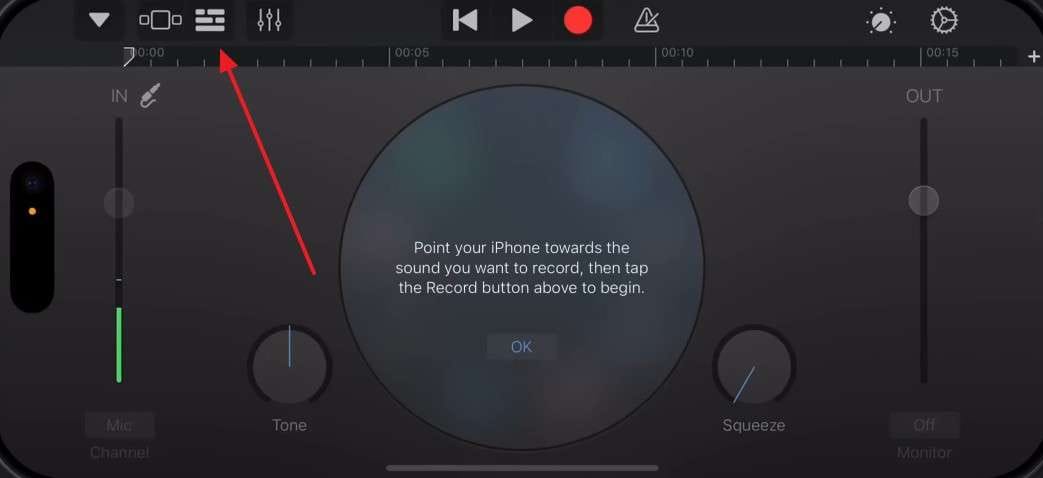
Step 2. Moving forward, go to the “Files” tab to tap and drag the downloaded music file to the left. When you access the track view screen, drop the music file into the “Track” bar.
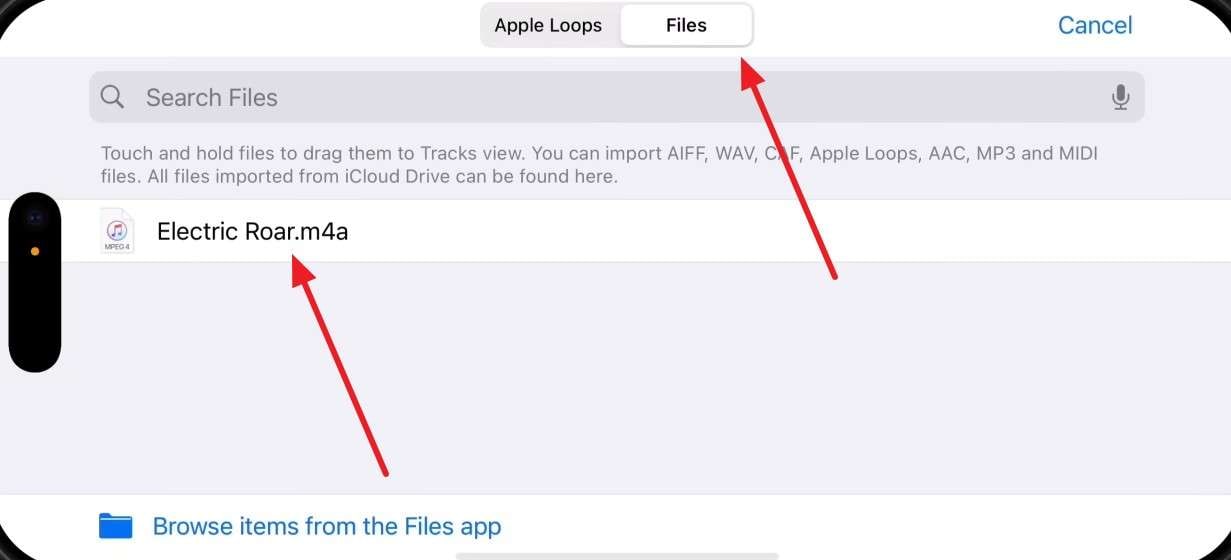
Step 3. Afterward, trim your imported music file and adjust its length to under 30 seconds. Here, tap the “Navigation” button and then select the “My Songs” option.
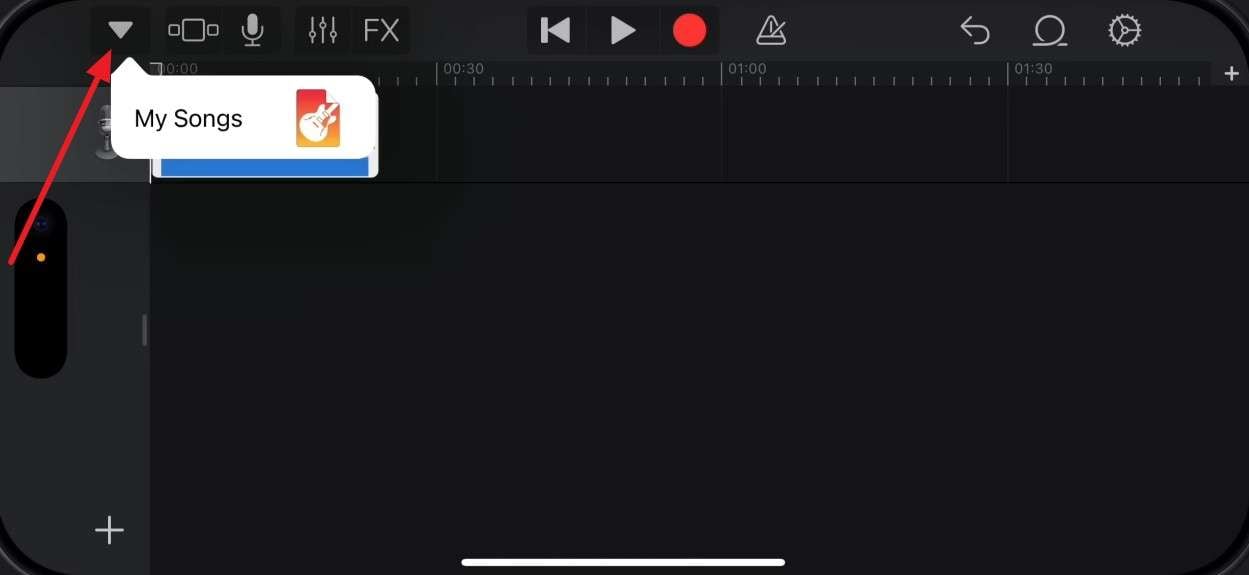
Step 4. Following that, press the “Three Dots” button and opt for the “Select” option. Afterward, choose your created song file and tap the “Share” icon.
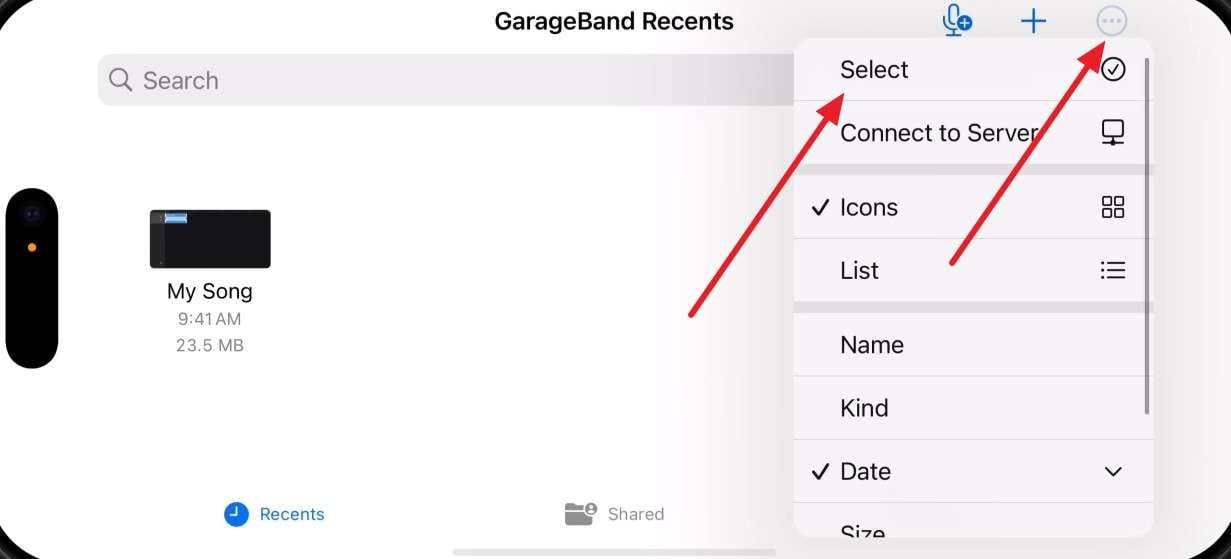
Step 5. As you see the new prompt display, tap “Ringtone” and give a name to this custom ringtone file. Next, you need to press the “Export” button to move forward.
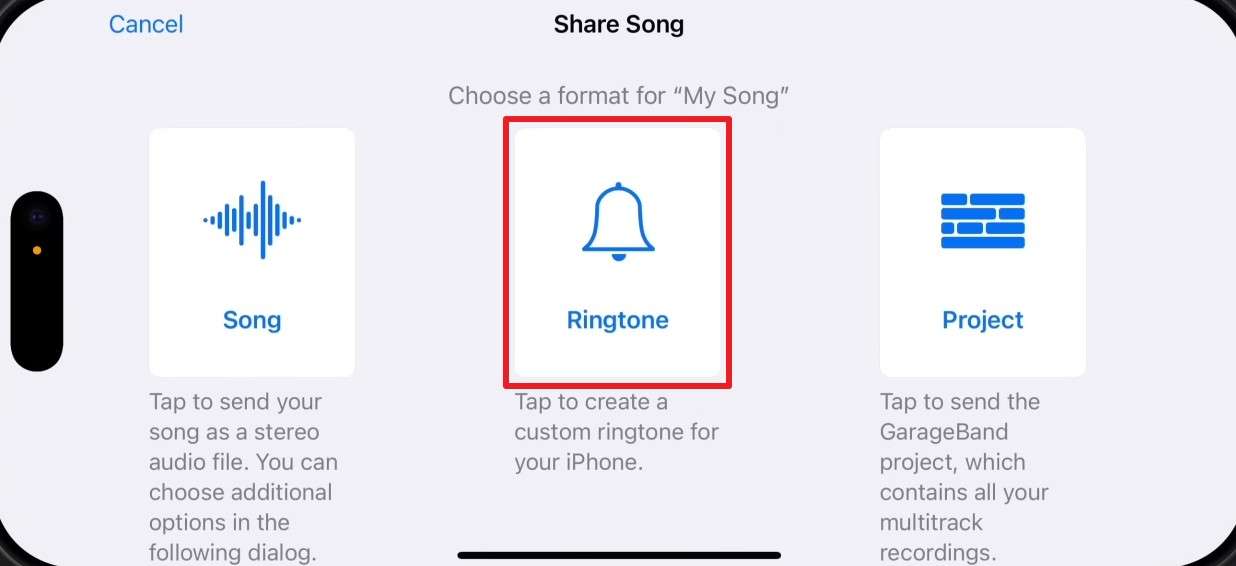
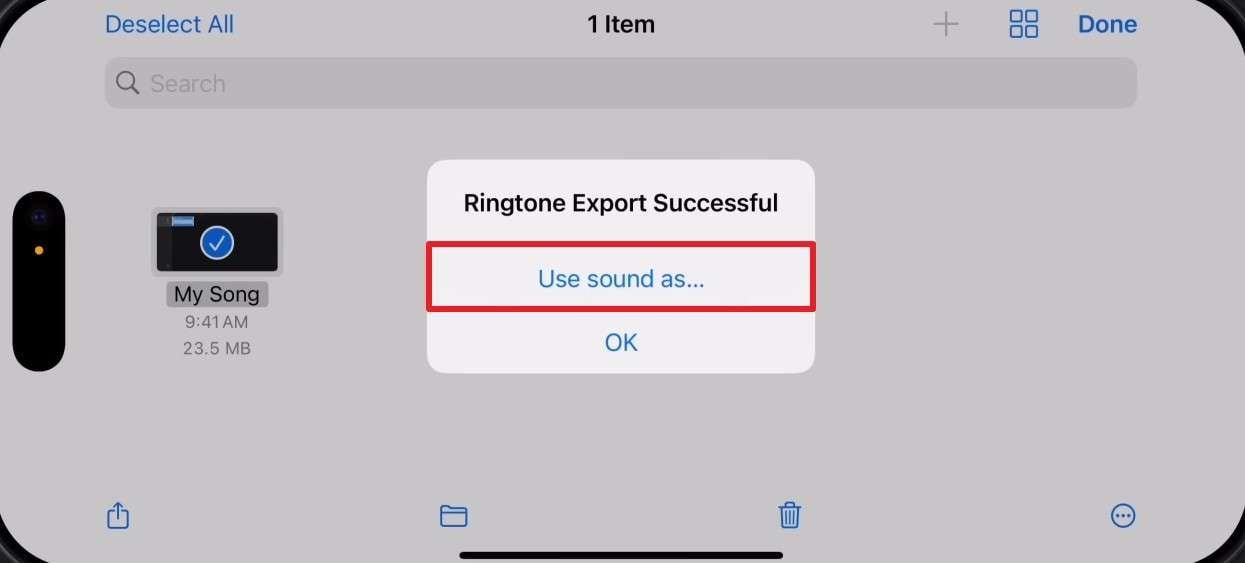
Step 6. Going ahead, tap the “Use Sound As…” option when you access the small prompt screen.
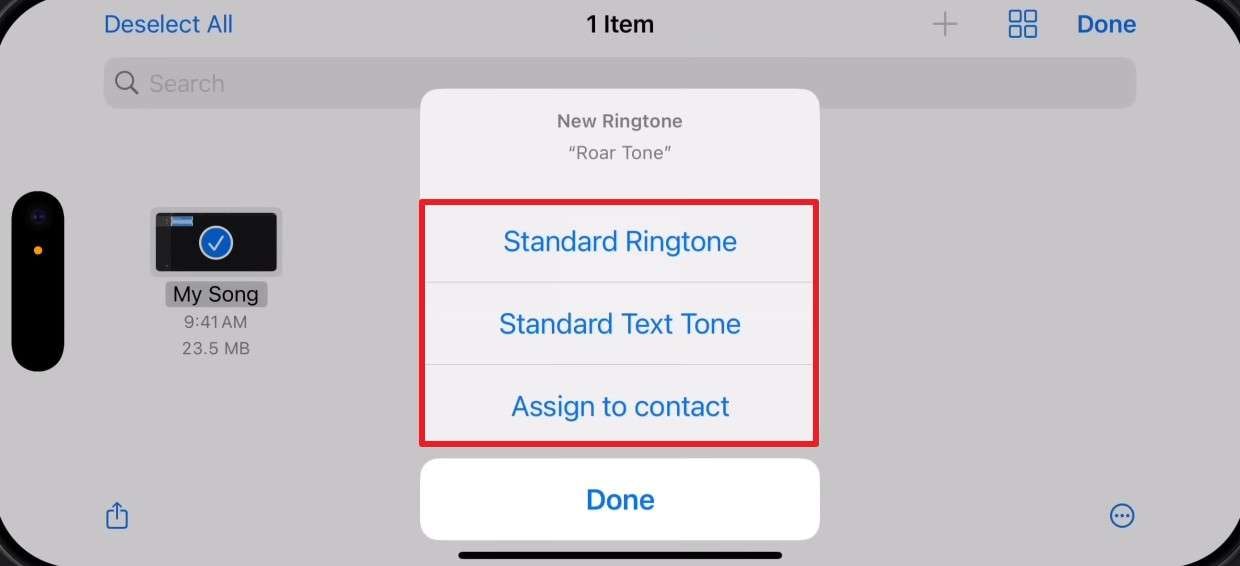
Step 7. Now, you can either select “Standard Ringtone,” “Standard Text Tone,” or “Assign To Contact” according to your preference.
Conclusion
To sum up, free ringtones help personalize your iPhone without spending money or breaking Apple rules. This guide explained apps, websites, and native tools to create sounds safely. Therefore, people ask how to get free ringtones on iPhone, and these steps work well.
You can now choose methods that match your comfort, whether apps or GarageBand. Apart from that, when managing many tones feels hard, Dr.Fone Basic offers easier and effortless setup options.
safe & secure4,624,541 people have downloaded it
FAQs
 Q1. How to Buy Ringtones on iPhone Using iTunes?
Step 1. When you run the “iTunes Store” app, head to the “Tones” tab. After that, tap the “See All” option in the “Ringtone” section to browse all the available tones.
Step 2. As you select your favorite tone, press the “Price” section and follow prompts to purchase it. Here, choose “Set as Default Ringtone” to set it.
Q2. Why do some free iPhone ringtones not appear in Sound settings?Q3, Is there an easier way to manage many ringtones together?Dr.Fone Basic:
Better Control for Your Phone
Manage, transfer, back up, restore, and mirror your device
You Might Also Like
Manage iOS Data
- iPhone Manage
- Data from iPhone to PC
- Photos from iPhone to PC
- Pictures from iPhone to PC
- Music from iPhone to PC
- Voice Memos from iPhone to PC
- Messages from iPhone to PC
- Files Between iPhone and PC
- Music from PC to iPhone
- Videos from PC to iPhone
- Photos from iPhone to Mac
- Music from iPhone to Mac
- Photos from iPhone to Laptop
- Videos from iPhone to Laptop
- Files from iPhone to Laptop
- Undelete Messages on iPhone
- Get iOS Text Message Records
- Music between PC and iPhone
- iPad/iPod Manage
- Photos from iPad to Laptop
- Music from iPod Nano to PC
- Music from iPod Classic to PC
- Photos from PC to iPod Touch
- Music from PC to iPad
- Files from PC/Laptop to iPad
- Mac-formatted iPod to Windows
- Sync iPod to New PC
- Sync iPad to New PC
- Music from Mac to iPod
- iTunes Manage
- Music from iPhone to iTunes
- Apps from iPhone to iTunes
- Purchases from iPhone to iTunes
- Playlists from iTunes to iPhone
- Sync iTunes Library to iPhone
- Items from iPad to iTunes
- Music from iPad to iTunes
- Music from iPod Nano to iTunes
- from iPod Classic to iTunes
- Music from iPod shuffle to iTunes
- Music from iTunes to iPod
- Watch iTunes Movie on Android
- Music from iTunes to Android
- Audio Books from iTunes to Android
- Playlists from iTunes to Hard Drive
- iPod Won't Sync with iTunes
- Import Multiple Lyrics to iTunes
- Top Alternatives to iTunes
- iCloud Manage
- Free iCloud Backup Extractor
- Access iCloud Photos
- View Messages on iCloud
- Reset iCloud Email
- Set Up iCloud Account
- Change iCloud Account
- Download iCloud Backup
- Cancel iCloud Storage Plans
- Access iCloud Backup File
- Access iCloud from Android
- Transfer iCloud to Android
- Sync iTunes to iCloud
- WhatsApp from iCloud to Android
- Phone Companion
- Read Text Message
- Hide Text Messages
- Send Anonymous Text Message
- Extract iPhone Text Messages
- SMS Scheduler
- Receive SMS Online
- Read Text Messages Online
- Send SMS Online
- Ringtones Maker
- Best Ringtone Apps
- Get Free Ringtones on iPhone
- Add Ringtones to iPhone
- Ringtones from iOS to Android
- Make Voice Memos into iPhone ringtones
- Device Diagnostics
- Run an iPhone Diagnostic Test
- Test Microphone on iPhone
- Perform iPhone Ear Speaker Test
- Check Phone Battery Health
- Run a Hardware Test on Xiaomi
- Run a Phone Battery Test on Xiaomi
- Apps for Android Hardware Test
- Test Microphone on Android
- Unlock Android Hidden Features
- HEIC Converter



Alice MJ
staff Editor