
Download the latest version | Secure & verified
UnlockTool.Net – What It Is, How It Works, & Is It Worth It?

Oct 22, 2026 • Filed to: Screen Lock Removal • Proven solutions
 TL;DR:
UnlockTool.Net is a paid, Windows-only utility tailored for mobile technicians to bypass FRP locks, flash firmware, and repair IMEI across multiple Android and iOS devices, but its complex interface requires advanced technical skills to operate safely.
● While UnlockTool.Net is best suited for professional repair shops dealing with frequent multi-device unlocks across Qualcomm, MediaTek, and Spreadtrum chipsets, everyday users should opt for Dr.Fone due to its automated, beginner-friendly wizard available on both Windows and Mac.
● Operating the software mandates a Windows PC, a physical USB connection, purchasing a time-based license ranging from $19.99 to $149.99, and manually whitelisting the installation file in Windows Defender to prevent automatic deletion.
● Performing advanced modifications through UnlockTool.Net carries the risk of voiding device warranties, whereas the Dr.Fone alternative specifically preserves existing device data when removing lock screens on supported Samsung and LG models.
Ask AI for a summary
 ChatGPT
 Perplexity
 Gemini
 Claude
 Grok
Grok
The process of unlocking smartphones, particularly when there is a screen lock, FRP lock, or forgotten password, can be a complicated one. However, UnlockTool.Net saves the day as it's a powerful tool that is designed to bypass FRP locks, reset passcodes, and repair device problems in just a few taps.
Still, many users wonder if the tool is worth the hype, which we will explore in this detailed guide. From uncovering users' reviews to understanding its usage, you’ll discover a better substitute. So, review the article and learn how reliable it is, and whether it is really worth your time and money.
- Part 1. What Is UnlockTool.Net and What Is It Used For?
- Part 2. How to Download & Use UnlockTool.Net for FRP Bypass
- Part 3. UnlockTool.Net | Pricing, User Review, Pros and Cons
- Pro Tip. The Most Reliable Alternative to Unlock Xiaomi Lock Screen and FRP Lock

- Part 5. Dr.Fone vs UnlockTool.Net: Which Tool Standout for FRP Lock Bypass
Part 1. What Is UnlockTool.Net and What Is It Used For?
The process of unlocking smartphones, particularly when there is a screen lock, FRP lock, or forgotten password, can be a complicated one. However, UnlockTool.Net saves the day as it's a powerful tool that is designed to bypass FRP locks, reset passcodes, and repair device problems in just a few taps.
Still, many users wonder if the tool is worth the hype, which we will explore in this detailed guide. From uncovering users' reviews to understanding its usage, you’ll discover a better substitute. So, review the article and learn how reliable it is, and whether it is really worth your time and money.
www.UnlockTool.Net is a paid software that unlocks mobile devices, mainly Android phones and tablets. Technicians and advanced users mainly use it to bypass locks, reset devices, and perform service tasks on phones from brands like Samsung, Xiaomi, Oppo, Huawei, and others. It helps bypass FRP locks, remove screen locks, unlock carriers, and even open bootloaders for advanced use.
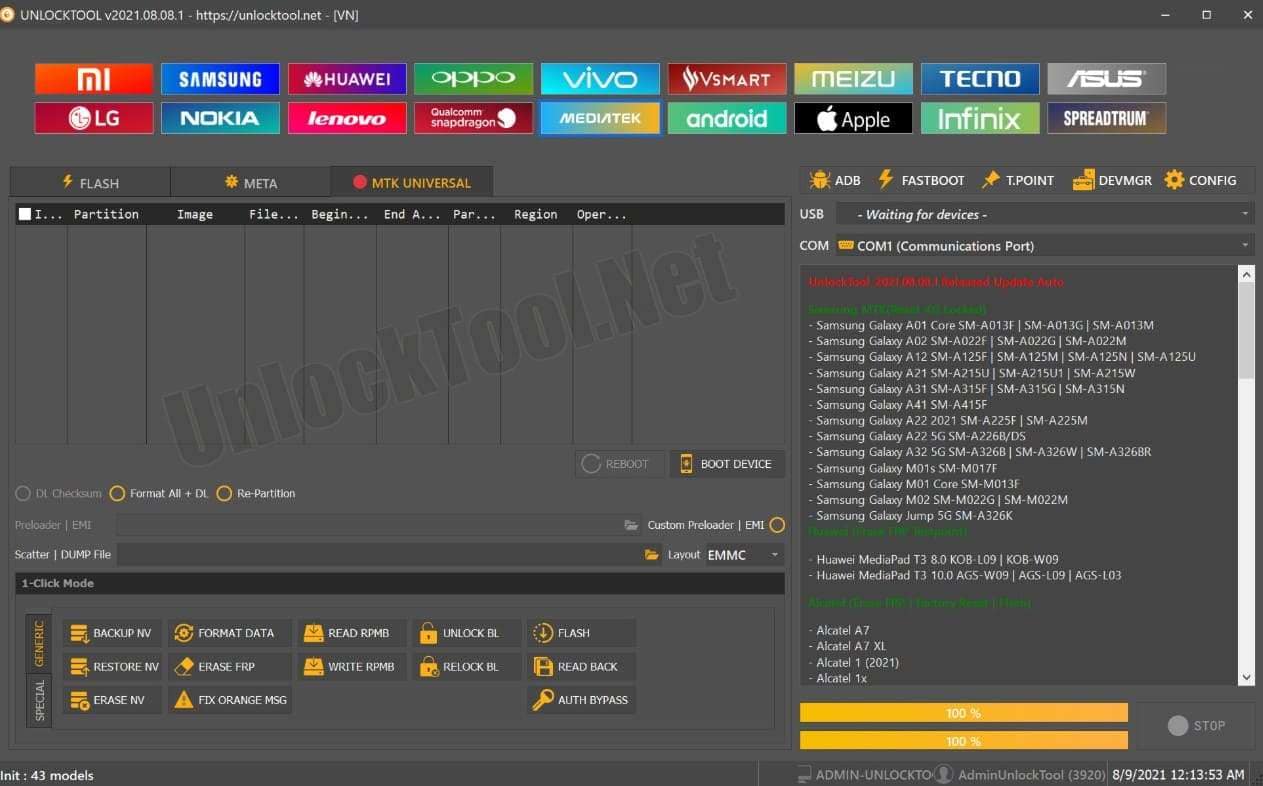
Additionally, it supports IMEI repair, firmware flashing to fix software issues, and EFS management for device identity. Besides, its regular updates ensure wide compatibility with new Android models, chipsets like MediaTek and Qualcomm, and major brands such as Samsung, Xiaomi, Oppo, and Huawei. To further know what this tool offers, review the listed features for better clarity:
- Unlocks or relocks bootloaders for firmware customization, rooting, or enhanced device access.
- Flashes stock/custom ROMs, repairs partitions, and backs up or restores system data to fix bricked or buggy devices.
- On older models, it removes locked Mi Accounts and bypasses some Apple ID/iCloud locks.
- It also enables you to delete Mobile Device Management restrictions from business, school, or carrier-managed phones.
- Offers limited support for some iOS devices, including bypassing the “Hello” activation screen, removing iCloud locks, and resetting passcodes on certain models.
- Unlike other solutions, it works with Qualcomm, MediaTek, and Spreadtrum chipsets to cover most Android brands.
- The tool is frequently updated to support new devices and security patches, with technical support included in most plans.
UnlockTool Supported Models
|
Brand |
Popular Supported Models |
Main Functions Supported |
| Samsung | S21, A05s, M52, Z Fold3/Flip3 | FRP bypass, flashing, reset, unlock |
| Xiaomi | Redmi Note 12, Poco X5 | Bootloader unlock, IMEI repair, MiCloud bypass |
| Motorola | G32, G35, Edge+ | FRP, flash, carrier unlock |
| Huawei | Nova Series, Y9 | Fastboot reset, account removal, network unlock |
| Oppo | A53s, F19, Reno Series | Screen lock removal, firmware flashing |
| Vivo | Y20, V21, X60 | Bootloader unlock, FRP reset |
| Realme | Narzo 50A, Realme 8 | Bootloader unlock, IMEI repair |
| Infinix | Hot 11, Note 10 | MTK auth bypass, reset, unlock |
| Nokia | 5.4, 7.2, G10, G20 | Firmware flashing, pattern unlock |
| LG | K40, K52, K61 | Google account removal, unlock bootloader |
| Tecno | Camon 17, Spark 7 | Factory reset, FRP bypass |
| Lenovo | K12, Legion Series | Flash, FRP unlock, bootloader |
| ZTE | Nubia Focus Pro, Blade Series | FRP, reset, flashing |
| ASUS | Zenfone 8, ROG Phone Models | FRP unlock, bootloader, flashing |
| ITEL | Vision 1, A47 | FRP bypass, flashing, reset |
| Apple (Partial) | Selected iPhones/iPads | iCloud lock bypass, passcode reset |
Part 2. How to Download & Use UnlockTool.Net for FRP Bypass
If you want to know how to use UnlockTool.Net to bypass FRP lock, this section offers you a detailed guide on accessing the tool:
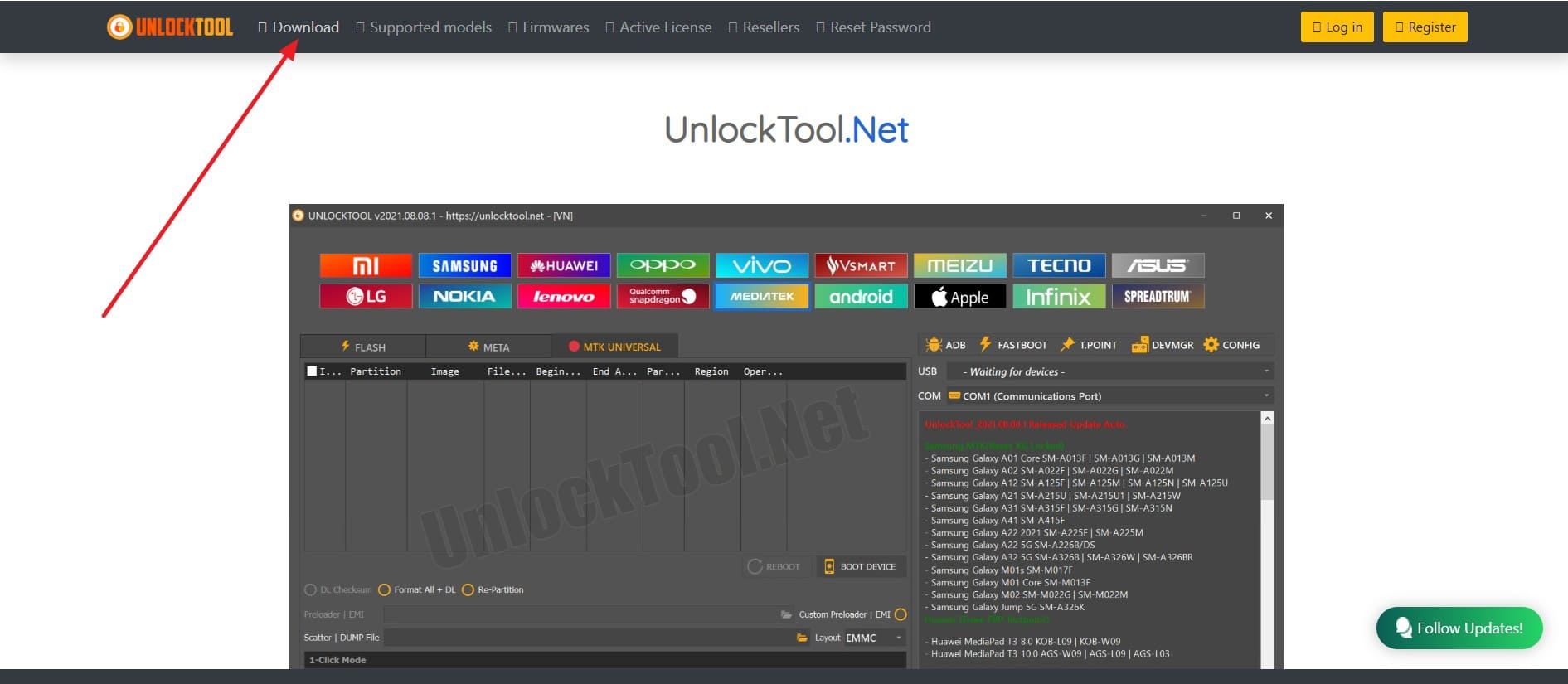
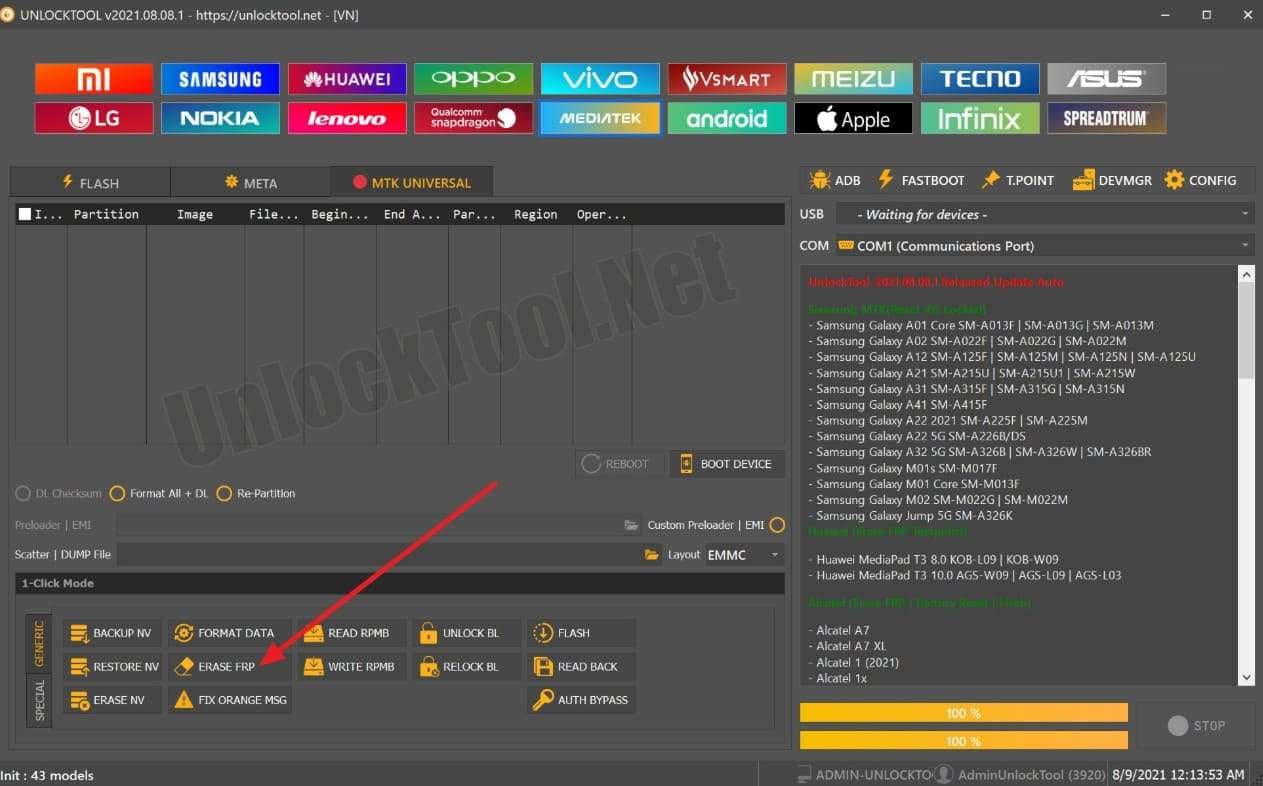
Step 1. Visit UnlockTool.net and from the navigation bar, hit the “Download” button. Go for the latest UnlockTool version from the list, and after downloading, run the installer and follow prompts to set up the tool.
Step 2. Log in to the account, purchase the activation license, and connect the FRP - locked Android device to the PC via USB cable. For Samsung, put the device in the “Download Mode” and upon launching the UnlockTool, choose the phone’s brand from the list and opt for the “Erase FRP” option. The tool connects to your phone, runs the FRP bypass to remove the Google lock, and once it ends, reboots the device.
Part 3. UnlockTool.Net | Pricing, User Review, Pros and Cons
Pricing Plans
● 1 Month License: $30–$35
● 3 Months License: $19.99–$60
● 6 Months License: $29.99–$75
● 12 Months License: $49.99–$149.99
User Reviews
Positive Reviews:
● "UnlockTool.Net helped me unlock my Xiaomi phone’s FRP. The bypass worked on my model, but I had to follow technical steps carefully. Useful for technicians and advanced users."
● "I used UnlockTool.Net to flash firmware on a bricked Samsung device, and it restored the phone. The tool supports multiple brands and is very handy for repairs."
Negative Reviews:
● “I just wanna share my experience with unlocktool software so far, i purchase there tool to unlock my Xiaomi mi 8 bootloader that am stuck with, as they say in there website they support the device, but sadly the unlock tool didn't work, they don't offer any support or anything….”
● “I was somewhat desperate to find a method to force unlock my otherwise non - unlockable realme phone (deep testing don't work, mtkclient don't work). I bumped across this website "unlocktool.net" and after I downloaded it, it was immediately caught by Windows Defender and deleted. Has people of XDA had any experience with this unlocktool.net and is it legit or scam?”
Pros & Cons
Pro Tip. The Most Reliable Alternative to Unlock Xiaomi Lock Screen and FRP Lock
If you're looking for a better option than the UnlockTool.Net download, Dr.Fone - Screen Unlock (Android) offers you a simple and cost-effective way to bypass FRP or screen lock. The tool is designed to bypass multiple lock types like Face ID, fingerprint, or passcode in just a few minutes. While handling these locks, it offers support for major Android brands like Samsung, Huawei, Xiaomi, OPPO, etc.
Furthermore, users can use it to bypass FRP lock and regain full access to the device, without having any technical skills. The process can be done in just 3 steps and ensures a 100% success rate as compared to other tools. Additionally, it can bypass Samsung FRP with and without a PC on Samsung S24, S23, A52, A71, etc.
Regarding data loss, this UnlockTool.Net alternative ensures the data integrity for Samsung/LG when dealing with the lock screen. Most importantly, if your phone is broken, Dr.Fone still ensures to unlock it, regardless of the model you own.
Simple Solution to Unlock Android Screen Using Dr.Fone - Screen Unlock (Android)
Rather than dealing with intricate https UnlockTool.Net, review our listed guide and see how Dr.Fone makes screen unlock far easier:
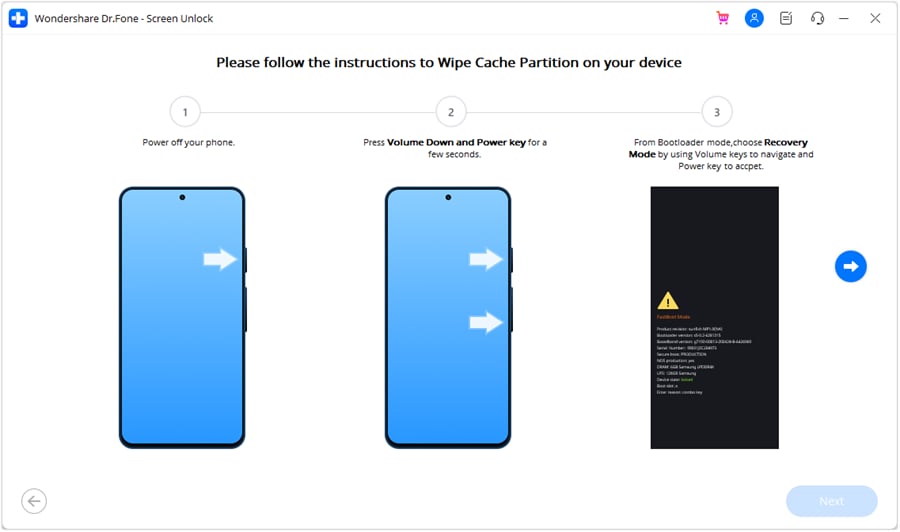
Step 1. Determine the Android Brand to Unlock. To begin with, access the “Screen Unlock” module from the Toolbox tab and choose the “Unlock Android Screen” tool. Here, specify your Android brand, which in your case is Xiaomi.

Step 2. Follow the Instructions to access the Mode and wait. After that, enter the specific mode by following the onscreen instructions, and as the unlocking process ends, choose the “Done” button.
Bypass FRP Lock for Major Android Devices | Complete Guide
If you want to bypass FRP lock without using tools like UnlockTool.Net, head to the most straightforward guide for Dr.Fone - Screen Unlock (Android):
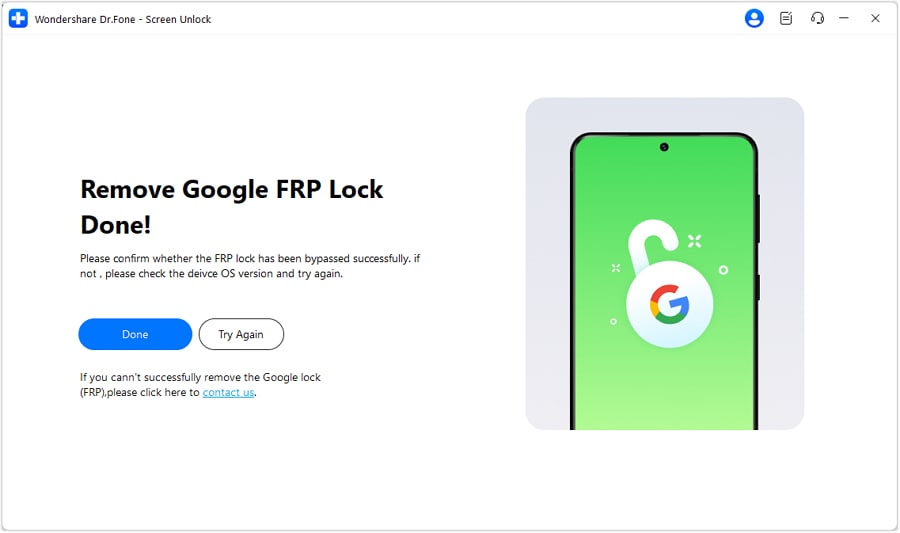
Step 1. Choose Remove Google FRP Lock on Screen Unlock Tool After selecting the Screen Unlock tool and choosing “Android” phone, select the “Remove Google FRP Lock” option. Then, choose the phone brand like Xiaomi and pick the “General Unlocking Method” on the “Remove Google FRP Lock” screen.

Step 2. Access the Recovery Menu After Connecting with MiAssistant. Follow the instructions to the Recovery Menu, opt for the “Connect with MiAssistant” and choose the "Continue" button. The process to bypass the FRP will start, so you can monitor and have an unlocked device in a few minutes.
Part 5. Dr.Fone vs UnlockTool.Net: Which Tool Standout for FRP Lock Bypass
To know which tool to choose from, Dr.Fone - Screen Unlock (Android) or UnlockTool.Net, head to the given comparison table:
|
Features |
Dr.Fone |
UnlockTool.Net |
| Supported Brands | Samsung, Xiaomi, LG, Oppo, Huawei, etc. 27 Brands and 2,000+ Android Devices |
Samsung, Xiaomi, Oppo, Realme, Vivo, Huawei, more |
| Device Coverage | Popular and recent phones | Limited |
| FRP Bypass Method | Guided wizard, click-to-unlock, largely automated | Choose device/model, advanced control, and multiple methods |
| Ease of Use | Very user-friendly interface; click-based | Technical interface; some steps require experience |
| Supported OS | Windows, Mac | Windows only |
| Extra Functions | Data recovery, phone unlock, system repair, WhatsApp transfer, data eraser, etc. | Limited |
| License Type | Single device, pay-per-use, or license | Time-based (1/3/6/12 months), multi-device, pro/retail plans |
| Success Rate (FRP) | High for mainstream models, some limitations | High for supported brands, best for technicians with frequent updates |
| Customer Support | Strong customer service and help guides | Mixed; limited support, community/forum-based |
| Antivirus Issues | None | Sometimes flagged as a false positive, needs whitelisting |
| Best For | Individuals, basic shops, quick unlocks | Advanced technicians, pro shops, and multi-device repair |
So, if you are looking for an intuitive, easy-to-use, and versatile tool to deal with screen and FRP locks, Dr.Fone - Screen Unlock (Android) proves to be the best option.
Conclusion
Summing up, UnlockTool.Net is designed to bypass FRP locks, reset passcodes, and repair devices, but the tool is quite daunting to use. To know more about it, this guide has offered you a detailed guide to use it along with the users' reviews. Hence, based on the limitations and usage, we recommend using Dr.Fone - Screen Unlock (Android) as it's safe, easy to use, and supports multiple Android models.
Frequently Asked Questions
 Q1. Can I use UnlockTool.Net without technical skills?Q2. Does UnlockTool.Net support iPhones?Q3. Do I need a PC to use UnlockTool.Net?


Android Unlock
- Android Password Lock
- 1. Reset Lock Screen Password
- 2. Ways to Unlock Android Phone
- 3. Unlock Wi-Fi Networks
- 4. Reset Gmail Password on Android
- 5. Unlock Android Phone Password
- 6. Unlock Android Without Password
- 7. Emergency Call Bypass
- 8. Enable USB Debugging
- 9. Unlock Asus Phone
- 10. Unlock Asus Bootloader
- Android Pattern Lock
- Android Pin/Fingerprint Lock
- 1. Unlock Android Fingerprint Lock
- 2. Recover a Locked Device
- 3. Remove Screen Lock PIN
- 4. Enable or Disable Screen Lock PIN
- 5. Pixel 7 Fingerprint Not Working
- Android Screen Lock
- 1. Android Lock Screen Wallpapers
- 2. Lock Screen Settings
- 3. Customize Lock Screen Widgets
- 4. Apps to Reinvent Your Android
- 5. Lock Screen Wallpaper on Android
- 6. Unlock Android with Broken Screen
- 7. Unlock Google Find My Device Without Problems
- 8. Forgot Voicemail Password on Android
- 9. Unlock SafeSearch on Google
- Android Screen Unlock
- 1. Android Device Manager Unlock
- 2. Unlocking Android Phone Screen
- 3. Bypass Android Face Lock
- 4. Bypass Android Lock Screen
- 5. Bypass Lock Screen By Emergency Call
- 6. Remove Synced Google Account
- 7. Unlock Android without Data Loss
- 8. Unlock Phone without Google Account
- 9. Unlock Android phone
- 10. Reset a Locked Android Phone
- 11. Unlock Doogee Phones
- 12. Best 10 Unlock Apps For Android
- 13. Remove Gmail Account
- 14. Unlock 30/30 Attempts Remaining
- 15. OEM Unlock Missing
- 16. Change Lock Screen Clock
- 17. OEM Unlocking on Android
- 18.Bypass Knox Enrollment Service
- 19. Unlock Google Pixel 6a, 6 or 7
- 20. Best Alternative to MCT Bypass Tool
- 21. Best Way to Unlock Your ZTE Phone
- Android SIM Unlock
- 1. Easily Unlock Android SIM
- 2. 5 Android Unlock Software
- 3. Carrier Unlock Phone to Use SIM
- 4. Change Android Imei without Root
- 5. How to Change SIM PIN on Android
- 6. Best Unlocked Android Phones
- Android Unlock Code
- 1. Lock Apps to Protect Information
- 2. Unlock Secret Features on Phone
- 3. Android SIM Unlock Code Generator
- 4. Ways to Sim Unlock Phone
- 5. Remove Sim Lock without Code
- 6. Updated Android Factory Reset Code
- Google FRP Bypass
- 1. Bypass Google Account Verification
- 2. Bypass Google FRP Lock On Phones
- 3. Bypass Google Pixel FRP
- 4. Huawei Bypass FRP Tools for PC
- 5. Direct Open FRP MobileTech
- 6. Bypass Samsung S24 FRP Lock
- 7. EDL Cable Unlock FRP
- 8. Unlock OnePlus Nord FRP
- 9. Tecno FRP Bypass
- 10. Remove Infinix FRP Lock
- 11. FRP Itel Lock Removal
- 12. Itel A23 FRP Bypass Easy Guide
- 13. Itel A16 FRP Bypass
- 14. Remove Google FRP Using Online Tools
- Unlock Bricked Phone
- 1. Restore Bricked Mobile Phone
- 2. Fix Motorola Bricked Phone
- 3. Fix Bricked Redmi Note
- 4. Unbrick Oneplus Easily
- 5. Unbrick Xiaomi Phone
- 6. Unbrick Huawei Phone
- 7. Unbrick Poco X3
- 8. Software to Unbrick Samsung
- 9. Unbrick 3DS
- 10. Unbrick PSP
- Android Unlock Tools
- 1. Griffin Unlocker Tool Review
- 2. BMB Unlock Tool Review
- 3. Android Multi Tools Review
- 4. Best Bootloader Unlock APKs
- 5. Top 5 Micromax FRP Tools
- 6. Pangu FRP Bypass
- 7. Google Account Manager APK FRP Review
- 8. D&G Password Unlocker Review
- 9. Android Multi Tools Review
- 10. Easy Samsung FRP Tool Review
- 11.Samfw FRP Tool
- Android MDM
- ● Manage/transfer/recover data
- ● Unlock screen/activate/FRP lock
- ● Fix most iOS and Android issues
- Free Download Free Download Free Download



Julia Becker
staff Editor