

How to Screenshot on Instagram Without Them Knowing: 2026 Complete Guide

Sep 04, 2026 • Filed to: Virtual Location Solutions • Proven solutions
 TL;DR:
Instagram only sends screenshot notifications for disappearing photos, replayable videos, or Vanish Mode chats inside DMs, while regular messages, stories, reels, and profiles can be captured silently without alerting the creator.
● To discreetly save disappearing DM content on iOS or Android, let the app load the media, activate Airplane Mode, take the screenshot, and force-close the Instagram app completely before reconnecting to the internet.
● Mobile restriction alerts can be bypassed entirely by using a secondary device camera or by casting your smartphone to a Mac or PC via Dr.Fone - Screen Mirror to capture the footage externally.
● To prevent Instagram from tracking physical footprints, Dr.Fone - Virtual Location allows users to mask their real GPS position, simulate route movement with a joystick, and apply GPX files across up to 5 iOS devices simultaneously.
Ask AI for a summary
 ChatGPT
 Perplexity
 Gemini
 Claude
 Grok
Grok
People use Instagram daily and want privacy while saving important shared moments. Many times, messages or stories matter, but users fear alerts or awkward situations. This concern grows because rules change often, and clear answers feel hard to find. Users search online to learn how to screenshot in Instagram without them knowing.
Alongside, they want simple steps that respect limits and avoid breaking app trust. So, this guide explains what Instagram tracks and common misunderstandings. You will also learn what triggers notices and easy steps for your preferred phones. Along with these methods, we will introduce Dr.Fone Virtual Location to mask real GPS positions while browsing Instagram, keeping activity patterns private.
- Part 1. Can Instagram Detect Screenshots Without Them Knowing?
- Part 2. Does Screenshot on Instagram DMs Work Every Time Without Them Knowing
- Part 3. How to Save Instagram Pictures Without Screenshotting
- Part 4. How to Screenshot Instagram Stories Without Them Knowing

- Pro Tip. Stay Anonymous on Instagram with Dr.Fone Virtual Location
Part 1. Can Instagram Detect Screenshots Without Them Knowing?
Users worry that Instagram watches private actions and may report screenshots taken. This fear grows because private apps feel personal, and hidden tracking sounds intrusive. People also fear awkward moments if others receive alerts about captured messages. Therefore, unclear updates and online rumors increase confusion about what Instagram detects. In reality, Instagram does not track screenshots across profiles, posts, or stories.
Alerts appear only inside DMs for content meant to disappear temporarily. View once photos or replayable videos in chats trigger small screenshot icons. Besides, Vanish Mode chats also notify senders when messages get captured in screenshots. Outside these cases, learning how to screenshot Instagram without them knowing matters less. Thus, understanding these limits helps users relax and avoid unnecessary worry online.
Common Myths vs Reality of Instagram Detect Screenshots
People believe Instagram tracks all screenshots with instant alerts everywhere. When you understand myths vs reality, it helps users avoid unnecessary fear. So, this section clears up confusion around common myths versus facts:
|
Myths |
Reality |
| Instagram notifies you every time you screenshot anything. | Notifications only appear for disappearing or vanish-mode messages inside DMs. |
| You can see a list of people who screenshotted your story or post. | Instagram has no feature showing who screenshots stories, posts, reels, or profiles. |
| Third-party apps can reveal who took screenshots. | Instagram does not share screenshot data, making such apps unreliable or misleading. |
| Story screenshots do not send alerts as Snapchat does. | Stories, including Close Friends, remain silent about the captures. |
| Feed posts and reels are protected from screenshots. | Posts and reels can be captured silently without any alert to creators. |
| Screenshotting profiles or highlights is not visible to owners. | Highlights and profiles allow for quiet screenshots always. |
Part 2. Does Screenshot on Instagram DMs Work Every Time Without Them Knowing
Not all DMs allow safe screenshots without alerts, so caution is always essential. Thus, learning how to screenshot on IG without them knowing helps avoid mistakes:
Regular Messages vs Disappearing Messages
Regular messages in Instagram DMs let you capture screens without any alerts. Senders stay unaware when you save normal texts or photos this way. Learning how to screenshot on Instagram dm without them knowing works for these chats always.
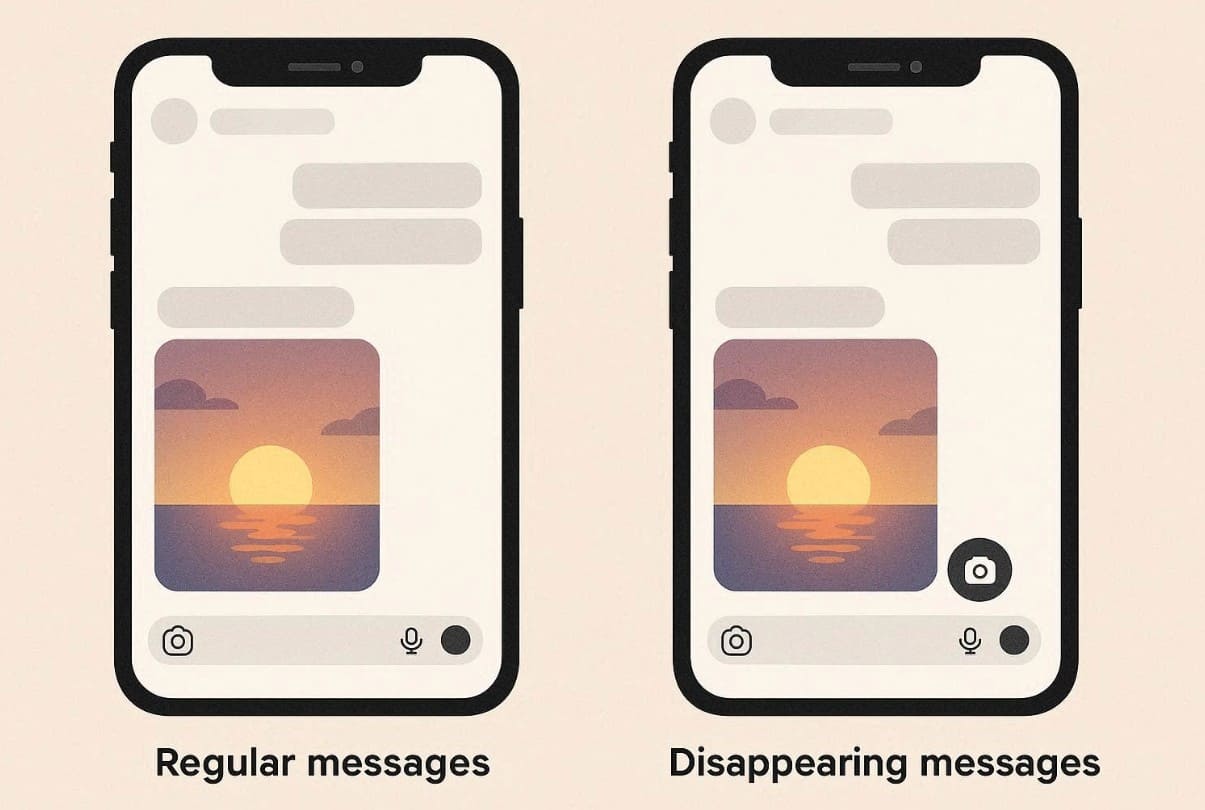
Disappearing messages differ because they vanish after one view by design. Capturing a view once photos trigger a small icon notice next to them immediately. Plus, allow replay options send alerts too if screenshotted before they disappear. This protects short-lived content from easy saving forever.
Vanish Mode Considerations
Vanish Mode on Instagram creates temporary chats that disappear after being viewed. All messages or multimedia files vanish once the chat closes completely. The screen darkens, and a banner informs both users about disappearing content rules. Therefore, screenshots in Vanish Mode always send notices right inside the chat area.
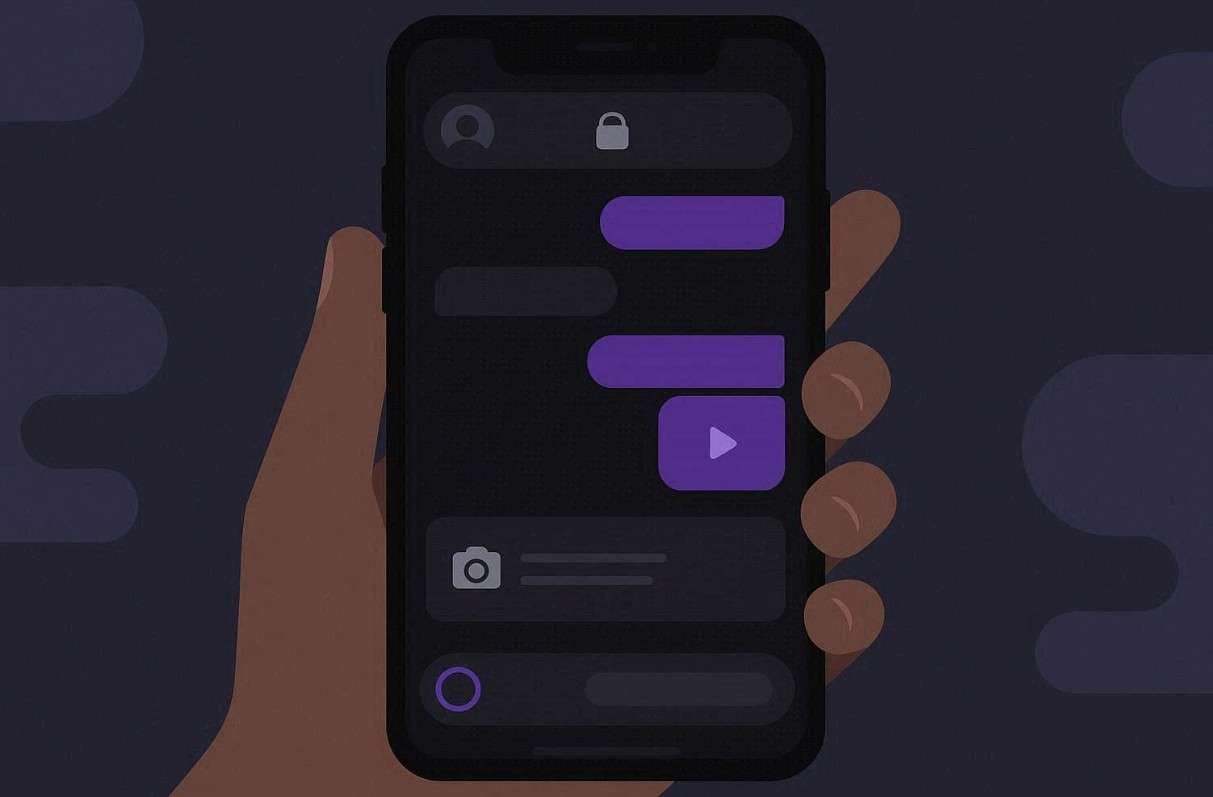
The other person gets an icon alert for any capture attempt immediately. Thus, knowing these rules is essential for learning how to screenshot an IG story without them knowing. So, note that nothing in Vanish Mode remains secret from the other participant.
Platform Differences: iOS vs Android
Instagram treats screenshot alerts the same on iOS and Android devices. The type of content matters more than your phone's system. So, disappearing photos trigger notices regardless of iOS or Android usage, though. Alongside, Vanish Mode shows icons for screenshots across every device type.
Part 3. How to Save Instagram Pictures Without Screenshotting
Many times, screenshots are unnecessary because Instagram offers safe ways to save pictures. Thus, this part shows how you can save Instagram pictures without screenshotting:
Using Built-in Save Features
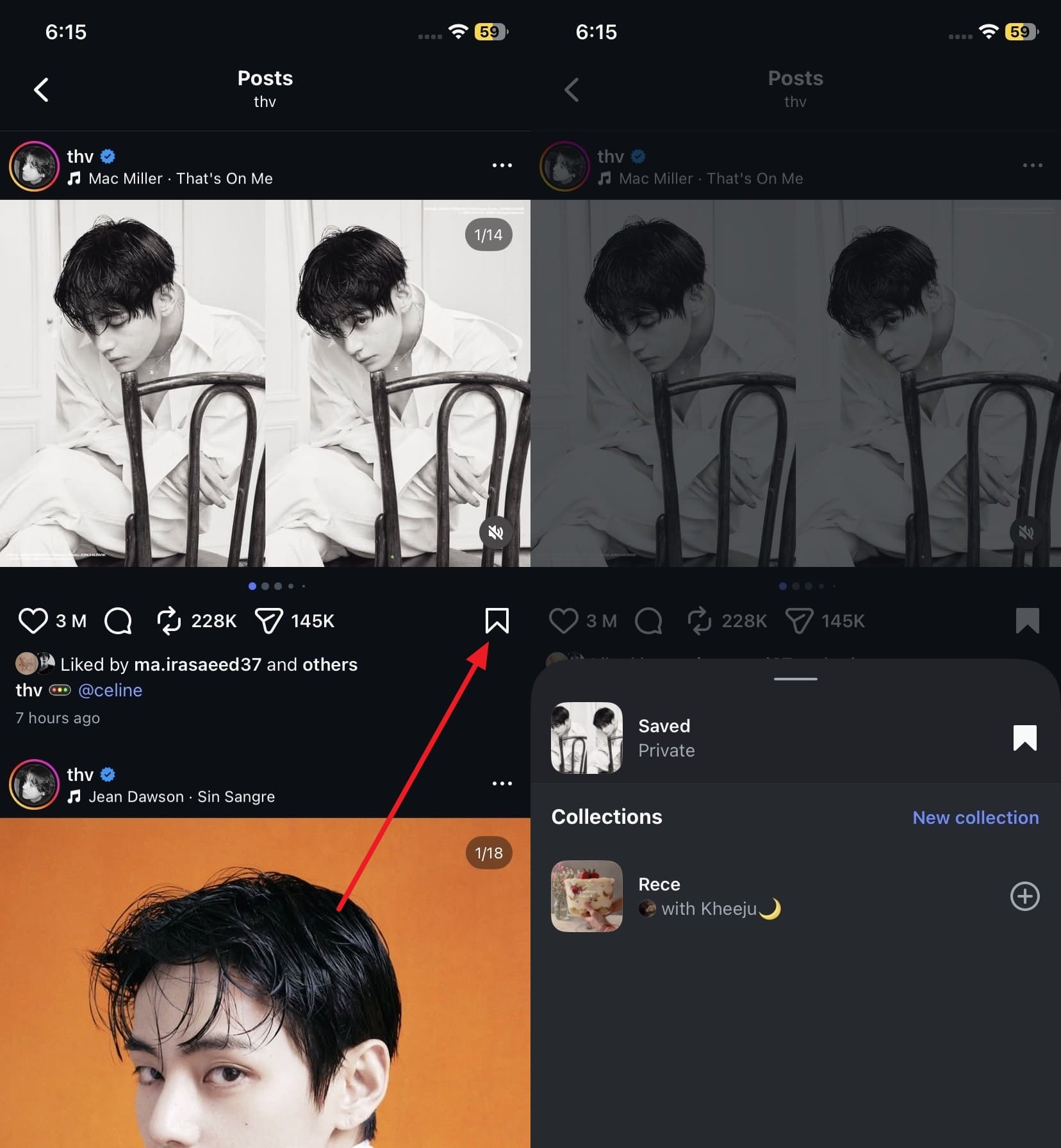
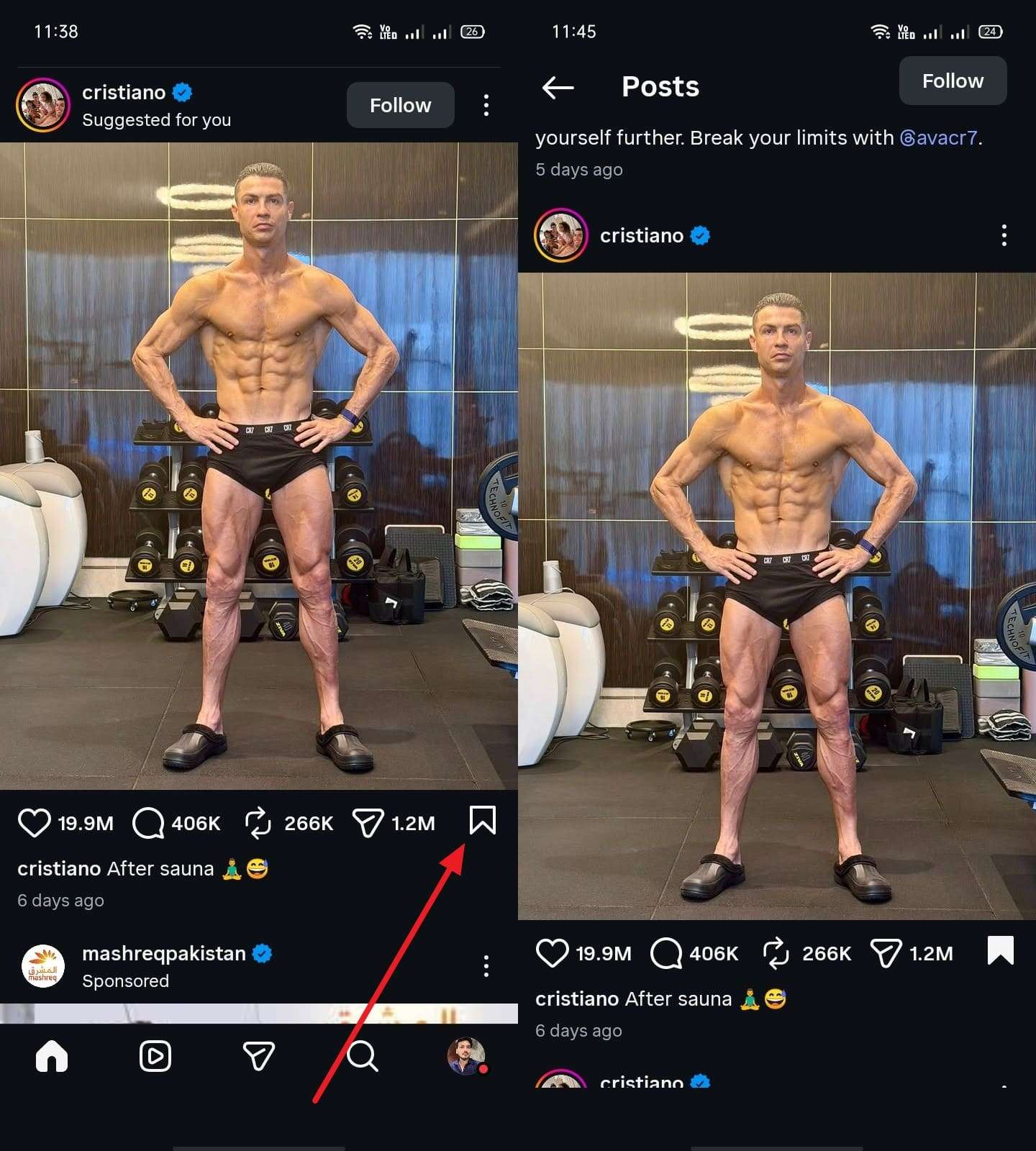
Sometimes, you do not even need to learn how to screenshot an IG story without them knowing. Instagram’s native Bookmark save tool already lets you keep many posts inside the app. Saved items stay organized in folders, making them easier to revisit later. Plus, it protects creators’ work better while still preserving your favorite shared moments. So, adhere to the given steps to save your preferred post via the native tool:
On iOS: When you open the post you want to bookmark, tap the “Bookmark” icon to save it to your profile’s “Saved” section.
On Android: Upon seeing your favorite post, opt for the “Bookmark” icon. The post is then kept in a personal "Saved" area on your profile, accessible only to you.
Third-Party Apps and Legal Considerations
Web downloaders like Snapinsta also save public stories using pasted post links online. Dedicated apps like SaveVideo can download content, including reels and archived stories. Yet, tools asking for Instagram passwords may steal logins and hijack accounts. Automated downloading also breaks Instagram’s Terms, risking suspensions or permanent account removal.
Part 4. How to Screenshot Instagram Stories Without Them Knowing
Instagram stories can feel temporary, making users cautious about saving them. Below, you will explore 3 methods to learn how to screenshot in Instagram without them knowing:
1. Take Screenshots/Screen recording with a Different Device
One simple method is to use another phone or tablet to capture the screen. Open the story on your main device and record or screenshot it with the second. This avoids Instagram's native alerts for story captures, even in Vanish Mode. Yet, make sure the recording device is steady to get clear results. Thus, it works well for learning how to screen record on Instagram without them knowing.
2. Airplane Mode Method (Works on App)
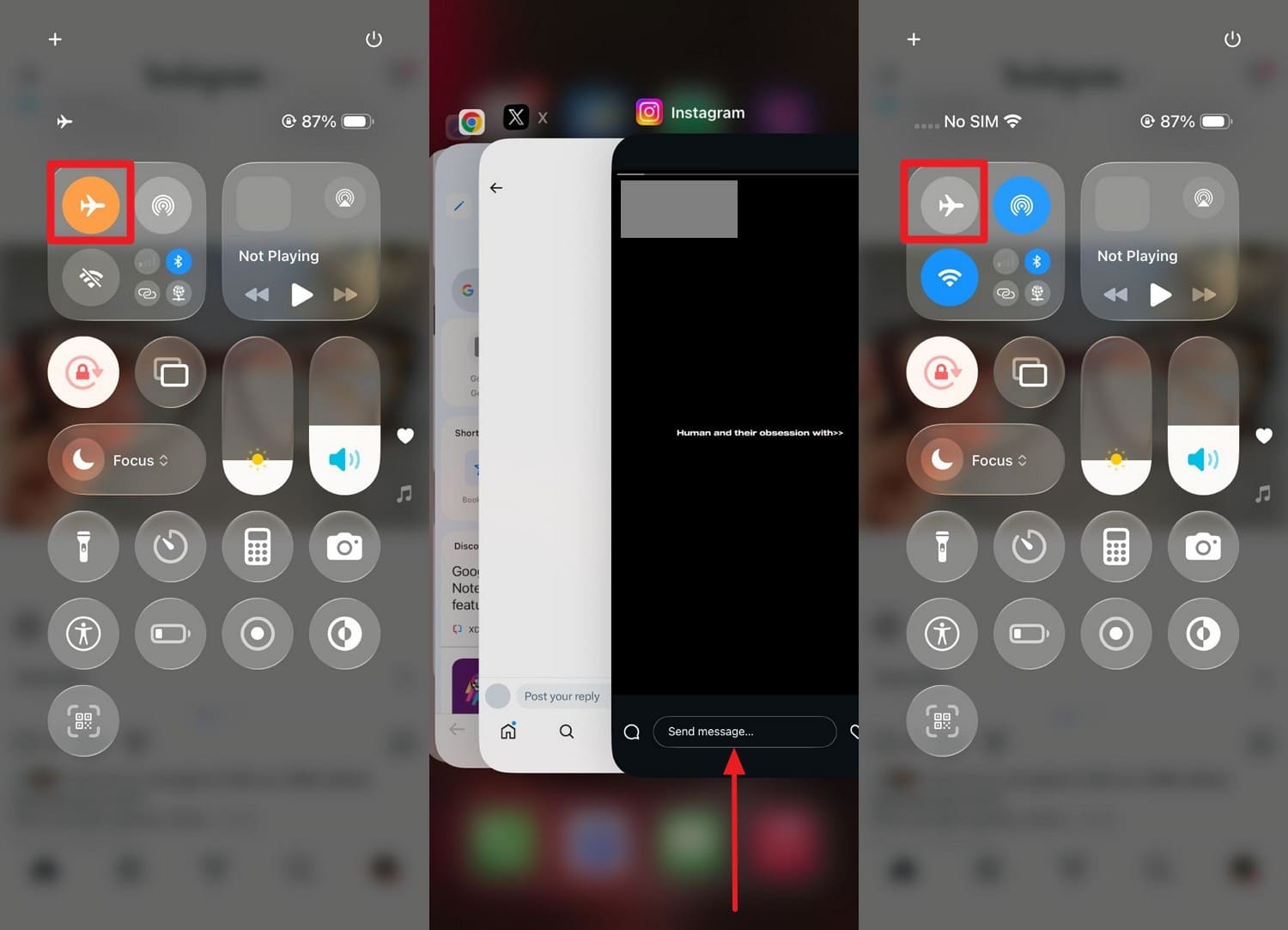
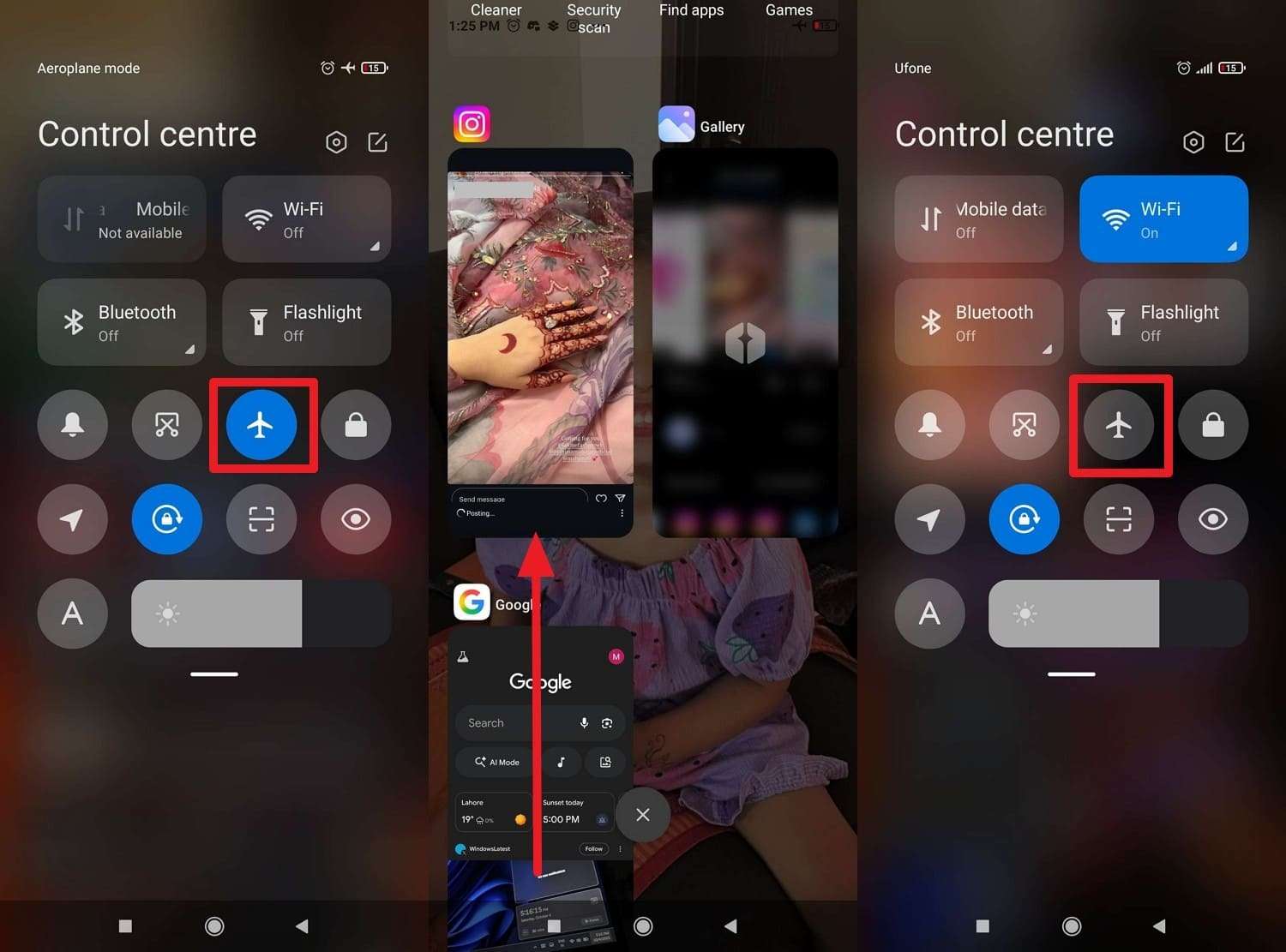
The Airplane Mode method allows users to attempt capturing stories without triggering notifications. It works by temporarily disconnecting the device from the internet while viewing Instagram content. You load the content first, then switch modes to attempt to save it discreetly. Thus, go through the guide to learn how to screenshot on Instagram DM without them knowing:
On iPhone: Allow the app to load all the required content, then turn on “Airplane Mode” via the “Control Center.” Next, take a screenshot, exit the app, and then disable “Airplane Mode.”
On Android: While the stories are loading, turn on “Airplane Mode” and take a screenshot or record. Once done, force close the “Instagram” app and switch off “Airplane Mode” to protect yourself from any alerts.
3. Utilize the Screen Mirroring Feature
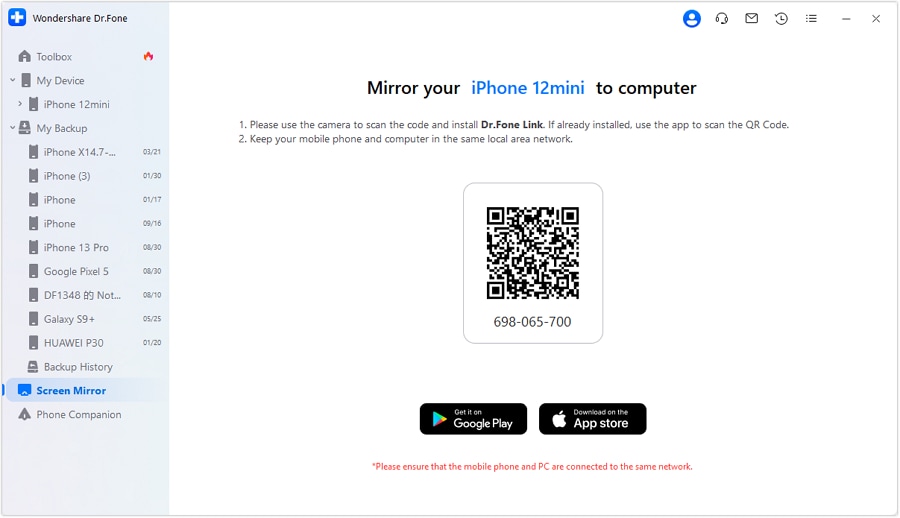
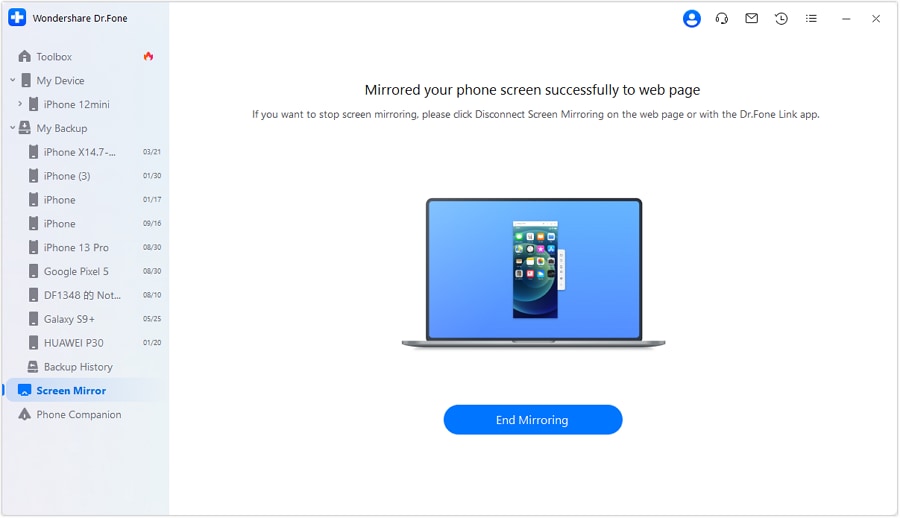
While learning how to screenshot in Instagram without them knowing, you can also use Dr.Fone - Screen Mirror (iOS) or Dr.Fone - Screen Mirror (Android). It mirrors Android or iPhone screens to computers to capture Instagram stories. During mirroring, users can record screens or take screenshots from computers. The tool also supports iPads with stable mirroring to a PC or Mac. Hence, take guidance from the steps to do screen mirroring:
Step 1. Access the Tool to Install the App
When you access the program’s “My Device” tab, click the “Wireless” tab and link your iPhone. Head to the “Screen Mirror” section and scan the displayed code to install Dr.Fone Link.
Step 2. Mirror Your Phone’s Screen to Record
Open the app and tap the “Scanner” icon to link both devices together. Afterward, record Instagram’s disappearing content and then stop by clicking “End Mirroring” on your PC or Mac.
 safe & secure
4,624,541 people have downloaded it
Pro Tip. Stay Anonymous on Instagram with Dr.Fone Virtual Location
Even if you understand how to screenshot Instagram without them knowing, your location can still reveal more than intended. Instagram posts and stories can display location data that others can misuse. To avoid this, many users prefer changing their GPS location before browsing content. At this point, Dr.Fone - Virtual Location lets you fake your GPS position with full control.
You can even teleport to any place or simulate movement using a joystick or custom routes. This makes your activity appear natural while keeping your real location private. The tool also works with Instagram and other location-based apps like Snapchat. Dr.Fone lets you import or export GPX route files to reuse favorite fake paths. Plus, it even controls GPS spoofing on up to 5 iOS devices from one computer.

Dr.Fone - Virtual Location
1-Click Location Changer for both iOS and Android
- Teleport from one location to another across the world from the comfort of your home.
- With just a few selections on your computer, you can make members of your circle believe you’re anywhere you want.
- Stimulate and imitate movement and set the speed and stops you take along the way.
- Compatible with both iOS and Android systems.
- Work with location-based apps, like Pokemon Go, Snapchat, Instagram, Facebook, etc.


Detailed Guide to Stay Anonymous on Instagram with Dr.Fone Virtual Location
Adhere to the comprehensive steps given below to change your actual IG location via Dr.Fone:
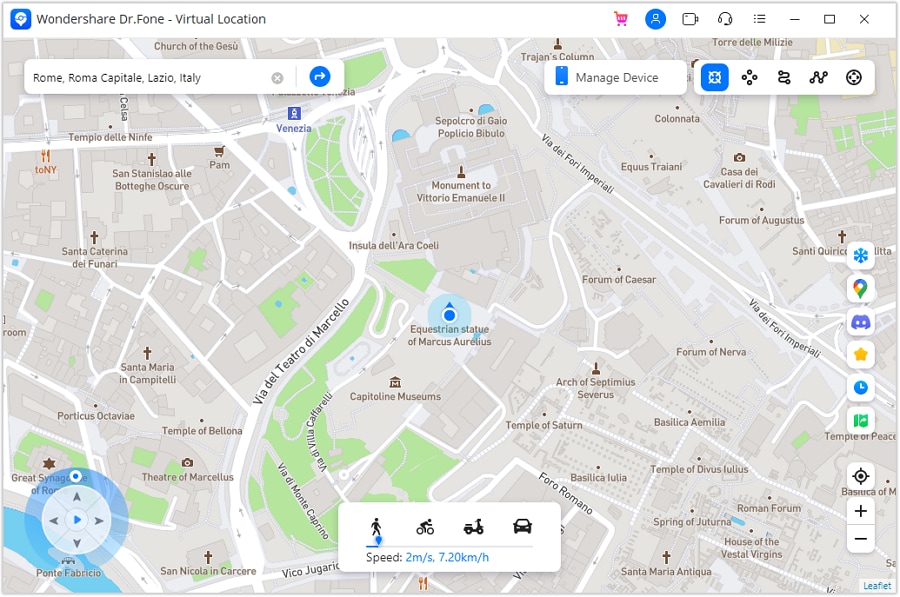
Step 1. Access and Activate Teleport Mode
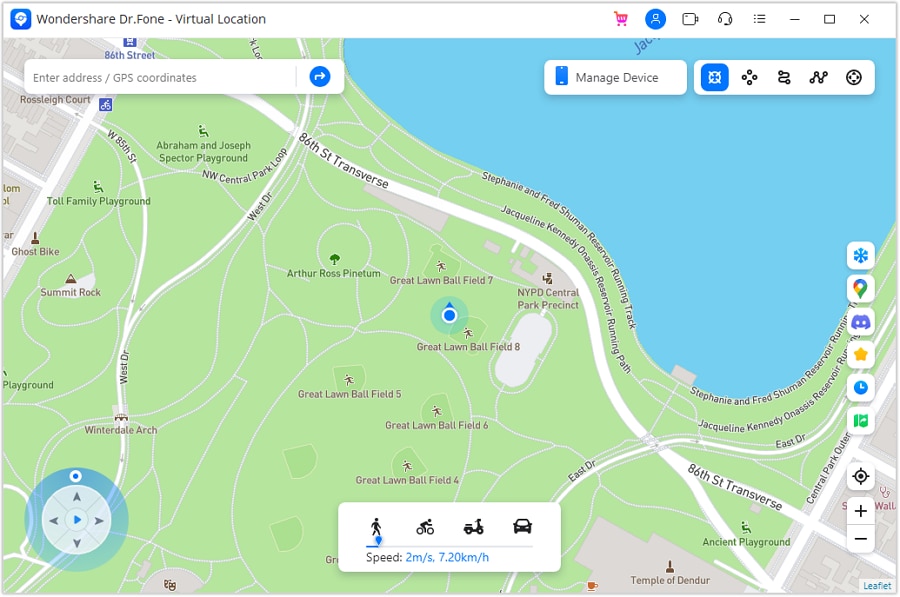
To initiate, access the Virtual Location tool, link your device to the computer, and click the “Teleport Mode” icon.
Step 2. Search for Your Target Location
Enter the location you want in the search field and press “Enter” to display it on the map. After the map focuses on the selected place, choose “Move Here” to set the location.
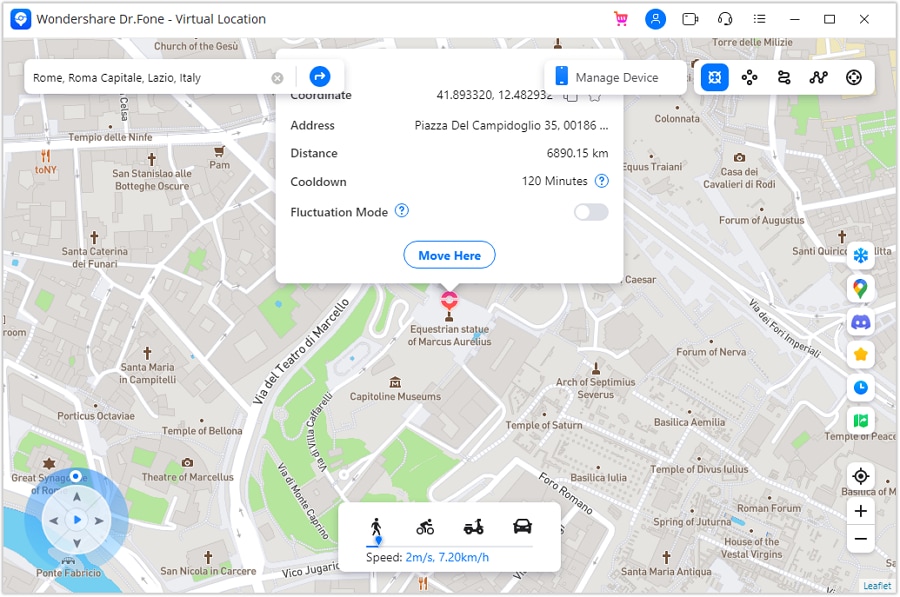
Then, open the map app on your phone to verify the new virtual position. Both the computer and the mobile device should now show the exact location.
Why Dr.Fone Virtual Location Is the Safer Privacy Choice
- Full Control: Users change locations without moving, giving control over visible Instagram activity. This prevents others from guessing real places from posts or interactions online.
- Route Saving: Favorite places save time when changing locations for users online. Saved routes help maintain consistent movement patterns during longer Instagram sessions.
- Natural Movement: Joystick and routes simulate real travel, making fake locations appear natural. This avoids sudden jumps that could look strange to other viewers online.
- GPX Files: Importing GPX files lets users reuse planned routes with one click again. Export options also help store favorite paths for future privacy needs in online use.
- App Support: It works with Instagram and other apps using location information daily. Users keep their privacy across platforms without installing many extra tools.
Conclusion
In conclusion, learning how to screenshot in Instagram without them knowing helps reduce worry. Understanding which content triggers alerts lets you capture posts, DMs, and stories. Still, screenshots alone cannot hide where you are or where you browse from. For stronger privacy over location, consider using Dr.Fone – Virtual Location.
safe & secure4,624,541 people have downloaded it
FAQs
 Q1. Can people see if I screen record an Instagram Story?Q2. Can I take screenshots of private account content without the owner knowing?Q3. How can users hide location traces while browsing Instagram content?
You Might Also Like
Virtual Location
- Change iOS Location
- 1. Best iOS Location Changers
- 2. Fake iPhone GPS Location
- 3. Change iPhone Home Address
- 4. Change iPad Weather Location
- 5. Track a Cell Phone Location
- 6. iPhone GPS not Working
- 7. iPhone “No Location Found”
- 8. iPhone “Location Not Available”
- 9. iTools Alternatives
- 10. DoPokeGo++ Alternatives
- 11. 3uTools Alternatives
- 12. Foneazy MockGo Alternatives
- 13. "No Location Found" Vs."Location Not Available"
- Change Android Location
- 1. Best Android Fake GPS Apps
- 2. Free Android Location Spoofers
- 3. Fake Android GPS Location
- 4. Android Location Settings
- 5. Fake GPS No Root
- 6. Fake GPS on Huawei
- 7. Fake GPS without Mock Location
- Hide GPS Location
- 1. Stop Sharing Location without Notifying
- 2. Fake Location on Find My Friends
- 3. Stop Google Tracking Your Location
- 4. Fake Location on Google Maps
- 5. Spoof Location on Life360
- 6. Turn Off Life 360 Without Knowing
- 7. Stop Life360 from Tracking You
- 8. Life360 Circle: Tips & Tricks
- 9. Track Location by Mobile Number
- 10. How Do I Know If My Phone Is Being Monitored
- 11. Can Life360 Track You When Your Phone is Off
- Fake GPS on Games
- 1. Play Pokémon Go Without Moving
- 2. Celebrate National Pokémon Day
- 3. Fake GPS on Mobile Legends
- 4. Spoof Ingress Prime Location
- 5. Spoof Location on Jurassic World Alive
- Fake Location on Social Apps
- 1. Fake Location on Whatsapp
- 2. Fake Location on Facebook
- 3. Fake Location on Telegram
- 4. Fake Location on Tiktok
- 5. Does Your Snap Score Increase with Chats
- 6. Fake Location on Snapchat
- 7. Add Location Filters on Snapchat
- 8. Change Location on Twitter
- 9. Change Instagram Business Location
- 10. Change Instagram Region/Country
- 11. Stop mSpy from Spying You
- 12. Change Location On Linkedin
- Fake Location on Dating Apps
- 1. Fake Hinge GPS
- 2. Top Funny Hinge Prompts
- 3. Apps Like Tinder
- 4. Enjoy Tinder Gold
- 5. Fake Tinder GPS
- 6.Tinder Keeps Crashing
- 7. Find People on Tinder
- 8. Use Grindr on a PC
- 9. Grindr Web app explained
- 10. Fake Grindr GPS
- 11. Grindr Unable to Refresh
- 12. Fake Bumble GPS
- 13. Bumble Snooze Mode Guide
- 14. Tinder vs Bumble vs Hinge
- Get Around Geo-blocking
- 1. Hola Fake GPS Alternative
- 2. Change Netflix Location
- 3. Bypass MLB TV
- 4. Change Location on YouTube TV
- 5. Change Play Store Country
- 6. Change Facebook Marketplace Location
- Followers & Unfollowers Trackers
- Location & Social Apps Tips
- 1. How to Share Live Location on Snapchat
- 2. Best Mobile Number Tracker
- 3. Best Private IG Viewer Tools
- 4. View a Private Instagram Account
- 5. Screenshot on Instagram Without Them Knowing
- 6. Does Instagram Notify When You Screenshot
- 7. Find Out If Someone Screenshots Your Instagram Story
- 8. Does Instagram Notify When You Screen Record
- 9. Fix iPhone Location Not Updating
- 10. Does Snapchat Show Who Viewed Your Profile
- ● Teleport GPS location to anywhere
- ● Play AR games without moving
- ● Spoof Location on the popular Apps
- Free Download Free Download Free Download


 > How-to > Virtual Location Solutions > How to Screenshot on Instagram Without Them Knowing: 2026 Complete Guide
Alice MJ
staff Editor